
Managing coupons, store credit and loyalty points usually means clicking through one admin screen at a time. If you work with an AI assistant like Claude or ChatGPT, you can ask it to do that work for you. This article shows the AI abilities in Advanced Coupons, Advanced Coupons Premium and Advanced Loyalty Program, who can use them, and how to connect your assistant.
What you’ll need
- WordPress 6.9 or newer, where the Abilities API is built in, or an earlier version with the Abilities API feature plugin active.
- WooCommerce and Advanced Coupons 4.7.4 or newer. This adds 8 abilities.
- Optional: Advanced Coupons Premium 4.0.9 or newer. This adds 9 more abilities.
- Optional: Advanced Loyalty Program 1.9.3 or newer. This adds 14 more abilities.
- A connection between your AI assistant and your store. The easiest route is StoreAgent 1.1.9 or newer, connected, with MCP turned on. See How to connect ChatGPT or Claude to your store with MCP. You can also use an MCP adapter plugin (see the WordPress MCP adapter guide).
- An administrator or shop manager account. Your assistant acts as that signed-in user.
What AI abilities are
An ability is an action that a plugin lets an AI assistant take in your store, through the WordPress Abilities API. Some abilities only read data, such as listing your coupons. Others make changes, such as creating a coupon or adjusting a customer’s store credit. All Advanced Coupons abilities share one Advanced Coupons source, so your assistant finds them in one place.
Connect your AI assistant
Step 1: Connect the assistant to your store
- Follow How to connect ChatGPT or Claude to your store with MCP to connect Claude or ChatGPT through StoreAgent.
- In your assistant, ask what it can do with your coupons.
- Start with a read-only request, such as “list my active coupons”, to confirm the connection works.
If you use an MCP adapter plugin instead of StoreAgent, follow that adapter’s own connection steps, then ask your assistant what it can do with your coupons.
Step 2 (optional): Let the assistant make changes
Two settings in StoreAgent decide whether your assistant can make changes. Both must allow it.
Your connection must be approved as Read and write. If you approved it as Read-only, choose Revoke on the assistant’s row on the Connections sub-tab, then connect again and approve Read and write. A Read-only connection never sees the abilities that make changes.
Then switch on the abilities that make changes:
- Go to StoreAgent > Settings > MCP and open the Abilities sub-tab.
- In Ability allowlist, select the Advanced Coupons source.
- Switch on each Makes changes ability that you want your assistant to use.
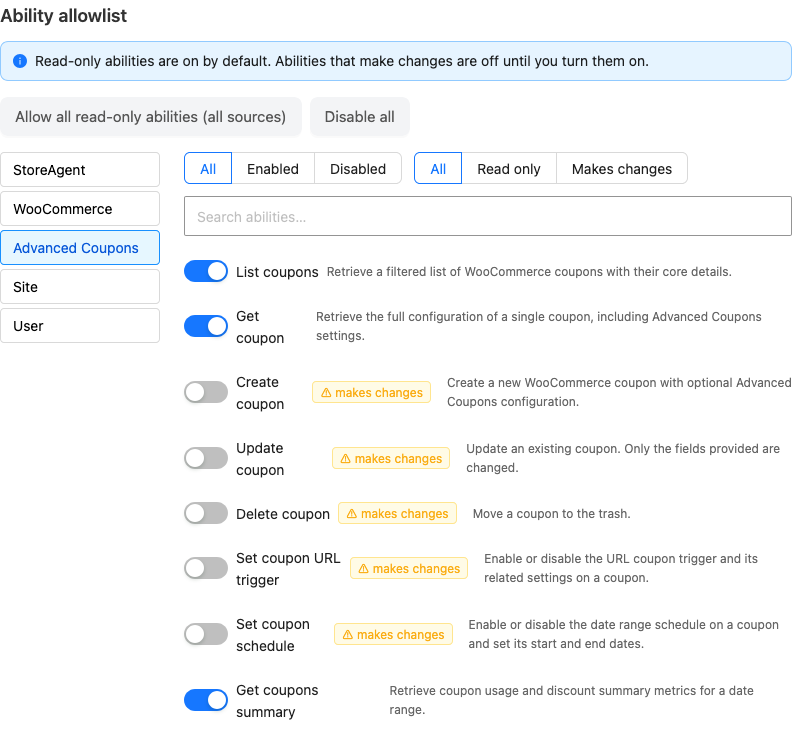
Read only abilities from the Advanced Coupons source are on by default. Each ability that makes changes stays off until you switch it on.
What your assistant can do
Advanced Coupons and its add-ons register 31 abilities: 14 are Read only and 17 make changes. Your assistant may show an ability by its technical name, shown in the Name column.
Advanced Coupons
| Ability | Name | Type |
|---|---|---|
| List coupons | advanced-coupons/list-coupons | Read only |
| Get coupon | advanced-coupons/get-coupon | Read only |
| Get coupons summary | advanced-coupons/get-coupons-summary | Read only |
| Create coupon | advanced-coupons/create-coupon | Makes changes |
| Update coupon | advanced-coupons/update-coupon | Makes changes |
| Delete coupon | advanced-coupons/delete-coupon | Makes changes |
| Set coupon URL trigger | advanced-coupons/set-coupon-url | Makes changes |
| Set coupon schedule | advanced-coupons/set-coupon-schedule | Makes changes |
Advanced Coupons Premium
| Ability | Name | Type |
|---|---|---|
| List store credits | advanced-coupons/list-store-credits | Read only |
| Get store credit ledger | advanced-coupons/get-store-credit-ledger | Read only |
| Export coupons | advanced-coupons/export-coupons | Read only |
| Create cashback coupon | advanced-coupons/create-cashback-coupon | Makes changes |
| Create add products coupon | advanced-coupons/create-add-products-coupon | Makes changes |
| Set shipping override | advanced-coupons/set-shipping-override | Makes changes |
| Set recurring schedule | advanced-coupons/set-recurring-schedule | Makes changes |
| Set auto apply | advanced-coupons/set-auto-apply | Makes changes |
| Adjust store credit | advanced-coupons/adjust-store-credit | Makes changes |
Advanced Loyalty Program
| Ability | Name | Type |
|---|---|---|
| Get Loyalty Points Balance | advanced-coupons/get-loyalty-balance | Read only |
| List Top Loyalty Customers | advanced-coupons/list-top-loyalty-customers | Read only |
| Get Loyalty Points Ledger | advanced-coupons/get-loyalty-points-ledger | Read only |
| List Loyalty Earn Rules | advanced-coupons/list-loyalty-earn-rules | Read only |
| Get Loyalty Redemption Settings | advanced-coupons/get-loyalty-redemption-settings | Read only |
| Get Loyalty Program Overview | advanced-coupons/get-loyalty-program-overview | Read only |
| Get Loyalty ROI Report | advanced-coupons/get-loyalty-roi-report | Read only |
| Get Expiring Loyalty Points | advanced-coupons/get-expiring-loyalty-points | Read only |
| Adjust Loyalty Points | advanced-coupons/adjust-loyalty-points | Makes changes |
| Create Loyalty Earn Rule | advanced-coupons/create-loyalty-earn-rule | Makes changes |
| Update Loyalty Earn Rule | advanced-coupons/update-loyalty-earn-rule | Makes changes |
| Toggle Loyalty Earn Rule | advanced-coupons/toggle-loyalty-earn-rule | Makes changes |
| Update Loyalty Redemption Settings | advanced-coupons/update-loyalty-redemption-settings | Makes changes |
| Issue Loyalty Bonus Points | advanced-coupons/issue-loyalty-bonus-points | Makes changes |
You can ask your assistant things like “show me every coupon expiring this month”, “create a 15% off coupon called SPRING15 that expires in 30 days”, “give [email protected] 20 dollars of store credit for the late delivery”, or “who are my top 10 loyalty customers?”. It uses the matching ability to answer or act.
When your assistant creates or updates a coupon, it uses the same save process as the Advanced Coupons edit screen. Coupons made this way behave the same as coupons you create by hand.
Abilities that need a module
Some abilities work only when their module is turned on under Coupons > Settings > Modules. If the module is off, the ability returns a message and makes no change.
- Set coupon URL trigger needs the URL Coupons module (see How to apply a coupon with a URL).
- Set coupon schedule and Set recurring schedule need the Scheduler module (see How to schedule coupons).
- Set auto apply needs the Auto Apply module.
- Create cashback coupon, List store credits, Get store credit ledger and Adjust store credit need the Store Credits module.
Who can use each ability
All 31 abilities need an administrator or shop manager account, including the Read only ones. Customer and subscriber accounts cannot use any of them.
The abilities that make changes are marked as destructive. Your assistant may ask you to confirm before it runs one. Whether it asks is up to the assistant.
Troubleshooting
The assistant does not list any Advanced Coupons abilities
Update Advanced Coupons to 4.7.4 or newer, and check that you run WordPress 6.9 or newer, where the Abilities API is built in, or an earlier version with the Abilities API feature plugin active. If they still do not appear, ask your developer to check that no disable switch is set. See “Turn abilities off (for developers)” below.
The assistant cannot create or change anything
Approve the StoreAgent connection again as Read and write, then switch on the ability for the Advanced Coupons source on the Abilities sub-tab. Both are needed.
The Premium or Loyalty abilities are missing
Check that the plugin is active and up to date: Advanced Coupons Premium 4.0.9 or newer, or Advanced Loyalty Program 1.9.3 or newer.
The assistant says a module is not enabled
Turn on that module under Coupons > Settings > Modules, then ask again. The message names the module, for example “The Store Credits module is not enabled.”
Frequently asked questions
Which AI assistants does this work with?
Any assistant that supports MCP, such as Claude or ChatGPT, once you connect it to your store through StoreAgent or an MCP adapter.
Can my AI assistant see customer or order data through this?
Yes, some abilities do. The Store Credits and Loyalty abilities show customer balances and details, and Get coupons summary shows discount and revenue totals. That is why every ability needs an administrator or shop manager account.
Will coupons my assistant creates behave differently from ones I make manually?
No. They are saved through the same process as the coupon edit screen, so they behave the same.
Do I need to write any code to use this?
No. You only need WordPress 6.9 or newer, WooCommerce, Advanced Coupons, and StoreAgent or an MCP adapter. Code is involved only if you want to turn the abilities off.
Why do all the abilities use the advanced-coupons name?
Advanced Coupons and its add-ons share one name, so your assistant sees one set of abilities across all the plugins. The Loyalty abilities include “loyalty” in their names, so they are easy to find.
Turn abilities off (for developers)
Each plugin has its own switch. A switch only turns off the abilities of its own plugin. Add the constant to wp-config.php, or use the filter in code. You need only one of the two.
Advanced Coupons:
define( 'ACFWF_DISABLE_ABILITIES', true );

// Or use the filter:
add_filter( 'acfwf_disable_abilities', '__return_true' );
Advanced Coupons Premium: the constant starts with ACFW_, not ACFWP_.
define( 'ACFW_DISABLE_ABILITIES', true );

// Or use the filter:
add_filter( 'acfwp_disable_abilities', '__return_true' );
Advanced Loyalty Program:
define( 'LPFW_DISABLE_ABILITIES', true );

// Or use the filter:
add_filter( 'lpfw_disable_abilities', '__return_true' );
Need help?
If you have a question or run into any issues, we’re here to help.
- Premium users: Open a support ticket
- Free users: Visit our community forum

