If you want your WooCommerce store to grow long-term, getting new customers is only part of the equation. You also need a way to keep existing shoppers engaged, valued, and excited to come back.
That’s where a WooCommerce points and rewards system can help. Instead of relying only on one-time discounts, you can reward customers for actions like making purchases, leaving reviews, creating an account, and referring friends. Over time, those points give shoppers a reason to return and redeem their rewards in your store.
In this guide, we’ll walk through what a points and rewards system is, why it matters for WooCommerce stores, and how to set one up using Advanced Loyalty Program.
What Is A WooCommerce Points And Rewards System?
A WooCommerce points and rewards system is a loyalty program that lets customers earn points for specific actions in your store. Once customers collect enough points, they can redeem them for store credit or discounts on future orders.
For example, you can reward shoppers for actions such as:
- Making a purchase: Give customers points based on how much they spend in your store.
- Leaving a product review: Reward customers for sharing feedback that can help other shoppers make buying decisions.
- Creating an account: Encourage new shoppers to register by giving them points when they sign up.
- Referring friends: Give existing customers points when they introduce new shoppers to your store.
This makes your rewards program feel more interactive than a standard coupon. Every qualifying action brings customers closer to a reward, which can encourage them to keep engaging with your brand.
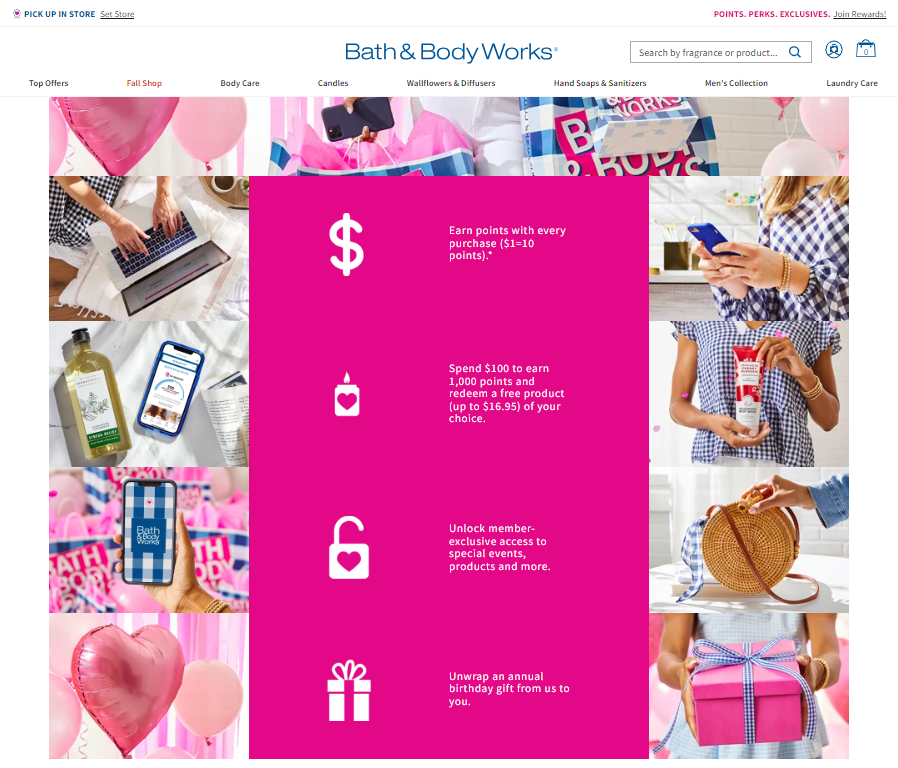
The main advantage is that the value builds over time. Instead of giving customers a single-use discount and hoping they come back, a points program gives them a visible balance they can continue earning and redeeming.
Benefits Of Adding A Points And Rewards System In WooCommerce
Setting up points and rewards for WooCommerce can support several important goals, from encouraging repeat purchases to creating more personalized customer experiences.
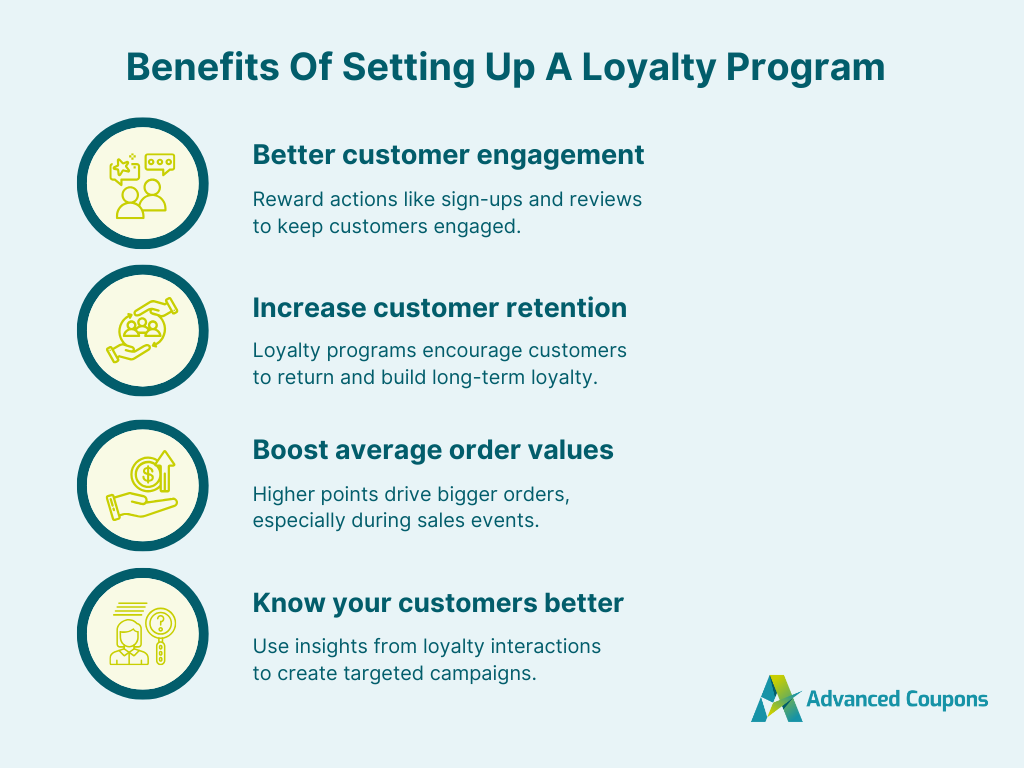
1. Better customer engagement
A points program gives customers more ways to interact with your store beyond placing an order. For example, you can encourage shoppers to leave product reviews, create an account, refer friends, or return during a limited-time points promotion.
When these actions earn points, customers have a clearer incentive to participate. This can turn passive shoppers into more active members of your store community.
2. Improved customer retention
Customers are more likely to return when they know they are building toward a reward. A points balance gives shoppers a reason to choose your store again instead of starting from scratch with another brand.
This is especially useful for stores that sell consumable, seasonal, or repeat-purchase products. Each order can help customers earn toward their next reward, making the next purchase feel more valuable.
3. Higher average order values
A points and rewards system can also encourage shoppers to add more items to their carts. If customers know they can earn more points by reaching a certain spend level, they may be more motivated to complete a larger order.
You can also use extra points during peak shopping periods, such as Black Friday or holiday campaigns. For example, you might grant bonus points during a specific date range to encourage shoppers to buy within the promotion window.

4. Better customer insights
Running a loyalty program can also help you understand what motivates your customers. You can review which earning actions customers use most, which shoppers accumulate the most points, and how often points are redeemed.
These insights can help you refine future promotions, adjust your rewards structure, and create campaigns that better match customer behavior.
How To Set Up A WooCommerce Points And Rewards System
WooCommerce does not include a full loyalty program by default. To create points and rewards for WooCommerce, you’ll need a loyalty plugin such as Advanced Loyalty Program.
Before starting, make sure Advanced Loyalty Program is installed and active on your WooCommerce store. You can also review the official getting started guide if you need help with installation.
Step 1: Set up your points system
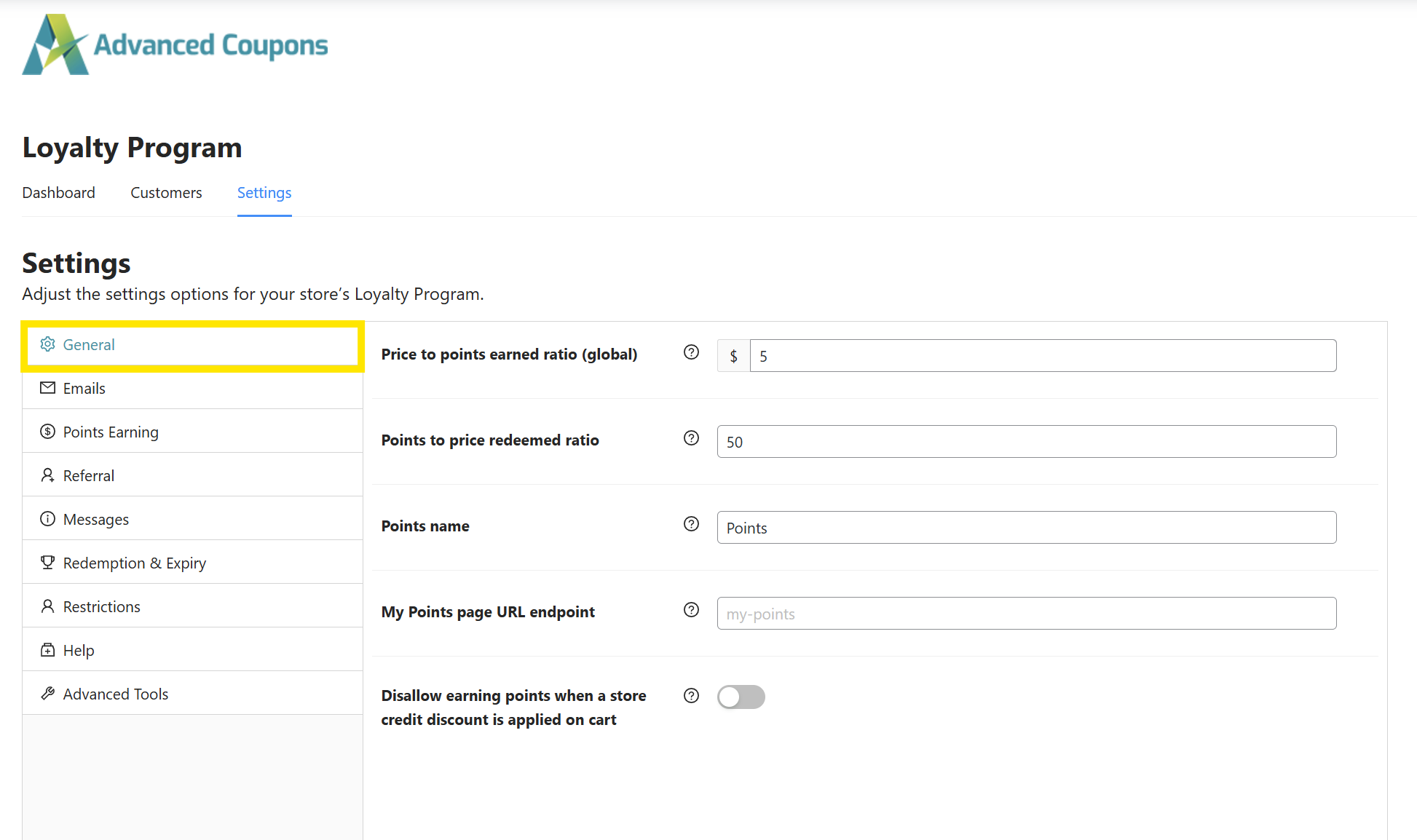
After installing Advanced Loyalty Program, go to Coupons > Loyalty Program in your WordPress dashboard. Then open the Settings tab to configure the basic points rules for your store.
Under the General section, you can set how many points customers earn for every dollar spent and how those points convert into store credit. For example, you might set customers to earn 5 points for every $1 spent, then set 50 points to redeem $1 off a future purchase.
Try to make the reward feel achievable while still protecting your margins. If customers need too many purchases before they can redeem anything meaningful, the program may feel less motivating. If rewards are too generous, the program may become costly to maintain.
Step 2: Choose which actions earn points
Next, open the Points Earning tab. This is where you can decide how shoppers earn points in your store and which actions should count toward their rewards.
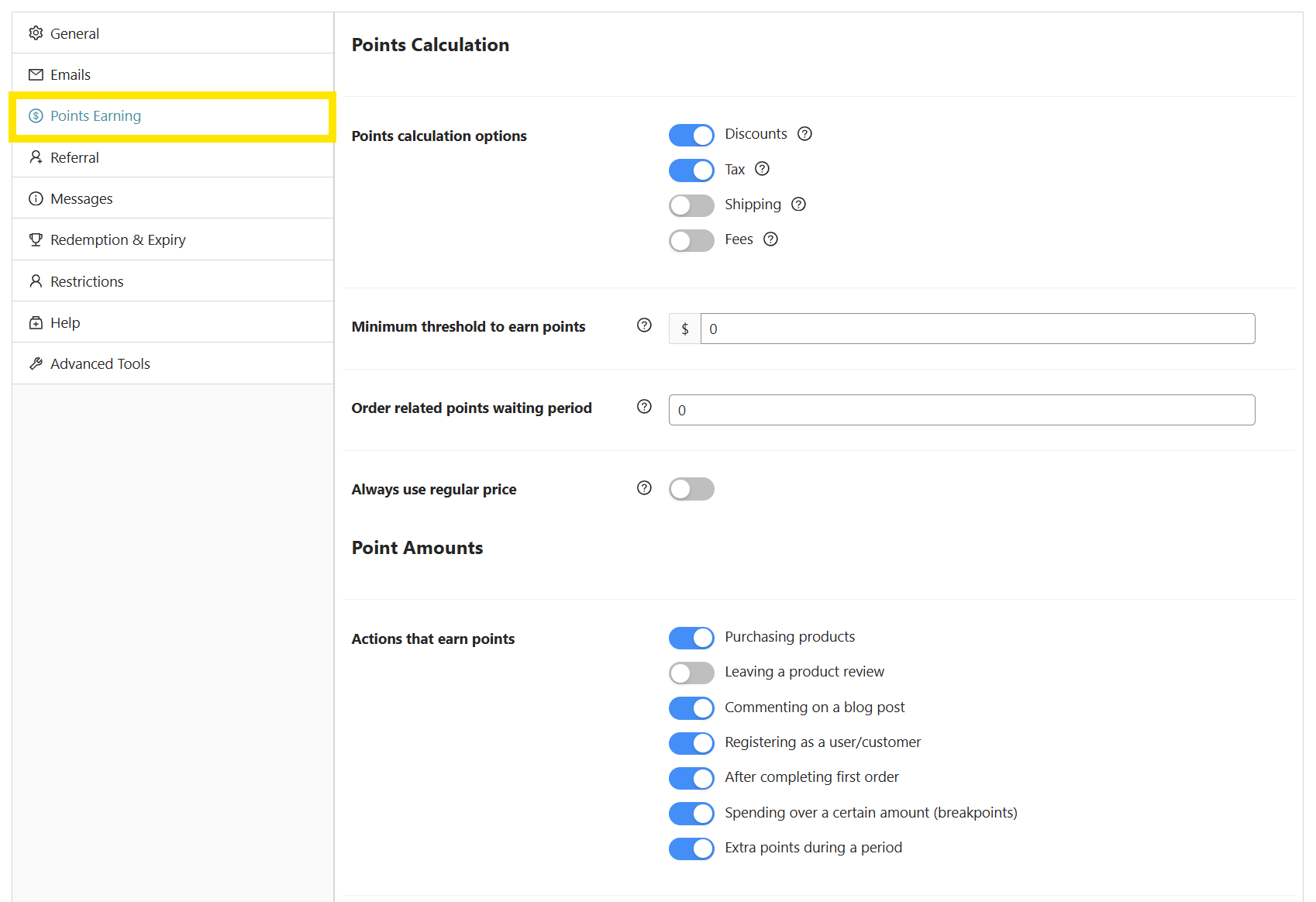
This section lets you configure settings such as:
- Points granted per action: Decide how many points customers earn for eligible actions, such as placing an order, leaving a review, registering as a customer, or completing other supported actions.
- Minimum spend to earn points: Set a minimum order amount before customers can earn purchase points.
- Maximum points per order: Limit how many points can be earned from a single order to help keep the program sustainable.
- Points calculation rules: Decide whether points are calculated on discounts, tax, shipping, and other order details.
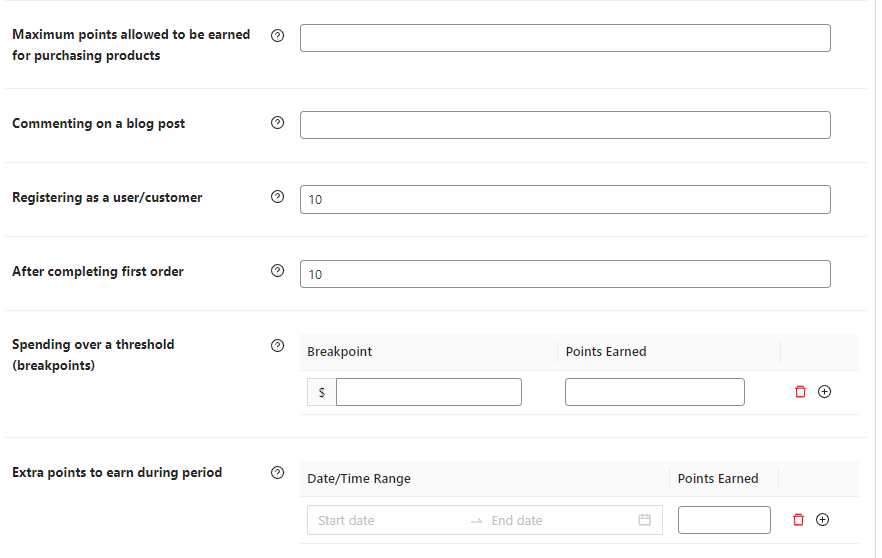
Start with the earning actions that matter most to your business. You can always add more later once you see how quickly customers are earning and redeeming points.
Step 3: Enable referral points (optional)
Advanced Loyalty Program also lets you reward customers for referrals. This can help you turn loyal shoppers into advocates by giving them points when referred customers sign up or make a purchase.
To configure this, open the Referral tab in the settings page.
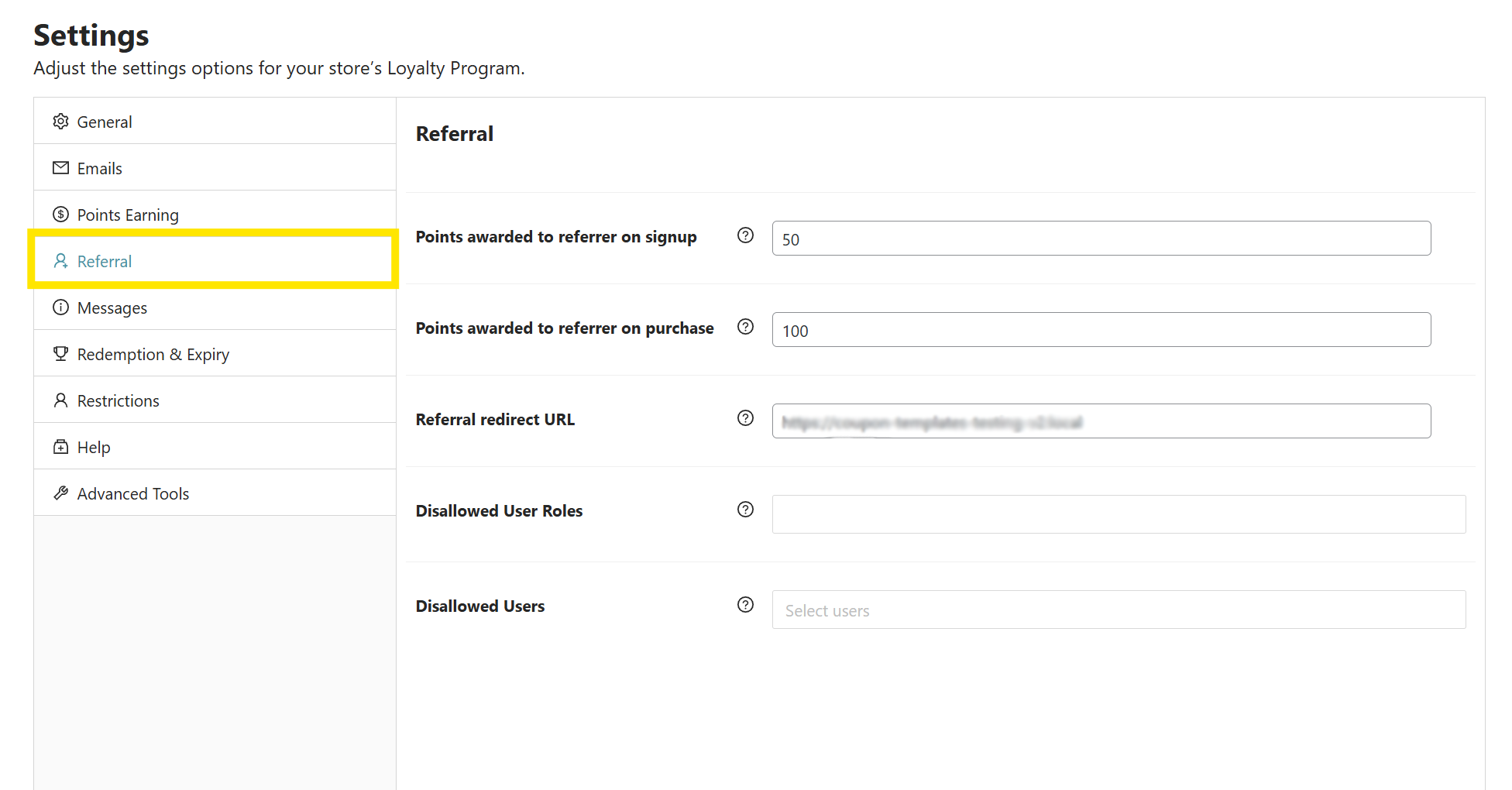
From here, you can set:
- Points awarded to referrer on signup: Define how many points a customer earns when their referred friend creates an account.
- Points awarded to referrer on purchase: Set how many points the referrer earns when their invited user makes a purchase.
- Referral redirect URL: Choose which page referred users land on after clicking the referral link, such as your homepage or shop page.
- Disallowed user roles and users: Exclude specific roles or individual users from earning referral points.
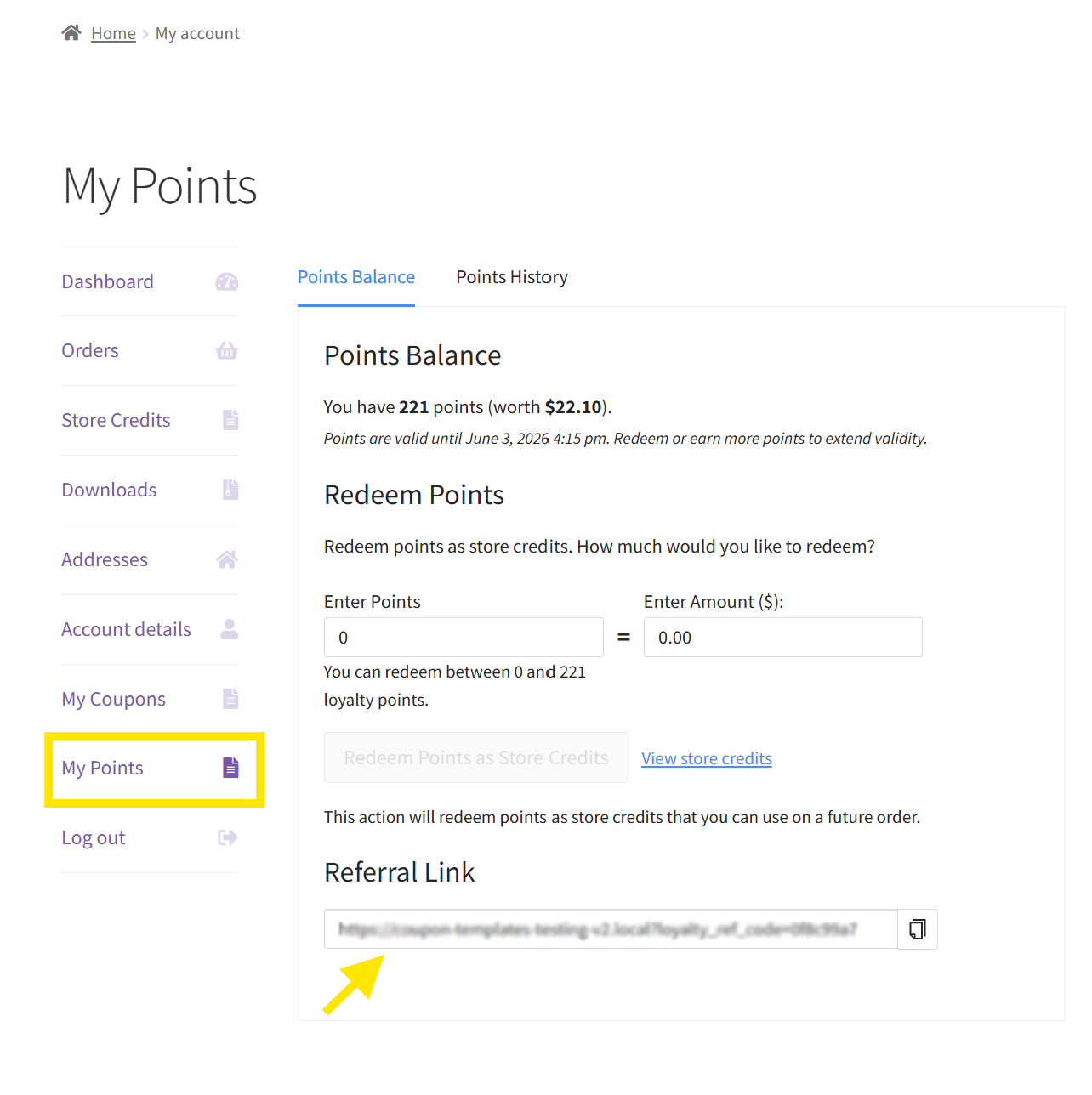
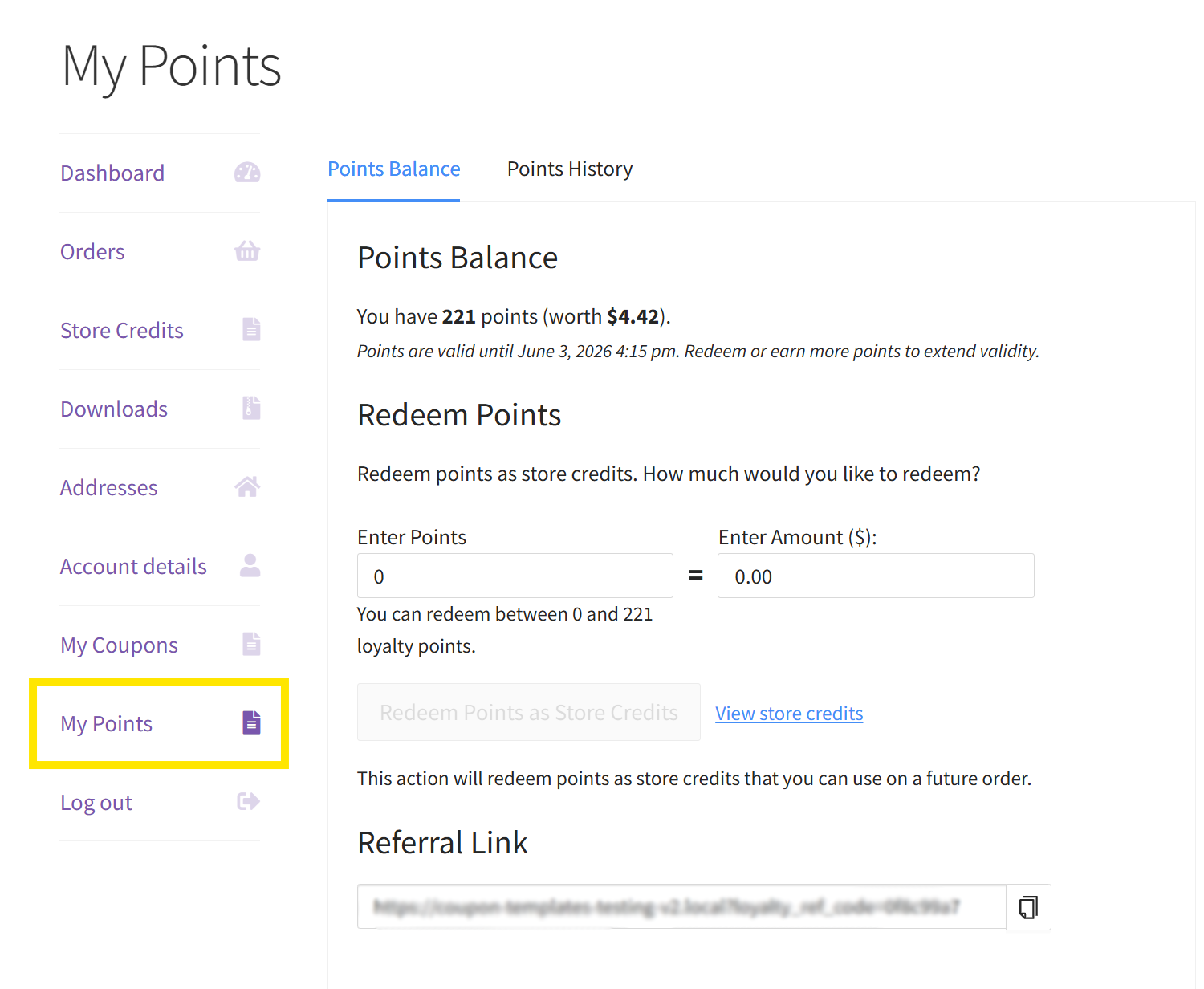
Customers can view their unique referral link from the My Points area in their account. From there, they can also check their points history and redeem points as store credit.
Step 4: Determine redemption and expiry settings
Once you’ve set how customers earn points, the next step is to define how they can redeem those points. These settings help keep your points and rewards system fair for customers and sustainable for your business.
Open the Redemption & Expiry tab to configure your redemption rules.
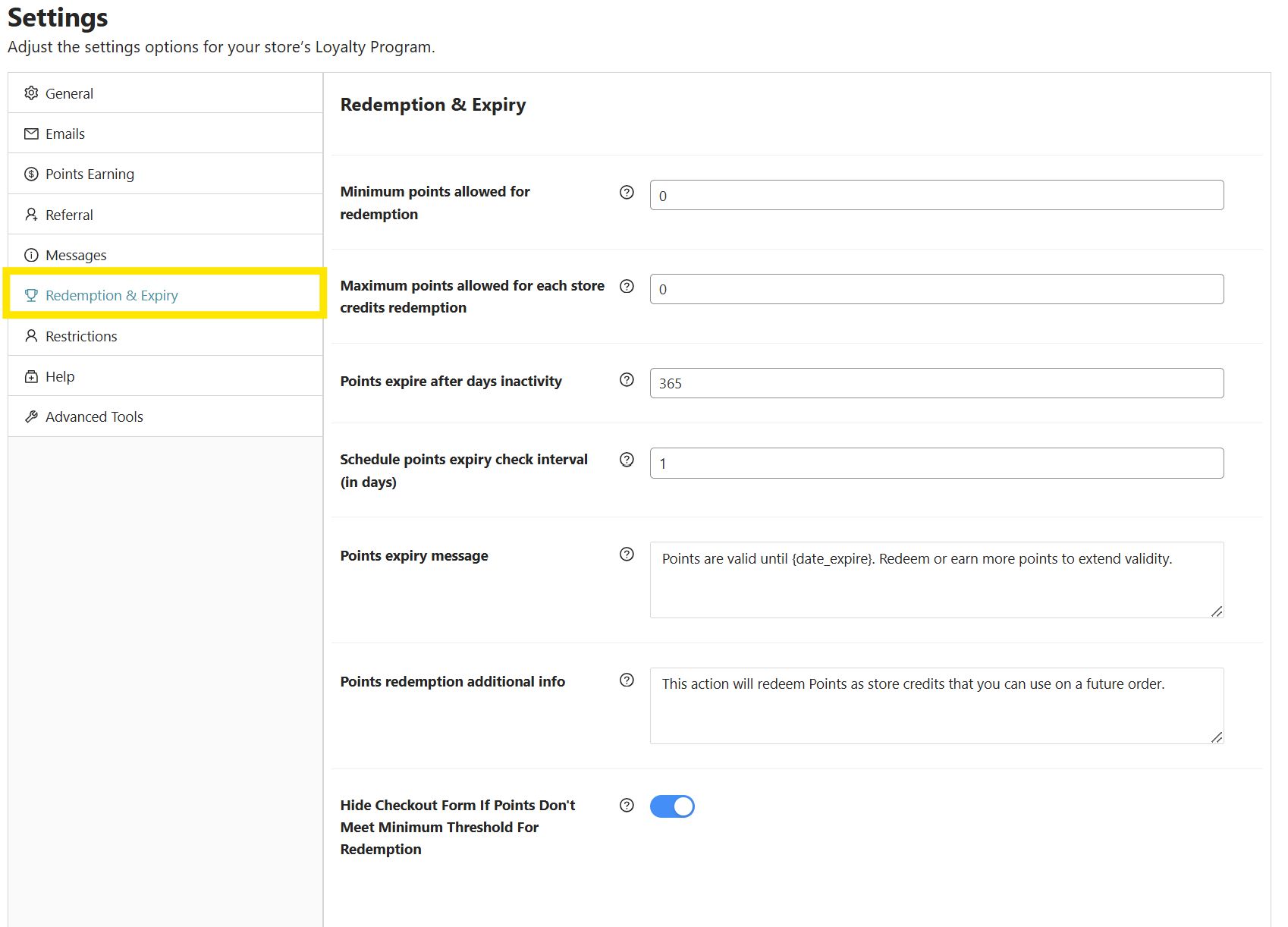
- Minimum points allowed for redemption: Set how many points a customer needs before they can start redeeming rewards.
- Maximum points allowed for each store credit redemption: Limit how many points can be redeemed in one transaction.
- Points expiry: Choose how many days points remain valid after inactivity.
You can also customize messages that notify customers when their points are about to expire. This helps shoppers understand the value of their points and encourages them to return before they lose their balance.
Step 5: Define role restrictions (optional)
In some cases, you may want to prevent certain users or user roles from earning points. For example, you might exclude wholesale customers if they already receive discounted bulk pricing.
You can define these rules under the Restrictions tab.
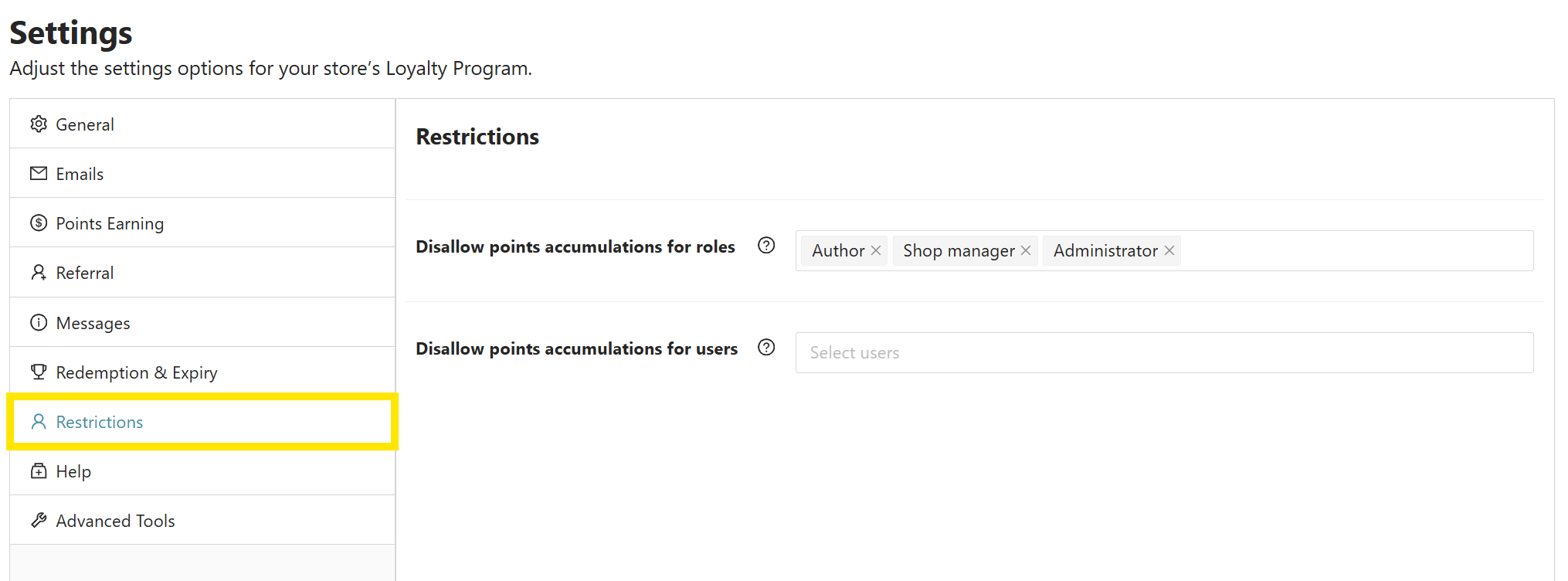
- Disallow points accumulation for roles: Choose which user roles should not earn points, such as wholesale customers, shop managers, or staff accounts.
- Disallow points accumulation for users: Exclude specific individual users from your rewards program.
After configuring your core settings, review the program from both the admin and customer side. This helps you confirm that customers can earn, view, and redeem points as expected.
⭐ GET INSPIRED:
See how LivOliv, a vegan beauty brand, uses Advanced Loyalty Program to keep customers coming back with personalized rewards.
Managing Your WooCommerce Points And Rewards System
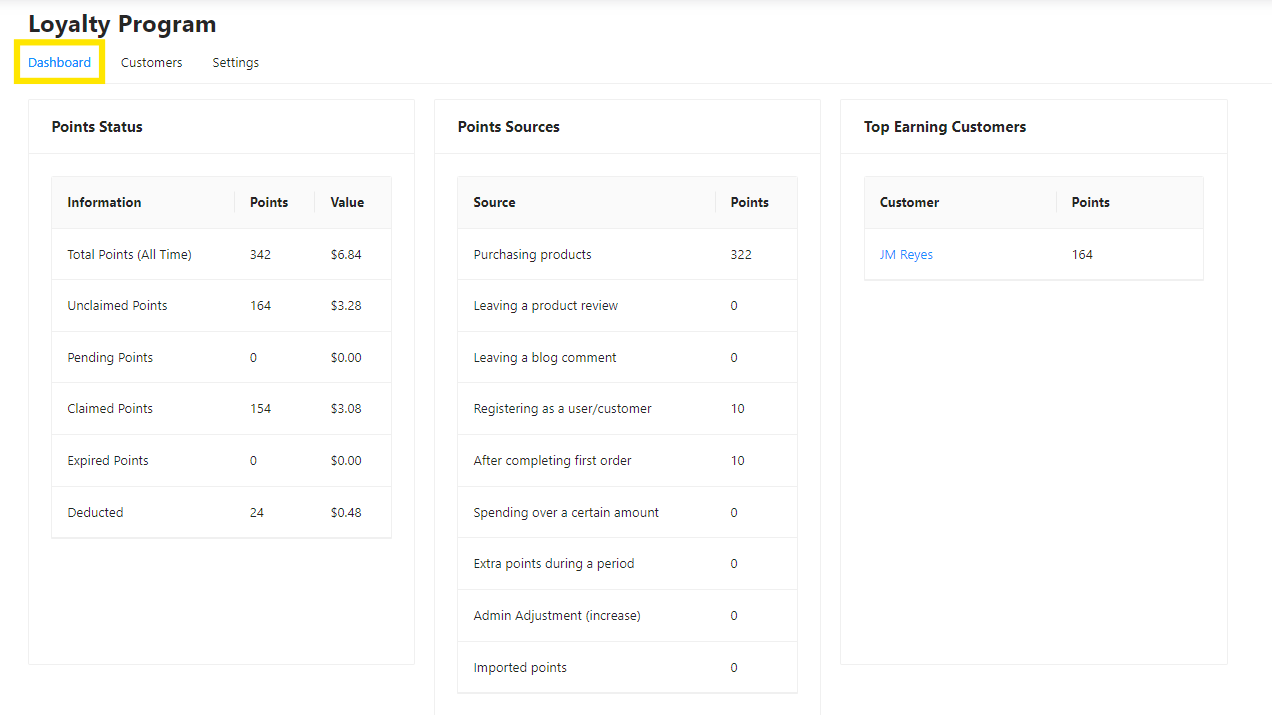
Once your program is running, you can monitor activity from the Loyalty Program dashboard. This dashboard gives you a summary of important points data, such as total points earned, top customers, and points earning sources.
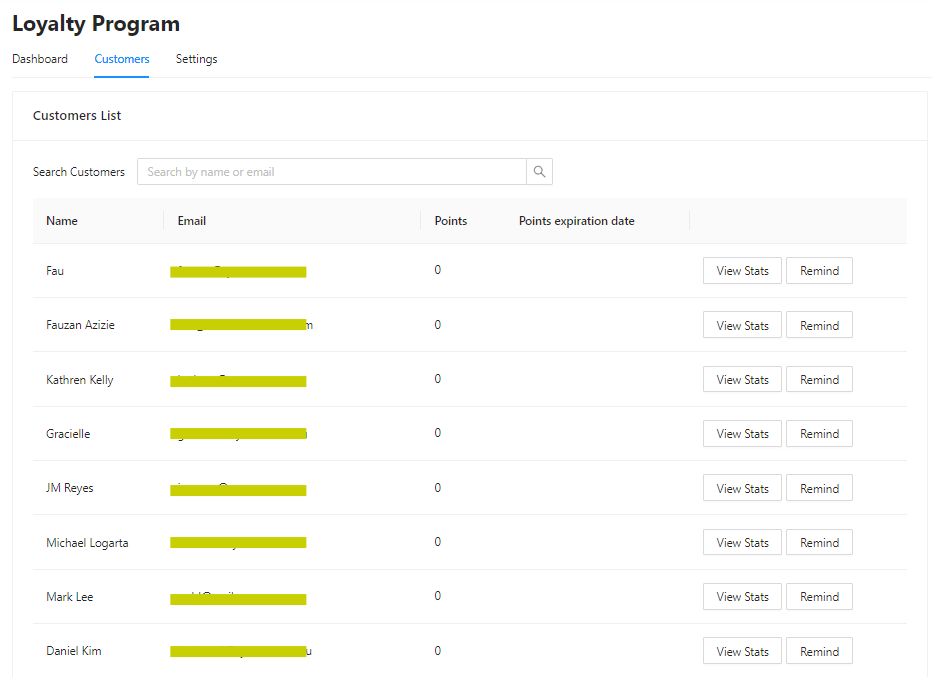
You can also use the Customer Dashboard to view customers and manually adjust their points when needed. This is helpful for customer support situations, special rewards, or correcting a points balance.
On the customer side, shoppers can view and redeem points from the My Account area. This is also where they can find their referral link and review their points history.
WooCommerce Points And Rewards Plugin Comparison
There are several WooCommerce points and rewards plugins available, but the best choice depends on how you want your loyalty program to support the rest of your store strategy. Some tools focus mainly on points and discounts, while others give you more ways to connect loyalty rewards with coupons, referrals, store credit, and seasonal promotions.
If you want a loyalty system that works as part of a broader WooCommerce promotion strategy, Advanced Loyalty Program is the strongest overall fit. It gives you points, rewards, referrals, customer-facing redemption, and admin controls while fitting naturally into the wider Advanced Coupons ecosystem.
| Plugin | Best fit | Key strengths | Considerations |
|---|---|---|---|
| Advanced Loyalty Program | Best overall fit for WooCommerce stores that want loyalty rewards to support coupons, referrals, and long-term promotional campaigns | Points for purchases, reviews, registrations, referrals, spending thresholds, and promotional periods. It also includes customer-facing points redemption, referral links, admin controls, and dashboard reporting. | Best suited for stores that want more than a basic points tracker and are already using, or planning to use, Advanced Coupons tools. |
| YITH WooCommerce Points and Rewards | Stores that want a feature-rich standalone points system, especially if they already use other YITH plugins | Supports points for purchases, registration, reviews, birthdays, referrals, levels, badges, and several YITH ecosystem integrations. | It may be a stronger fit for stores already invested in the YITH ecosystem, but the wider setup can feel more complex depending on the features you enable. |
| WooCommerce Points and Rewards by Woo | Stores that prefer an official Woo extension for a straightforward points-for-discounts setup | Supports purchase-based points, points for selected actions, product/category/global point settings, discount redemption, customer point adjustments, and point logs. | It covers the core points-and-discounts workflow well, but stores that need referrals or a broader promotion stack may need additional tools. |
The main advantage of Advanced Loyalty Program is that it does not treat loyalty as a separate, isolated feature. It helps you build a rewards system that can work alongside the campaigns you already run, including coupons, store credits, gift cards, BOGO deals, referral rewards, and seasonal promotions.
That makes it the more practical long-term choice for WooCommerce stores that want their points and rewards system to do more than track purchases. Instead of adding loyalty on the side, you can use it as part of a complete customer retention and promotion strategy.
Best Practices For WooCommerce Points And Rewards Success
Setting up the plugin is only the first step. To make your WooCommerce points and rewards system more effective, use a few simple best practices as you launch and refine your program.
Make rewards feel achievable
Customers are more likely to stay engaged when rewards feel realistic. Review your earning and redemption ratios from a shopper’s perspective, and make sure customers can see a clear path from earning points to redeeming them.
Promote your program across key touchpoints
Don’t assume customers will discover your rewards program on their own. Mention it on product pages, account pages, post-purchase emails, and seasonal campaign messages so shoppers understand how to earn and use points.
Use extra points strategically
Extra points can help you support short-term goals, such as boosting sales during a holiday campaign or encouraging shoppers to place another order. Use them intentionally so they feel special instead of expected.
Review and adjust over time
Check your loyalty dashboard regularly. If customers are earning points but not redeeming them, your redemption threshold may be too high. If rewards are being redeemed too quickly, your earning ratio may need adjusting. The goal is to keep the program rewarding for customers while still sustainable for your store.
Frequently Asked Questions
What is a WooCommerce points and rewards system?
A WooCommerce points and rewards system is a loyalty program that lets customers earn points for actions such as purchases, product reviews, account registration, and referrals. Customers can redeem accumulated points for store credit or discounts, depending on your program settings.
How do customers redeem their loyalty points?
Customers can visit the My Points section in their account to view their balance and redeem points as store credit. Store owners can set minimum redemption thresholds, maximum redemption limits, and expiry rules.
Can I give points for actions other than purchases?
Yes. Advanced Loyalty Program lets you reward customer actions such as product reviews, account registration, completed orders, spending over a set threshold, and referrals. You can choose which actions matter most for your store.
Do loyalty points expire?
Yes, you can set points to expire after a period of inactivity. You can configure this in the Redemption & Expiry settings and customize messages that notify customers when their points are about to expire.
Can I exclude certain customers from the loyalty program?
Yes. The Restrictions tab lets you exclude specific user roles or individual users from earning points. This is useful for wholesale customers, staff accounts, test users, or any group that should not receive loyalty points.
Does Advanced Loyalty Program support referrals?
Yes. Advanced Loyalty Program includes referral settings that let you reward customers when referred users sign up or make a purchase. Customers can access their unique referral link from the My Points area in their account.
How do I manage customer points?
You can monitor your program from the Loyalty Program dashboard and review individual customer balances from the Customer Dashboard. Store owners can also manually adjust points when needed.
Start Building Your WooCommerce Points And Rewards System
A WooCommerce points and rewards system gives customers a reason to return, engage, and keep building value with your store. Instead of relying only on one-time discounts, you can reward purchases, reviews, registrations, referrals, and other meaningful actions.
Here’s a quick recap:
- Set your points earning and redemption ratios so rewards feel valuable and sustainable.
- Choose which customer actions earn points, such as purchases, reviews, registration, and referrals.
- Enable referral rewards if you want to reward customers for bringing in new shoppers.
- Set redemption and expiry rules to control how customers use their points.
- Monitor your loyalty dashboard and adjust the program as you learn what works.
Ready to set up WooCommerce points and rewards for your store? Get Advanced Loyalty Program and start building a rewards system that keeps customers coming back.