Built your checkout page with Elementor instead of WooCommerce’s default template? Advanced Coupons still recognizes it and keeps every coupon and checkout feature working.
Works on Elementor-built checkout pages
If you build your checkout page with Elementor’s WooCommerce Checkout Page widget instead of WooCommerce’s default checkout template, Advanced Coupons still works there. It recognizes the Elementor widget and loads its coupon field, notices and store credit features exactly like it does on a standard checkout page.
- Automatic detection: Advanced Coupons checks the page for Elementor’s WooCommerce Checkout Page widget and adjusts on its own.
- No extra setup: There’s nothing to configure. It works the moment the widget is on the page.
- Full feature parity: Coupon fields, notices and store credit all behave the same as on a standard WooCommerce checkout.
Also works with Advanced Promo Kit’s product labels
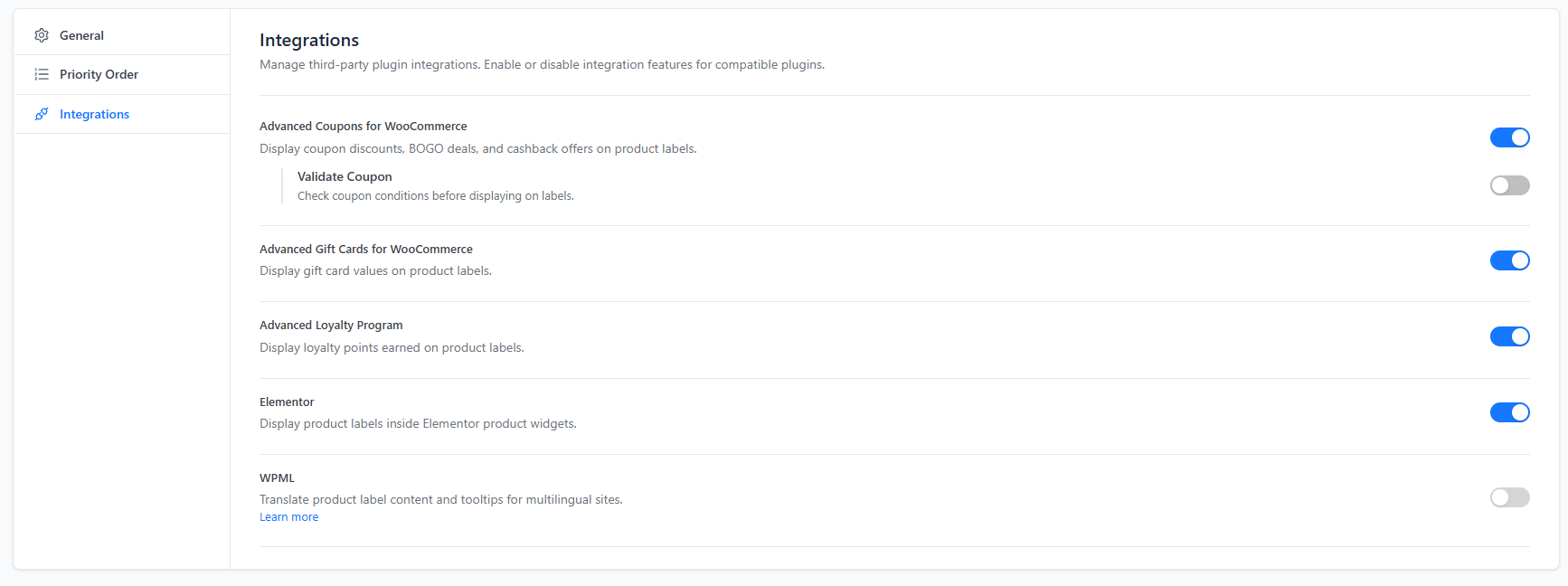
If you use Advanced Promo Kit alongside Advanced Coupons, its product labels display correctly inside Elementor’s WooCommerce widgets too. Enable the integration in Advanced Promo Kit’s settings and labels keep working wherever your products are shown.
- Works inside Elementor widgets: Labels appear correctly in Elementor’s WooCommerce Products, Product Images and Archive Products widgets.
- Scripts load automatically once enabled: After you turn it on, Advanced Promo Kit’s frontend scripts load on any Elementor-built page, not just default WooCommerce templates.
- One click to enable: Turn it on from the Integrations settings screen, no code required.
Frequently Asked Questions
Do I need to configure anything for this to work?
No. Advanced Coupons automatically detects when a page uses Elementor’s WooCommerce Checkout Page widget and adjusts itself accordingly.
Will my coupon field still show up if I build my checkout with Elementor?
Yes. Advanced Coupons loads its coupon and checkout scripts on any page it recognizes as a checkout, including ones built entirely with Elementor’s widgets.
Does this work with Elementor Pro too?
Yes. The integration looks for the WooCommerce Checkout Page widget, which ships with Elementor Pro, so it works wherever that widget is used.
What happens if I use WooCommerce’s default checkout page instead?
Nothing changes. Advanced Coupons already works with the default WooCommerce checkout page out of the box. This integration only extends that support to Elementor-built pages.
Does this affect store credit and BOGO deals too?
Yes. Once your Elementor checkout page is detected, all of Advanced Coupons’ checkout-side features, including store credit redemption, behave the same as on a standard checkout.
Does this integration also cover Advanced Promo Kit?
Yes. If you run Advanced Promo Kit alongside Advanced Coupons, its own Elementor integration keeps product labels showing correctly inside Elementor’s WooCommerce widgets. Enable it from Advanced Promo Kit’s Integrations settings.