
A customer clicks Store Credits in their account and gets a “page not found” instead of their balance. Their store credit is safe, and no data is lost. The Store Credits page is a WooCommerce account endpoint rather than a real page, so it depends on your site’s permalink rules. When those rules are out of date, the URL has nothing to match. This article covers the usual causes and the fix for each.
The Store Credits page returns a 404
What is happening: WordPress does not recognise the Store Credits URL, so it serves your theme’s 404 page.
Why: Advanced Coupons registers Store Credits as an account endpoint. WordPress only routes that URL if the endpoint is present in the site’s stored rewrite rules. If those rules were last rebuilt at a time the endpoint was not registered, the URL matches nothing.
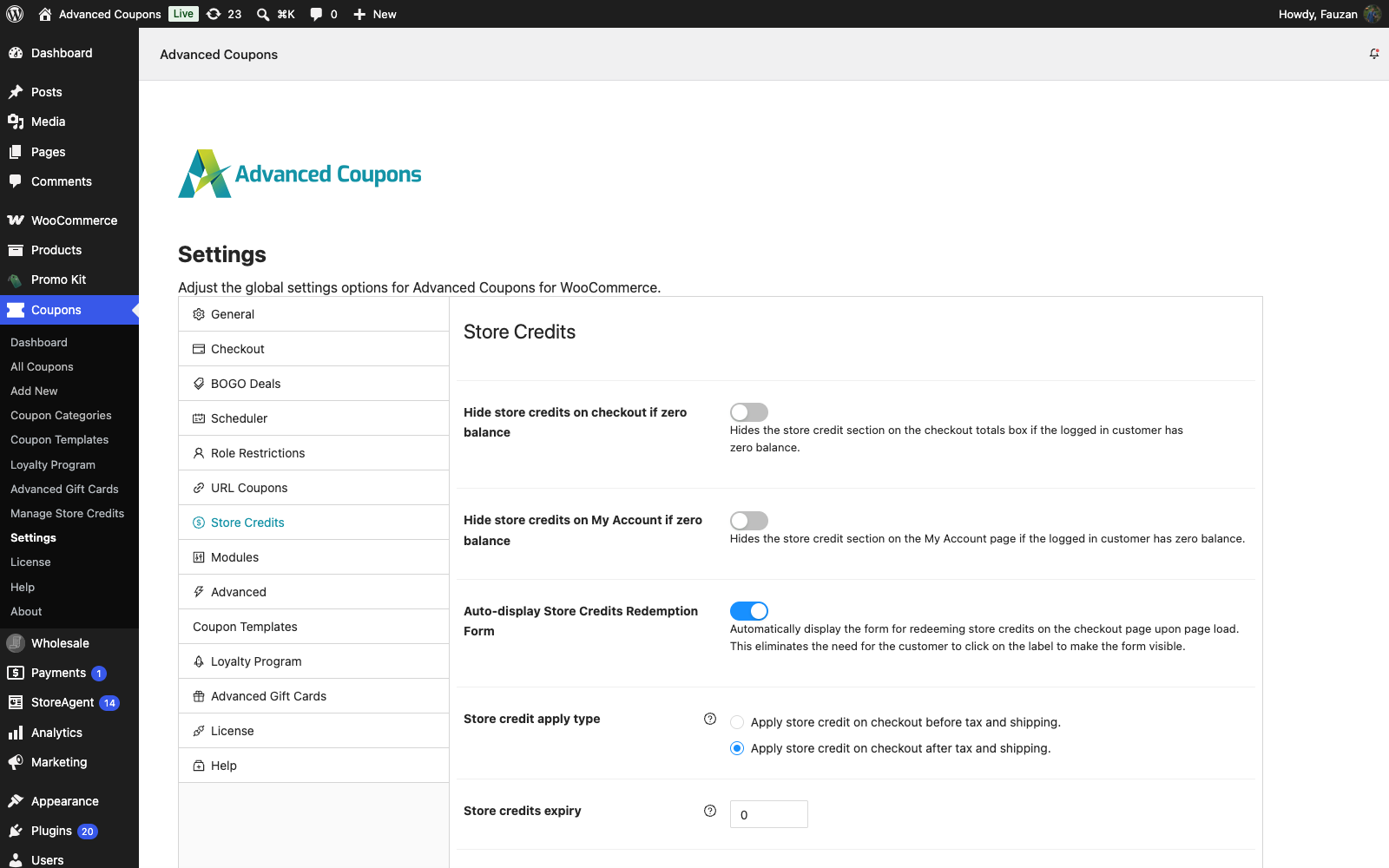
Fix: re-save your permalinks. This rebuilds the rewrite rules and fixes most cases. If Hide store credits on My Account if zero balance is on, follow the next section instead, because re-saving on its own may not fix it.
The default address of the page is example.com/my-account/store-credit/. If your My Account page uses a different slug, the first part changes to match it.
- Go to Settings → Permalinks in your WordPress admin.
- Click Save Changes. You do not need to change any setting.
- Load the Store Credits page again.

The Store Credits page 404s and the zero-balance setting is on
What is happening: every customer gets a 404 on the Store Credits page, including customers who have a balance. It often starts after someone saves the permalinks or after a plugin update.
Why: while Hide store credits on My Account if zero balance is on, the plugin adds the Store Credits page to the rewrite rules only when the person whose visit rebuilds those rules has store credit. If an admin with no store credit saves the permalinks, or the first page load after a plugin update comes from someone with no store credit, such as a visitor or an admin, the page drops out of the rules for everyone.
Fix: turn the setting off, then re-save permalinks. Turning the setting off on its own is not enough, because the rules stay as they were until you save them again. With the setting off, customers with a zero balance also see the Store Credits page and menu item.
- Go to Coupons → Settings in your WordPress admin.
- Open the Store Credits tab.
- Turn off Hide store credits on My Account if zero balance. The setting saves automatically.
- Go to Settings → Permalinks and click Save Changes.
- Load the Store Credits page again as a customer.
The link opens My Account instead
What is happening: this one is often reported as a 404, but it is not. The customer lands on the My Account dashboard rather than an error page, and the Store Credits screen never opens. The Store Credits item is also missing from their account menu.
Why: Hide store credits on My Account if zero balance is on, and the customer has no store credit. The plugin hides the Store Credits page from customers with a zero balance, so a saved link or an email link takes them to the dashboard.
Fix: nothing is wrong if you want zero-balance customers to skip the page. To show it to every customer, turn the setting off and re-save permalinks, as described in the section above.
A quick way to tell the symptoms apart: a genuine 404 shows your theme’s error page, while this case lands the customer on a working My Account page.
Nothing above fixed it
Work through these in order.
- Clear every cache. Page caching, object caching, and a CDN can all keep serving the old 404 response after the rules are fixed.
- Test while logged in as the customer. A logged-out visitor sees the My Account login form, not a 404, so a logged-out test tells you nothing.
- Confirm the My Account page is set. Under WooCommerce → Settings → Advanced, the My account page must point at a real page containing the account shortcode or block. Every account endpoint hangs off it.
- Test with a default theme and only WooCommerce plus Advanced Coupons active. Another plugin registering a conflicting endpoint or rewriting URLs is the usual remaining cause.
If you also run the Loyalty Program and its page has the same problem, see Troubleshooting a 404 error on the My Points page.
Frequently asked questions
Will re-saving permalinks break anything else?
Not usually. It rebuilds the routing rules from what is currently registered, and your URLs and content are untouched. The exception is when Hide store credits on My Account if zero balance is on and the person saving has no store credit. Turn the setting off first, as described above.
Do I need to re-save permalinks after every plugin update?
Not usually. The exception is when Hide store credits on My Account if zero balance is on. An update can then remove the Store Credits page. Turn the setting off and re-save permalinks to fix it.
Can I change the Store Credits page URL?
There is no setting for it. A developer can change the store-credit slug with the acfw_store_credits_endpoint filter. Re-save permalinks after the change.
Why is the Store Credits item missing from the account menu?
That is a different problem from a 404. The item is hidden when the Store Credits module is off under Coupons → Settings → Modules, or when the zero-balance setting above hides it from a customer with no balance.
Need help?
If you have a question or run into any issues, we’re here to help.
- Premium users: Open a support ticket
- Free users: Visit our community forum

