
Integrations / SaveTo Wishlist
Advanced Coupons +
SaveTo Wishlist
Reward customers for saving products to their wishlist. Advanced Coupons can restrict a coupon so it only applies when the cart contains something from the customer's SaveTo Wishlist.
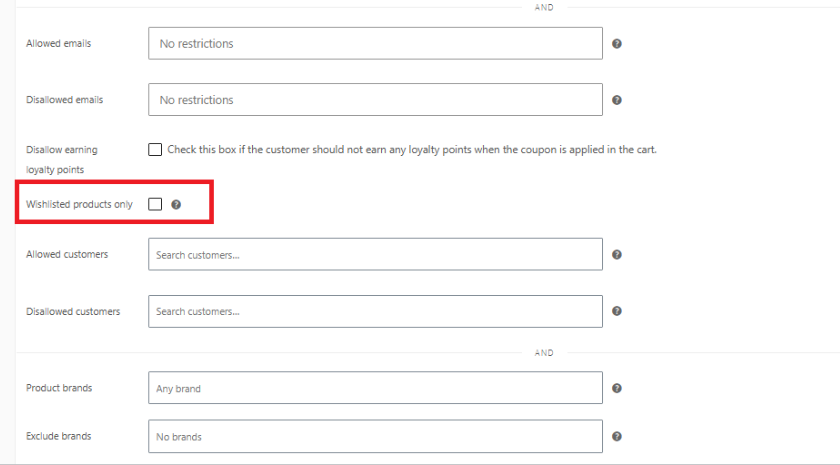
Wishlisted products only, as a coupon restriction
Restrict a coupon so it only applies when the logged in customer’s cart contains at least one product from their SaveTo Wishlist. It’s a simple way to reward customers for coming back and buying what they saved.
- Variation precise matching: Wishlisting a specific variation only qualifies that exact variation in the cart, while wishlisting the parent product qualifies any of its variations.
- Still works after the item leaves the wishlist: SaveTo Wishlist removes an item from the wishlist as soon as it's added to cart. Advanced Coupons remembers it was wishlisted, so the coupon still applies.
- Guests are excluded automatically: The restriction only checks logged in customers, since guests have no saved wishlist to match against.

Frequently Asked Questions
On the coupon’s Usage restriction tab, check “Wishlisted products only”. No other setup is required.
Yes. SaveTo Wishlist Pro requires SaveTo Wishlist Lite to run, and both share the same wishlist data, so the restriction works whether a customer is on Lite or Pro.
No. Guests do not have a saved wishlist, so a coupon restricted this way only works for logged in customers.
Matching is variation precise. Wishlisting “Blue / L” only qualifies that exact variation in the cart, not other colors or sizes of the same product.
No. Advanced Coupons remembers that the item was wishlisted at the moment it was added to cart, so the coupon keeps working even after SaveTo Wishlist clears the wishlist row.

