
PW WooCommerce Gift Cards makes it easy to start selling digital gift cards. But if your store also handles refunds as store credit or lets customers redeem loyalty points for credit, it’s worth looking at how those balances work together.
PW’s free plugin has more than 20,000 active installs and lets shoppers redeem gift cards without an account. With Advanced Gift Cards, customers redeem gift cards into their store credit balance, where the value stays available for future purchases. The two options also differ in delivery, reporting, pricing, and how you move existing cards.
How WooCommerce Gift Card Plugins Handle A Card From Sale To Redemption
Most WooCommerce gift card purchases follow a similar path: a card is sold, issued, delivered, and redeemed. What happens to the remaining value, and how you track it, depends on the plugin.
Here’s the lifecycle in order:
- Sale: A shopper buys a gift card product, choosing from the amounts the store offers or entering their own amount if supported.
- Issue: The plugin generates the card code according to its payment, order status, and delivery settings.
- Delivery: The card arrives by email, either right away or on a scheduled date if the plugin supports it.
- Redemption: The recipient enters the code. The value is either applied at checkout or transferred into their store credit balance.
- Balance and expiry: Remaining value can be used on later purchases. Gift card expiry settings determine how long an unredeemed code stays valid.
- Reporting: Store owners need to track issued, redeemed, and outstanding gift cards.
Gift cards and store credit are close cousins, but they start differently: a customer buys a gift card, while you issue store credit. We cover the full difference in our guide to store credit vs gift cards.
Gift cards are especially popular during the holidays. According to the National Retail Federation, 43% of shoppers planned to buy at least one gift card during the 2025 holidays, with gift card spending expected to reach $29 billion.
What PW WooCommerce Gift Cards Does Well
PW WooCommerce Gift Cards is a free plugin by Pimwick for selling digital gift cards. You can create a gift card product with one click, and recipients get an email link that adds their card to the cart automatically.
Two features make the free version particularly convenient for customers:
- Guest redemption: Gift cards aren’t tied to a customer account, so recipients can redeem them without signing up.
- Applied like cash: The balance is applied after tax, and the remaining amount appears on the cart and checkout pages.
The free version supports the block-based Cart and Checkout pages and High Performance Order Storage (HPOS). Store owners can also check gift card liability and view details for individual cards in the admin area.
In the free version, customers choose from amounts you set. PW WooCommerce Gift Cards Pro adds customer-entered amounts with minimum and maximum limits, along with these extra features:
- Import and export of gift card balances
- PDF gift cards, QR codes, and an email designer
- Bonus gift cards, such as a free $5 card with a $25 purchase
- Scheduled delivery and automatic expiration dates based on purchase date
- Physical gift cards, by importing existing card numbers and balances
- Balance adjustments, a customer balance-check page, and a REST API
PW offers plenty of options for stores focused on selling gift cards. Each card keeps its own balance, which shoppers can use at checkout. Refunds or loyalty rewards issued as store credit through a different plugin are managed separately.
Advanced Gift Cards: Gift Cards That Become Store Credit
With Advanced Gift Cards for WooCommerce, customers redeem gift cards into their store credit balance, ready to use on future orders. This works through the store credit feature in the free Advanced Coupons plugin, so gift card value can sit alongside other credit in their account.
To set up a gift card product, choose Advanced Gift Card in the Product data dropdown for a fixed value, or Variable Advanced Gift Card to offer several values. These products are virtual, so there’s no shipping step for the gift card itself.
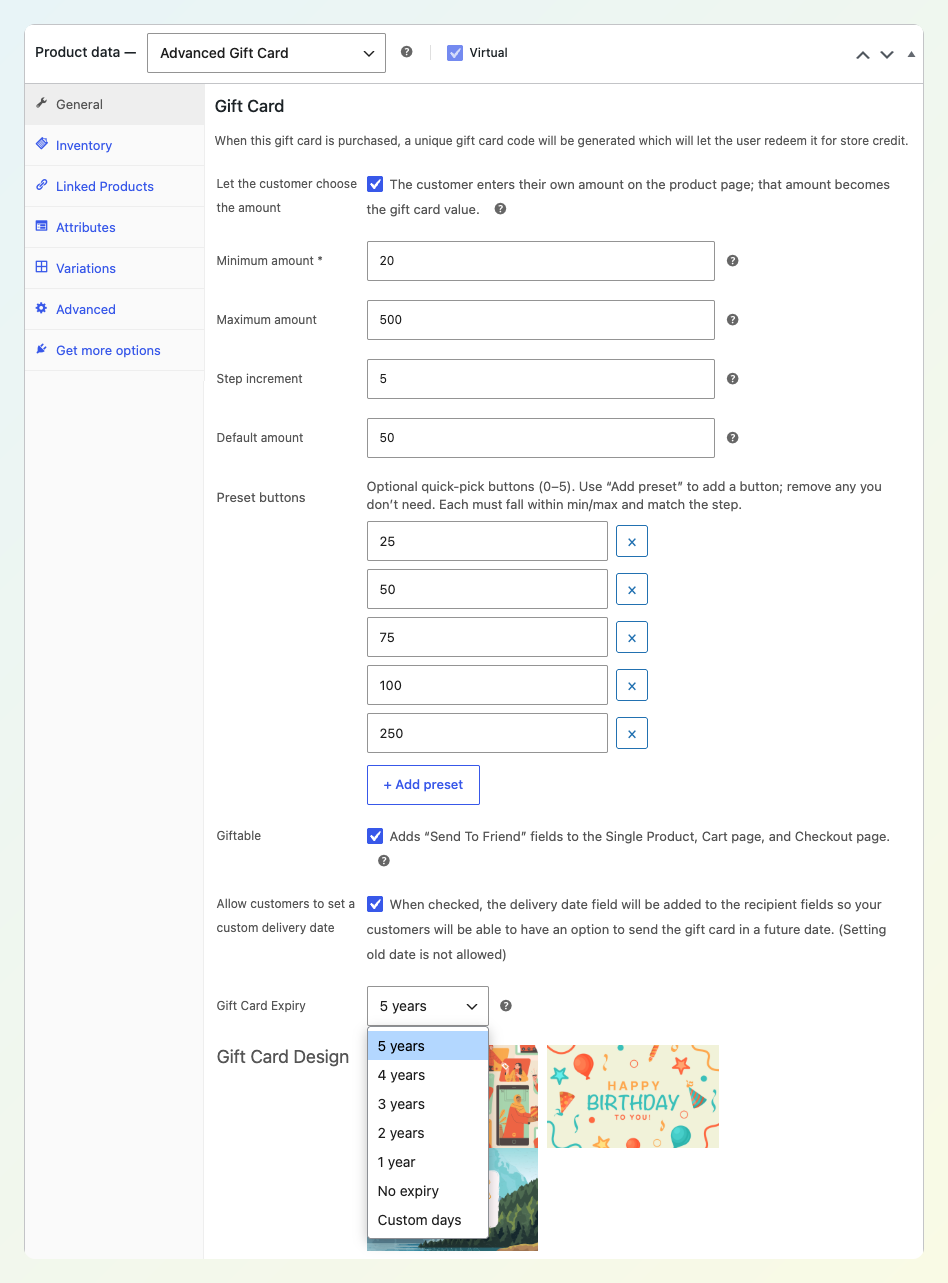
You can also customize gift card amounts, delivery, expiry, and designs:
- Customer-chosen amounts: Set a required minimum, an optional maximum, and up to five preset buttons. Our guide to custom amount gift cards covers the setup.
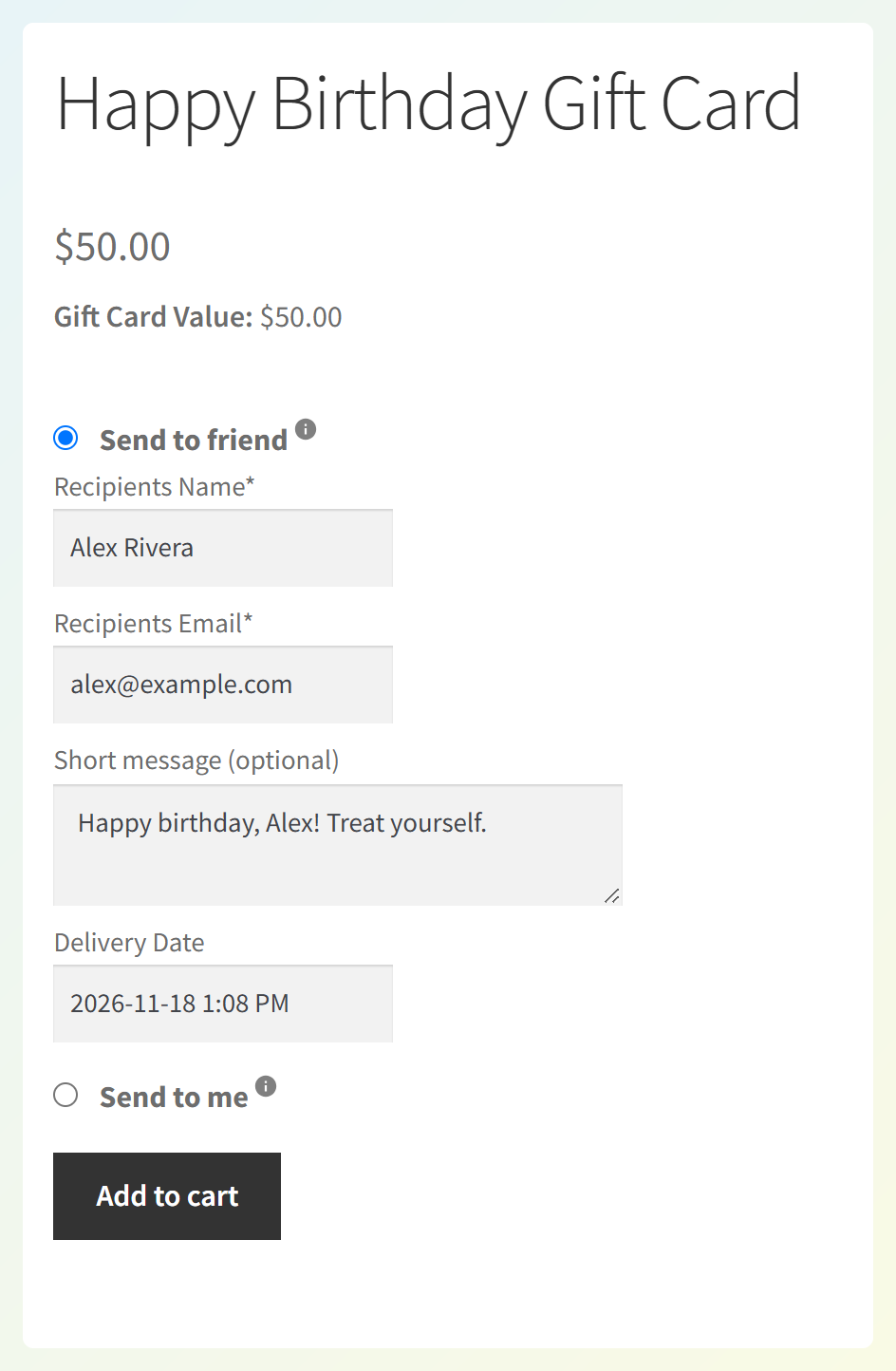
- Send to friend: Tick Giftable and shoppers enter a recipient name, email, and a short message.
- Delivery date: Turn on custom delivery dates and buyers can pick a date up to one year ahead.
- Expiry: Choose 5 years (the default), 4, 3, 2, or 1 year, no expiry, or a custom number of days.
- Designs: Choose from three built-in designs, upload your own background, or use one of 85 additional designs.
Gift cards are issued only after an order reaches a paid status. If the order is later canceled, refunded, or marked as failed, any unredeemed card is invalidated. Gift card codes are generated automatically using characters that are easier to distinguish, helping customers enter them correctly.
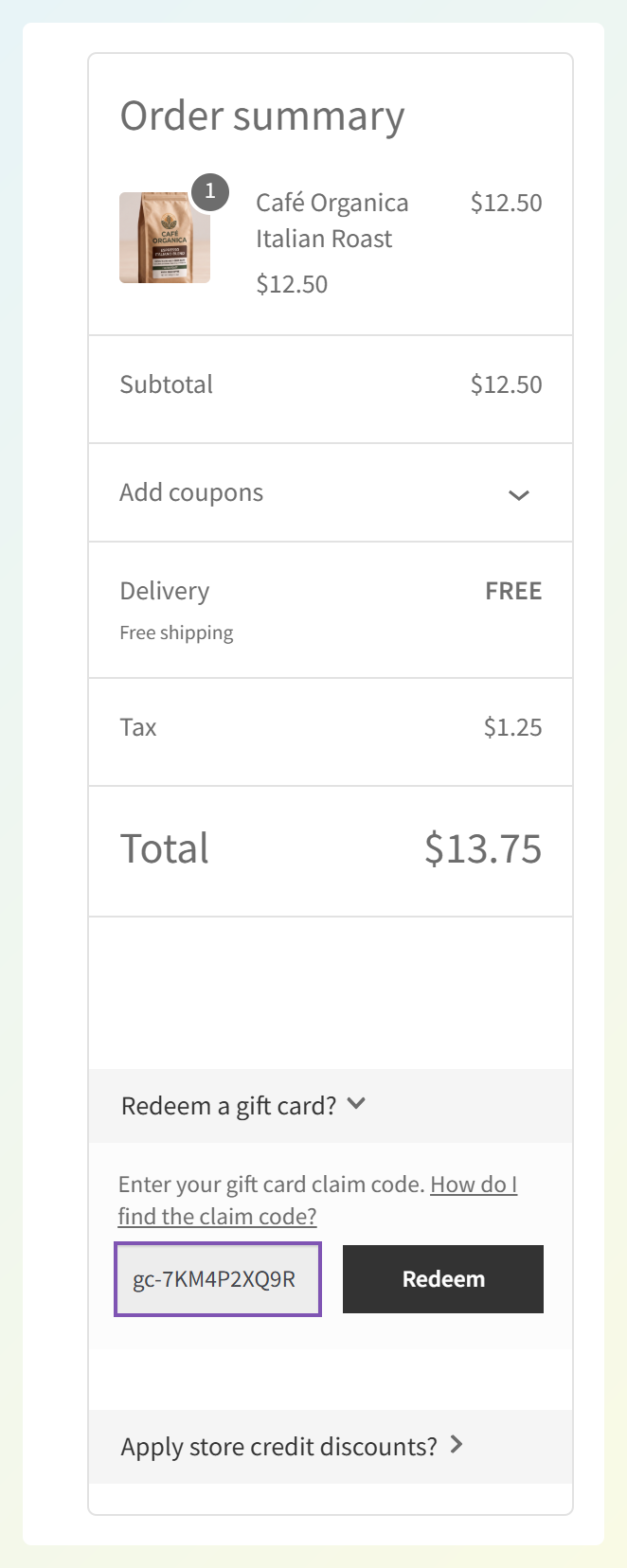
Recipients sign in or create an account to redeem their gift card. Its value is then added to their store credit balance for future purchases, and the code can no longer be used. Customers can redeem cards through the Store Credit tab in My Account, a block or shortcode form, or the “Redeem a gift card?” section at checkout on both classic and block checkout pages.
Side By Side: Redemption, Delivery, Expiry And Reporting
The main difference is how customers use their gift card value. Advanced Gift Cards adds redeemed value to the customer’s store credit balance, while PW WooCommerce Gift Cards keeps a balance on the card for use at checkout.
| Advanced Gift Cards | PW WooCommerce Gift Cards (free) | PW WooCommerce Gift Cards Pro | |
|---|---|---|---|
| Where redeemed value goes | Customer’s store credit balance | Stays on the card, applied at checkout like cash | Same as free |
| Guest redemption | Account sign-in required | Yes | Yes |
| Customer-chosen amount | Yes (minimum, maximum, up to 5 presets) | Picks from amounts you set | Yes (minimum, maximum) |
| Scheduled delivery date | Yes, up to 1 year ahead | No (Pro feature) | Yes |
| Expiry | 5 years default; 4, 3, 2, 1 year, none, or custom days | No built-in expiry setting (Pro feature) | Automatic, based on purchase date |
| Bulk import | CSV | No built-in import (Pro feature) | Import and export |
| Block checkout | Yes | Yes | Yes |
| Reporting and card activity | Gift card dashboard totals and order notes referencing gift-card-related credit | Gift card liability and individual card details | Gift card liability and details, plus balance adjustments |
| First-year price, 1 site | $99.50 | Free | $99 |
Where the balance lives
With Advanced Gift Cards, a redeemed card joins the customer’s store credit balance in the free Advanced Coupons plugin. That same balance can also hold refunds issued as store credit and credit earned when customers redeem loyalty points through the separately sold Advanced Loyalty Program. Customers can check their available store credit in one place, even when it came from different sources.
With PW, customers keep using their gift card balance at checkout. Any store credit issued through another plugin remains separate from that card balance.
Why this matters: A customer who redeems a gift card and later receives a refund as store credit can see both amounts in their account’s store credit balance. That makes it easier to check what’s available before placing another order.
Guest redemption versus account redemption
PW lets recipients redeem a gift card without signing in. With Advanced Gift Cards, recipients log in or create an account when they redeem their code. The value then becomes store credit in their account, where any remaining balance is available for future orders.
Seeing where the value went
When store credit from a redeemed gift card is used on an order, Advanced Gift Cards adds an order note referencing the gift card code and amount. The Advanced Gift Cards dashboard shows cards sold and claimed for a period, plus lifetime claimed and unclaimed totals. Together, these records help store owners review gift card activity alongside the credit used on orders.
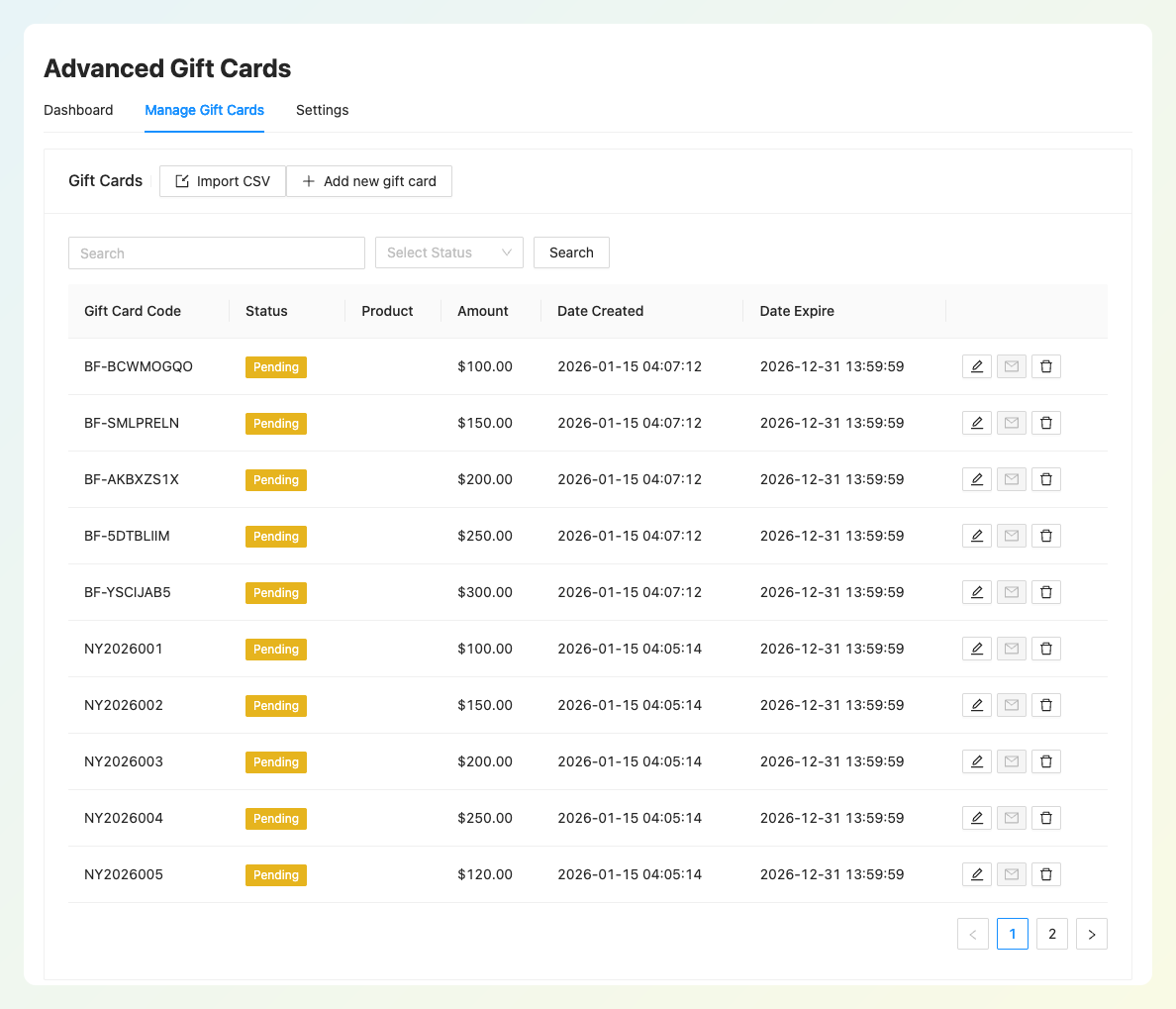
The Manage Gift Cards table shows each card’s status, value, and expiry date, with an option to resend the gift card email. Advanced Gift Cards also maintains a gift card activity history. Unused balances are worth tracking: a 2024 Bankrate survey found that 43% of US adults had at least one unused gift card, voucher, or store credit, with an average unused value of $244 among those holding a balance.
Pricing By Site Count
Advanced Gift Cards costs $99.50 for the first year on one site. PW WooCommerce Gift Cards is free, and its Pro version costs $99 for the first year on one site. As you add sites, the first-year prices look like this:
| Plan | Sites | First-year price |
|---|---|---|
| Advanced Gift Cards Growth | 1 site | $99.50 |
| Advanced Gift Cards Business | Unlimited sites | $199.50 |
| All Access Bundle (all four Advanced Coupons plugins) | Unlimited sites | $249 |
| PW WooCommerce Gift Cards (free) | Any | Free |
| PW WooCommerce Gift Cards Pro | 1 site | $99 |
| PW WooCommerce Gift Cards Pro | 5 sites | $129 |
For one site, Advanced Gift Cards costs $99.50 in the first year, compared with $99 for PW WooCommerce Gift Cards Pro. The Advanced Gift Cards plan covers custom amounts, scheduled delivery, expiry options, CSV import, dashboard reporting, and 85 additional designs. Redeemed gift cards also work with the store credit system in Advanced Coupons.
For multiple stores, PW Pro offers one-site and five-site licenses, while the Advanced Gift Cards Business plan covers unlimited sites. The All Access Bundle also includes Advanced Coupons Premium, Advanced Loyalty Program, and Advanced Promo Kit for stores using those features. The paid Advanced Coupons plans shown here come with a 14-day money-back guarantee.
Switching From PW To Advanced Gift Cards
You can prepare a CSV file to bring existing PW gift card codes and their remaining balances into Advanced Gift Cards. There’s no one-click PW importer, so check the codes and balances carefully before switching.
- Get your PW card data: PW WooCommerce Gift Cards Pro includes a CSV export. In the free version, go to Pimwick Plugins > PW Gift Cards, search with the field blank to show your cards, then copy the results into a spreadsheet and clean up the columns.
- Map the columns: Advanced Gift Cards needs code, value, and status. You can also include date_created, date_expire, send_to, recipient_name, recipient_email, and short_message. If an existing card has an expiry date, include it in date_expire so it isn’t overlooked during the move.
- Use the remaining balance: For partly spent cards, put the amount that’s left in the value column, not the original amount. Use pending as the status for cards that should remain redeemable after import, including partly spent PW cards with a remaining balance.
- Import: Go to Coupons > Advanced Gift Cards > Manage Gift Cards, click Import CSV and upload the file. Download Sample CSV gives you a ready-made template, and files can be up to 5MB.
- Test and plan the switch: Back up your gift card records and test a small batch before importing everything. Check that a test card converts to the right store credit amount, and make sure the same codes can’t be spent through both plugins during the switch.
Our walkthrough on how to bulk import gift cards via CSV covers each field. Let existing cardholders know they’ll need to log in to redeem their codes and that the value will then appear as store credit instead of remaining on the card.
Which Should You Use?
Advanced Gift Cards is a good fit for stores already using store credit for refunds or loyalty rewards. Redeemed gift cards join that same customer balance, so shoppers can check their available credit in one place. Store owners can also review gift card totals and related order notes.
PW’s free version works well for straightforward gift card sales, particularly if guest redemption is important to your shoppers. For stores that use store credit in several ways, Advanced Gift Cards keeps redeemed card value in that existing balance. It also includes custom amounts, delivery dates, expiry options, and CSV import in its one-site plan, at a similar first-year price to PW Pro.
For more options, you can also explore our roundup of other WooCommerce gift card plugins.
Frequently Asked Questions
Can gift cards in WooCommerce be redeemed by guests?
Yes. PW WooCommerce Gift Cards lets guests redeem cards without signing up. With Advanced Gift Cards, recipients sign in or create an account to redeem their card into store credit. Any unspent credit stays in their account for future orders.
Does Advanced Gift Cards work with the block checkout?
Yes. The “Redeem a gift card?” section works on both the classic checkout and the WooCommerce block checkout. Customers can also redeem from the Store Credit tab in My Account, or from a redeem form you add to any page with a block or shortcode.
Can customers choose their own gift card amount?
Yes. In Advanced Gift Cards, you set a minimum, an optional maximum, and up to five preset buttons, and customers type any amount in that range. In PW, custom amounts are a Pro feature. The free version lets customers pick from amounts you set.
Can I schedule a gift card to arrive on a birthday?
Yes. Turn on custom delivery dates on a giftable Advanced Gift Card product, and the buyer can pick a date up to one year ahead. The gift card email goes to the recipient on that date. PW offers scheduled delivery in its Pro version.
Can I import existing gift cards from PW?
Yes, by preparing a CSV file. PW WooCommerce Gift Cards Pro has a built-in export, while free-version users can copy card records from the PW admin table into a spreadsheet. Import the codes into Advanced Gift Cards with code, value, and status columns, using each card’s remaining balance. Test a small batch first and prevent the same codes from being redeemed in both plugins during the switch.
Choosing Between PW WooCommerce Gift Cards And Advanced Gift Cards
Both plugins let you sell gift cards, but they handle redemption differently. PW lets customers apply their card balance at checkout, even as guests. Advanced Gift Cards brings redeemed value into the customer’s store credit balance, alongside refunds or loyalty rewards that have been converted into credit.
Before deciding, it helps to check a few details against how your store already works:
- Map your gift card lifecycle from sale to expiry before you pick a plugin.
- Compare redemption, delivery, and reporting against the balances you already run.
- Check first-year pricing for the number of sites you manage.
- Move existing PW cards over by CSV, starting with a small test batch.
If you prefer gift cards that become store credit after redemption, you can review the Advanced Gift Cards plans and pricing to see which option fits your store.