
WooCommerce Points and Rewards covers the core points workflow: customers earn points and apply them as a discount at checkout. But if you want store credit redemption, built-in referrals, bulk customer point adjustments, or a loyalty dashboard, you may eventually start looking for a WooCommerce Points and Rewards alternative.
Customer loyalty is easy to lose. In Salesforce’s 2022 research, 71% of consumers had switched brands at least once in the previous year. For a points program, that makes it worth keeping rewards easy to understand and use.
The biggest differences show up in redemption, earning rules, admin control, pricing, and migration. WooCommerce Points and Rewards keeps the core earn-and-discount workflow straightforward, while Advanced Loyalty Program adds more ways to earn, redeem, and manage points.
What WooCommerce Points And Rewards Includes
WooCommerce Points and Rewards is the official WooCommerce extension for a points program. Customers earn points on purchases at a conversion rate you set, and they redeem those points for a discount at checkout.
WooCommerce Points and Rewards includes a sensible core feature set:
- Earning: points per purchase at a global rate, with overrides at the category or product level, plus points for signing up and for writing a product review.
- Redemption: points convert to a checkout discount at a separate rate; you can cap the maximum discount at the cart, category, or product level, allow partial redemption, and set a minimum points threshold.
- Admin tools: a Manage Points screen to adjust one customer’s balance, a log of every change, the option to award points for past orders, and a points expiry period.
- Customization: rename points to “Coins” or “Tokens” and edit the messages on product, cart, and checkout pages.
It costs $179 for a one-year plan (or $286.40 for two years), needs WooCommerce coupons enabled, and only works for logged-in customers. Guest checkout earns nothing.
Redemption works much like a standard coupon. The customer applies points in the cart or at checkout, the discount lands on that one order, and points they don’t apply stay as a balance shown on their My Account page. In the core extension, admins adjust balances one customer at a time and every change is logged. It doesn’t include built-in referral rewards, bulk customer point adjustments, or a program-level loyalty dashboard, and exporting points data requires a separate add-on. The WooCommerce Marketplace also offers a separate third-party add-on that adds bulk point changes, first-purchase points, importing, and other controls.
Those differences matter most if you want the loyalty program to go beyond a simple earn-and-discount workflow. Advanced Loyalty Program adds built-in referrals, bulk customer adjustments, auto-redeem, and a program dashboard, while the core WooCommerce extension keeps the setup simpler. If automated follow-up emails are the bigger need, our AutomateWoo alternative guide compares options for that workflow.
Points As Store Credit Vs Points As A Discount
The difference is where the value lands. A per-order discount exists only for the order it’s applied to. Store credit is a balance on the customer’s account. Customers can spend it across orders, while refunds and gift cards can add value to the same balance. The Advanced Coupons Store Credits dashboard also lets you track unclaimed and used credit.
According to Statista, the average US consumer held about 19 loyalty program memberships in 2024 but actively used only 9.3 of them. That gap is a useful reminder to keep rewards easy to find and use. Advanced Loyalty Program can convert points into store credit that is available at checkout, while WooCommerce Points and Rewards lets customers apply points as a discount to the current order.
Store credit can also bring refunds and loyalty rewards into the same customer balance. According to the National Retail Federation, retailers expected 19.3% of online sales to be returned in 2025. With the free Advanced Coupons plugin, you can refund an order as store credit from the order editor, so that refund can sit alongside credit created from loyalty points. Advanced Gift Cards redeem into the same balance too.
If you’re still deciding which loyalty model suits your store, our guide to points vs cashback vs tiered rewards walks through the trade-offs. For a points program, though, the store credit model makes points easier to spend.
Advanced Loyalty Program
Advanced Loyalty Program is a WooCommerce plugin that awards points for seven kinds of customer activity. Customers convert those points into Advanced Coupons store credit whenever they choose, or spend them on products and coupons you offer as loyalty rewards. It’s built by the Advanced Coupons team and runs alongside the free Advanced Coupons plugin, which supplies the store credit system.
Customers can earn points for seven actions, each one toggleable with its own email notification:
- Purchases: at a price-to-points ratio you set (default 1 point per currency unit spent).
- Product reviews and blog comments: points for an approved review or comment.
- Signing up and first order: a welcome bonus, with the first order defaulting to 10 points.
- Order within a period and spend breakpoints: extra points for ordering again inside a window, or for crossing spend thresholds on an order.

Redemption is where the two plugins part ways. Points convert into store credit at a points-to-price ratio (default 10 points per currency unit), and you can set a minimum and maximum number of points per redemption. Customers redeem from the My Points tab in My Account on their own, and the resulting credit appears in their Store Credit tab and at checkout.
Points can also buy specific rewards. Tick “Offer as Loyalty Reward” on a simple or variable product, or on a coupon, and set the points required. Customers claim it from the Rewards tab on their My Points page and receive a coupon code for that reward.
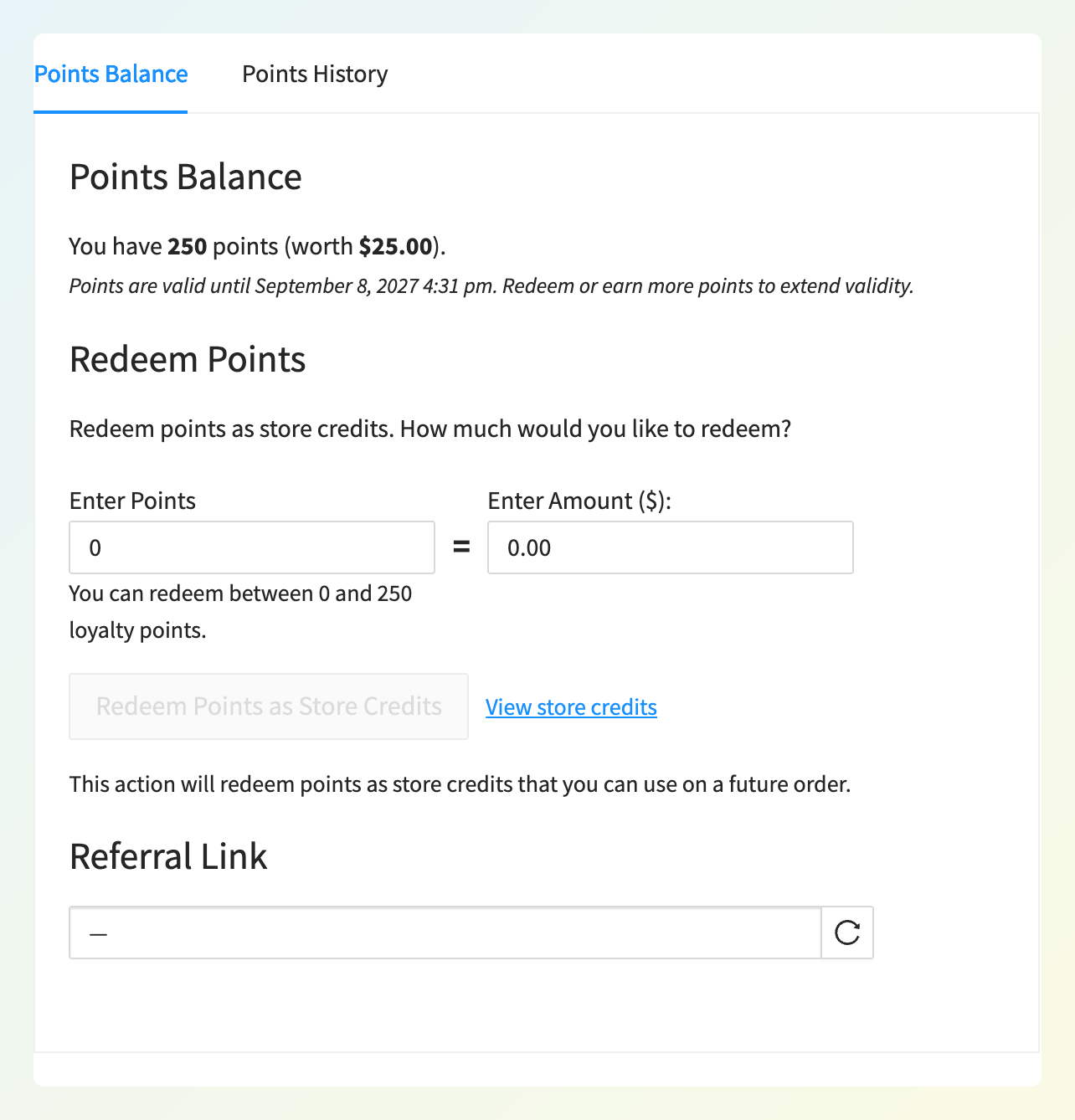
When a customer redeems points from the My Points tab, the converted value appears in their Store Credit tab and is available to use at checkout. Refunds issued with the “Refund [amount] to Store Credits” option go into that same balance. The earn ratio (“Price to points earned ratio”) and redeem ratio (“Points to price redeemed ratio”) are separate settings, so set and test them together before you launch.
For example, at 5 points earned per $1 spent and 10 points required per $1 redeemed, a $100 order earns 500 points worth $50 in store credit. That may be more generous than you intended, so check the math on a sample order before launch.
You can also let the plugin redeem for the customer. Auto-redeem converts points to store credit once a balance reaches a threshold you set (0 disables it), either the entire balance or up to your maximum cap. Points expire after a number of days of inactivity (default 365; 0 disables expiry), and if a customer asks for help, you can redeem on their behalf from the Customers screen.
Earning Rules Compared
Both plugins reward purchases, signups, and reviews, but Advanced Loyalty Program adds four more earning actions and a different destination for redeemed points.
| Earning rule | Advanced Loyalty Program | WooCommerce Points and Rewards (core) |
|---|---|---|
| Points per purchase (ratio you set) | Yes (default 1 point per currency unit) | Yes (conversion rate you set) |
| Category or product overrides | Yes, including per-variation fields | Yes (category or product level) |
| Product review | Yes, with an option to award every review | Yes |
| Signup / first order | Yes (first order default 10 points) | Signup: Yes; first-order bonus: No in core |
| Blog comment | Yes | No in core |
| Order within a period / spend breakpoints | Yes | No in core |
| Referral (signup + purchase) | Yes | No in core |
| Redemption lands as | Store credit balance, or a product or coupon reward | Per-order discount |
The finer controls matter once the program is live. Advanced Loyalty Program lets you pick which order statuses award points and add a waiting period before order points become redeemable. You can also calculate from the regular price, block earning when a coupon or store credit was applied, and restrict earning by role or user. WooCommerce Points and Rewards can also award points for past orders, which is useful when you add the program to an existing store.
Referrals, Bulk Adjustments And Automation
Advanced Loyalty Program adds three tools that aren’t built into the core WooCommerce Points and Rewards extension: referral points, bulk customer adjustments, and automatic redemption to store credit.
Referrals. You set points for the referrer when a referred friend signs up, and again each time that friend’s order reaches Completed (both default to 0 until you set them). After you configure a referral reward, eligible customers can access a unique referral link in their My Points tab. Referral rewards land as points, which customers can redeem through the same loyalty program.
Bulk adjustments. Under Coupons > Loyalty Program > Bulk Adjust you filter customers by user role, points balance range, registered date, or last order date. Then you increase, decrease, reset, or delete points by a fixed amount or a percentage. You can preview the affected customers, export them to CSV, and email them about the change. Our guide to bulk adjusting loyalty points walks through the setup. Useful examples include giving a points boost to a customer role, resetting dormant accounts, or correcting balances after an import.
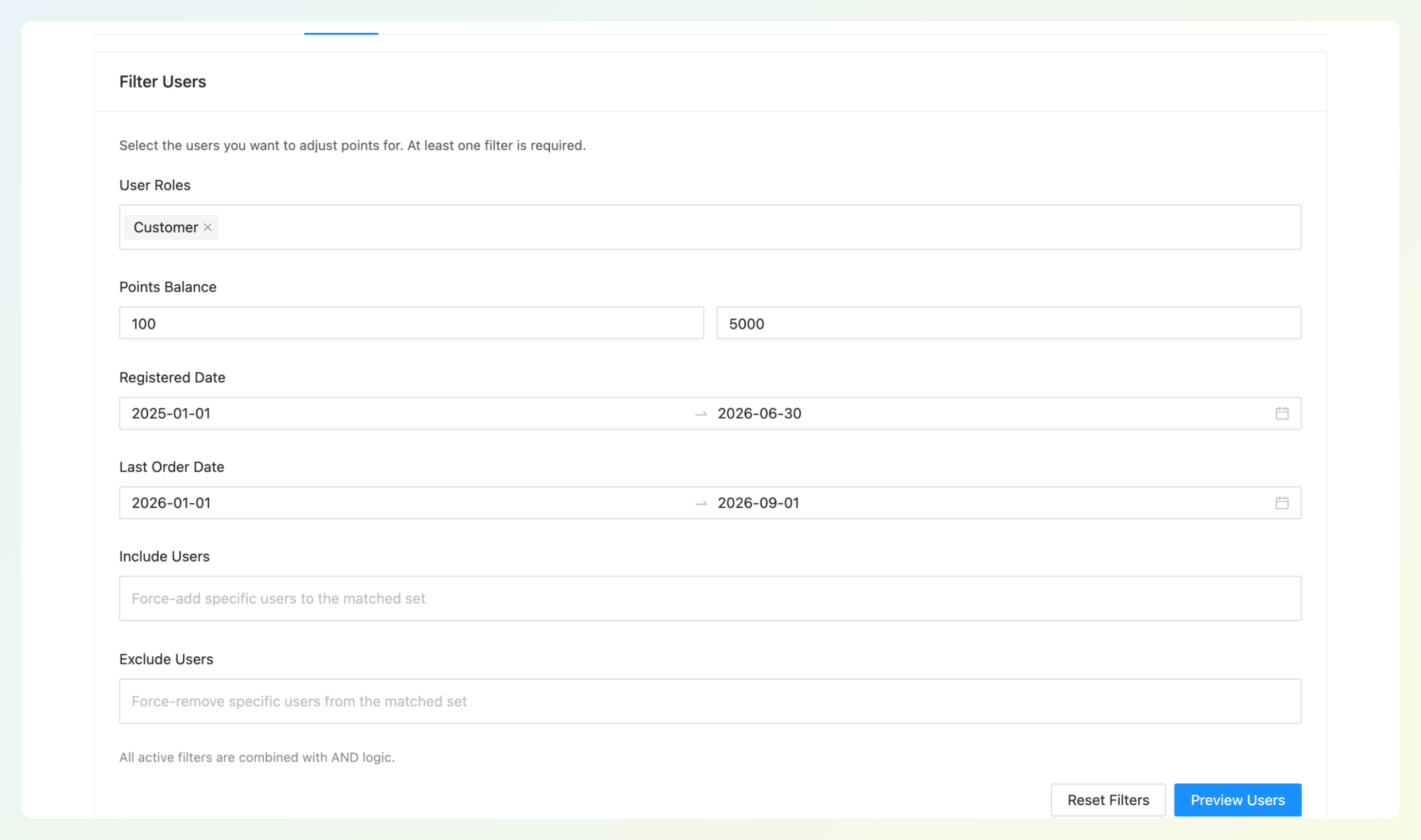
Check the preview table before you run an adjustment. It shows each matched customer’s current points, the adjustment, and the new total, so unexpected results can be caught before you confirm. Decreases never take a balance below zero, and deleting points requires a separate confirmation because it removes the underlying ledger entries.
Automation. Auto-redeem can convert points to store credit automatically once a customer reaches the threshold you set. Advanced Loyalty Program also registers 14 Abilities under the WordPress Abilities API, giving compatible AI agents access to supported loyalty actions such as reading balances, listing top customers, and adjusting points. For an example of how promotions can support repeat purchases, see our Layers of Learning case study.
Reporting And Outstanding Rewards
Every unclaimed point represents reward value a customer may still redeem, and Advanced Loyalty Program gives you a program-wide view of those balances. The Loyalty Dashboard reports total points across all time, along with claimed, unclaimed, pending, expired, and deducted points, points by source, and your top customers.
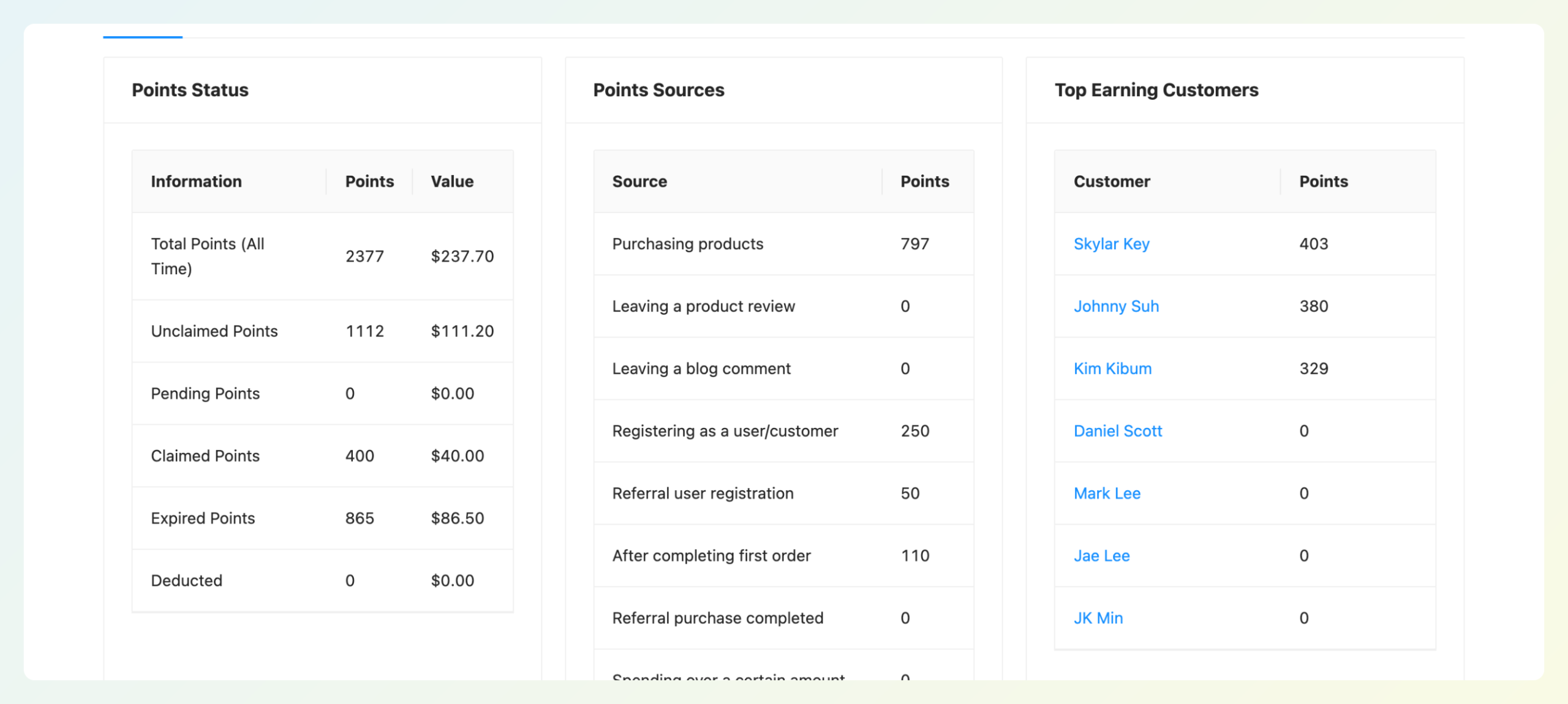
Unclaimed points are useful to watch alongside claimed points. If unclaimed points keep rising while claimed points stay low, review your earning and redemption settings before increasing rewards further. Because redeemed points become store credit, the free Advanced Coupons Store Credits dashboard then shows your unclaimed credit, plus credit added and credit used for the date range you select. That gives you a second view once points have been converted into credit.
Through the same Abilities API, an AI agent can also pull a loyalty ROI report for a chosen number of days. If you want to model the numbers before you launch, our guide on how to calculate your loyalty program ROI covers the inputs. WooCommerce Points and Rewards keeps a log of points changes per customer, which is useful for support questions, but the core extension does not include a comparable program-level loyalty dashboard.
Price: First Year And Renewal
Advanced Loyalty Program has the lower first-year single-site price. Its Growth plan is $99.50 for the first year and renews at $199. WooCommerce Points and Rewards is currently $179 for a one-year term, and WooCommerce.com subscriptions renew at 100% of the listed price for the selected term at the time of renewal. Here is what you pay:
| Plan | Year one | Renewal | Sites | Includes |
|---|---|---|---|---|
| WooCommerce Points and Rewards | $179 ($286.40 for a two-year plan) | 100% of the current listed price for the selected term | Per license | Points and Rewards only |
| Advanced Loyalty Program, Growth | $99.50 | $199 per year (list price) | 1 | Loyalty Program only |
| Advanced Loyalty Program, Business | $199.50 | $399 per year (list price) | Unlimited | Loyalty Program only |
| All Access Bundle | $249 | $498 per year (list price) | Unlimited | Advanced Coupons Premium, Advanced Loyalty Program, Advanced Gift Cards, Advanced Promo Kit |
The 50% discount on Advanced Loyalty Program applies to the first year. After that, the Growth license renews at $199. WooCommerce.com charges renewals at 100% of the current listed price for the selected term, so at today’s $179 one-year price, WooCommerce Points and Rewards would renew for $20 less. Advanced Loyalty Program adds referral points, bulk adjustments, auto-redeem, a program dashboard, and store credit redemption, while the store credit layer itself is in the free Advanced Coupons plugin.
The math changes again if you also want gift cards or product badges. The All Access Bundle covers all four plugins on unlimited sites for $249 in year one and $498 on renewal, which is less than buying two of them separately on unlimited-site licenses at list price.
Switching: Importing Your Existing Points
You don’t have to start your customers from zero. Advanced Loyalty Program includes a migration tool that imports balances from WooCommerce Points and Rewards, SUMO Reward Points, and YITH WooCommerce Points and Rewards.
The import runs in the background with a progress indicator, and there’s an option to deactivate the source plugin once the import finishes. For a step-by-step walkthrough, see our guide to importing loyalty points from other plugins.
After the import, check four things before you announce the change:
- Spot-check balances. Compare a handful of customers against their old totals.
- Set both ratios. The old plugin’s earn and redeem rates don’t carry over, so enter the values you want.
- Review expiry. WooCommerce Points and Rewards expires points a set period after they are granted; Advanced Loyalty Program expires them after days of inactivity, so pick a window that matches your promise.
- Tell customers where to look. Points now live under My Points in My Account, and redeemed credit appears in the Store Credit tab.
Run the import on a staging copy first if you can, then repeat it on the live site once the numbers match.
Frequently Asked Questions
Is WooCommerce Points and Rewards free?
No. WooCommerce Points and Rewards is a paid extension on the WooCommerce Marketplace, listed at $179 for a one-year plan or $286.40 for two years. It also requires customer accounts and WooCommerce coupons to be enabled. Advanced Loyalty Program is also paid, at $99.50 for the first year and $199 on renewal for a single site. The store credit system it redeems into ships in the free Advanced Coupons plugin.
Can I import points from WooCommerce Points and Rewards?
Yes. Advanced Loyalty Program ships a migration tool that imports customer balances from WooCommerce Points and Rewards, SUMO Reward Points, and YITH WooCommerce Points and Rewards. The import runs in the background with progress reporting, and you can choose to deactivate the old plugin automatically when it completes. Spot-check a few balances afterwards and set your earn and redeem ratios before announcing the switch.
What’s the difference between points and store credit?
Points are a score customers build up; store credit is a monetary balance on their account. In WooCommerce Points and Rewards, points become a discount on one order at checkout. In Advanced Loyalty Program, points convert into an Advanced Coupons store credit balance, and you can also let customers spend them on product and coupon rewards. Customers can use store credit across future orders, while refunds and gift cards can add value to the same balance. You can also track unclaimed and used store credit in the dashboard.
Does Advanced Loyalty Program work without Advanced Coupons?
Advanced Loyalty Program needs the free Advanced Coupons plugin installed, because redemption uses its Store Credit module. You don’t need Advanced Coupons Premium for the loyalty program to run. If you later add Advanced Gift Cards or Premium, they share the same store credit balance.
Can customers refer friends for points?
Yes. Advanced Loyalty Program awards referral points to the referrer when a referred friend signs up and again each time that friend’s order reaches Completed. Both values default to 0. After you configure a referral reward, eligible customers can access their referral link in the My Points tab. The core WooCommerce Points and Rewards extension does not include referral rewards.
Final Thoughts On WooCommerce Points And Rewards Alternatives
Advanced Loyalty Program goes beyond a straightforward points-to-discount workflow. It can turn points into store credit or specific product and coupon rewards, add referral rewards, automate store credit redemption, and give you bulk tools plus a program dashboard for day-to-day management.
That broader setup suits stores that want store credit redemption, built-in referrals, bulk point management, or automatic conversion of points to store credit. If you only need customers to earn points and apply them as a checkout discount, the official extension covers that core workflow well.
Here’s what to do next:
- What WooCommerce Points And Rewards Includes: note which core limits matter for your store.
- Points As Store Credit Vs Points As A Discount: decide whether refunds and gift cards should share the loyalty balance.
- Earning Rules Compared: pick the earning actions and ratios you’ll launch with.
- Price: First Year And Renewal: compare the published prices and plan for Advanced Loyalty Program’s full-price renewal.
- Switching: Importing Your Existing Points: run the importer on staging, then live.
If store credit redemption, referrals, bulk tools, and automatic redemption match what you need from a WooCommerce Points and Rewards alternative, get Advanced Loyalty Program for WooCommerce and move your existing balances across.