
A referral program can offer a great reward and still get little attention. Customers need to know it exists, and the friends they invite need a reason to visit. The best referral program ideas make sharing easy and give both people a clear reason to take part.
Some customers are already telling friends about your store. A referral program makes those recommendations easier to share and track. Here are 12 ideas for WooCommerce stores, each with an example reward, a simple rule, and a way to put it into practice. You’ll also find tips for keeping your program fair and tracking results.
What Makes A Referral Idea Work
A referral idea works when it’s easy to explain, worth sharing, rewards meaningful actions, and fits your margins. If you need a refresher first, here’s what referral marketing is.
In a WooCommerce store, the flow usually looks like this:
- A customer copies their unique referral link.
- A friend clicks it and lands on your store.
- The friend creates an account, then places an order.
- The referrer earns a reward at the sign-up step, the order step, or both.
Use these four tests on any idea before you launch it:
- Easy to explain: A customer should be able to describe the offer in one sentence.
- Worth sharing: The friend needs a reason to click, not just the referrer.
- Matches the result: Keep sign-up rewards modest if you offer them, and tie purchase rewards to completed orders.
- Fits your margin: Budget for sign-up incentives and repeat-order rewards, not just the first sale. Compare the total cost with your other ways of attracting and keeping customers.
Referral programs give you another way to attract customers alongside ads and affiliate marketing. When you offer points or store credit, the reward can also encourage the referrer to shop again. Just remember to count the value of those rewards as a real cost.
Trust matters, too. According to BrightLocal’s 2026 Local Consumer Review Survey, 49% of US consumers trust online reviews as much as personal recommendations. It’s a reminder that recommendations from people shoppers know still carry weight.
Referral Program Ideas For WooCommerce Stores
The point values below are example numbers. Adjust them to your own margins.
1. Points for every friend who signs up
Reward the referrer as soon as a friend creates an account.
- Reward example: 50 points per new account.
- Rule: The friend registers through the referral link.
- Best for: Stores where buyers research for a while before the first order.
- How to run it in WooCommerce: Advanced Loyalty Program has a “Points awarded to referrer on signup” setting.
2. Points when a friend’s order completes
Reward the referrer when the friend buys, rather than for signing up alone. Set the point value with repeat orders in mind.
- Reward example: 200 points.
- Rule: The referrer earns points each time one of the friend’s orders reaches Completed status.
- Best for: Stores with healthy order values and low refund rates.
- How to run it in WooCommerce: Use the “Points awarded to referrer on purchase” setting in Advanced Loyalty Program.
3. Double-sided welcome
Reward both people. The referrer earns points, and the friend gets a welcome reward for joining.
- Reward example: 200 points per completed referred order for the referrer, plus a welcome coupon for the friend.
- Rule: The friend signs up through the referral link and can use the welcome coupon on their first order.
- Best for: Nearly every store. This is the default to start with.
- How to run it in WooCommerce: Referral points cover the referrer. For the friend, use Advanced Loyalty Program’s standard sign-up and first-order points, which apply to every new customer, or offer a welcome coupon.
Tip: Rewarding the referrer gives customers a reason to share, but their friends need a reason to shop, too. Even a small welcome offer can make the invitation more appealing.
4. Store credit instead of a discount
Offer store credit rather than a percentage off. It gives referrers a balance they can use on a future order without lowering your advertised product prices.
- Reward example: Points that convert to $10 in store credit.
- Rule: Award referral points on completed purchases, then let customers redeem those points for credit.
- Best for: Stores that want to protect their prices.
- How to run it in WooCommerce: Advanced Loyalty Program lets customers redeem loyalty points for store credit. The free Advanced Coupons plugin can add store credit manually, but that is separate from automatic referral rewards.
5. Free product reward
Let referrers turn their points into a product instead of a discount.
- Reward example: A travel-size item or a popular add-on.
- Rule: The referrer has enough points to claim it.
- Best for: Beauty, food, and hobby stores with low-cost products customers love.
- How to run it in WooCommerce: Loyalty points can be redeemed for free products as well as coupons.
6. Milestone bonus at 3, 5, and 10 referrals
Add a bonus when a customer hits a referral milestone. This rewards your most active fans.
- Reward example: 300 extra points when three different referred customers buy.
- Rule: Count distinct referred customers with completed orders, not every repeat order from the same friend.
- Best for: Stores with a small group of very vocal customers.
- How to run it in WooCommerce: This is a manual campaign. Review referral purchase entries and their linked orders in Points History to check how many different customers bought, then bulk adjust loyalty points for everyone who qualified.
7. Limited-time double-points referral week
Double purchase-referral points for a week and remind customers to share their links while the offer is active.
- Reward example: 400 points per completed referred order instead of 200.
- Rule: The higher rate applies to any referred order completed during that week, even when the customer was referred earlier.
- Best for: Slow months or the run-up to a launch.
- How to run it in WooCommerce: Temporarily double the “Points awarded to referrer on purchase” value, then restore it when the promotion ends.
8. Holiday gifting referral
Frame the referral around gift giving. Customers send the link to friends who are shopping for presents.
- Reward example: Store credit the referrer can use on their own gifts.
- Rule: Promote it during the holiday season.
- Best for: Giftable products and seasonal stores.
- How to run it in WooCommerce: Temporarily point the referral redirect URL at your gift guide page so friends land somewhere useful, then change it back after the holidays.
9. Referral contest
Award a prize to the customers who refer the most friends in a month.
- Reward example: A large points bonus for the top three referrers.
- Rule: Count different referred customers who complete an order, and announce the end date upfront.
- Best for: Stores with an active email list or social following.
- How to run it in WooCommerce: Contests are manual. Review “Referral purchase completed” entries and their linked orders to count distinct referred customers, then award the winners a bonus with a bulk point adjustment.
10. VIP referral invitation
Invite your best customers to share their link with a one-to-one email before you announce the program to everyone.
- Reward example: Your standard referral points plus a thank-you bonus.
- Rule: Send the invitation to your top spenders or most frequent buyers.
- Best for: Stores where a small group drives most of the revenue.
- How to run it in WooCommerce: Direct invited customers to the referral link in My Points. If you offer an extra VIP bonus, award it manually through a points adjustment.
11. Referral landing page with a welcome offer
Send referred friends to a page made for them instead of your homepage.
- Reward example: A welcome coupon shown on the page.
- Rule: Invite friends to create an account and use the welcome offer on their first order.
- Best for: Stores whose homepage is busy or hard to scan.
- How to run it in WooCommerce: Set the referral redirect URL in Advanced Loyalty Program to your landing page, and create and display the welcome coupon separately.
12. Ask after the second order
A repeat purchase or a positive review can be a good time to invite customers to refer a friend. Don’t overlook customers who joined through a referral, either. In a 2024 study by Gershon and Jiang, reminding referred customers how they joined raised their likelihood of making a referral by 21% in a field experiment.
- Reward example: Your standard referral reward.
- Rule: Send the ask after the second completed order.
- Best for: Consumables and anything customers reorder.
- How to run it in WooCommerce: Use your email marketing tool to send a follow-up after the customer’s second completed order, with a link to My Points.
Here’s a quick look at all 12 ideas and their example rewards:
| Referral idea | Example reward | Best for |
|---|---|---|
| Points per friend sign-up | 50 points | Long research cycles |
| Points on a completed order | 200 points | Healthy order values |
| Double-sided welcome | Points plus a welcome coupon | Almost every store |
| Store credit reward | $10 credit | Protecting prices |
| Free product reward | Low-cost favorite item | Beauty, food, hobby |
| Milestone bonus | Extra points at 3 referrals | Vocal superfans |
| Double-points week | 2x referral points | Slow months, launches |
| Holiday gifting | Store credit | Giftable products |
| Referral contest | Big points prize | Active email lists |
| VIP invitation | Thank-you bonus | Top spenders |
| Welcome landing page | Welcome coupon | Busy homepages |
| Ask after second order | Standard reward | Repeat purchases |
Guardrails That Keep Referrals Honest
A few clear rules can protect your referral budget and help you spot misuse early. Set them before you launch.
- Check purchase rewards: Purchase points are awarded when an order reaches Completed status. Review later refunds separately, since previously awarded referral points are not automatically reversed.
- Require an account: Advanced Loyalty Program tracks referrals through registered customers, so guest checkouts do not earn referral rewards.
- Check account eligibility: Decide which new customer roles should qualify, and review staff and test accounts that could share referral links.
- Watch for self-referrals: Look for a burst of new accounts from one referrer, matching shipping addresses, or sign-ups that never order.
Advanced Loyalty Program awards purchase referral points when the referred customer’s order is completed. A 30-day referral cookie links a visitor’s registration to the shared link, and the referred customer must have an account. In the Referral tab, Disallowed User Roles can prevent new accounts with selected roles, such as wholesale customers, from generating referral rewards. That setting checks the friend signing up, not the existing customer who shared the link.
The separate “Disallow points accumulations for roles” restriction affects regular purchase-point earning and hides My Points for those roles; it should not be relied on as a complete block on referral rewards earned by referrers.
A customer who creates a second account may still be able to refer themselves. Review referral activity in Points History regularly, especially while the program is new.
How To Run These Ideas In WooCommerce
Advanced Loyalty Program runs the core referral mechanic natively. It’s a premium plugin that works alongside the free Advanced Coupons plugin, and plans start at $99.50 for the first year.
Once referral rewards are enabled, customers can get a unique referral link from My Points and share it with the copy button. The referrer earns points for qualifying sign-ups and each completed order from a referred customer, depending on which rewards you enable. Points History labels awarded points as “Referral user registration” or “Referral purchase completed.” Purchase entries also link to the corresponding order for a closer look.
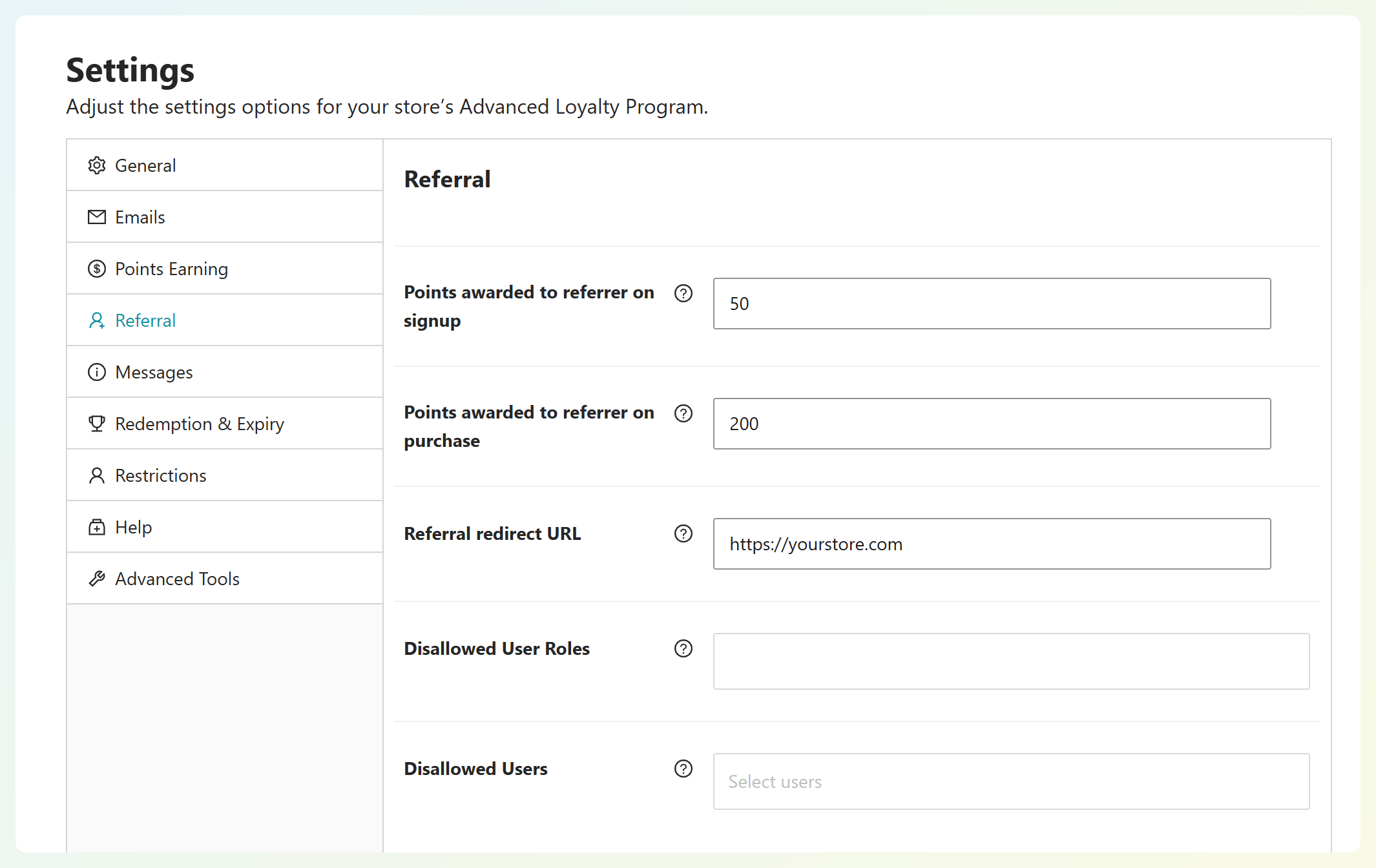
Here is what Advanced Loyalty Program handles automatically and what needs a manual step:
| Referral idea | Native in Advanced Loyalty Program? | How |
|---|---|---|
| Points when a friend signs up | Yes | “Points awarded to referrer on signup” |
| Points when a friend’s order completes | Yes | “Points awarded to referrer on purchase” |
| Reward the friend too | Partly | Standard sign-up and first-order points, or a welcome coupon |
| Referral landing page | Yes | “Referral redirect URL” |
| Limit eligible roles | Partly | “Disallowed User Roles” checks the referred sign-up; the separate points-earning restriction limits regular purchase points for selected roles |
| Milestone or contest bonus | Manual | Bulk point adjustment |
| Redeem as store credit, products, or coupons | Yes | Loyalty rewards |
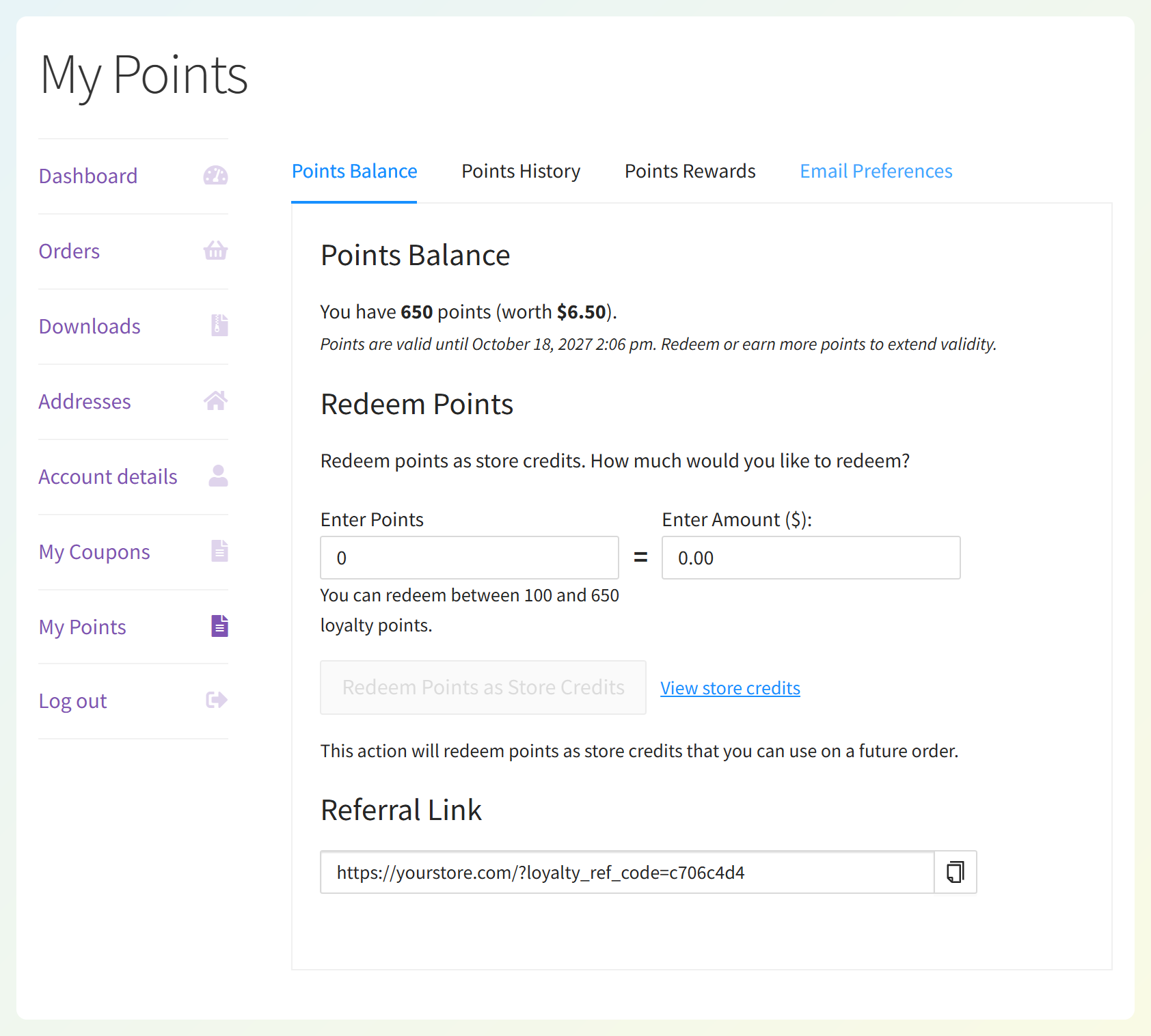
When you’re ready to configure the fields, follow our guide to set up a WooCommerce referral program, or read the knowledge base article on referral rewards settings for the exact click path.
How To Measure Your Referral Program
Points History helps you review awarded referral points, but it doesn’t give you a complete acquisition report. Track sign-ups and orders, then calculate the value of the rewards you give out.
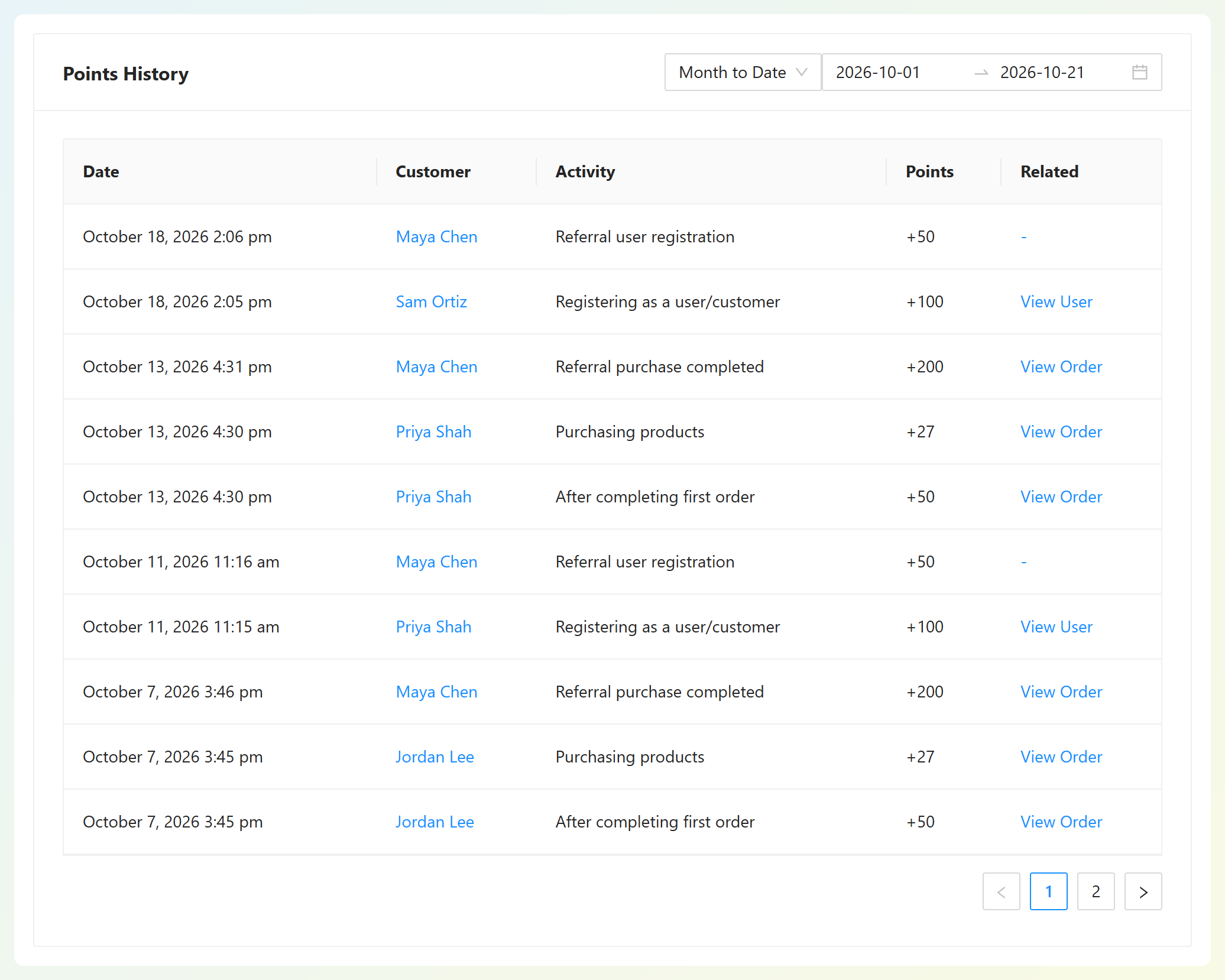
Track these three numbers each month:
- Referred sign-ups: Count “Referral user registration” entries when sign-up rewards are enabled.
- Referred orders and buyers: Count completed referred orders, then use their linked orders to identify first-time buyers. Repeat orders count toward order activity, not new-customer totals.
- Referral reward cost: Calculate the value of points awarded for sign-ups and purchases, including repeat orders. Keep ongoing rewards separate from first-purchase rewards when estimating what it costs to acquire a new buyer.
Referred customers may also introduce more people to your store. The Gershon and Jiang study found that referred customers make 31% to 57% more referrals than non-referred customers, even after accounting for how much they buy. For a wider scorecard, see these loyalty program KPIs.
Frequently Asked Questions (FAQ)
What is a good referral reward?
A good referral reward is worth sharing without wiping out the profit from the customers it brings in. Points or store credit can encourage referrers to return. Start with an amount your margins support, make the offer easy to find, and adjust it after reviewing sign-ups and completed orders.
Should both the referrer and the friend get a reward?
Yes, in most stores. A double-sided offer gives the friend a reason to click and sign up, not just the person sharing. In Advanced Loyalty Program, referral points reward the referrer, while standard sign-up and first-order points or a welcome coupon cover the friend.
How do I stop people referring themselves?
Keep sign-up rewards modest, and consider giving larger rewards only after a completed order. These rules reduce the incentive for abuse, but they won’t stop someone from referring a second account they control. Check Points History and orders for unusual activity, such as repeated shipping addresses. If you confirm abuse, you can deduct wrongly awarded points from the referrer’s balance with an admin adjustment.
Do referred guests count?
No, not in Advanced Loyalty Program. The referred customer must register an account for the referral to be tracked, so guest checkouts don’t trigger referral rewards. Your welcome offer can encourage friends to create an account before they check out.
How do I promote my referral program?
Mention it where happy customers already are: order confirmation and follow-up emails, the My Account area, and your social channels. Ask after a repeat purchase or a positive review. The same tactics you’d use to promote your loyalty program work for referrals too.
Pick One Referral Idea And Launch It This Week
You don’t need all 12 ideas. Start with one clear offer that customers can explain in a sentence. A double-sided welcome is one option; you can add a seasonal campaign later and use Points History to follow sign-ups and completed referred orders.
- Check each idea against the four tests before you launch.
- Choose one or two referral program ideas that fit your margins.
- Set your guardrails first and check referral activity for misuse.
- Map each idea to a setting and run the rest as manual campaigns.
- Track referred sign-ups and orders every month.
Ready to put one of these ideas to work? With the WooCommerce loyalty program plugin with referral points, you can set up referral rewards and give customers a simple link to share.