If you don’t want customers redeeming loyalty points the moment an order comes in, for example to leave room for a return or refund, Advanced Loyalty Program lets you add a waiting period before points earned from an order become redeemable. Customers still earn the points straight away. They just can’t cash them in until the wait is over.
The wait applies to points for purchasing products, the first-order bonus, spend-based (breakpoint) bonuses, and extra points during a period. It doesn’t delay referral points or points for registering, leaving a product review, or commenting on a blog post. It also never changes points already sitting in a customer’s balance.
Requirements
- Advanced Loyalty Program installed and activated with a valid license.
- Advanced Coupons for WooCommerce (the free plugin) installed and activated.
- The Advanced Coupons Store Credit module active, because loyalty points are redeemed as store credit.
- Loyalty points earning already set up under Coupons → Loyalty Program → Settings → Points Earning. See How the Loyalty Program Works for the general setup.
Set the waiting period
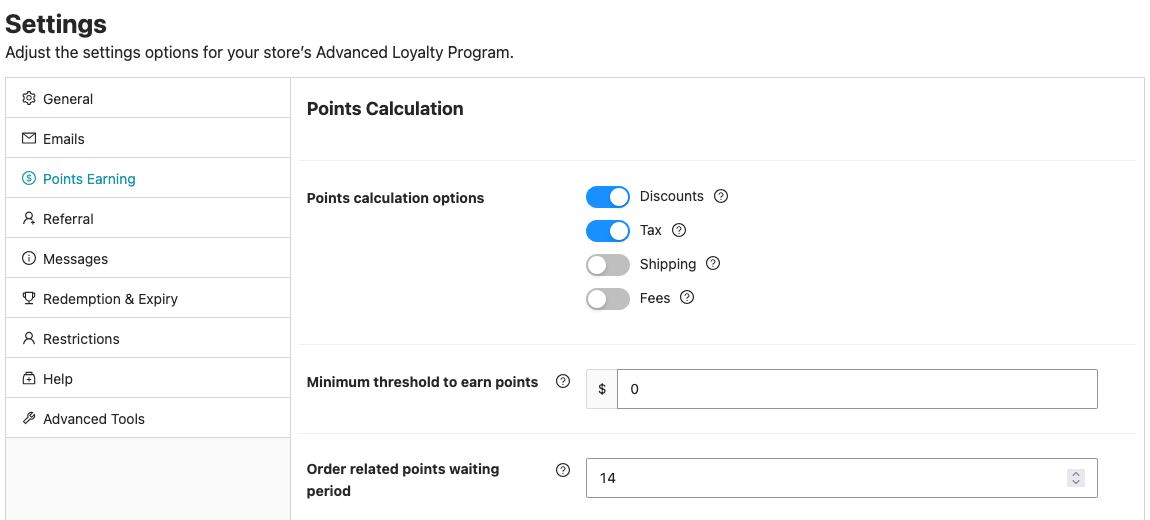
- Go to Coupons → Loyalty Program → Settings → Points Earning.
- Enter the number of days in the Order related points waiting period field.
- Wait for the confirmation message. The field saves automatically, so there is no Save button.
Leave the field at 0, its default, to turn the waiting period off. Points earned from an order then become redeemable as soon as they’re awarded.
How pending points appear to customers
Points affected by the waiting period are earned right away, but they stay marked as pending until the wait ends. Customers can see the pending status on their Points History tab at My account → My Points → Points History.
If the order leaves an allowed status before the wait ends, for example because it’s refunded or cancelled, its pending points are not approved. The allowed statuses are set in Order status(es) for when to award loyalty points on the same Points Earning tab.

Changing the waiting period only affects future orders
Advanced Loyalty Program locks in the waiting period for each order at the time its points are scheduled. Increasing or shortening the number of days on the settings page only changes the wait for orders placed after that change. Orders that already have pending points keep the waiting period that applied when they were placed.
Troubleshooting
Why can’t a customer redeem points from an order they just placed?
Go to Coupons → Loyalty Program → Customers and click View Stats for the customer. If the Points Status table shows Pending Points, the waiting period hasn’t finished yet.
Points from an order stay pending for the number of days set in Order related points waiting period, counted from when the order qualifies. Customers can see the same pending entries under My account → My Points → Points History.
I lowered the waiting period, but a customer’s pending points are still on the old schedule. Why?
The wait is locked in per order when its points are scheduled, using whatever the setting was at that time. Changing the number of days only applies to orders placed after the change, not to orders that already have pending points.
Frequently asked questions
Does the waiting period delay when points are earned, or only when they can be redeemed?
Only redemption. Points are earned as soon as the order qualifies. The waiting period just keeps them marked as pending, and unavailable to redeem, until it ends.
Which ways of earning points does the waiting period apply to?
Points for purchasing products, the first-order bonus, spend-based (breakpoint) bonuses, and extra points during a period. Referral points are not delayed, even though they come from an order. Points for registering, leaving a product review, or commenting on a blog post are not delayed either.
Can the waiting period be different for different products, roles, or customers?
No. The waiting period set on the Points Earning tab is a single store-wide value that applies to every qualifying order.
Does the waiting period apply to points an admin adds manually?
No. Manual point adjustments from the admin dashboard are credited immediately and are not affected by this setting.
Need help?
If you have a question or run into any issues, we’re here to help.
- Premium users: Open a support ticket
- Free users: Visit our community forum