
If your customers earn loyalty points but forget to redeem them, you can have the Advanced Loyalty Program convert their points into store credit automatically. This article shows you how to turn on automatic redemption, set the points threshold that triggers it, and choose how much of the balance is converted each time.
Before you start
- The Loyalty Program add-on for Advanced Coupons is installed and active.
- The Advanced Coupons Store Credit module is active. Automatic redemption converts points into store credit, so it will not run without it. How to use store credit
- Your loyalty program is already set to redeem points as store credit. Loyalty Points Redemption Changes to Store Credit
Turn on automatic redemption
Automatic redemption is configured alongside the other points redemption settings.
- In your WordPress dashboard, go to Coupons → Loyalty Program, then open the Settings tab.
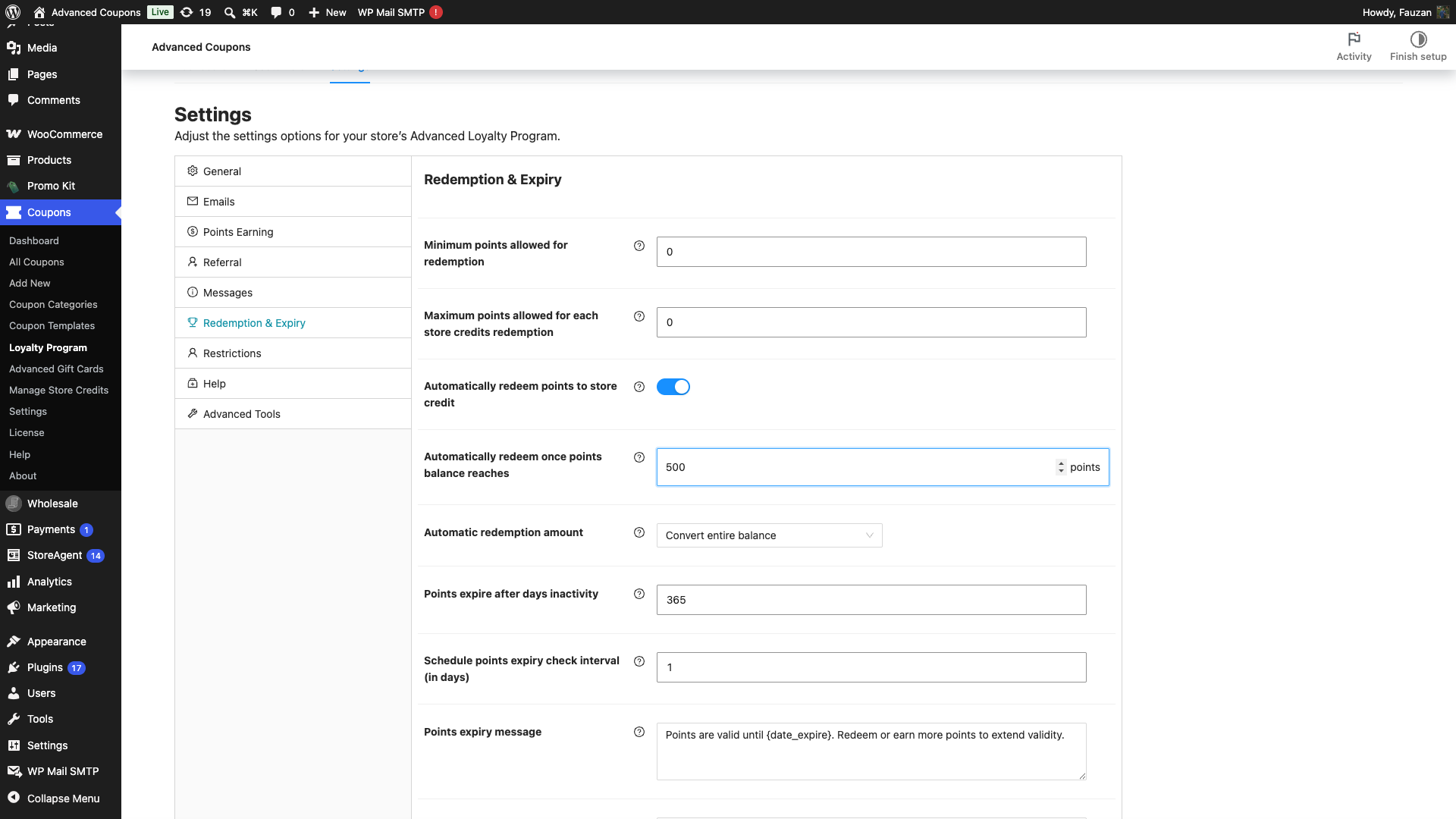
- Open the Redemption & Expiry section and turn on Automatically redeem points to store credit.
- In Automatically redeem once points balance reaches, enter the number of points that should trigger a redemption.
- In Automatic redemption amount, choose how much to convert each time.
- Click Save changes.
What each setting does
| Setting | Description | Default |
|---|---|---|
| Automatically redeem points to store credit | When enabled, a customer’s points are converted to store credit automatically once their available balance reaches the threshold below. Removes the need to redeem manually. | Off |
| Automatically redeem once points balance reaches | The points threshold that triggers automatic redemption. Once available points reach this amount, they are converted to store credit. Set to 0 to disable. | 0 |
| Automatic redemption amount | How many points are converted each time. Convert entire balance redeems all available points. Convert up to maximum cap respects the Maximum points allowed for each store credits redemption setting and leaves any remainder as points. | Convert entire balance |
How it works
Once a customer’s available points reach the threshold, the plugin converts them to store credit using the redemption rate you already have configured. With Convert entire balance, the whole balance is redeemed. With Convert up to maximum cap, only the amount allowed by your maximum-per-redemption setting is converted, and the rest stays as points for next time.
Troubleshooting
Points are not being redeemed automatically
Confirm the Advanced Coupons Store Credit module is active, since automatic redemption depends on it. Then check that Automatically redeem points to store credit is enabled and the threshold is set to a value above 0.
Only part of the balance was converted
That is expected when Automatic redemption amount is set to Convert up to maximum cap. It converts only up to your Maximum points allowed for each store credits redemption value and leaves the remainder as points. Switch to Convert entire balance to redeem everything.
Frequently Asked Questions
Do customers still need to redeem points manually?
No. Once automatic redemption is on and the threshold is met, points are converted for them. Manual redemption still works for anyone below the threshold.
Does this require the Store Credit module?
Yes. Points are converted into store credit, so the Advanced Coupons Store Credit module must be active.
What happens if a customer’s points never reach the threshold?
Nothing is converted automatically. Their points keep accruing until the balance reaches the threshold you set.
Need Help?
If you have a question or run into any issues, we’re here to help.
- Premium users: Open a support ticket
- Free users: Visit our community forum

