By default, store credits in Advanced Coupons can be applied in full toward a customer’s order. However, if you’d like to limit the amount of store credit that can be used per order, Advanced Coupons allows you to set a cap.
This is helpful when you want to offer store credit as a reward or incentive without allowing customers to pay entirely with credits. As a store owner, you may prefer not to give away “free” products through store credits. This setting is part of Advanced Coupons Premium. On the free plugin the closest control is Minimum order total allowed, in the same Store Credits settings tab, which sets the minimum order total that must remain after store credit is applied.
Where to Set the Maximum Store Credit Usage
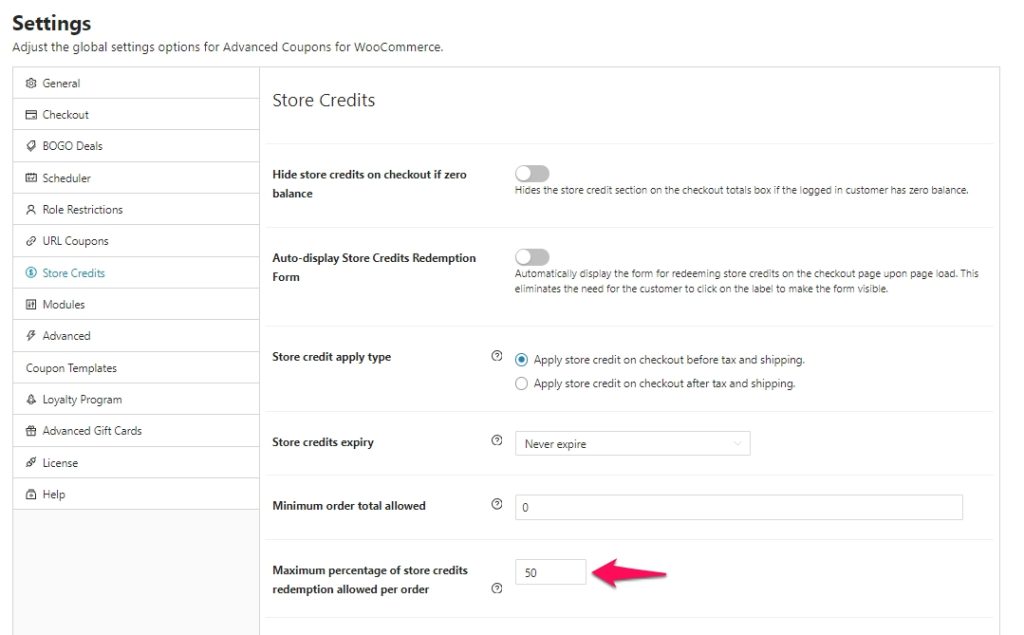
To configure this, go to Coupons > Settings > Store Credits (the Store Credits tab appears only while the Store Credits module is enabled) and modify the Maximum percentage of store credits redemption allowed per order setting.
By default, this is set to 100% (allowing full redemption). In this example, I’ve set it to 50%. With this setting, customers will only be able to apply store credit up to the amount you’ve specified. The percentage is based on the order subtotal while Store credit apply type is set to “Apply store credit on checkout before tax and shipping”, which is the default. If you switch it to “Apply store credit on checkout after tax and shipping”, the percentage is based on the order total instead, any remaining credit will stay in their account for future use.

How It Works on the Checkout Page
When a customer applies store credit during checkout:
- The system checks the maximum limit you’ve set.
- If their available credit exceeds the limit, only the allowed amount will be applied.
- Any unused store credit will remain in their balance.
This helps you maintain control over discounting, especially during high-volume sales periods or promotions.

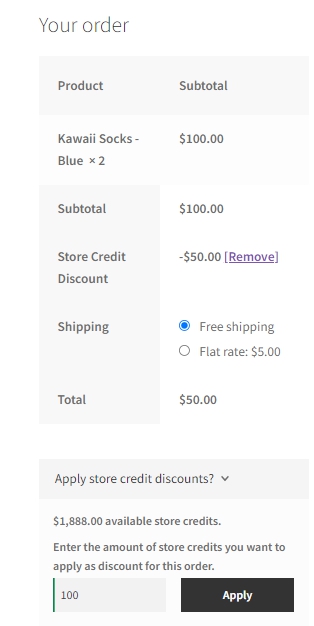
In the screenshot, you have enough store credits to cover the full order amount. However, because the Maximum percentage of store credits redemption allowed per order is set to 50%, you are limited to using store credits for only half of the amount the percentage is based on, which is the order subtotal by default.
Related: Looking to Limit Loyalty Point Redemption Instead?
If you’re using the Loyalty Program feature and want to control how many points a customer can redeem per order (before they’re converted into store credit), check out this helpful guide:
👉 How to Set the Maximum Points That Can Be Redeemed at Once »
Help & Support
We have a dedicated support team for Advanced Coupons who know our products, WooCommerce, and the industry very well. You’re welcome to make use of their expertise at any time, worldwide.
If you are an existing customer, please go to the support ticket request form and send us a message.
If you are a free plugin user, please send us a support request on the forum, we actively monitor the WordPress.org support forums for the free plugin and help our users there as best as we can.