
Running a membership site? With Advanced Coupons Premium, you can control exactly who can redeem a coupon based on their WooCommerce Memberships plan. You can allow only selected plans to use a coupon, or block specific plans from using it. The setup happens in the coupon editor’s Cart Conditions panel.
Prerequisites
- WooCommerce is installed and active.
- Advanced Coupons Premium (includes the free Advanced Coupons plugin) is installed and active.
- WooCommerce Memberships is installed and active.
- At least one WooCommerce Memberships plan is published.
Set up the membership plan restriction
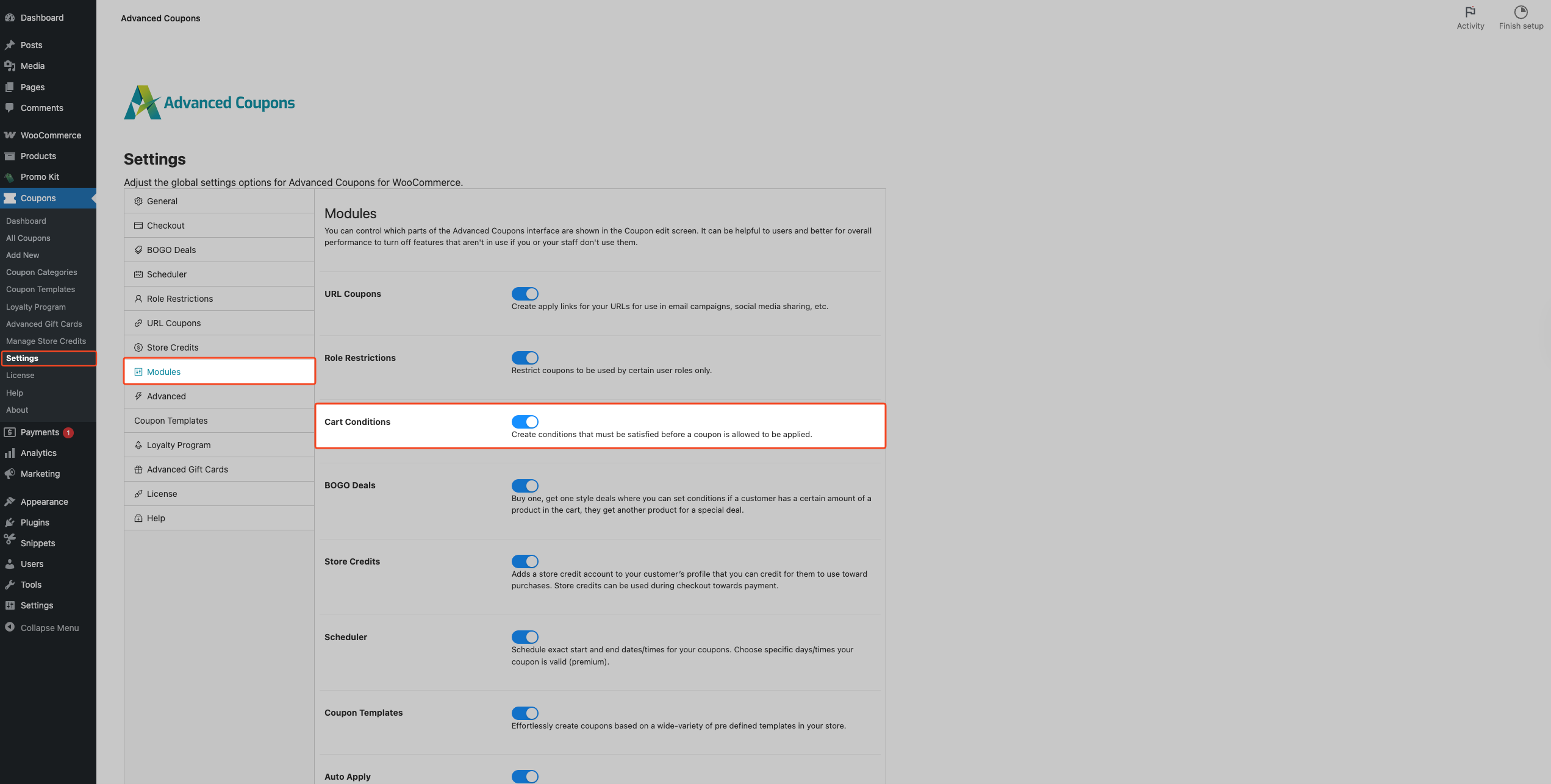
- Go to Coupons → Settings → Modules.
- Enable Cart Conditions if it is not already enabled. The toggle saves automatically.
- Go to Coupons → All Coupons.
- Click Edit on the coupon you want to restrict.
- Scroll to the Cart Conditions box.
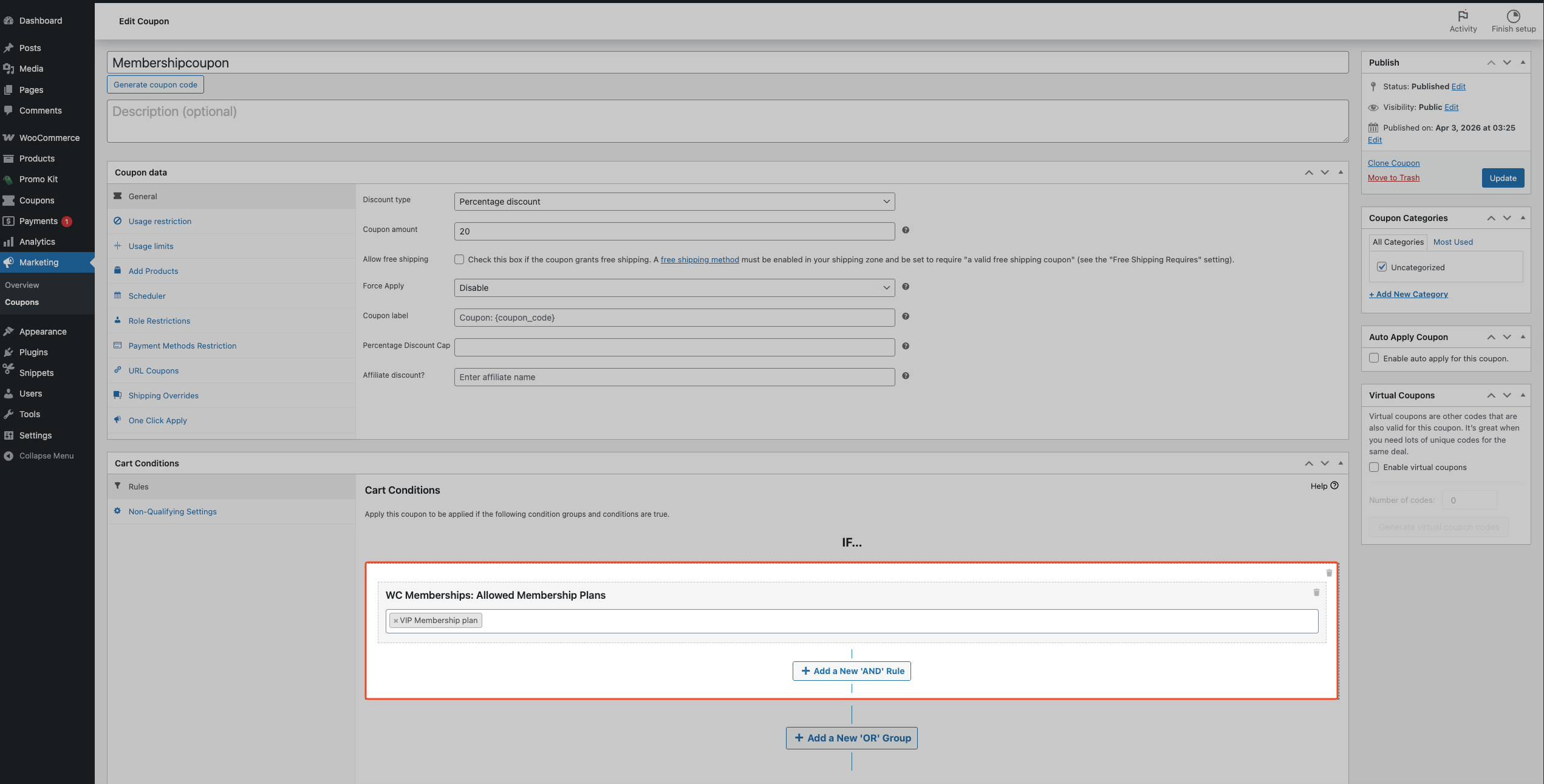
- In Search/select condition fields, select one of these options:
- WC Memberships: Allowed Membership Plans
- WC Memberships: Disallowed Membership Plans
- Click Add.
- In Select membership plans, choose one or more plans.
- Click Save Cart Conditions.
- Click Update or Publish.
How the allowed and disallowed conditions behave
WC Memberships: Allowed Membership Plans lets only logged-in customers with an active membership in at least one selected plan use the coupon.
WC Memberships: Disallowed Membership Plans block logged-in customers who have an active membership in any selected plan from using the coupon.
These conditions work with any coupon type, including percentage, fixed cart, free shipping, BOGO deals, and other Advanced Coupons Premium coupon types.
If a customer is not logged in, WC Memberships: Allowed Membership Plans fails because guests cannot have an active membership. WC Memberships: Disallowed Membership Plans pass for guests because they do not belong to any plan.
If WooCommerce Memberships is deactivated or the Cart Conditions module is disabled, the plugin bypasses existing membership restrictions, and the coupon becomes usable by everyone, including guests. Re-enable both to enforce the restriction again.
Common use cases
VIP member-only discount
Reward top-tier members with an exclusive 30% off coupon. Set the coupon type to Percentage discount and add WC Memberships: Allowed Membership Plans, selecting only the VIP plan. Non-members and lower-tier members are blocked at checkout.
BOGO deal gated by membership
Run a buy-one-get-one promotion for paying members only. Create a BOGO coupon and add WC Memberships: Disallowed Membership Plans, selecting the Free plan. Customers on the Free plan are blocked, while other members can still use the coupon.
Blocking members from a public sale coupon
Use a public sale coupon for non-members to encourage sign-ups, while preventing active paid members from stacking it with member pricing. Add WC Memberships: Disallowed Membership Plans and select all paid plans. Logged-in members in those plans are blocked, while guests and customers without an active plan can use the coupon.
Troubleshooting
The Cart Conditions box is missing on the coupon screen
Go to Coupons → Settings → Modules and enable Cart Conditions. The toggle saves automatically. Reopen the coupon and check the editor again.
The WC Memberships condition fields do not appear
If Cart Conditions are visible but Membership options are missing, WooCommerce Memberships is likely inactive. Go to Plugins → Installed Plugins, activate WooCommerce Memberships, then refresh the coupon editor and add a new condition.
The membership plan dropdown is empty
Only published membership plans are loaded. In WooCommerce Memberships, create or publish at least one plan, then refresh the coupon edit screen.
A member says the coupon does not work
Check all of the following:
- The customer is logged in.
- Their membership status is active.
- Their active plan matches the condition logic (Allowed vs Disallowed).
- No other Cart Conditions on the coupon are failing.
Frequently asked questions
Can I restrict coupons by user role instead of membership plan?
This integration restricts coupons by WooCommerce Memberships plans. For role-based rules, use Role Restrictions.
Can I select multiple membership plans?
Yes. Both WC Memberships: Allowed Membership Plans and WC Memberships: Disallowed Membership Plans support selecting multiple plans.
Do customers need to be logged in?
For WC Memberships: Allowed Membership Plans, yes. Guests cannot have an active membership, so the coupon is blocked.
For WC Memberships: Disallowed Membership Plans, no. Guests are not members, so they are not blocked by a membership plan restriction.
Need help?
If you have a question or run into any issues, we’re here to help.
- Premium users: Open a support ticket
- Free users: Visit our community forum on WordPress.org

