
If you sell with FunnelKit (formerly WooFunnels) Store Checkout, customers do not use the standard WooCommerce checkout block, where Advanced Coupons normally shows its tabbed checkout redemption block. Add each redemption field inside your FunnelKit checkout template so logged-in customers can use store credits, loyalty points, or gift cards before they place an order.
Advanced Coupons (free) registers a Store Credits field in FunnelKit’s checkout editor. Advanced Loyalty Program registers Loyalty Points, and Advanced Gift Cards for WooCommerce registers Gift Card Code; install and activate each plugin for the fields you need. Advanced Coupons Premium extends Force Apply so it runs when coupons are applied through FunnelKit’s checkout coupon field, and URL coupons keep working on FunnelKit landing pages and funnel steps.
Prerequisites
- WooCommerce is installed and active
- Advanced Coupons for WooCommerce (free): version 4.5.7 or higher. This is the base plugin that registers the Store Credits field for FunnelKit checkout
- FunnelKit Funnel Builder: installed and active, with Store Checkout enabled and at least one published FunnelKit checkout page
- Loyalty points at checkout: Advanced Loyalty Program version 1.8.4 or higher
- Gift card redemption at checkout: Advanced Gift Cards for WooCommerce version 1.3.5 or higher
- Force Apply in FunnelKit: Advanced Coupons Premium (which includes the free base plugin) version 3.6.1.1 or higher adds Force Apply compatibility with FunnelKit; without it, Force Apply won’t trigger when coupons are applied through FunnelKit’s checkout coupon field
What the integration includes
When FunnelKit Funnel Builder and the relevant companion plugins are active, the following fields and behaviors become available:
Store Credits (Advanced Coupons free): A Store Credits field becomes available in FunnelKit’s checkout editor. Add it to your checkout template, and logged-in customers with a store credit balance can redeem their credits directly at FunnelKit checkout.
Loyalty Points (Advanced Loyalty Program): A Loyalty Points field becomes available in FunnelKit’s checkout editor. Customers with enough points to meet the minimum redemption threshold can redeem points for a discount at FunnelKit checkout.
Gift Card Code (Advanced Gift Cards for WooCommerce): A Gift Card Code field becomes available in FunnelKit’s checkout editor. Customers can enter a gift card code to apply its balance at FunnelKit checkout. Gift card products also display correctly in FunnelKit Cart (the slide-in cart widget, cart-for-woocommerce).
Force Apply coupons (Advanced Coupons Premium): When Force Apply is set to Enabled in the coupon’s General tab, Advanced Coupons replaces conflicting coupons correctly when a customer applies the coupon through FunnelKit’s checkout coupon field. Without this integration, Force Apply would not trigger on FunnelKit’s apply-coupon action.
When FunnelKit’s Store Checkout is active with a published checkout page, Advanced Coupons removes the tabbed checkout redemption block from the standard WooCommerce checkout template so customers do not see the same fields twice. Add Store Credits, Loyalty Points, and Gift Card Code to your FunnelKit checkout template for each option you offer; otherwise customers have no way to redeem them at checkout.
How to add Advanced Coupons fields to your FunnelKit checkout
- Log in to your WordPress admin.
- Open your FunnelKit Store Checkout flow.
- Open the checkout step you want to edit.
- Open the Fields area in the checkout editor.
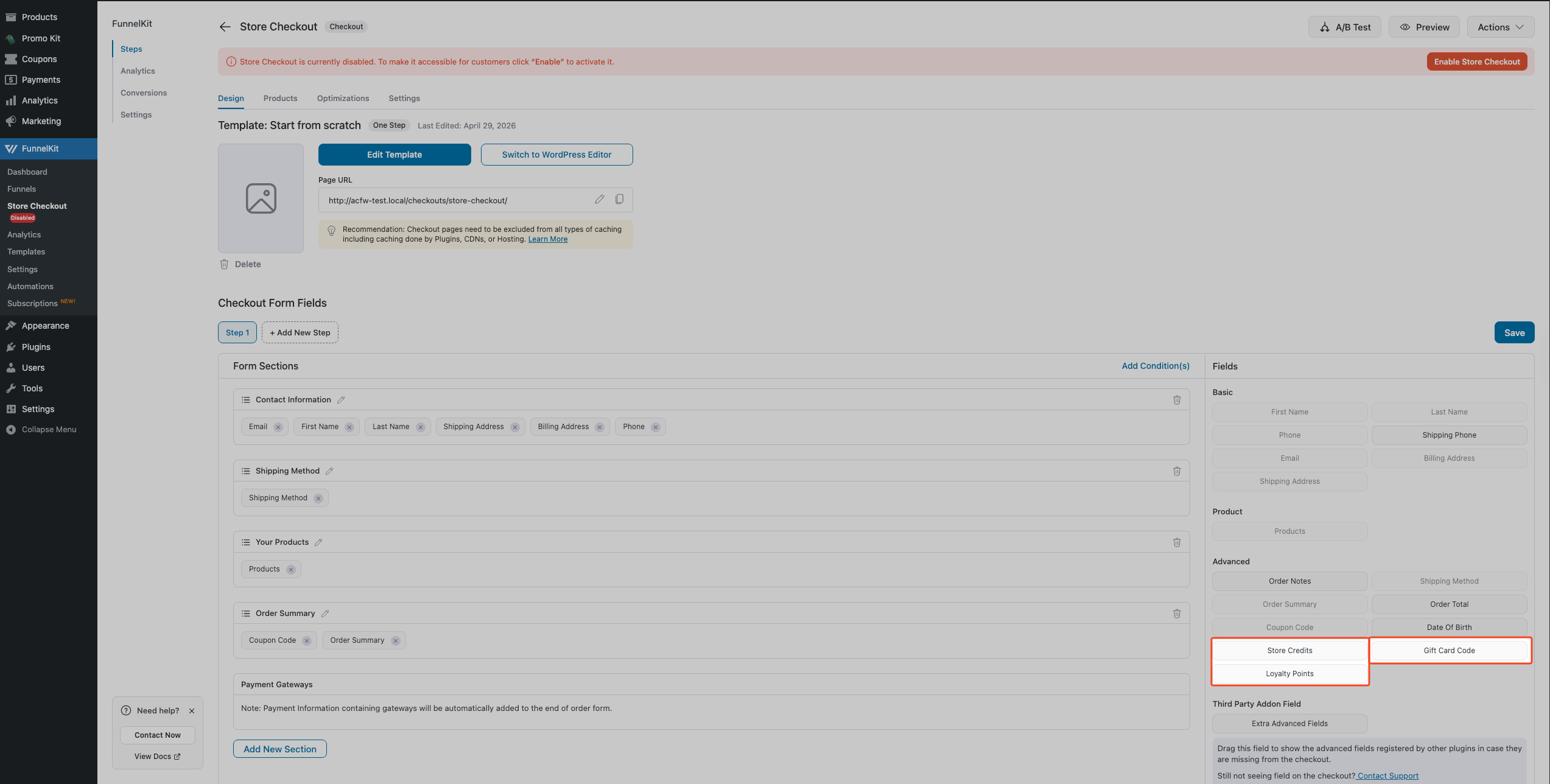
- In the Fields panel, scroll to the Advanced section.
- Locate the field you want to add: Store Credits, Loyalty Points, or Gift Card Code.
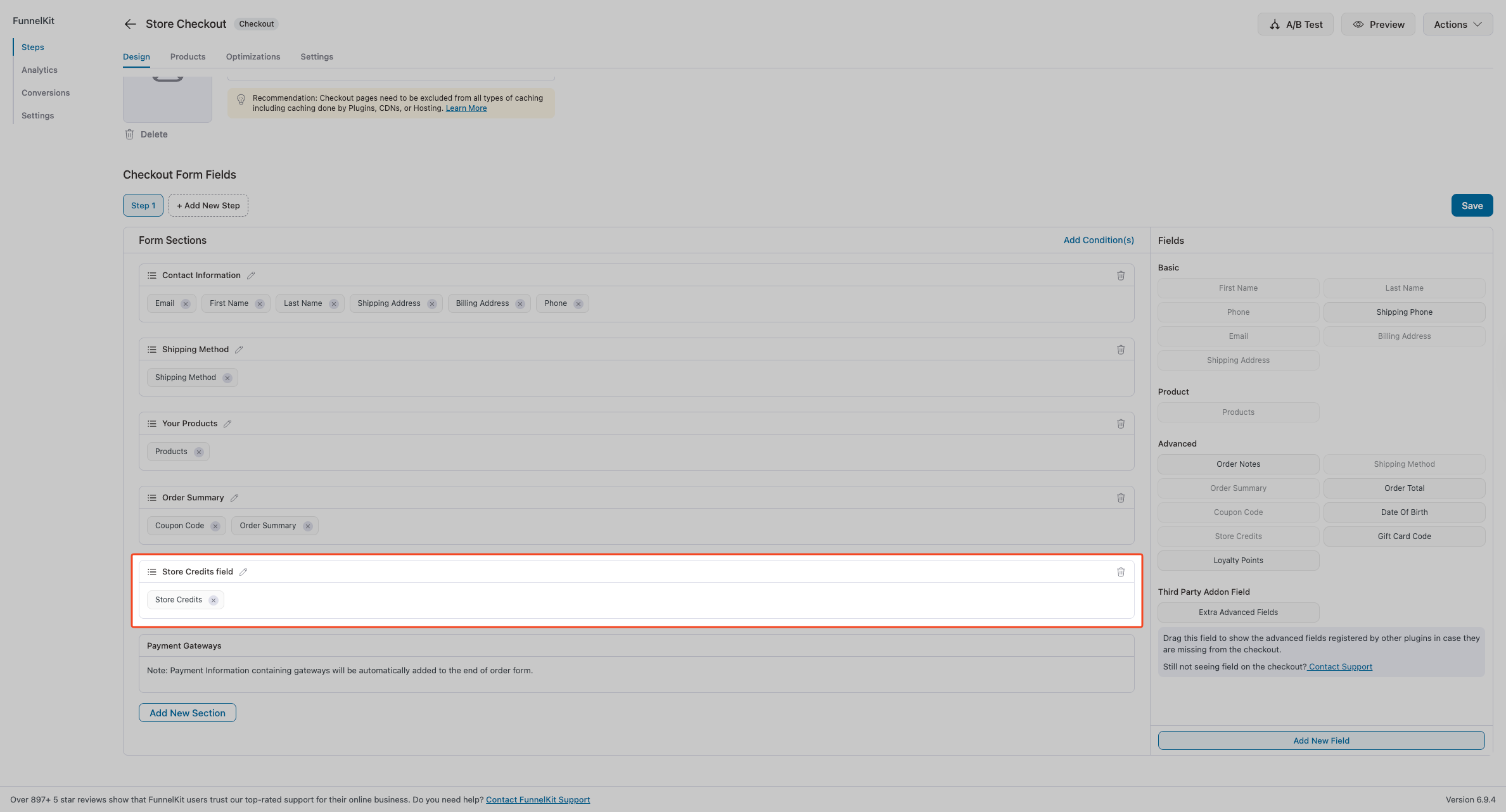
- Drag that field into your checkout layout.
- Click Save Changes.
- Confirm the field appears on your live FunnelKit checkout page.
Repeat steps 5–9 for each additional field you need.
How Force Apply works in FunnelKit checkout
Force Apply is an Advanced Coupons Premium feature that temporarily removes applied coupons so a priority coupon can be applied. By default, it triggers when a customer applies a coupon through WooCommerce’s standard coupon field. The FunnelKit integration extends this to also trigger when a customer applies a coupon through FunnelKit’s checkout coupon field.
No additional setup is needed. As long as Advanced Coupons Premium is active alongside FunnelKit Funnel Builder, any coupon with Force Apply set to Enabled in the coupon’s General tab behaves correctly in FunnelKit checkout. The plugin temporarily removes applied coupons, applies the Force Apply coupon, and re-adds any coupons that still validate.
Force Apply doesn’t trigger for coupons applied via Auto Apply; this is intentional. Auto Apply runs silently in the background, and Force Apply is designed for coupons that the customer explicitly enters or applies via a URL link. Avoid enabling both Force Apply and Auto Apply on the same coupon; if you do, Auto Apply will keep re-adding the coupon after a customer removes it, which can appear to customers as the coupon being stuck in the cart.
Coupons are kept when a funnel step rebuilds the cart
A funnel step that has its own products has to rebuild the cart to put them in. That rebuild empties the cart first, which used to take any applied coupons with it. A customer who had entered a code before reaching the funnel would arrive at checkout with the discount gone.
From Advanced Coupons Premium 4.0.8 this is handled for you. The applied coupons are recorded just before the rebuild and put back immediately after, so the customer keeps the discount. No setting controls it and there is nothing to switch on.
Two things to keep in mind:
- It only runs on funnel steps that have products configured. Steps without products never empty the cart, so there is nothing to restore.
- A coupon is only put back if it is still valid for the rebuilt cart. If the funnel step changed the contents enough to break the coupon’s own conditions, it stays off, which is correct behaviour rather than a fault.
Troubleshooting
The Store Credits / Loyalty Points / Gift Card Code field isn’t showing in my FunnelKit checkout
The most common cause is that the field hasn’t been added to the FunnelKit checkout template. Open your FunnelKit checkout editor, follow the steps above to drag the field into the layout, then save. If you only need store credits, see How to add the store credit form to your FunnelKit checkout page; this article covers the wider integration.
If you don’t see the Advanced section or the field in the FunnelKit field picker, confirm that the companion plugin for the field you need (Loyalty Program, Advanced Gift Cards) meets the minimum version listed in Prerequisites, and that FunnelKit Funnel Builder (funnel-builder/funnel-builder.php) is active.
The Store Credits field is in the template, but doesn’t appear on the checkout page
The Store Credits redemption form only renders for logged-in customers. Guests never see it. If a logged-in customer has a zero balance, the field can still appear unless you enable Hide store credits on checkout if zero balance under WooCommerce → Settings → Advanced Coupons → Store Credits, in which case customers with no balance no longer see the Store Credits block. If the customer is logged in and should see the field, but it still does not display, check whether an Advanced Gift Cards product is in the cart, Advanced Coupons disables store credits while a gift card product is being purchased.
Force Apply isn’t triggering when customers use FunnelKit’s checkout coupon field
Confirm that Advanced Coupons Premium version 3.6.1.1 or higher is active. Then open the coupon in the WooCommerce coupon editor, go to the General tab, and verify that Force Apply is set to Enabled, not When applied via URL only or Disable. The When applied via URL only option only triggers Force Apply when the coupon is applied via a URL link, not through the checkout coupon field.
Frequently asked questions
Do URL coupons work on FunnelKit landing pages?
Yes. URL coupons (Advanced Coupons Premium) work on any WordPress page, including FunnelKit landing pages and funnel steps. Add the URL coupon link to your FunnelKit page as a button or call-to-action. When a customer clicks it, the coupon is applied, and they’re redirected to your chosen destination, typically your FunnelKit checkout. No special configuration is needed beyond setting up the URL coupon in Advanced Coupons.
Do Auto Apply coupons work with FunnelKit?
Auto Apply coupons (Advanced Coupons Premium) work on FunnelKit checkout pages the same way they do on standard WooCommerce checkout. The coupon is applied automatically when cart conditions are met before the customer reaches the checkout form. Auto Apply doesn’t have a specific integration with FunnelKit order bumps or upsells; it applies to the main cart before checkout, not to add-on products that are offered after the initial order is placed.
Can I use Advanced Gift Cards in FunnelKit Cart?
Yes. When Advanced Gift Cards for WooCommerce version 1.3.5 or higher is active alongside FunnelKit Cart (cart-for-woocommerce), Gift card products display correctly in the FunnelKit slide-in cart widget. No additional setup is needed; the integration activates automatically when both plugins are active.
Need help?
If you have a question or run into any issues, we’re here to help.
- Premium users: Open a support ticket
- Free users: Visit our community forum on WordPress.org

