
If you sell subscriptions and want discounts to behave consistently across checkout and renewals, this guide covers what applies once and what carries forward to renewals. Renewal orders behave differently from one-time purchases, so some coupon and store credit behaviors are intentionally limited.
You’ll see how store credits, URL coupons, cashback coupons, virtual coupons, and the Add Products feature behave with WooCommerce Subscriptions, plus how to enable store credits for renewal orders in Advanced Coupons Premium.
Prerequisites
- WooCommerce is installed and active
- Advanced Coupons for WooCommerce (free) installed and active
- WooCommerce Subscriptions is installed and active
- Advanced Coupons Premium (includes the free base plugin) — required for the subscription compatibility fixes, the Add Products feature with subscription handling, and the renewal store credits setting.
How standard coupon types behave with subscription products
When a customer adds a subscription product to their cart and applies a coupon at checkout, standard WooCommerce coupon types — percentage discounts, fixed cart discounts, and fixed product discounts — apply to the initial order normally. Advanced Coupons Premium includes a compatibility fix that keeps these coupon types applied during WooCommerce Subscriptions’ internal cart recalculation, so multiple coupons remain applied at checkout even when subscription products are present.
Which coupon types apply to renewal orders?
WooCommerce Subscriptions controls renewal order behavior. By default, it removes coupons from automatic renewals — this isn’t an Advanced Coupons limitation, it’s how WooCommerce Subscriptions is designed. Only its native recurring coupon types are built to carry a discount forward to each renewal:
| Coupon type | Applies to initial order? | Applies to renewals? |
|---|---|---|
| Percentage discount | Yes | No (stripped by WC Subscriptions) |
| Fixed cart discount | Yes | No (stripped by WC Subscriptions) |
| Fixed product discount | Yes | No (stripped by WC Subscriptions) |
| Recurring Product % Discount (WC Subscriptions native) | Yes | Yes |
| Recurring Product Discount (WC Subscriptions native) | Yes | Yes |
| URL coupon (Advanced Coupons) | Yes | No |
| Cashback coupon (Advanced Coupons) | Yes | No |
| Store credits (Advanced Coupons) | Yes | No (by default — see below) |
The Advanced Coupons types behave the same way: they apply to the first order and don’t repeat on renewals unless WooCommerce Subscriptions’ own recurring types are used.
How store credits work with subscriptions
By default, the plugin doesn’t apply store credits to automatic subscription renewal orders. The free Advanced Coupons plugin removes any store credit data from renewal order metadata to prevent incorrect double-application, and it hides the Apply Store Credits button when you view a subscription in the WordPress admin.
This is intentional behavior — store credits work as a one-time discount on the initial purchase, not a recurring benefit.
Enabling store credits for renewals (Advanced Coupons Premium)
If you want store credits to apply automatically to renewal orders, Advanced Coupons Premium adds a setting to allow this.
- Go to Coupons → Settings in your WordPress admin.
- Open the Store Credits section.
- Enable Allow store credits for subscription renewals. This setting saves automatically.
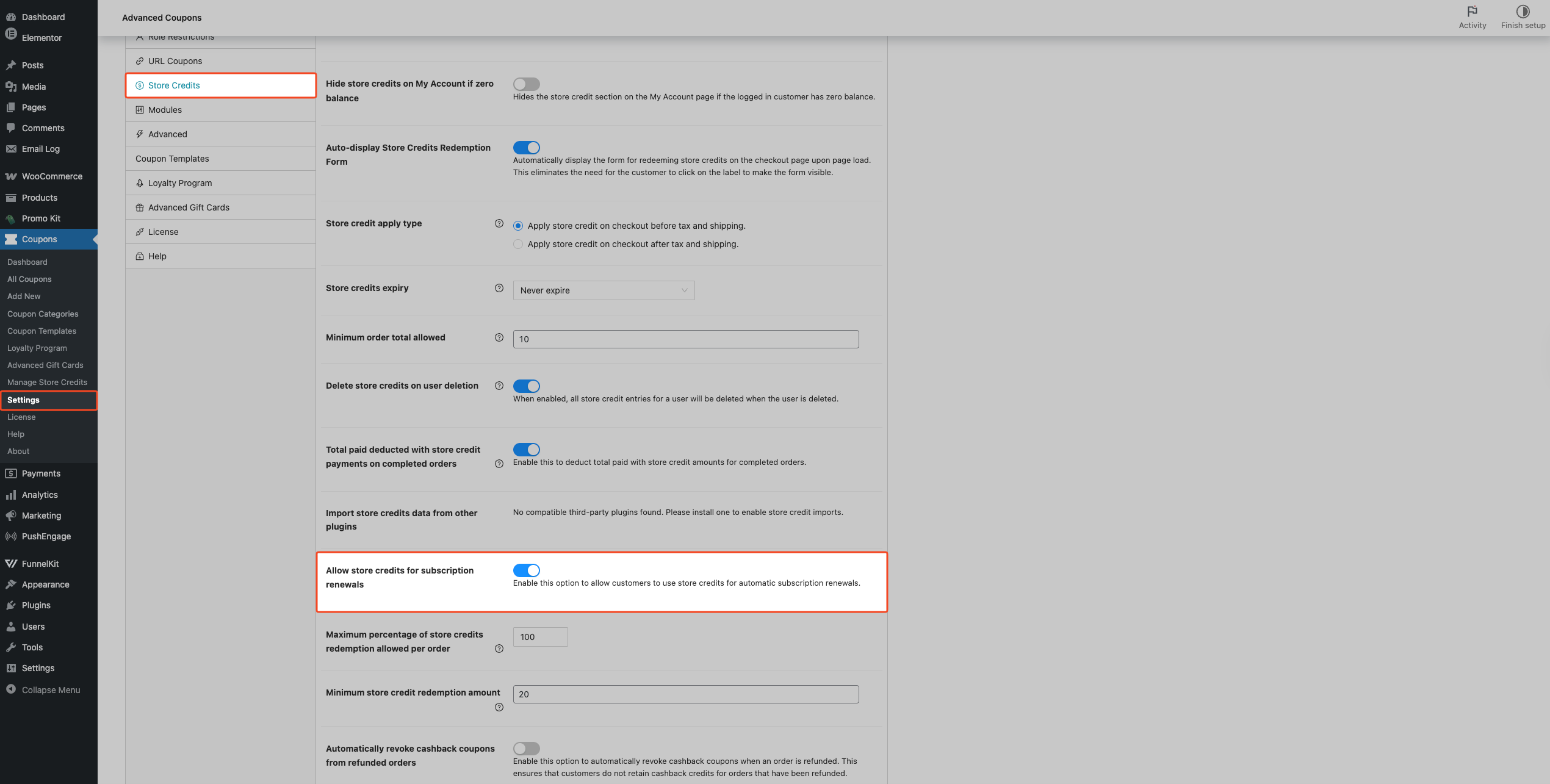
When this setting is enabled:
- At the time each renewal order is created, the plugin checks the customer’s current store credit balance.
- If the balance is sufficient, the plugin applies the store credit amount from the previous order to the renewal automatically and recalculates the order total.
- If the balance is insufficient — for example, if the customer spent credits since their last renewal — the plugin skips the store credit for that renewal and the renewal processes at its full amount.
- A store credit discount row appears in the recurring subscription totals at checkout, showing the customer the expected credit reduction on future renewals.
Early renewals (when a customer clicks “Renew now” from their account page) are also supported. Advanced Coupons checks the customer’s current balance and restores the store credit from the previous order if the balance allows it.
Paying subscription renewals with store credits: manual vs automatic
WooCommerce Subscriptions processes two kinds of renewal, and store credits apply to each in a slightly different way. Both paths require Advanced Coupons Premium and the Allow store credits for subscription renewals setting to be enabled. Standard coupon types (percentage, fixed cart, fixed product) still do not carry forward to either type of renewal. The behavior described here is specific to store credits.
Automatic renewals (scheduled payment)
An automatic renewal is the scheduled payment WooCommerce Subscriptions charges on the customer’s billing date, with no action from the customer. When the renewal order is created, Advanced Coupons reads the store credit amount that was applied to the previous order and checks the customer’s current balance. If the balance covers that amount, the plugin adds the store credit as a discount on the renewal order and recalculates the total before payment is taken. If the balance is too low, the store credit is skipped for that cycle and the renewal is charged at its full amount. The store credit is applied to the order total, not as a recurring coupon, so the customer is billed the reduced amount automatically.
Manual and early renewals (customer pays at checkout)
A manual renewal happens when the customer pays for the next billing period themselves rather than waiting for the scheduled charge. The most common case is an early renewal, where the customer clicks Renew now on the subscription in their account and is taken to checkout to pay. In this flow, Advanced Coupons restores the store credit from the previous order into the renewal cart so it is reflected in the checkout totals before the customer pays. As with automatic renewals, the plugin checks the current balance first: if the balance covers the previous store credit amount, the credit is restored to the cart; if not, the store credit is cleared and the customer pays the full amount at checkout. The credit is restored either as a checkout session discount or by re-applying the store credit coupon, depending on how it was originally applied to the parent order.
In both cases the customer also sees a store credit discount row in the recurring subscription totals at checkout, so the expected reduction on future renewals is visible before they commit.
How the Add Products feature works with subscription products
The Add Products feature (Advanced Coupons Premium) lets you automatically add specific products to a customer’s cart when a coupon is applied — at a discount or for free. When subscription products appear in an Add Products rule, Advanced Coupons automatically sets their discount type to No discount, so the subscription product is added at its regular price with no custom price reduction.
This is a hard limitation: WooCommerce Subscriptions doesn’t support custom pricing for subscription products added via third-party integrations. If you try to set a custom discount value on a subscription product in the Add Products panel, you’ll see this message:
“Custom discounts for subscription products are not supported for this feature.”
In practice, this means:
- You can include a subscription product in an Add Products rule, but the plugin always adds it at its standard price — the coupon can’t discount it further.
- Non-subscription products in the same Add Products rule work normally with any discount type.
How virtual coupons work with subscriptions
Advanced Coupons Premium includes an automatic compatibility fix for virtual coupons used alongside WooCommerce Subscriptions. WooCommerce Subscriptions triggers cart recalculation at checkout, which can interfere with how virtual coupons clean up their session data. Advanced Coupons handles this timing difference automatically, so virtual coupons remain valid through subscription checkout without any extra configuration.
For merchants, this means a virtual coupon issued to a customer applies on a subscription order the same way it would on a one-time purchase — the coupon is consumed on use and removed from session afterwards, with no manual cleanup needed.
Troubleshooting
Store credits don’t apply to renewal orders
Store credits don’t apply to renewals unless the Allow store credits for subscription renewals setting is enabled under Coupons → Settings → Store Credits — and this setting is only available with Advanced Coupons Premium.
If the setting is enabled and credits still aren’t applying, check the customer’s store credit balance at renewal time. If their balance is lower than the credit amount from the previous order, the plugin skips the credit for that renewal and the order processes at its full amount.
Multiple coupons are being stripped when subscription products are in the cart
This is a known WooCommerce Subscriptions behavior. Advanced Coupons Premium includes a fix that keeps standard coupon types (fixed cart, percentage, fixed product) applied during WooCommerce Subscriptions’ cart recalculation. If you’re using the free version and experiencing this, upgrading to Advanced Coupons Premium resolves it.
The “Allow store credits for subscription renewals” setting doesn’t appear in settings
This setting is added by Advanced Coupons Premium and only appears when WooCommerce Subscriptions is active. Check that both Advanced Coupons Premium and WooCommerce Subscriptions are installed and active, then revisit Coupons → Settings → Store Credits.
Frequently asked questions
Does the coupon discount apply to every renewal order?
No. Standard coupon types — percentage, fixed cart, fixed product — apply to the initial subscription checkout only. WooCommerce Subscriptions is designed to remove these from renewal orders. Only WooCommerce Subscriptions’ own recurring coupon types (Recurring Product % Discount and Recurring Product Discount) are built to carry a discount forward to renewals. Advanced Coupons coupon types follow this same pattern.
Can I use a URL coupon with a subscription product?
Yes — URL coupons apply at the initial checkout as normal. Like all standard coupon types, they don’t carry over to renewal orders.
Why isn’t my Add Products coupon discounting the subscription product?
This is expected. Advanced Coupons always sets subscription products added via Add Products rules to No discount — custom pricing for subscription products isn’t supported through this feature. The product is still added to the cart; it just carries its regular price rather than the coupon-configured discount.
Can I use the Add Products feature to give a free subscription as a gift?
You can add a subscription product via an Add Products rule, but the plugin adds it at its regular price — no discount or free pricing can be applied. If you want to give a free subscription, consider using a 100% discount via WooCommerce Subscriptions’ native coupon types instead.
Can store credits be used on manual or early renewals?
Yes, when Allow store credits for subscription renewals is enabled (Advanced Coupons Premium). When a customer triggers an early renewal from their account, the plugin checks their current balance and restores the credit from the previous order if the balance allows it.
Does this work with variable subscriptions?
Yes. The subscription compatibility layer applies to both simple and variable subscription product types.
What does the customer see at checkout when store credits apply on renewals?
When Allow store credits for subscription renewals is enabled and the customer has a sufficient balance, a store credit discount row appears in the recurring subscription totals on the checkout page. This shows the expected credit reduction on each future renewal so the customer knows what to expect on their next billing cycle.
Need help?
If you have a question or run into any issues, we’re here to help.
- Premium users: Open a support ticket
- Free users: Visit our community forum on WordPress.org

