According to a global survey, customers trust personal recommendations more than any other advertising channel. This is exactly why referral programs are so powerful! By launching your own WooCommerce referral program, you can encourage happy customers to spread the word about your brand and bring in new shoppers.
We’re here to help you get started. In this complete guide, we’ll walk you through how to set up a WooCommerce referral program and start rewarding customers for every successful referral. It’s a simple yet effective way to grow your business without spending too much on ads.
Let’s get right into it!
What Is A WooCommerce Referral Program?
A WooCommerce referral program lets you reward customers when they successfully refer new people to your store. It usually works this way: you give customers a unique referral link (or code), and they share that with family and friends. Every successful purchase using that link or code gives the referrer a reward. Depending on your setup, this reward can be in the form of discounts, store credit, or loyalty points.
Some stores also offer rewards to the new customer, such as a welcome discount or bonus store credits. This creates a fun, win-win experience that motivates both sides to participate while helping your business reach more people.
Why Start A WooCommerce Referral Program?
Launching a referral program can help you grow your customer base and drive more sales without overspending on marketing costs. Here are just a few reasons why it’s a great move for your business:
- Brings in high-quality leads: According to Harvard Business Review, referred customers make more purchases compared to those who discovered your brand through other means. Since they were introduced to your brand through someone they know and trust, they’re often more engaged and likely to spend. This often leads to a higher customer lifetime value.
- Boost loyalty among existing customers: Introducing a referral program also gives your existing customers another reason to stick around. Shoppers love being rewarded—offering perks for referrals makes them feel valued and motivates them to stay engaged with your brand.
- Lower marketing costs: Other marketing channels such as paid ads and influencer partnerships can get expensive fast. Referral programs help you grow your customer base without overspending. Instead of relying on paid ads, you encourage happy customers to promote your brand, making it a more sustainable and cost-effective strategy.
Bonus Tip: Referral programs are a key piece of the puzzle, but they are just one part of keeping your customers coming back. For a deeper look at why this matters for your long-term growth, check out these 8 Proven Benefits Of Customer Retention For Online Stores (2026).
How To Start A WooCommerce Referral Program (Step-by-Step Tutorial)
While WooCommerce doesn’t offer a built-in referral program feature out of the box, you can easily add one using a plugin like WooCommerce Loyalty Program. This powerful plugin lets you grant loyalty points for purchases, referrals, and more. It’s a powerful tool to grow your store through customer engagement and word-of-mouth marketing.
Here’s how to get started in a few steps:
1. Install and activate WooCommerce Loyalty Program
Make sure that you have installed and activated Advanced Coupons Free and WooCommerce Loyalty Program to enable referral points in your store. You can get the plugin here.
Once you’ve purchased the plugin, head to your WordPress dashboard > Plugins > Add New. Click Upload Plugin, then select the .zip file you downloaded after getting the plugin. After installing the plugin, click Activate to enable loyalty and referral features on your WooCommerce store.
2. Configure your loyalty program basics
After activating WooCommerce Loyalty Program, you can now configure how customers can earn loyalty rewards in your store! 🎉
Simply head to your WordPress dashboard > Coupons > Loyalty Program > Settings. This is where you can set the basic rules for your rewards system.
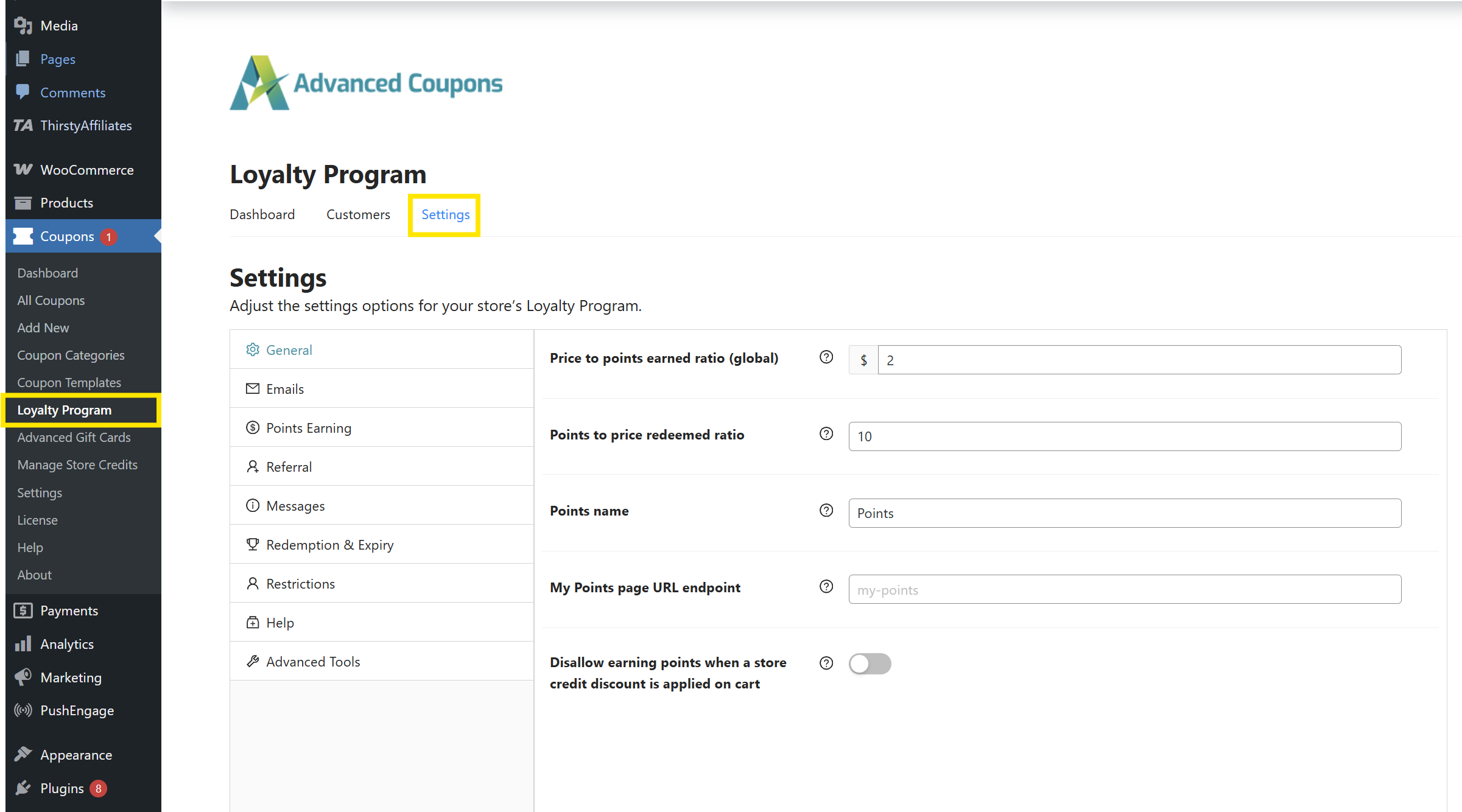
In the General tab, set up:
- Price to points earned ratio: Set how many points customers earn per amount spent.
- Points to price redeemed ratio: Set how much each point is worth when redeemed.
- Points name: You can also customize the name of your points here (e.g., “Coins,” “Stars,” or anything on-brand).
- My Points page URL endpoint: This defines the page where customers can view their points balance. You can leave it as the default (my-points) or customize it to match your store branding.
Once your basic settings are configured, you’re ready to enable referral rewards in the next step!
💡 GOOD TO KNOW: WooCommerce Loyalty Program gives you full control over your rewards system. Feel free to explore other tabs to set up which specific actions earn points, customize points messaging, adjust expiry and redemption, and more. You can also check out our full guide here.
3. Set up your referral reward settings
Once your basic rewards settings are in place, it’s time to enable referral rewards! This option allows you to reward customers with loyalty points whenever a new shopper uses their referral link to sign up or place an order in your store.
Easily set this up by heading to Coupons > Loyalty Program > Settings > Referral tab. From here, you can configure:
- Points awarded to referrer on signup: Determine how many points the referrer will earn when someone signs up using their referral link.
- Points awarded to referrer on purchase: Set the number of points awarded when the referred customer makes their first purchase.
- Referral redirect URL: This is the page that referred users will be directed to. You can leave it as your homepage or customize it to a dedicated product or shop page.
- Disallowed User Roles & Disallowed Users: If needed, you can prevent certain roles (like admins or affiliates) or specific users from earning referral points.
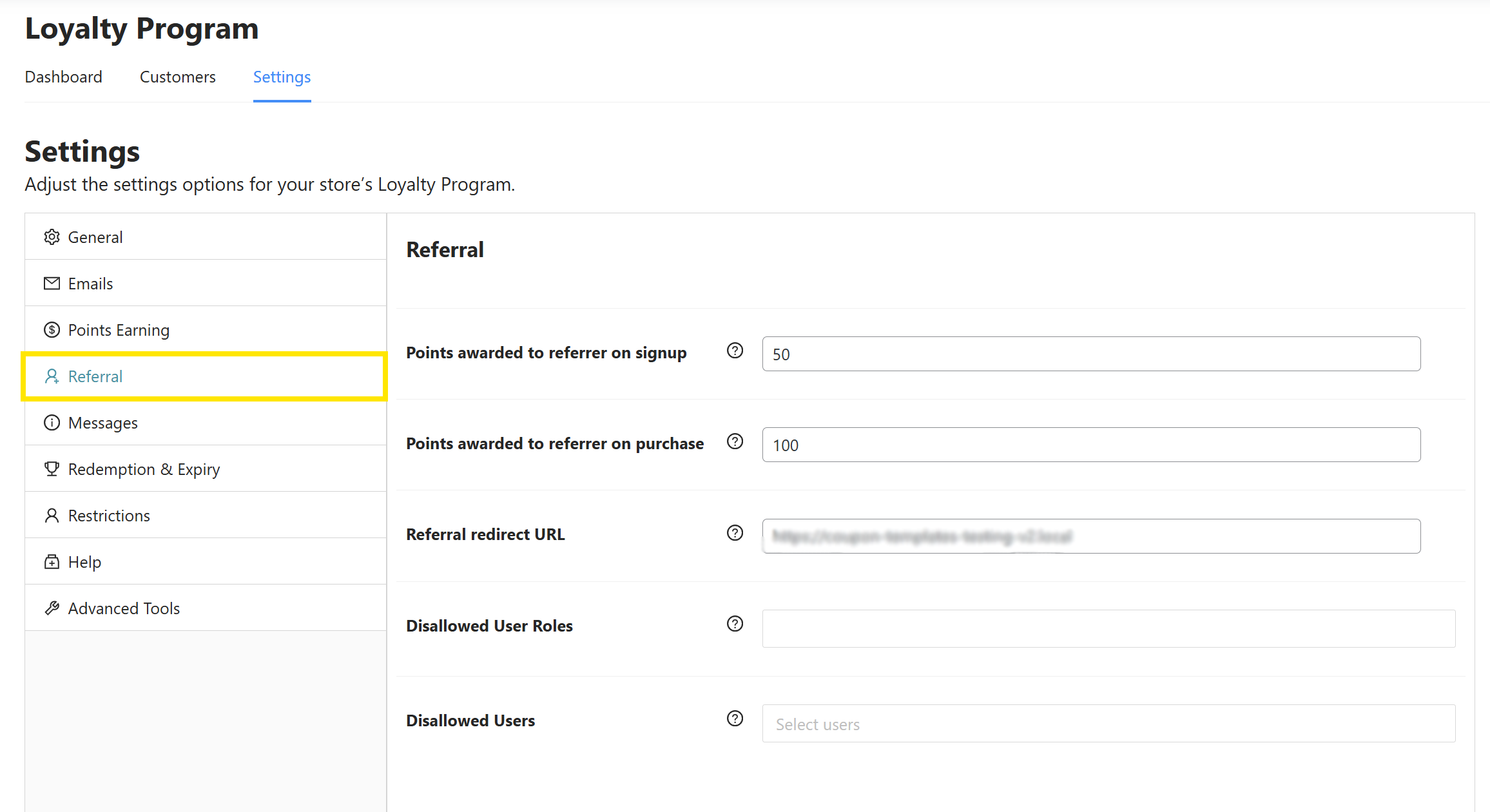
After these settings are configured, shoppers can start earning points when someone uses their referral link!
4. Promote your referral program
Now that your referral program is set up, it’s time to let your customers know about it!
Existing customers can automatically access their referral links on their My Account > My Points page. This is also where they can monitor their available points balance, redeem them for store credits, and view their points earning history.
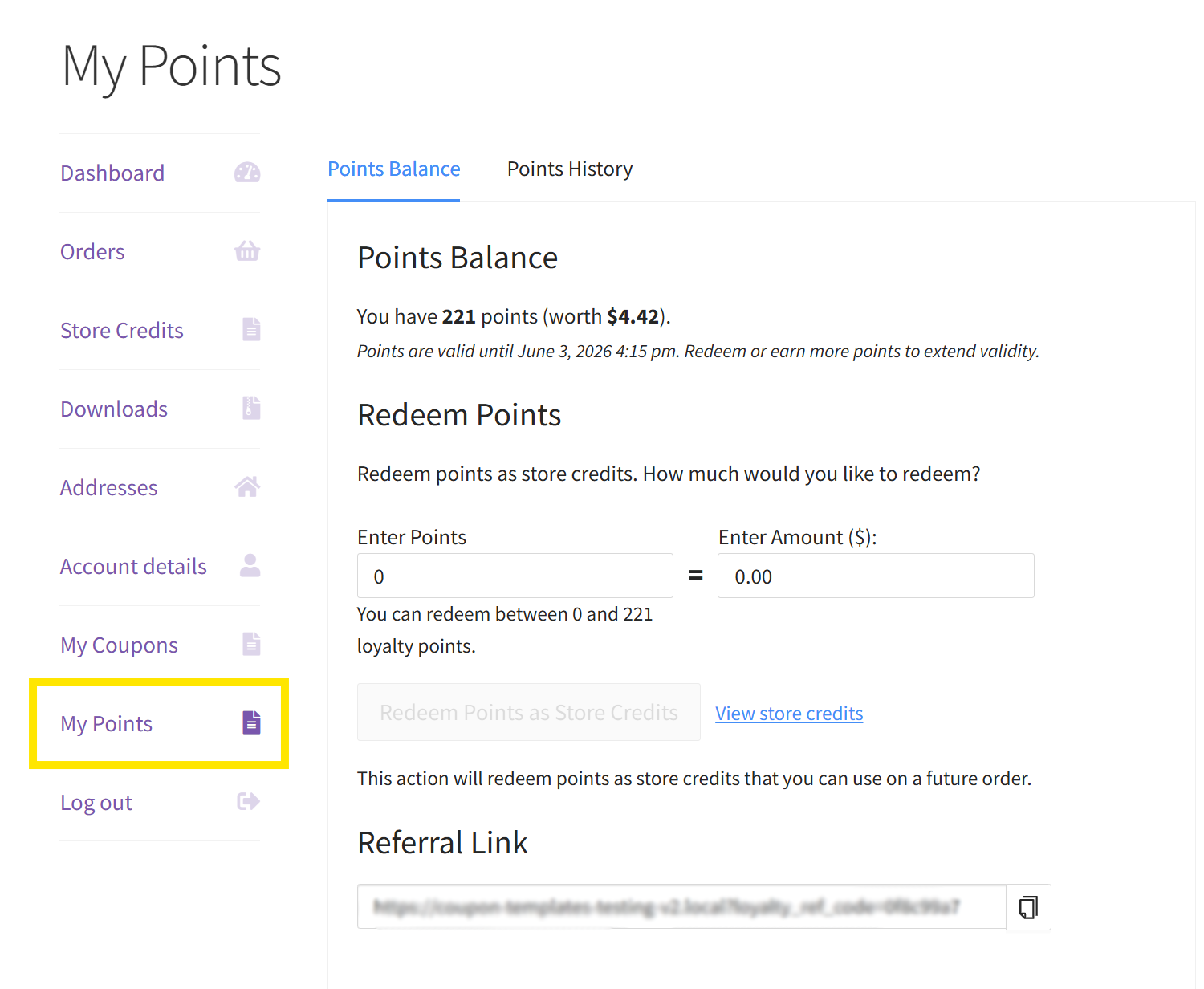
Here are some easy ways you can spread the word:
- Add a website banner: Highlight the referral program on your site’s homepage banner or key pages.
- Announce it via email: Send a dedicated email campaign introducing your referral program and how it works.
- Promote it on social media: Encourage customers to share their link and remind them of the rewards.
- Include it in post-purchase emails: Mention the referral program on your thank-you page or follow-up emails to turn buyers into advocates.
The goal is to make it visible and easy for customers to join. The more you promote your referral program, the more likely customers are to engage and join.
RELATED READ: How To Promote Loyalty Program (7 Effective Strategies)
Frequently Asked Questions
What is the best referral plugin for WooCommerce?
This depends on your store setup and goals. WooCommerce Loyalty Program is a great choice for store owners who want to reward customers for referrals, purchases, and other actions using one seamless system. This plugin allows you to grant loyalty points for shoppers who bring new customers to your store. The combined advantage of loyalty and referral features makes it a powerful tool to boost customer retention and attract new shoppers at the same time.
How can I create a referral program?
You can use a dedicated plugin or tool like WooCommerce Loyalty Program. Start by installing and activating the plugin, then configure how and when people earn rewards (for example, points on sign‑up, extra points when the referred user buys). Next, ensure shoppers have easy access to their referral link or code. Over time, it’s also important to track your results and monitor the effectiveness of your rewards.
What is a successful referral process?
A successful referral process is simple to understand, easy for shoppers to join, and trackable. Customers should receive a straightforward incentive (such as loyalty points or discounts) so they would be encouraged to join. Referred shoppers should feel welcomed — consider offering a welcome discount to boost conversions. Lastly, it’s important to track participation rates, conversions, and the overall cost of running the program. These metrics will help you assess the effectiveness of your referral program and help you spot opportunities for improvement.
Wrapping Up
Launching a WooCommerce referral program is a smart and cost-effective strategy to grow your customer base and keep happy customers engaged. By rewarding referrals, you turn happy shoppers into brand advocates, helping you drive organic traffic and boost repeat sales without spending too much on ads.
In this guide, we covered:
- What a WooCommerce referral program is and how it works
- The benefits of launching a referral program in your store
- A step-by-step tutorial on how to start your WooCommerce referral program
- Answers to commonly asked questions
With the right tools, it’s easy to get started. WooCommerce Loyalty Program lets you reward both purchases and referrals in one seamless system. It’s a powerful addition to your marketing toolkit, helping you create a more rewarding shopping experience for your customers.
We hope this guide helped out! 😊