
Most WooCommerce loyalty programs don’t fail because loyalty programs don’t work. They fail because of a few loyalty program mistakes that are easy to make, easy to miss, and easy to fix once you know what to look for.
According to industry research, more than 1 in 5 loyalty program members never redeem a single reward. The program exists, the points accumulate, and nothing happens. Stores interpret low redemption as low engagement. Usually, it’s a setup problem.
This guide covers the five mistakes we see most often, what causes them, and the specific fix for each.
5 Loyalty Program Mistakes To Avoid
Here are the five loyalty program mistakes to audit first, plus simple fixes that usually make a points program more effective.
Mistake 1: Making the point math too complicated
The problem: A store sets its loyalty program to “1 point per $0.50 spent, redeemable at 250 points = $1.25 off.” Technically correct. Practically useless.
Customers need to be able to answer “what is this actually worth to me?” in about three seconds. If they can’t, they stop thinking about it — and a loyalty program that customers stop thinking about doesn’t change behavior.
The fix: Use the simplest possible structure. For example:
- Earn: 1 point per $1 spent
- Redeem: 100 points = $1 off
If you’re using WooCommerce Loyalty Program, you can easily set this in Coupons → Loyalty Program → Settings (General) by adjusting the “points earned” and “points redeemed” ratios so your math stays simple and consistent for shoppers.
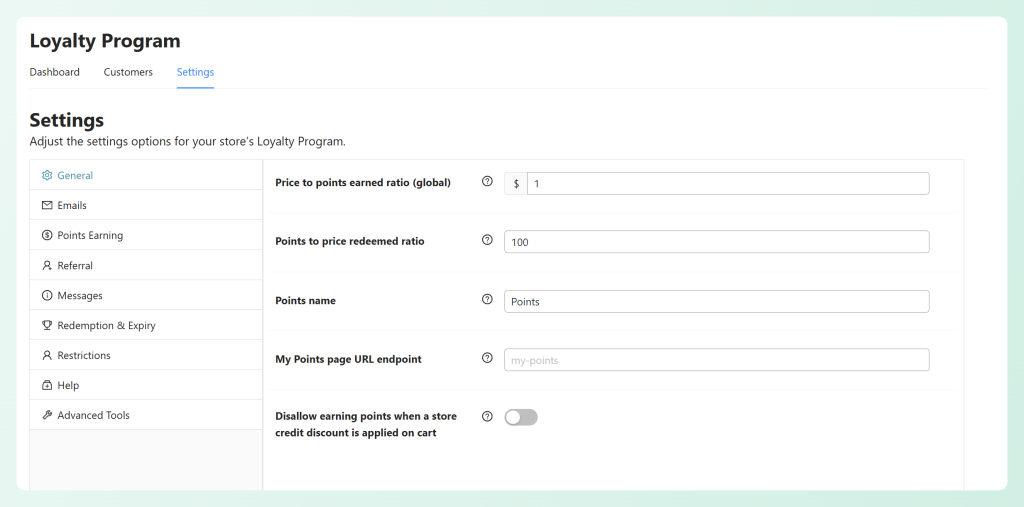
Customers can calculate their balance value instantly. 500 points? That’s $5. Clear, achievable, motivating. A bonus point promotion is also easy to communicate: “Earn double points this weekend” lands immediately. “Earn 2.5x points at our adjusted redemption rate” does not.
Mistake 2: No points expiry (and why that backfires)
The problem: Unlimited point accumulation sounds generous. It creates two problems most store owners don’t anticipate.
First, it’s a liability that grows indefinitely. Every unredeemed point is a future discount obligation. Stores that run for a few years without expiry sometimes find they’ve accumulated more outstanding points than they’d be comfortable discounting at once.
Second, it removes urgency. If points never expire, there’s no reason to come back before they do. The customer doesn’t feel the pull of “use them before you lose them.”
The fix: Set a rolling 12-month expiry. For example, points earned in March expire the following March. WooCommerce Loyalty Program supports expiry configuration in the plugin settings.
More importantly, use expiry as a reactivation trigger. An email sent 30 days before a customer’s oldest points expire — “You have 340 points expiring on April 15” — often brings back customers who haven’t bought in months. The expiry email works well because there’s a real deadline.
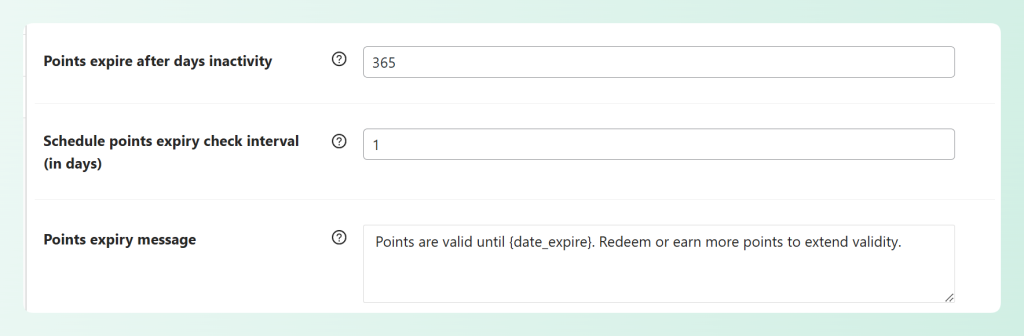
If you’re using WooCommerce Loyalty Program, you can easily set your points expiry in the Redemption & Expiry settings (it’s based on days of inactivity), then customize the expiry reminder message/email so customers get a real nudge before points disappear.
Mistake 3: Setting the redemption threshold too high
The problem: This is one of the most common causes of low redemption rates — and it’s easy to miss as a store owner.
If your minimum redemption threshold is 1,000 points, and customers earn 1 point per $1 spent, a customer needs to spend $1,000 before they can redeem anything. On a store with a $70 average order value, that’s roughly 15 purchases before the first redemption. Most customers will never get there.
The fix: Set the minimum redemption threshold at a level reachable within 2–4 average orders.
| Average Order Value | Recommended Threshold | Orders to First Redemption |
|---|---|---|
| $30 | 60–120 points | 2–4 orders |
| $60 | 120–240 points | 2–4 orders |
| $100 | 200–400 points | 2–4 orders |
| $200+ | 400–600 points | 2–3 orders |
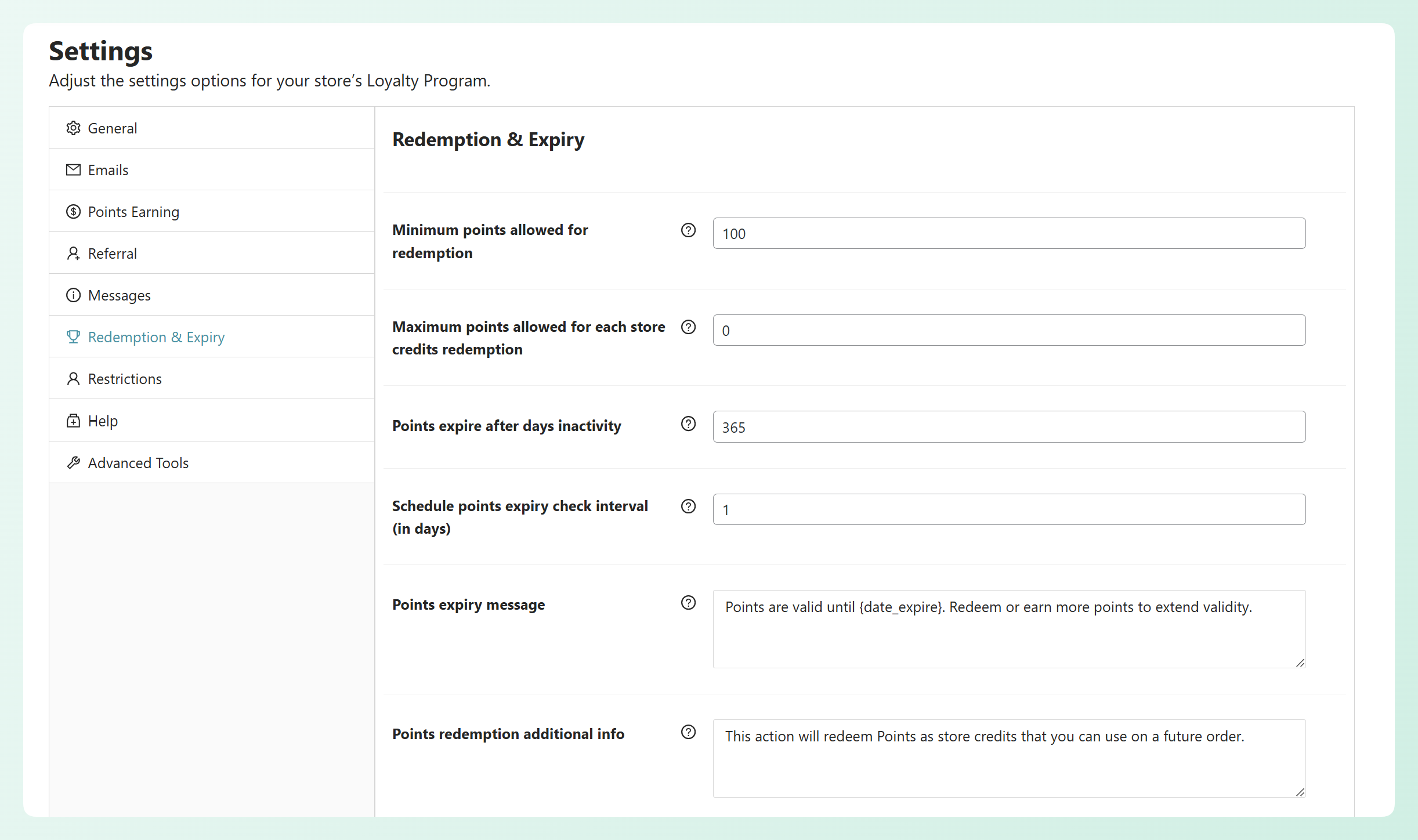
Plugins like WooCommerce Loyalty Program let you set a minimum points required for redemption (and even a max per redemption), so customers can unlock rewards sooner without cashing out an entire balance in one go.
💡 What We’ve Seen: When stores come to us with a loyalty program that “isn’t working,” one of the first things we check is the redemption threshold. A lot of the time, customers are earning points — they just can’t redeem them yet because the bar is set too high. Lowering the minimum to something reachable in 2–3 orders is usually a quick settings change, and it often leads to noticeably more redemptions over the next few weeks.
Mistake 4: Never telling customers their balance
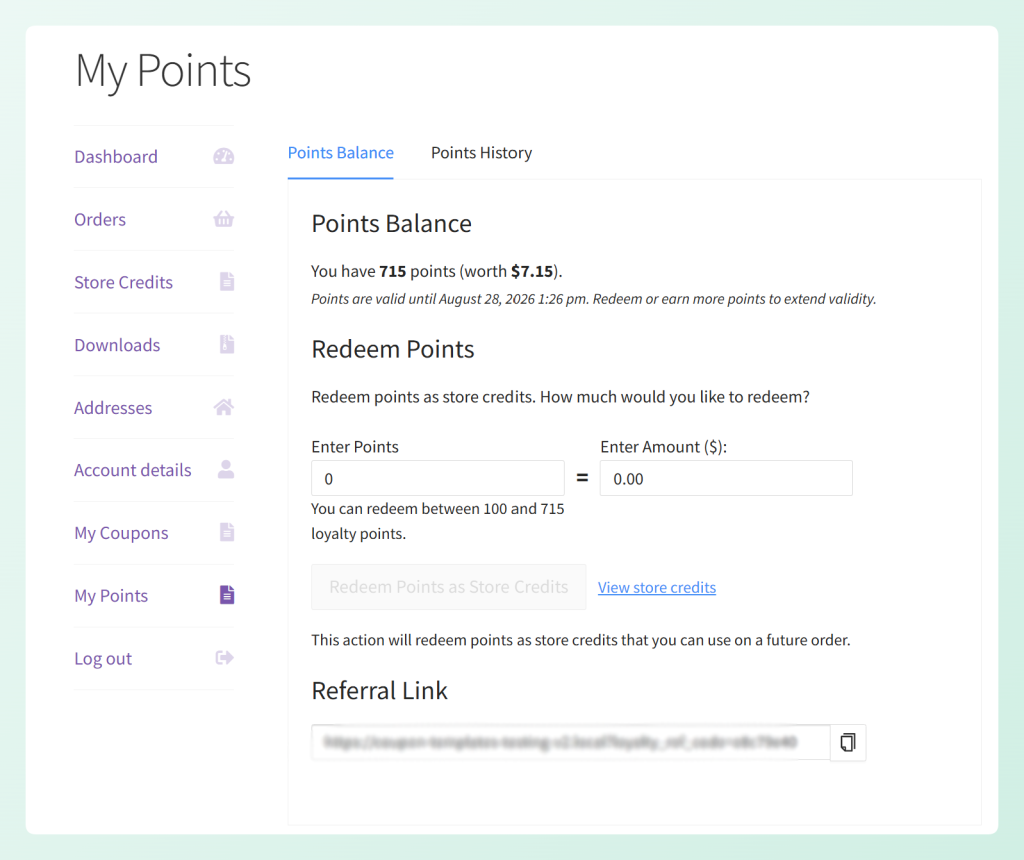
The problem: Customers forget they have points. This isn’t a loyalty problem — it’s a visibility problem. If a shopper doesn’t think about their point balance when they’re deciding where to buy, the program isn’t influencing the decision it was designed to influence.
In practice, loyalty program awareness is one of the biggest drivers of engagement. Customers who remember they have points tend to return sooner and spend more often. Customers who forget they’re enrolled don’t factor rewards into their next purchase decision.
The fix: Three touchpoints that keep balance awareness high:
- My Account page balance display. WooCommerce Loyalty Program shows the customer’s current balance in their account area. Make sure this is visible and the page is linked from navigation or post-purchase emails.
- Order confirmation email. After every purchase, include the customer’s updated point total and their progress toward the next redemption milestone. “You now have 340 points — 60 more until your next $3 reward.” This turns every order confirmation into a loyalty engagement touchpoint.
- Pre-expiry reminder email. Send a reminder 30 days before points expire. This is often one of the highest-performing loyalty emails you can send — and it requires having expiry set up (see Mistake 2).
Mistake 5: Giving points for every action equally
The problem: When every action earns similar points (purchase, review, signup), your loyalty program starts rewarding convenience instead of commitment. It can attract people who just want quick points while your real buyers don’t feel properly recognized.
A customer spending $800/year may earn 80–120 points from purchases. Someone else can sign up, leave a review, and earn the same points without buying. That’s not loyalty—it’s exploiting the reward rules.
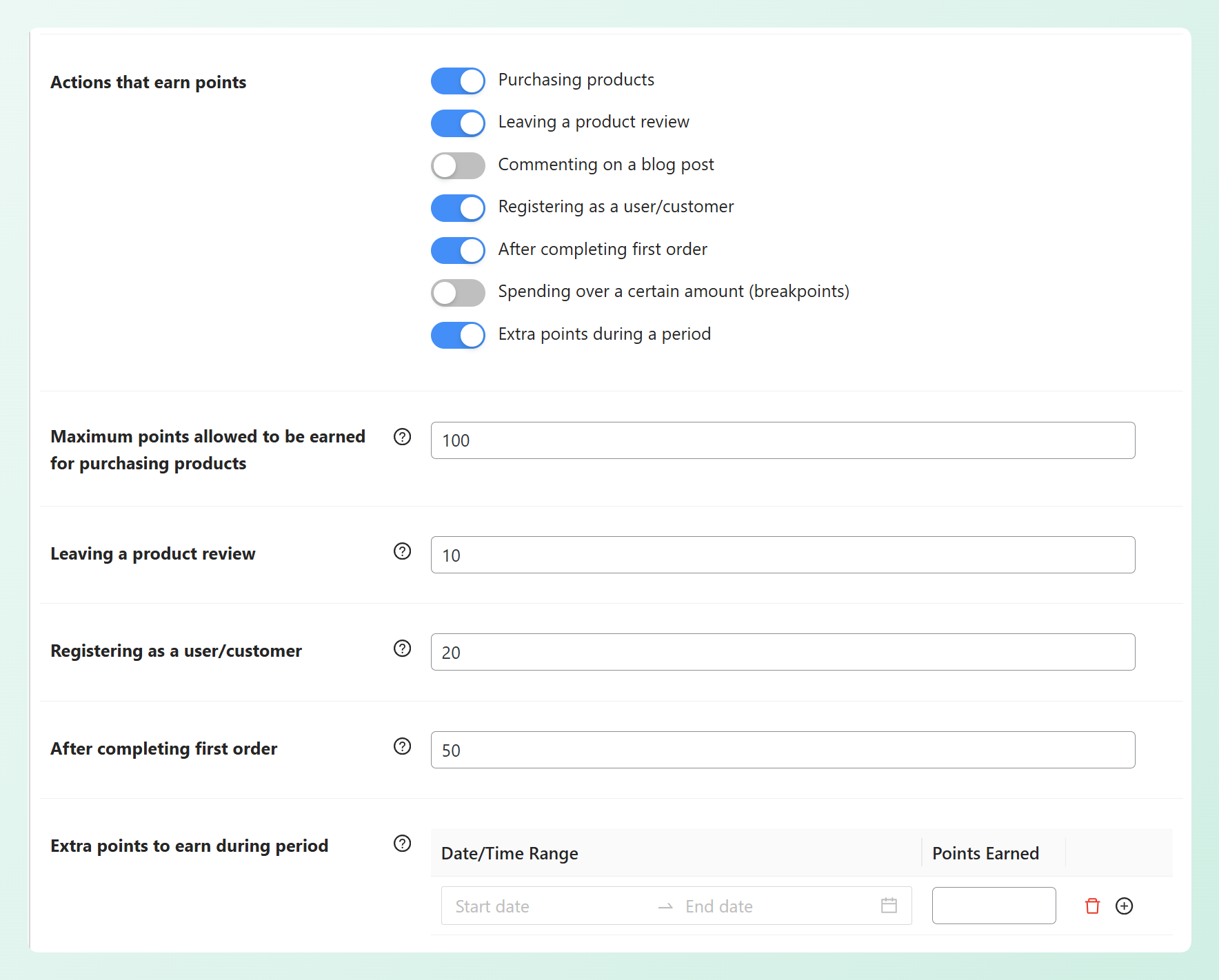
The fix: Weight point-earning based on the value of the action to your business.
- Purchases: The highest point-earning action. 1 point per $1 spent is the baseline. This is where the bulk of customer accumulation should come from.
- Reviews: Lower rate. 15–25 points per review rewards the action without making it the primary point source.
- Referrals: Moderate rate — but only when the referred customer actually makes a purchase.
- Signup bonus: One-time, relatively small. 50–100 points to create early momentum without opening a farming opportunity.
- Social follows / shares: Lowest rate or exclude entirely. Easy to game, low business value.
WooCommerce Loyalty Program lets you configure point values per action type. For example, you can award points for reviews, add a signup/first order bonus, give extra points for higher spend, run limited-time bonus points during promo dates, and even reward referrals.
For more on protecting your program from systematic abuse, see our guide on WooCommerce coupon fraud prevention — the same principles apply to points.
When A Loyalty Program Is The Wrong Tool
Not every WooCommerce store should run a loyalty program. Before you build one, check whether the economics work for your store.
- Very low AOV stores: If your average order is $15–$20, the margin math on a points program is difficult. 1% back in points on a $15 order is $0.15. That’s not motivating enough to change behavior, and it’s coming out of margin that’s already thin.
- One-time purchase categories: Furniture, mattresses, appliances, custom products. If your customers realistically only buy once every 3–5 years, a loyalty program doesn’t change the purchase cadence — because that cadence is driven by need, not rewards.
- Stores that need immediate revenue lift: Loyalty programs are long-game tools. They take months to influence LTV metrics. If you need to move revenue this month, a cart abandonment coupon sequence or a time-limited promotion will outperform a loyalty program launch.
For stores where repeat purchase frequency is the growth lever — apparel, consumables, subscriptions, pet supplies, specialty food — a loyalty program is one of the highest-ROI tools available. For others, it’s a distraction from better-fit options. Check out our guide on how to reward loyal customers for alternatives that work regardless of purchase cadence.
Frequently Asked Questions
How long does it take for a loyalty program to show results?
Most stores see meaningful redemption activity within 60–90 days of launch, assuming the threshold is set correctly (reachable within 2–4 orders). LTV impact takes longer — typically 6–12 months before you have enough cohort data to compare loyalty members vs. non-members on repeat purchase rate and average spend. See our loyalty program KPIs guide for the full measurement framework.
Should I offer a signup bonus for joining the loyalty program?
Yes, with caveats. A signup bonus (50–100 points) creates early momentum and gives customers a reason to register. Keep it below your minimum redemption threshold so the bonus alone doesn’t unlock a discount — that structure attracts abuse. The bonus should get customers partway there, not all the way.
What’s a healthy redemption rate for a WooCommerce loyalty program?
Redemption rates vary a lot by industry, margins, and how reachable your first reward is. If you’re consistently under ~5%, it often points to a threshold or visibility issue. If it’s very high, double-check that rewards aren’t too generous for your margins.
Can I run a loyalty program alongside regular coupons?
Yes — they’re complementary. Coupons work well for limited-time promos, while points are an ongoing retention lever. If you want to protect margins during sales, consider limiting point earning on deeply discounted items or excluding certain products from earning points. See how to reward loyal customers for more on combining these strategies.
Wrapping Up
Most loyalty programs don’t fail because customers “don’t care.” They fail because a few small setup choices quietly make rewards feel confusing, unreachable, or easy to ignore. The good news? These loyalty program mistakes are usually fast to fix — and most changes can be made right inside your WooCommerce Loyalty Program settings in just a few minutes.
Here’s what we covered in this guide:
- Mistake 1: Making the point math too complicated
- Mistake 2: Skipping points expiry
- Mistake 3: Setting the redemption threshold too high
- Mistake 4: Never reminding customers about their balance
- Mistake 5: Giving the same points for every action
If your program isn’t getting redemptions, start with the biggest levers first: simplify your point value, lower your redemption threshold so it’s achievable in 2–3 orders, then add expiry and make balances more visible. Once those foundations are solid, your loyalty program will finally drive the repeat purchases you expected when you launched it.
With WooCommerce Loyalty Program, you can fine-tune earning, thresholds, and expiry so your points program drives real retention.