

Managing WooCommerce coupons across multiple sites gets messy fast when every client store follows a slightly different process. One client needs a first-time buyer offer. Another needs a scheduled flash sale. A third wants a BOGO campaign with tighter usage limits. The more stores you manage, the easier it becomes for naming, scheduling, and coupon rules to drift.
This guide walks through a cleaner approach to WooCommerce coupon management for agencies, so you can standardize how promotions are built, protected, and maintained as your client list grows.
The Agency Coupon Problem (Why Single-Site Habits Break At Scale)
Most WooCommerce agencies develop their coupon workflows organically, one client at a time. The first client gets a careful setup. The second gets something similar. By client seven or eight, the process becomes whatever feels right at the time. The failure modes that show up consistently across agency portfolios:
1. Rebuilding the same setups from scratch
Every new client campaign starts at zero. A seasonal BOGO deal that took 45 minutes to build on site one gets rebuilt from memory on site four. Mistakes compound. Settings that worked well on one store never get documented or reused.
2. Expired promotions running undetected
A client launches a Black Friday deal and forgets to mention when it ends. Or the agency sets a manual calendar reminder that gets missed. The code stays active through December, January, and beyond, eroding margins on orders that should be full-price.
3. Clients editing settings they don’t understand
A client logs in, sees a “complicated” set of cart conditions on their coupon, and simplifies them. The per-customer limit disappears. The first-time buyer restriction gets removed. The campaign they’re paying for is now leaking to everyone with a WooCommerce account.
4. No easy way to review live promotions across client stores
For WooCommerce coupon management for agencies, one of the biggest workflow gaps is a lack of visibility. When you’re managing separate client WooCommerce installs, there usually isn’t a single built-in place to review every live promotion across all stores at once. In practice, that means auditing often happens site by site.
5. Per-site licensing costs that compound
Paying single-site plugin rates across eight to twelve client installs adds up fast. An unlimited sites license starts to look very different at client five than it did at client one.
A Common Agency Pattern
As more client stores get added, coupon workflows often become less consistent. A setup that was carefully built for one store may not get documented clearly enough for the next. Over time, naming, scheduling, and coupon rules can drift unless the agency is working from a repeatable system.
How To Build A Repeatable Coupon Workflow For Client Sites
If you want to manage WooCommerce coupons across multiple sites more consistently, the most valuable thing an agency can build is not just a plugin setup. It is a template document. A set of standard coupon configurations that you build once, document thoroughly, and adapt across new client sites with only the necessary changes.
Step 1: Create a coupon template library
Define your standard coupon types and document the settings for each. At minimum, most WooCommerce agency clients need some version of these:
BOGO Deal (Standard)
- Type: Buy X Get X
- Usage limit per customer: 1
- Scheduled end date: required
BOGO Deal (First-Time Buyer)
- Same as above, plus cart condition: Customer has not purchased before
New-Customer Offer
- Type: Percentage or fixed discount
- Usage limit per customer: 1
- Cart condition: Customer has not purchased before
- Cart condition: Minimum order amount [client-defined]
- Scheduled end date: required
Seasonal/Flash Sale
- Type: Percentage discount
- Usage limit: total order cap [client-defined]
- Scheduled start and end date: required — never create a seasonal coupon without both
Loyalty Reward
- Type: Fixed or percentage
- Usage limit per customer: 1
- Cart condition: Customer has purchased X or more times
- Scheduled end date: typically 30 days from send
Document each template with the exact settings, the rationale for each field, and a note about what breaks if any setting is removed.
Step 2: Use consistent naming conventions
Consistent naming makes auditing across sites fast. A simple convention that works: [CLIENT]-[TYPE]-[MONTH][YEAR]
Examples:
ACME-BOGO-MAR26— Acme client, BOGO deal, March 2026RIVERCO-NEW-APR26— River Co, new customer offer, April 2026SUMMIT-FLASH-MAR26— Summit client, flash sale, March 2026
Enforce this convention across every client site from day one.
Step 3: Standardize the setup process across client sites
Instead of rebuilding each campaign from memory, use the same setup checklist across every client store. Advanced Coupons gives you the key controls agencies usually need at the store level, including advanced scheduling, cart conditions, usage limits, and role-based restrictions, so your process stays more consistent from one install to the next.
You’ll still need to adjust store-specific details like products, discount values, dates, and customer rules, but the workflow becomes much easier to repeat when every site follows the same structure.
That is usually the real win for agencies. Not a magic one-click rollout, but a documented system that makes each new setup faster, cleaner, and less error-prone.
Coupon Scheduling: How To Avoid Expired Promotions
Expired promotions running indefinitely is one of the most common and most preventable agency coupon problems. It happens for a simple reason: deactivation is manual, and manual tasks get missed.
The fix is equally simple: treat scheduling as a required field, not an optional one. Every time-limited promotion should have a scheduled end date set at coupon creation, before the campaign goes live.
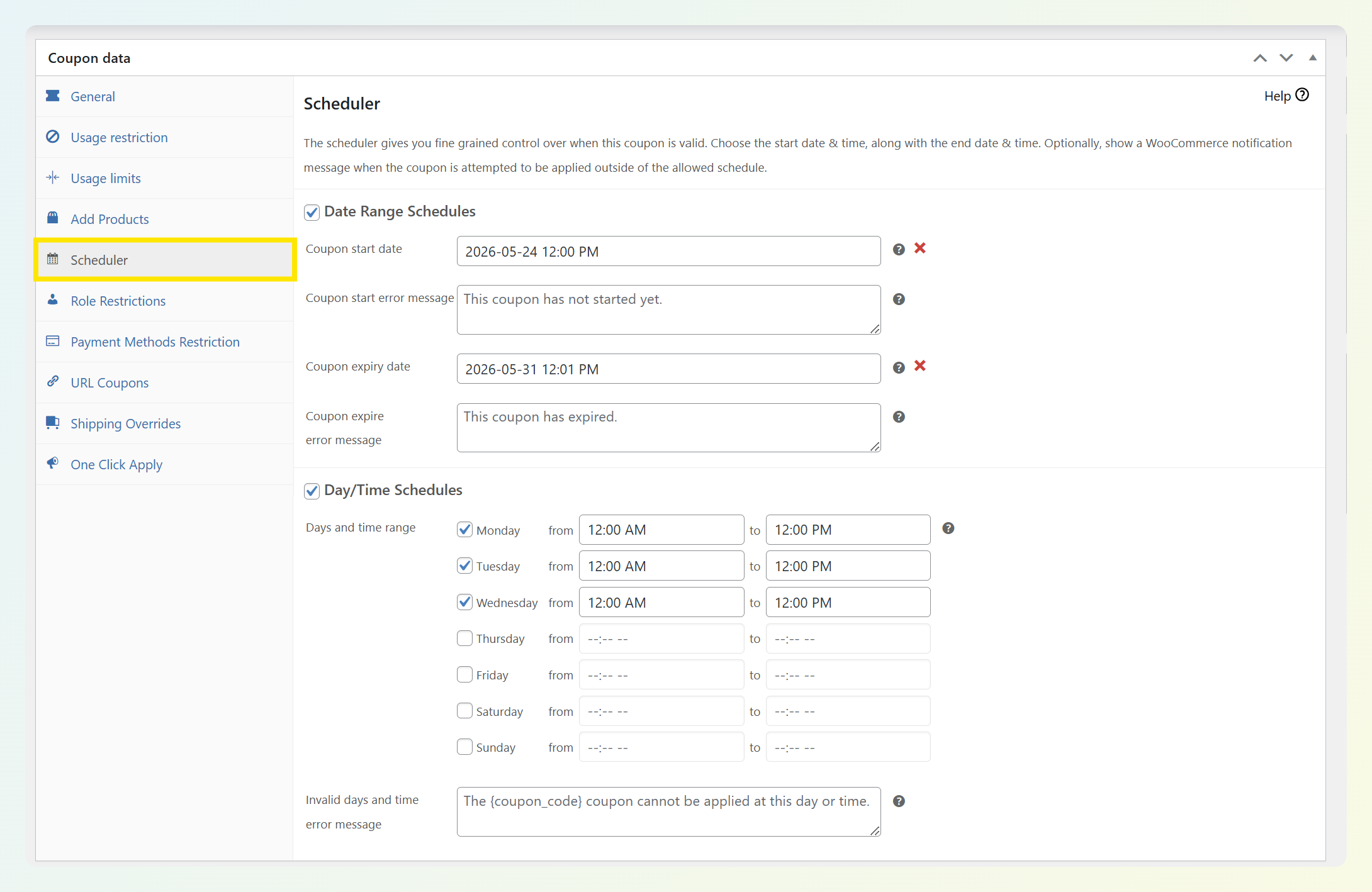
Advanced Coupons Premium lets you set:
- Start date and time — to the hour, so a Monday 9am launch is exactly that
- End date and time — midnight Sunday, end of month, last day of the quarter
- Active days of the week — for recurring promotions that only run on certain days
For agencies managing several promotions at once, scheduled start and end times reduce the chance of deals running longer than intended. Instead of relying on manual reminders, you can build the promotion window into the coupon setup from the start.
Build scheduling into your client onboarding conversation. Every new campaign should come with a defined promotional window. If a client can’t tell you when a promotion ends, push back before building it. A coupon without an end date is a liability, not a feature.
Protecting Client Promotions From Risky Edits
A client logs into their WooCommerce dashboard. They see a coupon with what looks like a complicated set of settings. They simplify it. The per-customer usage limit disappears. The first-time buyer cart condition gets removed. The BOGO deal that was supposed to run as an acquisition campaign is now available to any customer, unlimited times, indefinitely.
None of this is malicious. Clients don’t know what they don’t know. The responsibility for preventing it sits with the agency.
Document every coupon setup at creation. Take a screenshot of the coupon settings panel immediately after setup — the full page, showing usage limits, cart conditions, and scheduling. Store it in the client’s folder.
Send clients a brief after every coupon build. A short paragraph: what the coupon does, what the settings mean, and a clear request to check before making changes. Most clients won’t edit what they understand.
Review who can edit coupons on each client site. In many cases, giving clients a more limited role than full Administrator access can reduce the chance of accidental changes. If a store has a history of promo issues, it may be worth limiting who can edit live coupon settings at all.
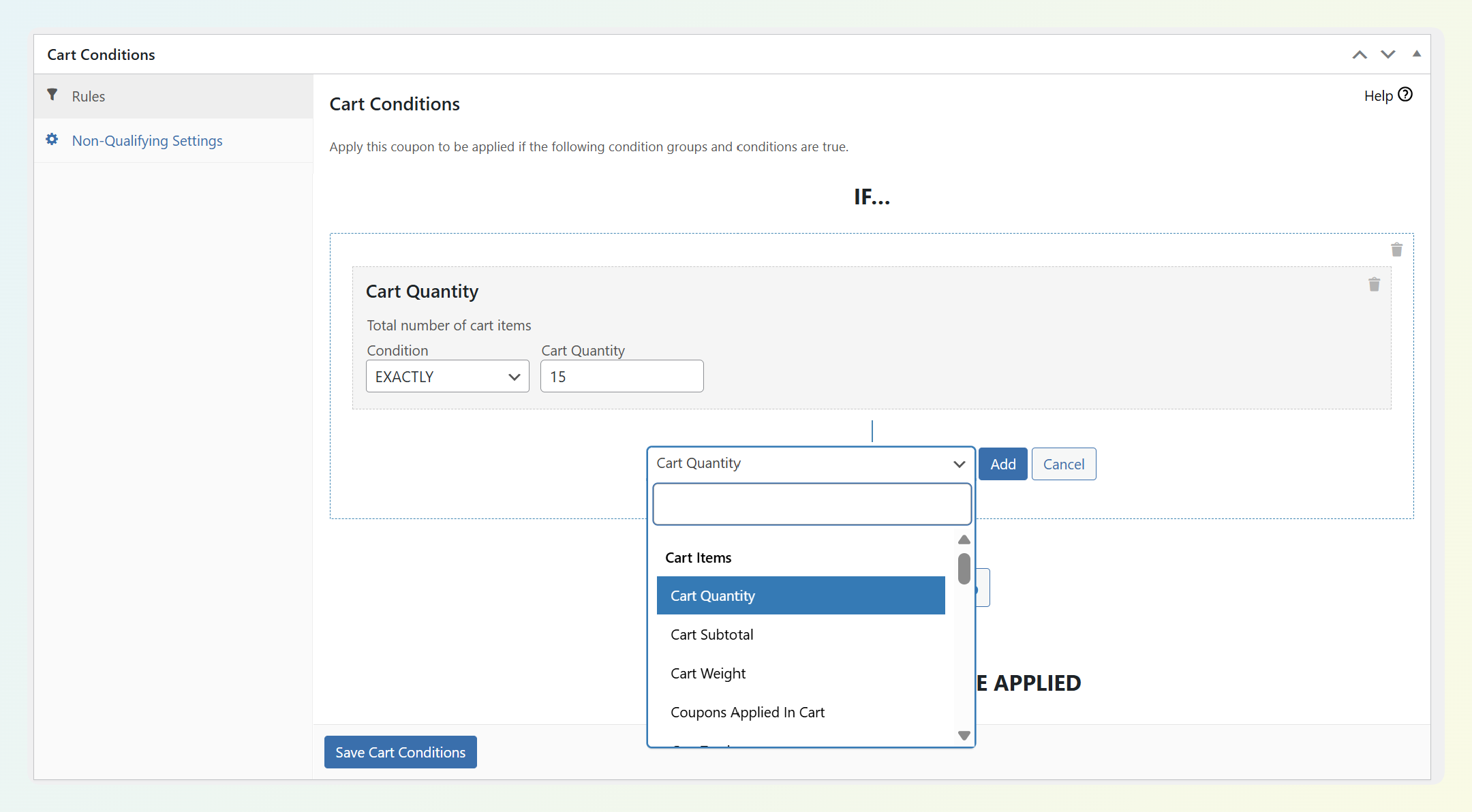
Use Advanced Coupons Premium’s cart conditions. Cart conditions can help agencies apply tighter rules around who can use an offer and when it should apply. That gives you more structure than relying on default coupon settings alone.
For more on protecting individual coupon setups from misuse, see our guide on how to prevent coupon fraud.
A Common Agency Pattern
Coupon settings can become risky when multiple people are editing them without a clear handoff. Even a small change to usage limits, customer conditions, or scheduling can affect who gets access to the offer. That is why it helps to document the setup clearly and ask clients to check in before editing live campaigns.
Licensing At Scale: When Unlimited Sites Starts Making Sense
Per-site licensing is a reasonable starting point when you manage one or two stores. Across a portfolio, it compounds quickly — and the break-even point is lower than most agencies expect.
| Client Sites | Per-Site (Growth $99.50/yr each) | Business ($199.50/yr unlimited) | All Access ($249/yr unlimited) |
|---|---|---|---|
| 1 site | $99.50 | $199.50 | $249 |
| 2 sites | $199 | $199.50 | $249 |
| 3 sites | $298.50 | $199.50 ✓ break-even | $249 |
| 5 sites | $497.50 | $199.50 | $249 |
| 10 sites | $995 | $199.50 | $249 |
At three client installs, the Advanced Coupons Business plan ($199.50/yr, unlimited sites) costs less than three Growth licenses. At five sites, the saving is nearly $300/year. At ten, it’s close to $800.
The operational benefit is as significant as the cost saving. One renewal date. One account. One update cycle across every client install. No per-client license tracking.
If you also manage loyalty programs or gift card setups for clients, the All Access Bundle ($249/yr, unlimited sites) covers Advanced Coupons Premium, Loyalty Program, and Advanced Gift Cards across every site — for less than the cost of three single-site Growth licenses.
Agency Coupon Checklist: What To Set Up On Every Client Site
Here’s a practical checklist agencies can use when they need to manage WooCommerce coupons across multiple sites more consistently. These steps help reduce the most common problems: inconsistent naming, expired offers, unclear ownership, and unnecessary manual cleanup.
At coupon setup:
- Install Advanced Coupons Premium under your unlimited sites license — one install, no per-client cost
- Set a naming convention before creating any coupon:
[CLIENT]-[TYPE]-[MONTH][YEAR] - Screenshot the coupon settings panel immediately after creation — store in the client folder
- Set a scheduled end date on every time-limited promotion — no manual deactivation required
- Enable per-customer usage limits on single-use offers to reduce repeat redemptions and keep campaign rules tighter.
- Add cart conditions where relevant — first-time buyer restriction, minimum order value, product category restrictions
- Send the client a setup brief — what the coupon does, what each setting means, and a clear ask to check before editing
Ongoing:
- Restrict coupon editing access by WordPress user role if the client has a history of making unsanctioned changes
- Audit active coupons quarterly — log into each site, sort by expiry date, deactivate anything that should have ended
- Check usage stats monthly on high-volume campaigns — flag unusual redemption spikes for review
This adds some additional time to the initial coupon setup. It removes hours of cleanup, client conversations, and margin loss over the course of the engagement.
Frequently Asked Questions
Can I manage WooCommerce coupons across multiple sites from one dashboard?
If you’re managing separate client WooCommerce installs, there isn’t a built-in central coupon dashboard that lets you control every store’s promotions from one place. In practice, agencies usually rely on a documented coupon workflow, consistent naming, and separate site-management tools for updates or monitoring. If you’re working inside a true WordPress Multi-Site setup, the workflow is different and should be treated as its own implementation case.
Can agencies use Advanced Coupons on client websites?
Yes. Advanced Coupons’ unlimited-site plans are positioned for agencies and groups that manage multiple stores, including use on client websites. If you’re running a WordPress Multi-Site install specifically, the official guidance is to use an Unlimited Sites license and network-activate the plugin from there.
What’s the best way to standardize coupon setups across client sites?
The most reliable approach is to use a documented workflow instead of rebuilding each coupon from memory. Start with a standard naming format, define the rules you want to reuse, and use the same setup checklist across every client store. Then adjust store-specific details like products, discount values, schedules, and customer restrictions before publishing.
How many sites does the Advanced Coupons unlimited license cover?
The Business plan ($199.50/yr) and All Access Bundle ($249/yr) are both sold as unlimited-site licenses. If you’re managing multiple WooCommerce sites, those are the plans designed for broader site coverage.
Wrapping Up
Agency-scale coupon management is a systems problem. The failure modes include expired promotions, inconsistent setups, clients who break their own rules, and licensing costs that compound over time. They usually point back to the same root issue: no repeatable process.
If you need to manage WooCommerce coupons across multiple sites, a documented workflow will usually save more time than trying to rebuild every campaign from scratch. A reusable coupon template library, scheduling by default, client documentation, role-based access controls, and the right license structure transform coupon management from a recurring headache into a predictable part of client delivery.
That is where Advanced Coupons can help. It gives agencies stronger coupon features to work with at the store level, including scheduling, cart conditions, and more flexible promotion rules, while the unlimited-sites plans make it easier to support multiple client stores under one setup.
And if your agency also handles loyalty rewards or gift card campaigns, the All Access Bundle gives you a broader set of tools without adding separate renewals for each one.