
You have switched your cart and checkout to the WooCommerce blocks, or you are about to, and you want to know whether your coupons still work. The short answer is yes. This page covers which Advanced Coupons features carry over unchanged, the handful that behave differently, and how store credit, loyalty points, and gift cards behave on the block checkout.
Do your coupon features still work on the block cart and checkout?
Yes. Advanced Coupons ships a dedicated integration for the WooCommerce Cart and Checkout Blocks, so your coupons and discounts apply on the block pages just as they do on the classic ones. Most features work with no change at all. There are a couple of small differences worth knowing about, covered further down.
What works on the block cart and checkout
The core coupon features all work on the block cart and checkout. This includes applying a coupon code, Auto Apply coupons, URL Coupons, Cart Conditions, and Shipping Overrides. Discount logic runs on the server, so your totals update correctly no matter which cart or checkout your store uses.
BOGO deals and the Add Products feature also work. When a shopper qualifies for a free or discounted gift, the item is added to the block cart the same way it is on the classic cart.
Cashback coupons and Advanced Usage Limits work too. Cashback is credited after the order completes, and usage limits are checked when the coupon is applied, so both behave the same on either checkout.
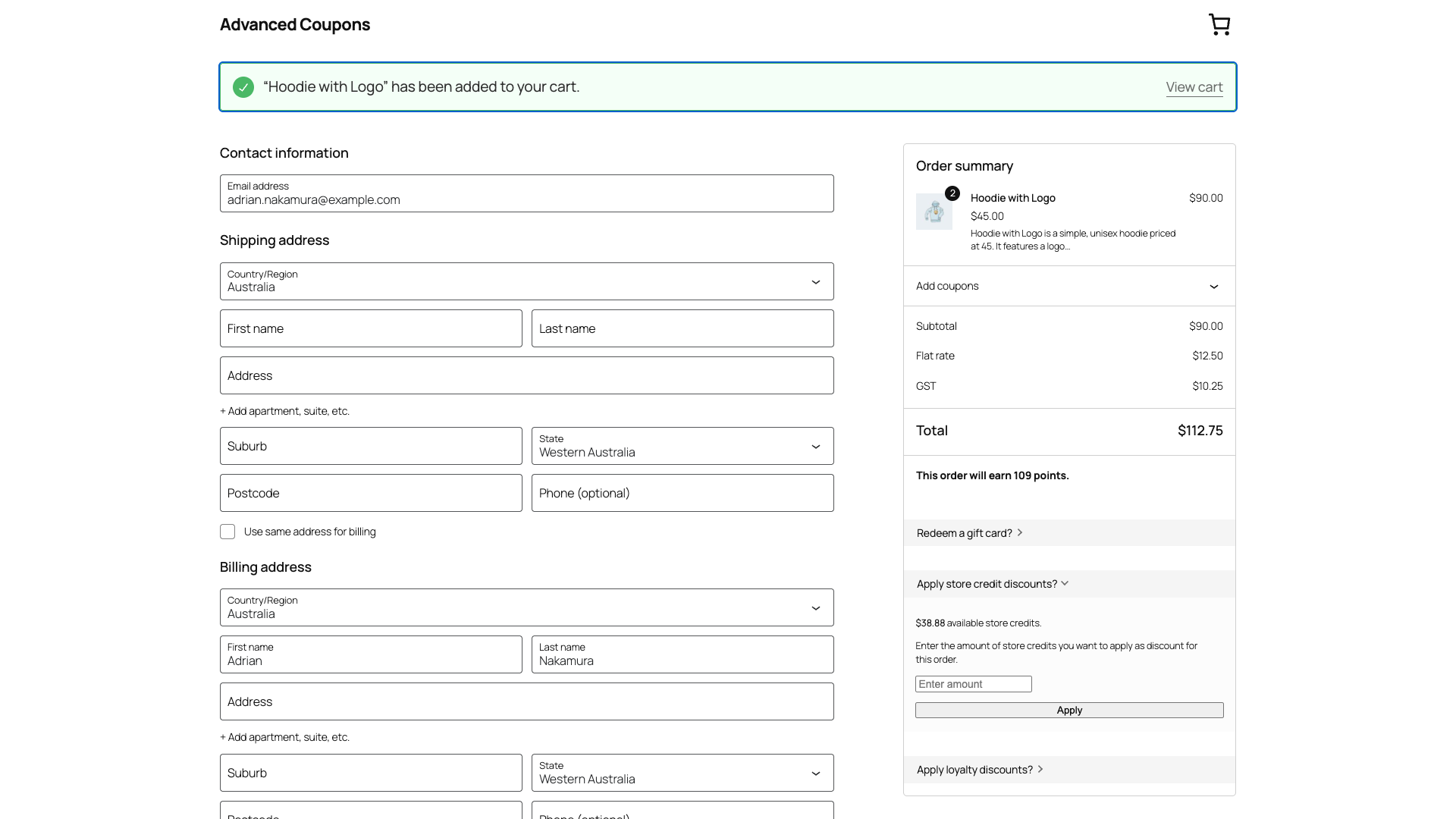
Store credit works on the block checkout. Auto-applied store credit is deducted from the order total automatically, and the store credit panel, where a shopper enters an amount and applies it, also appears on the block checkout, controlled by the same setting you use for the classic checkout.
Loyalty points work on the block cart and checkout through Loyalty Program for WooCommerce. Shoppers can redeem their points from the redeem form on the block checkout, and the “This order will earn N points” preview shows on both the block cart and checkout.
Advanced Gift Cards work on the block checkout through Advanced Gift Cards for WooCommerce. A “Redeem a gift card?” panel appears on the block checkout, and redeeming a card adds its value to the shopper’s store credit, which then discounts the order.
A few things to know
One Click Apply
The One Click Apply notice tells a shopper their cart qualifies for a coupon and offers a one-click button to apply it. On the block cart and checkout, the notice appears but its apply button currently shows as plain text, so there is nothing to click. The notice works correctly on the classic cart and checkout. The cause is that WooCommerce’s block notices strip the <button> element and keep only its text, so there is no button left to bind a click to. Shoppers can still enter the coupon code by hand, or you can use the classic cart and checkout if you rely on this feature.
Auto Apply behaves the same on both
Auto Apply does not pick up every coupon. Some usage restrictions stop a coupon applying automatically, and which ones depends on your Advanced Coupons version. Whatever the rules are on your store, they are identical on the block cart and checkout and on the classic pages, so this is never a blocks problem. If a coupon does not apply on its own, a shopper can still enter the code by hand.
Gift cards and store credit need a logged-in account
Redeeming a gift card or store credit requires the shopper to be logged in. A guest sees a Login or sign up link in the gift card panel. The store credit panel is not shown to guests at all. Gift card redemption also appears on the block checkout only, not on the block cart. Both of these are the same limits that apply on the classic checkout, so this is not a difference between block and classic.
Compatibility at a glance
| Feature | On the block cart and checkout |
|---|---|
| Coupons: apply, Auto Apply, URL Coupons, Cart Conditions | Works |
| BOGO deals and Add Products (free or discounted gift) | Works |
| Shipping Overrides | Works |
| Cashback and Advanced Usage Limits | Works |
| Store credit: auto-apply and manual redeem | Works (on the checkout) |
| Loyalty points: redeem and earn | Works |
| Advanced Gift Cards: redeem | Works (checkout, logged-in shoppers) |
| One Click Apply notice | Apply button does not work on the blocks yet |
What about product labels?
Advanced Promo Kit displays product labels and badges on your product and shop pages. It does not add anything to the cart or checkout, so your labels look and work the same no matter which cart or checkout your store uses.
Frequently asked questions
Do I need to change any settings to use Advanced Coupons with the block cart and checkout?
No. The block integration is built in. Your existing coupons, store credit, loyalty, and gift card settings apply on the block pages automatically.
Can guests redeem a gift card or store credit on the block checkout?
No. Redeeming a gift card or store credit requires a logged-in account, and a guest is prompted to log in or sign up first. This is the same on the classic checkout.
Why does the One Click Apply button not work on my block checkout?
This is a known issue on the block cart and checkout, where the button renders as plain text. The classic cart and checkout are not affected. A fix is in progress. Shoppers can still apply the coupon by entering the code manually.
Need help?
If you have a question or run into any issues, we are here to help.
- Premium users: Open a support ticket
- Free users: Visit our community forum

