

Most WooCommerce store owners can tell you how many times a coupon was used. Far fewer can tell you whether it actually drove meaningful results. That’s where WooCommerce coupon reporting becomes important.
A coupon used 400 times might look like a success at first glance. But if most of those shoppers were already ready to buy, the discount might have reduced your margin more than it increased your revenue. Usage count alone doesn’t tell you that. A better WooCommerce coupon report helps you look deeper.
In this guide, we’ll look at what native WooCommerce coupon reporting shows, which coupon metrics actually matter, and where a more detailed reporting setup can help you understand coupon performance more clearly. Let’s get right into it!
What Native WooCommerce Coupon Reporting Shows
WooCommerce does have built-in coupon reporting, and it’s more useful than many store owners realize. In WooCommerce > Analytics > Coupons, you can view coupon performance for a selected date range, filter by a single coupon or compare multiple coupons, sort by coupon code, orders, and amount discounted, and export the report to CSV.
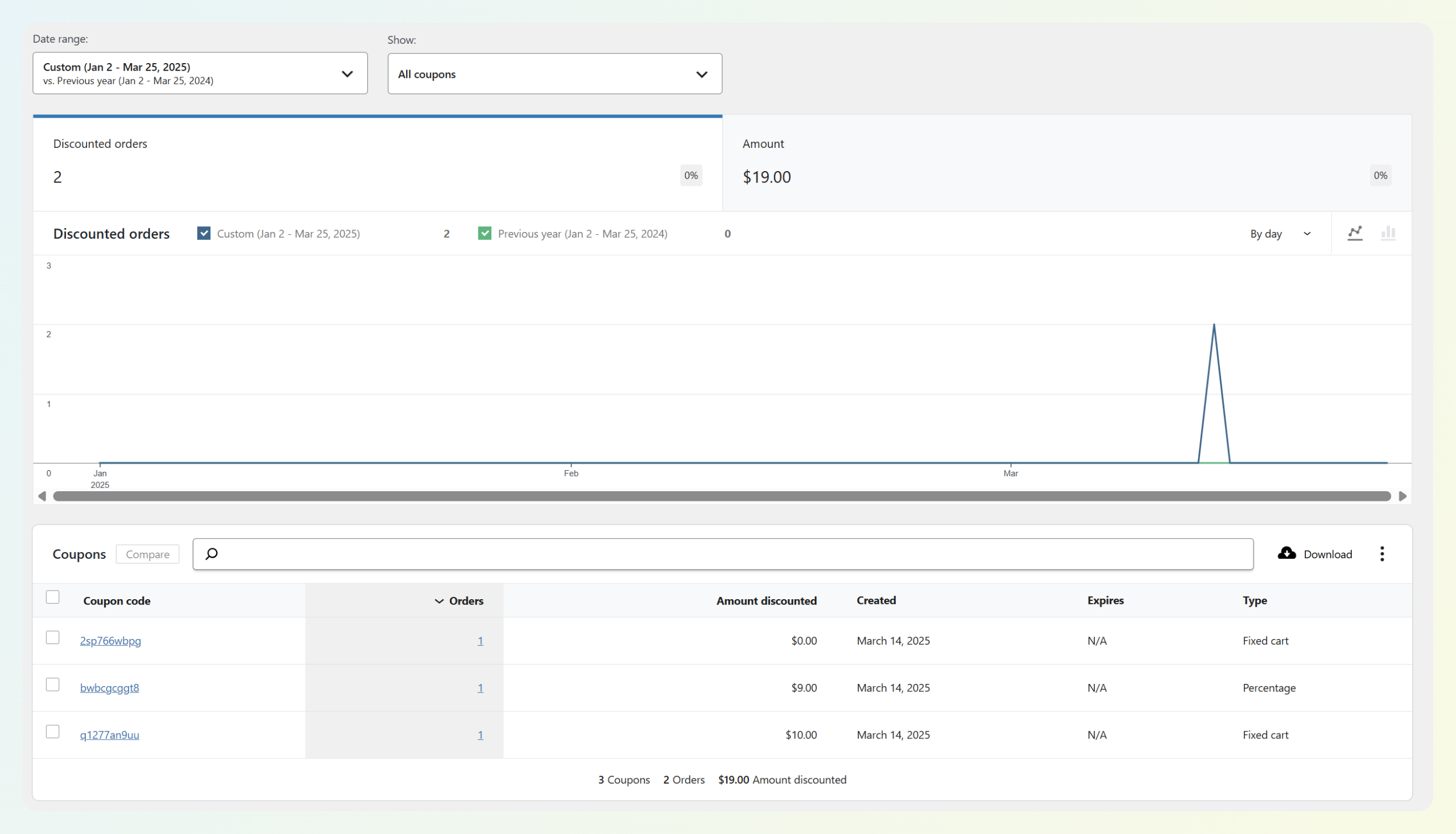
That said, native WooCommerce coupon reporting still has limits. It can show coupon activity and discount totals, but it doesn’t fully answer bigger performance questions like whether a coupon drove incremental revenue, whether it mainly discounted existing buyers, or how it performed by campaign intent. In other words, it helps you see that a coupon was used, but not always whether it truly worked.
If you want a more detailed WooCommerce coupon report, Advanced Coupons becomes helpful here. In addition to extending WooCommerce’s coupon features, it lets you apply a date range and quickly review coupon usage, discount totals, discounted order revenue, and coupon activity trends without piecing everything together manually.
Which Coupon Metrics Actually Matter
A native coupon report can tell you what happened on the surface. But if you want to understand whether a coupon actually improved performance, you need to look beyond usage count alone. These are the metrics that make WooCommerce coupon reporting more useful in practice:
Redemption rate
Of the customers who received or saw the coupon, how many used it? A 2% redemption rate on 10,000 email sends looks very different from a 40% rate on 100 targeted sends. If you don’t know how many people had access to the coupon, the redemption rate is hard to calculate — but it’s still the right question to start with.
Revenue per redemption
Total order revenue from coupon orders ÷ number of redemptions. This tells you the average order size when a coupon is involved. Compare it to your store’s baseline Average Order Value (AOV). If the coupon order AOV is significantly lower than your baseline, customers are using the coupon on small orders, and you might want a minimum cart value condition on the next run.
Discount-to-revenue ratio
For every $1 of discount given, how much gross revenue came in from coupon orders? There’s no universal ideal ratio here. What counts as healthy depends on your margins, product mix, and campaign goal. In general, though, a lower discount-to-revenue ratio deserves a closer look.
New vs. Returning buyer split
Are coupons acquiring new customers or discounting repeat buyers who would have come back anyway? If most coupon redemptions come from returning customers, the offer may be rewarding existing demand more than generating new demand.
Redemption velocity
Did redemptions spike in the first 24 to 48 hours after you sent the coupon, suggesting urgency worked? Or did they spread out over a longer period, suggesting the code may have circulated beyond your original audience? If a coupon keeps appearing well after the original campaign window, it may be worth checking whether it has been shared on coupon sites.
RELATED READ: How To Prevent Coupon Fraud In WooCommerce

How Advanced Coupons Improves WooCommerce Coupon Reporting
While native WooCommerce coupon reporting already gives you a built-in coupon report, Advanced Coupons adds a dashboard view that makes promo activity easier to scan at a glance. In the Advanced Coupons dashboard, you can apply a date range and review coupon-related widgets without digging through multiple reports.
The dashboard highlights key coupon metrics such as Coupons Used, Amount Discounted, Orders Discounted, and Discounted Order Revenue for the selected period. It also shows tables for Most Used Coupons and Recently Created Coupons, which can help you quickly spot active offers or newly launched codes. It can also show widgets for store credits, gift cards, and loyalty activity, depending on which other Advanced Coupons plugins are active.
The dashboard shows:
- Coupons Used: How many times coupons were used during the selected period
- Amount Discounted: The total discount value applied
- Orders Discounted: How many orders included a coupon
- Discounted Order Revenue: The revenue tied to discounted orders
- Most Used Coupons: Which coupon codes were used the most
- Recently Created Coupons: A quick view of newer coupon codes in your store
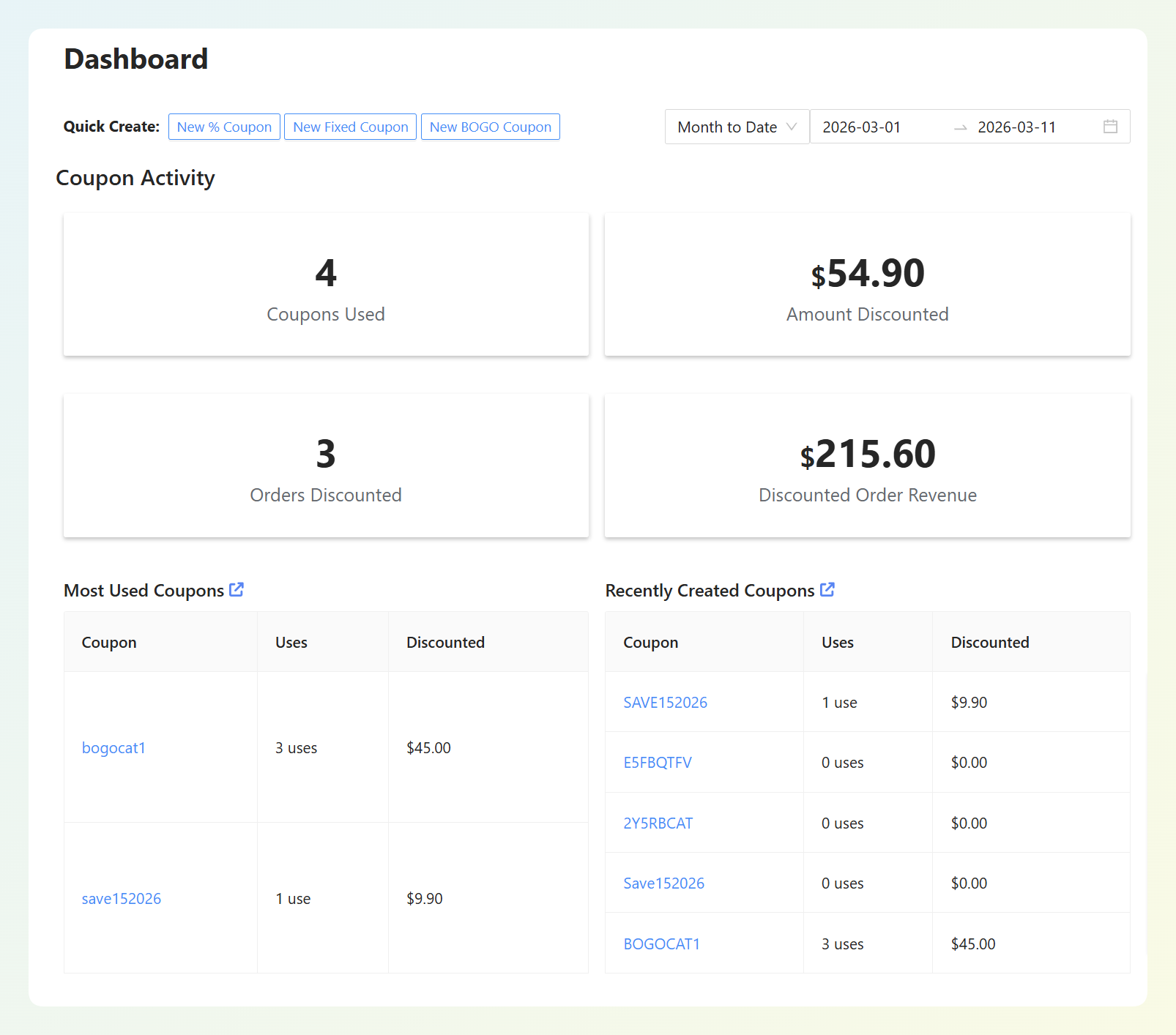
The most practical feature here is the date range filter. If you ran a short campaign, like a 72-hour flash sale, you can narrow the dashboard to that window and see how much coupon activity happened during that period. That makes it easier to compare one promo against another instead of relying on all-time coupon totals.
We’ve also seen how useful this kind of visibility can be in practice. In our Mencare case study, founder Edwin van der Panne shared that their coupons generated over €50,000 in revenue from just €1,700 in coupon value in one year. Looking at coupon-attributed revenue alongside discount value can give stores a clearer view of performance than usage count alone.
How To Read A WooCommerce Coupon Report
A WooCommerce coupon report is most useful when you treat it as a decision-making tool, not just a scorecard. These common patterns can help you decide what to test next.
High redemption rate, high revenue per order
This usually suggests the offer is resonating and still driving meaningful order value. In that case, the coupon may be worth repeating, or testing with a slightly smaller discount to see whether response stays strong.
High redemption rate, low revenue per order
Customers are using the coupon on small carts. The offer is compelling but attracts low-AOV purchases. Add a minimum cart value condition on the next run and watch whether redemption rate drops or holds. If you’re using Advanced Coupons, you can add specific cart conditions, such as a minimum cart total, product or category requirements, cart quantity rules, or customer role conditions to make the offer more targeted.
Low redemption rate, high revenue per order
This often points to a smaller but higher-intent group responding well. The offer may still be working, even if volume is limited. Before changing it, check whether the campaign was intentionally sent to a narrow segment.
Low redemption rate, low revenue per order
This usually points to either a visibility problem or an offer problem. The coupon may not have been seen enough, or it may not have felt compelling enough to use. Before changing the discount itself, check the basics first: where the coupon was shown, who received it, whether the timing made sense, and whether the message around it was strong enough.

What Coupon Reporting Still Can’t Tell You
This is the hardest part of coupon analytics: standard coupon reporting can’t definitively tell you whether a coupon generated incremental revenue or simply discounted revenue that would have come in anyway.
To answer that properly, you’d need a control group — a comparable set of customers who didn’t receive the coupon during the same period — and then compare their purchase behavior. Most stores don’t run that kind of test, so in practice, store owners usually rely on signals and patterns instead.
What you can use as proxies:
Coupon AOV vs. Baseline AOV
If orders placed with a coupon have a similar AOV to your store’s usual average, that can suggest many of those buyers may have purchased regardless. If coupon orders have a noticeably higher AOV, that may point to more incremental behavior, such as customers spending more because the discount made a larger cart feel worthwhile.
New buyer percentage
If a larger share of coupon redemptions comes from first-time buyers, the coupon may be helping generate new demand. If most redemptions come from repeat customers, the offer may be discounting purchases that were already more likely to happen.
The practical takeaway is simple: don’t evaluate a coupon campaign on revenue alone. Look at the discount-to-revenue ratio, new buyer mix, and AOV relative to your baseline. Together, those signals give you a more honest picture than usage count alone.
Frequently Asked Questions
Does WooCommerce have built-in coupon reporting?
Yes. WooCommerce has built-in coupon reporting in Analytics > Coupons, where you can use date ranges, filter by coupon, compare coupons, sort results, and download report data as CSV.
How do I track which marketing channel drove a coupon redemption?
The simplest way is to use a different coupon code for each channel — for example, one for email, one for social, and one for affiliates or partners. That makes it much easier to compare coupon performance by code inside your reporting workflow. In WooCommerce Analytics, you can filter and compare coupons directly, which helps you see which channel-specific code performed best.
What’s a good coupon redemption rate?
There’s no universal “good” coupon redemption rate. It depends on your audience, how targeted the offer is, where the coupon was promoted, and how compelling the discount feels. The best benchmark is usually your own past campaigns, especially ones sent through similar channels to similar audiences.
Conclusion
Good WooCommerce coupon reporting helps you move beyond simple usage counts and look at whether your promotions are actually supporting your store goals. Instead of judging a coupon by redemptions alone, it’s more useful to look at the bigger picture, including how much revenue it influenced, how much discount it gave away, and what kind of customer behavior it encouraged.
In this guide, we covered:
- What native WooCommerce coupon reporting shows
- Which coupon metrics matter most
- How Advanced Coupons adds more visibility through its dashboard
- How to read coupon performance patterns more clearly
- What coupon reporting still can’t fully tell you without deeper testing
Coupon reporting works best when you use it to guide better decisions, not just confirm that a code was used. And if you want an easier way to monitor coupon activity alongside discounts, store credits, gift cards, and loyalty features, Advanced Coupons gives you a more convenient view of that data in one place.
Hope this guide helped!