Ecommerce personalization sounds like something only large retailers can do. But for many WooCommerce stores, it starts with a much simpler idea: showing shoppers offers that match what they’re buying, how much they’re spending, or what type of customer they are.
Instead of sending the same coupon to everyone, you can use Advanced Coupons to create targeted discounts that only apply when certain cart or customer conditions are met. That keeps your promotions more relevant without requiring an enterprise personalization platform or a custom development team.
This guide covers what ecommerce personalization means for WooCommerce stores, the types of personalization available to you today, and how to start delivering targeted offers using cart conditions, role-based coupon restrictions, and Advanced Coupons Premium purchase-history targeting.
What Is Ecommerce Personalization?
Ecommerce personalization is the practice of tailoring the shopping experience based on who the customer is, what they’ve done before, and what they’re doing right now. It means different customers see different offers, different messaging, and different incentives depending on their behavior and relationship with your store.
Why does this matter? Because generic, one-size-fits-all promotions leave money on the table. According to McKinsey, 71% of consumers expect companies to deliver personalized interactions, and 76% get frustrated when this doesn’t happen. That frustration translates directly into lost sales and lower retention.
The financial impact is equally significant. McKinsey’s research also found that companies excelling at personalization generate 40% more revenue from those activities than average players. For a WooCommerce store, even a modest improvement in how you target promotions can compound into meaningful revenue gains over 12 months.
Here’s the key distinction most guides miss: ecommerce personalization is not just product recommendations. It can include targeted offers based on cart contents, conditional messaging, role-based coupon access, loyalty rewards, and other experiences that adapt to customer behavior. WooCommerce store owners can build many of these experiences through the right plugin stack.
Types Of Ecommerce Personalization
There are several types of ecommerce personalization available to WooCommerce store owners. Each one addresses a different part of the customer experience, and the most effective stores combine multiple types into a cohesive strategy.
Product recommendations
Product recommendations are algorithmically generated suggestions based on browsing history, purchase history, or what similar customers have bought. WooCommerce includes basic “Related Products” functionality out of the box, though third-party recommendation engines offer more sophisticated matching.
Dynamic pricing and targeted offers
Dynamic pricing and targeted offers change based on customer segment, cart contents, or shopping behavior. This is where cart conditions in Advanced Coupons do the heaviest lifting. Instead of offering the same 10% discount to everyone, you create offers that apply only when specific conditions are met, such as cart subtotal, customer role, product category, or purchase-history rules.
Personalized messaging and content
Personalized messaging includes email triggers, on-site banners, and targeted calls to action that change based on who’s viewing them. Abandoned cart emails, post-purchase follow-up sequences, and segment-based campaigns all fall into this category. WooCommerce handles this through email marketing integrations.
Role-based and account-level personalization
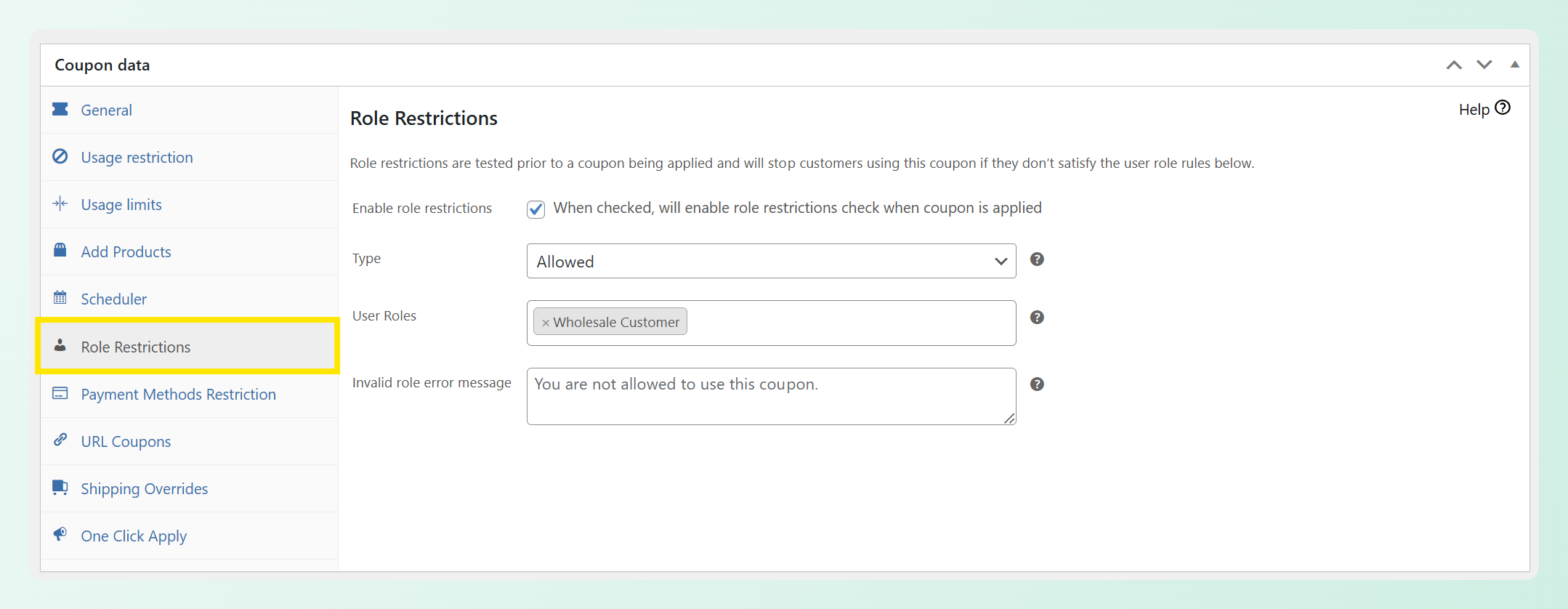
Role-based personalization helps you control which shoppers can access certain offers based on account type or user role. For example, you might create a wholesale-only coupon, subscriber-exclusive discount, VIP reward, or guest-friendly first-purchase incentive. Advanced Coupons supports role-based coupon restrictions and customer role cart conditions, so you can make these offers available only to the shoppers they’re meant for.
How WooCommerce Supports Ecommerce Personalization
WooCommerce core ships with limited native personalization. You get recently viewed products, basic coupon conditions (minimum spend, usage limits), and related product suggestions. For a store that wants to go further, the plugin ecosystem fills the gap.
This is actually WooCommerce’s greatest strength when it comes to ecommerce personalization. Rather than relying on one large personalization platform, you can assemble a stack from purpose-built tools. Advanced Coupons handles conditional coupon offers and role-based coupon access. Email marketing plugins handle automated communication. Wishlist tools handle discovery and intent signals. Each tool does its job well, and they work together without requiring a data science team.
For a deeper look at the offer layer, see our cart conditions ultimate guide, which walks through how to apply coupon rules in Advanced Coupons.
🎯 Personalization tip: A generic 10% coupon is still a blanket promotion, even if it uses a coupon plugin. The offer becomes more personalized when the coupon rules match a specific customer moment, such as a cart subtotal threshold, product category, user role, or purchase-history condition available in Advanced Coupons Premium. Start with a small set of clear segments, then expand as you learn which offers customers actually use.
Personalizing Offers With Cart Conditions
Cart conditions are the Advanced Coupons feature that transforms generic coupons into personalized offers. Each condition acts as a filter: the coupon only activates when the customer’s cart, account, or purchase history matches the rules you’ve set. Here’s how the main condition types work in practice.
Cart subtotal conditions
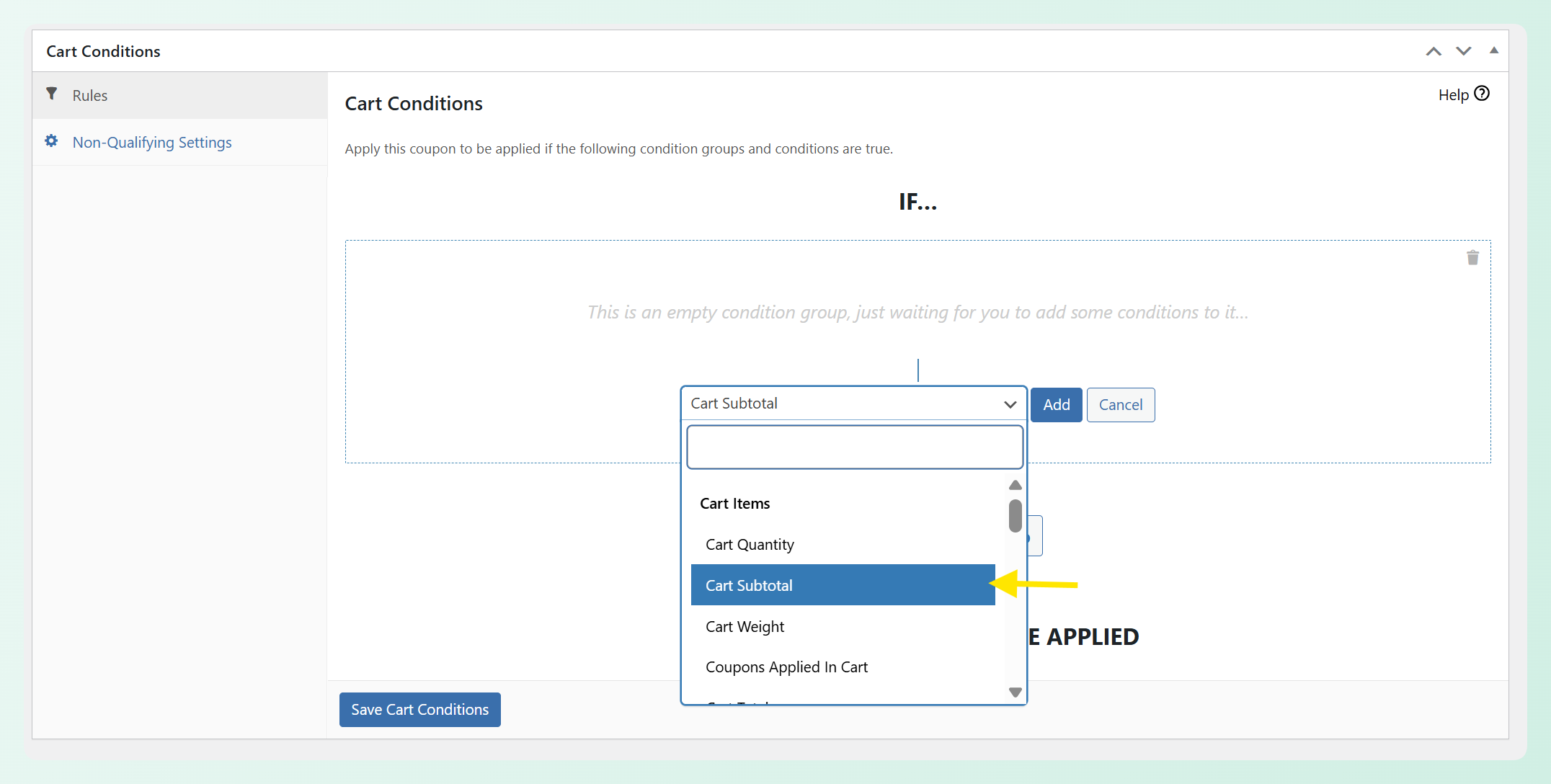
Cart subtotal conditions let you create spend-more-save-more incentives. A coupon with a “cart subtotal over $100” condition only applies when the cart has crossed that spending threshold. This can reward higher-value orders and encourage customers near the threshold to add one more item. A typical setup: “Spend over $100, get 15% off your order.”
Product category conditions
Product category conditions target customers based on what’s in their cart. If someone is buying from your accessories category, you can trigger a coupon specifically for that purchase context. This is far more relevant than a blanket discount because the offer matches what the customer is already interested in. For a detailed walkthrough, see our guide on cart conditions.
Customer purchase history conditions
Purchase history conditions reward repeat buyers based on their relationship with your store. In Advanced Coupons Premium, you can create rules based on signals like whether a customer has ordered before, their number of previous orders, or their total customer spend. For example, you might create a loyalty-style coupon that only applies after a customer reaches a certain order count, or a VIP offer based on total spend over time.
Customer role conditions
Role conditions let you deliver different coupon offers to different customer types. Wholesale customers can access wholesale-only discounts. Subscribers can receive subscriber-exclusive offers. Guest shoppers can be eligible for first-purchase incentives. This gives you a practical way to personalize coupon access based on user role.
Combining conditions for precision targeting
The real power of cart conditions shows up when you combine them using AND/OR logic. For example, a coupon with “cart subtotal over $75 AND product is in the Accessories category AND customer has an eligible user role” turns a generic discount into a more precise offer for a specific shopping context.
If you’re using Advanced Coupons Premium, you can make this even more precise by layering in purchase-history or total-spend conditions.
You can give personalized coupons that feel individually crafted, even though the system runs automatically once you’ve configured the conditions. That’s the difference between personalization that scales and personalization that requires constant manual effort.
Beyond Coupons: Other WooCommerce Personalization Tools
Cart conditions handle the offer layer of ecommerce personalization, but a complete personalization strategy involves multiple tools working together. Here are three additional approaches that complement conditional offers.
Wishlist-based personalization
Wishlists capture explicit purchase intent. When a customer saves a product to their wishlist, they’re telling you exactly what they want. SaveTo Wishlist Pro can turn that signal into action through automations like price-drop alerts. If a wishlisted product goes on sale, the customer can get notified automatically. This is personalization driven by the customer’s own behavior, which makes it feel helpful rather than intrusive.
AI-assisted product content and support
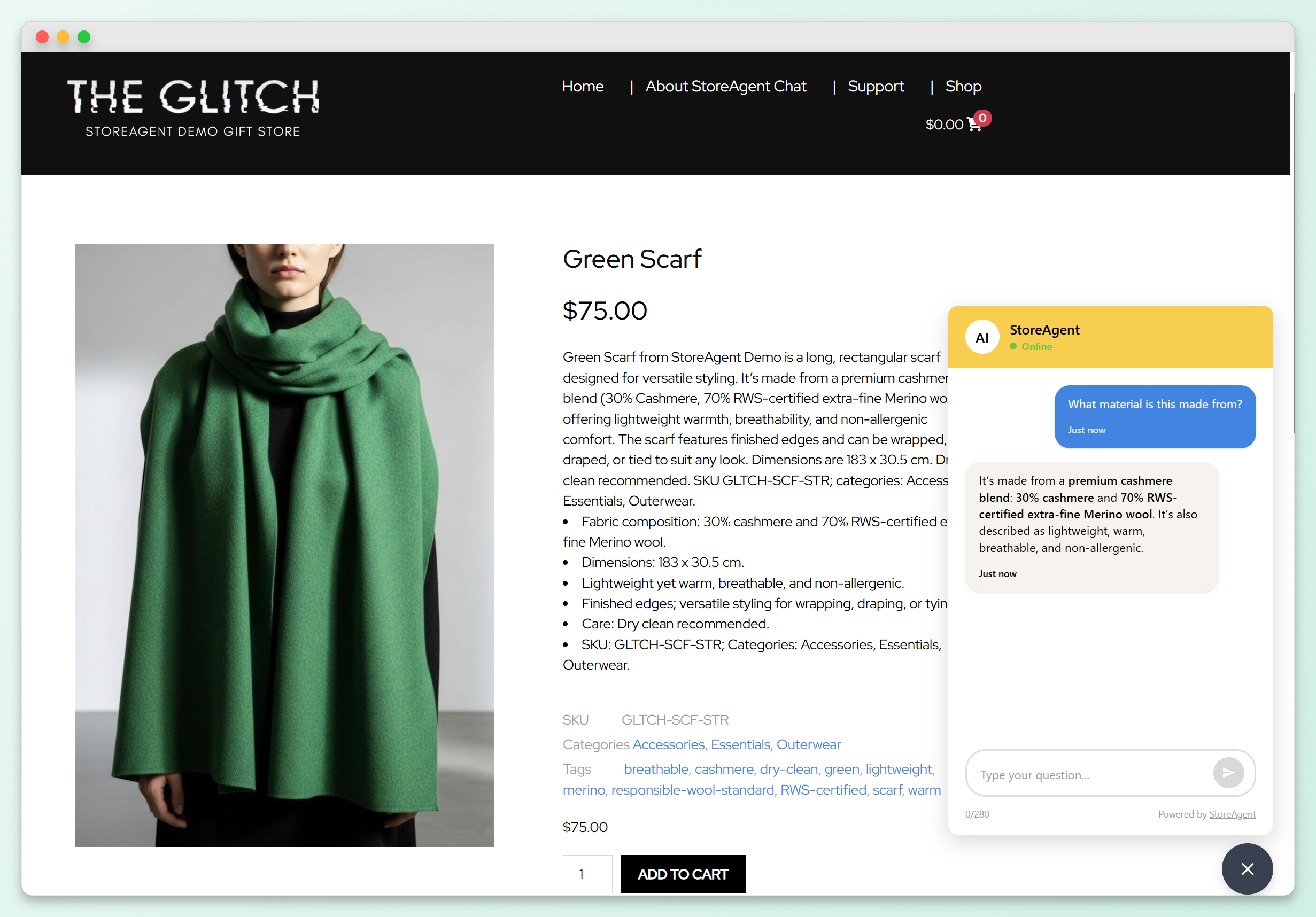
AI tools can also support the broader personalization experience by making product content and customer support more relevant. StoreAgent, for example, is a WooCommerce AI plugin that includes content tools and an AI chatbot for WooCommerce, helping shoppers get product answers while giving store owners a faster way to improve product descriptions, tags, and review summaries. It does not replace cart conditions, but it can make the shopping experience feel more helpful and tailored.
Email automation triggers
Email automation rounds out the personalization stack by handling communication timing. Abandoned cart sequences re-engage customers who left without buying. Post-purchase follow-ups encourage repeat orders. Segment-based campaigns deliver different content to different customer groups. WooCommerce integrates with most major email marketing platforms, making it straightforward to connect your store data to your email strategy.
The key takeaway: personalization is not one tool, it’s a stack. Advanced Coupons handles the offer layer. Wishlist tools handle discovery and intent. Email platforms handle communication. AI tools can support product content, customer support, and store insights. Together, these tools help you create shopping experiences that feel more relevant without building everything from scratch.
Personalization’s Impact on Customer Lifetime Value
Personalized offers can support customer lifetime value because they make repeat purchase campaigns feel more relevant. A first-time shopper, a loyal customer, and a high-spend customer usually need different incentives. When your promotions reflect those differences, you have a better chance of encouraging another order without relying on the same blanket discount every time.
According to Epsilon, 80% of consumers are more likely to make a purchase when brands offer personalized experiences. For WooCommerce stores, that makes targeted coupons, segmented email campaigns, and customer-specific rewards worth testing as part of a retention strategy.
The MenCare case study shows this idea in practice. MenCare uses Advanced Coupons for personalized offers, store credit, pre-order campaigns, and auto-applied discounts to make promotions feel more thoughtful and relationship-driven. It’s a good example of how personalized coupon strategies can support both sales and customer connection when they’re used intentionally.
Getting Started: Your First Personalized WooCommerce Offer
You don’t need to build a complete personalization stack on day one. Start with one strategic move and expand from there.
Step 1: Identify your two most useful customer segments. New versus returning customers is often the simplest starting point because these groups usually need different incentives.
Step 2: Create one offer for each segment using cart conditions. Give new shoppers a first-purchase incentive, such as free shipping or a modest percentage discount. For returning customers, you can create a loyalty-style reward using Advanced Coupons Premium purchase-history conditions, or start with a simpler role-based or cart-content condition if you’re not using Premium yet.
Step 3: Run both offers long enough to compare redemption rates. Track which offers get used, which customer segment responds more, and whether you see any impact on average order value. This baseline data tells you where to invest more personalization effort.
Step 4: Add more conditions and segments based on what you learn. Layer in product category conditions, cart subtotal thresholds, role-based targeting, and Premium purchase-history rules as you learn what your customers respond to. A practical approach is to start simple, then add complexity gradually.
Check Advanced Coupons pricing to see which plan gives you access to the cart conditions and targeting features that power this approach.
Frequently Asked Questions
Do I need an enterprise personalization platform for my WooCommerce store?
No. Enterprise platforms like Dynamic Yield and Nosto are active ecommerce personalization platforms, but they are generally designed for broader personalization programs than a typical small WooCommerce store may need. If your goal is to start with targeted coupon offers, Advanced Coupons cart conditions, email automation, and wishlist tools can cover a practical first layer of ecommerce personalization without requiring a full enterprise setup.
How many cart conditions should I set up to start?
Start with a small number of cart conditions tied to clear segments, such as one offer for new shoppers and one for returning customers. This gives you a clean baseline for comparing personalized offers against more generic promotions. Once you have data from your own store, expand into additional conditions based on cart value, product category, user role, or Premium purchase-history targeting.
Can I personalize offers for guest customers who aren’t logged in?
Yes, but the type of personalization matters. Cart-content conditions, such as subtotal, product category, and item quantity, can work for guest shoppers because they depend on the current cart. Role-based conditions can also target guests through the guest role where supported. Purchase-history and total-spend targeting depend on customer/order data, so they are better suited to logged-in or identifiable customers and are Premium capabilities in Advanced Coupons.
What is the difference between personalization and segmentation?
Segmentation is grouping customers into categories (new, returning, wholesale, VIP). Personalization is acting on those segments by delivering different experiences to each group. Segmentation is the foundation. Personalization is what you build on top of it. Cart conditions in Advanced Coupons handle both: you define the segment through conditions, and the coupon delivers the personalized experience automatically.
Does ecommerce personalization work for small stores?
Yes. Ecommerce personalization can work for small stores because the basic principle is the same: make offers more relevant to the shopper’s current context. Smaller stores do not need complex personalization programs to start. Begin with simple segments, such as cart value, product category, customer role, or new versus returning shoppers, then expand as you learn what works.
Start Personalizing Your WooCommerce Store Today
Ecommerce personalization is not an enterprise-only capability. WooCommerce store owners can start delivering more targeted, behavior-driven offers using cart conditions, role-based coupon access, and Advanced Coupons Premium purchase-history targeting. The key is to start with simple segments, test what your customers respond to, and build from there.
Here’s what to take away from this guide:
- What Is Ecommerce Personalization? for a clear definition and the revenue impact data that makes this worth pursuing
- Types Of Ecommerce Personalization to understand the full range of options available to WooCommerce stores
- Personalizing Offers With Cart Conditions for the practical walkthrough of how each condition type works
- Beyond Coupons: Other WooCommerce Personalization Tools to see how wishlists, AI, and email automation complete the stack
- Getting Started: Your First Personalized WooCommerce Offer for a step-by-step approach you can start this week
Personalized offers work even better on top of a loyalty base, so it is worth reading about launching a WooCommerce rewards program next. Ready to move beyond generic coupons? Get started with Advanced Coupons and set up your first personalized WooCommerce offer today!