Running a WooCommerce store on a small-business budget means every promotion has to pull its weight. You may know coupons, loyalty rewards, and store credit can help bring customers back, but it’s hard to know where to start when many tools feel expensive and most marketing advice assumes you have a full team.
Here’s why that matters: doing nothing can get expensive too. According to Harvard Business Review, acquiring a new customer costs five to 25 times more than retaining an existing one. Every customer who buys once and never returns is a missed opportunity to build repeat revenue from the audience you already worked hard to earn.
This playbook focuses on small business ecommerce promotions that are practical, affordable, and easy to test. You’ll see how to start with the free Advanced Coupons plugin, where loyalty and store credit fit in, and when it makes sense to invest in premium tools.
Free Coupon Strategies Using Advanced Coupons (Free Plugin)
The free WooCommerce coupon plugin from Advanced Coupons extends WooCommerce’s native coupon system with practical promotion features you can start using right away. That makes it a strong starting point for small business ecommerce promotions you can test before investing in a larger marketing stack.
BOGO deals (basic)
Buy-one-get-one deals let you pair a free or discounted product with a qualifying purchase. The free version of Advanced Coupons supports product-level BOGO, which is enough for most small store scenarios.
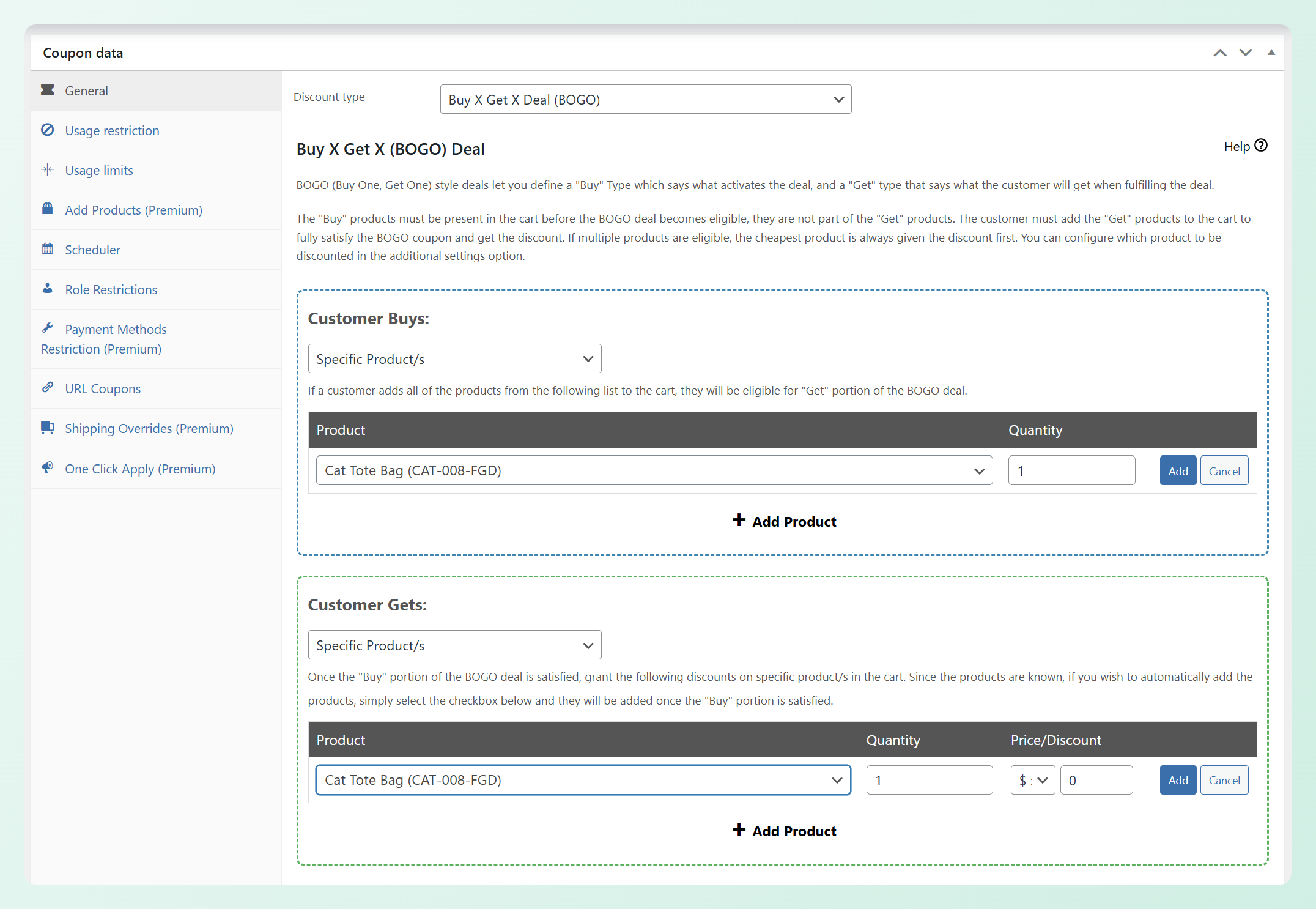
One practical small business use case is moving slow-selling inventory. You can pair a slower-moving product with a popular item so customers get extra value while you clear older stock. This can be more strategic than marking the product down on its own because the offer is tied to a qualifying purchase.
Cart conditions
Cart conditions let you apply coupons only when specific criteria are met. In the free plugin, you can set conditions based on cart subtotal, product/category presence, quantity, customer login status, and user role.
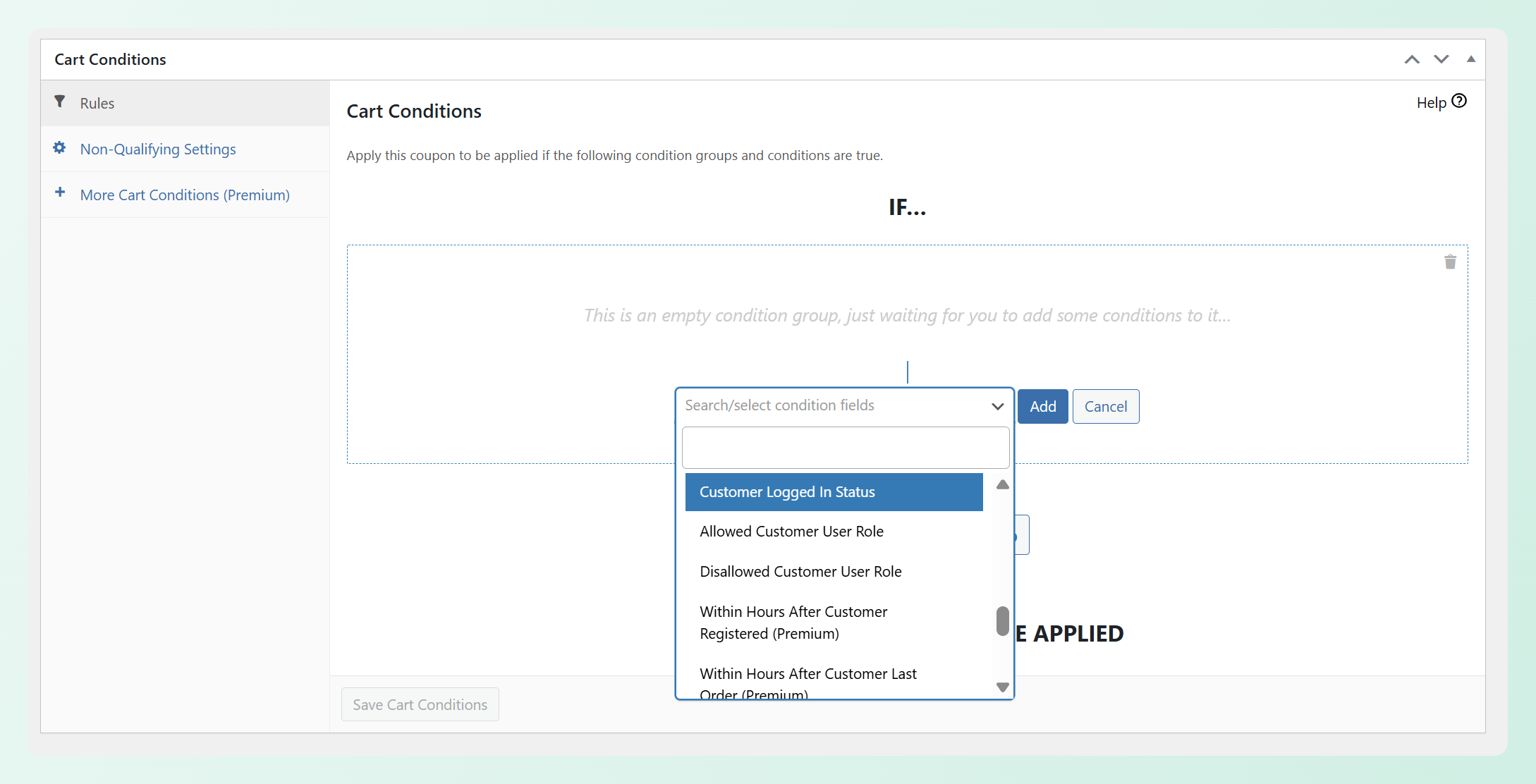
One high-impact use for small stores is a free shipping threshold. Set a cart condition so the coupon only applies once the subtotal reaches an amount that still protects your margins. Customers have a reason to add more to their cart, and you can raise average order value without discounting every product.
URL coupons
URL coupons generate a link that auto-applies a discount when clicked. No coupon code for the customer to remember or type.
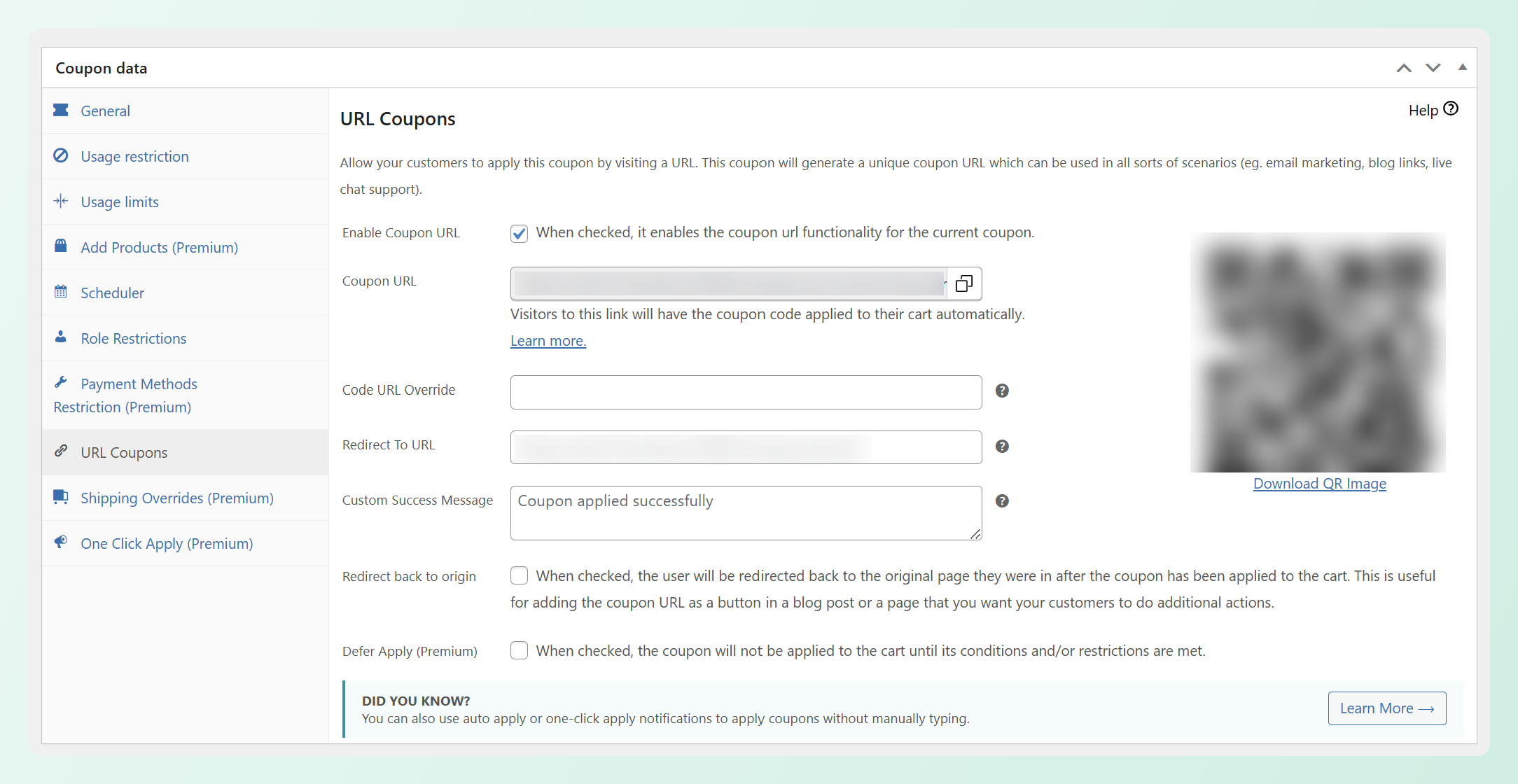
This is ideal for email campaigns, social media posts, and packaging inserts. Drop the link in a post-purchase email that says “Thanks for your order, here’s 10% off your next purchase,” and the customer clicks straight into a discounted cart. According to Bain & Company, a 5% increase in customer retention can boost profits by 25% to 95%. URL coupons in your post-purchase flow are one of the simplest retention tools available to a small store.
Scheduled coupons
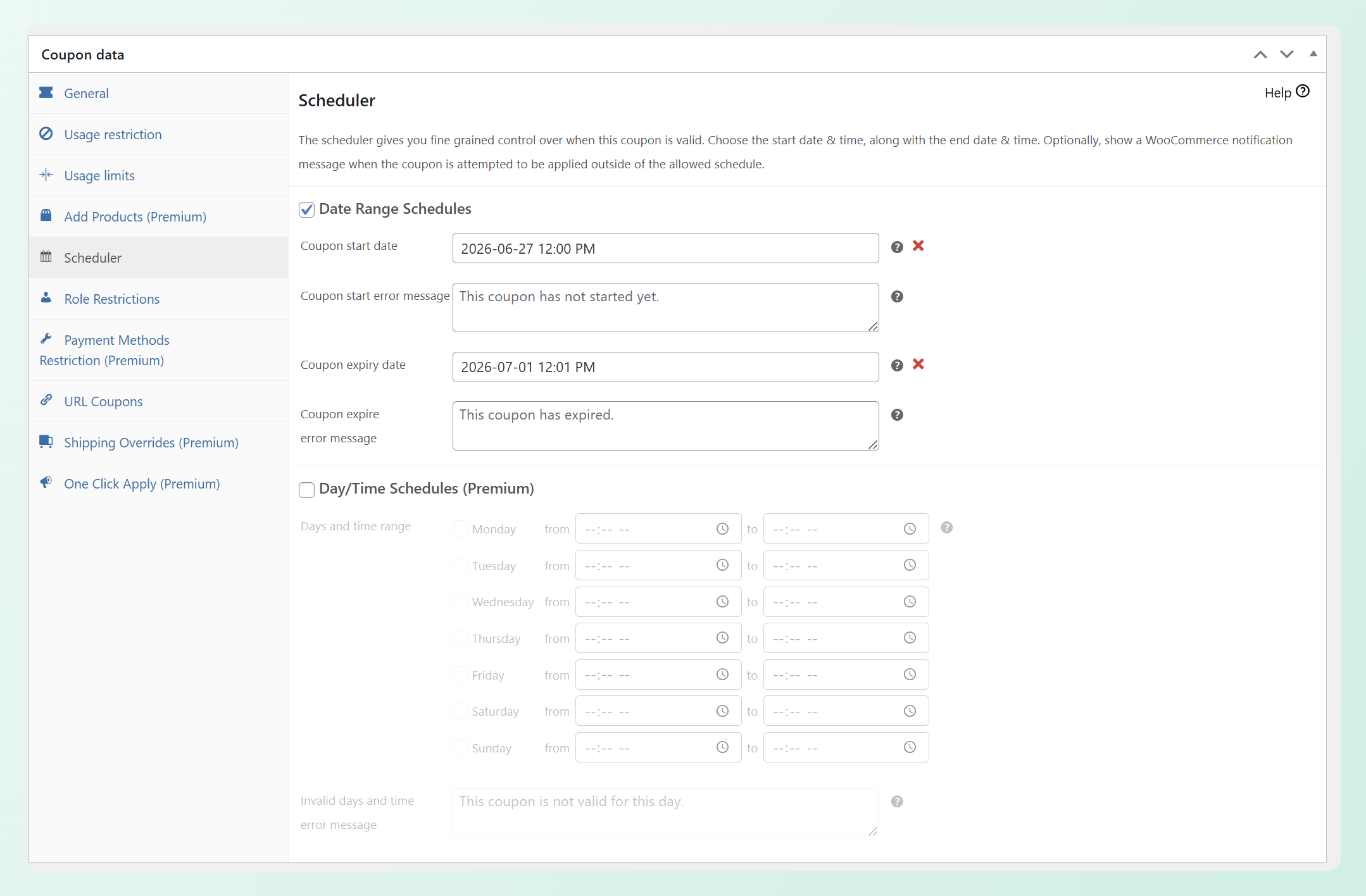
Scheduled coupons let you set a start date and end date for any coupon. The promotion activates and deactivates automatically.
For small business owners who don’t have time to manually turn every sale on and off, scheduling helps keep promotions organized. You can set up a weekend flash sale ahead of time, choose the start and end dates, and avoid leaving a discount active longer than intended.
💡 Practical tip: One common mistake is creating one 10% off code, sharing it everywhere, and leaving it running forever. That turns a promotion into a permanent price reduction. A stronger approach is to create specific, time-bound offers for specific goals: a weekend flash sale to clear older stock, a post-purchase coupon to encourage a second order, or a BOGO deal for a product launch. Variety and timing matter more than simply making the discount bigger.
Low-Cost Loyalty Programs That Fit A Small Budget
A loyalty program doesn’t have to be complicated or expensive to work. Even a simple points-per-purchase system creates stickiness that keeps customers coming back instead of shopping around.
Points on purchases
The simplest loyalty setup awards points on every order. Customers accumulate points and redeem them for discounts on future purchases. The Loyalty Program for WooCommerce from Advanced Coupons handles this without requiring a custom development project or a separate platform.
The psychology is straightforward. Once customers have points waiting in their account, they have a reason to return and use the value they’ve already earned. That sense of progress can be more powerful than a one-time discount because it gives shoppers an ongoing reason to choose your store again.
Points on signups and reviews
You can deepen engagement without additional marketing spend by awarding points for account creation and product reviews. Every review adds social proof that can help future visitors feel more confident, and every signup gives customers another reason to return to your store.
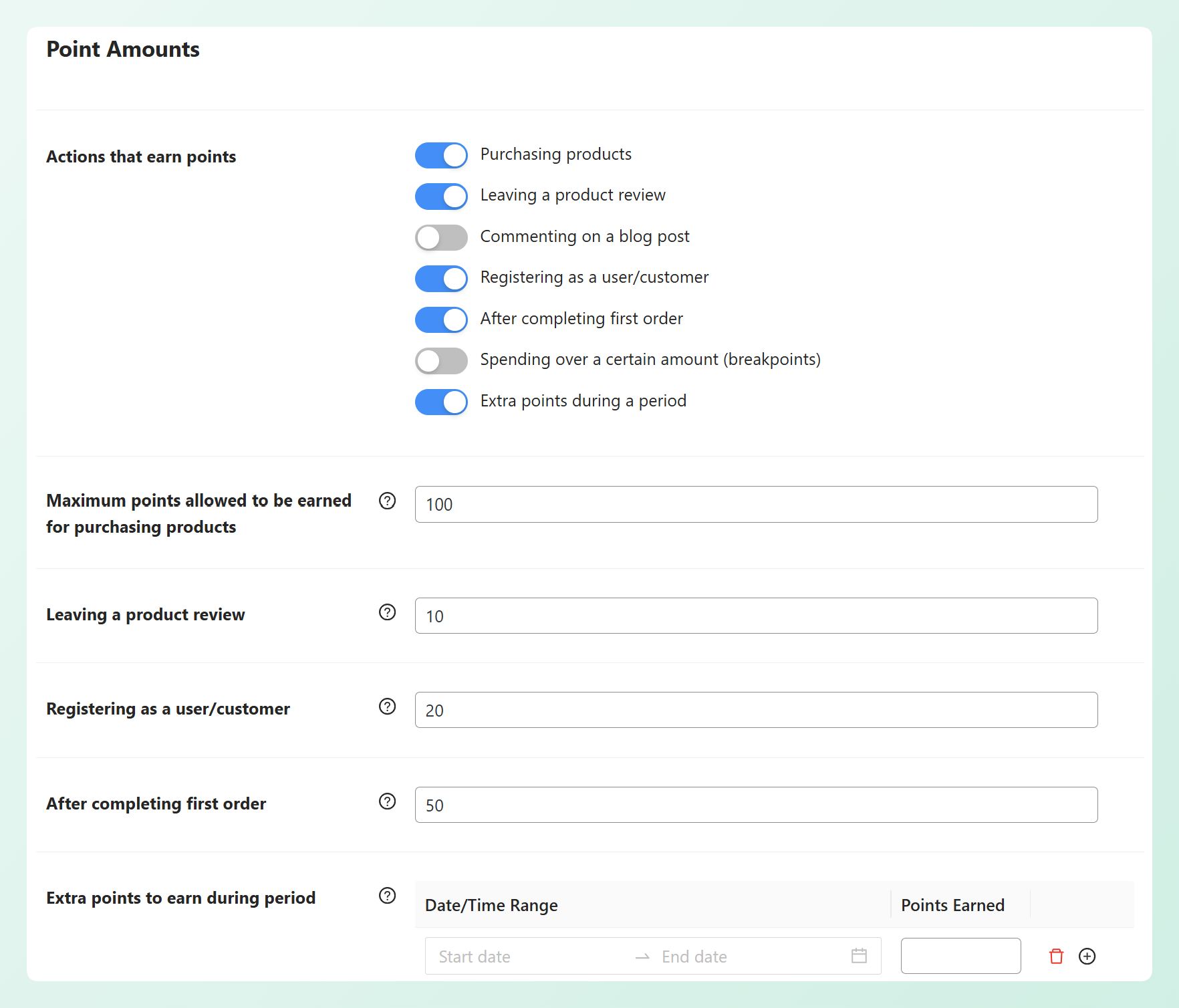
For a small store, even a steady flow of honest reviews can make product pages more persuasive. You’re encouraging that engagement with points that only create a real cost when customers come back to redeem them.
The math behind a small store loyalty program
Returning customers are often more valuable over time because they already know your brand and are more likely to purchase again. Since Advanced Loyalty Program starts at $99.50 per year, you don’t need a massive lift in repeat purchases before the investment becomes easier to evaluate.
Consider a simple example: if your average order value is $45 and a loyalty member places two additional orders in a year, that’s $90 in additional revenue before costs and margins. You still need to account for the discount value, product costs, and fulfillment expenses, but even modest repeat-order lift can make the annual plugin cost easier to justify. For more detail on structuring this, read our small business loyalty program tips for WooCommerce.
Store Credit As A Retention Tool
Store credit keeps money inside your ecosystem. Instead of refunding to a payment method (where the customer may never return), you issue credit that can only be spent in your store.
Refund alternative
When a customer returns a product, you can offer store credit as an alternative to a cash refund. Some customers may prefer it, especially if you add a small bonus, like turning a $25 return into $27 in store credit. The credit gives them a reason to shop with you again instead of ending the relationship at the refund.
Goodwill compensation
Support issues happen, even in well-run stores. Instead of letting a frustrating experience end the relationship, you can offer store credit as a goodwill gesture. It gives the customer a reason to return, while still letting you evaluate the real cost based on whether they redeem it and what they purchase next.
Win-back promotional credits
For customers who haven’t purchased in a while, a small store credit offer can feel more personal than a standard discount code. Instead of saying “here’s a sale,” you’re giving them a reason to come back and use value that already feels like it belongs to them.
Store owners initially resist issuing store credit because it feels like giving away money. A better way to evaluate it is to compare the credit against the order it helps recover. If a $10 credit brings back a customer who places a larger order, you can look at the margin, fulfillment costs, and repeat-purchase potential to decide whether the offer is worth repeating.
When To Invest In Premium Promotion Tools
The free plugin covers a lot of ground, but there are clear signals that your store has outgrown it. Here’s how to know when it’s time to invest.
Signs you’ve outgrown the free version
- You need category-level or group-level BOGO: The free plugin handles product-level BOGO. If you’re running promotions across entire product categories or bundled groups, you need the premium version.
- You want auto-apply coupons: Removing the need to enter a code can make coupon redemption easier for customers. Auto-apply is a premium feature.
- You need advanced cart conditions: Purchase history, total customer spend, number of customer orders, cart weight, stock availability, and shipping zone conditions open up more targeted promotions that go beyond the free version.
- You want coupon reports: Without data on which promotions are working, you’re guessing. Premium includes reporting on redemption rates, revenue impact, and usage patterns.
The investment case
If your store is already seeing steady monthly revenue, the $99.50 per year for Advanced Coupons Premium becomes easier to justify once you can connect premium features to a specific promotion goal. A more targeted BOGO campaign, an auto-applied offer, or better coupon reporting can help you run smarter promotions without adding more manual work.
For stores ready to run the full promotion stack, the All Access Bundle at $249 per year adds the loyalty program, gift cards, and Advanced Promo Kit alongside the premium coupon features. Check Advanced Coupons pricing for current rates.
A practical path is to start with the free tools, learn which promotions your customers respond to, and upgrade when premium features clearly support the campaigns you want to run next.
Frequently Asked Questions
Can I run effective WooCommerce promotions for free?
Yes. The free Advanced Coupons plugin gives you BOGO deals, cart conditions, URL coupons, and scheduled coupons at no cost. These features are enough to test targeted offers, encourage repeat purchases, and learn what your customers respond to before upgrading. Many newer stores can start with the free version and move to premium when they need auto-apply coupons, deeper cart conditions, or coupon performance reports.
What’s the best first promotion for a new small WooCommerce store?
Start with a cart condition coupon that offers free shipping above a specific subtotal. It’s the lowest-risk promotion because you’re not discounting products. You’re incentivizing customers to add more to their cart, which raises your average order value while the customer feels they’re getting a deal.
How often should a small store run promotions?
Start with one or two focused promotions per month, then adjust based on your margins, inventory, seasonality, and customer response. Rotate between types: a BOGO deal, a flash sale, or a post-purchase URL coupon. Variety helps prevent customers from expecting permanent discounts and keeps each promotion feeling more intentional.
Is the free Advanced Coupons plugin enough for most small stores?
For newer stores or stores still testing their promotion strategy, the free version covers many of the most practical promotion types. Once you need auto-apply coupons, advanced cart conditions based on purchase history, or coupon performance reports, that’s when the premium upgrade starts to make sense. The free version is genuinely useful, not a crippled trial.
Do small business ecommerce promotions actually work without an ad budget?
Yes, especially if you already have some traffic, past customers, an email list, or a social audience. Paid ads help bring new visitors to your store, while promotions help convert visitors, increase order value, and encourage repeat purchases. For many small stores, that makes promotions a practical growth lever even without a dedicated ad budget.
Start Running Small Business Ecommerce Promotions Today
You don’t need a huge budget to start running better small business ecommerce promotions. What matters most is choosing offers with a clear purpose: increasing order value, encouraging a second purchase, clearing inventory, or giving customers a reason to come back.
Here’s where to start:
- Free Coupon Strategies Using Advanced Coupons (Free Plugin): Install the free plugin and set up BOGO deals, cart conditions, URL coupons, and scheduled promotions
- Low-Cost Loyalty Programs That Fit a Small Budget: Launch a points-on-purchases loyalty program to increase repeat purchase rates
- Store Credit as a Retention Tool: Use store credit for refunds, goodwill, and win-back campaigns instead of losing customers
- When to Invest in Premium Promotion Tools: Upgrade when auto-apply, advanced conditions, and reporting become necessary for growth
For more ideas to pick from, see our 12 WooCommerce promotion tactics, and when you are ready to build repeat business, our guide on how to launch a rewards program that pays for itself covers the maths. Ready to start? Download the free Advanced Coupons plugin and test one simple promotion first. When your store is ready for more advanced targeting, automation, loyalty, or gift card options, explore Advanced Coupons pricing to see what fits your next stage of growth.