
Remembering to renew important business-critical software is actually a big problem that can cost businesses a lot of money. When your license is expired, you’ll no longer get updates that often include feature improvement, security fixes, and bug fixes. Our team spends a lot of time on this kind of work so we can ensure our products are safe and compatible with the latest version of WordPress and WooCommerce.
You’ll be automatically renewed each year on the anniversary of your purchase. But, we do send you a reminder email about 2 weeks before this happens.
The good thing is you can cancel the automatic renewal at any time via your My Account area before the renewal date to ensure you don’t get automatically charged and if you wish you can re-activate your renewal in case you want to start the renewals again from the “Subscription” tab of your account page.
All plans automatically renew yearly at a regular price using the payment method you provided at the time of purchase. The renewal price will depend on which products you purchased originally.
You can see all the details about your existing subscription under My Account ➝ Subscription on our website or click the link here https://advancedcouponsplugin.com/my-account/subscriptions.
Upgrading your plan partway through the year
You can move to a larger plan or to the All Access Bundle at any time, and you do not need to cancel anything first.
- Open My Account, then Subscription.
- Click View on the subscription you want to change.
- Click Upgrade and choose the plan you want.
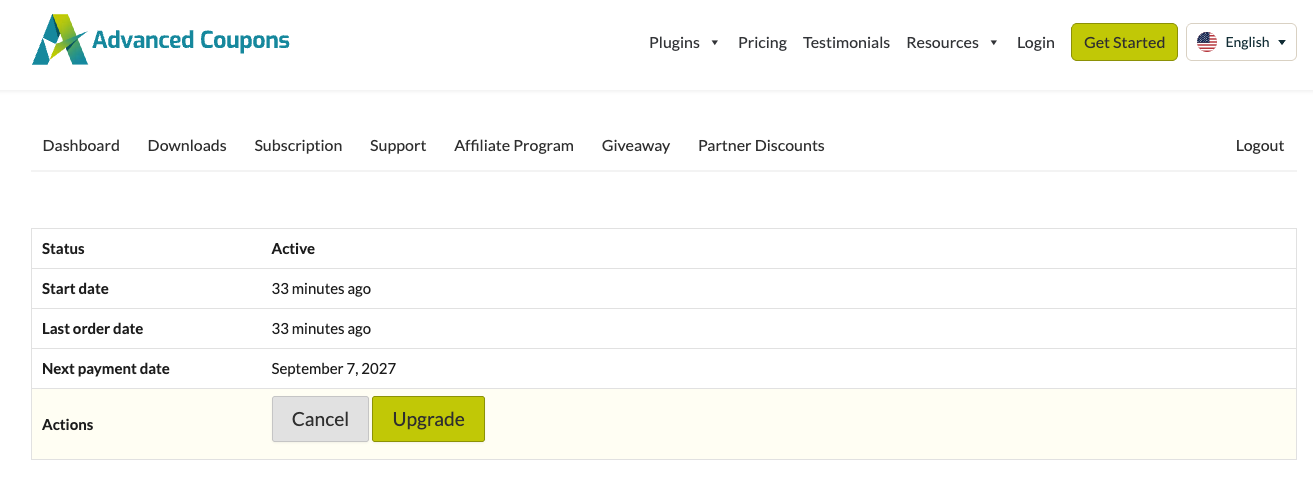
You pay the difference rather than the full price. The unused time on your current plan is credited against the new one, so the amount at checkout is prorated.
An upgrade does not start a new subscription and does not shorten the term you have already paid for. Your next renewal is charged at the full price of the new plan. Check the renewal date shown at checkout, and on the subscription afterwards, because a switch can move it.
Your existing license key keeps working. Moving to the All Access Bundle adds a separate key for each of the other plugins, and those appear under My Account, then Downloads once the upgrade goes through.
The Upgrade button only appears while the subscription is active. If you do not see it, open a support ticket and we will look at the subscription with you.
A license notice still shows after renewing
Your site checks its license status once a day and keeps the result until the next check. A notice raised before your renewal went through can therefore stay on screen for up to 24 hours afterwards, even though the renewal succeeded.
You do not have to wait. Open the Advanced Coupons licenses screen in your WordPress admin and refresh the license status there. That forces a fresh check, and the notice clears if the license comes back active. If you refreshed less than a minute ago, the screen asks you to wait a minute before checking again.
Each plugin has its own status, so refresh each one if you renewed several products.
Need help?
If you have a question or run into any issues, we are here to help.
- Premium users: Open a support ticket
- Free users: Visit the Advanced Coupons community forum

