
If your store has deleted customer accounts over time, you might end up with invalid store credit entries that still point to those old users. In this article, you’ll learn how to run the Delete invalid store credit entries tool in Advanced Coupons for WooCommerce (Free), confirm that the cleanup started correctly, and prevent the same issue from happening again. Following these steps helps keep your Store Credits data cleaner for reporting, audits, and troubleshooting.
Prerequisites
- WooCommerce is installed and active.
- Advanced Coupons for WooCommerce (Free) is installed and active (version 4.7.2 or higher; this cleanup tool was added in 4.7.2).
- If you’re using Advanced Coupons Premium, it can stay active, but this cleanup tool is part of the free plugin settings.
- You’re logged into WordPress as an administrator (or another role that can manage WooCommerce settings).
How to Delete Invalid Store Credit Entries
- In your WordPress admin, go to Coupons → Settings.
- Click the Advanced tab of the settings page.
- Find Delete invalid store credit entries.
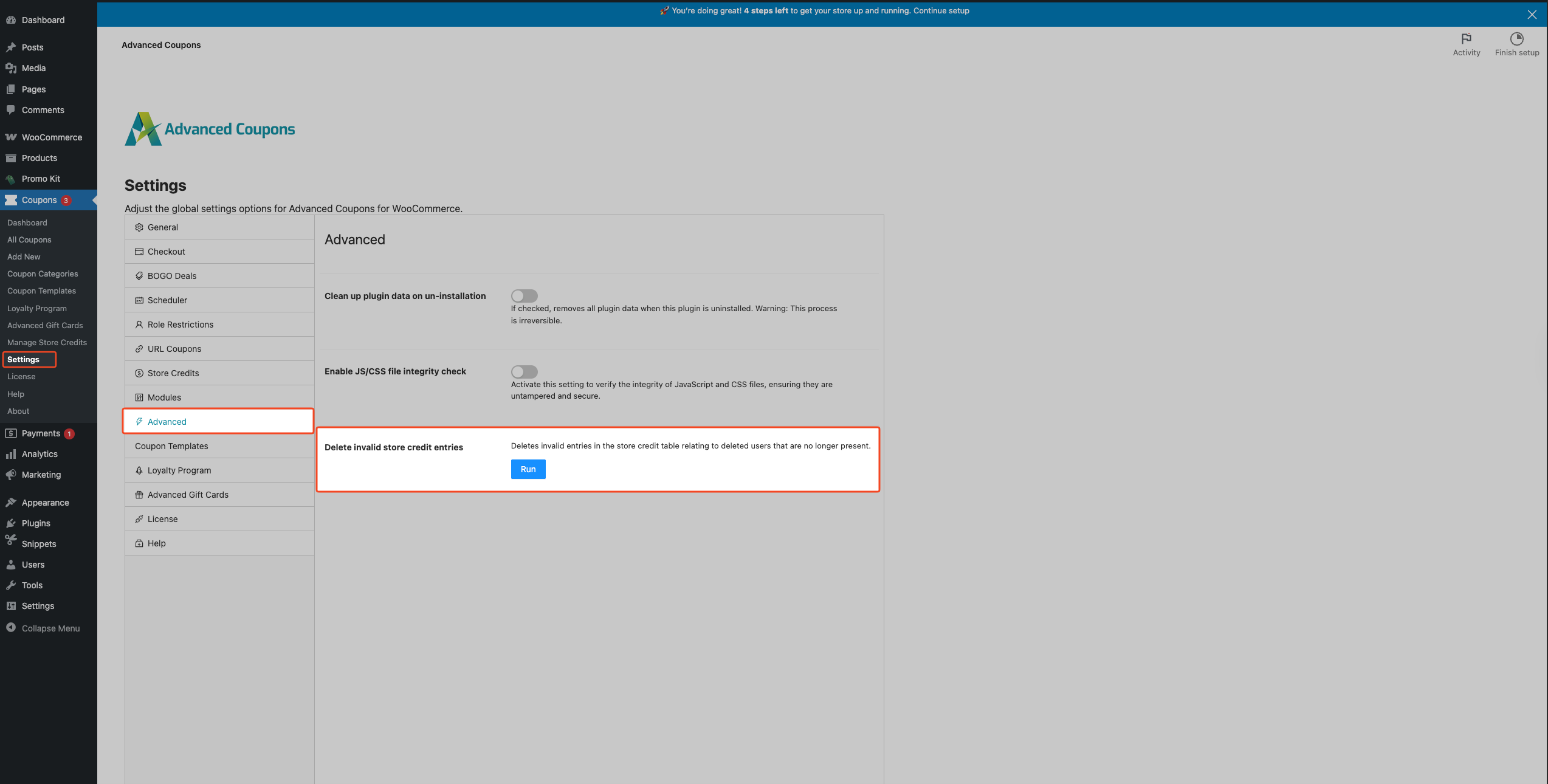
- Click Run.
- Wait for the success notice. You’ll see either “The cleanup has been started and is running in the background.” (when Action Scheduler is available) or “The cleanup has been completed.” (if the cleanup runs immediately).
Troubleshooting
I can’t find the Delete invalid store credit entries tool
Make sure the Advanced Coupons (free) plugin is active, and you’re viewing the Advanced Coupons settings page.
The cleanup tool only applies when Store Credits are in use. Under Coupons → Settings → Modules, ensure the Store Credits module is enabled. If it is off, the Store Credits table may not exist, and the tool cannot run as expected.
Go to Coupons → Settings, then click the Advanced tab.
I clicked Run, but nothing seems to happen
On many sites, the tool runs in the background using Action Scheduler. After you click Run, you should see: “The cleanup has been started and is running in the background.”
If you don’t see a success notice, go to Tools → Scheduled Actions and check for the acfw_clear_detached_store_credit_entries action. If it’s pending or running, wait for it to complete. The cleanup tool deletes invalid entries in batches of 500 at a time (to limit load and avoid long-running work on large tables), so bigger stores can take longer.
The store credits table does not exist
This error means the Store Credits database table is missing from your site.
Turn on the Store Credits module under Coupons → Settings → Modules first. Without that module, the table may never be created, and you will see this error when running the cleanup. After enabling Store Credits, deactivate and reactivate Advanced Coupons (free) to re-create the missing Store Credits table, then run the cleanup again.
Frequently Asked Questions
What exactly gets removed by this cleanup?
Only invalid store credit entries that belong to deleted users (entries where the stored user_id no longer exists in the WordPress users table) are deleted.
Will this change any valid customer balances?
No. This tool targets entries for users who are no longer present on the site.
Is this reversible?
No. This tool permanently deletes invalid entries from your Store Credits table.
Do I need Advanced Coupons Premium for this?
No. This cleanup tool is included in Advanced Coupons (free).
Should I run this regularly?
Only if you frequently delete customer accounts (or import/migrate users) and want to keep the Store Credits table tidy. Otherwise, you can run it only when needed.
What if I want to prevent these invalid entries in the future?
Preventative measure: Go to Coupons → Settings → Store Credits and enable Delete store credits on user deletion.
Need Help?
If you have a question or run into any issues, we’re here to help.
Premium users: Open a support ticket
Free users: Visit our community forum on WordPress.org support

