A good promotion rarely has to rely on one offer alone. A first-purchase coupon can help bring a new customer in, but what happens after that first order? Do they have a reason to come back? Can they share the offer with a friend? Can shoppers clearly see the promotion while browsing your store?
That’s where a WooCommerce promotion stack becomes useful. Instead of running a coupon, loyalty program, gift card offer, and sale badge as separate moving pieces, you can plan them as one connected campaign where each layer supports the next customer action.
This guide walks through how to build a WooCommerce promotion stack that combines coupons, loyalty points, gift cards, and sale badges. Each layer targets a different motivation, and together they create a more complete campaign than a single promotion type running on its own. With the Advanced Coupons ecosystem, you can manage these layers through one connected product family instead of piecing together separate tools that may not work cleanly together.
What Is A Promotion Stack (And Why Does It Work Better Than Single Promotions)?
A WooCommerce promotion stack is a coordinated campaign where multiple promotion types work together, each targeting a different stage of the customer journey or a different customer motivation.
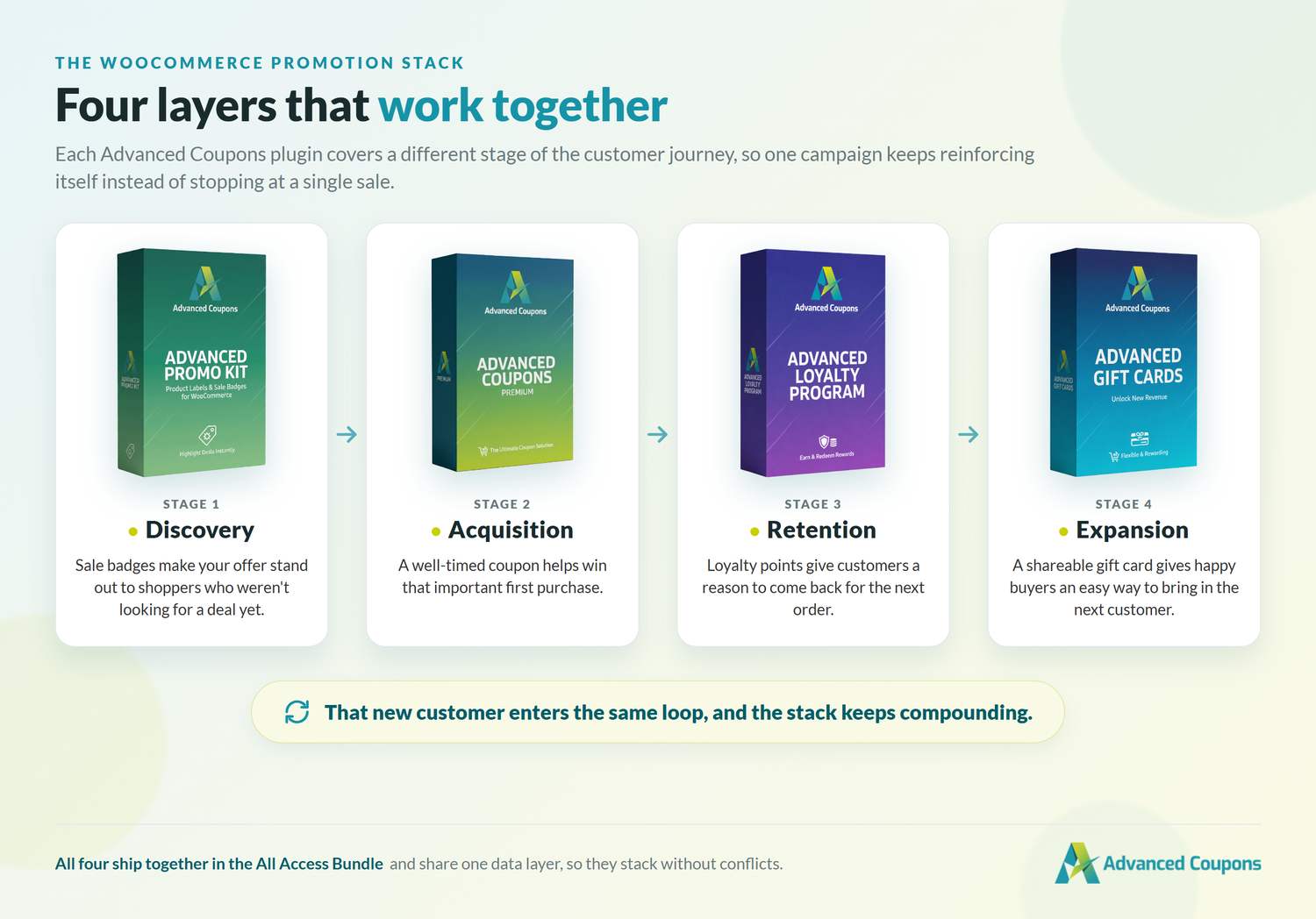
Here are the four layers:
- Layer 1, Sale Badge (Discovery): A visual label on product pages and category pages that catches browsers who aren’t searching for a deal yet.
- Layer 2, Coupon (Acquisition): A discount that drives the first purchase and brings new customers through the door.
- Layer 3, Loyalty Points (Retention): A reward on every order that gives customers a reason to come back for their next purchase.
- Layer 4, Gift Card (Expansion): An incentive that turns existing buyers into referrers by giving them something valuable to share with friends.
Why does stacking work? Each layer supports a different motivation. A coupon can help win the first order, but it doesn’t always give shoppers a reason to return. Loyalty points add a retention hook. A gift card gives customers something easy to share. Sale badges help the offer stand out to shoppers who may not have been looking for a promotion yet.
There’s a useful parallel in broader marketing data, too. According to Optimove, multi-channel campaigns received a 37% higher response rate than single-channel campaigns, based on an analysis of 10,000 campaigns across multiple industries. A WooCommerce promotion stack follows a similar idea: instead of relying on one offer to do everything, you give customers multiple reasons to notice, buy, return, and share.
The Advanced Coupons Ecosystem: How The Four Layers Work Together
The Advanced Coupons ecosystem brings coupons, loyalty points, gift cards, and sale badges into one connected WooCommerce product family.
Here’s how the four layers map to specific products:
- Sale Badges: Sale badges and product labels from the Advanced Promo Kit add visual labels to products on your store.
- Coupons: Advanced Coupons Premium provides cart conditions, scheduling, BOGO deals, URL coupons, and auto-apply. See the full list of Advanced Coupons Premium features.
- Loyalty Points: Advanced Loyalty Program adds point earning and redemption directly into WooCommerce.
- Gift Cards: Advanced Gift Cards for WooCommerce handles digital gift cards with email delivery.
The integration advantage is that these tools are built as part of the same WooCommerce product family. A customer can redeem a coupon, earn loyalty points on the same order by default, and receive a gift card reward without forcing the store owner to coordinate disconnected promotion tools. The Advanced Coupons All Access Bundle covers all four products in a single license.
🎯 Practical tip: Promotion stacks work best when each layer understands what the other layers are doing. If your coupon, loyalty, and gift card tools all calculate order value differently, you can end up with confusing totals, inflated point liability, or extra manual checking. Keeping these tools in the same product family makes the campaign easier to plan because the core promotion layers are designed to work together inside WooCommerce.
Building A Promotion Stack Step By Step: A Real Campaign Example
Let’s walk through a complete WooCommerce promotion stack for a spring acquisition campaign. You can adapt this to any season or goal.
Step 1: Set up the acquisition coupon
Create a campaign coupon offering 15% off to bring new shoppers through the door. In Advanced Coupons Premium, set a usage limit of one use per customer so the discount works as a controlled acquisition offer instead of something the same shoppers redeem over and over.
Next, set a scheduled start and end date for the campaign window. For a spring campaign, you might run it for three weeks. Then configure the coupon as a URL coupon so the discount auto-applies when the customer lands on your campaign landing page. No code entry required.
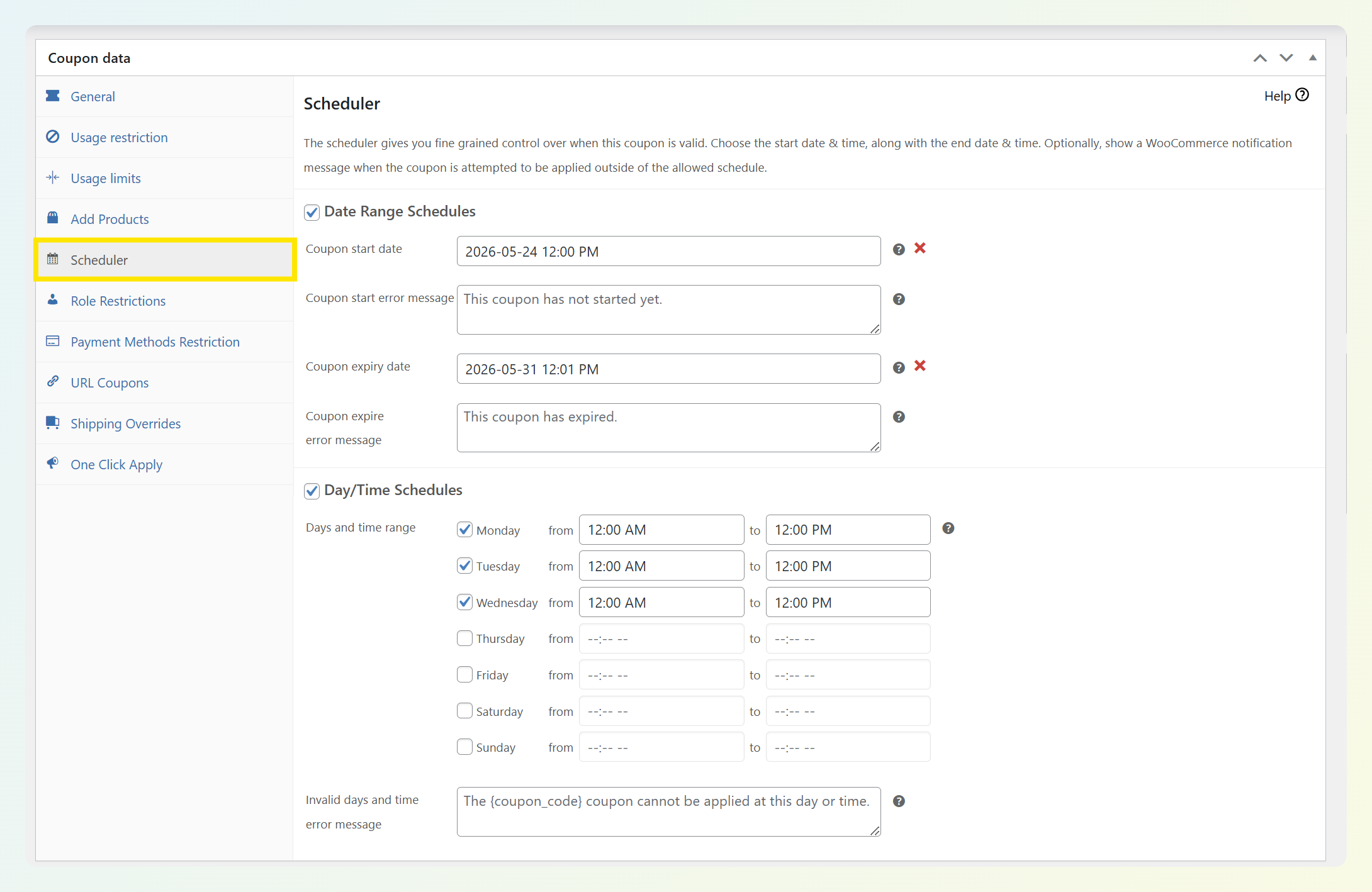
When I run a campaign coupon like this, I lean on the usage limit and the scheduled dates to keep it under control. A one-use-per-customer limit helps prevent repeat redemptions from the same account, and the start and end dates mean the offer closes itself when the campaign window is over, with no manual cleanup.
Step 2: Configure loyalty points on the order
Set your earning ratio. For this example, use 1 point per $1 spent. During the campaign window, you can also schedule extra bonus points so orders placed during the promotion feel more rewarding.
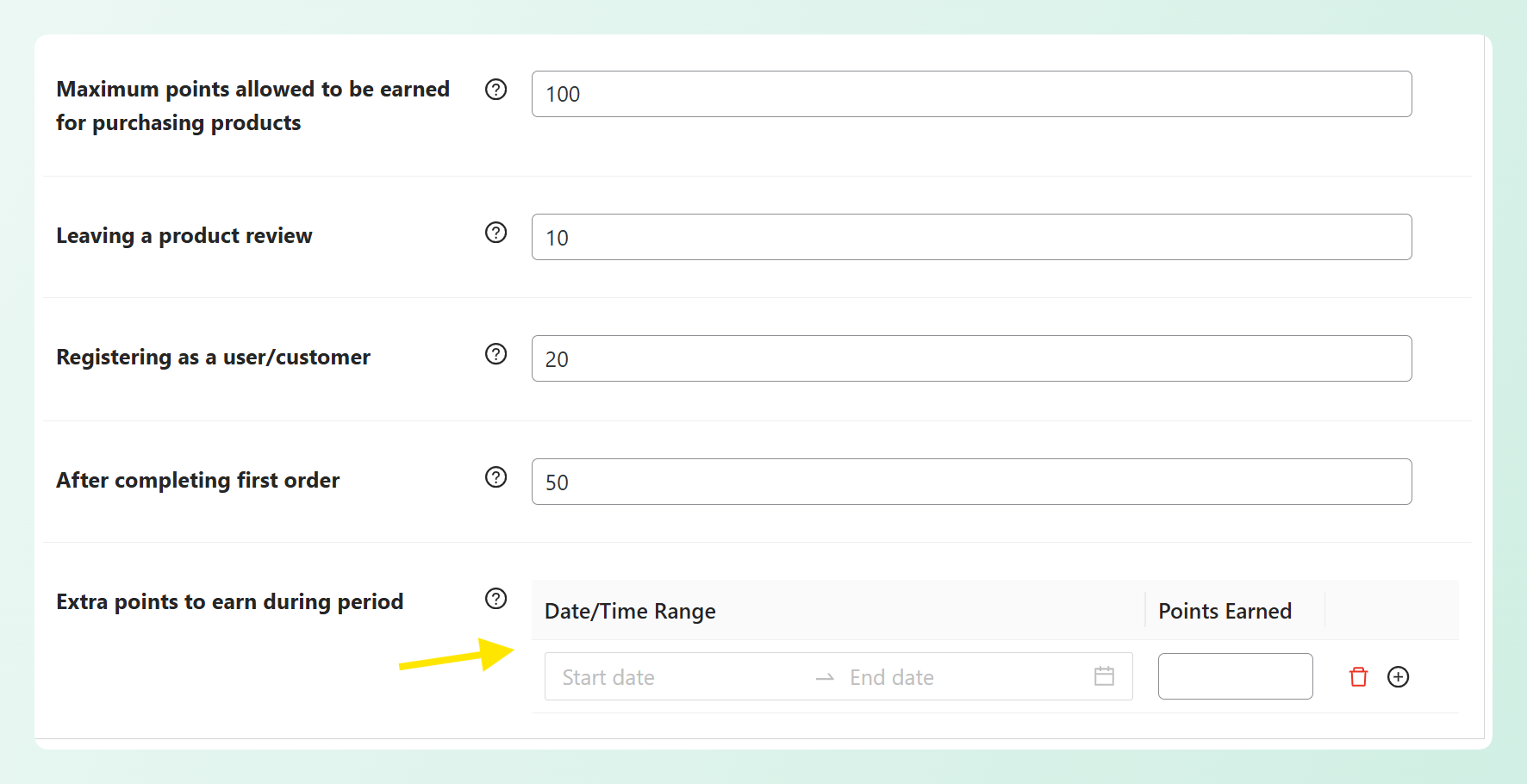
By default, the customer’s first order can still earn points even though they used a coupon. There’s no conflict. Advanced Loyalty Program recognizes the coupon discount and calculates points on the order total after the discount, so points are based on the discounted amount rather than the full pre-discount price.
This is a detail that matters. Earning points on the discounted total means your point liability reflects the revenue you actually collected. If a loyalty setup calculates points on the pre-discount total instead, you may end up rewarding more points than your campaign margins can comfortably support.
Step 3: Use gift cards to expand your reach
Gift cards are how one happy customer becomes a doorway to another. With Advanced Gift Cards, you can sell gift cards as products and let customers send one straight to a friend’s inbox using the built-in Send to a Friend option, complete with a personal message and an optional delivery date. You can also issue a gift card to a customer yourself as a thank-you that they can pass along.
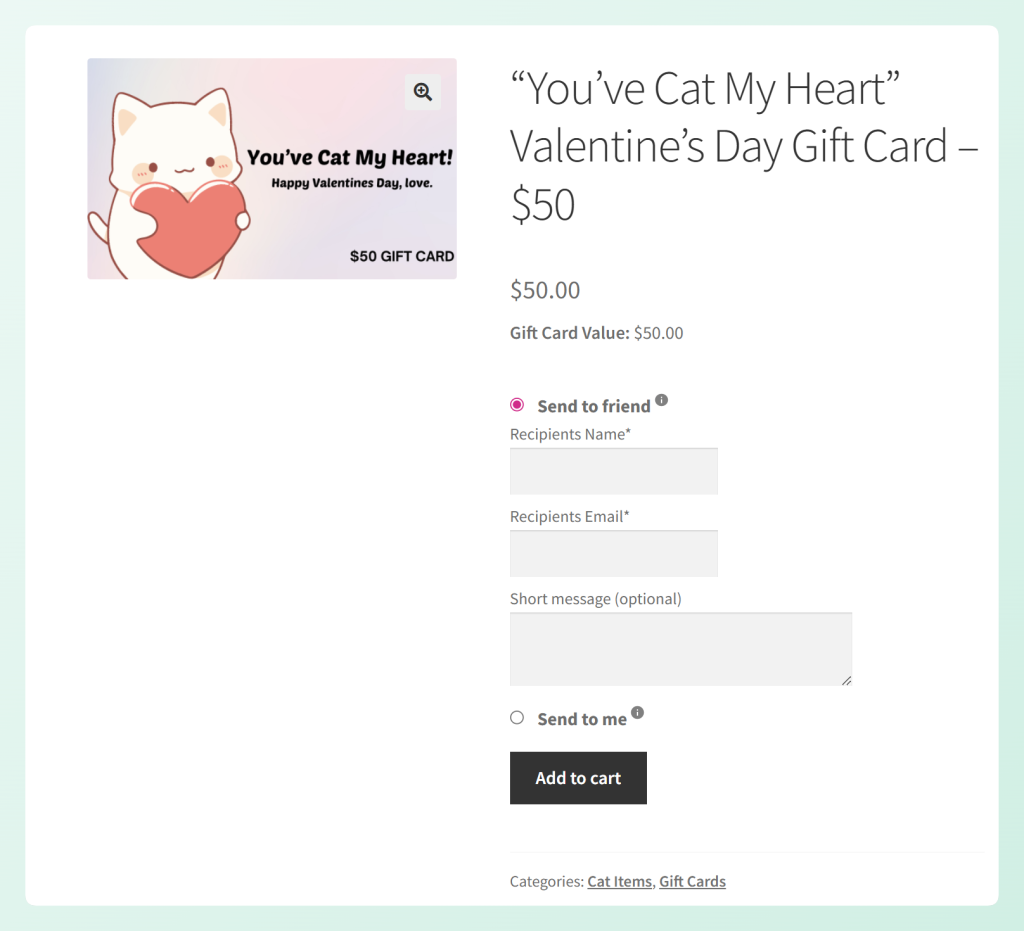
Each card carries a unique code, and the plugin tracks its balance and redemption status. When a friend redeems that card on their first purchase, one campaign has opened the door to a second customer.
Referral incentives can also support stronger customer acquisition when they’re planned carefully. Research published by the Wharton School of Business found that referred customers in the study had at least 16% higher average value than comparable non-referred customers, with lower churn risk. That makes the gift card more than a simple discount cost. It becomes a structured way to encourage word-of-mouth from customers who have already bought from you.
The original customer now has loyalty points building from their own order and a gift card they can share. That gives one purchase a better chance of turning into another customer touchpoint.
Step 4: Highlight with sale badges
Add a “Spring Special” or “New Customer Offer” badge to the products included in the campaign. These badges appear on product listing pages and category pages, catching browsers who haven’t clicked into a product page yet.

Advanced Promo Kit lets you create sale badges and product labels, which is the visibility layer of your WooCommerce promotion stack. Without them, the only customers who see your offer are those who already know about it. With badges, casual browsers notice something different about certain products and click through to investigate.
Schedule the badges to match the campaign window. When the promotion ends, the badges automatically deactivate. No manual cleanup required.
How The Four Layers Work Together: The Customer Journey
Here’s what the customer experience looks like when all four layers are active:
- Discovery: A customer browsing your category page spots a product with a “Spring Special” badge. It catches their eye because it looks different from the other products.
- First purchase: They click through to the product page, see the 15% off first-purchase coupon auto-applied in their cart, and complete the order.
- Reward: Their account shows loyalty points earned on the order, plus any campaign bonus points you’ve scheduled. They can see their point balance and know how much they need for a reward.
- Referral: An email arrives with a $10 gift card to share with a friend. The gift card has a unique code and a branded design.
- Repeat: The friend has a reason to make their first purchase with the gift card, while the original customer has loyalty points encouraging them to come back for another order.
Each layer hands off to the next. The badge supports discovery. The coupon encourages the first purchase. The loyalty points create a reason to return. The gift card encourages a referral. One campaign now supports four distinct customer actions.
This is where the “stack” concept becomes concrete: the customer who came in through a coupon now has reasons to join your loyalty program, share a gift card, and return for another purchase. A single promotion has created several additional touchpoints.
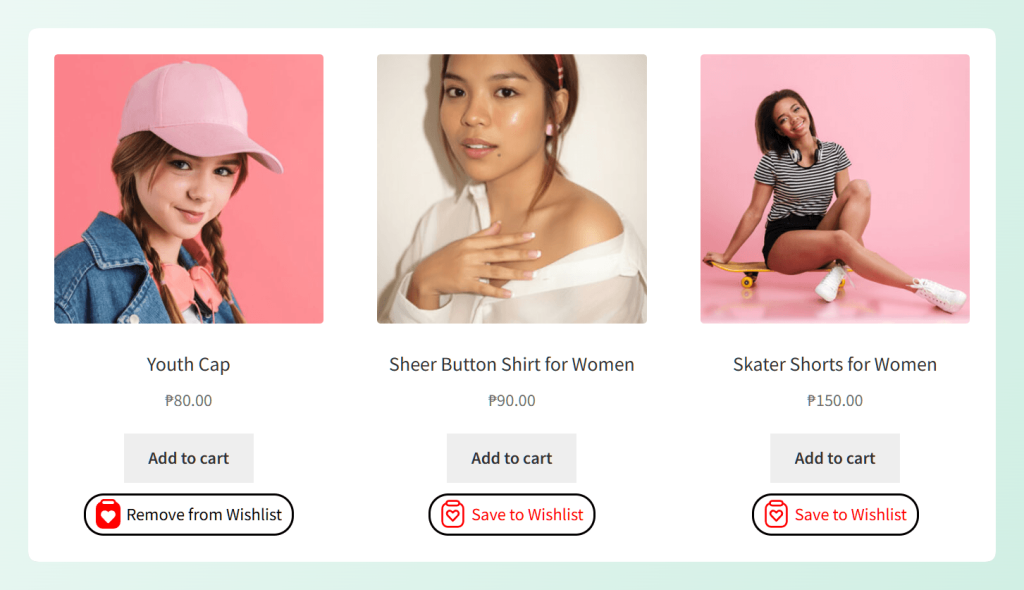
You can extend the stack further with SaveTo Wishlist. When customers save products to a wishlist during a promotion, you have a clearer signal of what they may want to buy next, which can help you plan more relevant follow-up offers.
Measuring A Promotion Stack: What To Track
Each layer of your WooCommerce promotion stack has its own KPIs, and the real value is in the aggregate metric that ties them together.
Coupon layer metrics:
- Redemption rate: what percentage of coupon recipients actually used it?
- New customer acquisition count: how many first-time buyers came through the campaign?
Loyalty layer metrics:
- Points earned versus points redeemed
- Repeat purchase rate within 30, 60, and 90 days of the first order
Gift card layer metrics:
- Gift cards issued versus gift cards redeemed
- New customers acquired through gift card referrals
Sale badge layer metrics:
- Product page view changes during the badge period compared to the same products without badges
According to Accenture research (2016), members of retailers’ loyalty programs generated 12% to 18% more revenue than non-members. That supports the value of the retention layer. When you also add acquisition, referral, and discovery layers, you have more ways to improve the return from a single campaign.
The aggregate metric to watch is total customer acquisition cost of the full stack compared to coupon-only acquisition. If the full stack brings in new customers while also encouraging referrals and repeat purchases, you have a stronger campaign to compare against a standalone coupon offer.
For a complete ROI framework, read Ecommerce Rewards Program: 90-Day WooCommerce Launch Plan. For the deeper customer lifetime value perspective, see our guide on tracking loyalty program KPIs.
Frequently Asked Questions
Can I use a coupon and loyalty points on the same WooCommerce order?
Yes. When using the Advanced Coupons ecosystem, customers can redeem a coupon and earn loyalty points on the same order. The loyalty program calculates points on the net order total after the coupon discount has been applied. The two systems are designed to work together without conflict.
Do loyalty points calculate before or after the coupon discount?
Loyalty points are calculated after the coupon discount. If a customer has a $100 cart and applies a 15% off coupon, bringing the total to $85, they earn points on the $85 total. This protects your margins by ensuring point liability reflects actual revenue collected.
Can gift cards be combined with coupons in WooCommerce?
Yes, within the Advanced Coupons ecosystem. A customer can apply both a coupon discount and a gift card balance to the same order. The system processes the coupon discount first, then applies the gift card to the remaining balance. This is one of the integration advantages of using tools from the same product family.
Do I need the Advanced Coupons All Access Bundle to run a promotion stack?
The All Access Bundle is the most practical way to run a full promotion stack because it includes Advanced Coupons Premium, Advanced Loyalty Program, Advanced Gift Cards, and the Advanced Promo Kit (sale badges) under a single license. You could purchase each product individually, but the Advanced Coupons All Access Bundle covers all four at a lower combined cost.
How long does it take to set up a full promotion stack?
The technical setup depends on your store’s complexity, but the four layers described in this guide can be configured in a single session. The coupon, loyalty program, gift card, and sale badge settings are all managed within your WooCommerce dashboard. The time investment is less about technical setup and more about planning: deciding your discount percentage, point earning ratios, gift card values, and campaign timing before you start configuring.
Start Building Your WooCommerce Promotion Stack Today
A WooCommerce promotion stack isn’t just four promotions running at the same time. It’s a coordinated sequence where each layer supports the next customer action, from discovery to first purchase, retention, referral, and repeat purchase. That structure is what turns a one-time campaign into something more intentional and easier to measure.
Here’s a recap of what to do:
- Set up your acquisition coupon with a one-use-per-customer limit, campaign dates, and URL auto-apply
- Configure loyalty points with the right earning ratio and optional campaign bonus points
- Use gift cards to expand your reach so happy customers can share a card with a friend
- Activate sale badges on campaign products to catch browsers who aren’t looking for a deal
The Advanced Coupons ecosystem gives you a practical way to run all four layers together, with coupons, loyalty points, gift cards, and sale badges available through one connected product family. If you want to plan campaigns with fewer disconnected tools, the Advanced Coupons All Access Bundle is the simplest place to start.