
If customers have store credits sitting in their accounts, you can make sure they use them at checkout. With Advanced Coupons Premium, you can enable Automatically apply available store credits amount so logged-in customers with a store credit balance don’t need to manually redeem their credits each time.
Prerequisites
- WooCommerce is installed and active.
- Advanced Coupons Premium is installed and active (this includes the required Advanced Coupons for WooCommerce Free base plugin).
- The Store Credits module is enabled.
- You have a logged-in customer test account with a positive store credit balance.
How to turn on auto-apply for store credits at checkout
- In WordPress admin, go to Coupons → Settings.
- On the Coupons → Settings page, click the Store Credits tab.
- Enable Automatically apply available store credits amount. The setting saves automatically — a confirmation appears: Automatically apply available store credits amount successfully updated
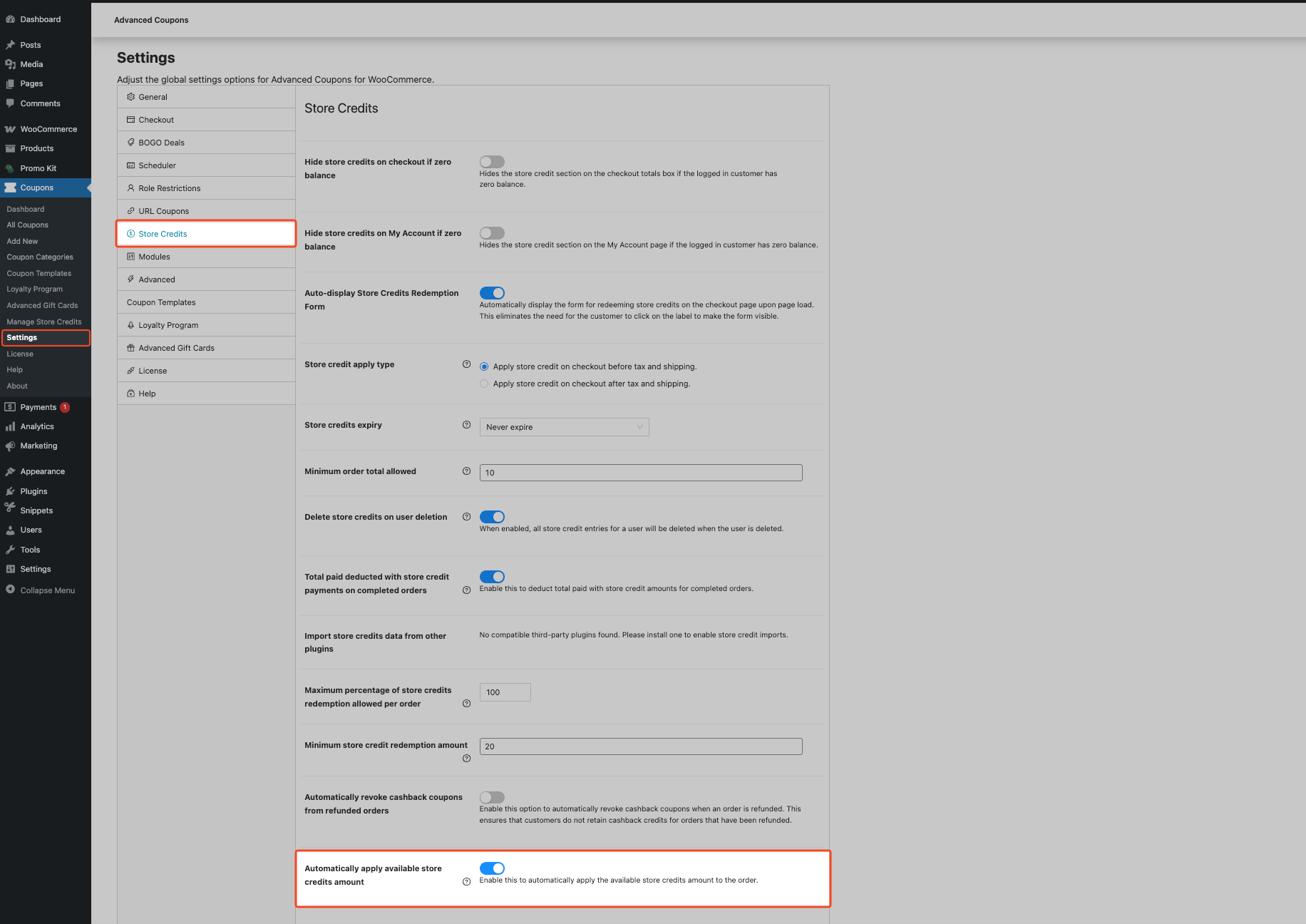
To turn auto-apply off later, return to this same setting and disable it.
Verify it works
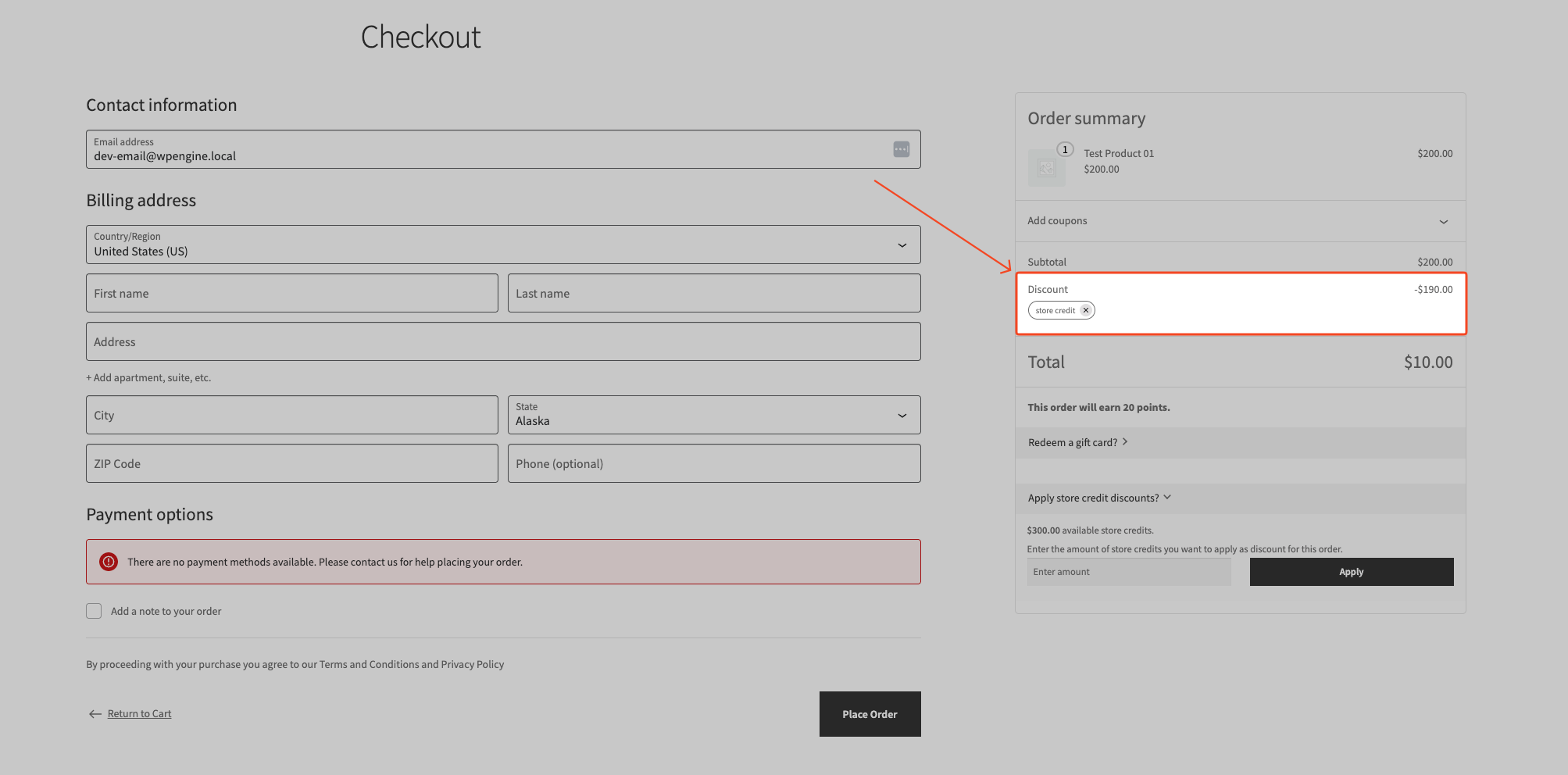
- Log in as a customer with a store credit balance.
- Add a product to the cart.
- Go to checkout.
Store credits apply automatically, so no manual redemption step is required.
Troubleshooting
Auto-apply doesn’t run at checkout
Confirm all of these conditions are true:
- Automatically apply available store credits amount is enabled.
- The customer is logged in.
- The customer has a positive store credit balance.
- The cart isn’t empty.
- The customer has not manually removed store credits in the current cart session.
- The customer is on the checkout page (auto-apply doesn’t run on cart, order received, or order pay).
- The cart doesn’t contain any Advanced Gift Cards for WooCommerce products — if it does, the plugin doesn’t allow store credits at checkout (see the FAQ below for details).
Store credits disappeared after cart updates
Ask the customer to click the reapply link in the notice that appears when the cart total drops below the applied store credit amount:
“The total of your order changed, please click here to reapply the store credit discount.”
Frequently asked questions
Is the auto-apply store credits setting available in the free version?
No. Automatically apply available store credits amount is available in Advanced Coupons Premium.
Does auto-apply always use the customer’s full balance?
Yes, by default — auto-apply uses the full available balance. The amount applied still follows your store credit rules, including any configured redemption limits. If you’ve set a per-order redemption cap under Coupons → Settings → Store Credits, auto-apply respects it.
Are store credits available when Advanced Gift Cards for WooCommerce products are in the cart?
No. The plugin doesn’t allow store credits when Advanced Gift Cards for WooCommerce products are in the cart. Remove those line items, then return to checkout and test again. See also: How to redeem gift cards.
If a customer removes auto-applied store credits, will they be re-applied in the same session?
No. Once a customer removes store credits, the plugin doesn’t auto-apply them again in that same cart session. Auto-apply resumes once the customer completes checkout (creating an order) or removes all items from the cart.
Does auto-apply behave differently on a subscription early renewal checkout?
No. Auto-apply follows the customer’s current store credit balance on an early renewal checkout the same way it does on any other checkout. If the balance is zero at that point, no store credit is applied, even if credit was used on the original subscription order.
Need help?
If you have a question or run into any issues, we’re here to help.
- Premium users: Open a support ticket
- Free users: Visit our community forum on WordPress.org

