


Picture this: it’s the first week of November. Black Friday is three weeks away. You haven’t created your coupon codes yet. You haven’t decided what to discount. Your email list hasn’t heard from you in two months.
Sound familiar? Most WooCommerce store owners operate in reactive mode when it comes to promotions. A sale event shows up on the calendar, they scramble to put something together, and they wonder why results are underwhelming compared to competitors who planned ahead.
A WooCommerce promotion calendar changes that. It turns seasonal chaos into a repeatable system where every campaign is planned, scheduled, and ready to execute weeks before the event. In this guide, you’ll get a month-by-month retail calendar broken into quarterly segments, a step-by-step framework for building your own calendar, and a free template you can copy into any spreadsheet. You’ll also learn how to pre-schedule your promotions so they launch and expire automatically, without any last-minute rush.
Why Your WooCommerce Store Needs a Promotion Calendar
A promotion calendar is a planning document that maps every campaign you’ll run over the next 3, 6, or 12 months. It’s the difference between “we should do something for Valentine’s Day” on February 10 and having your coupon codes, email sequences, and product badges ready to go on February 1.
The impact of planning goes beyond convenience. According to the National Retail Federation, 2024 holiday retail sales reached a record $994.1 billion, growing 4% over 2023. The stores that captured their share of that spending weren’t the ones who started planning in late November. They were months ahead.
There’s also the missed opportunity cost. According to Baymard Institute, the average online cart abandonment rate is just over 70%. Well-timed promotions with scheduled coupons and auto-apply discounts directly address the most common reasons shoppers leave without buying. But those promotions only work when they’re ready before the traffic arrives.
Beyond the holiday season, there’s a compounding benefit. When customers learn to expect regular promotions from your store at predictable intervals, they return to check. They watch for your emails. They share your sales with friends. That kind of repeat engagement doesn’t happen when your promotion schedule is random.
A calendar isn’t about running more promotions. It’s about running the right ones, at the right times, with enough preparation to execute well.
The Month-by-Month Retail Calendar for WooCommerce
The retail year has a natural rhythm. Some months are packed with shopping events, and others are quieter. Understanding this rhythm is the foundation of any WooCommerce promotion calendar. Here’s a quarterly breakdown of the dates that matter most.
January through March
Q1 is where many stores go silent after the holiday rush. That’s a mistake. Key dates include:
- New Year’s (January 1): New Year, New You sale. Works well for health, fitness, fashion, and self-improvement products. Run a week-long clearance to move holiday overstock.
- Valentine’s Day (February 14): Gift-focused campaigns. Gift cards and BOGO deals perform strongly. Start promotions by February 7.
- End-of-winter clearance (late February/March): Seasonal inventory clear-out before spring arrivals. Tiered discounts (spend $50 save 10%, spend $100 save 20%) help increase average order value.
Lead time: start planning each campaign at least 2 weeks in advance.
April through June
Q2 brings some of the biggest gift-giving holidays outside of December. Key dates include:
- Easter (date varies, typically April): Themed flash sales work well. A 48-hour WooCommerce flash sale with Easter-themed coupon codes creates urgency.
- Mother’s Day (second Sunday in May): This is one of the year’s biggest gift-buying events. Gift card campaigns paired with BOGO deals can work especially well. For a detailed playbook, see our guide to Mother’s Day promotions for WooCommerce stores.
- Father’s Day (third Sunday in June): Similar gift card approach as Mother’s Day, tailored to your product catalog.
Lead time: large campaigns like Mother’s Day need 3-4 weeks of preparation.
July through September
Summer is traditionally a slower retail period, and our summer sale playbook breaks the season into phases, which makes it a good time to run engagement-focused campaigns and inventory-moving offers. Key dates include:
- Summer kickoff sale (late June/early July): Flash sales and loyalty point bonuses can help drive traffic during quieter months.
- Back-to-school (August): A strong seasonal opportunity for stores selling school supplies, electronics, clothing, or parent-focused products.
- Labor Day (first Monday in September): End-of-summer clearance. Pair it with a storewide coupon and a free shipping threshold.
For more ideas on planning seasonal campaigns, check out our guide to running a WooCommerce sale.
Lead time: 2 weeks for smaller events; 3-4 weeks for back-to-school campaigns.
October through December
Q4 is the biggest retail quarter. According to Omnisend’s 2024 ecommerce report, automated emails drove 37% of all email sales from just 2% of email volume, which shows how much pre-scheduled, automated campaigns outperform reactive sends. Key dates include:
- Halloween (October 31): Themed coupon codes and limited-time badges. A fun, lower-stakes event to warm up your audience before the big sales.
- Black Friday/Cyber Monday (late November): Your biggest revenue opportunity. Plan the full campaign by October 1 at the latest, including coupon codes, email sequences, on-site banners, and product badges.
- Holiday season (December 1-25): Gift cards, gift guides, free shipping offers, and last-order-by-date urgency campaigns.
- Year-end clearance (December 26-31): Final push to clear remaining inventory before the new year.
Lead time: start Black Friday planning in September. Everything else in Q4 should be mapped by October.
One common planning mistake is putting most of your effort into Q4 while leaving the rest of the year too quiet. Even smaller promotions in slower months can help keep your store visible, give customers a reason to come back, and make your sales calendar feel more consistent year-round.
How to Schedule WooCommerce Promotions in Advance
Knowing what to promote and when is only half the equation. The other half is setting up your promotions so they launch and expire on schedule, without you needing to be at your computer at midnight to flip a switch.
Scheduling coupons with start and end dates
Advanced Coupons lets you set exact start and end dates and times for every coupon. When the start date arrives, the coupon activates automatically. When the end date passes, it deactivates. No manual work required.
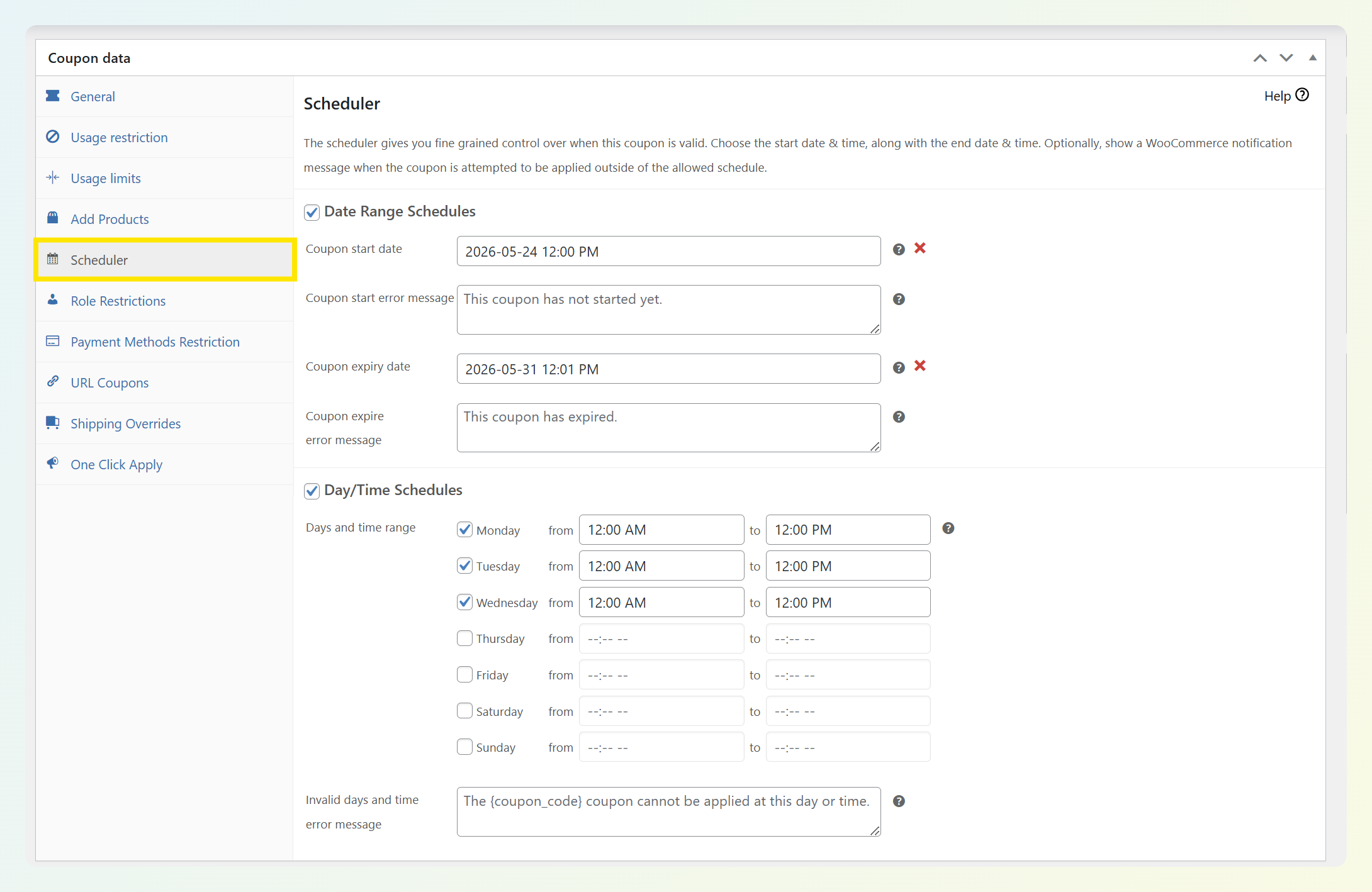
The strategic value here is significant. Instead of creating coupons one at a time as each event approaches, you can sit down once per quarter and create every coupon you’ll need for the next three months. Set the dates, configure cart conditions and auto-apply rules, and move on. For a deeper walkthrough of this approach, see our guide to WooCommerce coupon automation.
When you pre-schedule a full quarter of coupons in one sitting, promotion weeks can feel much less reactive. The setup work is already done, which makes it easier to focus on email timing, onsite messaging, and campaign follow-through.
Planning loyalty bonus events
Advanced Loyalty Program lets you run limited-time point multipliers. During key periods, you can offer double or triple points on purchases to drive engagement without cutting into your margins with straight discounts.
This can work especially well during slower months. Instead of running another price cut, you can use a bonus-points campaign to give customers added value while keeping your core pricing more stable.
Rotating product badges and labels
Advanced Promo Kit lets you add visual badges and labels to products. When combined with your promotion calendar, you can swap badge designs to match whatever campaign is currently active.
For example, your spring clearance might use a green “Spring Sale” badge, while your Black Friday campaign uses a bold red “BFCM Deal” label. Changing these to match each campaign creates visual consistency across your store and reinforces the promotion messaging customers see in your emails and social media.
Building Your Calendar: A Step-by-Step Framework
Here’s a practical framework you can follow to build your own WooCommerce promotion calendar from scratch.
Step 1: List your biggest retail moments. Start with the dates that matter most for your specific products and customers. A pet store’s calendar will look different from a fashion boutique’s, so focus on the events where your audience is most likely to buy.
Step 2: Choose a promotion type for each date. Match the event to the right tactic. Flash sales work well for urgency-driven events, gift card campaigns fit gift-giving holidays, and tiered discounts can help with clearance periods. For more ideas, browse these ecommerce promotion ideas. Use our discount and promotion calculators to set the right numbers for each campaign.
Step 3: Set preparation timelines. Larger campaigns like Black Friday, Mother’s Day, or back-to-school usually need more lead time than smaller flash sales or clearance promos. Add realistic prep windows for each campaign so you’re not building everything at the last minute.
Step 4: Pre-create and schedule your coupons. Using Advanced Coupons, create all coupons for the upcoming quarter. Set start and end dates, configure cart conditions, and enable auto-apply where appropriate.
Step 5: Coordinate email and on-site messaging. Most promotions work better when you plan more than one customer touchpoint. A simple sequence could include a pre-announcement, a launch email, and a last-chance reminder. Schedule them to match your coupon dates, and if you’re using product badges through Advanced Promo Kit, make sure the onsite visuals go live at the same time so the messaging stays consistent.
Step 6: Review and adjust quarterly. After each quarter, review what worked and what didn’t. Which promotions drove the most revenue? Which ones fell flat? Did any campaign underperform because the preparation timeline was too short? Use those insights to adjust your calendar for the next quarter. Over time, you’ll develop a clear picture of which promotion types work best for your specific audience and products.
Sample WooCommerce Promotion Calendar Template (Q2 Example)
Here’s a sample Q2 WooCommerce promotion calendar template you can adapt and copy into any spreadsheet tool. The examples below show how to map each campaign to a promotion type, the Advanced Coupons feature you’ll use, and a prep deadline. Adjust the exact dates to match your market and calendar year.
- Early April: Spring clearance
- Promotion type: tiered discount (spend more, save more)
- Feature: Advanced Coupons cart conditions with auto-apply
- Prep deadline: mid-to-late March
- Notes: useful for clearing seasonal inventory before your next campaign window
- Early April: Easter flash sale
- Promotion type: themed coupon with product badges
- Feature: scheduled coupon + Advanced Promo Kit labels
- Prep deadline: 1 to 2 weeks before launch
- Notes: works well for a short promotional window
- Early May: Mother’s Day campaign
- Promotion type: gift card campaign + BOGO deal
- Feature: Advanced Gift Cards + BOGO coupons
- Prep deadline: 2 to 3 weeks before launch
- Notes: a strong seasonal moment for gift-focused offers
- Mid-to-late June: Father’s Day campaign
- Promotion type: gift card campaign
- Feature: Advanced Gift Cards
- Prep deadline: 1 to 2 weeks before launch
- Late June: Summer kickoff sale
- Promotion type: flash sale + bonus-points campaign
- Feature: scheduled coupons + Advanced Loyalty Program
- Prep deadline: 1 to 2 weeks before launch
- Notes: useful for maintaining momentum during a slower sales period
To create your own version, set up a spreadsheet with columns for: date, event name, promotion type, coupon code, Advanced Coupons feature, prep deadline, status, and results. Fill in Q3 and Q4 following the same pattern. The “status” column is particularly useful for tracking where each campaign stands (not started, coupons created, emails drafted, live, completed). After the promotion ends, fill in the “results” column so you have performance data to reference when planning the same event next year. For creative coupon code ideas, check out our guide to promo code names for holidays.
Download the 2026 Promotional Calendar PDF
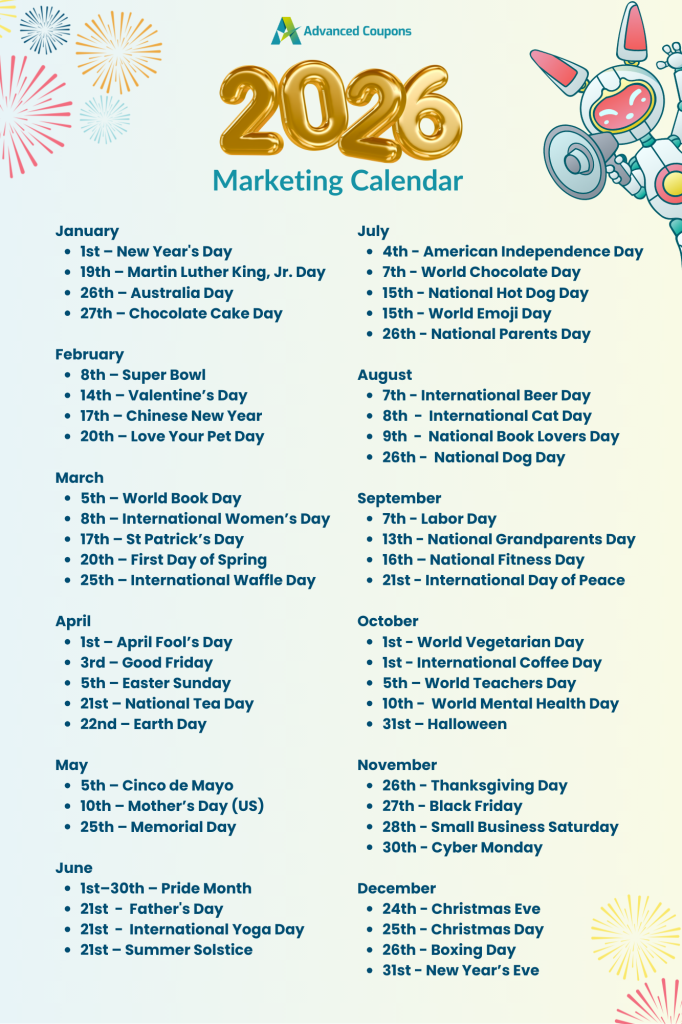
Want a quick-scan version of your WooCommerce promotion calendar you can save, share, or keep beside your planning sheet? Download our 2026 promotional calendar PDF for an at-a-glance view of key retail dates.
Frequently Asked Questions
How far in advance should I plan my WooCommerce promotions?
Plan at least one full quarter ahead when you can. A practical approach is to map out your year at a high level first, then build detailed campaigns one quarter at a time. Bigger events like Black Friday and Cyber Monday usually need a much earlier planning window than regular monthly promotions.
How many promotions should I run per month?
For many WooCommerce stores, a steady but not overwhelming promotion rhythm works better than constant discounting. The right pace depends on your products, margins, and audience, but consistency usually matters more than running promotions too often.
Can I schedule WooCommerce coupons to activate automatically?
Yes. Advanced Coupons includes a scheduling feature that lets you set exact start and end dates for each coupon. Once configured, the coupon activates and deactivates automatically. You can also combine scheduling with auto-apply rules so the discount applies to qualifying carts without customers needing to enter a code.
What is the best promotion to run during slow sales months?
Bonus-points campaigns can work well during slower periods because they add value without relying only on another price cut. Pair that kind of offer with a targeted email to past customers and it can be a useful way to encourage repeat purchases while protecting your margins.
Do I need separate tools for each promotion type?
Not necessarily. Advanced Coupons covers scheduled coupons, BOGO deals, cart conditions, and auto-apply rules. Advanced Loyalty Program supports points-based reward strategies, while Advanced Gift Cards helps with gift card campaigns. If you plan to use all three, the All Access Bundle gives you a more complete promotion toolkit in one package.
How do I measure which promotions worked best?
Track the metrics that matter most for your store, such as revenue during the campaign window, coupon redemptions, and average order value. Advanced Coupons includes coupon reporting that can help you compare performance across the promotions on your calendar.
Start Planning Your WooCommerce Promotions Today
The difference between stores that hit their revenue targets and stores that fall short often comes down to preparation. A WooCommerce promotion calendar doesn’t need to be complicated. A simple spreadsheet with dates, promotion types, and preparation deadlines gives you structure that reactive planning never will.
Here’s a quick recap of what to do next:
- Map your retail calendar by listing the key dates for each quarter
- Schedule your coupons in advance so campaigns launch automatically
- Follow the step-by-step framework to build your first full-quarter calendar
- Copy the sample Q2 template and adapt it for your store
Ready to put your WooCommerce promotion calendar into action? Advanced Coupons gives you scheduled coupons, auto-apply rules, BOGO deals, and cart conditions to execute every campaign on your calendar. Pair it with Advanced Loyalty Program and Advanced Gift Cards for a more complete promotion toolkit.





Thanks for the promo calendar. It can be overwhelming to keep track of all the holidays and fun promotional marketing days. 🙂
Glad it helped Alisha! Don’t forget to print it out!