Mother’s Day can be a strong seasonal opportunity for WooCommerce stores, but it rarely performs best as a one-day sale. Shoppers start browsing early, compare gift options, and often wait until the last minute to buy. That means your offer mix, timing, and follow-up matter just as much as the discount itself.
Instead of relying on a single coupon, it usually works better to build a short campaign with a few complementary promotions. Gift cards help last-minute buyers. Tiered discounts encourage bigger carts. Product badges and themed offers make gift-worthy items easier to spot.
This guide walks through a practical 4-week Mother’s Day promotions plan using Advanced Coupons plugins. In 2026, Mother’s Day in the United States falls on Sunday, May 10, so you can use the timeline below to map out your campaign and adjust the dates for your store as needed.
Let’s get right into it!
Why Mother’s Day Matters For Ecommerce
Mother’s Day is a major retail occasion, and the spending numbers show why it matters for ecommerce stores.
According to the National Retail Federation (NRF), total Mother’s Day consumer spending was expected to reach $34.1 billion in 2025, with 84% of U.S. adults planning to celebrate and average spending reaching $259.04.
Gift cards are also a meaningful part of that seasonal demand. NRF projected $3.5 billion in Mother’s Day gift card spending in 2025, which makes them especially worth considering for WooCommerce stores that want an easy option for planners and last-minute shoppers alike.
Here is what makes Mother’s Day especially interesting for online store owners: many of the shoppers visiting your store during this period are not your typical customers. They are gift-givers buying for someone else. That changes what promotions work. A BOGO deal targeting moms shopping for themselves requires different framing than a gift card campaign targeting sons and daughters who don’t know what to buy.
7 Mother’s Day Promotions You Can Run With The Advanced Coupons Suite
Running a single discount for the entire Mother’s Day season can limit your reach. A stronger Mother’s Day campaign often combines multiple offers that speak to different buyer motivations at the same time.
Strategy 1: Gift card bundles for easy gifting
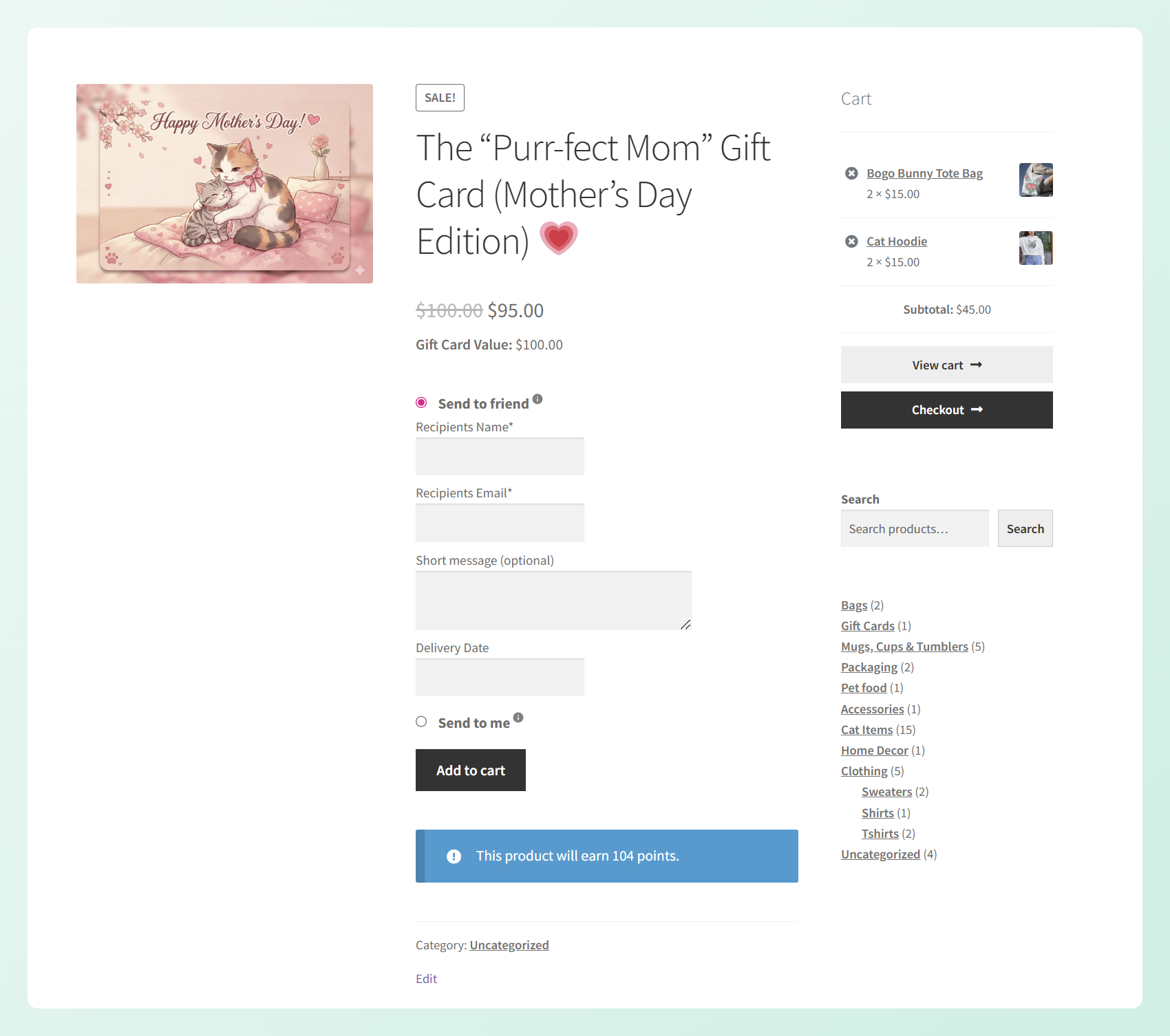
Gift cards are the perfect product for indecisive gift-givers, and there are a lot of those during Mother’s Day. Create pre-set gift card amounts ($25, $50, $100) with Mother’s Day-themed messaging so shoppers can buy a thoughtful gift in under two minutes.
The key is making the gift cards feel like a real present, not a last resort. Add themed email templates, personalized sender messages, and suggested pairing notes like “Pair this with Mom’s favorite category.” Advanced Gift Cards for WooCommerce lets you set up all of this directly in your WooCommerce store.
Strategy 2: “Treat Yourself, Mom” BOGO offer
A BOGO (Buy One Get One) deal works on two fronts during Mother’s Day. Gift-givers love it because they get more value for their money. Moms shopping for themselves love it because the “treat yourself” framing gives them permission to splurge.
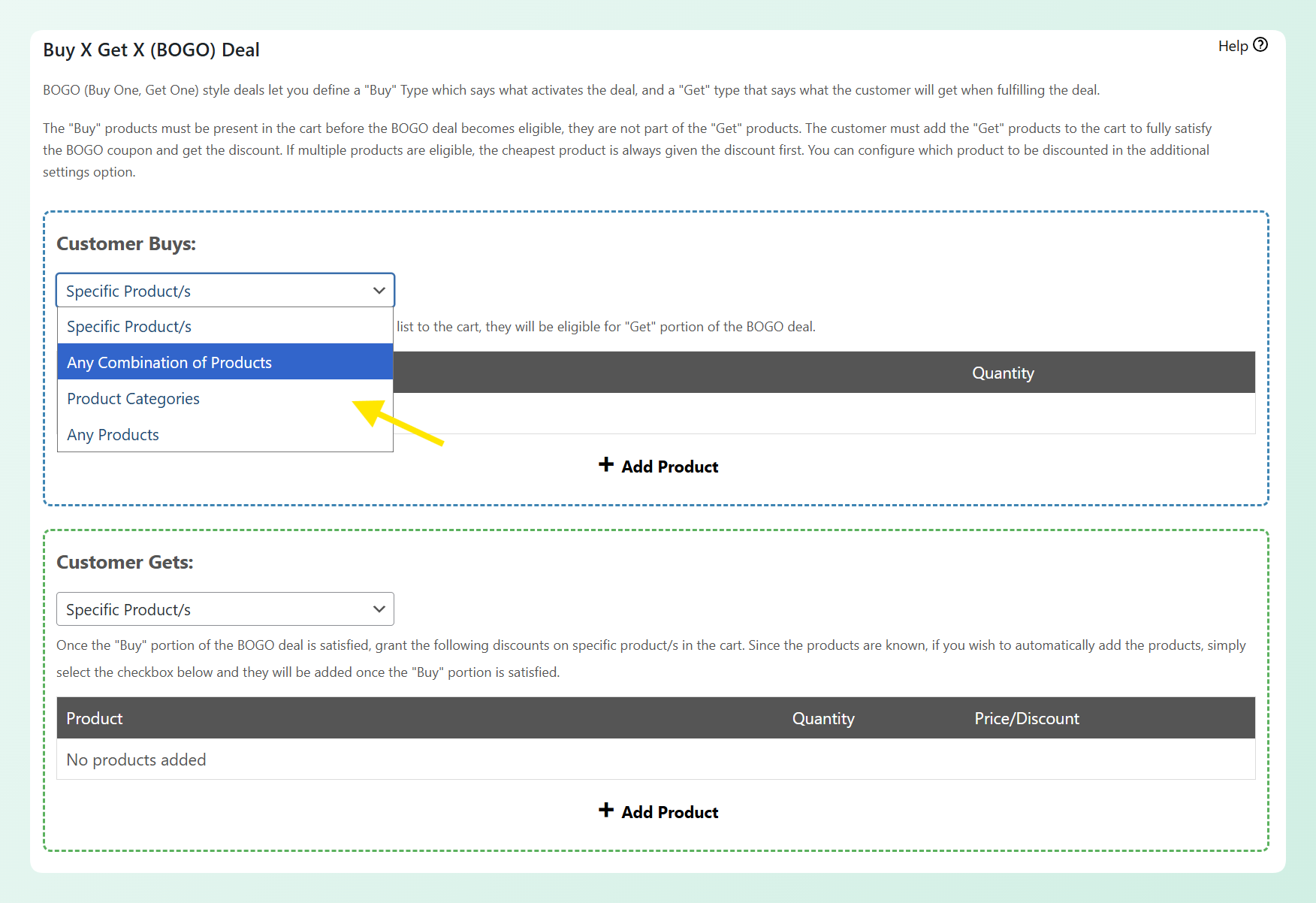
Set up a Buy One Get One or Buy 2 Get 1 deal on your most popular gift-worthy categories. Self-care, wellness, home decor, and accessories all perform well. Frame it explicitly as “Mom deserves to treat herself” in your promotional copy. Advanced Coupons’ BOGO conditions let you define exactly which products or categories qualify and how the discount applies.
Strategy 3: Bonus points campaign for existing customers
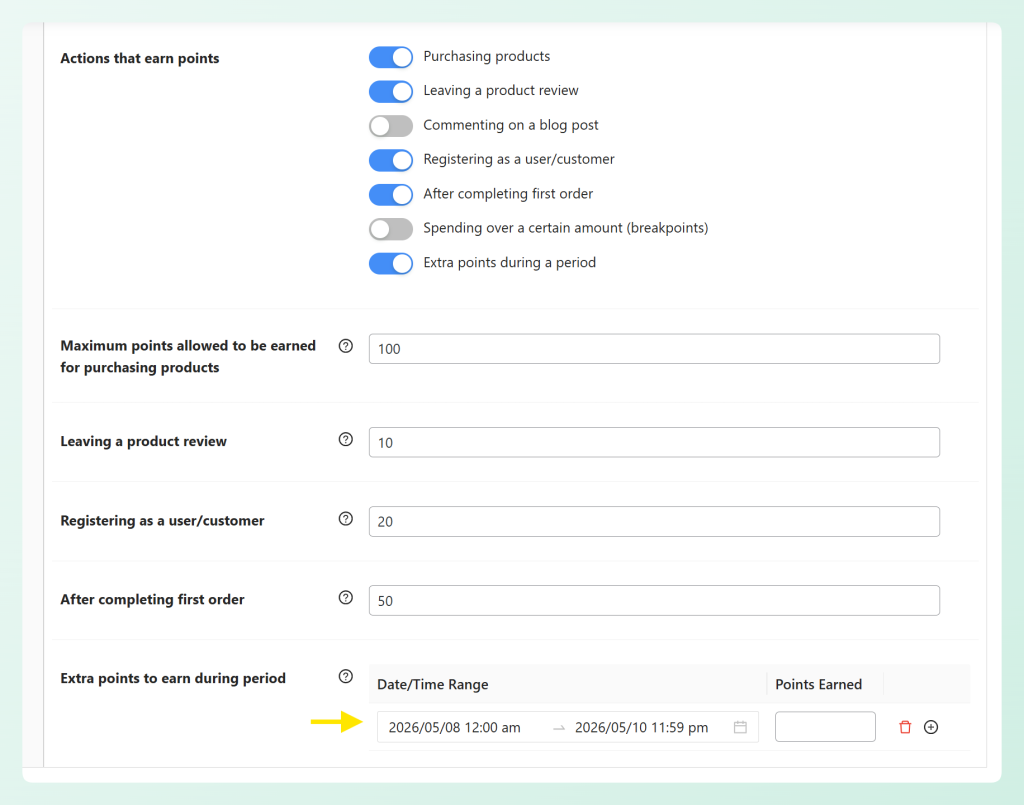
If you run a loyalty program in your WooCommerce store, a short bonus-points campaign around Mother’s Day can give repeat customers a reason to buy sooner instead of waiting until later.
This works best as a retention-focused promotion layered alongside your main Mother’s Day offers. Advanced Loyalty Program lets you reward customers with points for orders and other actions, so you can use that as part of a seasonal campaign and explain the perk clearly in your emails, banners, or onsite messaging. You can even set bonus points earning for specific timeframes, which is perfect for limited-time campaigns like Mother’s Day.
Strategy 4: Tiered “spend more, save more” discounts
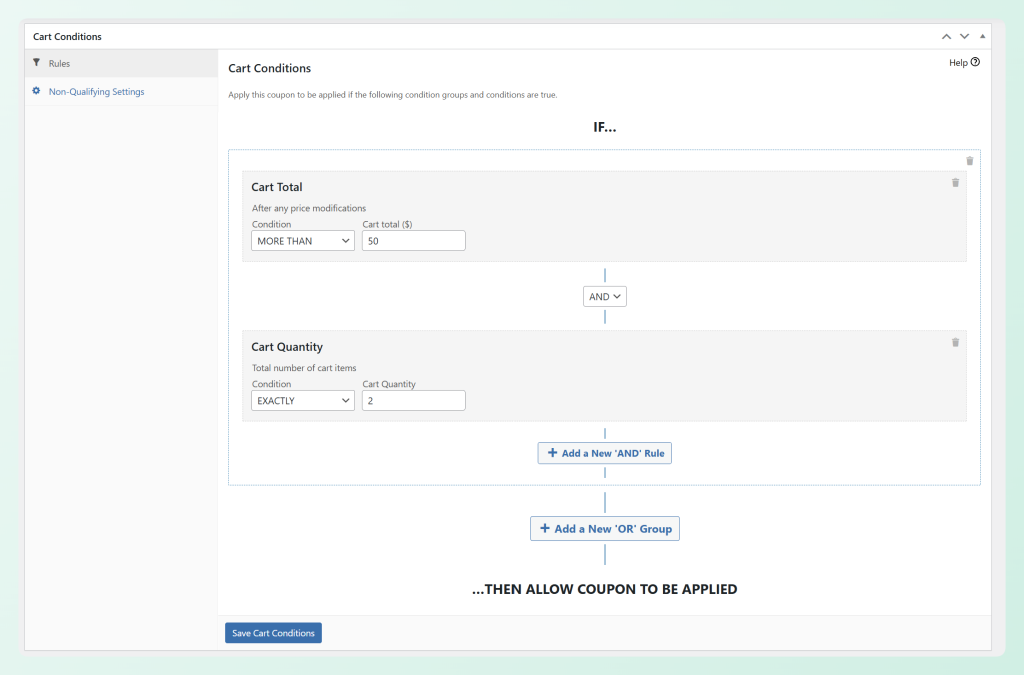
Tiered discounts encourage higher average order values, which matters during Mother’s Day because many shoppers buy for multiple recipients (mom, grandmother, wife, sister).
Set up thresholds like: Spend $50 get 10% off, spend $100 get 15% off, spend $150 get 20% off. This gives shoppers a reason to add that extra item to the cart instead of checking out at the minimum. Advanced Coupons cart conditions let you create subtotal-based thresholds that apply the right discount automatically.
Strategy 5: Personalized coupon for repeat mom-category buyers
Your most valuable Mother’s Day customers are people who have already bought from relevant categories like jewelry, skincare, or home decor in the past. They know your products and they know what Mom likes.
Send these customers a dedicated coupon before the general sale launches. The early access makes them feel valued, and targeting based on purchase history means you’re reaching people with proven buying intent. Advanced Coupons purchase history cart conditions make this possible by letting you restrict coupons to customers who have previously bought from specific categories.
Strategy 6: Free shipping threshold for Mother’s Day orders
Offering free shipping on qualifying Mother’s Day orders can add strong perceived value without forcing a deeper product discount. It also pairs well with your other offers because it gives shoppers one more reason to complete checkout.
Advanced Coupons supports shipping discounts and cart conditions, so you can build a threshold-based Mother’s Day offer, such as free shipping once the cart reaches a certain amount. If your store also offers gift wrapping, you can mention that separately in your campaign copy rather than presenting it as the plugin-controlled offer.
Strategy 7: Mother’s Day themed sale badges and labels
Adding “Mother’s Day Special,” “Gift for Mom,” or “Mom’s Favorite” badges to featured products helps gift shoppers quickly find relevant items. This is especially useful if your store sells a wide range of products and visitors might otherwise struggle to identify what makes a good Mother’s Day gift.
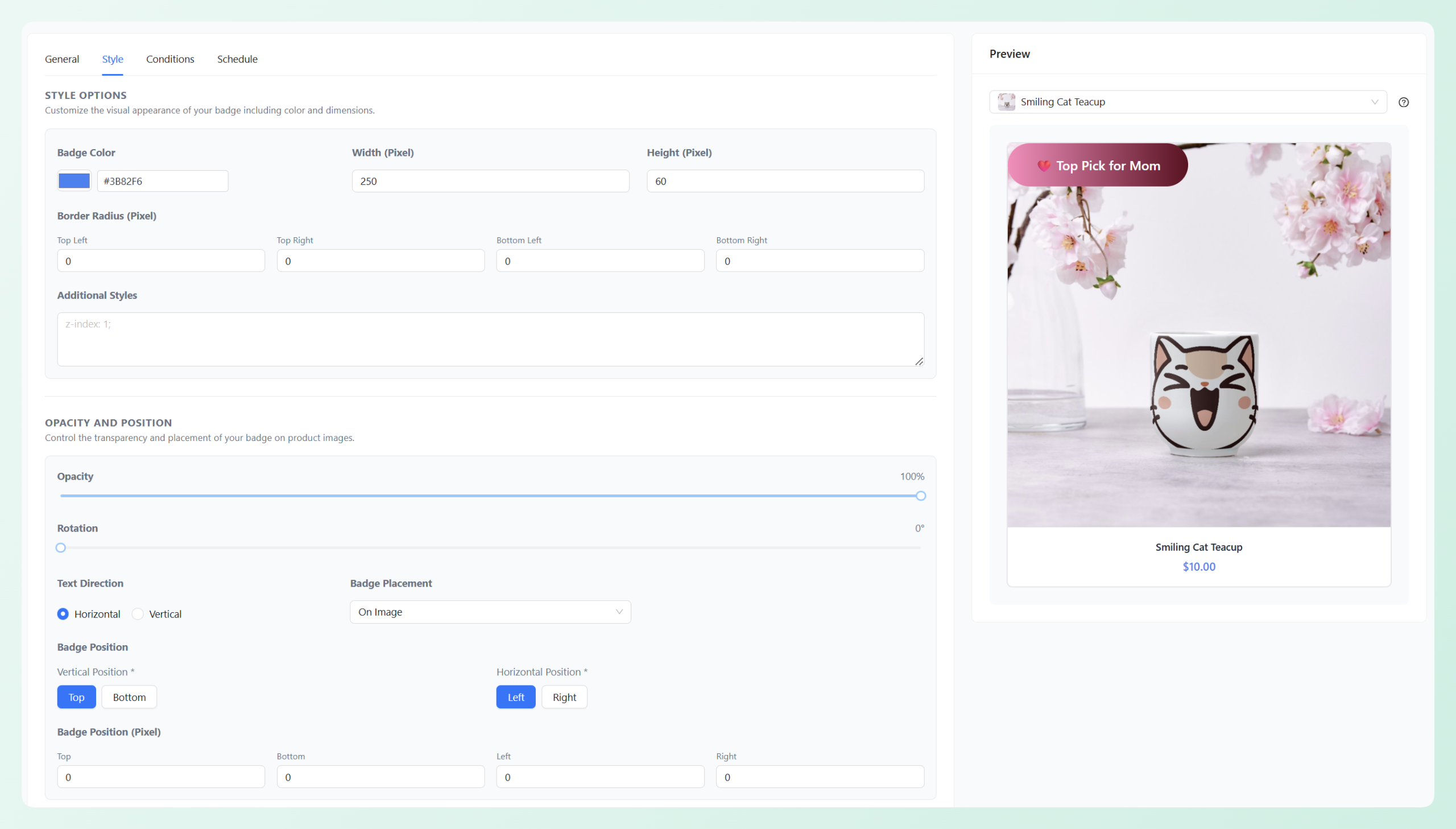
Advanced Promo Kit sale badges let you add custom badge designs to individual products or entire categories without touching your theme code. For design ideas on making these badges stand out, check out our guide on WooCommerce sale badge designs.
Mother’s Day Promo Code Naming Ideas
The right promo code name is short, memorable, and thematic. Here are some you can use or adapt for your store:
- MOMSDAY2026 (clear and timely)
- LOVEMOM (short and emotional)
- TREATMOM (aligns with self-care messaging)
- FORMOM25 (includes the discount amount for extra clarity)
- MOMGIFT (simple and universal)
- MOTHERSDAYVIP (ideal for early-access repeat customers)
Keep codes short, easy to read, and easy to type on mobile. Simpler codes are usually easier for shoppers to remember and enter correctly.
If you want to make claiming discounts even easier, you can use Advanced Coupons’ Auto Apply coupon feature so eligible offers are added automatically at checkout. For more naming inspiration, see our full list of promo code names, or learn how to set up an automatic coupon in WooCommerce.
Setting Up A Mother’s Day Gift Card Campaign
Gift cards deserve their own dedicated campaign, not just a mention in your general Mother’s Day email. The NRF data showing $3.5 billion in Mother’s Day gift card spending in 2025 confirms that this is a product category worth prioritizing.
Start with your denomination options. Offer at least three pre-set amounts ($25, $50, $100) plus a custom amount option. With Advanced Gift Cards for WooCommerce, you can set this up using variable gift cards. Different budgets need different price points.
Next, decide between email delivery and physical cards. For Mother’s Day, digital delivery is especially valuable because it rescues procrastinators who wait until the last minute.
Set up a Mother’s Day-themed email template for gift card delivery so the recipient gets something that feels like a real gift, not a transaction notification. Then create a dedicated landing page or product category for Mother’s Day gift cards. Don’t bury them inside your regular shop page.
Pair your Mother’s Day promotions with SaveTo Wishlist so moms can share gift ideas with their families. When a gift-giver can see what Mom actually wants, it can make the buying decision much easier.
For detailed setup instructions, see our guides on gift card marketing and how to sell gift cards in WooCommerce.
Mother’s Day Email Sequence With Coupon Triggers
A single email blast is not a campaign. A stronger Mother’s Day promotions plan uses a short email sequence, with each message tied to a specific offer or buying moment.
- Email 1 (3 weeks before, around April 20): “Mother’s Day is coming.” Announce your early bird coupon or gift card promotion. This is your awareness email targeting planners who shop early.
- Email 2 (2 weeks before, around April 27): Gift guide with curated products and your tiered “spend more, save more” discount. Show specific product suggestions at each spending tier.
- Email 3 (1 week before, around May 4): “Last chance for shipping.” Create urgency with a shipping deadline and remind customers about your bonus-points campaign for the weekend.
- Email 4 (2 days before, May 8): “Still need a gift?” This is your gift card push. Digital gift cards ship instantly, so this email catches every last-minute shopper.
One of the strongest Mother’s Day email angles for ecommerce stores is the last-minute gift card push sent shortly before the holiday. Procrastinators are your best last-minute customers, and a gift card with instant email delivery is the perfect product for them. Don’t skip this email.
Your 4-Week Mother’s Day Promotion Timeline
Here is the week-by-week breakdown for executing your Mother’s Day campaign. In 2026, Mother’s Day falls on Sunday, May 10.
Week 1 (April 14-20): Setup
- Create all coupon codes and configure cart conditions in Advanced Coupons
- Build your gift card products with Mother’s Day branding in Advanced Gift Cards for WooCommerce
- Prepare email templates for the 4-email sequence
- Design and assign Mother’s Day sale badges to featured products
Week 2 (April 21-27): Launch
- Activate your early-bird promotion (personalized coupon for repeat buyers)
- Send Email 1 announcing the early-bird offer
- Turn on Mother’s Day sale badges across your store
Week 3 (April 28 – May 4): Ramp up
- Send Email 2 (gift guide with tiered discounts)
- Launch the tiered “spend more, save more” discount for all shoppers
- Promote your bonus-points campaign for the upcoming weekend
Week 4 (May 5-10): Peak
- Send Email 3 (shipping urgency + bonus points reminder)
- Send Email 4 on May 8 (last-minute gift card push)
- Mother’s Day weekend: all promotions live simultaneously
- Monitor coupon redemption rates and adjust if needed
Post-campaign: Review your results within one week. Note which promotions had the highest redemption rates, which emails drove the most revenue, and which gift card denominations sold best. Use that data to plan your Father’s Day campaign.
Frequently Asked Questions
When should I start my Mother’s Day promotions?
Start setup at least 4 weeks before Mother’s Day. Your first customer-facing promotion can go live around 3 weeks out. Early-bird offers for repeat customers are often a good fit at that stage because they give loyal shoppers first access before the general sale launches.
What is the best Mother’s Day promotion for a small WooCommerce store?
Gift card bundles with Mother’s Day-themed delivery emails can be one of the easiest high-value options for a small WooCommerce store. They require no inventory, appeal to indecisive gift-givers, and work for stores of any size. Pair them with a simple tiered discount (spend $50 get 10% off, spend $100 get 15% off) for two overlapping promotions with minimal setup time.
Should I offer free shipping for Mother’s Day?
Free shipping works best as a secondary incentive rather than your primary promotion. Set a minimum order threshold (for example, free shipping on orders over $50) so it also helps increase your average order value. The perceived value of free shipping for gift purchases is high because nobody wants to tell Mom they paid $8 to ship her present.
How do I promote gift cards for Mother’s Day?
Give gift cards their own dedicated campaign instead of burying them in a general sale email. Create a landing page or product category specifically for Mother’s Day gift cards. Send at least one email focused entirely on gift cards, ideally 48 hours before Mother’s Day targeting last-minute shoppers. Digital gift cards with instant email delivery are the perfect solution for procrastinators.
Can I run multiple promotions at the same time?
Yes, you can. Running multiple promotions can work well when each one serves a different audience or buying moment, and the rules are clear. Use Advanced Coupons cart conditions to help each offer apply correctly. For example, a BOGO deal, a tiered discount, and a bonus-points campaign can run at the same time with different triggers.
Start Planning Your Mother’s Day Promotions Today
The WooCommerce stores that tend to do well on Mother’s Day are the ones that plan early and layer their promotions strategically. A single discount code sent in one email is often less effective than a multi-week campaign that reaches early planners, gift-guide browsers, and last-minute shoppers separately.
Here is your action checklist:
- Set up 2-3 overlapping promotions targeting different buyer segments
- Create a dedicated gift card campaign with themed delivery
- Build a 4-email sequence tied to specific promotions and deadlines
- Follow the 4-week timeline starting the week of April 14
Mother’s Day 2026 falls on Sunday, May 10. Your planning window is open right now. Get your promotions configured, your email sequence drafted, and your gift cards ready.
Check out the Advanced Coupons pricing page to see which plan fits your store. For more seasonal strategies you can reuse throughout the year, see our guide on holiday marketing tips.