
Shopping cart abandonment is still a major ecommerce problem. Baymard Institute’s current benchmark puts the documented average cart abandonment rate at around 70% across multiple studies. Common reasons include extra costs at checkout and a checkout flow that feels too long or complicated. For WooCommerce stores, that makes cart recovery worth treating as a real revenue lever instead of an afterthought.
Coupon codes are one of the most reliable tools for getting some of that back. But how you deliver the coupon matters as much as the discount itself. A generic “you left something behind” email gets skimmed. A personalized recovery link that applies the discount automatically when the shopper clicks — that gets used.
This guide covers the full workflow: creating a recovery coupon in Advanced Coupons, setting it up as a URL coupon for frictionless email delivery, using cart conditions to qualify which carts deserve a discount, and tracking performance with Coupon Reports.
What You Need Before You Start
Advanced Coupons handles the coupon side of cart recovery — creating the discount, generating the URL link, setting cart conditions, and tracking redemptions. It does not send the abandoned cart email itself.
For the trigger layer, you’ll need a WooCommerce-compatible email automation or cart recovery tool that can send abandoned cart emails and let you insert a custom link in the message. Common options include:
- Klaviyo — email automation platform with WooCommerce abandoned cart flows
- Metorik — WooCommerce analytics and email automation with cart recovery emails
- CartFlows — cart recovery and funnel tool for WooCommerce
- A dedicated WooCommerce cart recovery plugin — useful if you want a lighter, recovery-focused setup
The key requirement is simple: your email tool should let you place a custom recovery URL in the message so shoppers can return and claim the offer with as little friction as possible.
Step 1: Create The Recovery Coupon
Start by creating a new coupon in your WooCommerce coupon editor.
Set the basics:
- Discount type: Percentage (10–15% is the typical range for cart recovery; fixed dollar amounts work better for high-AOV stores)
- Coupon amount: Your chosen percentage or fixed amount
- Expiry date: Set a short expiry — 48–72 hours creates urgency without feeling punishing. In Advanced Coupons Premium, you can use Scheduled Coupons to control exact active windows.
Give the coupon a clean, readable code if you want it recognizable in email copy (e.g., COMEBACK10). Or use a generic internal code if the URL coupon will be the only delivery method and the code won’t appear visibly.
🧠 What I found testing this: Creating a basic recovery coupon from scratch is quick — discount type, amount, expiry, done. The Advanced Coupons fields integrate cleanly into the standard WooCommerce coupon editor with no separate panel or separate workflow required.
Step 2: Set Up The URL Coupon
A URL coupon is a shareable link that automatically applies your coupon when the shopper clicks it. No code entry. No “enter coupon at checkout” friction. The discount is already applied when they land on the cart or checkout page.
For cart recovery, this matters: every step between “I want to come back” and “the discount is applied” is a drop-off point. URL coupons eliminate that friction.
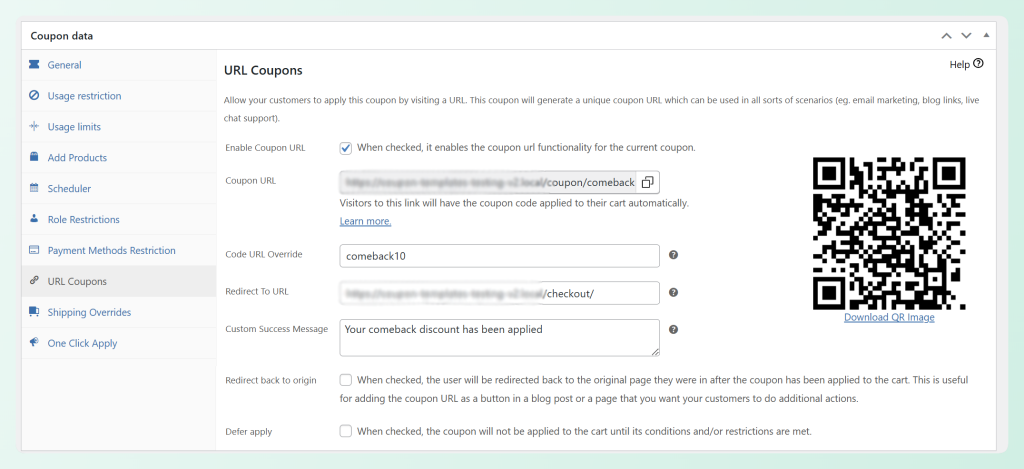
To set up a URL coupon in Advanced Coupons Premium:
- Open the coupon you just created
- Scroll to the URL Coupons tab in the Advanced Coupons panel
- Enable URL coupon
- Set the redirect destination — send the shopper directly to
/checkout/or/cart/, depending on the flow you want shoppers to return to - Copy the generated URL
The URL looks like: https://yourstore.com/coupon/COMEBACK10/
Paste this URL as the CTA link in your abandoned cart email. When the shopper clicks “Claim your discount,” the coupon applies automatically. They arrive at checkout with the discount already in place.
Step 3: Build Your Email Sequence
A short recovery sequence usually works better than a single reminder email. A practical starting point looks like this:
Email 1 — 1 hour after abandonment — No coupon
Subject: “You left something in your cart”
Content: Remind them what they left. No discount. Many abandoners just got distracted — they’ll convert without one.
Email 2 — 24 hours after abandonment — Coupon
Subject: “Here’s 10% off to finish your order”
Content: Insert the URL coupon link as your CTA. This is where the discount goes.
Email 3 — 48–72 hours after abandonment — Final reminder
Subject: “Your discount expires soon”
Content: Urgency close. Restate the offer, include the same URL coupon link, note the expiry.
In your email tool, insert the URL coupon link wherever you’d normally put a “Return to cart” or “Complete your purchase” button. The link does the work.
Step 4: Add Cart Conditions To Qualify Who Gets The Discount
Not every abandoned cart should get a recovery coupon. Advanced Coupons’ cart conditions let you restrict the coupon so it only applies to carts that meet your criteria.
Minimum cart value
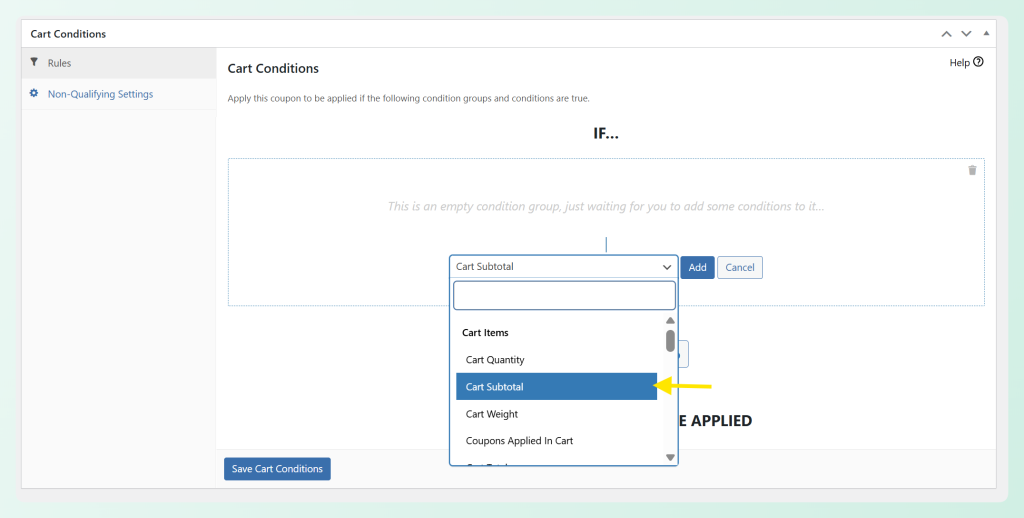
Set a minimum subtotal condition — for example, $50 — so the coupon only applies to carts worth discounting. A 10% discount on an $8 cart isn’t worth the margin hit; on an $80 cart, it often recovers a real sale.
To add this: in the coupon editor, go to Cart Conditions > Add Condition > Cart Subtotal and set your minimum.
First-order shoppers only
If you want to reserve recovery discounts for new customers, use a cart condition based on order history, such as a zero previous-order count or zero customer spend, so the coupon only applies to shoppers who have not bought from your store yet.
Avoid unwanted stacking
If you already run regular promotions, review your coupon restrictions so the recovery offer does not stack where you do not want it to. The goal is to recover worthwhile carts, not discount the same order twice.
What I found testing this: Adding the minimum cart subtotal condition is straightforward — click Add Condition, select Cart Subtotal, set the value. The cart conditions panel is one of the clearest UIs in the plugin. The condition list is long (50+ types), but the search box narrows it quickly.
Step 5: Track Performance With The Coupon Dashboard
Advanced Coupons Premium includes a coupon dashboard that helps you review coupon activity, discount totals, discounted order revenue, and usage trends over a selected date range.
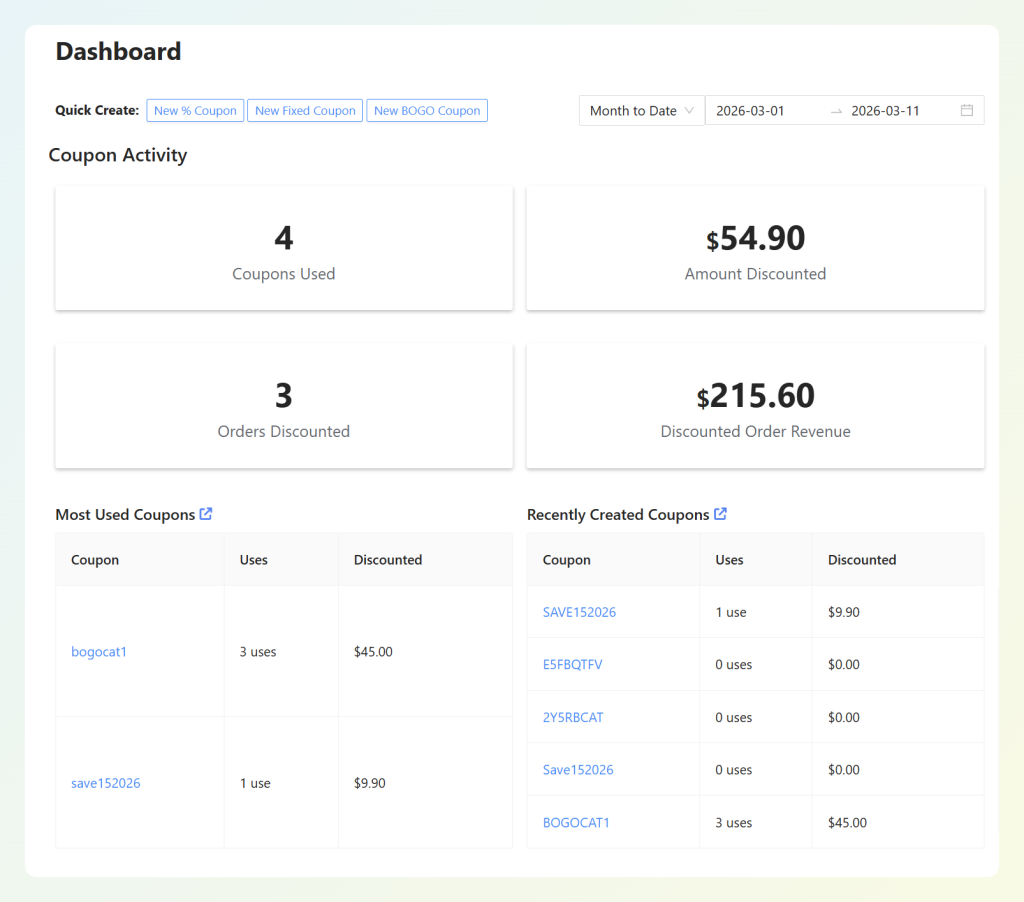
For cart recovery, what to watch:
- Redemption rate: How many shoppers who received the recovery offer actually used the coupon
- Revenue recovered: The order revenue tied to coupon redemptions
- Usage over time: When the coupon gets redeemed, so you can see which part of your sequence is doing the work
Use your coupon reporting dashboard to review how the recovery coupon performs over time and compare it against the emails or flows sending traffic back to your store.

When NOT To Use A Recovery Coupon
One thing to watch: if shoppers learn that every abandoned cart triggers a discount, some will start waiting for the coupon instead of checking out right away. A simple way to reduce that risk is to send the first reminder without a discount, then introduce the coupon only in a later follow-up if the shopper still has not converted.
Skip the recovery coupon when:
- The cart is already discounted. If the shopper has a sale item or an existing coupon applied, a recovery discount stacks on a discount. Protect your margin with a cart condition exclusion.
- The cart AOV is too low. A 10% recovery coupon on a $15 cart costs you $1.50 and might not move the needle. Set a minimum cart value condition.
- You’re in a high-trust category. For software, subscriptions, or digital products where the barrier is often information rather than price, a recovery email with more product details or a guarantee reminder may outperform a discount.
- You haven’t run email 1 first. Send the no-discount reminder first. Let the easy conversions happen for free.
Frequently Asked Questions
Does Advanced Coupons send the abandoned cart email itself?
No. Advanced Coupons handles the coupon creation, URL link generation, cart conditions, and tracking. You still need a separate email automation or cart recovery tool to detect the abandoned session and trigger the email sequence.
Can I make the recovery coupon single-use only?
Yes. In the coupon settings under Usage Limits, set “Usage limit per user” to 1. This prevents a shopper from using the same recovery coupon across multiple abandoned cart cycles.
How do I prevent the coupon URL from being shared publicly?
A URL coupon can be shared if someone forwards the email, so keep the offer tight. Use a short expiry window, set a usage limit per user, and avoid reusing the same recovery coupon for too long. If you need more control, you can also generate unique coupon codes in bulk instead of relying on one shared code. For more on controlling coupon misuse, see our guide on preventing WooCommerce coupon fraud.
What’s a good recovery discount amount?
10–15% percentage off is the most common range. Fixed dollar amounts ($5–$10 off) work better for high-AOV stores where a percentage discount could feel too large to offer. Free shipping works well for stores where shipping cost was the abandonment trigger — check your abandonment data to see if unexpected shipping costs correlate with the carts you’re trying to recover.
Conclusion
The full workflow is straightforward: create the coupon in Advanced Coupons, enable URL coupon and copy the link, paste it into your email sequence, add cart conditions for minimum value and buyer type, and track redemptions in Coupon Reports.
The two additions to this updated guide — URL coupons for frictionless email delivery, and cart conditions to protect your margin — are what turn a basic recovery email into a system you can run without discounting carts that don’t need it.
It won’t recover every abandoned cart. But done right, it recovers a meaningful share of high-intent abandoners without training the rest of your customer base to game the discount system.





Hi,
To what email address shall I send the coupon, if I don’t have the email address of the visitor who doesn’t complete the checkout process?
A more thorough tutorial that includes the process of obtaining the email address of the visitor who abandons the cart would be appreciated.
Thank you.
It would be helpful if your plugin would send the abandoned cart emails automatically. The auto apply is not that big deal for increasing revenue.
How is it with birthday coupons? Do you have a solution for that?
Hey Vlado, This is a tricky problem and slightly out of the scope of a coupon plugin. But it’s still something that’s on our radar. We’re looking at integrating with 3rd party email marketing tools for this.
Birthday coupons is something you can do only if you’re collecting the birthday and pushing that into your email marketing tool. Another approach would be to celebrate the anniversary of the first order by sending them a coupon 1 year after their first order.