

We’ve been FunnelKit users for a while now. We run it at checkout on Advanced Coupons and across our other brands at Rymera, and we’ve been on it for over a year.
After that much time in production through bundles, upsells, automations, and a few support tickets, we figured it was time to write down exactly what it’s like to live with.
This isn’t a drive-by review. Every screenshot below is from our own stores. Here’s our take.
Why We Switched To FunnelKit From Default WooCommerce Checkout?
We used to run the native WooCommerce checkout. It worked, but it always felt like it was leaving conversions on the table. It was rigid, cluttered, and not built to sell. We also wanted to roll out proper upselling without having to engineer it ourselves.
As a busy product team, we made it simple. Offload checkout and funnel logic to a dedicated product rather than build and maintain it in-house. That’s what first brought us to FunnelKit.
Ratings are a useful starting point. FunnelKit currently powers 40,000+ WooCommerce stores and holds the highest five-star ratio of any WooCommerce funnel builder on WordPress.org (980 five-star reviews, 5/5 rating, 98.3% five-star ratio).
But what we really care about is what it feels like to run a live store day after day.
The short version is that FunnelKit is much easier to set up than we expected, the modular architecture is the smartest thing in this category, and the pricing is genuinely budget-friendly once you understand the tiers.
Let’s get into it.
What Is FunnelKit?
FunnelKit (formerly WooFunnels) is a family of four independent WooCommerce plugins built around the same brand and support team.
It’s not a single bloated plugin. It’s a suite where each piece can be installed, used, and bought separately.
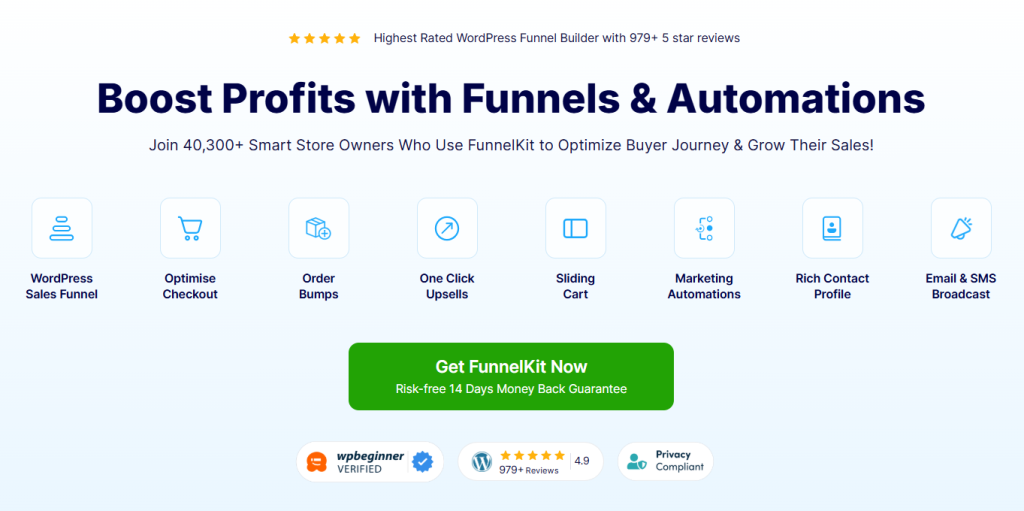
Here’s the lineup:
- FunnelKit Funnel Builder: Sales funnels, optimized checkout, order bumps, one-click upsells, A/B testing, and analytics
- FunnelKit Automations (formerly Autonami): Marketing automation, email + SMS broadcasts, CRM, abandoned cart recovery, and contact segmentation
- FunnelKit Cart: Slide-in side cart with in-cart upsells, free-shipping bars, gamified rewards, and express pay
- Sublium Subscriptions: Recurring billing, subscribe-and-save, installments, payment recovery, cancellation flows, and analytics (lives at sublium.com, separate brand and license)
Each plugin has its own free version on WordPress.org and its own Pro license. You don’t have to buy the whole suite. That modular structure matters more than it sounds, and we’ll come back to it in a dedicated section below.
For us, the workhorse is FunnelKit Funnel Builder, that’s what we use day to day. We did set up and poke through the other products to understand what they’re capable of and where they’d fit for us down the line.
The team behind FunnelKit has been building WooCommerce-specific tools since 2018 (originally as WooFunnels), rebranded in 2022, and is led by co-founder Damanjeet Singh, who has 15+ years of experience with WooCommerce. The parent company is Wisetr INC.
FunnelKit at a Glance & Pricing
| Best for | WooCommerce stores of any size, course creators, agencies, anyone who wants a single trusted vendor for funnels + automation + cart |
| Standout strengths | 3-step guided setup, modular architecture (install only what you need), wins Google Core Web Vitals vs competitors, generous free versions |
| Pricing | $99.50 / $179.50 / $249.50 / $399.50 per year |
| Free version | Yes. Every product (Funnel Builder, Automations, Cart, Sublium) has a full-featured free version on WordPress.org |
| Time to first funnel | 10-15 minutes from install to live |
| Refund | 14-day money-back guarantee |
| Trust signals | 40,000+ stores, 980 five-star reviews, 5/5 on WordPress.org, and 4.8/5 on Trustpilot |
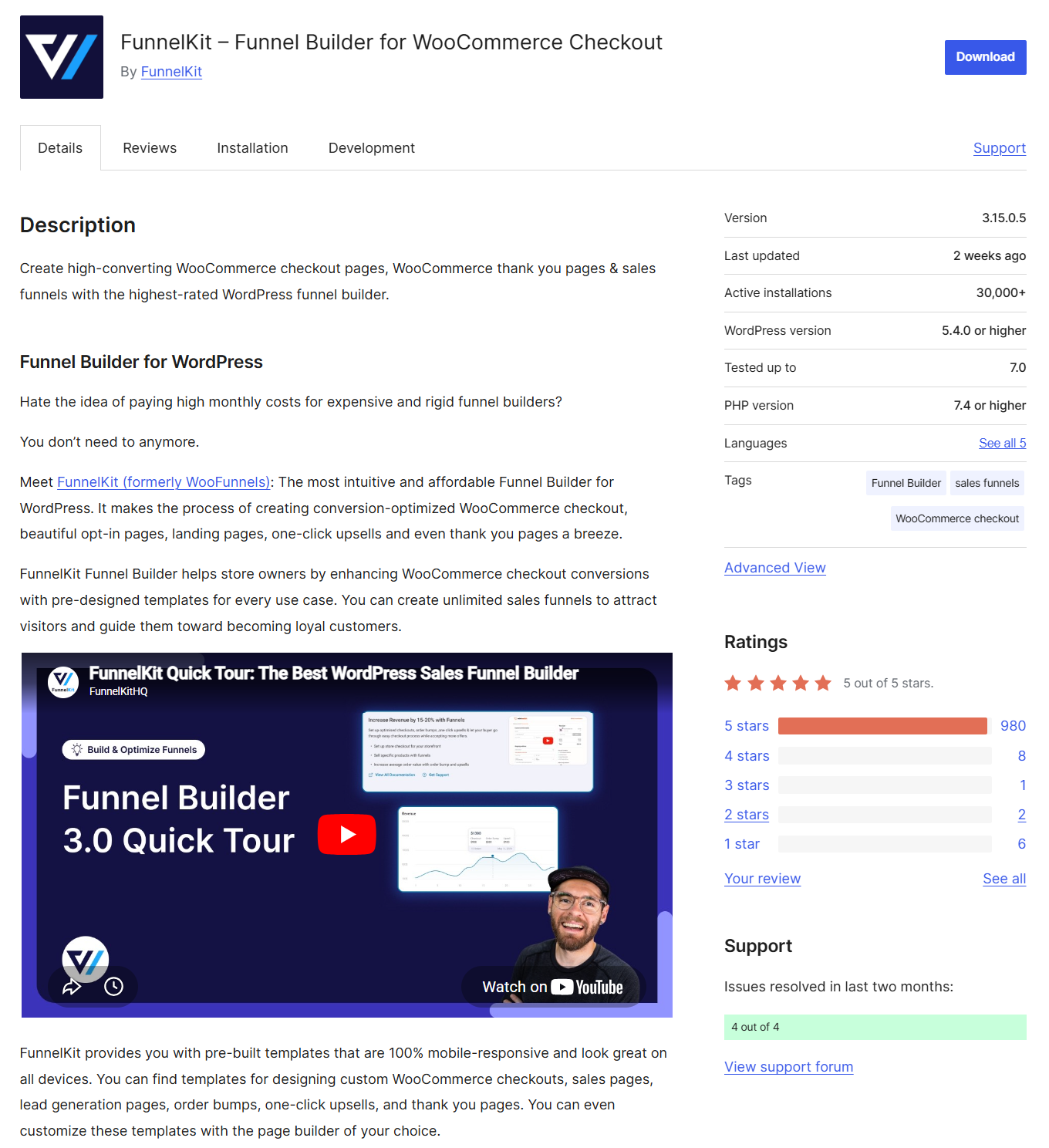
Most growing WooCommerce stores should start with the Plus plan at $179.50/year. It bundles the entire Funnel Builder, Sliding Cart Pro, order bumps, one-click upsells, A/B testing, and analytics for two sites.
If you also want to include native marketing automation and CRM, jump to Professional at $249.50/year. That’s the best value sweet spot.
A note on Sublium Subscriptions
FunnelKit recently launched Sublium Subscriptions. We haven’t moved to it yet, but we’ve been watching it. It’s early, but it’s already pulling in the same kind of positive reviews as their other products.
For us, it’s a “when we’re ready” option rather than today’s decision, but it’s good to know the subscription piece now lives in the same stack.
How Fast Can A Beginner Actually Get Live?
We started on staging, the way we test everything. Within the first session, we’d built checkouts, upsells, and thank-you pages, and the full funnel, matched to our brand and aesthetics, was live in under 15 minutes.
Here’s why the setup is so fast:
3-step guided onboarding
When you first activate FunnelKit, a setup wizard walks you through three steps with sensible defaults and no technical knowledge:
- Pick your goal: Optimize store checkout, build a sales funnel, or both
- Choose a template: Pre-designed, conversion-tested, fully responsive layouts to import
- Configure your funnel steps: Checkout, order bump, upsell, thank-you page
Canvas mode
This is the feature that genuinely makes FunnelKit beginner-friendly. Canvas Mode gives you a visual interface to view and build your funnel as a flow.
You can add new pages, preview or edit, A/B test, and visually understand what your customer will experience.
If you’ve ever used Figma’s whiteboard mode or Lucidchart, you already know how this feels.
Templates come with bumps already configured
When you import a funnel template in FunnelKit, the order bumps and upsells are already configured. You just swap in your products and go live.
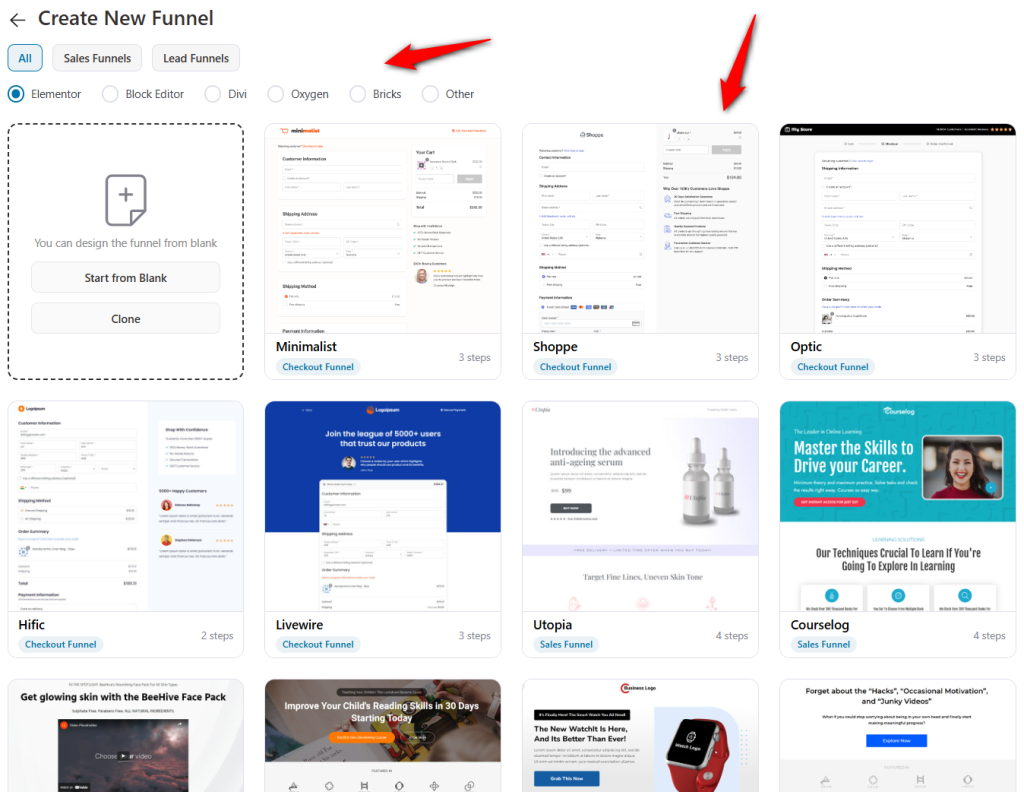
This is the kind of detail that adds up to easy setup.
Where it got interesting: our bundles
We sell complex bundles at Rymera, so the real test was compatibility. We’d done custom work on our products, with order bumps layered on top, and their upsell module needed some adjustment to handle it cleanly.
We reached out to support. The first response landed in under two hours. They didn’t just point us to docs; they worked with us directly and built an additional compatibility layer for our bundle setup. That was the moment I knew we’d picked a solid product backed by a team that actually has your back.
Once that was sorted, we went live not only at Advanced Coupons but also across our other brands.
What if you want advanced stuff
The advanced features (rule engine, conditional branching, complex automation workflows) are there if you grow into them. But you can permanently ignore them.
The linear list view of funnels works perfectly without ever opening Canvas Mode. The product scales with you, not against you.
Modular By Design: Install Only What You Need
This is FunnelKit’s biggest structural strength, and the one most reviews completely miss.
FunnelKit has four separate plugins. Each:
- Has its own free version on WordPress.org
- Can be installed independently
- Can be bought independently (or as part of a bundle plan)
- Loads its own assets only when needed
Why modular matters in practice:
- You only pay for what you use: If you just want a better checkout, you can grab Funnel Builder for $99.50/year and skip the rest. If you only want abandoned cart recovery and email automation, you can buy FunnelKit Automations as a standalone product for $99.50/year without ever touching Funnel Builder. No bloated all-or-nothing suite pricing.
- You only load what you use: FunnelKit Automations is a backend-only plugin and loads zero scripts on your front end. Sliding Cart only loads where the cart icon is enabled. Funnel Builder only loads on funnel pages. Pages that don’t need a module don’t pay the asset cost.
- You can scale up gracefully: Start with the free Funnel Builder. Add Automations Pro when you’re ready. Layer in Sliding Cart Pro for a modern cart drawer. Add Sublium when you’re ready to launch subscriptions. You’re never forced to upgrade the whole stack to get one new feature.
The plugins are independent, but the integration is as deep as a single product.
When you install both Funnel Builder and Automations, cart abandonment events fire automatically, post-purchase triggers feed into automation workflows, and upsell accepted/rejected events become workflow triggers.
When you add Sublium, subscriber-only broadcasts and renewal reminders just work.
That combination, with independent plugins and native data flow, is the real moat. And there’s no need for Zapier, OttoKit, or a third-party glue plugin.
FunnelKit Performance Benchmarks
We ran identical tests on a clean WordPress 6.9.4 + WooCommerce 10.7 installation with the Storefront theme, no caching, on SiteGround-managed hosting. Built the funnel in FunnelKit.
Here’s what we measured when testing on webpagetest.org:
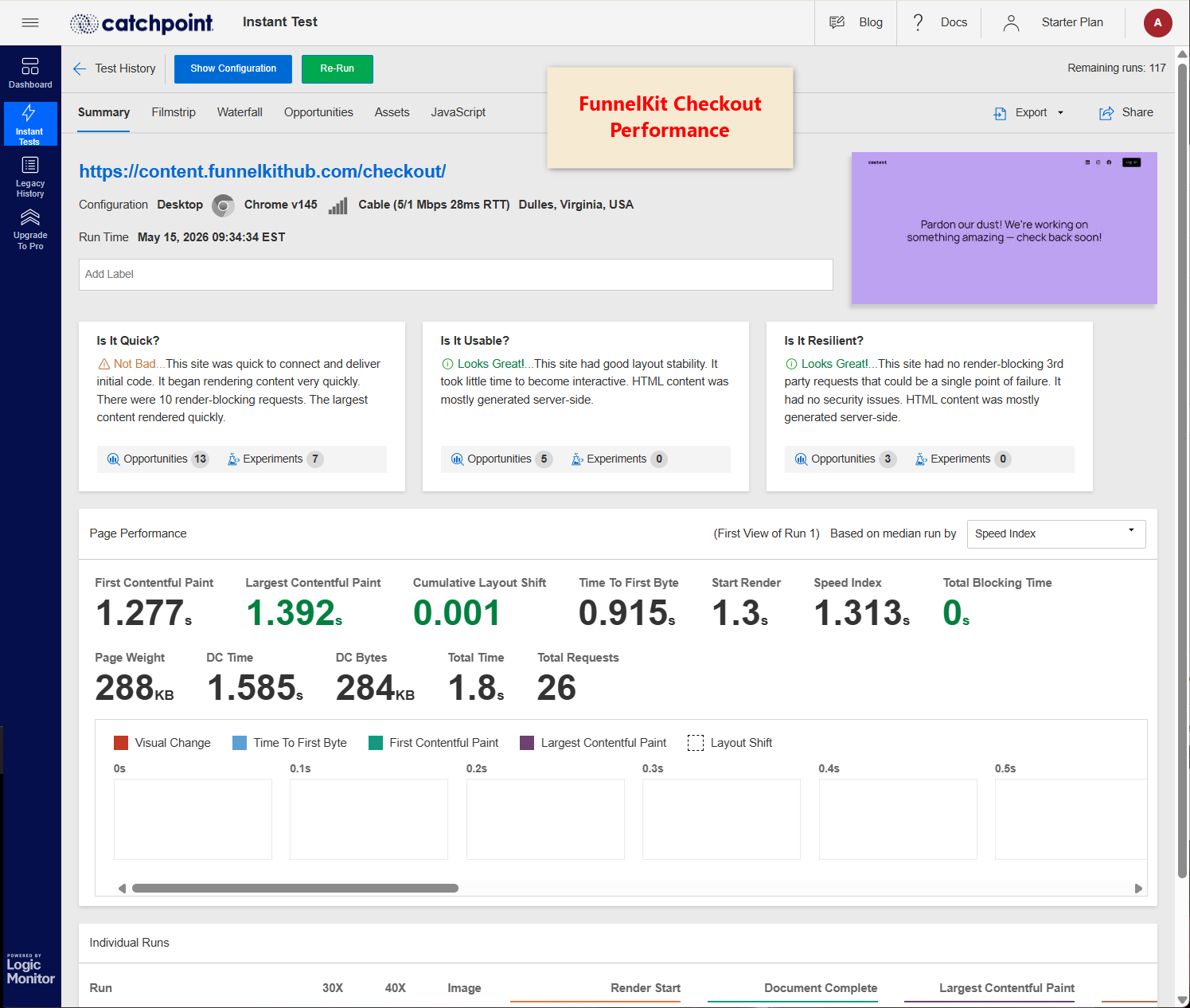
See the metrics in this table.
| Page | Metric | FunnelKit |
| Homepage | LCP | 1.067s |
| Homepage | FCP | 0.928s |
| Single product | LCP | 1.015s |
| Single product | FCP | 0.88s |
| Checkout | LCP | 1.391s |
| Checkout | FCP | 1.277s |
| Checkout | TTFB | 0.915s |
FunnelKit is smoother and outperforms competitors like CartFlows, CheckoutWC, and others across every Core Web Vitals metric on every rankable page.
Speed matters to Rymera’s customers and FunnelKit checkout actually came out faster than the native WooCommerce checkout. They’ve clearly optimized this to the core.
Why FunnelKit is faster
The modular architecture we described above is the reason for these numbers. Because FunnelKit’s Cart and Automations are separate plugins, their code doesn’t load on your homepage or product pages. Other builders, such as CheckoutWC or CartFlows, ship as a single suite that loads its assets across the site even when individual features are toggled off.
There are also a few engineering details that matter:
- Custom database tables: FunnelKit doesn’t bloat your wp_postmeta or wp_options tables. It uses normalized, indexed custom tables for performance.
- Contact list pagination: 100 records per fetch in the admin keeps everything responsive at scale.
- Backend-only Automations: Runs via WP-Cron or Action Scheduler, zero front-end scripts.
- Caching compatibility documented: WP Rocket, LiteSpeed, W3 Total Cache, SG Optimizer, Breeze, WP Engine cache, Kinsta cache, Cloudflare, all officially supported with documented exclusion rules.
WP Hive’s automated testing independently rates FunnelKit Funnel Builder as having minimal memory and PageSpeed impact, which is better than average WordPress.org plugins.
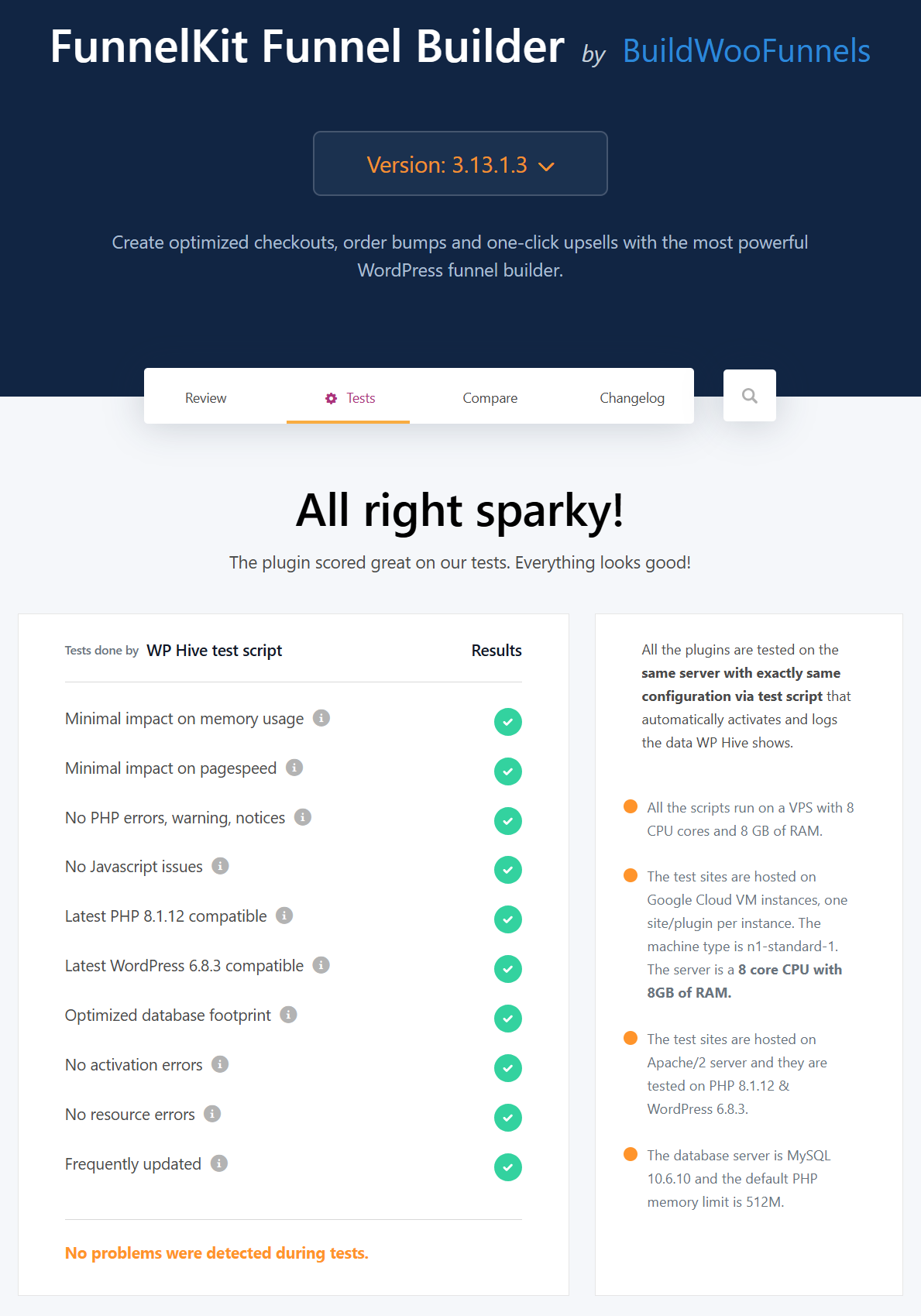
All in all, FunnelKit doesn’t slow down your site. That’s a real differentiator in this category.
FunnelKit Funnel Builder: Hands-On Test
Here’s what we found in our tests.
Optimized WooCommerce checkout
The default WooCommerce checkout is a conversion killer with rigid fields and layouts. FunnelKit replaces it with a clean, fast, one-step or multi-step checkout that includes:
- Customizable checkout design with page builders such as Elementor, Divi, Bricks, Gutenberg Block Editor, Oxygen, and more
- Flexible checkout form fields
- Express checkout (Apple Pay, Google Pay, Stripe Link)
- Google Address Autocomplete
- Advanced phone field with country detection
- Inline field validation
- Checkout optimizations, including auto-apply coupons, a tactic worth pairing with well-structured coupon and loyalty rules for repeat purchases
- Conditional checkout fields (show “Gift Message” only if the customer ticks Gift)
See, our store checkout is actually built using FunnelKit:
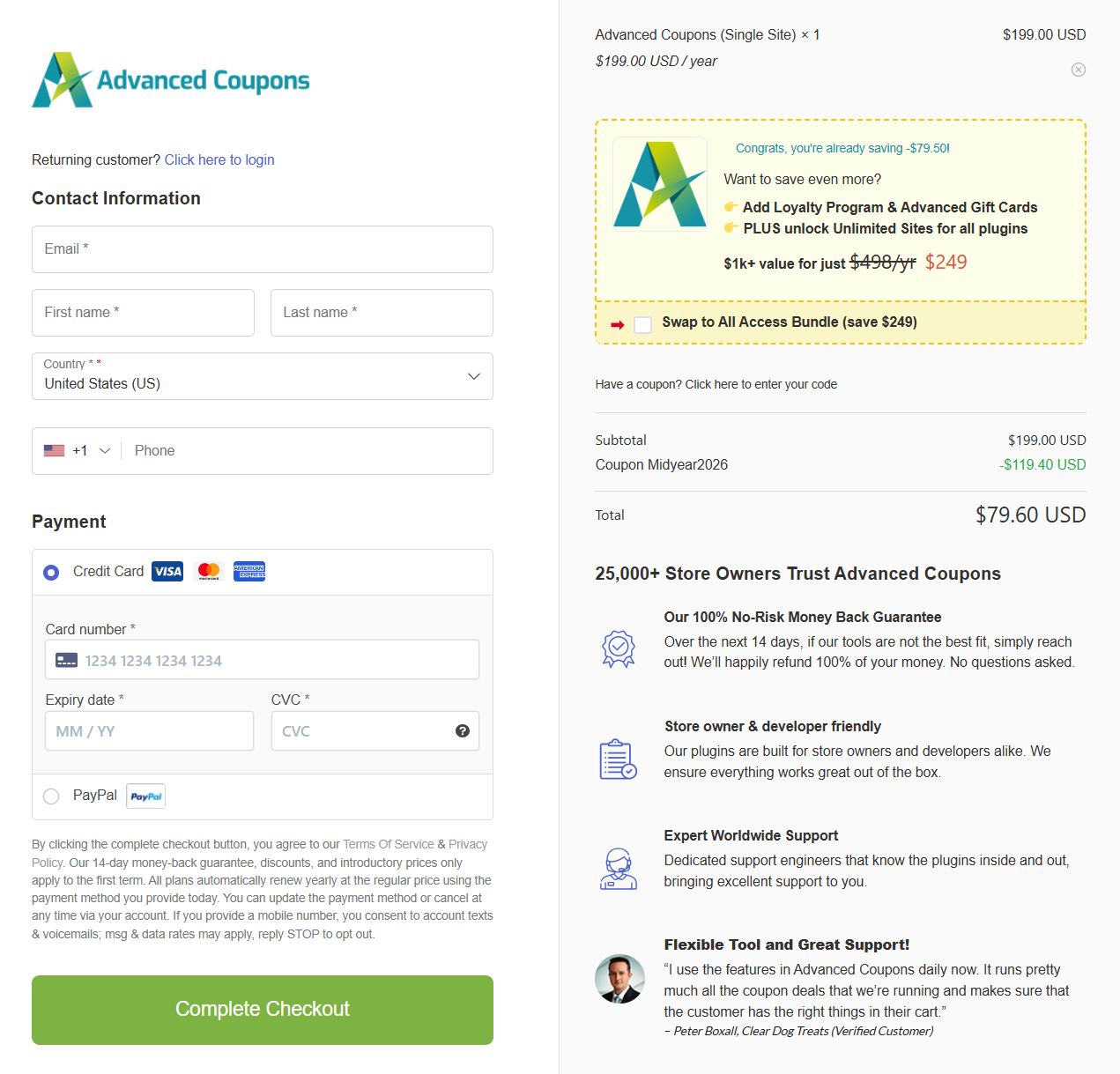
Building checkouts like this one is effortless with the FunnelKit Funnel Builder.
Drag-and-drop field editor
FunnelKit’s checkout field editor lets you drag fields anywhere, create custom sections, add 14 built-in field types, and even move shipping above billing.
If you’ve ever needed a custom field at checkout for a specific use case (gift orders, B2B tax IDs, dietary preferences), this matters.
Order bump and one-click upsells
FunnelKit’s bumps are unusually flexible. You get 8 placement positions on the checkout, 20+ conditional rules, and 8 modern skins. You can customize your offer copy and pricing to make it look attractive.
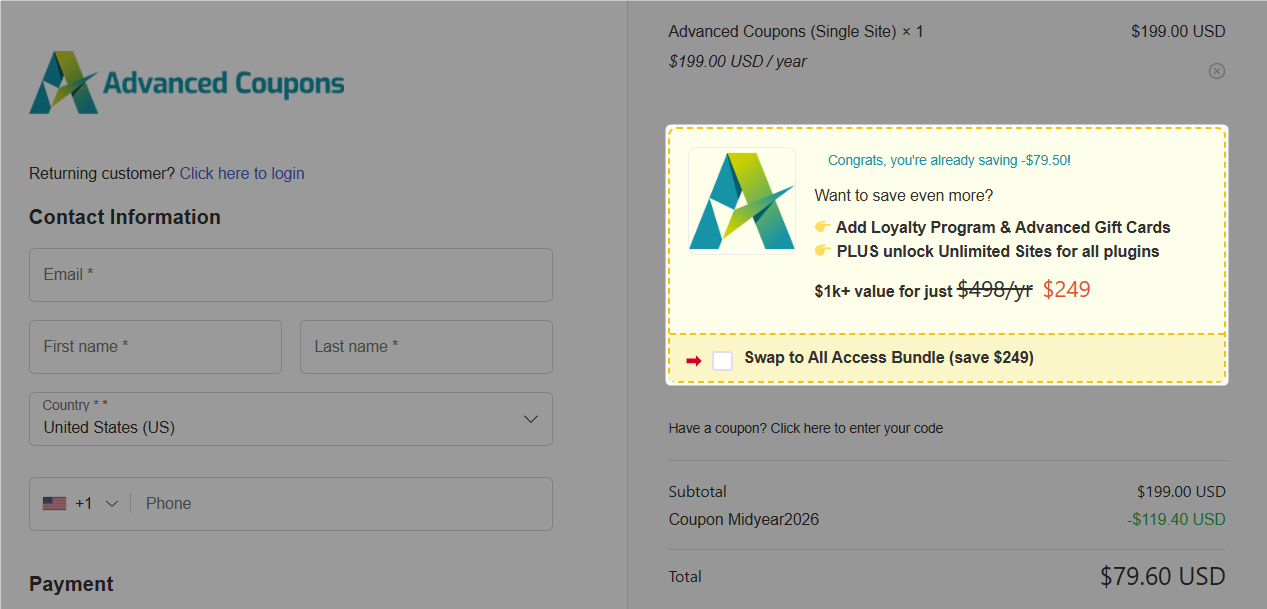
With the “one-click upgrade” feature, you can replace a product already in the cart with a higher-tier version. This feature alone has driven real AOV lift on the test store.
Post-purchase upsells are where funnel builders earn their keep. FunnelKit supports 15+ payment gateways for tokenized one-click upsells, multi-product upsells (offering 2-3 products on a single upsell page), and dynamic shipping and tax recalculation, ensuring upsells remain compliant with tax laws.
FunnelKit users have reported a more than 20% increase in average order value using the order bump and one-click upsell features. See this Trustpilot review:
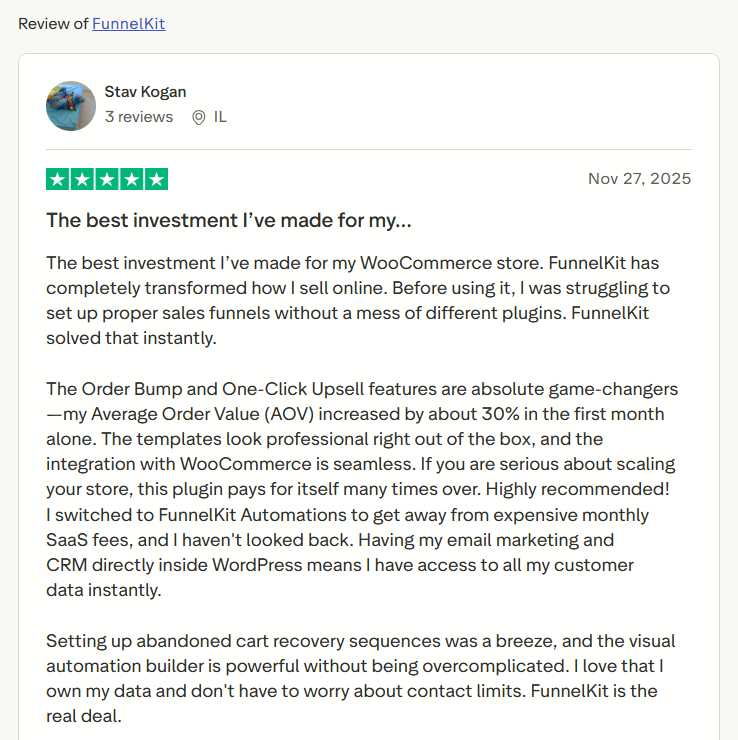
A 10% take rate on a $50 upsell across 1,000 monthly orders is $5,000/month in margin you didn’t have before. The upsell builder is straightforward: a page builder for design, and FunnelKit for the logic.
A/B testing and analytics
You can split-test funnels, checkouts, bumps, upsells, and opt-in pages. Reporting includes confidence intervals, revenue per visit, and conversion rate.
A/B testing is included in the Plus plan ($179.50/year) and is not gated to higher tiers.
Per-funnel analytics with step-by-step conversion rates, revenue attribution, UTM source tracking, referrer reports, and cart/upsell performance.
Conversion pixel tracking is built in for Google Ads, GA4, Meta Pixel, TikTok, Pinterest, and Snapchat, with no separate tracking plugin required.
For our checkout, this one alone justified the cost.
FunnelKit Automations: The WooCommerce And WordPress CRM Half
Most reviews treat Automations as an afterthought. That’s a mistake. FunnelKit Automations is essentially a full WooCommerce-native CRM and marketing engine.
It’s bundled with the Professional plan at no extra cost and available as a standalone plugin at $99.50/year.
Here’s what we found inside.
Visual automation builder
Drag-and-drop workflows are triggered by store events, such as new orders, abandoned carts, subscription renewals, course progress, tag changes, refunds issued, and custom webhooks.
Actions include email, SMS, WhatsApp, tag updates, contact field updates, and external API calls.
There are 30+ prebuilt automation recipes you can import with one click, including abandoned cart recovery, post-purchase sequence, winback campaign, birthday discount, optin follow-up.
For most stores, the recipes get you 80% there and you customize from there.
Abandoned cart recovery
FunnelKit captures emails before checkout completion, then triggers a recovery sequence.
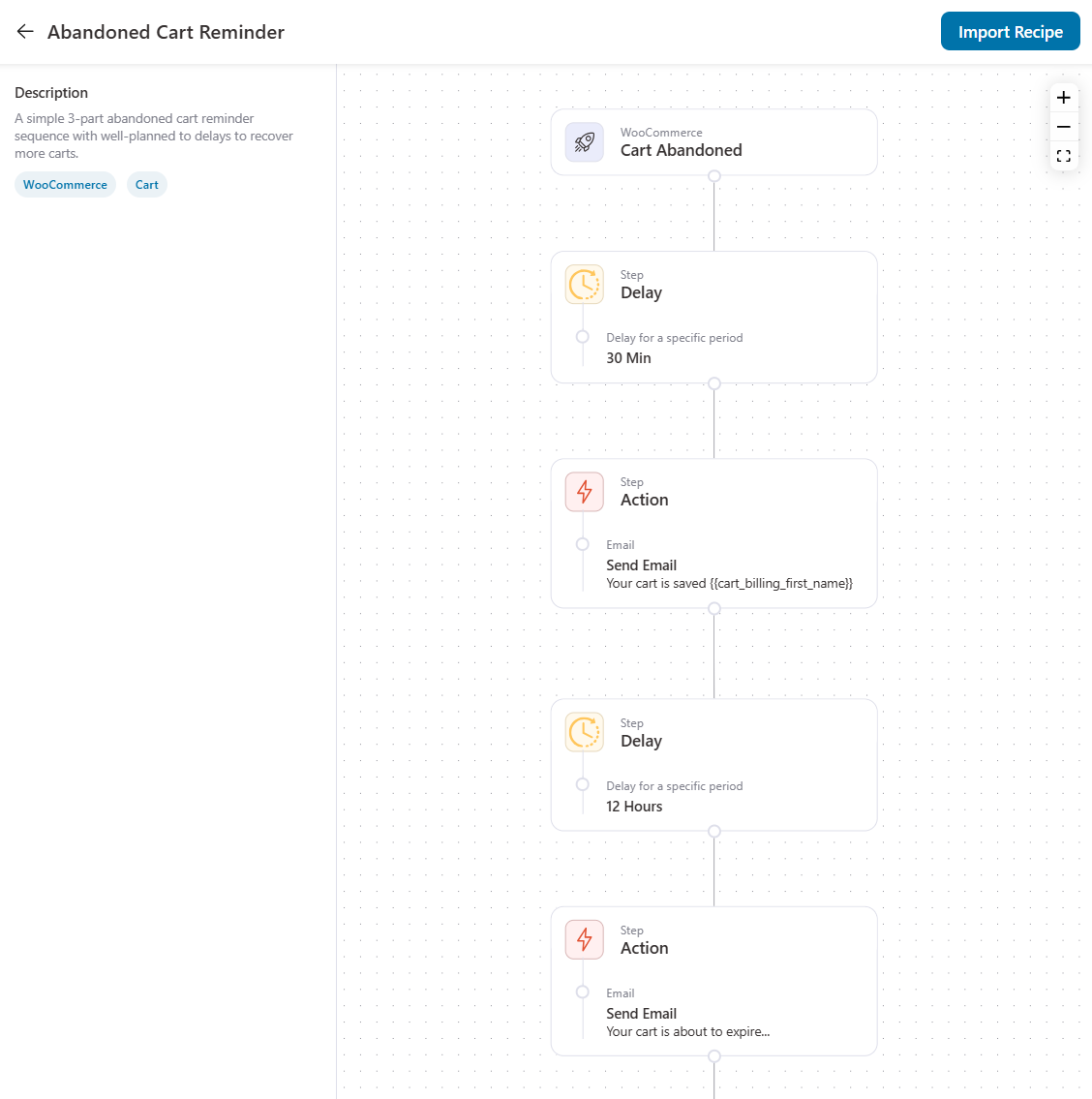
We recommend sending 3 reminders at 15 minutes, 24 hours, and 72 hours, with the discount in the final email. The free version of Automations includes basic abandoned cart recovery and post-purchase emails.
That means you don’t even need Pro to get started.
Broadcasts (email + SMS)
Send one-off email or SMS campaigns to segments of your contact list. The drag-and-drop visual email builder is genuinely good.
To send SMS, you can use either Twilio or BulkGate.
Segmentation, CRM, contact profiles
Every contact gets a 360° profile with order history, lifetime value, email engagement, tags, custom fields, automation history, and more.
You can build segments by combining purchase history, engagement, tags, and any custom field using AND/OR logic.
Transactional emails
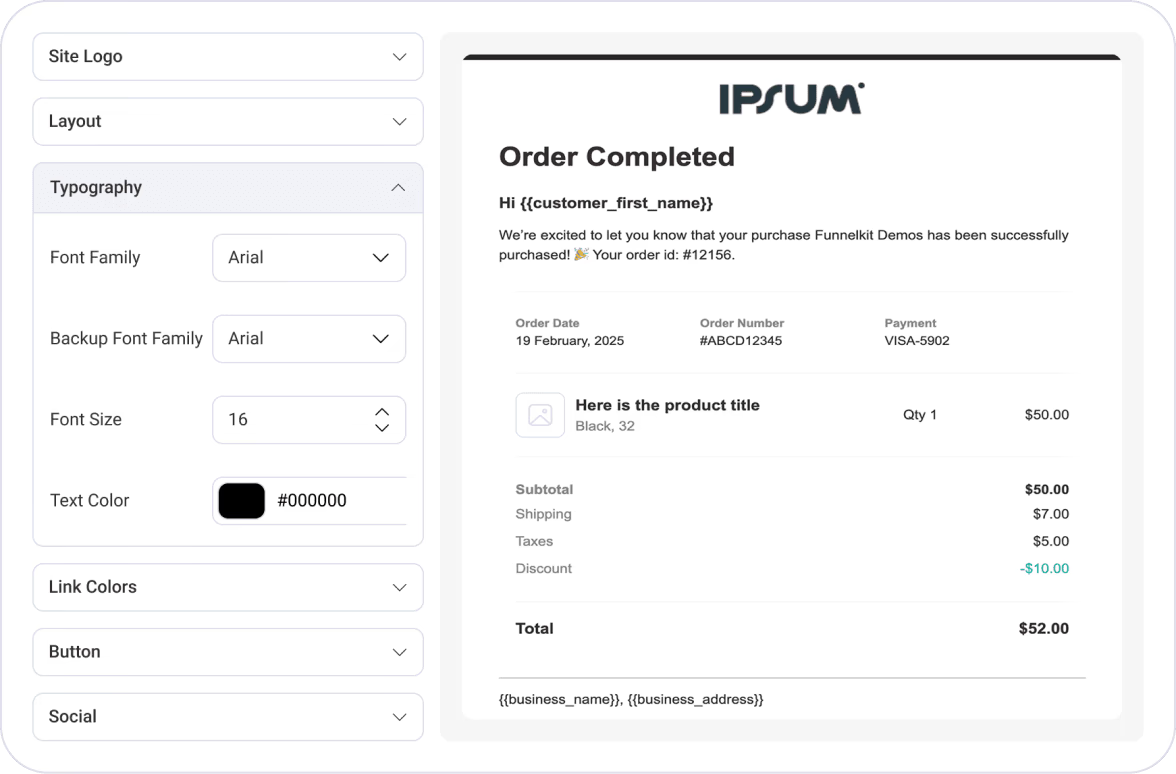
You can customize transactional emails, such as order confirmations, cancellations, failed orders, new account notifications, and more, to make them branded.
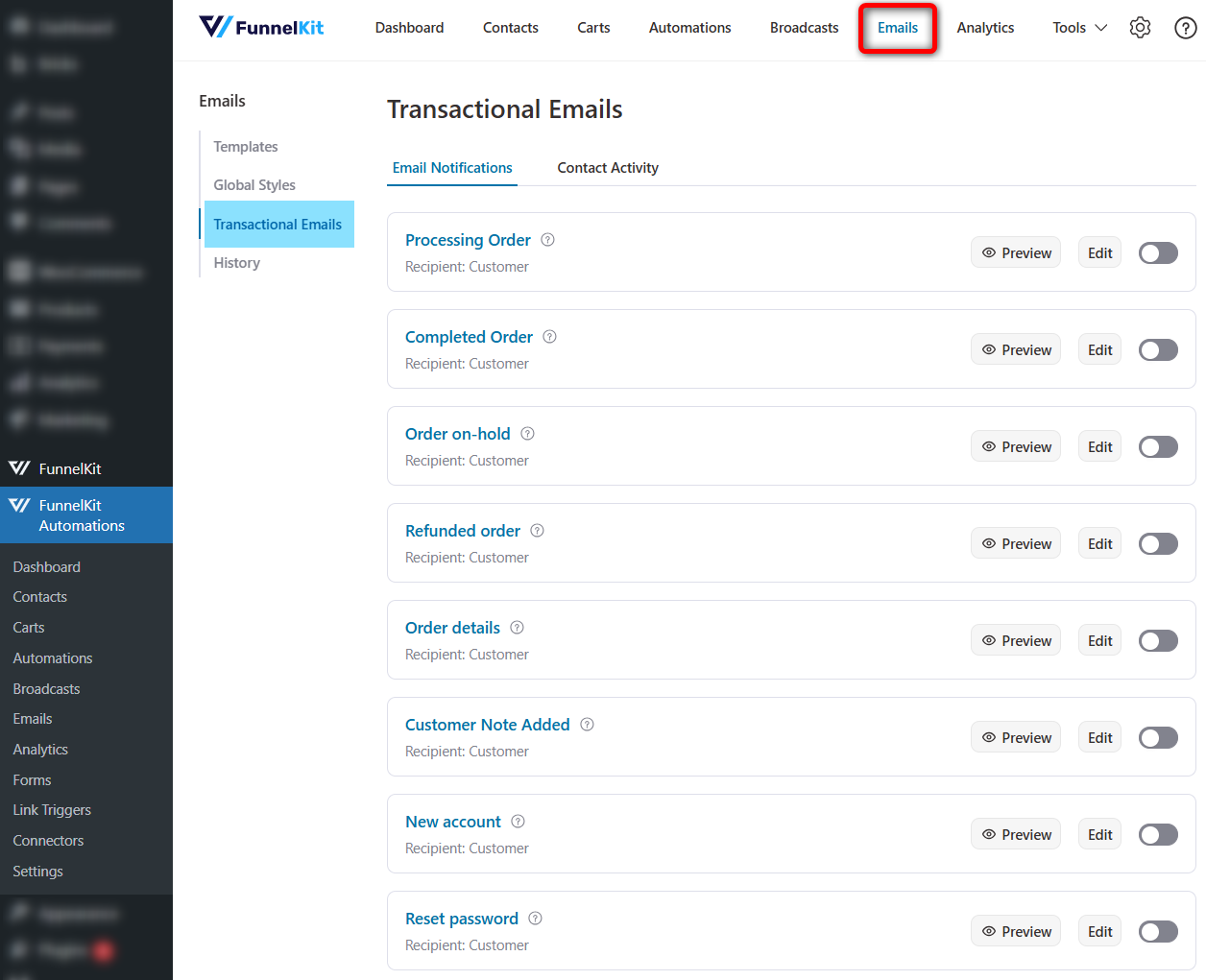
Use the drag-and-drop WooCommerce-specific content blocks to add necessary details to your transactional emails.
Integrations
Native integrations with ActiveCampaign, ConvertKit, Mailchimp, Drip, Klaviyo, HubSpot, MailerLite, GetResponse, Twilio, Slack, plus Zapier, Pabbly, and webhooks for everything else.
Our verdict is that FunnelKit Automations is powerful and incredibly easy to use. The total cost of ownership math favors FunnelKit decisively compared to its competitors.
FunnelKit Sliding Cart: Quietly Boosts AOV
The default WooCommerce cart redirects customers to a separate /cart page with a table layout dating back to 2014. FunnelKit Sliding Cart replaces it with a modern slide-in drawer, as every well-designed Shopify store has.
Here’s what you get in the Pro version (included in Plus plan and above).
- Gamified rewards with free shipping bars, milestone-based discounts, and free gift unlocks
- Product recommendations, including upsells, cross-sells, and special add-ons, inside the cart
- Express pay buttons (Apple Pay, Google Pay) directly in the drawer
- Built-in cart analytics
- Real-time previews while you configure
- Language translation support (WPML, Polylang)
- Custom cart icon placement in any menu
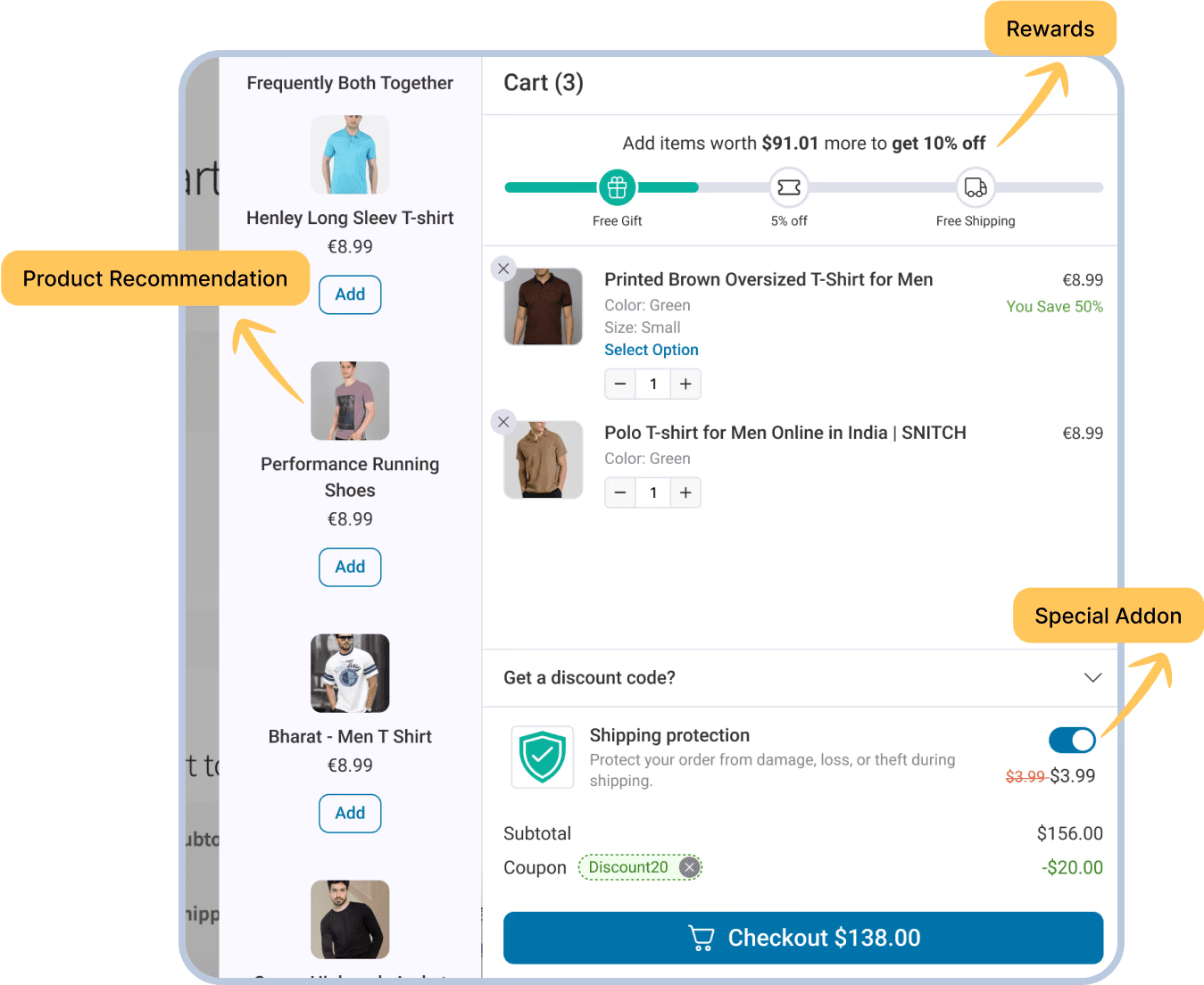
The single biggest AOV lever here is the free-shipping progress bar, set to 1.5x your average order value. A well-tuned threshold is one of the more reliable AOV boosters when paired with cart incentives such as gift cards or store-credit promotions.
Even the free version of FunnelKit Cart already replaces the static WooCommerce cart with a modern slide-in drawer. Most stores will find that good enough to start.
Our verdict is the FunnelKit Cart is the quiet AOV booster. It’s not the headline feature, but worth the upgrade once you’re on Plus.
FunnelKit Pricing: Budget-Friendly And Affordable
FunnelKit’s pricing is more affordable and more transparent than most competitors. Here are the actual numbers (intro pricing, May 2026):
| Plan | Sites | What’s included | Price/year |
| Basic | 1 | Optimized checkout, thank-you pages, basic Sliding Cart, abandoned cart recovery (free Automations) | $99.50 |
| Plus | 2 | Everything in Basic + funnels + bumps + one-click upsells + A/B testing + analytics + Sliding Cart Pro | $179.50 |
| Professional | 3 | Everything in Plus + FunnelKit Automations Pro (full CRM + email + SMS + segmentation) | $249.50 |
| Elite | 30 | Everything in Professional, agency/multi-site | $399.50 |
There’s also a standalone Automations plan at $99.50/year for 1 site if you only want the CRM/email side.
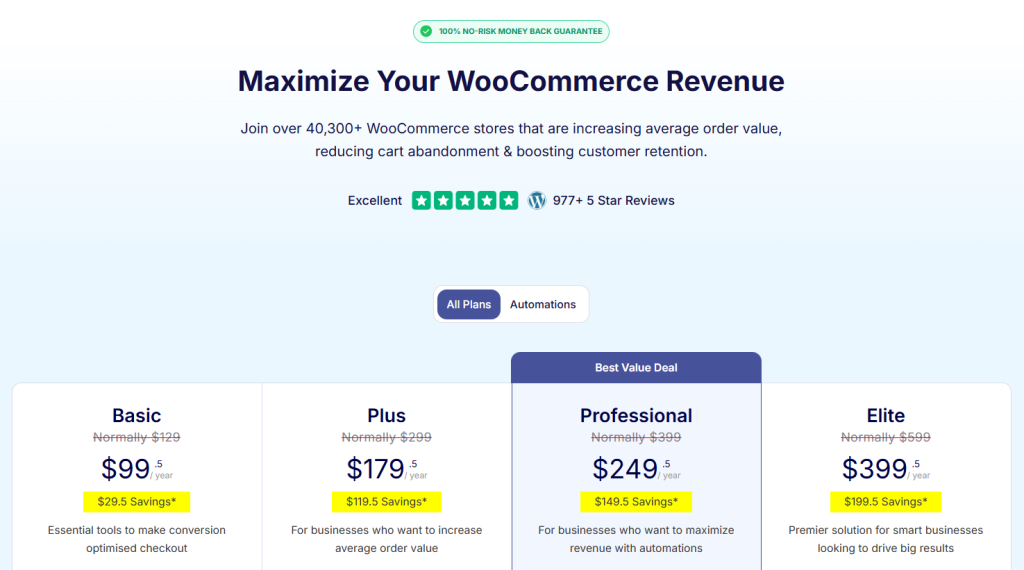
How each tier breaks down
- Basic ($99.50/year): Perfect for a small store that just wants a better checkout, thank-you page, and basic Sliding Cart. You also get free Automations on top (including abandoned cart recovery). This is a great entry point.
- Plus ($179.50/year): Full funnel builder, Sliding Cart Pro, bumps, upsells, A/B testing, and analytics for two sites. If you’re not doing email marketing yet, this is the plan.
- Professional ($249.50/year): The best-value plan if you want native marketing automation. Three sites, full CRM, broadcasts, segmentation with funnel builder, checkout, and more. The price per feature here is hard to beat anywhere in the WooCommerce ecosystem.
- Elite ($399.50/year): Agencies and multi-site portfolios. 30 sites at $399.50 works out to ~$13.32/site/year for the full stack. Lowest per-site rate in the category by a wide margin.
Our verdict is that FunnelKit is budget-friendly, transparent, no nickel-and-diming. You pick what you actually need today and upgrade later without buying a new license.
Integrations And Compatibility
FunnelKit plays nicely with everything in the WordPress ecosystem.
Page builders: For our stores, we build with Gutenberg. We deliberately avoided pulling in a heavyweight page builder because we wanted something available out of the box in native WordPress, with no extra dependency. FunnelKit works cleanly with that, which is exactly what we wanted. (FunnelKit also supports Elementor, Divi, Bricks, Oxygen, plus shortcodes and a visual customizer for less-common builders.)
Payment gateways: Anything that works on your native WooCommerce checkout works on the FunnelKit checkout too because it follows native compatibility, so there’s nothing special to wire up. FunnelKit also ships three free production-grade gateway plugins (Stripe, PayPal, Square), built on the latest APIs and supporting Apple Pay, Google Pay, Venmo, and Pay Later.
Email & CRM: ActiveCampaign, ConvertKit, Mailchimp, Drip, Klaviyo, HubSpot, MailerLite, GetResponse, Sendinblue/Brevo. Plus Zapier, Pabbly, Integrately, and webhooks.
SMS: Twilio, BulkGate.
LMS: LearnDash, TutorLMS, LifterLMS, and more.
Membership: MemberPress, WooCommerce Memberships, AffiliateWP.
Themes: Tested with Astra, Blocksy, GeneratePress, Kadence, Storefront, and most well-coded WooCommerce themes (block-based and classic).
Caching: Officially documented compatibility with WP Rocket, LiteSpeed Cache, W3 Total Cache, WP Super Cache, WP Fastest Cache, SG Optimizer, Breeze, WP Engine cache, Kinsta cache, Cloudflare, and KeyCDN.
Hosting: Works fine on managed WooCommerce hosting (Kinsta, WP Engine, SiteGround, Cloudways, Rocket.net). Doesn’t require expensive hosting.
Support And Documentation
Support is one of FunnelKit’s most-cited strengths in user reviews, and our own experience lined up with what we’d read on Trustpilot, especially on support. The clearest proof for us was the bundle compatibility work: they didn’t just answer, they engineered a fix for our specific setup.
There’s an active YouTube channel with full setup tutorials for every major feature, and dedicated support if you hit a wall.
Ticket support has a documented response window of less than 24 hours. In our testing, real responses came in fast on weekdays. Premium support is included in Professional and Elite; Priority support comes with Plus. Even the Basic plan gets standard support, which is more than most competitors offer at that price.
Trustpilot reviews (4.8/5 from 145 reviews) consistently cite support team members by name, which is the gold-standard signal that real humans are responding, not a chatbot.
For example, here is the review that highlights its strong customer support:
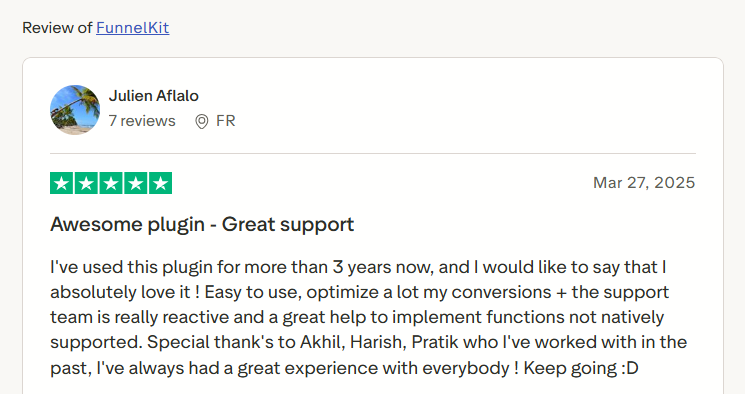
There’s no live chat, which is the only gap, if that’s a dealbreaker for your buying process.
FunnelKit Pros And Cons
Pros
- Easy setup: 3-step guided onboarding, first funnel live in under 15 minutes
- Beginner-friendly: Visual canvas mode, drag-and-drop everywhere, zero overwhelm is the most common phrase in user reviews
- Genuinely modular architecture: Install only the modules you need, with free versions of all four products
- Performant: Wins Google Core Web Vitals on every measurable page vs the closest competitor; doesn’t slow your store down
- Budget-friendly pricing: $99.50 entry, $179.50 for the full funnel stack, $249.50 with native CRM included
- Generous free versions: You can launch a working sales funnel, recover carts, and run a modern slide-in cart for $0
- Best-in-class support: 24-hour ticket response, 98.3% five-star ratio on WordPress.org
- Deepest WooCommerce integration: Feels native because it closely works with WooCommerce
- One vendor, one stack: Funnels + automations + cart + subscriptions, all maintained by the same team
- $2,147 in bonuses: OptinMonster Pro access bundled with Plus and above
Cons
- No lifetime deal: If LTDs are non-negotiable, look elsewhere.
- WooCommerce-only: Shopify, BigCommerce, and other platforms aren’t supported yet.
- No native Beaver Builder support: Elementor, Divi, Bricks, Oxygen, and Gutenberg are covered; Beaver isn’t.
- No built-in subscription or membership system: You’ll need to buy Sublium Subscriptions (available separately on another website). Sublium integrates with MemberPress and WooCommerce Memberships.
If you’re still mapping out your wider promotion stack, it’s worth reading how funnel toolkits sit alongside coupons and loyalty programs in this overview of the best WooCommerce plugins to grow a store.
Final Verdict: Is FunnelKit Worth It In 2026?
After more than a year of running FunnelKit in production across our brands, here’s where we land. For our needs, it’s the best end-to-end funnel and automation solution for WooCommerce in 2026. And it’s also the most beginner-friendly plugin compared to its competitors.
The combination of a 3-step guided setup, a modular architecture that lets you install only what you need, measurable performance wins on every Core Web Vitals metric, and budget-friendly pricing starting at $99.50/year makes it hard to recommend anything else for a WooCommerce store.
- If you’re just starting out, install the free versions of Funnel Builder, Automations, and Cart. They’re production-ready for a real store. Total cost: $0.
- If you want to customize your WooCommerce checkout, there’s an entry plan at $99.50/year.
- Growing store, mostly needs checkout + funnels? FunnelKit Plus at $179.50/year. Two sites, full funnel + bumps + upsells + A/B testing + Sliding Cart Pro.
- Ready to do real email marketing? Professional at $249.50/year. Three sites, everything above + full CRM + email + SMS broadcasts. This is the best-value plan.
- Agency or multi-site? Elite at $399.50/year covers 30 sites (about $13/site for the full stack).
If you’re on the fence, start free. There’s a 14-day money-back guarantee for paid plans, and the free versions let you validate the fit before you spend anything.
Frequently Asked Questions
Does FunnelKit have a free version?
Yes. Each of FunnelKit’s products, including Funnel Builder, Automations, Cart, and Sublium, has a free version on WordPress.org with no time limit. The free tiers are enough to build a working funnel, run basic cart recovery, and use a slide-in cart before paying anything.
How long does FunnelKit take to set up?
A first funnel built from a template typically takes under 15 minutes, thanks to a three-step setup wizard and pre-configured templates. No coding is required.
Does FunnelKit slow down a WooCommerce site?
No, FunnelKit does not slow down a WooCommerce site. The modular design loads each plugin’s assets only where needed, and third-party testing by WP Hive rates its page-speed impact as low.
Is FunnelKit the same as WooFunnels and Autonami?
Yes. WooFunnels was renamed FunnelKit Funnel Builder in 2022, and Autonami became FunnelKit Automations at the same time. Older tutorials using those names describe the current products.
Does FunnelKit work without WooCommerce?
No. It is built specifically for WooCommerce and requires it. Stores on other platforms cannot use it.
Can FunnelKit Automations be bought separately?
Yes. Automations is available as a standalone plugin, so a store can run cart recovery, broadcasts, and CRM workflows without installing Funnel Builder.