

Launching promotions is part of running a successful WooCommerce store, but manually setting up coupons can take more time than expected. Even a simple offer can involve several settings, conditions, and tiny decisions that add up over time. Our latest AI coupon generator integration with StoreAgent makes this process a lot easier!
Instead of building every coupon from scratch, you can now use AI to generate coupons, review the details inside WooCommerce, and turn them into live offers when you’re ready. It’s a faster and smarter way to build promotions. In this guide, we’ll walk you through everything you need to know about this new feature.
Let’s get right into it!
What Is The AI Coupon Generator?
The AI coupon generator is a new integration between Advanced Coupons and StoreAgent that makes launching promotions faster in WooCommerce.
Instead of building every coupon manually from scratch, you can now use AI to generate coupons based on your promotion idea. Once AI generates the coupon, you can review the details, make any adjustments you want, and then turn it into a live offer in your store. You also have the option to save the coupon as a template, which makes it easier to reuse similar promotions in the future.
This feature is meant to give you a helpful head start when crafting promotions. It helps reduce repetitive manual work while still letting you review and fine-tune everything before publishing.
Here’s how this integration benefits your store:
- Create coupons faster: No need to configure every setting manually – you can generate a ready-made coupon setup with AI. This helps you launch promotions more quickly, especially when you need to create multiple offers.
- Reduce repetitive manual work: Coupon creation often involves repeating the same steps for different campaigns. With AI generating the initial setup, you can skip much of the repetitive work and focus on refining your promotion instead.
- Reuse successful promotions with templates: If you create a coupon that works well, you can save it as a template and reuse it later. This makes it easier to recreate similar promotions for future campaigns or seasonal sales.
- Stay in full control: Even though AI helps generate the coupon, you still review and edit everything before it goes live. This ensures the final promotion matches your exact strategy and store requirements.
How To Generate WooCommerce Coupons With AI
Creating coupons with the AI coupon generator is quick once you have everything set up. So, before following along with this tutorial, make sure that you have both Advanced Coupons and StoreAgent installed and activated in your WooCommerce store.
With that in mind, let’s walk through the steps to generate WooCommerce coupons using AI!
Step 1: Create your coupon
From your WordPress dashboard, head to Coupons > Add New. Immediately, you’ll see a Create New Coupon pop-up that lets you choose how to create your coupon. Choose Generate with AI.
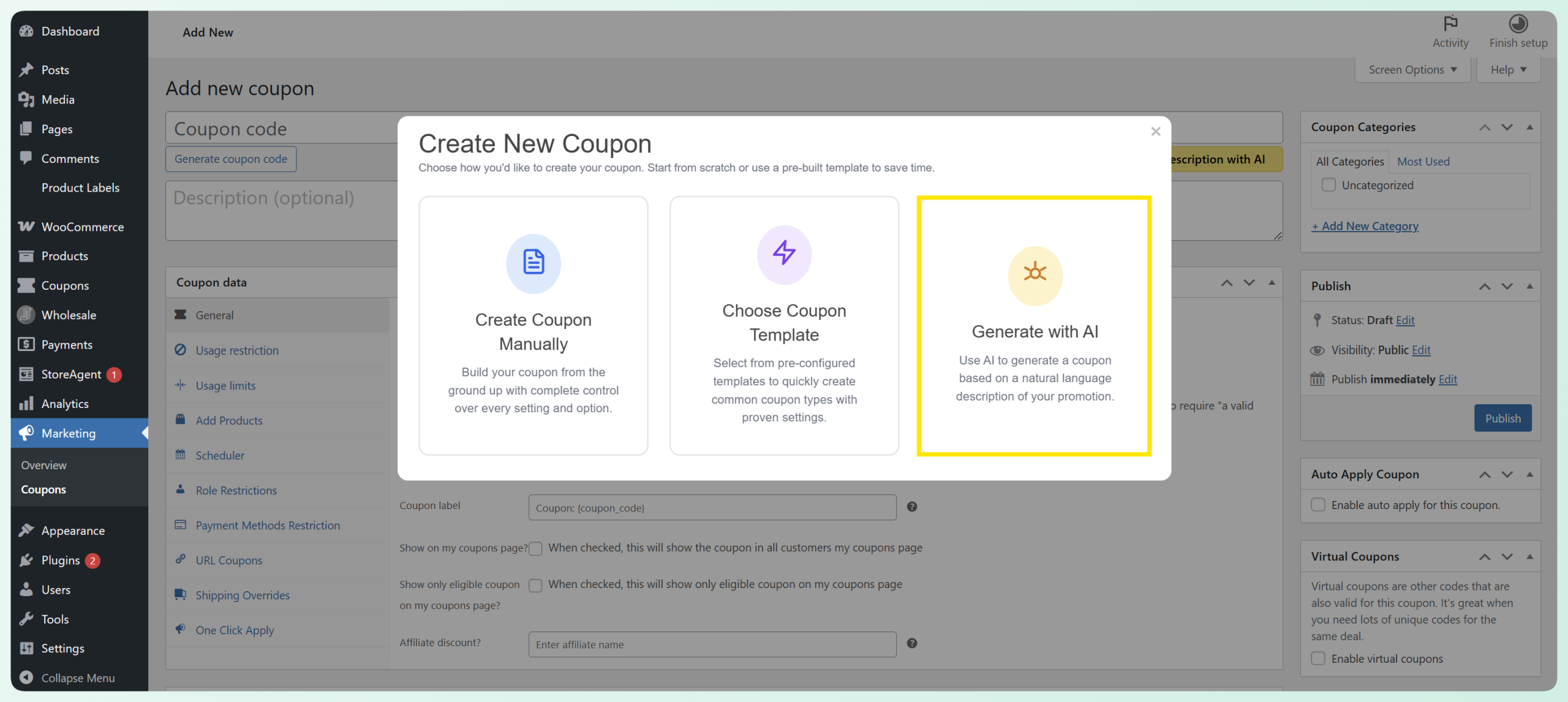
Once selected, you’ll be taken to the Generate Coupon with AI window, where you can describe the promotion you want to create and let AI generate a coupon for you.
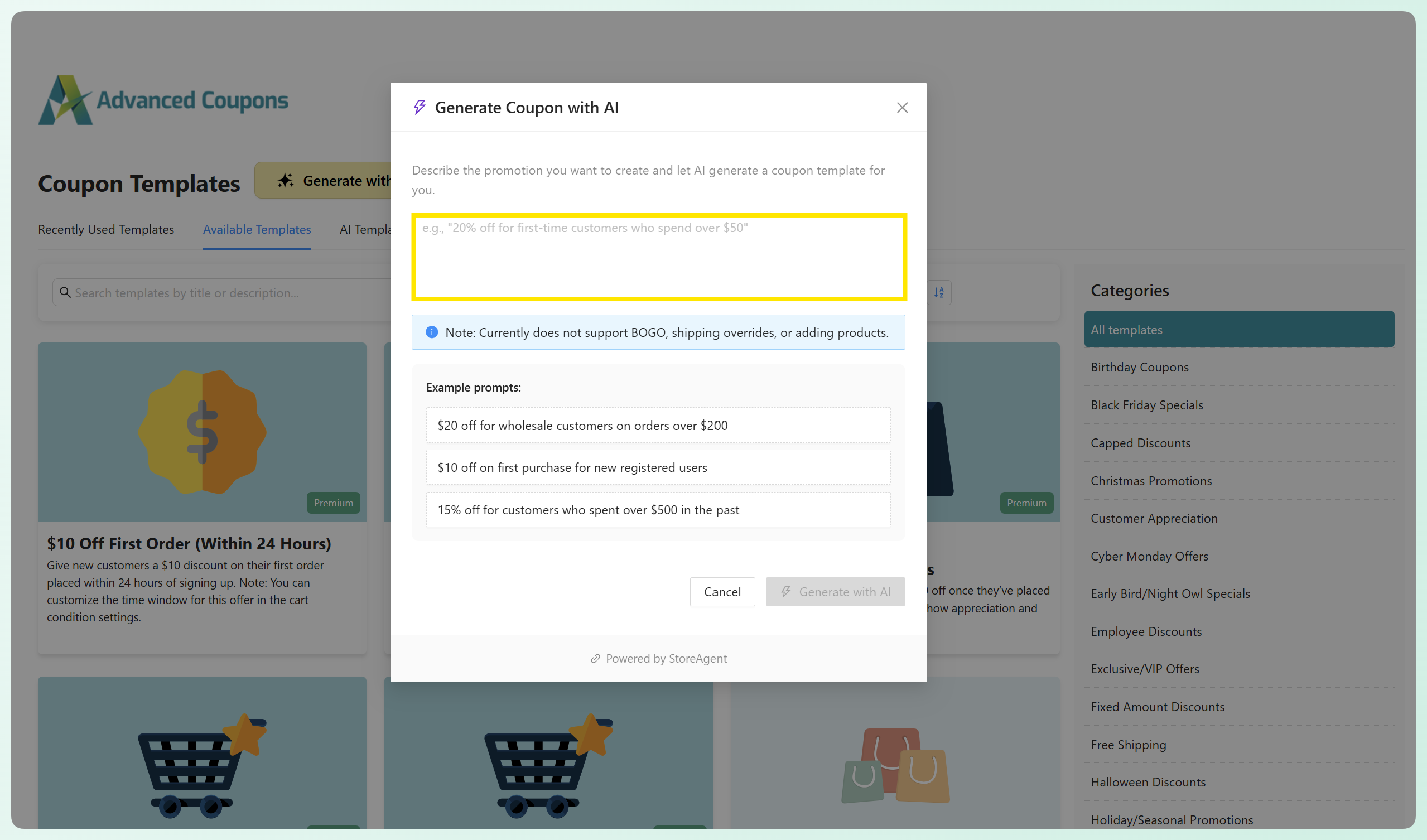
💡 Alternatively, you can head to Coupons > Coupon Templates and click Generate with AI to access the WooCommerce AI coupon generator.
Step 2: Describe your promotion
In the Generate Coupon with AI window, you’ll see a text field where you can describe the promotion you want to run. Simply type a short description of your offer, and the AI will generate a coupon based on your input.
Here are a few examples you can try:
- 20% off for first-time customers on orders over $50
- Free shipping for orders over $75
- $10 off orders above $100 for returning customers
- 15% off site-wide this weekend
In our example below, we’ll create a 10% off site-wide coupon for orders over $50.
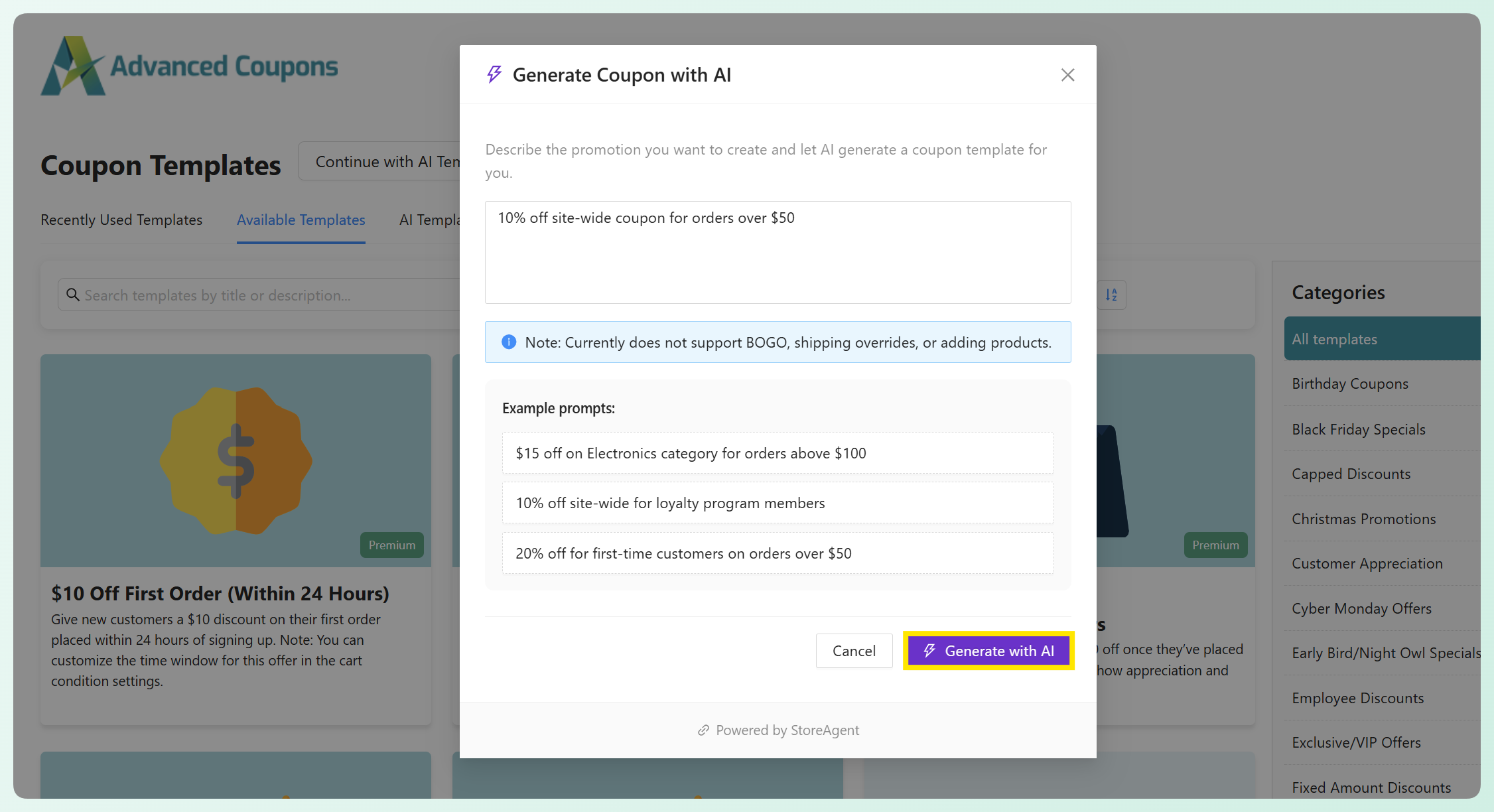
Once you’re happy with your description, click Generate with AI!
💡Unsure how to phrase your offer? Check out the example prompts shown in the window for inspiration.
Step 3: Review the AI-generated coupon
After clicking Generate with AI, a coupon will automatically be created based on your description.
Using our example prompt: “10% off site-wide for orders over $50,” the AI automatically configured several key coupon settings for us. This includes:
- Discount type and amount
- Minimum spend requirements
- Basic usage restrictions
- Coupon description
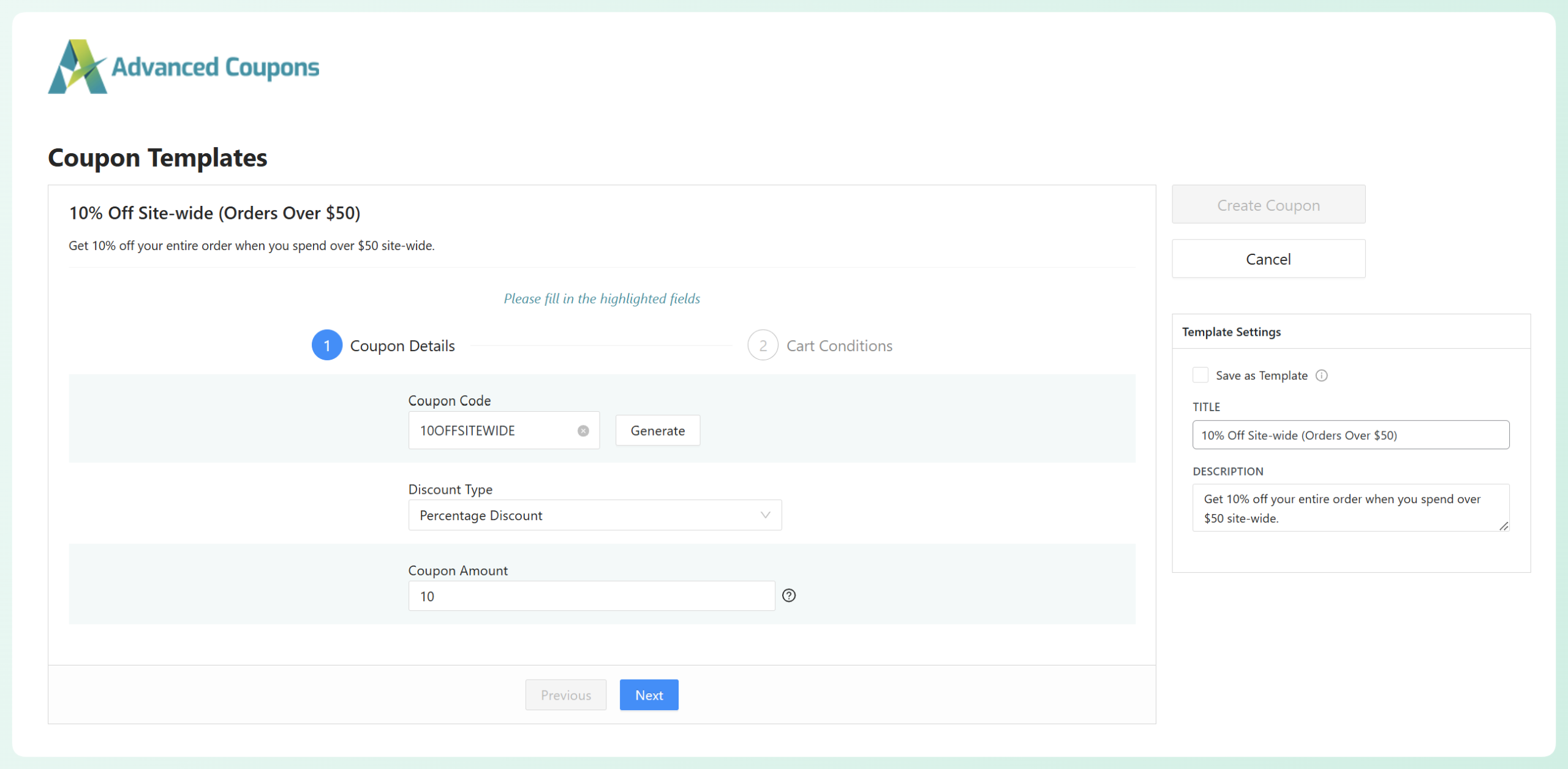
You’ll also need to set a coupon code name before creating the coupon. Feel free to name your coupon code manually or click the Generate button to create one automatically.
If you click Next or scroll through the coupon setup sections, you’ll also be able to view the Cart Conditions created by the AI. In our example, the AI added a condition requiring the cart subtotal to reach $50 or more before the discount is applied. This ensures the coupon works exactly as described in the promotion.
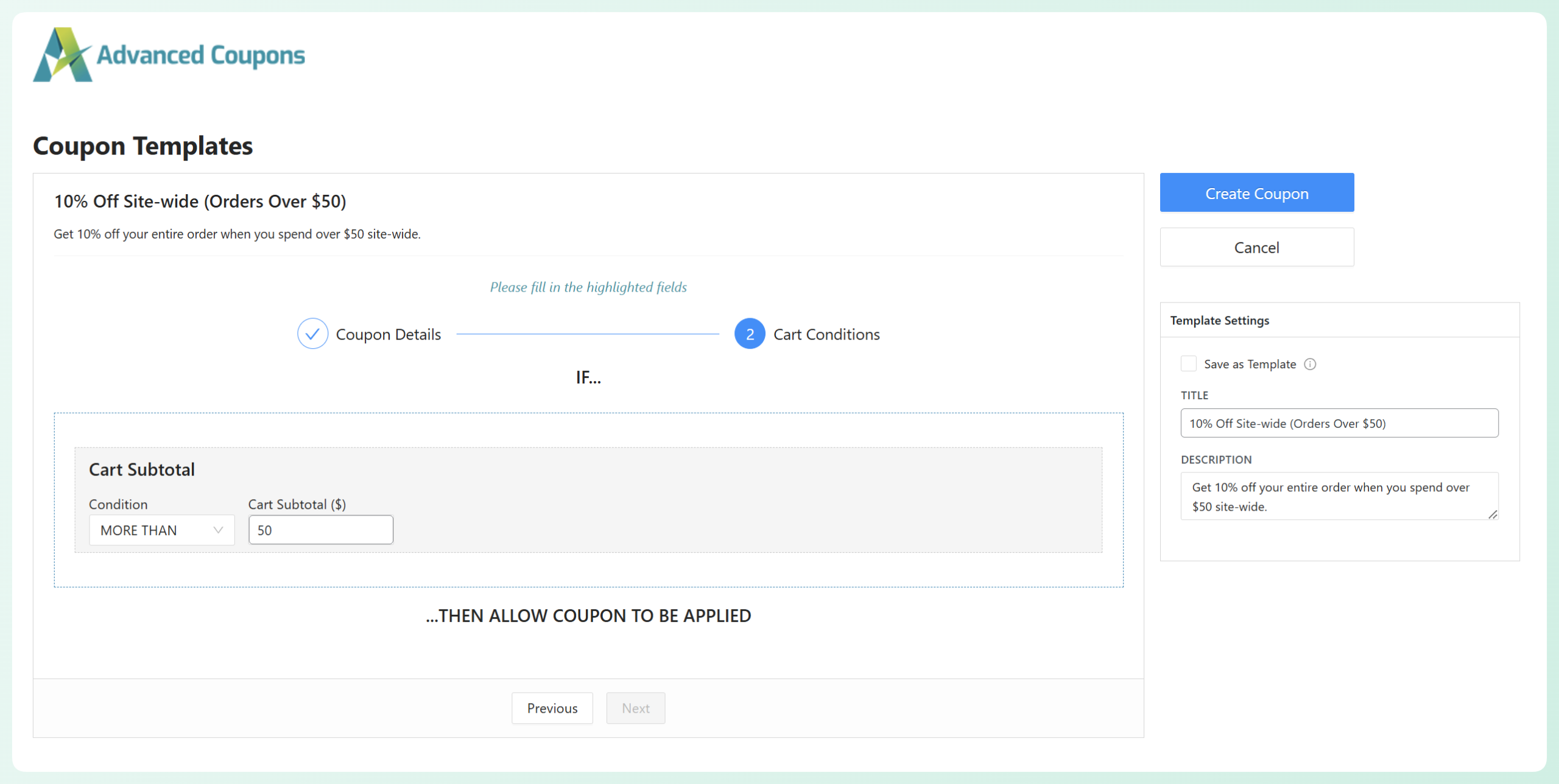
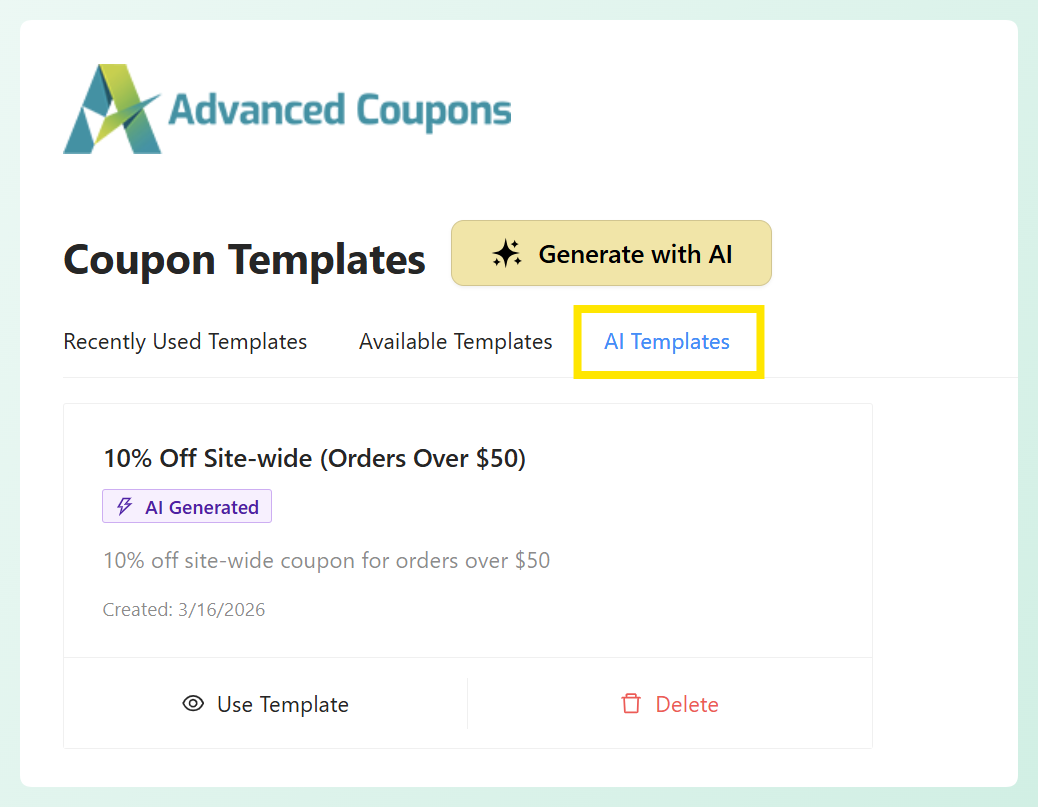
On the right side of your screen, you’ll also notice the option to Save as Template. This feature is available for Advanced Coupons Premium users and lets you save the generated coupon setup as a reusable template for future promotions. You can access saved templates by heading to Coupons > Coupon Templates > AI Templates.
Once you’re happy with your settings, click Create Coupon to publish your coupon in WooCommerce. And that’s it! Your coupon is now live. 🎉
📝 IMPORTANT: Before publishing the coupon, take a moment to review the generated settings and make sure they match the promotion you want to run. If needed, you can still adjust the coupon details, add restrictions, or customize the offer further.
Things To Review Before Publishing A Coupon
Using an AI coupon generator for WooCommerce can save you a lot of time, but it’s still important to double-check the final setup before publishing your coupon. Doing a quick review can help ensure your promotion works as intended and give your shoppers the right experience at checkout.
So, before publishing your coupon, take a moment to review the following details:
- Check the discount type and amount: Make sure the generated discount matches the promotion you want to run. For example, confirm whether the coupon is set as a percentage discount, fixed cart discount, or another type of offer, and verify that the amount is correct.
- Review the minimum spend or cart conditions: If your offer depends on a required cart total, a cart condition, or other rule, check that the generated condition reflects your intended promotion. This is especially important for offers like “10% off orders over $50,” where the coupon should only apply once the shopper meets that requirement.
- Look over any usage restrictions: Review whether the coupon includes restrictions for certain customers, products, categories, or order types. This helps prevent the coupon from applying to carts where it should not be valid.
- Decide whether to save it as a template: If the offer is something you may want to run again, consider saving it as a template. This makes it easier to reuse a similar setup later instead of starting from scratch every time you create a new WooCommerce coupon with AI.
Frequently Asked Questions
What is an AI coupon generator?
An AI coupon generator is a tool that helps create coupon setups based on a simple description of the promotion you want to run. Instead of configuring every coupon setting manually, you can describe your offer in plain language and let AI generate the initial coupon setup for you.
How does the AI coupon generator work in WooCommerce?
In WooCommerce, the AI coupon generator works through the integration between Advanced Coupons and StoreAgent. You enter a short description of your promotion, and the AI generates a coupon setup based on that request. From there, you can review the generated settings, make any changes you want, and then create the final coupon in your store.
Do I need StoreAgent AI to generate coupons with AI?
Yes. To use this feature, you need both Advanced Coupons and StoreAgent installed and activated in your WooCommerce store. The AI generation is powered by StoreAgent, while Advanced Coupons handles the coupon setup and creation inside WooCommerce.
Can I edit AI-generated coupons before I publish them?
Definitely. After the coupon is generated, you can review the settings and make adjustments before publishing it. This gives you full control over the final coupon, so you can fine-tune the discount, conditions, restrictions, and other details as needed.
Wrapping Up
Launching promotions in WooCommerce can take up more setup time than expected. For busy store owners, configuring every coupon setting manually can quickly become repetitive. Thankfully, our new integration with StoreAgent makes this process much easier with the AI coupon generator!
Now, you can generate coupon setups with AI, review the details, and turn them into live promotions in just a few steps. In this complete walkthrough, we discussed:
- What the AI coupon generator is and why it matters
- How to generate WooCommerce coupons with AI
- The key details to review before publishing a coupon
- Answers to frequently asked questions about the feature
This new feature gives you a smarter starting point for building promotions without configuring every detail from scratch. We hope this guide helps you save time and launch smarter promos!