If you’re looking for a WP Swings points and rewards alternative, the earning rules are only part of the decision. How customers redeem those points matters just as much.
Both WP Swings’ Points and Rewards for WooCommerce and our Advanced Loyalty Program help stores reward customers. WP Swings puts more emphasis on gamification and membership perks, while Advanced Loyalty Program makes it easy to turn points into store credit. Which approach fits best depends on how you want shoppers to use their rewards.
Before switching, it’s also worth checking each plugin’s expiry rules, pricing, and options for moving existing customer balances.
How WooCommerce Points Programs Turn Points Into Value
WooCommerce stores can let customers redeem points in several ways, including cart discounts, coupon codes, and store credit. The option you choose affects how shoppers access and spend their rewards.
Here’s what these options look like for customers:
- Cart discount: Customers apply points toward the order they’re placing, usually in the cart or at checkout.
- Coupon code: Customers exchange points for a coupon they can apply to an eligible order.
- Store credit balance: Points convert into a monetary balance shoppers can use toward eligible purchases, now or later.
Making rewards easy to use matters in a crowded loyalty landscape. According to McKinsey, the average US customer belongs to 17 loyalty programs, and fewer than half of those memberships are active.
McKinsey’s 2022 loyalty research also found that 64% of members of top-performing programs were more likely to purchase more frequently, while 35% were more likely to choose the brand over competitors. Giving customers a clear way to spend their points is one practical part of a useful loyalty program.
What WP Swings Points And Rewards Does Well
WP Swings Points and Rewards for WooCommerce has a free version with gamification, membership levels, and tools for managing customer points. It is a good option to consider if you want interactive ways to reward shoppers.
With the free version, you can set up:
- Gamification: A spin-the-wheel pop-up and campaign pop-ups with seasonal templates that award points or prizes.
- Badges and levels: User badges and membership levels, capped at two levels in the free version.
- Earning basics: Points per dollar spent, sign-up points, and referral sign-up points.
- Admin tools: A points table, manual point updates, and an import for user points.
- Notifications: Points notifications that tell customers what they’ve earned.
WP Swings Pro adds the option to pay fully or partly with points, rewards for referred purchases, points for reviews and comments, coupon generation, points expiration, additional membership levels, first-order points, birthday rewards, and a points export feature.
WP Swings can award points for guest purchases, but guests need to register before redeeming them. Purchase points are awarded when an order reaches Completed status, which can mean a wait for stores that leave orders in Processing.
Customers can apply WP Swings points at the cart or checkout. Pro also supports coupon generation and points-only purchases of eligible products. To convert points into a wallet credit balance, you need the separate Wallet System for WooCommerce plugin. WP Swings also supports wallet-credit prizes through that integration.
Advanced Loyalty Program: Points That Become Store Credit
Advanced Loyalty Program is a paid WooCommerce loyalty plugin that turns redeemed points into Advanced Coupons store credit. It runs on the store credit system in the free Advanced Coupons plugin, so points land in the same balance customers already use at checkout.
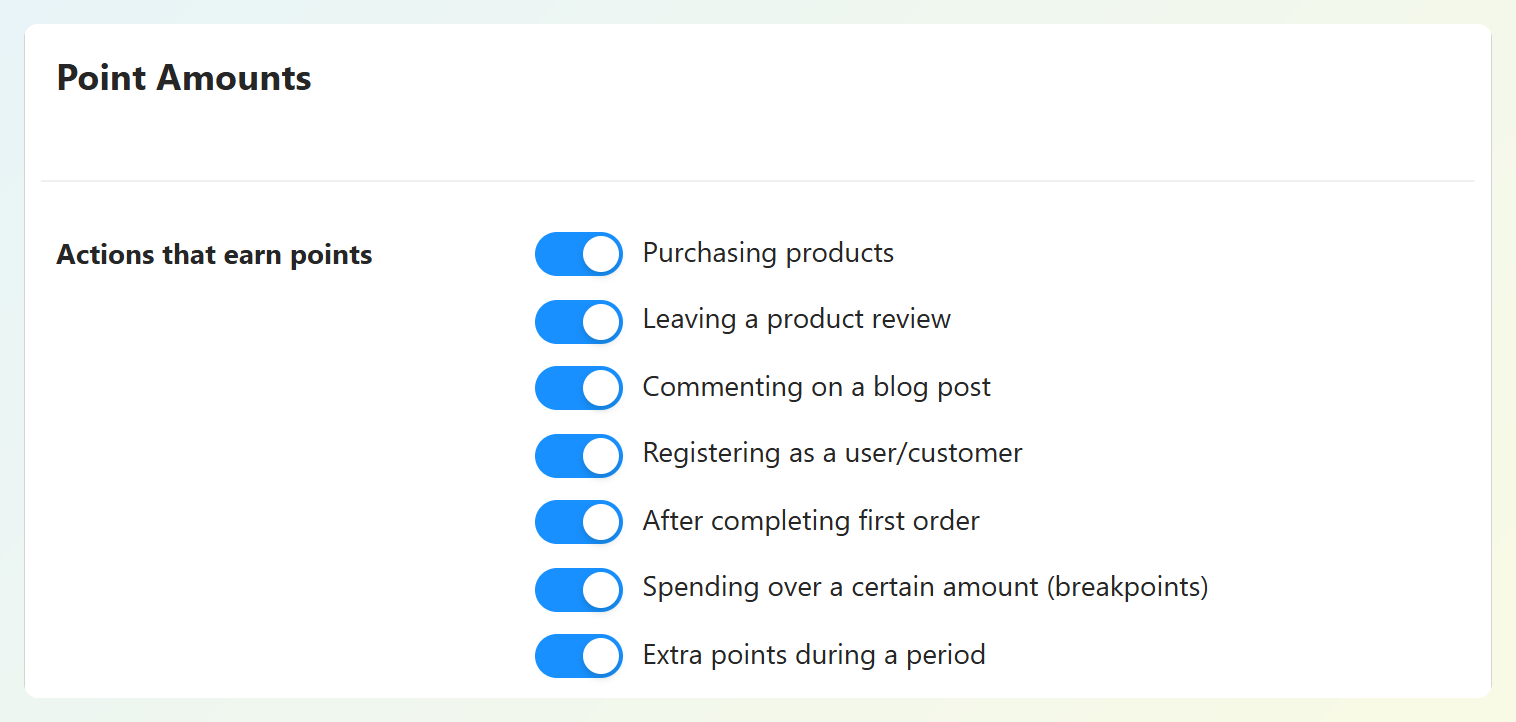
Advanced Loyalty Program for WooCommerce gives customers points for:
- Purchases: Based on a price-to-points ratio you set (1 point per currency unit by default).
- Engagement: Product reviews, blog comments, and account registration.
- Milestones: A first order, spending over set amounts, and extra points during a promo period.
- Referrals: Points when a referred friend signs up and when they make a purchase, using unique referral links.
You’ll find these options under WordPress dashboard > Coupons > Loyalty Program > Settings > Points Earning.
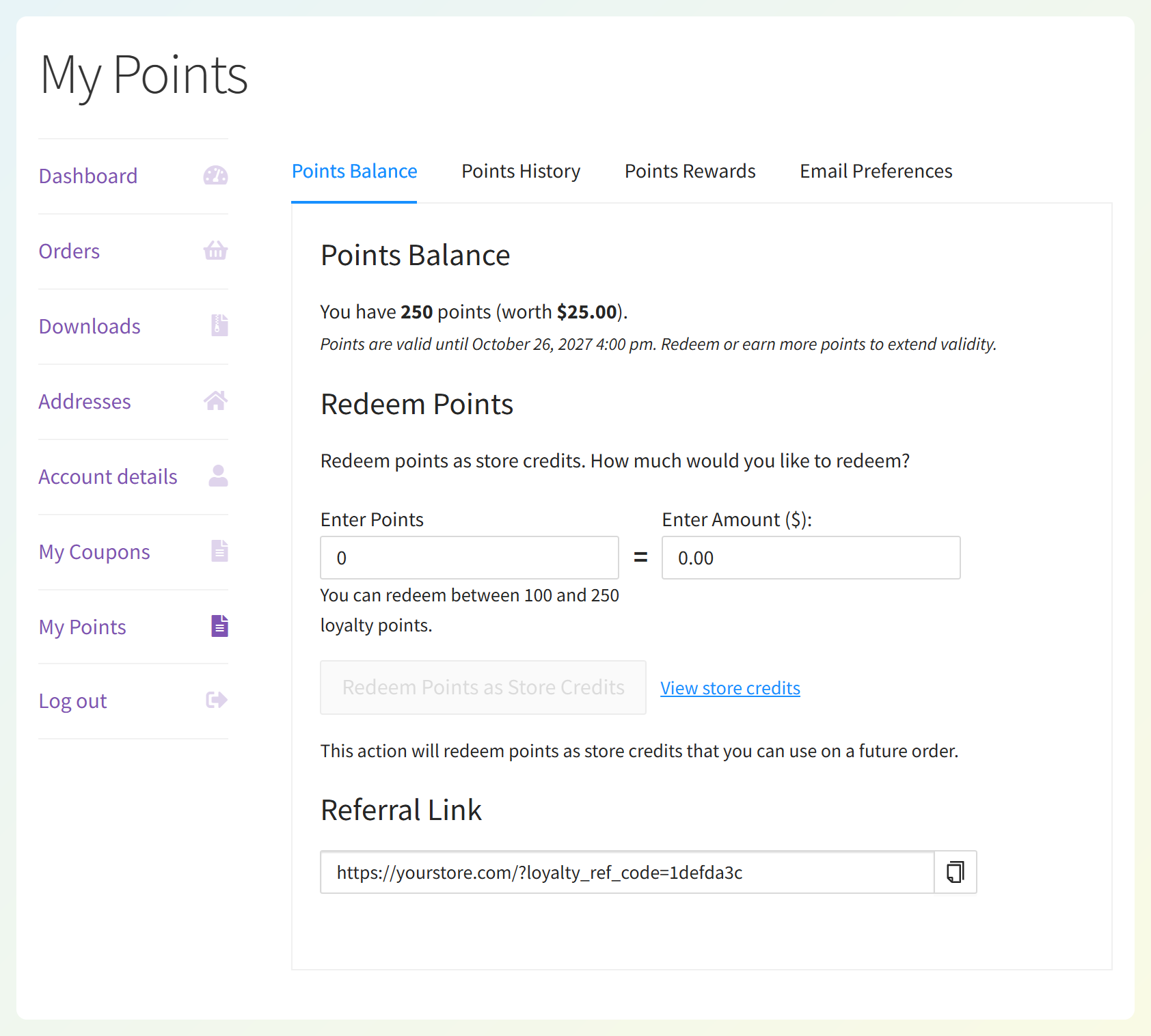
Customers can convert loyalty points to store credit from My Points or at checkout. By default, 10 points convert to 1 currency unit of store credit, but you can change this ratio and set minimum and maximum redemption amounts. Store owners can also redeem points for individual customers from the Customers tab in the admin.
Customers can also redeem points for products and coupons. You mark an eligible product or coupon as a reward and set its points cost. For simple products, the plugin fills in a starting amount based on the price and your redemption rate; for coupons and product variations, you set the points cost yourself. When a customer claims a reward, the plugin generates a single-use coupon locked to their email address.
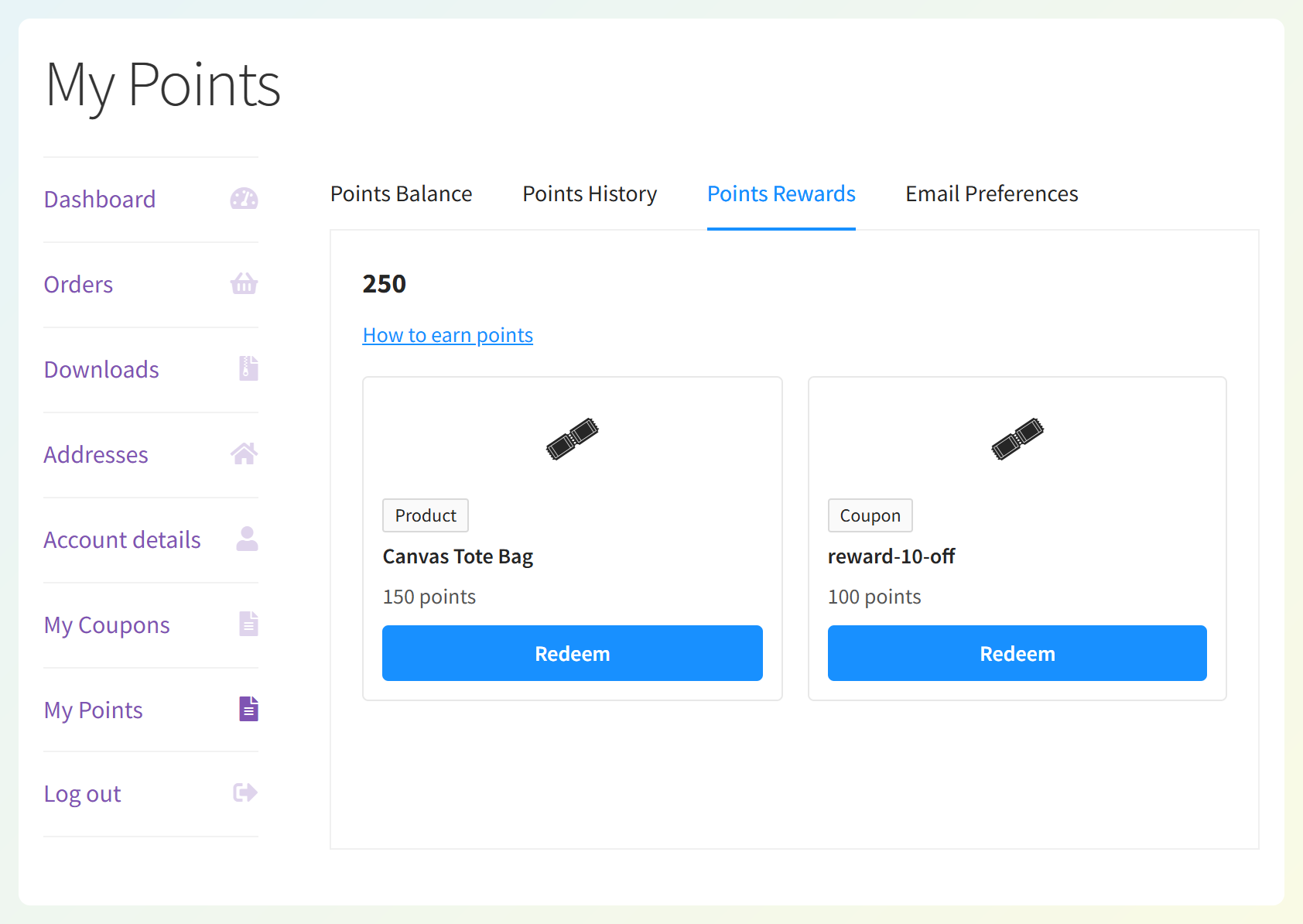
The Growth plan includes referral points and review points. By default, points expire after 365 days without loyalty points activity, and you can set the expiry period to 0 to turn it off.
Side By Side: Earning, Redemption, Expiry And Admin
Both plugins support core points and rewards features. Advanced Loyalty Program focuses on store credit, flexible reward redemption, and point management, while WP Swings offers more gamification and membership options.
| Advanced Loyalty Program | WP Swings Points and Rewards (free) | WP Swings Pro | |
|---|---|---|---|
| How points are spent | Store credit (manually or automatically at a threshold); product and coupon rewards | Cart or checkout points discounts | Cart or checkout discounts, points-only or partial purchases, generated coupons |
| Store credit or wallet balance | Advanced Coupons store credit; also used for Advanced Gift Cards redemptions and refunds issued as store credit | Wallet credit conversion needs the separate Wallet System plugin | Wallet credit conversion needs the separate Wallet System plugin |
| Referral points | Sign-up and referred purchase | Referral sign-up | Adds referral purchase |
| Review points | Yes | Pro feature | Yes |
| Product and coupon redemption | Claim designated product or coupon rewards from My Points | Apply points for a discount at cart or checkout | Points-only or partial purchases; coupon generation |
| Points expiry | After a set number of days without points activity (365 by default) | Pro feature | Yes |
| Gamification (spin-the-wheel, badges) | Not included | Yes | Yes |
| Bulk points changes | Bulk Adjust: increase, decrease, reset, delete | Manual updates and points import | Adds export |
| First-year price (1 site) | $99.50 | Free | $99 |
Prices and features may change, so check each plugin’s current plans before purchasing.
One balance instead of three
With Advanced Loyalty Program, redeemed points join your Advanced Coupons store credit balance. If you also use the separate Advanced Gift Cards plugin or issue refunds as store credit, those amounts share that balance, which customers can use at checkout.
WP Swings can also convert points into wallet credit, with its separate Wallet System plugin. For stores already using Advanced Coupons store credit for refunds or Advanced Gift Cards redemptions, keeping those amounts together may be more convenient.
Automatic redemption can make points easier to use
You can automatically redeem points as store credit once a customer’s balance reaches a threshold you choose. The plugin converts either the whole balance or a capped amount, and it only counts approved points, not pending ones. Customers don’t need to remember a redemption step, because the credit is waiting for them at checkout.
Choosing your redemption setup: If you offer product or coupon rewards, keep automatic store-credit redemption off so customers can save their points for those rewards. Otherwise, points may convert into credit before they have enough to claim a product or coupon.
Admin tools at scale
Advanced Loyalty Program includes a dashboard with total, unclaimed, pending, claimed, and expired points, plus a full points history. You can also enable reminder emails to help customers keep track of unused points, and customers can opt out. WP Swings’ free version supports manual updates and a points table, while exporting points is a Pro feature.
Pricing By Site Count
Advanced Loyalty Program costs $99.50 for the first year on the Growth plan (one site) and $199.50 for the first year on the Business plan (unlimited sites). WP Swings’ free plugin costs nothing, and their Pro version costs $99 for one site, $199 for five sites, or $409 for ten sites on a one-year plan.
| Sites | Advanced Loyalty Program (first year) | WP Swings Pro (1-year plan) |
|---|---|---|
| 1 site | $99.50 (Growth) | $99 |
| 5 sites | $199.50 (Business, unlimited sites) | $199 |
| 10 sites | $199.50 (Business, unlimited sites) | $409 |
At one site the two are within 50 cents of each other. Past one site, the Business plan covers every store you run for the same price. The All Access Bundle is $249 for the first year and adds Advanced Coupons Premium, Advanced Gift Cards, and Advanced Promo Kit for unlimited sites.
Switching From WP Swings To Advanced Loyalty Program
If you’re switching from WP Swings to Advanced Loyalty Program, you can carry over the value of your customers’ existing rewards. Start by recording their current points balances, comparing the redemption rates, and planning the adjustments needed to keep their rewards’ value intact.
We recommend this order:
- Save the current balances: Back up your store and record each customer’s points before making changes. WP Swings Pro includes an export feature; with the free version, you can check balances in its Points Table.
- Match the points’ value: Compare the old and new redemption rates and work out how many Advanced Loyalty Program points each customer should receive to preserve the value of their rewards.
- Transfer and check balances: Adjust individual customers from the Customers tab. You can also bulk adjust loyalty points for groups needing the same change. For customers with different balances, apply the appropriate adjustments individually.
- Verify and notify customers: Check the transferred balances before telling shoppers about the switch and how to use their points.
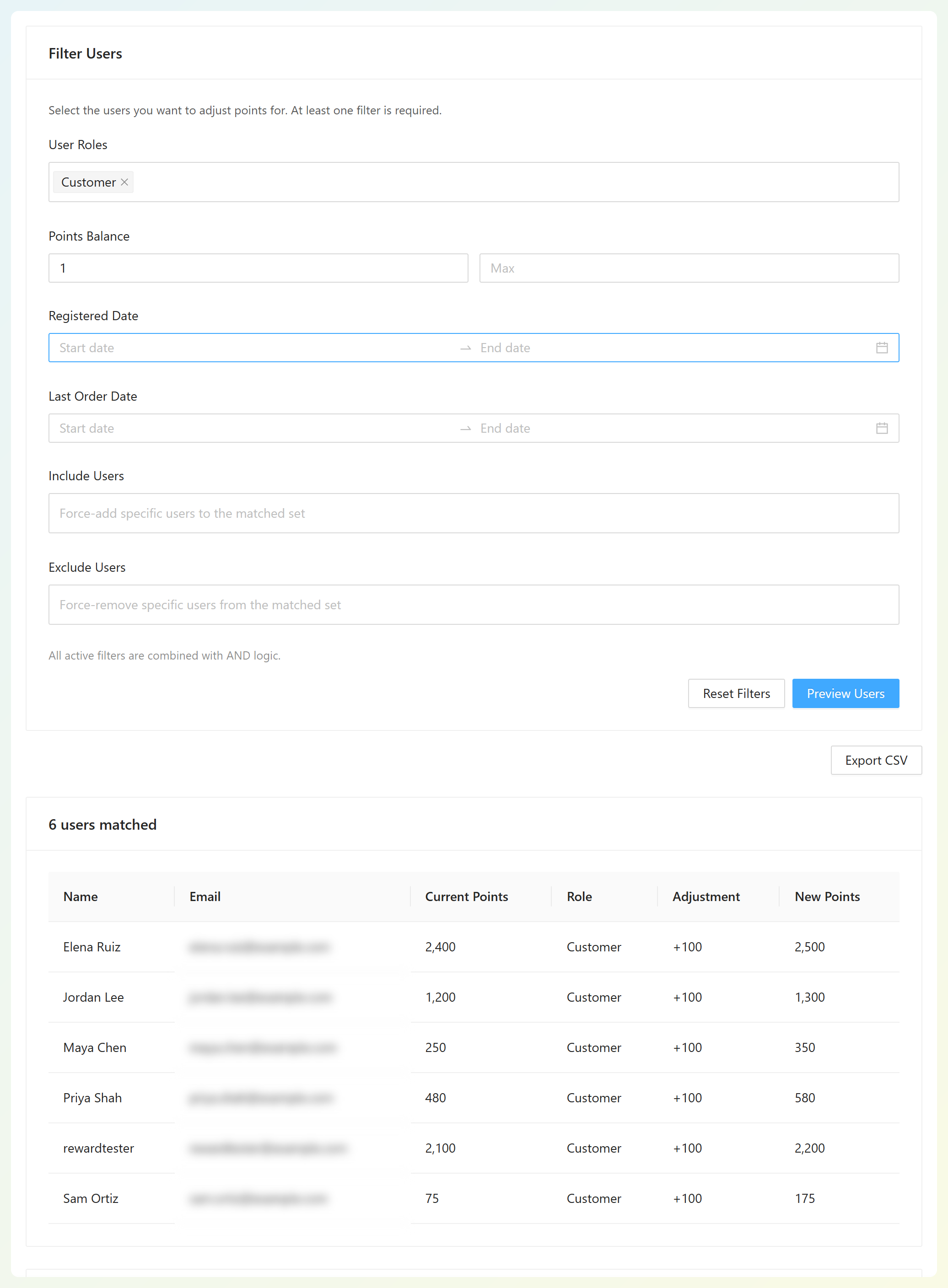
Bulk Adjust lets you preview selected customers before applying a fixed or percentage change. For a large migration involving different balances, contact our support team before making changes.
Which Should You Choose?
If your main goal is turning loyalty points into useful store credit, choose Advanced Loyalty Program. WP Swings is a strong option if you want a free starting point or if spin-the-wheel campaigns and membership perks are central to your rewards strategy.
Advanced Loyalty Program converts points into store credit, offers automatic redemption when that fits your setup, and lets customers claim selected products or coupons as rewards. Referral and review points are included in Growth, while Bulk Adjust and the dashboard help you manage balances. It is the stronger fit when clear redemption options and the Advanced Coupons store-credit system matter most.
Frequently Asked Questions
Is WP Swings Points and Rewards free?
Yes. WP Swings’ Points and Rewards for WooCommerce has a free version on WordPress.org with per-dollar points, sign-up and referral sign-up points, gamification, badges, and two membership levels. Features like points expiration, review points, coupon generation, and export need their Pro version, which costs $99 for one site on a one-year plan.
Can loyalty points become store credit in WooCommerce?
Yes. Advanced Loyalty Program converts redeemed points into Advanced Coupons store credit. By default, 10 points convert to 1 currency unit, but you can customize this ratio in the plugin settings. Customers can redeem points from My Points or directly at checkout. You can also enable automatic redemption when their balance reaches a set threshold. If you use Advanced Gift Cards or issue refunds as store credit, those amounts share the same store credit balance.
Do points expire in Advanced Loyalty Program?
They can. By default, points expire after 365 days without loyalty points activity. Earning or redeeming points resets the inactivity period and extends their validity. If you don’t want points to expire, set the expiry period to 0.
Can customers earn points for referrals and reviews?
Yes. Advanced Loyalty Program awards points when a referred friend signs up and when they make a purchase, using unique referral links. It also awards points for product reviews, blog comments, registration, and a first order. All of these are included in the Growth plan, so there’s no higher tier to unlock them.
Can I move my WP Swings points to Advanced Loyalty Program?
Yes. Start by recording or exporting each customer’s points balance, then compare the redemption rates and make the adjustments needed to preserve their rewards’ value. Bulk Adjust can help with groups needing the same change, while customers with different balances may need individual adjustments. For large migrations, contact our support team before making changes.
Final Thoughts And Next Steps
A useful loyalty program makes it clear what customers earn and how they can spend it. If you want a WP Swings points and rewards alternative centered on store credit, Advanced Loyalty Program is worth considering.
Advanced Loyalty Program for WooCommerce lets you turn points into store credit, offer products and coupons as rewards, and manage points from one dashboard. Here are a few places to start:
- Pick a redemption model customers can see
- Set up earning, rewards, and store credit redemption
- Decide whether automatic store-credit redemption fits your rewards
- Plan your move from WP Swings and preserve points value
If store credit is the right fit for your loyalty program, explore Advanced Loyalty Program pricing. The Growth plan starts at $99.50 for the first year.