

The best Cyber Monday promotion ideas don’t have to mean a deeper discount. Give Monday its own offer: a short online window, store credit back, a category threshold, or another promotion that feels different from Friday’s markdown. That’s the principle behind the ideas below.
Picture a store running the same 25% off from Friday morning to Monday night. The offer may still convert on Monday, but by then you have little new to say about it. A different format gives your Cyber Monday message a clearer reason to exist.
This guide gives you nine Cyber Monday promotion ideas for a WooCommerce store that already has a Black Friday plan. You’ll see where each offer fits, how to build it, and what to check before it eats too far into your margin.
Why Cyber Monday Needs A Different Offer From Black Friday
Cyber Monday is built around online shopping, it lands on a workday, and it arrives after a long weekend of holiday promotions. That makes it a useful moment to change the shape of the offer rather than simply extending Friday’s campaign.
Cyber Monday still brings serious online spending. According to Adobe, U.S. consumers spent $14.25 billion online on Cyber Monday 2025, up 7.1% year over year, and in the peak hours of 8 pm to 10 pm they spent $16 million every minute. The same report found 57.5% of U.S. Cyber Monday online sales came through a mobile device. That makes a mobile-friendly path and a clearly timed evening offer especially worth planning for.
By Monday, shoppers have also moved through several days of holiday promotions. According to the National Retail Federation, 85.7 million U.S. consumers shopped online on Black Friday 2025 and 75.9 million shopped online on Cyber Monday. If you’ve been promoting the same offer since Friday, your Monday audience has already had several days to see it. A different format gives Monday something new to communicate.
That’s why simply extending Black Friday can make Cyber Monday feel like a continuation rather than a fresh campaign. A different offer type gives you a new reason to email and can help you protect margin compared with another broad markdown.
How To Plan Your Offers From Black Friday To Cyber Monday
Treat Thanksgiving weekend as three offers in a row, each with its own job. Friday is the markdown day, the weekend carries the bundle or BOGO, and Monday gets the time-boxed, credit-back offer that gives the customer a reason to return in December.
Your Friday plan is already covered in our Black Friday checklist, so this article takes over from Saturday. According to Adobe’s 2025 holiday season recap, U.S. online spend on Black Friday grew 9.1% in 2025 while Cyber Monday grew 7.1%, as shoppers embraced earlier deals. Some customers may already have bought on Friday, so Monday needs a reason that isn’t simply a lower price.
Here’s what the sequence looks like in practice (example offers; set your own amounts):
| Day | The job | Offer type | Example |
|---|---|---|---|
| Friday | Win the deal hunter | Markdown | 25% off sitewide |
| Saturday and Sunday | Lift order size | BOGO or bundle | Buy 2, get 1 half price on a hero product |
| Monday | Encourage a December return | Credit-back, time-boxed | Spend $100, get $15 store credit, 12:00 to 14:00 |
Each step needs a hard stop before the next one begins. The Friday coupon should expire Friday night, the weekend BOGO should end Sunday night, and the Monday coupon should carry its own start and end time, so no two offers overlap in a customer’s cart. We’ll cover the margin check for each step further down.
9 Cyber Monday Promotion Ideas For WooCommerce Stores
Each idea below gives Monday a different angle from Friday’s markdown. We’ll also show you which Advanced Coupons feature builds it and whether you can do it with the free plugin or need Premium or a separate plugin.
1. Lunch-hour flash coupon
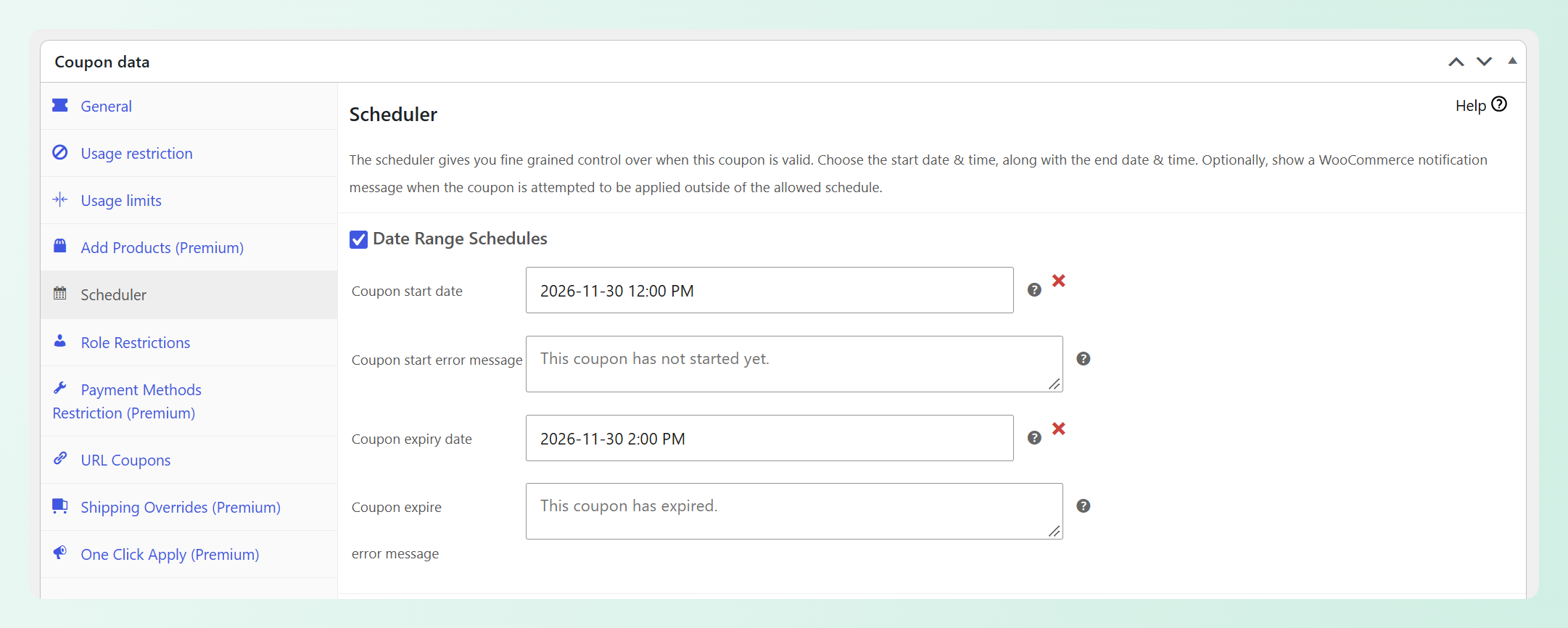
Run a coupon that’s live for two hours in the middle of the workday, say 12:00 to 14:00, and put the window in the subject line. A short window gives the offer a clear deadline without extending it across the whole day.
The Scheduler in the free Advanced Coupons plugin sets a start and expiry date with a time, down to the minute, in your site’s timezone. Our guide on how to schedule WooCommerce coupons walks through the setup. Weekly recurring windows are Premium; a single Monday window is free.
2. Credit-back instead of a markdown
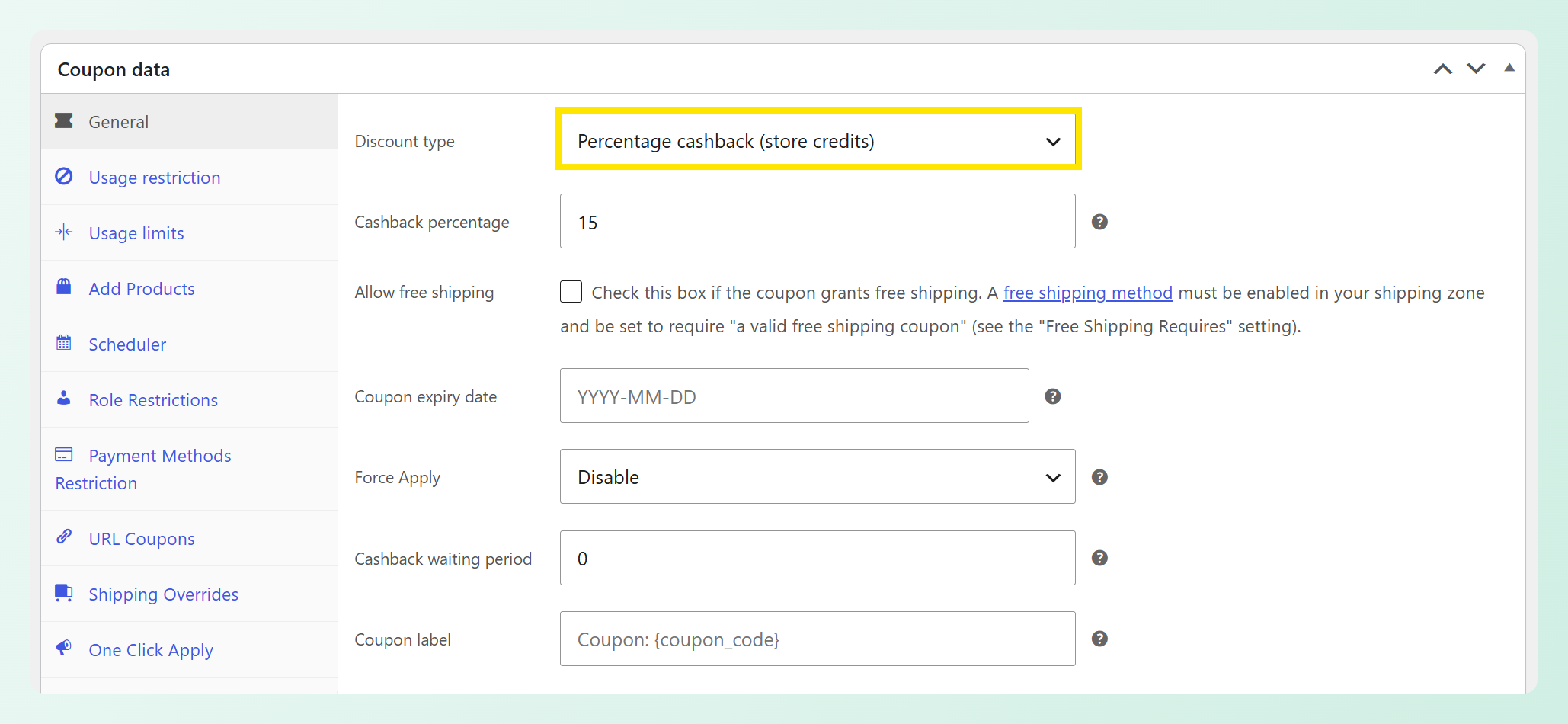
Instead of taking 15% off a $100 order today, give $15 of store credit when the cart reaches $100. On that example order, the headline value is still $15; the customer pays full price today and receives credit for later use.
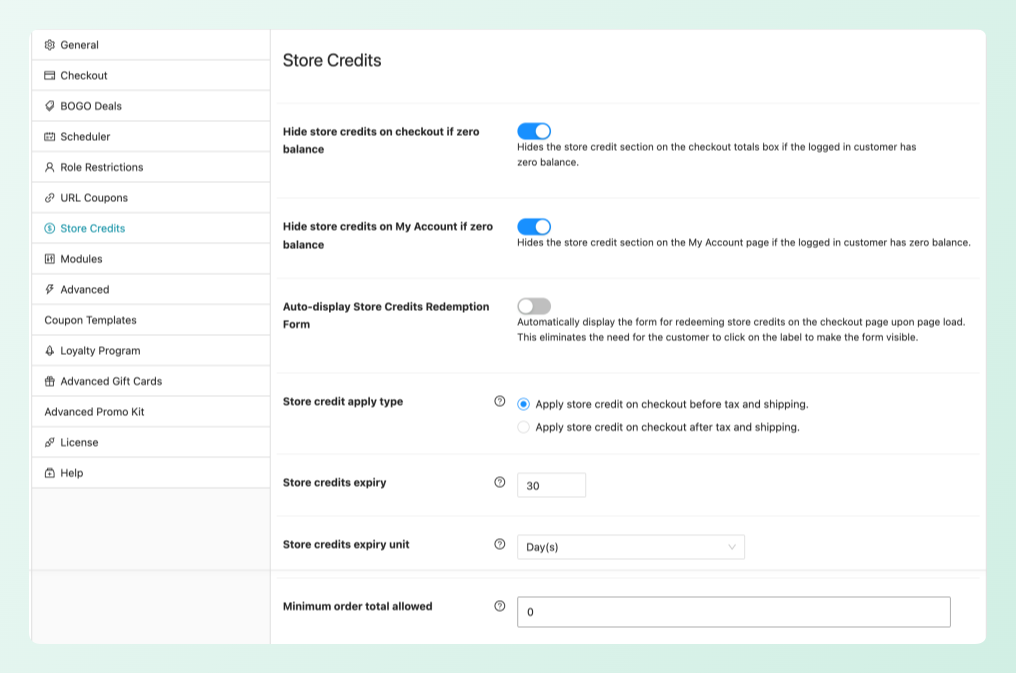
That’s a cashback coupon in Advanced Coupons Premium: a percentage or fixed amount credited to store credit once the order is paid, with an optional waiting period before the credit is released. Pair the fixed $15 reward with a Cart Subtotal condition for the $100 minimum spend. Cashback goes to logged-in customers only, so guests are asked to log in before it applies. The free store credit expiry setting can add a store-wide inactivity-based expiry rule too, but it covers every customer’s balance, not just Monday’s credit (more on that in idea 9).
3. Category spend threshold
“Spend $75 on skincare and shipping’s on us” is more targeted than a storewide “free shipping over $75” offer. It lets you put the threshold on the category you want to move without letting unrelated products count toward it.
The Category Subtotal cart condition in Advanced Coupons Premium calculates the threshold only on the categories you select, so a $75 cart holding $40 of skincare doesn’t qualify. Our post on the category subtotal cart condition shows the setup screen.
4. Gift-card top-up
Sell a $100 gift card and give the buyer $10 of store credit for themselves. Gift cards are delivered by email and don’t depend on physical inventory, which makes them easy to feature in an online-only Cyber Monday campaign.
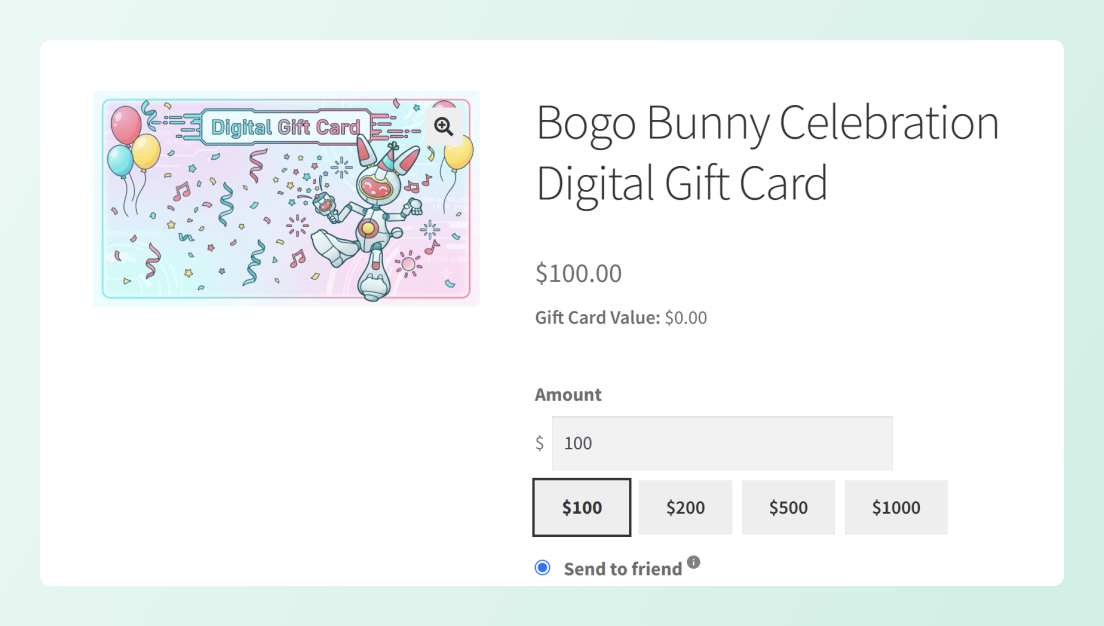
Advanced Gift Cards, a separate plugin, adds gift card products with custom amounts and scheduled delivery. The top-up itself is store credit: add it to the buyer’s account from the Store Credits page in the free Advanced Coupons plugin, or give it automatically with a Premium cashback coupon the buyer applies at checkout. Our guide to holiday gift cards has more ideas if you want to build out the offer for the wider season.
5. Logged-in customer early access
Give logged-in customers an early-access window in the morning, then open a separate public coupon at noon. That keeps the early-access rule clear without requiring you to change a live coupon halfway through the day.
For the early coupon, use the free Customer Logged In Status cart condition and the free Scheduler, then set it to end before the public coupon begins. If you run the Advanced Loyalty Program, its Bulk Adjust tool can also add bonus points to a filtered customer group.
6. Same-product BOGO on a hero SKU
A buy one, get one half-price offer on your best seller discounts the second unit without cutting the sitewide price. It can be a good fit for consumables and gifts people often buy in pairs.
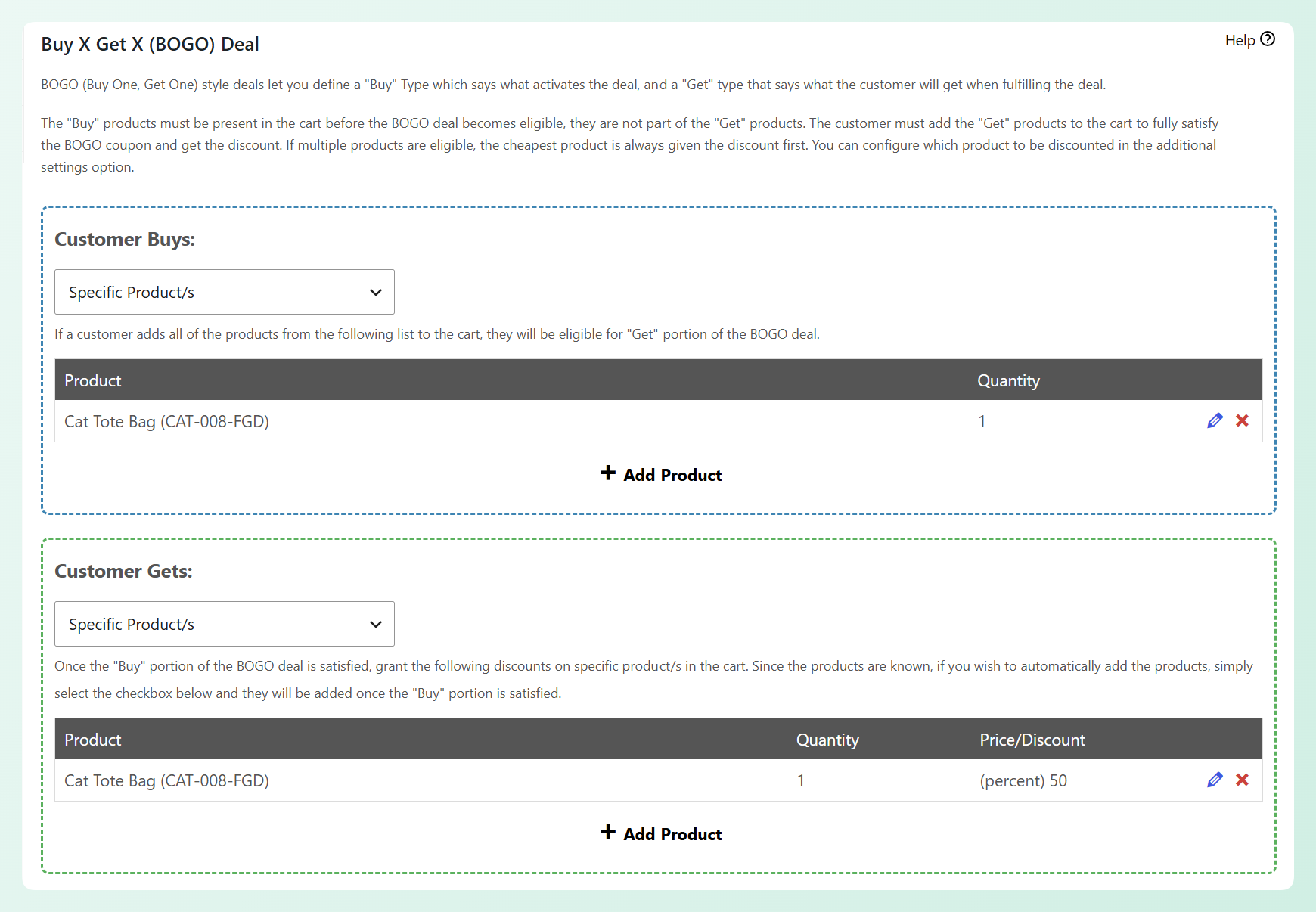
You can build this in the free Advanced Coupons plugin: pick your hero product on both the Buy and Get sides of a Specific Products BOGO deal. Premium adds a Same Products deal type, which discounts another unit of whichever qualifying product the customer buys, so you don’t have to list each one. Either way you set the trigger quantity and the discount, and the deal applies once or repeats across the cart.
7. URL coupon in the Monday email
Put the coupon in the link. The customer clicks from your email, the coupon applies itself, and they land on the page you choose with a message confirming it worked.
URL coupons are free in Advanced Coupons: every coupon gets its own link, a redirect URL, and a custom success message. For mobile shoppers, removing the copy-and-paste step keeps the redemption path simpler.
8. “Last chance” badges scheduled for the day
Show a “Cyber Monday only” or “Ends 2 pm” label on the products in the offer, and only on Monday. That puts the deadline next to the product itself instead of relying on shoppers to remember it from the email.
Advanced Promo Kit, a separate plugin, adds product labels with a Schedule tab for start and end dates. For fixed deadline copy, write the label directly, such as “Cyber Monday only” or “Ends 2 pm.” If you want a label to pull discount text from an Advanced Coupons coupon, enable the Advanced Coupons integration and insert that coupon’s {ac_coupon-CODE} placeholder. These are scheduled badges, not countdown timers, so keep the end time fixed in the copy.
9. A December follow-up coupon
If you want Cyber Monday customers to have a reason to return in December, send them a follow-up coupon with a clear redemption window. Use your email platform to send the code to your Monday audience, then let Advanced Coupons control when the coupon can be used.
With the free Scheduler, you can open the follow-up coupon on 1 December and close it before your chosen deadline. Store credit expiry works differently: it applies store-wide, and a customer’s whole balance expires after the configured period of no store credit activity. That makes it useful as a store-wide policy, but not as a deadline for Cyber Monday credit alone.
One risk is offer overlap: if one day’s coupon is still active when the next one starts, a customer may be able to use both unless your coupon rules block it. Give each coupon a hard expiry in the Scheduler (Friday night for the Friday code, Sunday night for the weekend BOGO), and tick WooCommerce’s “Individual use only” box on the Monday coupon.
Here’s how the nine ideas map to the features that build them (example offers; set your own amounts):
| Idea | The offer | Built with | Tier |
|---|---|---|---|
| Lunch-hour flash coupon | 20% off 12:00 to 14:00 | Scheduler (date and time start and end) | Free |
| Credit-back instead of markdown | Spend $100, get $15 store credit | Cashback coupon + Cart Subtotal condition | Premium |
| Category spend threshold | Spend $75 in Skincare, free shipping | Category Subtotal cart condition | Premium |
| Gift-card top-up | Buy a $100 gift card, get $10 store credit | Advanced Gift Cards + manual store credit adjustment, or cashback coupon | Separate plugin + Free (manual) / Premium (automatic) |
| Logged-in customer early access | Early coupon for logged-in customers; public coupon starts later | Customer Logged In Status + Scheduler | Free |
| Same-product BOGO | Buy 1, get 1 half price on a hero SKU | BOGO deal, Specific Products type | Free (Same Products type: Premium) |
| URL coupon in the email | One-click apply with a landing-page redirect | URL coupons | Free |
| Scheduled “last chance” badges | “Ends 2 pm” label on Monday only | Advanced Promo Kit Schedule tab | Separate plugin |
| December follow-up coupon | Follow-up coupon redeemable 1 to 15 December | Scheduler + email platform for delivery | Free (coupon scheduling) |
Checking The Margin On Each Offer
Credit-back offers preserve more of today’s order value, but the credit still has a future cost if it’s redeemed. Use the discount margin calculator for direct markdowns, and model credit-back separately by reserving the full reward value when you check the offer.
Here’s what this looks like in practice (example data):
| Offer | Customer pays today | Cost of goods today | Immediate gross margin | Margin after reserving the full reward value |
|---|---|---|---|---|
| 25% off (Friday) | $75 | $50 | $25 | $25 |
| $15 credit-back (Monday) | $100 | $50 | $50 | $35 if the full $15 is redeemed later |
On the first order, the credit-back example preserves more gross margin even after you reserve the full $15 reward value. The later order has its own revenue and cost of goods, so don’t treat the $35 figure as lifetime margin. Some credit may go unused, but planning as if all of it will be redeemed keeps the comparison conservative.
Two simple checks can protect the offer. Use a Cart Subtotal condition to set the minimum spend for a fixed credit-back offer, and check stock depth before you put a hero SKU into a BOGO. The BOGO calculator on our discount calculators page shows what “buy one, get one half price” really costs per unit sold.
Where To Find These Settings In Advanced Coupons
Everything above comes from a small set of settings in Advanced Coupons, and most of them ship in the free plugin. Here’s where each one lives.
- Scheduler (free): Coupons > Add New > Scheduler tab. Turn on Date Range Schedules, set the start and expiry date and time, and edit the “not started yet” and “expired” messages customers see.
- Cashback (Premium): the coupon’s discount type. Set a percentage or fixed amount and, if you want, a waiting period before the credit is released.
- Store credit expiry (free): Coupons > Settings > Store Credits. Enter a number and pick days, months, or years; 0 means credit never expires. The clock runs from each customer’s last store credit activity and applies to every balance in the store.
- Cart conditions (free; Category Subtotal in Premium): the Cart Conditions panel on the coupon. Cart Subtotal, Product Categories Exists In Cart, and Customer Logged In Status are free, and conditions can be grouped with AND/OR logic.
- URL coupons (free): the URL Coupons tab on the coupon editor. Set the coupon URL, redirect, and success message there.
Check the site timezone before you schedule these offers, because it decides whether a lunch-hour window opens when you expect. The Scheduler uses your WordPress site timezone (Settings > General), so a window entered against a different timezone opens early or late. Check that setting before you trust a 12:00 start, and replace the default “This coupon has not started yet.” message with one that names the start time, so an early clicker knows when to come back.
Setting an end date in the Scheduler also writes WooCommerce’s own coupon expiry date, so the end shows in your coupon list without a second step. That makes each cutoff in the weekend sequence easy to audit at a glance.
How To Measure Your Cyber Monday Results
Start with coupon uses and discounted order revenue per discounted order. If you used cashback or store credit, also check Store Credits Added and Store Credits Used, but treat those store-wide figures as context rather than a direct measure of your Cyber Monday coupon.
The free Coupon Activity Dashboard in Advanced Coupons (Coupons > Dashboard) shows Coupons Used, Orders Discounted, Discounted Order Revenue, Most Used Coupons, and, when Store Credits is enabled, Store Credits Added and Store Credits Used for the selected period. Use a custom Monday date range for a day-level snapshot, then compare it with Friday; dividing Discounted Order Revenue by Orders Discounted gives you a simple revenue-per-discounted-order figure. If you need order-level filtering by coupon code or a CSV export, the Premium Orders with coupons report adds that detail.
Frequently Asked Questions
Should Cyber Monday deals be different from Black Friday?
If Black Friday already uses your main markdown, Cyber Monday is a good place to change the offer type. Store credit back on the order, a category threshold, or a short scheduled window gives you something new to communicate without automatically cutting the price again.
How long should a Cyber Monday flash sale last?
There isn’t one universal best length. A two-hour lunch window or a three-hour evening window can work as clear, easy-to-communicate examples. Adobe’s 2025 U.S. data put Cyber Monday’s spending peak between 8 pm and 10 pm, so an evening window has a data point behind it; a midday window is simply another practical option for a workday campaign. Whichever you choose, give it a clear start and end time.
Can I schedule a WooCommerce coupon by the hour?
Yes, with the free Advanced Coupons plugin. WooCommerce core can schedule a coupon’s publication for a future date and time and includes a coupon expiry date. The Scheduler tab in Advanced Coupons puts the start and expiry controls together, adds time fields for both ends, and lets you customize the messages customers see if they try the code too early or too late. Weekly recurring day-and-time schedules are a Premium feature; a single Cyber Monday date-range window is free.
Is store credit better than a discount for Cyber Monday?
It can be, depending on your margin and repeat-purchase goal. A discount lowers today’s order value immediately; a cashback coupon keeps the current order at full price and awards store credit for later use. That later credit still has a cost when it’s redeemed, and it doesn’t guarantee a second order. The cashback coupon that automates the credit is in Advanced Coupons Premium, while store credit itself is free.
When should I email Cyber Monday offers?
There isn’t one universal send schedule. A simple option is to announce the day’s offer early, then send a reminder near the deadline if that fits your usual email cadence. Put the offer in a URL coupon so the code applies on click; Adobe found 57.5% of U.S. Cyber Monday 2025 online sales came through mobile devices, so removing the copy-and-paste step is useful on smaller screens. If your weekend BOGO is still live on Sunday, make the Monday start time explicit and keep the coupon schedules from overlapping.
Getting Your Cyber Monday Offers Ready
Black Friday can win the first order. Cyber Monday can give customers a different reason to come back, especially when the offer shifts from a broad markdown to a time-boxed reward or follow-up incentive. The goal is to create a distinct Monday campaign without giving away more margin than you planned.
Here’s what to do next:
- Give Monday its own offer type instead of a fourth day of Friday’s markdown: Why Cyber Monday Needs A Different Offer From Black Friday
- Map Friday, the weekend, and Monday as three offers with hard stops: How To Plan Your Offers From Black Friday To Cyber Monday
- Pick two or three ideas and note the feature and tier each one needs: 9 Cyber Monday Promotion Ideas For WooCommerce Stores
- Run the numbers before you schedule anything: Checking The Margin On Each Offer
- Configure the Scheduler, cart conditions, and any store-credit settings your chosen offer actually needs: Where To Find These Settings In Advanced Coupons
- Check redemptions, credit, and order value on Tuesday: How To Measure Your Cyber Monday Results
Ready to turn these Cyber Monday promotion ideas into scheduled offers? See how Advanced Coupons Premium adds cashback coupons, recurring day-and-time schedules, and more to the free plugin, and have Monday’s windows built before the weekend starts.