Comparing Advanced Coupons vs Power Coupons for your WooCommerce store? Both plugins let you build conditional discounts, but they differ in the types of promotions you can run for free and the controls you get when you upgrade.
Power Coupons offers automatic discounts and in-cart offer previews in its free plugin. Advanced Coupons lets you run BOGO deals, share coupon links, and give customers store credit without upgrading. If you want to reward repeat buyers or run more targeted campaigns, it’s also worth looking at what each paid plan offers.
We build Advanced Coupons, and in this guide, we’ll compare both plugins’ free and paid features, cart conditions, and pricing to help you choose the right fit for your store.
What A WooCommerce Coupon Plugin Adds Over Native Coupons
WooCommerce already gives you the basics for running discounts: percentage and fixed discounts, expiry dates, usage limits, and restrictions based on spending, products, categories, or billing email.
According to W3Techs, WooCommerce accounts for 46.4% of the ecommerce systems in its surveys (November 2026). Adding a coupon plugin gives you more ways to run promotions on that familiar platform, such as rewarding customers based on previous purchases.
Here are four features to look for in a WooCommerce coupon plugin:
- Cart conditions: Rules that test the cart or the customer before a coupon applies, such as the total quantity of items in a cart or a past purchase.
- Auto-apply: The discount appears on its own when the cart qualifies, so nobody has to type a code.
- BOGO deals: Buy-one-get-one offers, which core WooCommerce has no coupon type for.
- Store credit: A balance customers spend on a future order, often used for refunds and rewards.
According to Baymard Institute, the average documented cart abandonment rate is 70.22%. Discounts are one tool you can use to give shoppers a reason to complete their purchase. Both plugins offer the features above across their free and paid versions, but they give you different ways to run promotions.
Power Coupons At A Glance
Power Coupons for WooCommerce is a coupon plugin from Brainstorm Force, built around auto-applied discount rules and offers shown inside the cart. It launched on WordPress.org on February 2, 2026. As of November 2026, it has 30,000+ active installations and three reviews.
The free version lets you build rules on cart subtotal, products, categories, quantities, and combinations, then apply the discount automatically when a cart matches. The plugin also shows eligible offers inside the cart, so shoppers can see available discounts without searching for a coupon code. According to Baymard Institute, 17% of surveyed US shoppers who abandoned a cart (excluding those who were just browsing) cited a long or complicated checkout.
Here are some of the features you can use to run promotions:
- Free cart offers: Show available coupons in the cart and automatically apply discounts when customers qualify.
- Pro promotions: Run and schedule BOGO deals, share coupon links, sell gift cards, and display cart progress bars.
- Credit-based loyalty rewards (Pro): Let customers earn credits for purchases, signups, or product reviews and redeem them for rewards.
If you mainly run cart-based discounts and want to spare shoppers from typing a code, the free version is a good starting point.
Advanced Coupons At A Glance
Advanced Coupons, the WooCommerce coupon plugin, has been on WordPress.org since 2020 and builds on WooCommerce’s own coupon system rather than replacing it. Its coupon features extend the familiar WooCommerce coupon editor, so you can add rules to your existing coupons rather than rebuild them from scratch.
Here are some of the features included in the free plugin:
- BOGO deals: Choose specific qualifying and reward products for buy-one-get-one offers, including free or discounted items.
- URL coupons: A shareable coupon link or QR code that applies the discount when the customer qualifies.
- Store credit: Give customers with accounts a balance to spend on future orders, with optional expiry in days, months, or years.
- Cart conditions: Six condition types, including cart subtotal, cart quantity, product category, login status, and customer roles, combined in groups with AND/OR logic.
- Scheduling and admin tools: Date-range scheduling, role restrictions, coupon templates, Send Coupon, and an AI coupon generator through the free StoreAgent AI plugin.
The free plugin has 20,000+ active installations and 185 ratings on WordPress.org (November 2026).
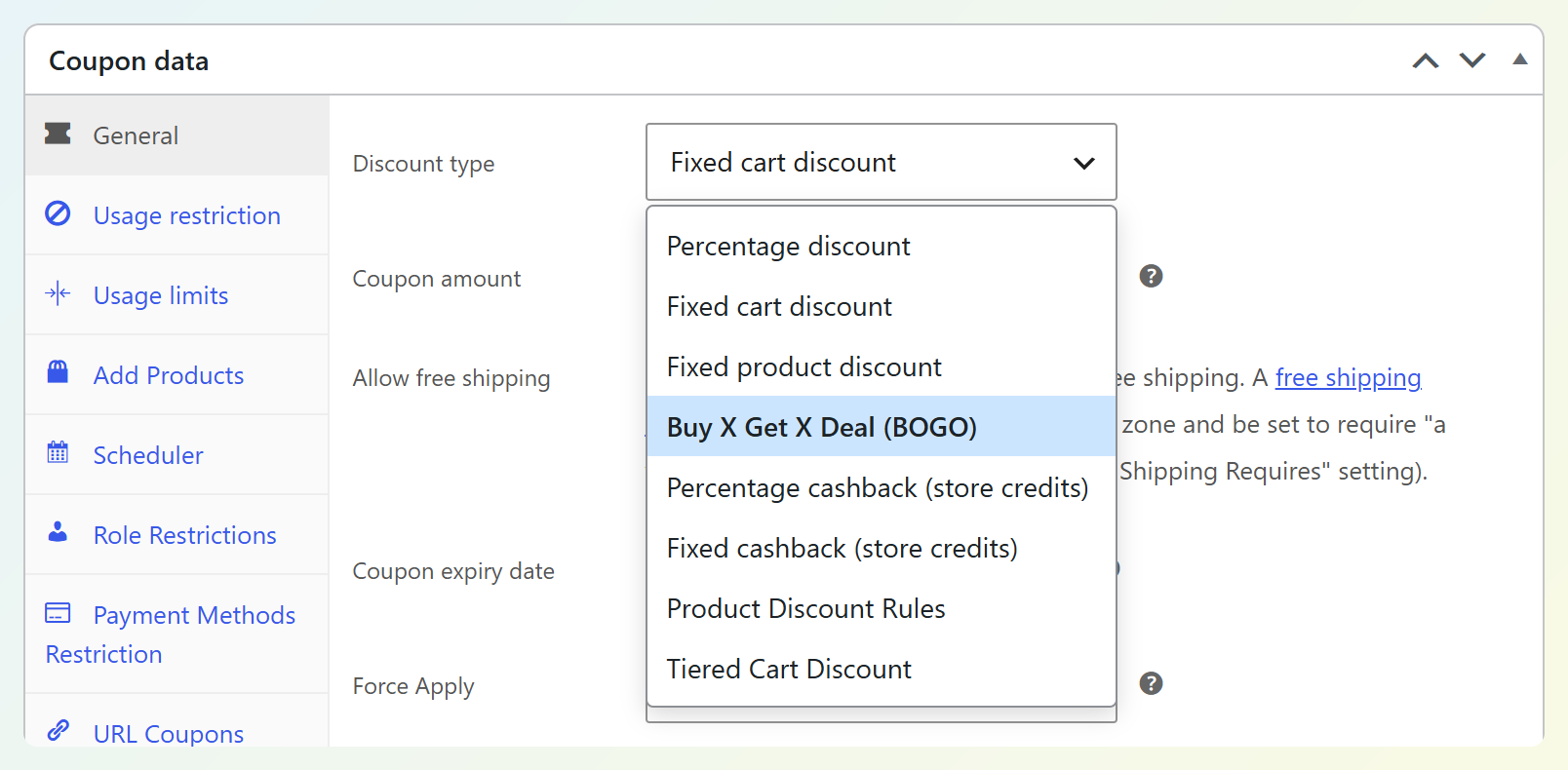
To create a BOGO offer, select the BOGO discount type in the WooCommerce coupon editor. You can also set usage limits, schedule the offer, and add cart conditions just as you would for other coupons.
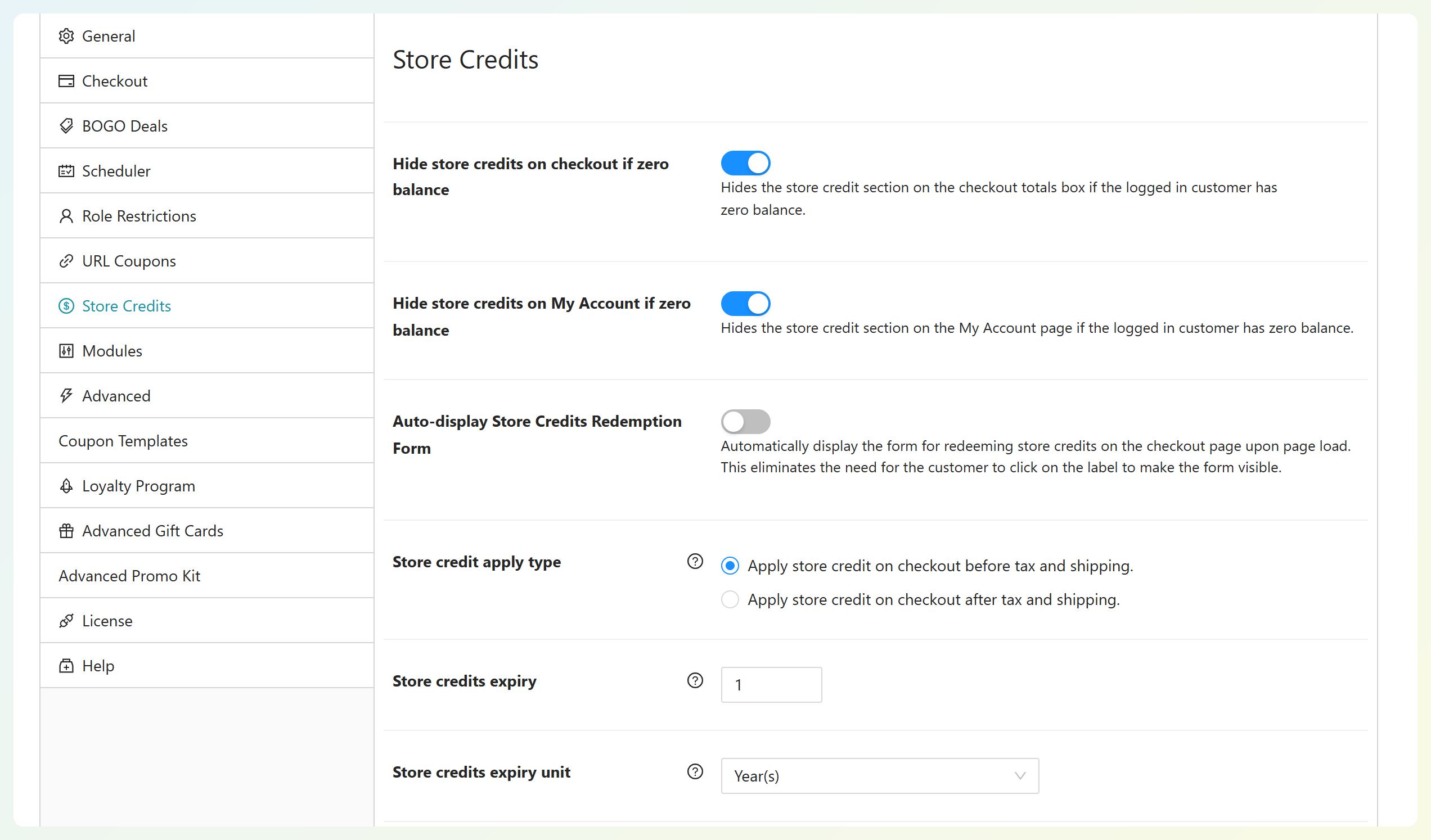
You can also set an optional expiry under Coupons > Settings > Store Credits. Credit never expires by default. If you set an expiry period, adding or spending credit resets the countdown. Check your local rules before putting an expiry date on customer balances.
Advanced Coupons Premium adds automatic coupon application, more BOGO options, and conditions for more targeted promotions. You can also add gift cards, loyalty points, and promotional product badges through the separate paid plugins Advanced Gift Cards, Advanced Loyalty Program, and Advanced Promo Kit.
Rules And Conditions Compared
Both plugins support cart-based rules. Advanced Coupons also includes login and role conditions in its free plugin, with more specific customer-history and shipping conditions in Premium.
What Power Coupons can check
Power Coupons supports rules based on cart totals, products, categories, and quantities, including combinations of these conditions. You can also use product and category exclusions to control which purchases qualify.
What Advanced Coupons Premium can check
Premium includes all six free conditions and adds more ways to control who can use a coupon and which carts qualify:
- Customer history: Customer Has Ordered Products Before, Total Customer Spend, and Number of Customer Orders.
- Timing: Within Hours After Customer Registered and Within Hours After Customer Last Order.
- Location and cart makeup: Shipping Zone And Region, Cart Weight, Category Subtotal, and Product Stock Availability Exists In Cart.
- Codes and custom data: Coupons Applied In Cart (with code pattern matching), Custom User Meta, and Custom Cart Item Meta.
You can combine these conditions using AND/OR logic, just as you can with the free conditions. Our guide on how cart conditions work walks through the panel step by step.
Two worked examples
First order over $50. In Advanced Coupons Premium, add a Cart Subtotal condition set to more than $50 and a Number of Customer Orders condition set to exactly 0 in the same condition group, joined by AND. Set the number of previous days to 0 to check the customer’s entire account order history. Shoppers must sign in before using the coupon.
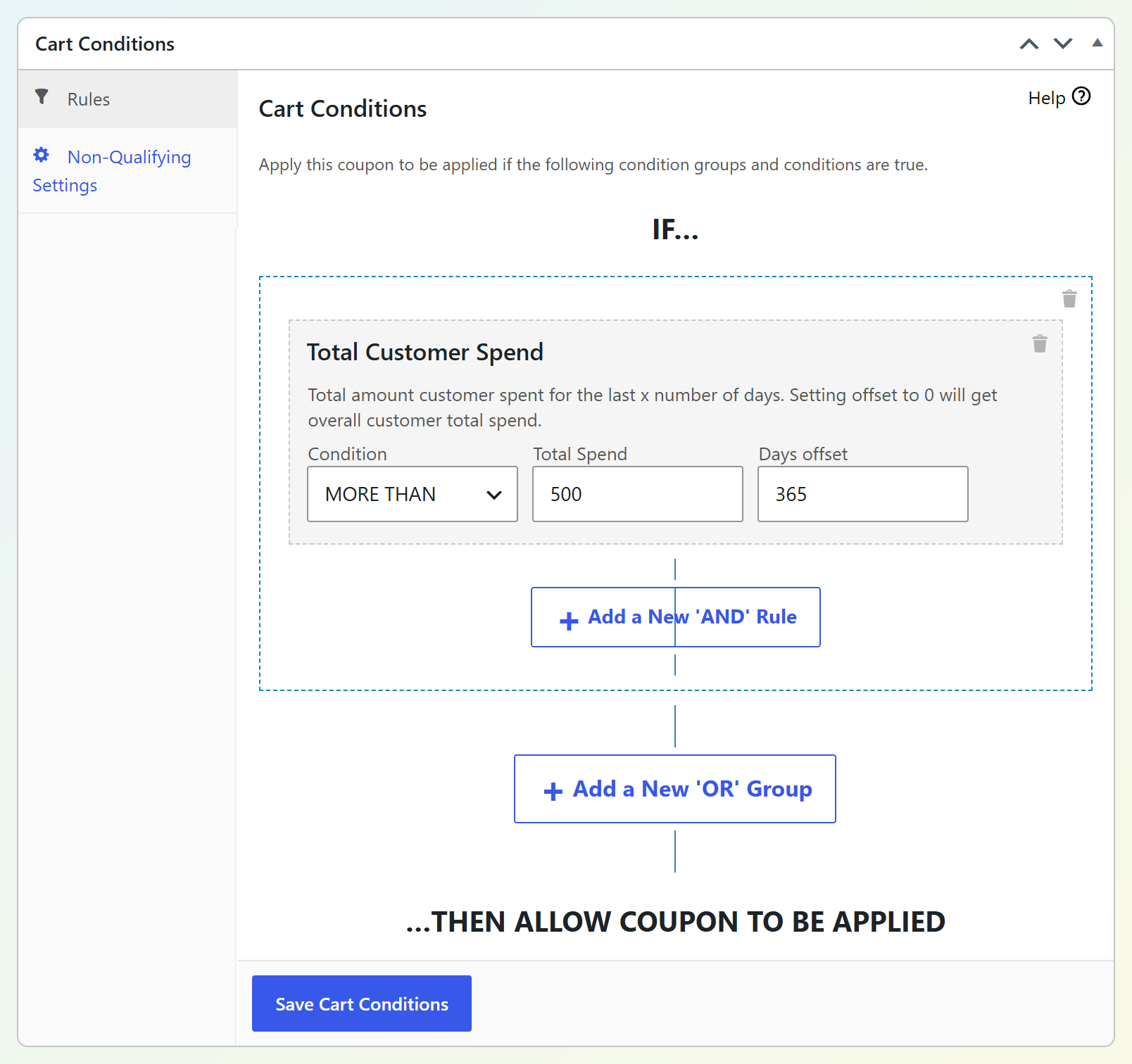
Customers who spent more than $500 in the past year. With Total Customer Spend, set the condition to more than $500 and enter 365 for the days offset. Enable auto-apply if you want eligible logged-in customers to receive the discount without entering a code.
With Premium, you can also build tiered cart discounts in one coupon. If you run campaigns with related coupon codes, use the Coupons Applied In Cart condition to check for a matching code pattern.
🎯 TIP: Think about who should receive each offer. A welcome discount for first-time buyers and a thank-you offer for loyal customers may have the same minimum spend, but they need different eligibility rules. Customer-history conditions let you distinguish those shoppers.
BOGO, Store Credit And Gift Cards: What’s Free And What’s Paid
Advanced Coupons gives you BOGO, store credit, and URL coupons in the free plugin. Power Coupons offers all three in its Pro version.
Here’s what you can do with each plugin, whether you start free or upgrade.
| Feature | Advanced Coupons (Free) | Advanced Coupons Premium | Power Coupons (Free) | Power Coupons Pro |
|---|---|---|---|---|
| Auto-apply coupons | No | Yes | Yes | Yes |
| Cart subtotal, category, and quantity conditions | Yes | Yes | Yes | Yes |
| BOGO | Yes (specific products) | Yes (categories, any product, combinations, same-product rewards, brands with a brand taxonomy) | Pro required | Yes |
| Store credit | Yes | Yes | Pro required | Yes |
| URL coupons | Yes | Yes | Pro required | Yes |
| Gift cards | Separate paid Advanced Gift Cards plugin required | Separate paid plugin required | Pro required | Yes (included) |
| Loyalty rewards | Separate paid Advanced Loyalty Program required for points | Separate paid plugin required for points | Credit rewards require Pro | Credit-based rewards (included) |
| Annual plan price | Free | From $99.50 introductory (1 site) | Free | $149 standard annual rate (up to 3 sites; discounts may apply) |
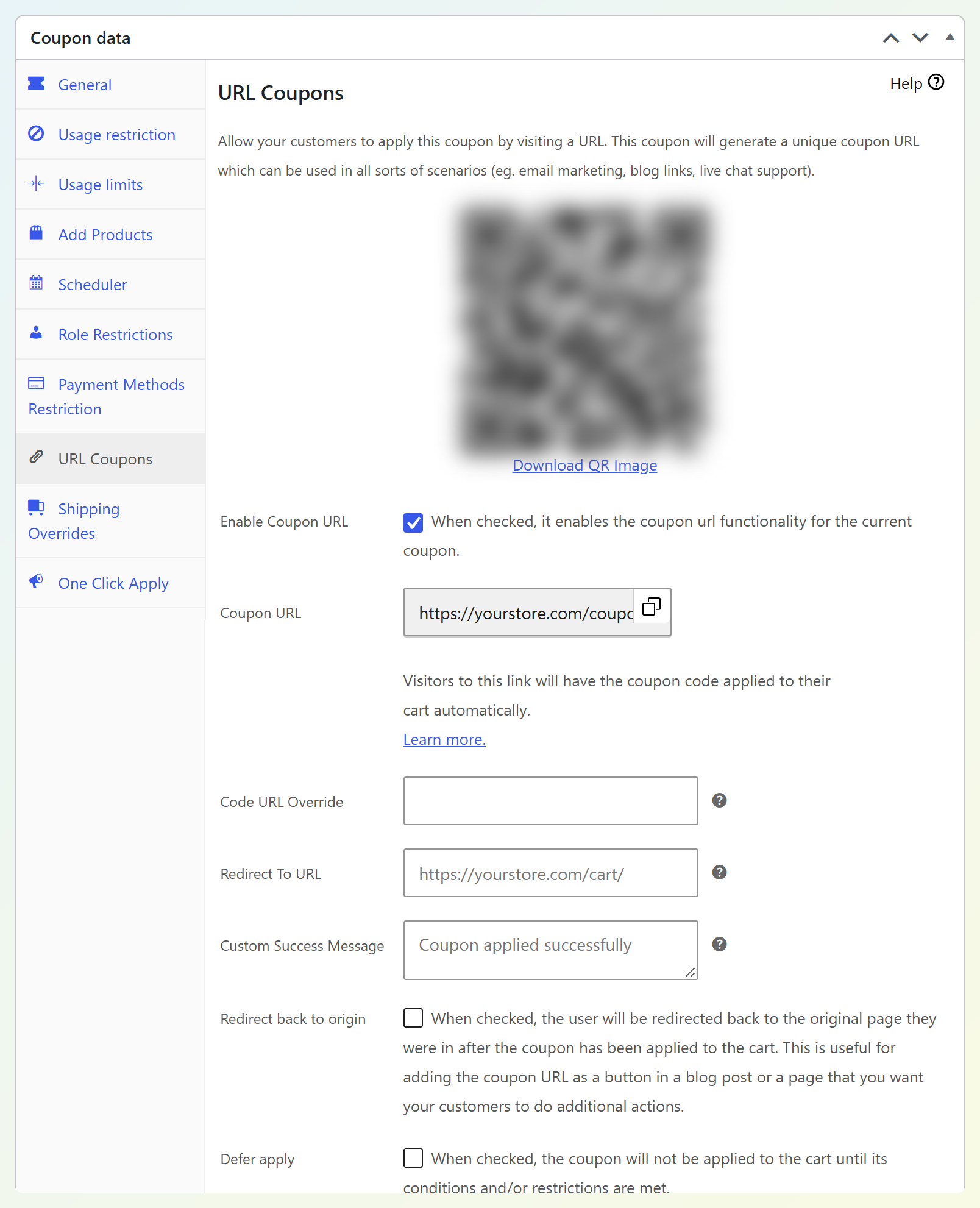
With the free Advanced Coupons plugin, you can enable a Coupon URL and share it in emails or on social media. When an eligible shopper clicks the link, the coupon applies without typing a code. If the cart does not qualify yet, the shopper can use the link again once it qualifies. This differs from auto-apply, which does not require a coupon link.
Gift cards and loyalty points are available through separate paid plugins in the Advanced Coupons suite or together in the All Access Bundle. When customers redeem a gift card through Advanced Gift Cards or convert their loyalty points into store credit through Advanced Loyalty Program, the credit goes into the same balance. Customers can also redeem loyalty points directly for product or coupon rewards instead of converting them to credit.
Power Coupons Pro includes digital gift cards and a loyalty rewards program in one paid plugin. Customers can earn credits for purchases, signing up, or leaving product reviews. The rewards you can offer include fixed discounts, percentage discounts, and free shipping.
Pricing: Plans And Site Limits
Advanced Coupons Premium starts at $99.50 for the first year on one site. The Business plan covers unlimited sites, while the Power Coupons Pro annual plan covers up to three sites at a standard rate of $149 before discounts. For two or three stores, the $149 Power Coupons plan costs less at these rates than the Advanced Coupons Business plan. If you manage more stores or need additional features, compare the site limits and included tools as well as the price.
| Plan | Sites | Annual plan price (USD) |
|---|---|---|
| Advanced Coupons Premium Growth | 1 | $99.50 (first year) |
| Advanced Coupons Premium Business | Unlimited | $199.50 (first year) |
| All Access Bundle (all four Advanced Coupons plugins) | Unlimited | $249 (first year) |
| Power Coupons Pro | Up to 3 | $149 (standard annual rate; discounts may apply) |
Advanced Coupons prices are introductory rates for the first year; the $149 Power Coupons price is its regular annual rate, including renewals. Both plugins may offer seasonal discounts. Check the current purchase and renewal prices before choosing a plan. See Advanced Coupons pricing for current plans, or WooCommerce coupon plugin pricing compared for the wider market.
For $249 in the first year, the All Access Bundle includes Advanced Coupons Premium, Advanced Gift Cards, Advanced Loyalty Program, and Advanced Promo Kit for unlimited sites. It’s an option if you want to run coupon campaigns, sell gift cards, reward shoppers with points, and display promotional product badges.
Which One Should You Pick?
We recommend Advanced Coupons if you want to start with BOGO deals, shareable coupon links, and store credit without paying for an upgrade. Premium adds customer-history conditions when you need more targeted offers, and the All Access Bundle brings all four paid plugins together on unlimited sites.
Power Coupons is a good fit if free auto-apply and in-cart offer previews are your priorities. Pro also bundles gift cards and credit-based rewards in one paid plugin and may cost less for two or three stores. If you want to let customers redeem loyalty points for products, build coupons around specific purchase-history conditions, or manage more than three stores with one annual license, we recommend looking at the Advanced Coupons plans.
Here’s how you can get started with Advanced Coupons and add features as you need them:
- Start free: Set up BOGO deals, URL coupons, and store credit with the free plugin.
- Add Premium: Upgrade when you need customer-history conditions, shipping-region rules, or auto-apply.
- Get the bundle: Consider the All Access Bundle if you want to run coupons, sell gift cards, offer loyalty rewards, and display product badges.
Frequently Asked Questions
Is Power Coupons free?
Yes, Power Coupons has a free version on WordPress.org with auto-applied rules based on cart subtotal, products, categories, quantities, and combinations. BOGO, store credit, gift cards, and URL coupons require Pro, which covers up to three sites at a standard annual rate of $149 before discounts. The free Advanced Coupons plugin includes BOGO, URL coupons, and store credit at no cost.
Does the free Advanced Coupons plugin include BOGO?
Yes. The free Advanced Coupons plugin lets you choose specific qualifying and reward products for BOGO deals in the WooCommerce coupon editor. Advanced Coupons Premium adds more flexible options, including product categories, any product, combinations, same-product rewards, and product brands (when a brand taxonomy is available). Because BOGO is a coupon, you can add cart conditions, scheduling, and usage limits to it like any other coupon.
Can I create coupons based on customer order history?
Yes. Advanced Coupons Premium lets you create coupons based on a logged-in customer’s previous purchases, total spending, number of orders, or time since their last order. For example, you can offer a welcome discount to shoppers with no previous orders on their account or reward those who have spent a certain amount at your store.
Can I auto-apply coupons for free?
Power Coupons auto-applies its rules in the free version. In Advanced Coupons, auto-apply is a Premium feature, along with one-click apply notices. The free plugin also offers URL coupons for shoppers who qualify and click your link. Unlike auto-apply, URL coupons need that initial click or scan.
Does Advanced Coupons include gift cards and loyalty points?
Gift cards and loyalty points require separate paid plugins: Advanced Gift Cards and Advanced Loyalty Program. Redeemed gift card value and loyalty points converted to credit use the customer’s Advanced Coupons store credit balance. Shoppers can also use loyalty points to claim products or coupons directly. The All Access Bundle includes Advanced Coupons Premium, Advanced Gift Cards, Advanced Loyalty Program, and Advanced Promo Kit for $249 in the first year on unlimited sites.
Can I switch from Power Coupons to Advanced Coupons?
Yes. Advanced Coupons does not provide a dedicated one-click importer for Power Coupons. Start by backing up your store and reviewing your active rules, gift cards, and credit balances. On a staging site, recreate your promotions using Advanced Coupons and any paid add-ons you need. Disable Power Coupons there before testing the discounts with carts that should and should not qualify. Before switching on your live store, plan how to honor any outstanding gift cards and credit balances. Do not assume those balances transfer automatically. If both plugins need to be active, test for conflicts on your staging site first.
Advanced Coupons vs Power Coupons: Next Steps
When comparing Advanced Coupons vs Power Coupons, think about the promotions you want to run now and as your store grows. Advanced Coupons gives you BOGO deals, store credit, and URL coupons for free, with the option to add customer-history rules, gift cards, and a points-based loyalty program as you need them.
- Compare the free features first, then set up BOGO, URL coupons, and store credit.
- Check which conditions your promotions need before you pay for any plugin.
- Compare gift cards and loyalty rewards to decide whether you need the paid add-ons.
- Compare plan prices and site limits for the features your stores need.
Want to try Advanced Coupons for yourself? Install the free Advanced Coupons plugin and set up your first BOGO deal, share a coupon link, or give customers store credit.