
There’s a new way to manage your loyalty program with AI! Advanced Loyalty Program now supports the WordPress Abilities API, so you can connect a compatible assistant such as Claude Desktop and ask for what you need in plain language.
Across 14 built-in abilities, your assistant can check customer balances, review earning rules, find points that are about to expire, pull loyalty reports, and carry out supported actions such as adjusting points or updating redemption settings. Instead of moving between customer records, reports, and settings, you can handle more of these everyday tasks from one conversation.
Your existing WordPress permissions still apply, and the six abilities that change data are marked as destructive so compatible clients can ask for confirmation before they run. Below, we’ll walk through what each ability can do and what you need to connect your assistant.
What Is The WordPress Abilities API?
The WordPress Abilities API is a standard built into WordPress that lets plugins register specific, permission-checked actions for other tools, including AI assistants. Think of each “ability” as one clearly defined task the plugin can handle, such as “get a customer’s points balance” or “create an earning rule.”
Once those abilities are registered, a connected AI assistant can use them when you ask for a supported task. Instead of opening each customer record, report, or setting yourself, you can make the request in plain language.
For a closer look at how the API and connection work, read how to manage WooCommerce coupons with AI. This article focuses on the abilities available for Advanced Loyalty Program.
What You Can Manage With An AI Assistant
Advanced Loyalty Program registers 14 abilities in two groups: eight that retrieve loyalty program data and six that make supported changes.
This lets you ask plain-language questions about your loyalty data, then carry out approved actions without opening each settings screen yourself.
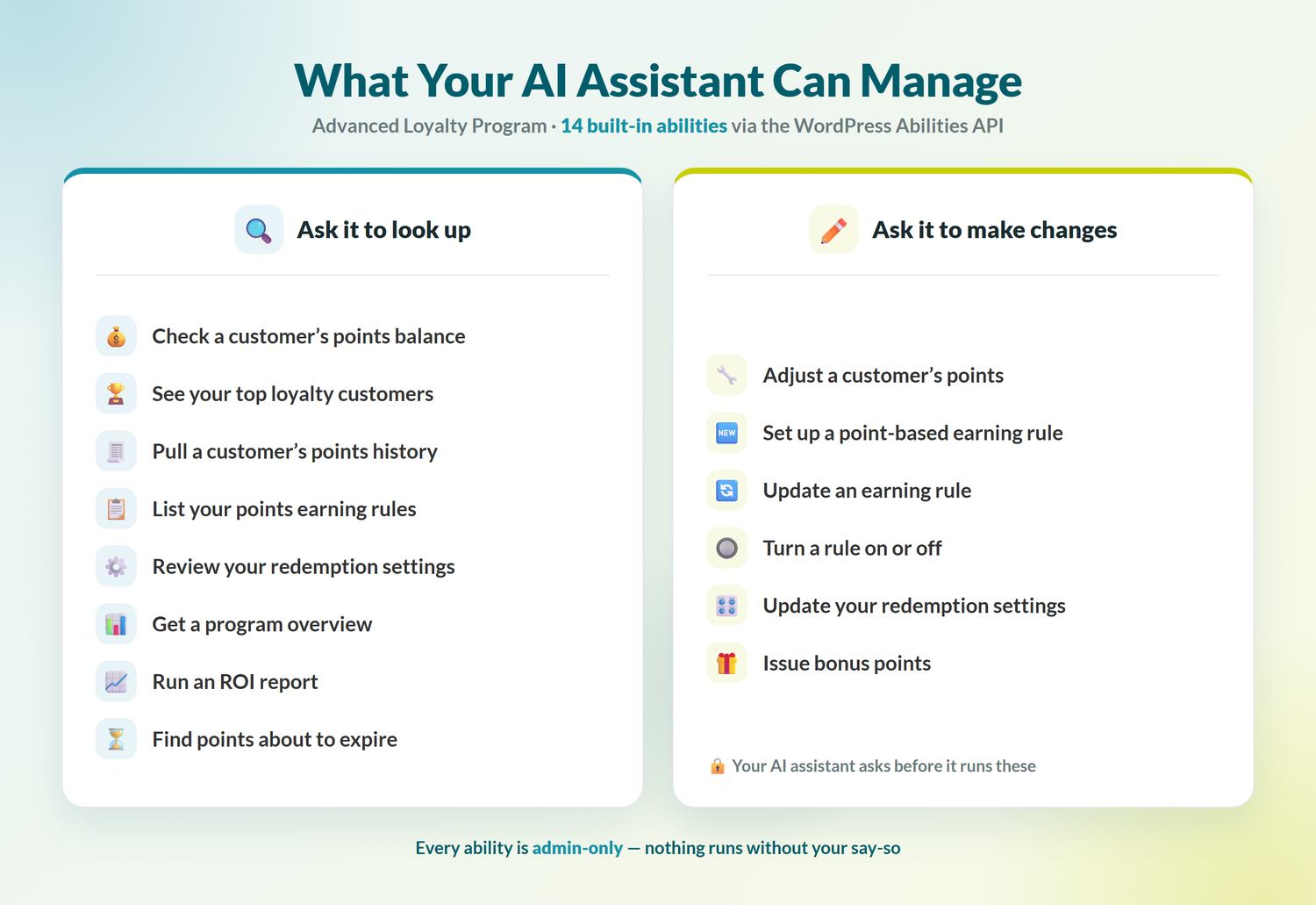
What your assistant can look up
These eight abilities retrieve information without changing your loyalty program. They’re a practical place to start:
- Check a customer’s points balance, including its value and any upcoming expiry. Look them up by user ID, email address, or order ID.
- See your top loyalty customers, ranked by their current points balance or lifetime points earned.
- Pull a customer’s full points history, including points earned, redeemed, manually adjusted, and expired.
- List your points earning rules, so you can review the ways customers currently earn points.
- Review your redemption settings, including the points-to-currency ratio and redemption limits.
- Get a program overview for a broader look at your loyalty activity and outstanding rewards.
- Run an ROI report covering points earned and redeemed, the cost of redeemed points, and your outstanding points liability over a recent period.
- Find points scheduled to expire within a chosen number of days, so you can plan a timely customer reminder.
What your assistant can change
The other six abilities can make changes to loyalty program data. They are marked as destructive, which allows compatible AI clients to ask for confirmation before running them:
- Adjust a customer’s points by adding or subtracting points and recording a reason for the change.
- Configure and enable a point-based earning rule for a product review, blog comment, account sign-up, or first order.
- Update a point-based earning rule by changing its points amount or notification.
- Turn any built-in earning rule on or off without opening its settings individually.
- Update your redemption settings, including the points-to-currency ratio and redemption limits.
- Issue bonus points for a thank-you or goodwill gesture.
Practical ways to use these abilities
You can use one ability at a time or combine a few in the same request. Here are some practical examples:
- Review your program at the start of the week. Ask, “Give me an overview of my loyalty program this month, show my top ten customers, and include the ROI report.” Your assistant can bring those results together in one response, giving you a useful snapshot before you plan your next steps.
- Reach customers before their points expire. Ask “which customers have points expiring in the next two weeks?” to create a list you can use for a timely reminder campaign.
- Reward a loyal customer on the spot. Ask, “How many points does [email protected] have? Then add 300 bonus points as a thank-you.” Your assistant can check the balance first, then present the points action for review before it runs.
- Make a clear adjustment after a support issue. Ask, “Add 150 points to this customer and note that it’s for the delivery delay.” Your assistant can submit the points adjustment together with the reason you provide.
- Set up an earning rule in plain language. Ask, “Give customers 100 points for leaving a product review.” Your assistant can configure and enable the rule, and you can use the same approach to switch built-in rules on or off later.
- Settle a points question fast. If a shopper asks about their balance, ask your assistant, “Pull the full points history for this customer.” You’ll get a record of points earned, redeemed, adjusted, and expired.
🎯 POWER TIP: Start with a read-only request, such as “Which customers have points expiring in the next 30 days?” It’s a simple way to check the connection and create a useful reminder list before trying an action that changes data.
What You Need To Connect Your AI Assistant
This setup takes a few more steps than enabling a setting inside WordPress. Before you begin, make sure you have:
- WordPress 6.9 or newer. The Abilities API is included in WordPress core starting with version 6.9.
- The latest version of Advanced Loyalty Program, installed and active on your store.
- The official WordPress MCP Adapter, installed and configured to make registered WordPress abilities available to an MCP client.
- An MCP-compatible AI client, such as Claude Desktop, that supports the connection method and actions you plan to use.
- A WordPress account that can manage WooCommerce. All 14 loyalty abilities require this level of access.
Once the connection is configured, Advanced Loyalty Program registers its abilities automatically when the Abilities API is available. For a no-code connection, StoreAgent’s free WooCommerce MCP server lets Claude, ChatGPT or Cursor run these loyalty abilities once you allow them. There is no separate setting to enable inside the plugin.
Frequently Asked Questions
Is it safe to let AI manage my loyalty program?
The feature includes permission checks to help protect your store. All 14 abilities require a logged-in WordPress account with permission to manage WooCommerce. The six abilities that change data are also marked as destructive, allowing compatible clients to request confirmation before running them. You should still connect only trusted MCP clients, protect your WordPress credentials, and review requested actions before approving them.
Do I need WordPress 6.9 or WordPress 7.0?
You can use the loyalty abilities on WordPress 6.9 or newer. You’ll also need the latest version of Advanced Loyalty Program, a configured MCP adapter, and a compatible AI client.
Do the AI abilities cost extra?
There’s no separate add-on or fee for the 14 abilities. They’re included with Advanced Loyalty Program, a premium plugin that must be installed and active. For current plans and what each one includes, see the pricing page.
How is this different from the coupon abilities in Advanced Coupons?
Advanced Coupons has its own abilities for managing coupons, which you can read about here. The abilities in Advanced Loyalty Program focus on points, balances, earning rules, redemption settings, and loyalty reports. Both use the WordPress Abilities API, but each plugin handles a different part of your store.
Which AI assistants can I use?
Use an MCP-compatible client that supports the connection method and actions you need. Claude Desktop supports MCP connections. ChatGPT can also connect to MCP-powered apps, but availability and write-action support depend on your plan and workspace settings. Check your client’s current MCP documentation before connecting it to your store.
Manage Everyday Loyalty Tasks With AI
Advanced Loyalty Program’s 14 abilities give you another way to handle common loyalty tasks. Use read-only requests to check balances and reports, then run supported actions when you need to adjust points, update rules, or change redemption settings.
To get started, make sure you have:
- Get your site onto WordPress 6.9 or newer.
- Install and configure the WordPress MCP Adapter, then connect a compatible AI client such as Claude Desktop.
- Start with the read-only abilities, then move on to the actions once you’re comfortable.
Ready to manage your loyalty program with AI? Make sure you’re running the latest version of Advanced Loyalty Program, then explore the current plans and features.