
Discount Rules for WooCommerce can handle tiered pricing and automatic discounts well. But if you eventually want to give a customer store credit, issue a refund as credit, or add other retention tools, a rules-focused plugin may no longer cover everything you need.
If you’re searching for a Discount Rules for WooCommerce alternative, you’ve probably hit a similar wall. The rules engine is good at what it does, but promotions can eventually need tools beyond pricing rules: a balance a customer can spend later, a refund paid back as store credit, or a gift card that turns into credit at checkout.
Below, we compare five Discount Rules for WooCommerce alternatives across store credit, BOGO deals, loyalty, gift cards, and pricing, so you can see which setup fits the promotions you want to run next.
What Discount Rules For WooCommerce Does Well (And Where Stores Outgrow It)
Discount Rules for WooCommerce is a rules engine: you define a condition and a discount, and the plugin applies it automatically to matching carts. With 100,000+ active installations on WordPress.org, it is the most widely installed plugin in this comparison.
Discount Rules for WooCommerce supports storewide, percentage and fixed discounts, bulk and tiered quantity pricing, category discounts, user-role pricing, purchase-history discounts, cart-subtotal offers, and several buy X get Y formats. If your promotions are mostly “spend more, save more,” it covers a lot of ground.
The limitation appears when you need tools beyond automatic price changes. Discount Rules for WooCommerce focuses on discount rules rather than customer store credit balances, gift cards, or a dedicated loyalty points program. It can change what a customer pays, but it doesn’t manage a balance they can spend later.
If your tiered pricing still works but you now need retention tools such as store credit or loyalty rewards, that’s where the alternatives start to differ. For a direct feature-by-feature comparison with Flycart, you can also read our head-to-head with Discount Rules for WooCommerce.
Rule-Based Vs Coupon-Based Discounting
Rule-based and coupon-based discounting overlap. Discount Rules for WooCommerce applies matching rules automatically by default, but its Pro version can also activate rules through coupon codes or URLs. The differences become clearer when your promotion needs to do more than change the price.
Rules are a natural fit when the discount should apply automatically from product, cart, or customer conditions. Wholesale tiers, quantity breaks, and “10% off Category A for members” are good examples.
Advanced Coupons becomes useful when you want coupon-based offers alongside tools such as store credit and reporting. Depending on the feature or tier, you can:
- Share offers: email a coupon code, include it in a newsletter, or use a coupon URL.
- Schedule coupons: set start and end dates and times, with a message when a coupon has not started yet.
- Restrict coupons: limit them by user role, cart conditions, payment method, or usage limits.
- Connect offers to store credit: issue refunds as credit or use cashback coupons that pay out as store credit.
- Track performance: use dashboard reports to see how coupons are being used.
You may not need to choose one approach exclusively. If automatic pricing rules still cover your needs, Discount Rules for WooCommerce can stay in place. If you also need a customer store credit balance or more coupon controls, Advanced Coupons adds those while still letting you build conditional deals. If you’d like to see how that works in practice, our guide on how to create WooCommerce discount rules with coupons walks you through the setup.
Advanced Coupons
Advanced Coupons is the alternative we recommend first because it adds a customer store credit balance while also covering familiar promotion tools such as BOGO deals, URL coupons, and scheduling. Store credit, specific-product BOGO deals, URL coupons, and date-range scheduling all ship in the free Advanced Coupons plugin, while Premium adds deeper automation and conditions. Because the discounts are built as WooCommerce coupons, you can combine them with sharing, restrictions, and reporting.
Here’s what the free plugin gives you out of the box:
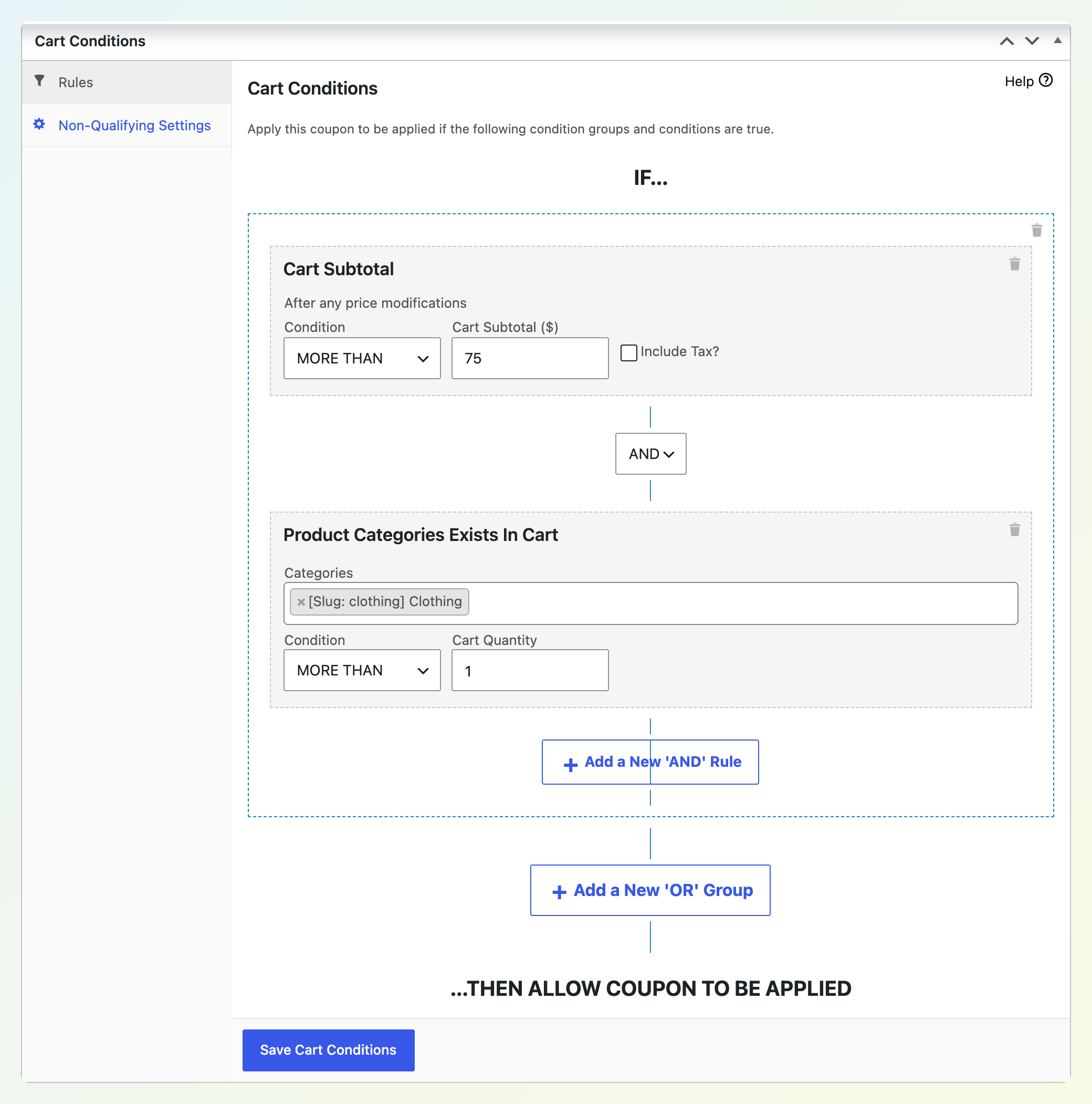
- Cart conditions: six condition types (Cart Quantity, Cart Subtotal, Product Categories Exists In Cart, Allowed Customer User Role, Disallowed Customer User Role, and Customer Logged In Status) arranged in groups with AND/OR logic, plus a custom message when the cart doesn’t qualify.
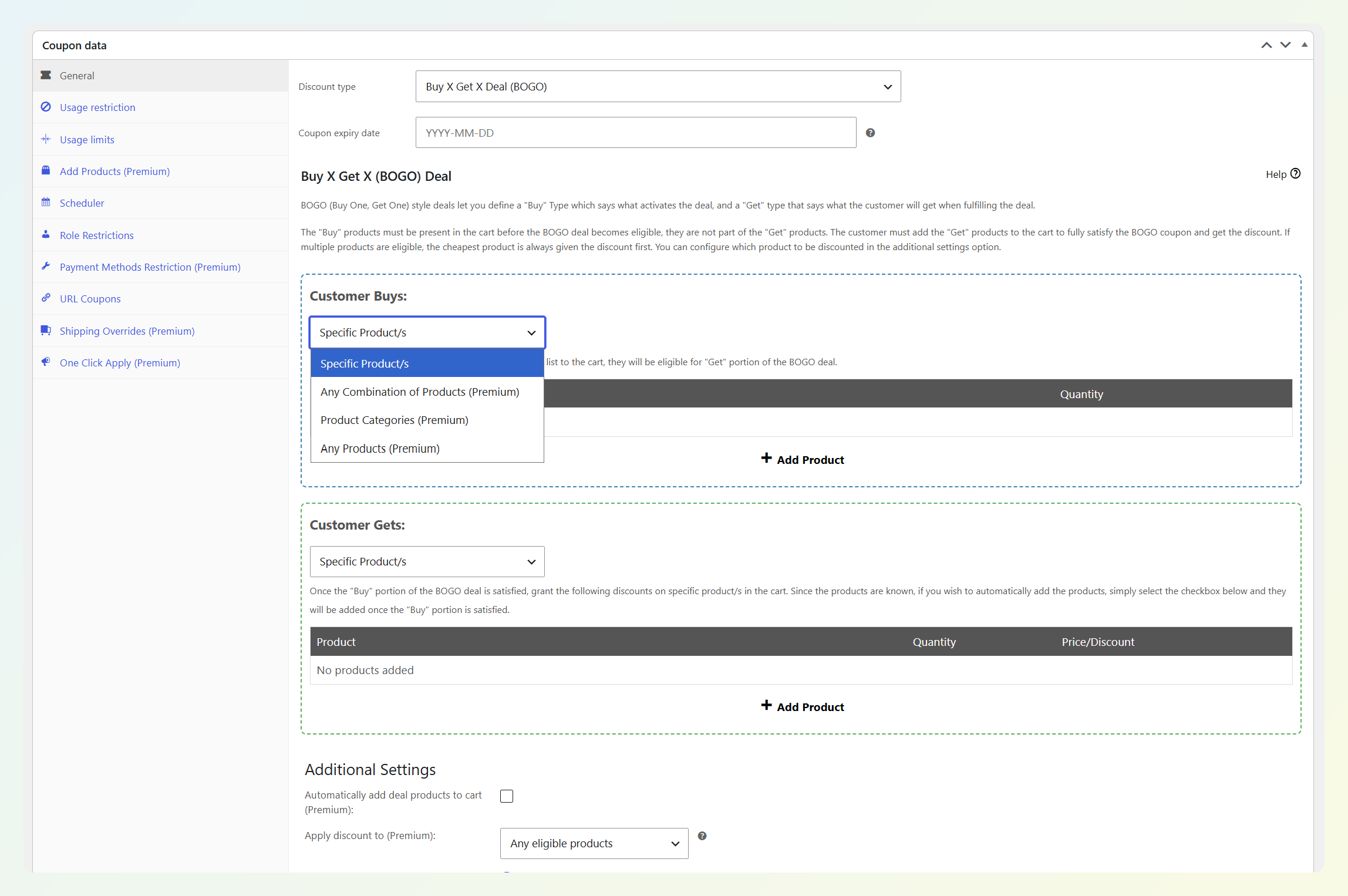
- BOGO deals: buy specific products, get specific products free or discounted, applied once or repeated with a maximum limit.
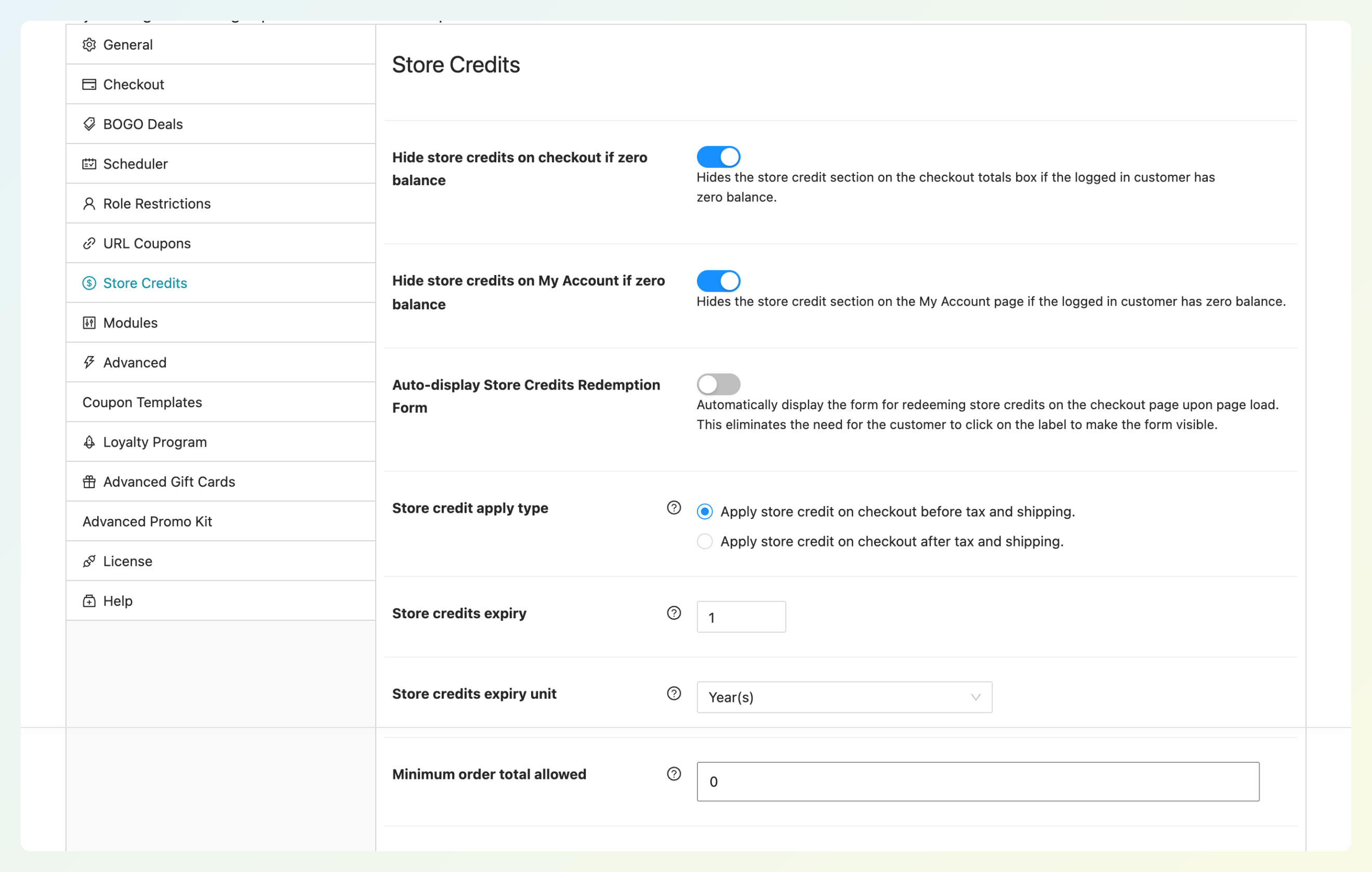
- Store credit: a full ledger with refund-to-credit from the order screen, manual adjustments, a My Account tab, and expiry in days, months, or years.
- URL coupons and scheduling: every coupon gets a shareable link, and a date-range schedule with start and end date and time.
- Role restrictions, coupon categories, and dashboard reports: tools for organizing, controlling, and tracking coupon campaigns.
Inside the Cart Conditions tab, you can combine conditions into groups and use AND/OR logic both within and between those groups. For example, you could build one coupon for “subtotal over $150 and a Skincare product in the cart, or any logged-in wholesale customer.”
The BOGO Deals tab also shows a clear difference between tiers. The free plugin supports Specific Products and lets you apply the deal once or repeat it up to a set limit. Premium expands the available BOGO types to include Any Combination of Products, Product Categories, Any Products, and Same Products, giving you more flexibility for broader promotions.
How store credit is handled is one of the clearest differences in this comparison. Refunds can be issued as credit straight from the order editor, balances are adjusted per customer under Coupons > Store Credits > Customers, and the settings live under Coupons > Settings > Store Credits. According to the National Retail Federation’s 2025 Retail Returns Landscape, retailers expect 15.8% of annual sales to be returned, and 19.3% of online sales. Refunding an eligible return as WooCommerce store credit can keep that value available for a future purchase instead of sending it back to the original payment method.
Advanced Coupons Premium is where the rules-style automation comes in. It extends the free builder with cart conditions such as Product Quantity In The Cart, Cart Weight, Within Hours After Customer Last Order, Total Customer Spend, and Category Subtotal, plus the category, any-product, and same-product BOGO types. Premium also adds Auto Apply, Force Apply and coupon sorting, cashback coupons that pay out as store credit, virtual (bulk) coupon codes, shipping overrides, and payment-method restrictions.
One migration mistake to avoid: if you recreate an automatic discount as a coupon with cart conditions, make sure customers have a way to apply it. Auto Apply is a Premium feature; turn it on for coupons that should apply automatically, or use the free plugin’s coupon URL in your emails.
Premium Growth costs $99.50 for the first year on one site and renews at $199; Business costs $199.50 for the first year on unlimited sites and renews at $399. The All Access Bundle, which adds Advanced Loyalty Program, Advanced Gift Cards, and Advanced Promo Kit on unlimited sites, costs $249 for the first year and renews at $498. The free plugin has no time limit.
Our LivOliv case study shows how a vegan beauty brand uses free-shipping promotions and loyalty rewards to increase cart size and reward customers with points.
Smart Coupons By WebToffee
WebToffee Smart Coupons is a coupon-based alternative rather than another rules engine. It supports BOGO and buy X get Y coupons, gift cards and store credits, URL coupons, sign-up coupons, purchase-history coupons, bulk code generation, and abandoned-cart coupons. A free version is available, while the paid plugin costs $89 a year for one site, $129 for up to five, and $249 for up to 25.
WebToffee creates coupons from a Smart Coupons menu with an Add Coupon screen. Its BOGO tools can use the cheapest or most expensive item in the cart as the free-item target, which can be useful for clearance deals. Store credit is coupon-based: sending store credit generates a corresponding store credit coupon, and customers can view active credits from a Store Credits tab in My Account.
Advanced Coupons handles store credit differently: it uses a customer balance with refund-to-credit, manual adjustments, expiry, a dashboard, and a My Account tab in the free plugin. That difference is especially important if store credit is the main reason you’re moving away from Discount Rules for WooCommerce.
Smart Coupons By StoreApps
StoreApps Smart Coupons is the oldest plugin in this group. It costs $129 for one year or $206.40 for two years and includes gift cards, store credit, BOGO deals, bulk coupon generation, URL and auto-apply coupons, cashback coupons, coupon restrictions, and a revenue dashboard. It doesn’t offer a free tier.
StoreApps also positions the plugin as an alternative to buying several separate extensions. Its coupon toolkit includes gift cards sold as products in fixed, customer-entered, or product-linked denominations.
BOGO offers are configured from the coupon’s Actions tab, where you link the qualifying product and set the discount and quantities. Gift cards support custom images and scheduled delivery, while store credit can also be issued as a refund. These tools are handled across coupon actions, product settings, and restrictions rather than through separate feature screens.
Advanced Coupons gives you a lower-cost starting point: store credit, specific-product BOGO, and URL coupons are included in the free plugin, while Premium and the bundle add more automation, loyalty points, and gift cards. StoreApps Smart Coupons has no free tier; its one-year plan starts at $129 and includes a 30-day money-back guarantee.
Flexible Pricing By WP Desk And Power Coupons
WP Desk Flexible Pricing stays closest to rule-based dynamic pricing, while Power Coupons takes a coupon-first approach with a free tier and paid BOGO, loyalty, and gift card features.
WP Desk Flexible Pricing
WP Desk Flexible Pricing is the closest thing here to a straight Discount Rules for WooCommerce replacement because it’s also a rules plugin. It supports product and variation discounts, order-total tiers, order-history discounts, category discounts, role and group discounts, and BOGOF and BOGOHO deals. The Professional plan costs $79 a year (€79 in some regions) for one site.
Flexible Pricing focuses on automatic pricing rules, including order-history discounts such as rewarding customers who spent a certain amount in a previous period. If you’re leaving Discount Rules for WooCommerce specifically for store credit, gift cards, or a loyalty points program, WP Desk Flexible Pricing doesn’t fill those gaps.
Power Coupons
Power Coupons is Brainstorm Force’s coupon plugin, launched in 2026 and already at 30,000+ active installations on WordPress.org. The free version includes auto-apply discounts, cart subtotal rules, product and category rules, quantity rules, and an in-cart offer slideout. Pro starts at $49 a year for one site, with a $99 plan for up to 10 sites that renews at $129, plus a $249 lifetime option covering up to 30 sites.
The free plugin also includes sale-item exclusions and has no limit on the number of coupons. Pro adds BOGO offers, loyalty rewards and store credits, gift cards, a cart progress bar, templates, and scheduling.
Advanced Coupons has included store credit and BOGO in its free plugin for years. Power Coupons launched in February 2026, with BOGO, store credits, loyalty rewards, and gift cards reserved for Pro. If those are the features you need, Advanced Coupons lets you try store credit and specific-product BOGO before paying.
How To Choose A Discount Rules Alternative
Choose based on the features that made you search in the first place: store credit, BOGO with a free item, loyalty points, gift cards, and price. Here’s how the five compare on those points.
| Alternative | Free tier | Store credit | BOGO with free item | Loyalty points | Gift cards | Year one pricing |
|---|---|---|---|---|---|---|
| Advanced Coupons | Yes | Yes (free) | Yes (free) | Add-on plugin (bundle) | Add-on plugin (bundle) | $99.50 Premium (renews $199); bundle $249 for unlimited sites (renews $498) |
| WebToffee Smart Coupons | Yes | Paid plugin | Yes (free) | No | Paid plugin | $89 for 1 site |
| StoreApps Smart Coupons | No | Yes | Yes | No | Yes | $129 for 1 year |
| WP Desk Flexible Pricing | No | No | Yes | No | No | $79 / €79 for 1 site |
| Power Coupons | Yes | Pro | Pro | Pro | Pro | $49 for 1 site; $99 for up to 10 sites |
A few simple rules of thumb:
- Store credit today: Advanced Coupons, because the free plugin includes a customer balance with refund-to-credit and admin adjustments.
- BOGO with free items: Advanced Coupons and WebToffee both offer free BOGO options; Advanced Coupons Premium expands the available BOGO types.
- Points or gift cards too: the Advanced Coupons All Access Bundle keeps all of it under one Coupons menu.
- Automatic tiered pricing only: Discount Rules for WooCommerce may still fit if dynamic pricing rules are your main need.
- Several client sites: Advanced Coupons Business and the All Access Bundle both cover unlimited sites under one subscription.
On migration, recreate the rules that map to coupon-based deals with cart conditions, test each one, then decide whether it needs Auto Apply or a URL. If you’re moving from a plugin that already holds customer balances, the free Advanced Coupons plugin includes a store credit importer for StoreApps Smart Coupons and WebToffee Smart Coupons, so you can bring those balances across instead of re-entering them manually.
Frequently Asked Questions
Is Discount Rules for WooCommerce free?
Yes. Discount Rules for WooCommerce has a free version on WordPress.org with 100,000+ active installations. Its regular annual Pro prices are $85 for one site, $135 for five sites, and $295 for 25 sites. Each license covers one year of support and updates.
Can Advanced Coupons do dynamic pricing?
Advanced Coupons builds pricing deals as coupons. Cart conditions such as Cart Quantity and Cart Subtotal handle “buy 10, save 10%” and “spend $200, save $20” offers, BOGO deals handle free or discounted items, and Advanced Coupons Premium adds Auto Apply so the coupon applies itself. The discount shows in the cart and checkout rather than as a silent product-page price change.
Which Discount Rules for WooCommerce alternative includes store credit?
Advanced Coupons includes store credit in its free plugin, with refund-to-credit, manual adjustments, expiry, and a customer-facing My Account tab. WebToffee Smart Coupons offers store credit in its paid plugin, StoreApps Smart Coupons includes it as part of its paid plugin, and Power Coupons adds store credits in Pro. WP Desk Flexible Pricing and Discount Rules for WooCommerce do not provide the built-in customer store credit balance we’re comparing here.
Do I need a separate gift card plugin?
With Advanced Coupons, gift cards come from Advanced Gift Cards, a separate plugin included in the All Access Bundle. For logged-in customers, redeemed cards become store credit, so they share the same balance and checkout flow. WebToffee Smart Coupons and StoreApps Smart Coupons also support gift cards. Discount Rules for WooCommerce and WP Desk Flexible Pricing do not include a built-in gift card system.
Can I run Discount Rules for WooCommerce and Advanced Coupons at once?
If you plan to run both during a migration, test the setup on a staging site first. Overlapping discount rules and coupons can change cart totals in ways you didn’t intend, so recreate and test each replacement coupon before disabling the old rule.
Final Thoughts On Discount Rules For WooCommerce Alternatives
A Discount Rules for WooCommerce alternative should solve the limitation that made you start looking. If you need a customer balance, refund-to-credit, or gift cards, focus on plugins that add those capabilities rather than switching to another pricing tool with the same gaps.
Advanced Coupons is a strong fit when store credit is the missing piece, because that feature is included in the free plugin and you can add Premium, loyalty, or gift cards as your promotions grow. If you’re narrowing down your next step:
- Review what your rules plugin can’t do and list the promotions you’ve been putting off.
- Decide which deals should be rules and which should be coupons before you move anything.
- Set up store credit and your first BOGO deal in the free plugin and see how the ledger works.
- Compare the five alternatives in the table and plan your migration.
If Advanced Coupons fits the promotions you want to run, explore Advanced Coupons Premium cart conditions and BOGO deals, or start with the free plugin when store credit and specific-product BOGO deals cover what you need.