

Advanced Coupons is the better choice for WooCommerce stores that want a complete promotion toolkit, not just a dynamic pricing engine. Discount Rules for WooCommerce by Flycart is a strong option for rule-based discounts, bulk pricing, tiered pricing, and product-level discount displays. Advanced Coupons goes further by keeping coupons, BOGO deals, URL coupons, cart conditions, store credit, scheduling, auto-apply settings, and reporting inside a coupon-led WooCommerce workflow. And with the wider Advanced Coupons ecosystem, stores can add loyalty rewards, gift cards, and product labels from the same brand as their promotion needs grow.
That difference matters because the two plugins are not built around the same kind of promotion strategy. Flycart is best understood as a dynamic pricing and discount rule tool, while Advanced Coupons is built for stores that want to manage promotions through WooCommerce’s native coupon system and expand into a broader campaign toolkit over time.
In this comparison, we’ll look at how Advanced Coupons Free and Premium stack up against Discount Rules for WooCommerce by Flycart, then cover where the wider Advanced Coupons ecosystem gives your store more room to grow.
Advanced Coupons Vs Discount Rules For WooCommerce: Quick Overview
Advanced Coupons Free and Premium expand WooCommerce’s coupon system with features like BOGO deals, cart conditions, URL coupons, scheduling, auto-apply coupons, store credit, and reporting. The wider Advanced Coupons ecosystem also includes loyalty rewards, gift cards, and product labels through related tools in the All Access Bundle. Discount Rules for WooCommerce by Flycart is a focused dynamic pricing and discount rule engine designed to apply percentage, fixed, bulk, and BOGO discounts based on rules and conditions.
Both plugins have free versions on WordPress.org, and both handle core discounting well. The table below compares the main Advanced Coupons plugin against Discount Rules for WooCommerce by Flycart, while also noting where the All Access Bundle adds extra promotion tools beyond the core plugin.
| Feature | Advanced Coupons | Discount Rules for WooCommerce by Flycart |
|---|---|---|
| Percentage discounts | Yes | Yes |
| Fixed amount discounts | Yes | Yes |
| BOGO deals | Yes (products, product groups, categories, and flexible coupon conditions) | Yes (Pro; Buy X Get X, Buy X Get Y, cheapest item, and related BOGO scenarios) |
| Cart and rule conditions | Yes (cart subtotal, purchase history, user role, shipping zone, payment method, coupon usage, and more) | Yes (subtotal, line items, quantity, product/category filters, user roles, shipping/billing details, purchase history, and more) |
| Bulk/tiered pricing | Yes, through coupon-based rules and cart conditions | Yes; especially strong for dynamic pricing, quantity discounts, and product-page discount tables |
| URL coupons | Yes | Yes (Pro; URL-based coupon activation is available) |
| Auto-apply discounts | Yes, as auto-applied coupons | Yes, through automatic discount rules |
| Coupon scheduling | Yes (start/end scheduling plus weekly day and time controls inside the coupon workflow) | Yes, through date, day, and time-based rule conditions |
| Coupon and promotion reporting | Yes (coupon usage, amount discounted, discounted order revenue, store credit activity, and more) | Some rule-level reporting tools, but not the same coupon-focused dashboard workflow |
| Loyalty program | Yes (included in the All Access Bundle) | No |
| Gift cards | Yes (included in the All Access Bundle) | No |
| Store credit | Yes | No |
| Product badges/labels | Yes (Advanced Promo Kit, included in the All Access Bundle) | Limited display features such as sale badges, discount tables, and promotional messages |
| Free version available | Yes | Yes |
| Current starting price | $99.50/year for Advanced Coupons Premium Growth; $249/year for the All Access Bundle | $85/year for a single-site Pro license |
Coupon And Discount Features Compared
Both Advanced Coupons and Discount Rules for WooCommerce by Flycart cover the core discount types WooCommerce store owners need. The differences show up in flexibility and depth. For a deeper look at dynamic pricing strategies, see our full guide to WooCommerce dynamic pricing and discounts.
Percentage and fixed discounts
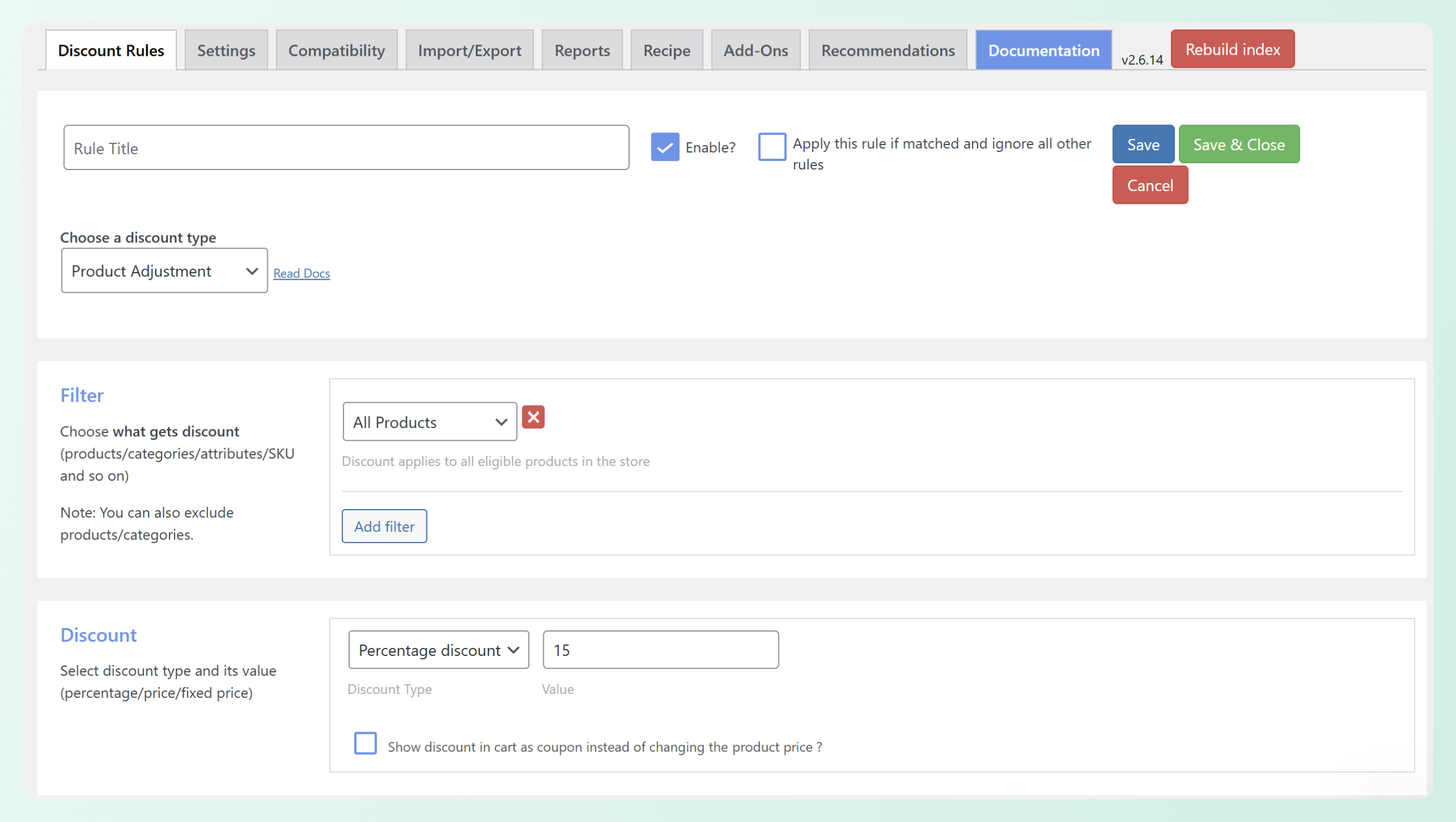
Both plugins handle percentage and fixed-amount discounts well. Discount Rules for WooCommerce by Flycart makes it easy to create basic percentage discounts in the free version. The rule builder is clean and the learning curve is minimal. When I set up a 15% storewide discount, the rule was live in a few clicks.
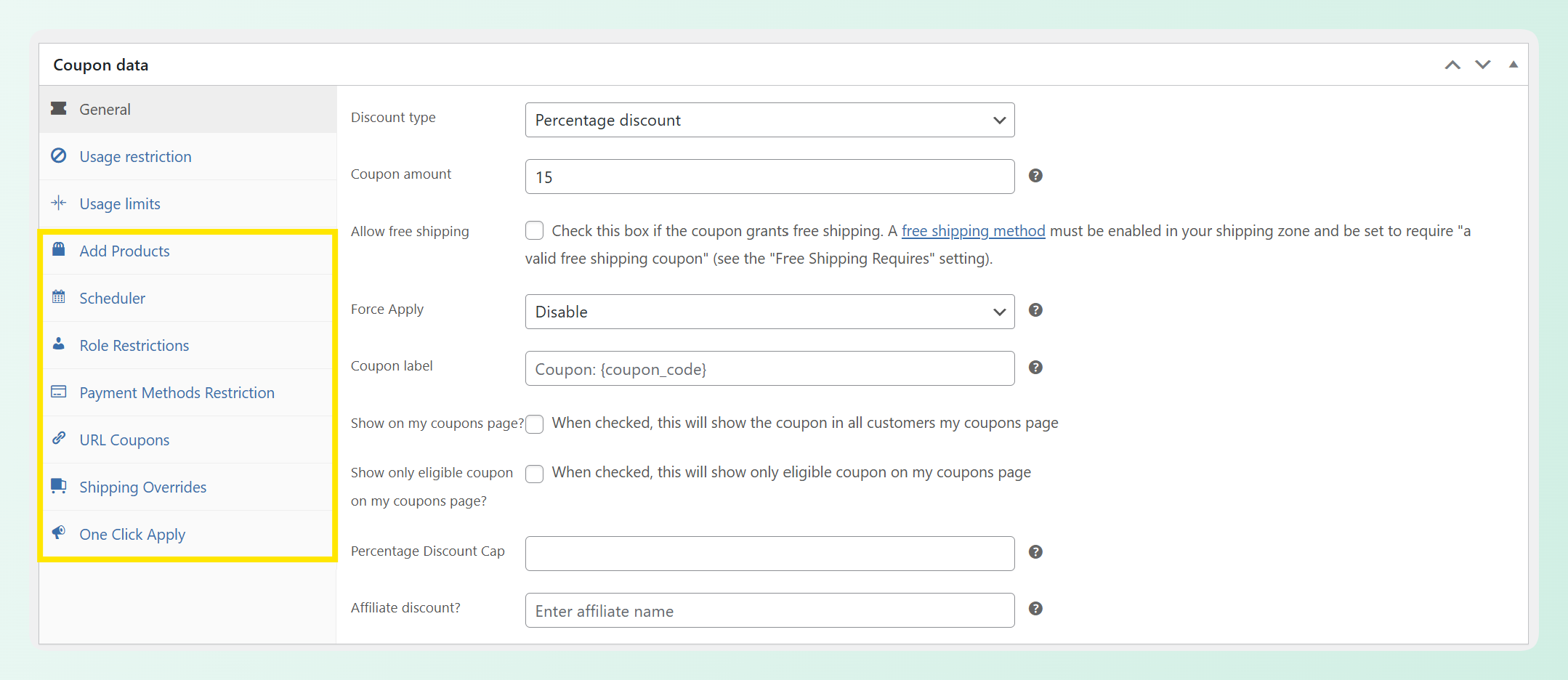
Advanced Coupons handles the same discount types by building on WooCommerce’s native coupon system. Instead of managing promotions in a separate discount-rule interface, you can create a coupon in the familiar WooCommerce coupon editor and add extra controls like cart conditions, usage limits, scheduling, URL coupons, auto-apply settings, and reporting around it. When I created the same 15% discount in Advanced Coupons, I could add those campaign controls without leaving the coupon editor.
Cart conditions and rules
Advanced Coupons offers cart conditions for targeting coupons based on cart subtotal, product categories, specific products, purchase history, user roles, shipping zones, payment methods, coupon usage, and more.
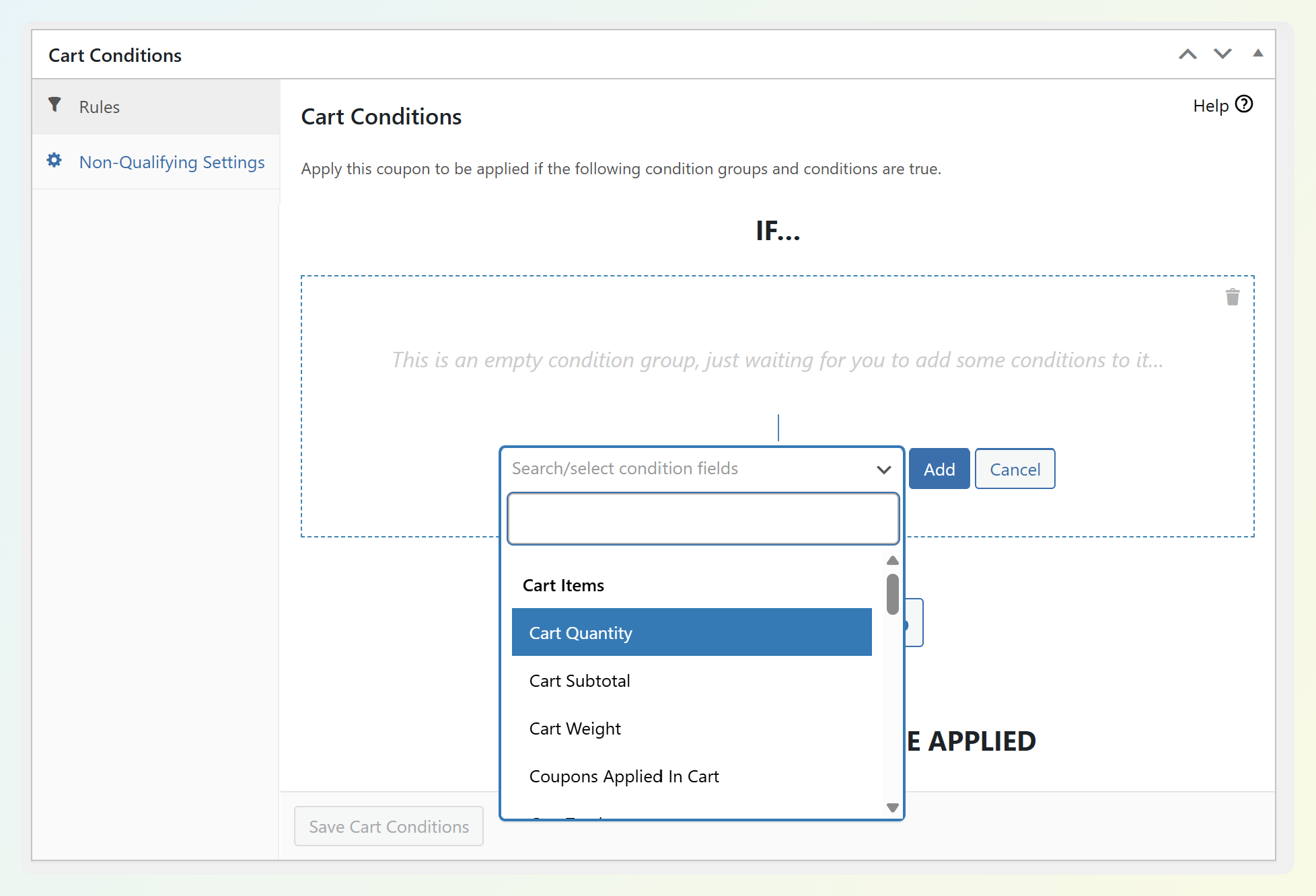
Discount Rules for WooCommerce by Flycart also has a wide condition system, including options for cart details, products, categories, purchase history, shipping details, users, and user roles. The difference is that Flycart is built around discount rules, while Advanced Coupons is built around coupon campaigns. If you want conditions tied to coupon URLs, scheduling, usage limits, reporting, and store credit, Advanced Coupons gives you a more connected workflow.
BOGO deals
Advanced Coupons offers BOGO deals across products, product groups, and categories, with the added benefit of keeping the offer inside a coupon-based workflow. That means your BOGO coupon can also use cart conditions, scheduling, usage limits, URL coupons, and reporting.
Discount Rules for WooCommerce by Flycart also supports strong BOGO scenarios in its Pro version, including Buy X Get X, Buy X Get Y, cheapest-item offers, and product/category-based deals. Advanced Coupons is the stronger choice when the BOGO offer needs to work as part of a broader coupon campaign rather than only as a dynamic pricing rule.
Bulk and tiered pricing
Both plugins handle bulk and tiered pricing competently. Discount Rules for WooCommerce by Flycart displays bulk discount tables directly on product pages, which helps customers see the savings tiers at a glance. This is a genuinely useful feature for stores that rely on volume discounts.
Advanced Coupons also supports tiered pricing through its cart conditions. You can create quantity-based discount tiers that apply at the cart level, giving you control over how tiers interact with other promotions running at the same time.
Promotion tip: Be careful when running several discounts at the same time. A store might offer 10% off orders over $100 and another 15% off a specific category, only to realize both offers can apply to the same cart. Advanced Coupons gives you coupon-based controls such as cart conditions, usage restrictions, and coupon priority sorting, which makes it easier to manage how promotions interact. With rule-based discount plugins like Discount Rules for WooCommerce by Flycart, it is still important to review rule priority and stacking behavior before publishing a campaign.
Where Advanced Coupons Goes Beyond Discounts
Discount Rules for WooCommerce by Flycart is a strong discount tool. But discounts are only one part of a promotion strategy. This section covers where Advanced Coupons Premium features give you a more connected coupon workflow, especially when you want your offers to work alongside store credit, reporting, scheduling, and broader campaign controls.
URL coupons (shareable coupon links)
Advanced Coupons lets you generate a shareable URL for a coupon, so shoppers can click from an email, social post, or campaign page and have the coupon applied automatically. This is especially useful when you want the promotion to feel seamless without asking customers to remember or paste a code at checkout.
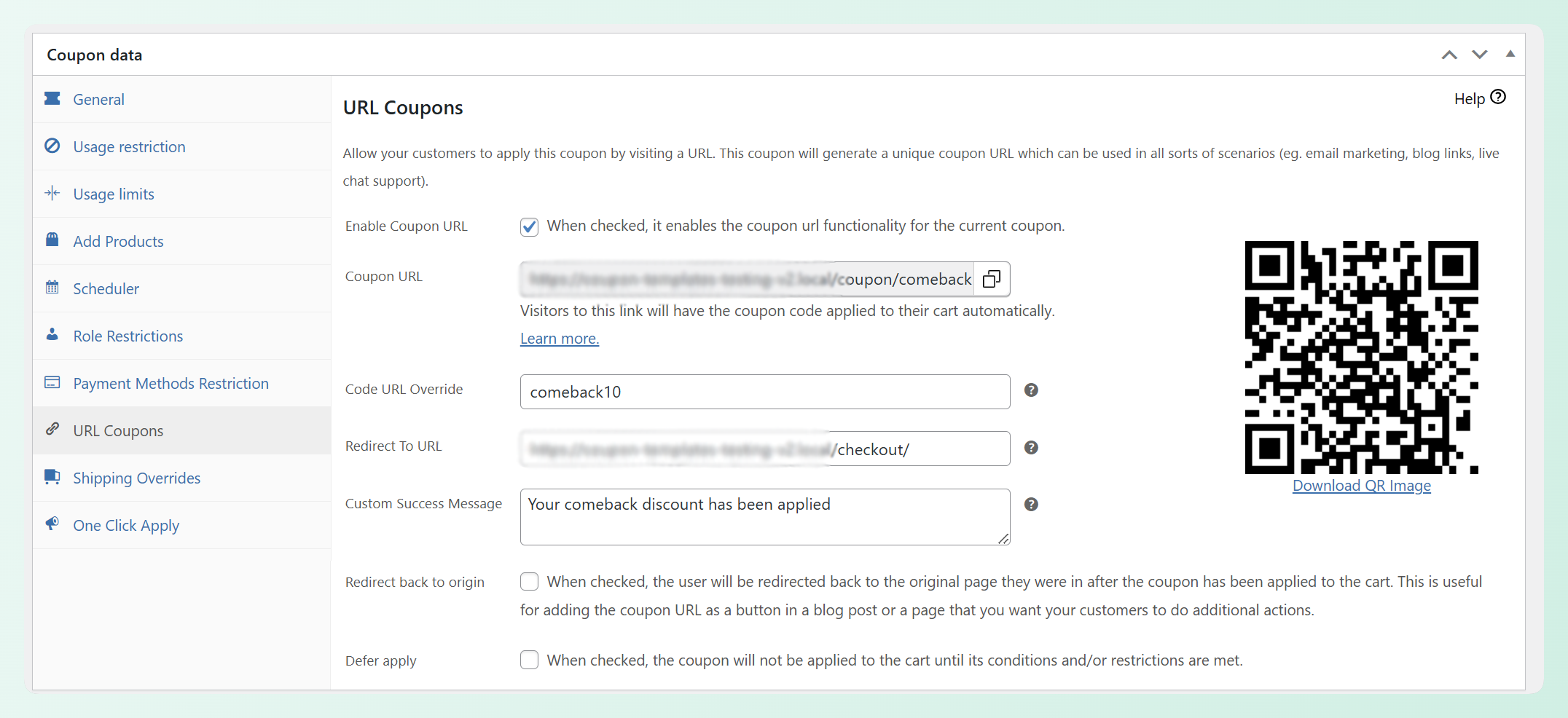
Discount Rules for WooCommerce by Flycart also supports URL-based coupon activation in its Pro version. The difference is that Advanced Coupons keeps this inside a broader coupon workflow, where the same coupon can also use cart conditions, scheduling, usage limits, auto-apply settings, and coupon reporting. That makes Advanced Coupons the stronger fit if URL coupons are part of a larger campaign strategy rather than a one-off discount rule.
Auto-apply coupons
Advanced Coupons can automatically apply a coupon when a customer’s cart meets the conditions you’ve set. The customer never needs to hunt for a code or paste anything at checkout. I tested this with a “free shipping on orders over $75” coupon and it applied silently the moment the cart crossed the threshold.
Discount Rules for WooCommerce by Flycart’s Pro version applies discounts automatically through its rule engine, but these are price adjustments rather than trackable coupons. The distinction matters for reporting: with Advanced Coupons, every auto-applied coupon shows up in your coupon reports so you can measure how often each promotion fires and what revenue it drives.
Coupon scheduling
Advanced Coupons includes scheduling controls that go beyond simple start and end dates. You can set coupons to activate only on specific days of the week and during specific time windows. A coupon that’s valid only on Tuesdays between 5 PM and midnight, for instance, is a single configuration in the scheduler. This is useful for recurring promotions like “Taco Tuesday” deals or weekend flash sales.
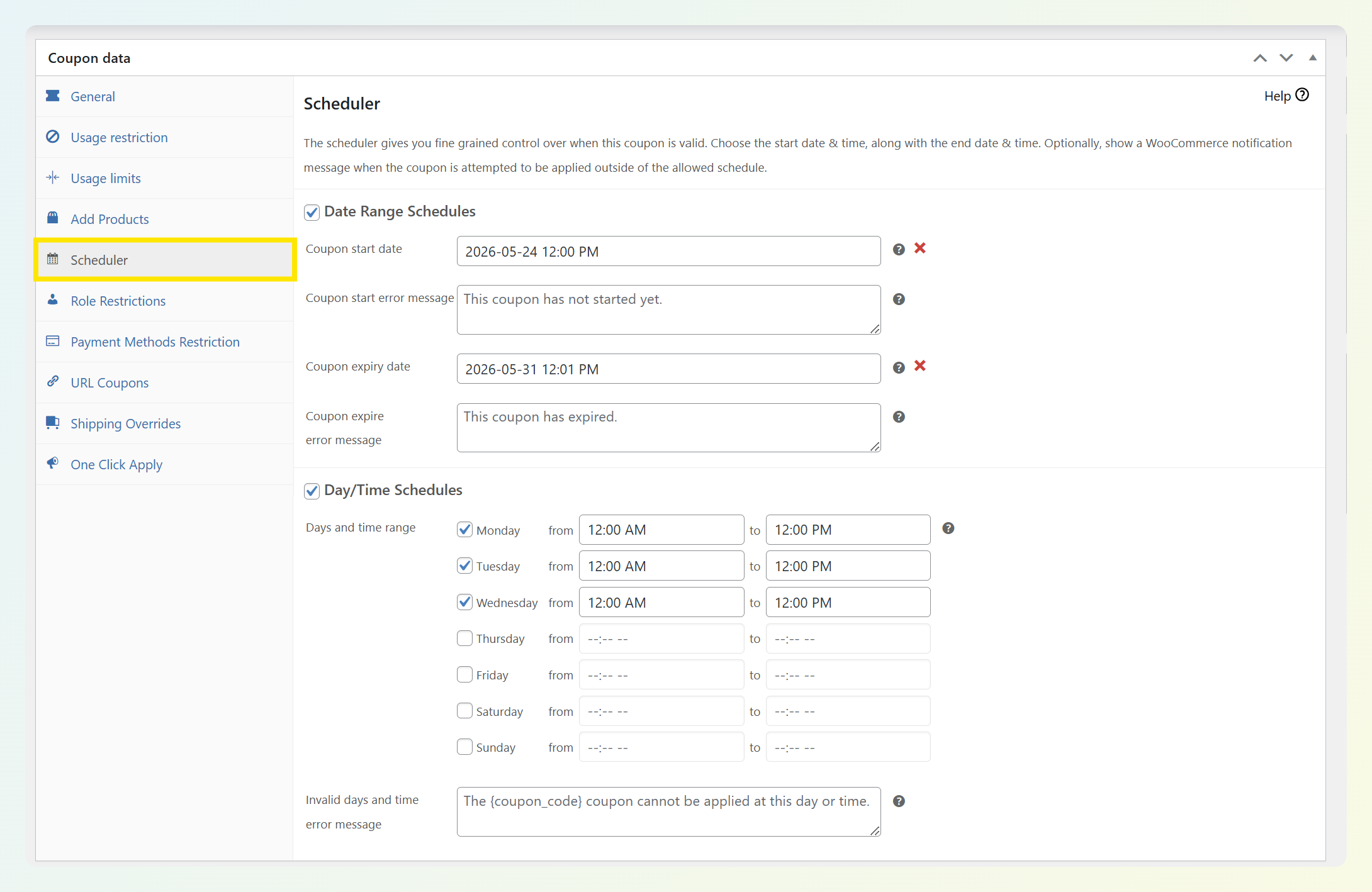
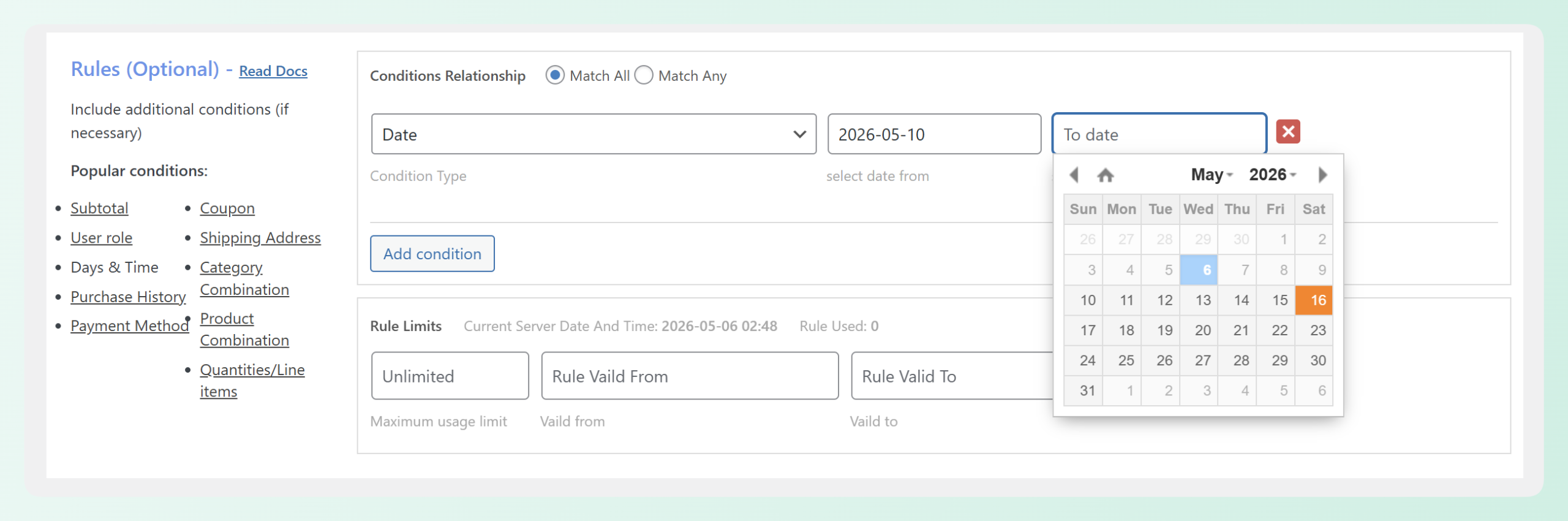
Discount Rules for WooCommerce by Flycart also supports date, date-and-time, day-of-week, and time-based conditions for discount rules. Advanced Coupons has the stronger advantage when you want that scheduling to live inside a coupon-led workflow alongside coupon URLs, usage limits, auto-apply settings, and reporting.
Coupon reporting and analytics
Advanced Coupons gives you a clearer coupon reporting workflow inside your promotion setup. You can review coupon usage, amount discounted, discounted order revenue, store credit activity, and other campaign signals without relying only on scattered order data.
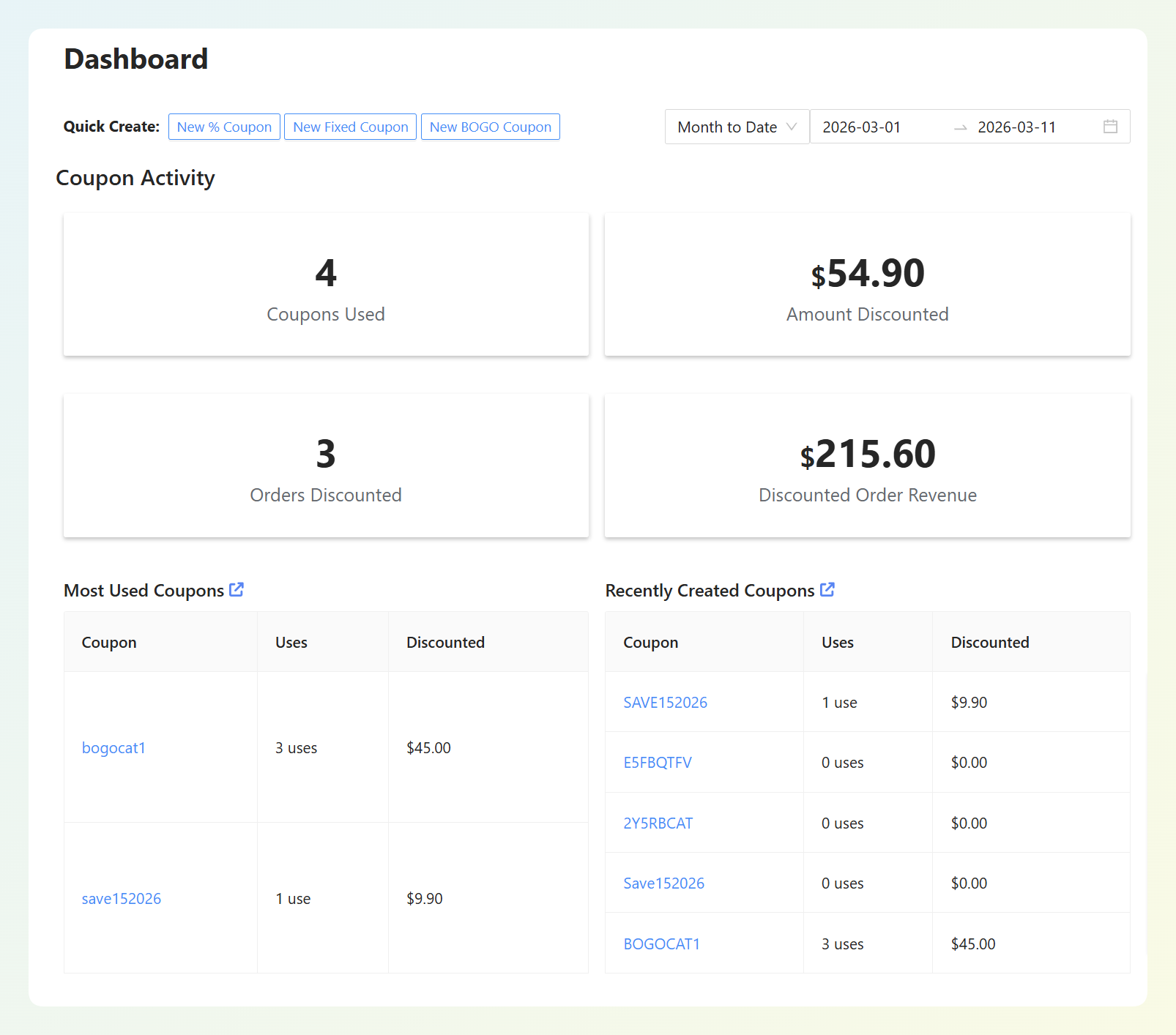
Discount Rules for WooCommerce by Flycart is primarily built around creating and applying discount rules. Advanced Coupons has the stronger advantage if you want coupon usage, discounted revenue, store credit activity, and promotion activity to live inside a more complete campaign management workflow.
Loyalty Programs, Gift Cards, And Store Credit
This is where the comparison moves from “similar with differences” to “different categories entirely.” These features don’t exist in Discount Rules for WooCommerce by Flycart at all. They’re part of the Advanced Coupons ecosystem, available individually or bundled in the All Access Bundle.
Loyalty Program for WooCommerce
According to Invesp, acquiring a new customer costs five times more than retaining an existing one. That’s why loyalty programs matter for WooCommerce stores, and it’s an area where Advanced Coupons has a clear advantage.
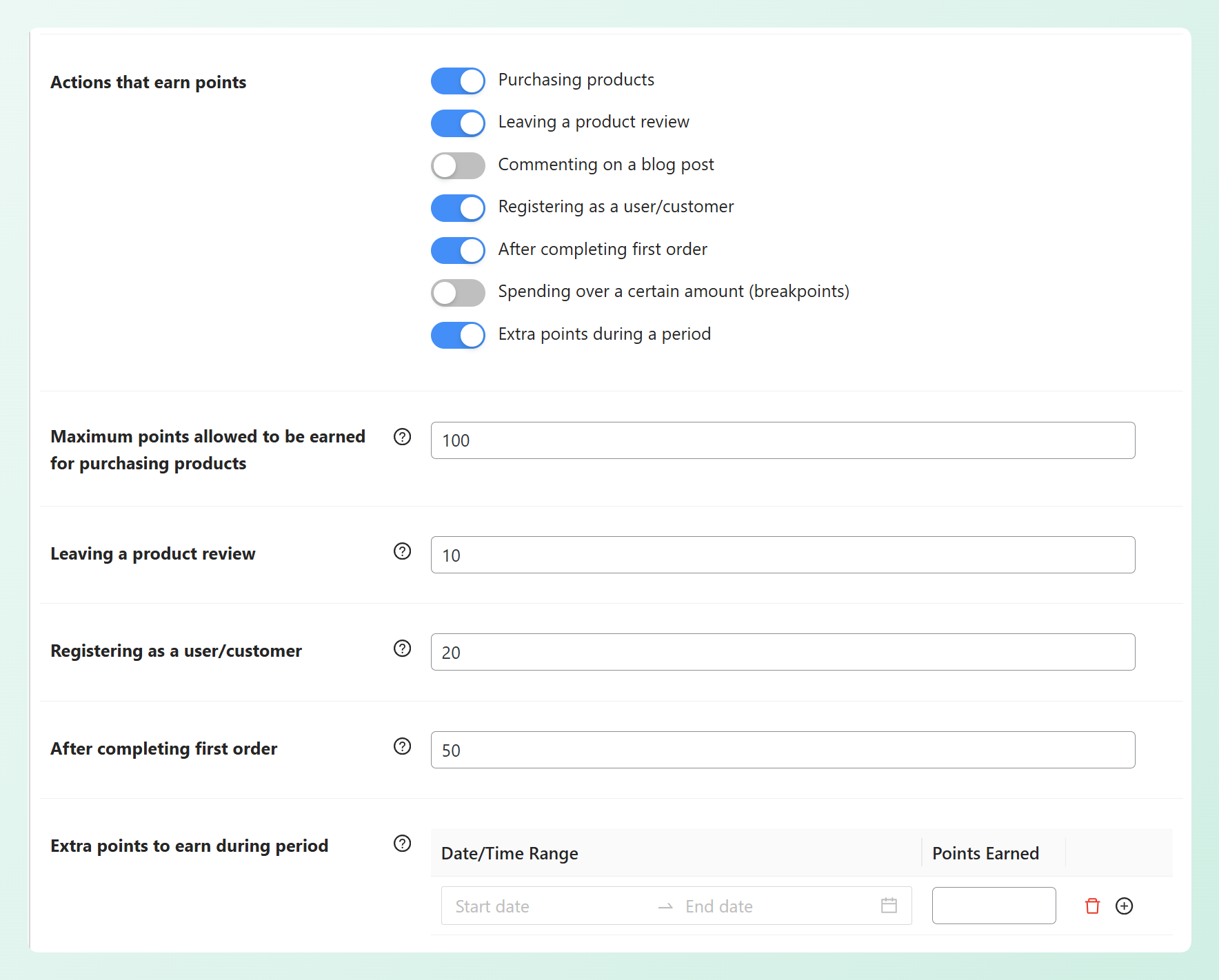
Advanced Loyalty Program for WooCommerce lets you award points for purchases, account creation, referrals, and other actions. Customers redeem points for store coupons. I found the earning rules flexible enough to reward behaviors beyond just buying (like leaving a product review or referring a friend).
Discount Rules for WooCommerce by Flycart has no loyalty program functionality. If you need a points-based program alongside Flycart, you’d need to add a separate loyalty plugin. As we covered in our case study with Layers of Learning, the real power comes from connecting loyalty points and coupons in one system so that promotions reinforce each other.
Advanced Gift Cards for WooCommerce
According to Precedence Research, the global gift card market is projected to reach $5.03 trillion by 2033, growing at a 17.74% CAGR. For WooCommerce store owners, gift cards can create another revenue channel while giving existing customers an easy way to introduce new shoppers to the brand.
Advanced Gift Cards for WooCommerce includes 85+ card designs, digital delivery, custom amounts, and scheduled sending. Gift cards are handled as store credit within the same ecosystem, so they integrate naturally with your other promotions.
Discount Rules for WooCommerce by Flycart has no gift card functionality. Adding gift cards alongside Flycart means installing and managing a separate plugin.
Store credit
WooCommerce store credit in Advanced Coupons lets you issue credit for returns, goodwill gestures, or promotional campaigns. Store credit becomes an alternative to cash refunds, keeping revenue inside your store instead of sending it back to the customer’s bank account.
That makes store credit useful for partial refunds, customer service gestures, and retention campaigns because shoppers can keep the value in their account and apply it toward a future order.
Discount Rules for WooCommerce by Flycart has no store credit capability.
Product Labels And Promotion Visibility
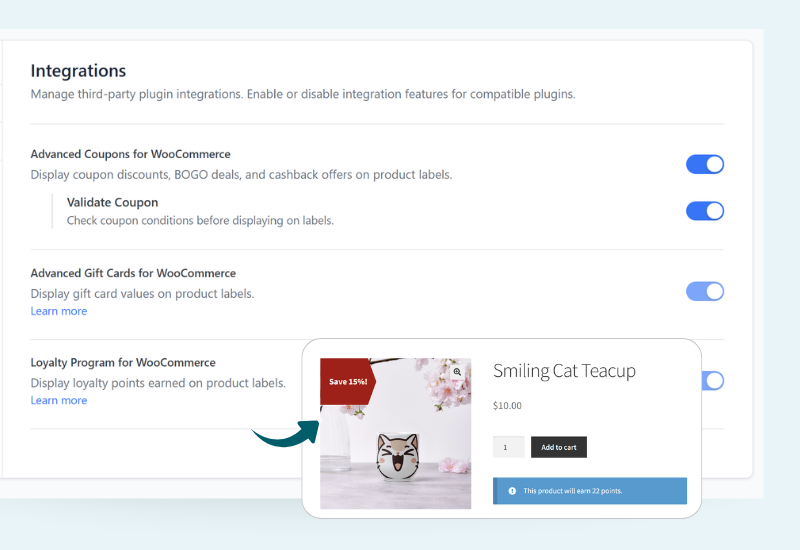
Advanced Promo Kit (included in the All Access Bundle) adds product labels and sale badges that help make your promotions more visible across your store. This is useful when you want shoppers to notice offers before they reach the cart, especially during seasonal campaigns, category promotions, product launches, or limited-time deals.
Discount Rules for WooCommerce by Flycart also includes useful discount display options, including sale badges, strikeout pricing, discount tables, cart messages, and promotional messages. That gives Flycart a real advantage for showing dynamic pricing and quantity discounts clearly on product and cart pages.
Advanced Coupons has the stronger long-term advantage when product labels are part of a broader promotion system. Instead of only showing that an item is discounted, you can use Advanced Promo Kit alongside coupons, gift cards, loyalty rewards, and store credit campaigns to create more connected promotional messaging across the customer journey.
Pricing Comparison
Advanced Coupons Premium starts at $99.50 per year for the single-site Growth plan. The Business plan covers unlimited sites at $199.50 per year. Both include key coupon features such as BOGO deals, cart conditions, auto-apply, URL coupons, scheduling, store credit, and reporting.
The All Access Bundle is $249 per year and includes Advanced Coupons Premium, Loyalty Program for WooCommerce, Advanced Gift Cards for WooCommerce, and Advanced Promo Kit for unlimited sites. Visit the pricing and feature comparison page for the latest plan details.
Discount Rules for WooCommerce by Flycart Pro starts at $85 per year for a single-site license, with higher plans available for more sites.
On price alone, the two single-site plans are fairly close. The stronger value argument for Advanced Coupons is not just the entry price; it is the wider promotion ecosystem. With the All Access Bundle, you can manage advanced coupons, store credit, loyalty rewards, gift cards, and product labels under one connected toolkit instead of piecing together separate plugins for each campaign type.
According to Studio Wombat’s 2026 WooCommerce data, the average WooCommerce site runs 30 plugins. Every additional plugin adds maintenance overhead, potential conflicts, and another vendor to manage. Consolidating your promotion tools into one ecosystem is a practical way to reduce that complexity.
Who Should Choose Which Plugin?
Choose Discount Rules for WooCommerce by Flycart if your main priority is dynamic pricing. It is a strong fit for stores that want bulk discounts, tiered pricing, product-specific rules, cart-based discounts, BOGO offers, and clear discount displays on product and cart pages.
Choose Advanced Coupons if you want a broader WooCommerce promotion system, not just a dynamic pricing engine. It is the stronger choice if you want advanced coupons, store credit, loyalty rewards, gift cards, product labels, URL coupons, coupon scheduling, auto-apply coupons, and reporting inside one connected ecosystem. That makes it easier to grow from simple discounts into full campaigns without adding a separate plugin for every new promotion type.
For most WooCommerce stores, promotions don’t stay simple for long. You start with a percentage discount, then you want a loyalty program, then gift cards for the holidays, then store credit for returns. Advanced Coupons handles that entire journey in one ecosystem. Discount Rules for WooCommerce by Flycart handles the first step well, but you’ll be shopping for additional plugins soon after.
Frequently Asked Questions
Is Advanced Coupons better than Discount Rules for WooCommerce by Flycart?
Yes, for most stores that want more than dynamic pricing. Discount Rules for WooCommerce by Flycart is a strong discount rule plugin, especially for bulk pricing, tiered discounts, BOGO offers, and product-level discount displays. Advanced Coupons is the better long-term choice if you want a fuller promotion ecosystem with advanced coupons, store credit, loyalty rewards, gift cards, product labels, scheduling, auto-apply coupons, and reporting working together.
Can I migrate from Discount Rules for WooCommerce to Advanced Coupons?
There’s no one-click migration tool between the two plugins. However, since Discount Rules for WooCommerce by Flycart uses its own rule system (separate from WooCommerce’s native coupon system), you can install Advanced Coupons alongside it, recreate your active promotions as Advanced Coupons coupons, test them, and then deactivate Flycart’s plugin. The process requires manually rebuilding your rules, but most stores only have a handful of active promotions at any given time.
Does Advanced Coupons have a free version?
Yes. Advanced Coupons offers a free WooCommerce coupon plugin that extends WooCommerce’s default coupon features. The free version includes BOGO deals, URL coupons, cart conditions, and role restrictions. Premium features like advanced scheduling, auto-apply, virtual coupons, and shipping overrides are available in the paid plans.
Which plugin is better for BOGO deals?
Advanced Coupons is the stronger choice if you want BOGO deals to work as part of a full coupon campaign. Discount Rules for WooCommerce by Flycart also supports powerful BOGO offers, including Buy X Get X, Buy X Get Y, cheapest-item deals, and product/category-based discounts. The advantage of Advanced Coupons is that your BOGO offer can also connect with coupon URLs, cart conditions, scheduling, usage limits, and reporting.
Which plugin has more features in its free version?
Advanced Coupons is the stronger free option for coupon-led promotion features. Its free plugin includes BOGO deals, URL coupons, cart conditions, store credit, coupon templates, and coupon role restrictions. Discount Rules for WooCommerce by Flycart is also useful in the free tier, especially for rule-based discounts, dynamic pricing, quantity discounts, and bulk pricing. The better free version depends on whether your store needs coupon campaign tools or a dynamic pricing rule builder.
Is Discount Rules for WooCommerce by Flycart easier to set up than Advanced Coupons?
Discount Rules for WooCommerce by Flycart can feel easier if your main goal is to build automatic dynamic pricing or tiered pricing rules from a central rule builder. Advanced Coupons may feel more familiar if you already use WooCommerce coupons, because it adds extra promotion controls directly to the native coupon workflow. In practice, the easier setup depends on how you run promotions: automatic pricing rules may suit Flycart, while coupon codes, URL coupons, scheduled offers, and campaign tracking are often easier to manage in Advanced Coupons.
Can I run a loyalty program with Discount Rules for WooCommerce by Flycart?
Discount Rules for WooCommerce by Flycart does not include a built-in loyalty program because it focuses on discount and pricing rules. Advanced Coupons offers Advanced Loyalty Program, a dedicated WooCommerce loyalty plugin that lets customers earn points and redeem them as discount coupons at checkout. If you want coupons, loyalty rewards, gift cards, and product labels in one connected ecosystem, the All Access Bundle is the better fit.
Final Verdict: Advanced Coupons Is The Smarter Long-Term Investment
The choice between Advanced Coupons vs Discount Rules for WooCommerce by Flycart comes down to how you want to manage promotions. Flycart is a strong dynamic pricing tool if your main focus is rule-based discounts, bulk pricing, BOGO offers, and product-level discount displays. But if you want your promotions to grow beyond pricing rules, Advanced Coupons gives you the stronger long-term foundation.
Advanced Coupons builds on WooCommerce’s native coupon workflow, so you can manage discounts inside the familiar coupon editor while adding more advanced controls like cart conditions, URL coupons, scheduling, auto-apply settings, usage limits, store credit, and reporting. And with the wider Advanced Coupons ecosystem, you can also add loyalty rewards, gift cards, and product labels without piecing together a separate tool for every campaign type.
That makes Advanced Coupons the better choice for WooCommerce stores that want more than a discount-rule engine. It gives you a practical path from simple coupons to a fuller promotion system, with more of your campaign tools working together as your store grows.
Ready to move beyond a discount-only plugin? Explore the full Advanced Coupons Premium features or visit the pricing page to find the plan that fits your store.