

Store credit sounds simple until a customer tries to use it with a coupon, or until you need to decide whether credit can cover an entire order. That’s when settings like expiry, stacking rules, and minimum order totals start to matter. The plugin you choose determines how much control you have over those moments.
Store Credits & Gift Cards for WooCommerce is a $49-a-year extension by WPExperts that combines store credit and gift cards in one plugin. If you’re looking for a Store Credits & Gift Cards for WooCommerce alternative, Advanced Coupons takes a different approach: store credit is included in the free plugin, while gift cards come through the separate Advanced Gift Cards plugin.
Those setups differ most in how they handle balances at checkout, expiry, refunds, admin controls, and gift cards.
What To Look For In A Store Credit Plugin
Store credit represents value your store may need to honor later, so it helps to decide upfront how long it stays valid, how it can be spent, and what customers can see. The right controls depend on your store policy, tax treatment, and local rules.
Returns are common enough that your refund workflow deserves a clear policy. According to the National Retail Federation, retailers expected 15.8% of 2025 sales to come back as returns, worth $849.9 billion, with 19.3% of online sales returned. The same NRF report found 76% of consumers are more likely to choose a return option that gives them an instant refund or exchange. Store credit gives WooCommerce stores another way to handle a refund while keeping the value available for a future purchase.
Here’s the checklist worth using before you pick any store credit plugin:
- Expiry controls: whether you can set an expiry period and how that period is calculated.
- Minimum order total: whether you can require an amount to remain payable after credit is applied.
- Tax mode: whether credit applies before tax and shipping or after them.
- Stacking rules: what happens when a coupon, gift card, or other credit is already in the cart.
- Admin tools: whether you can adjust balances, refund orders to credit, and apply credit to admin-created orders.
- Reporting: whether you can monitor outstanding credit and usage from the dashboard.
Use those six areas as your checklist when comparing the two setups.
What The WPExperts Store Credits & Gift Cards Extension Does
Store Credits & Gift Cards for WooCommerce is a single extension that sells gift cards and issues store credit, priced at $49 for one year or $78.40 for two. One license covers both jobs.
Store credit can be purchased, issued as a refund, or added manually by an admin. Customers can add purchased store credit to their account balance and redeem that balance at checkout. Gift card value can also be added to store credit when the admin enables that option. Admins can adjust balances, issue refunds as store credit or gift cards, and review a credit log. The extension also supports guest gift card purchases, printable PDFs, QR codes or barcodes, and options that let credit or gift card value cover shipping and tax.
The extension also includes checkout stacking controls. By default, store credit can’t be combined with coupons, gift cards can’t be combined with coupons, and store credit can’t be combined with gift cards unless the admin changes those settings. Advanced Coupons differs with a dedicated store credit expiry setting, a minimum order total, a selectable before- or after-tax apply mode, and additional Premium controls described below.
For a broader look at other options, see our roundup of the best WooCommerce store credit plugins compared.
How Advanced Coupons Handles Store Credit
The free Advanced Coupons plugin holds store credit as a ledger: every increase and decrease is an entry with a source, a date, and an optional note, and the customer sees the balance in a Store Credit tab in My Account. Nothing below costs money unless it’s marked Premium.
Under Coupons > Settings > Store Credits you’ll find several of the store credit controls from that checklist:
- Expiry: a number plus a unit of Day(s), Month(s) or Year(s), counted from last activity; 0 means never expire. For a closer look at expiry timing, see our guide to store credit expiry in days or months.
- Store credit apply type: “Apply store credit on checkout before tax and shipping” works as a discount; “Apply store credit on checkout after tax and shipping” works as a payment after both.
- Minimum order total allowed: the total that must remain payable after credit is applied. Default 0.
- Display options: hide the checkout field or My Account tab at a zero balance, and auto-expand the redemption form.
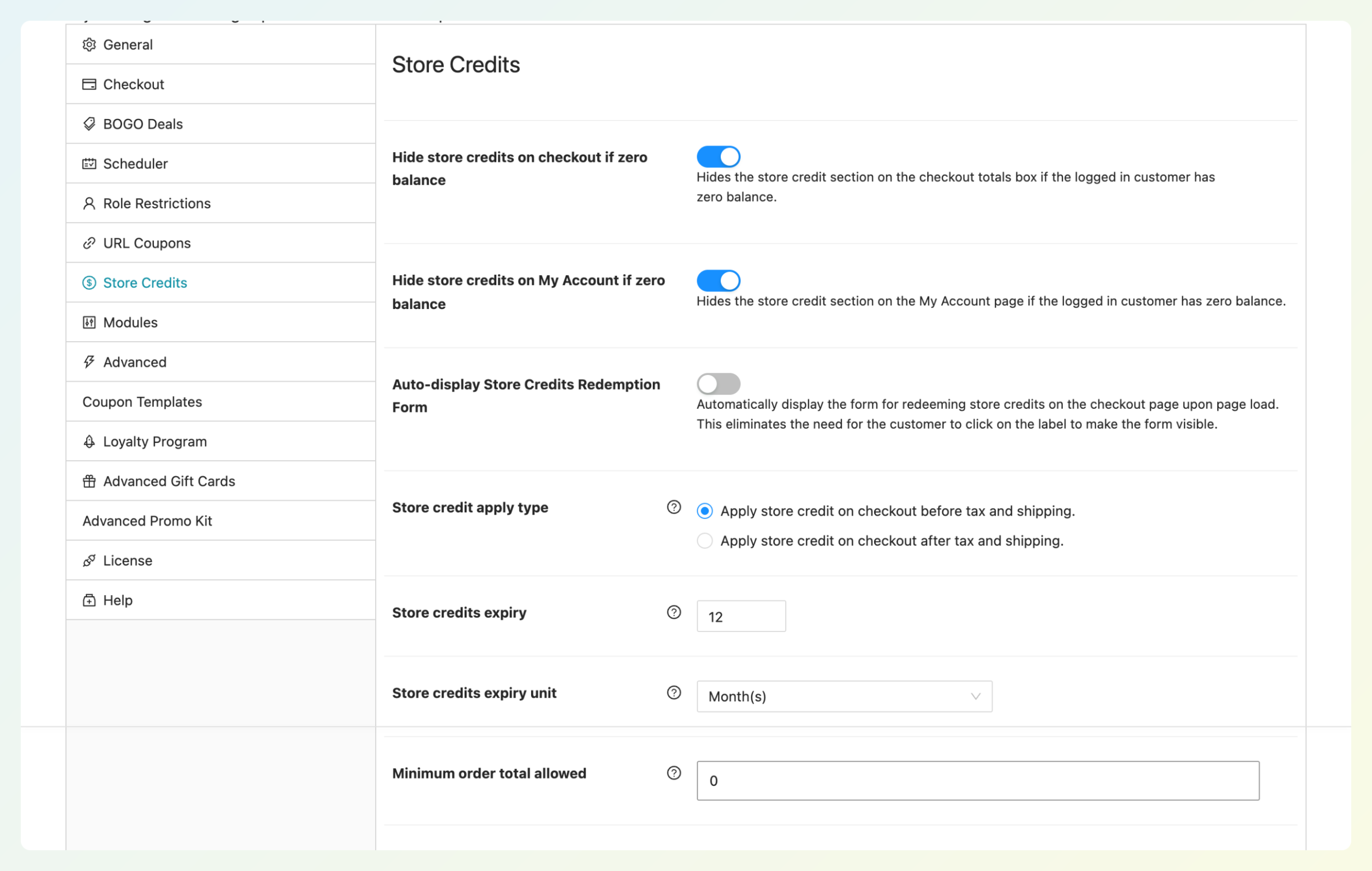
Expiry is measured from the customer’s last activity, so the date on their Store Credit tab moves forward when their balance changes. The minimum order total lets you decide how much must remain payable after credit is applied, which can keep store credit from reducing an order all the way to zero.
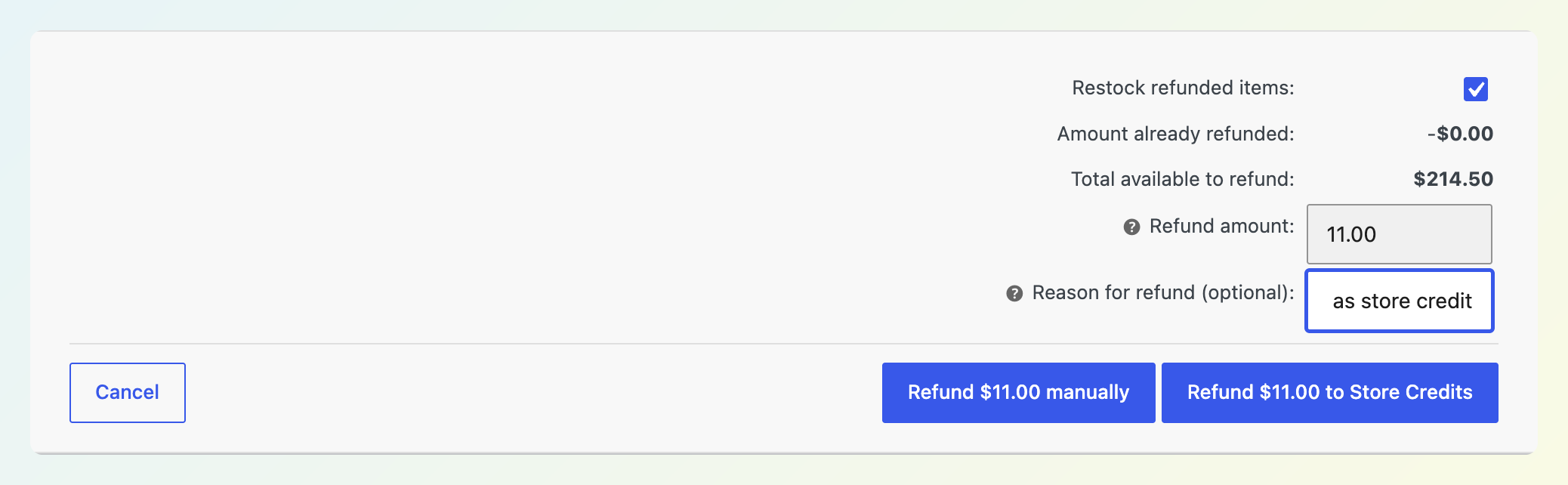
Admin tools are free too. When you refund an order, WooCommerce’s refund panel shows a “Refund [amount] to Store Credits” button next to “Refund manually,” and it adds the refund to the customer’s balance. A pending or on-hold order also carries an “Apply Store Credits” button, so an admin can use the customer’s balance on an order created for them. Manual balance adjustments send the customer a store credit email by default, with a checkbox to switch it off.
Under Coupons > Manage Store Credits, the Customers tab has an Adjust Store Credit modal (increase or decrease, an amount, a note) and the Dashboard tab shows Unclaimed, Added, and Used totals for any period. The Unclaimed figure helps you monitor outstanding store credit from one dashboard.
Premium adds the spending controls on top:
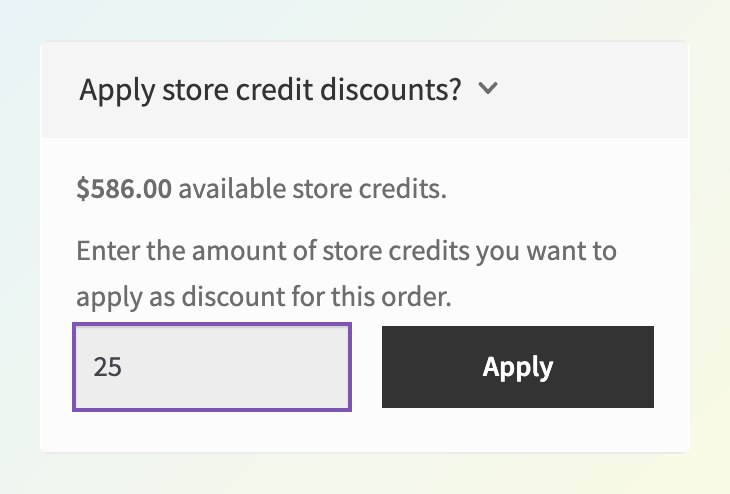
- Auto-apply available balance at checkout, so customers needn’t remember they have credit.
- Hide store credits when a coupon is applied, which blocks new redemptions while a coupon sits in the cart.
- Maximum percentage per order and a minimum redemption amount.
- Pay admin-created orders with credit on the order-pay page, so a phone customer can settle the order themselves.
- Bulk Adjust wizard: filter by role, balance, registration, or last-order date, then adjust, reset, or delete entries in one run.
Set your expiry policy before the first refund goes out so customers receive credit under clear terms from the start. They can see the expiry date in their Store Credit tab in My Account.
Gift Cards Side By Side
Both products sell gift cards and can connect gift card value with store credit, but the workflows differ. In Advanced Gift Cards, redeeming a card creates store credit in the customer’s Advanced Coupons balance, so the store credit settings in the previous section apply to that value too. With Store Credits & Gift Cards for WooCommerce, customers can redeem a gift card at cart or checkout. When the store enables the option, they can also add its value to their store credit balance.
If you’d like a quick refresher on the difference, our guide to store credit vs gift card breaks it down. Advanced Gift Cards is a separate plugin from the free store credit module, and here’s what it adds:
- Two product types: a simple gift card with a fixed value, and a variable gift card with several amounts in one listing.
- Designs: three built-in designs, or upload your own 500 by 300 pixel image per product or variation.
- Custom amounts: let the buyer type an amount within a minimum, maximum, and step, with up to five preset buttons.
- Send to friend and scheduled delivery: recipient name, email, a message, and a future delivery date, with the email queued for that day.
- Expiry: five years by default, with options from one to five years, no expiry, or a custom number of days. The Federal Reserve’s 2010 gift card rule requires funds on covered U.S. gift cards to stay valid at least five years from issue or last load, and the five-year default matches that window. Check applicable laws before choosing a shorter expiry period.
- Admin tools: a Manage Gift Cards screen to edit, resend, or bulk-create codes, CSV import, and dashboard widgets for cards sold and claimed.

Scheduled delivery uses the buyer’s timezone, which helps the selected delivery date line up with the buyer’s local date rather than the server’s. Because redemption creates a store credit entry, gift card value joins refunded credit in the same Unclaimed total, so one dashboard reflects both types of outstanding value.
A clear differentiator for the WPExperts extension is printable and scannable gift cards: it supports PDFs plus QR codes or barcodes. Advanced Gift Cards leans more into digital gifting controls such as custom designs, custom amounts, and scheduled delivery.
Gift cards are worth getting right. NRF’s 2025 holiday survey found gift cards were the most-wanted gift, named by 50% of consumers, with $29 billion of projected gift card spending that season. That makes it worth checking how gift card value is redeemed, tracked, and handled over time before you choose a setup.
Control Comparison Table
Here’s how the two compare on features that can be matched directly.
| Control | Advanced Coupons | Store Credits & Gift Cards for WooCommerce |
|---|---|---|
| Store credit price | Free | Included in the $49/year extension with gift cards |
| Refund an order to store credit | Yes | Yes |
| Customer balance in My Account | Store Credit tab | Store credits and gift cards tab |
| Coupon interaction control | Premium: hide new store credit redemptions when a coupon is applied | Restrict Store Credit with Coupon is on by default |
| Tax and shipping handling | Choose before tax and shipping or after tax and shipping | Can allow store credit and gift cards to cover shipping and tax |
| Usage log or ledger | Yes | Yes |
| Gift card expiry | Advanced Gift Cards: 1–5 years, no expiry, or custom days | Configurable in days, weeks, months, or years from activation |
| Gift cards | Advanced Gift Cards (separate plugin, or the bundle) | Included |
Both products cover the basics of issuing, tracking, and redeeming credit. The bigger differences are packaging and the specific controls each exposes: Advanced Coupons includes store credit at no cost and adds dedicated expiry, minimum-order, tax-mode, and admin-order controls, while the WPExperts extension bundles store credit and gift cards together and includes its own stacking, shipping/tax, and printable gift card features.
Price And What’s Included
Store Credits & Gift Cards for WooCommerce costs $49 for one year or $78.40 for two years, and that one license covers both store credit and gift cards.
Advanced Coupons splits the two jobs, and here are the current prices:
- Store credit: free. The free plugin includes the core store credit features described above.
- Advanced Coupons Premium: $99.50 for the first year on one site (list price $199, which is what it renews at) or $199.50 for unlimited sites (list $399).
- Advanced Gift Cards: $99.50 for the first year on one site (renews at the $199 list price) or $199.50 for unlimited sites (list $399).
- All Access Bundle: all four Advanced Coupons plugins on unlimited sites for $249 in the first year, renewing at $498.
If you only need store credit, Advanced Coupons starts at $0 and includes expiry, the before- or after-tax apply type, a minimum order total, refunds, admin adjustments, and reporting. If you need gift cards too, Advanced Gift Cards starts at $99.50 for the first year on one site, while the WPExperts extension includes both store credit and gift cards for $49 a year. Choose based on which workflow and controls fit your store, not just the first-year price.
Switching From The Extension
There’s no built-in importer for balances from Store Credits & Gift Cards for WooCommerce. The Advanced Coupons import tool covers StoreApps Smart Coupons and WebToffee Smart Coupons, and our guide on how to import store credits from other plugins walks through those two. For the WPExperts extension, you’ll need to recreate the existing value in Advanced Coupons rather than migrate those balances automatically.
The best approach depends on how many customers you’re moving and whether their balances are different:
- Manual adjustments for individual balances. Record each customer’s current balance in the WPExperts extension, then use Adjust under Coupons > Manage Store Credits > Customers with a note such as “Migrated balance”.
- Bulk Adjust for groups that need the same change. Advanced Coupons Premium can bulk adjust store credit balances for a filtered group of customers. You can target users by role, balance, registration date, last order date, or specific accounts, preview the group, then apply a fixed or percentage adjustment. This is useful when several customers need the same balance adjustment, but it isn’t a direct importer for different per-customer balances.
- Equivalent-value gift cards as a workaround. For a larger list with different values, the CSV import in Advanced Gift Cards can create a card for the value of each customer’s old balance. This does not import the original store credit itself; the gift card becomes store credit when the customer redeems it.
Set your store credit expiry and minimum order total before recreating balances manually or with Bulk Adjust. If you use gift cards as the workaround, configure the gift card expiry separately.
Frequently Asked Questions
Is there a free WooCommerce store credit plugin?
Yes. The free Advanced Coupons plugin includes store credit with a ledger, refund-to-credit, admin adjustments, a My Account tab, adjustment emails, expiry settings, a tax mode, and a minimum order total. Auto-apply, hiding credit when a coupon is applied, per-order caps, and bulk adjustments are in Advanced Coupons Premium. Store Credits & Gift Cards for WooCommerce has no free edition; it costs $49 a year.
Can store credit expire in WooCommerce?
With Advanced Coupons it can. Under Coupons > Settings > Store Credits, enter a number and pick Day(s), Month(s) or Year(s). The clock runs from the customer’s last activity, and the expiry date shows in their Store Credit tab. Leave the number at 0 and credit never expires. Check your local rules on store credit and gift card expiry before you set one.
Can I refund an order to store credit?
Yes, in both products. In Advanced Coupons, the order’s refund panel shows a “Refund [amount] to Store Credits” button next to WooCommerce’s manual refund button; clicking it adds the amount to the customer’s balance. You can also return credits a customer spent on an order that’s later refunded. Store Credits & Gift Cards for WooCommerce also supports refunds as store credit or gift cards.
Do gift cards become store credit?
In Advanced Gift Cards, yes. Redeeming a code creates a store credit entry for that amount, marks the card as used, and applies the credit to the current checkout, so expiry, tax mode, and minimum order total all apply. In Store Credits & Gift Cards for WooCommerce, gift cards can be redeemed at cart or checkout or added to the customer’s store credit balance.
Can I move balances from another plugin?
The Advanced Coupons import tool brings in balances from StoreApps Smart Coupons and WebToffee Smart Coupons. It doesn’t directly import Store Credits & Gift Cards for WooCommerce balances. You can recreate those balances manually with the Adjust button, or use Advanced Gift Cards’ CSV import to issue equivalent-value gift cards that become store credit when redeemed.
Final Thoughts On Store Credits & Gift Cards For WooCommerce Alternatives
WPExperts puts store credit and gift cards in one $49-a-year license, with stacking controls and printable or scannable cards. Advanced Coupons takes a modular approach: store credit is included in the free plugin with dedicated expiry, tax-mode, minimum-order, and admin tools, while Advanced Gift Cards adds digital gifting features separately. Both support customer balances, refunds, and usage tracking.
If your priority is detailed store credit controls, Advanced Coupons is the stronger fit. Add Advanced Gift Cards if you also want to sell digital cards with custom amounts, designs, and scheduled delivery. If you prefer one lower-cost license for both store credit and gift cards, especially with PDF and QR or barcode support, the WPExperts extension remains a credible option.
If you’re choosing between them, compare these points against how your store handles credit and gift cards:
- Run your setup against the controls checklist
- Set expiry, apply type, and minimum order total in the free plugin
- Decide whether gift cards need to land as store credit
- Compare first-year and renewal prices
- Plan the re-issue if you’re switching
If Advanced Coupons fits the way you want to manage store credit, explore WooCommerce store credit in Advanced Coupons, then start with the free plugin and set your expiry policy before issuing your next credit balance.