
Most WooCommerce store owners start with coupons manually: choose the discount type, set the limits, pick the dates, and publish. That works well enough for one simple offer. But when you’re planning a seasonal campaign with different discounts for different shoppers, the setup work can quickly become the part that slows everything down.
An AI coupon strategy for WooCommerce helps by giving you a faster starting point for the tasks AI can handle well. AI is already part of many ecommerce workflows, with a large share of online retailers now leaning on it to create smoother, more personalized shopping experiences. The key is knowing where AI can save time, and where your store data, campaign goals, and coupon rules should guide the final decision.
In this article, we’ll look at six practical ways to build an AI coupon strategy for WooCommerce. Tools like StoreAgent AI, a WooCommerce AI agent, are especially useful when you want AI to support real coupon tasks, such as generating standard coupons, writing coupon descriptions, or offering approved coupons in chat. Advanced Coupons then gives you the promotion rules, targeting options, and reporting tools you need to run each campaign properly.
Where AI Fits In Your WooCommerce Coupon Strategy
AI is most useful when it saves you from repetitive setup work or helps you make sense of coupon data you already have. Advanced Coupons handles the promotion rules, including BOGO deals, cart conditions, auto-apply, scheduling, usage limits, and role restrictions. StoreAgent AI then helps with the lighter but time-consuming parts of the workflow, like turning a plain-language discount idea into a ready-to-review coupon configuration.
That makes your coupon workflow easier to manage without taking strategy out of your hands. You still choose the offer, review the details, and decide how the coupon fits your campaign. AI simply gives you a faster starting point.
Practical note: Store owners can have access to advanced coupon tools and still lean on simple percentage discounts because they’re faster to set up. AI can reduce that friction for standard discounts. When you can describe the offer in plain language and review a generated coupon setup, the setup process is less likely to be the reason you skip a useful promotion.
It helps to see where AI fits into a coupon program already in motion. According to DemandSage, digital coupons account for one-third of all coupon redemptions, so this is already a meaningful part of the shopping experience. For a wider view of how store owners are using AI in their marketing, see our guide to how AI is changing WooCommerce marketing.
6 Ways To Use AI In Your WooCommerce Coupon Strategy
Here are six ways AI can support your coupon work, grouped by what AI builds for you and what it simply helps you plan or read.
1. Generate coupons from a plain language description
The clearest win is coupon creation. With the WooCommerce AI coupon generator, you describe the coupon you want and get a ready-to-review configuration back. Tools like StoreAgent AI can turn a plain-language discount idea into the right Advanced Coupons fields, so you start with a draft setup instead of building every detail manually.
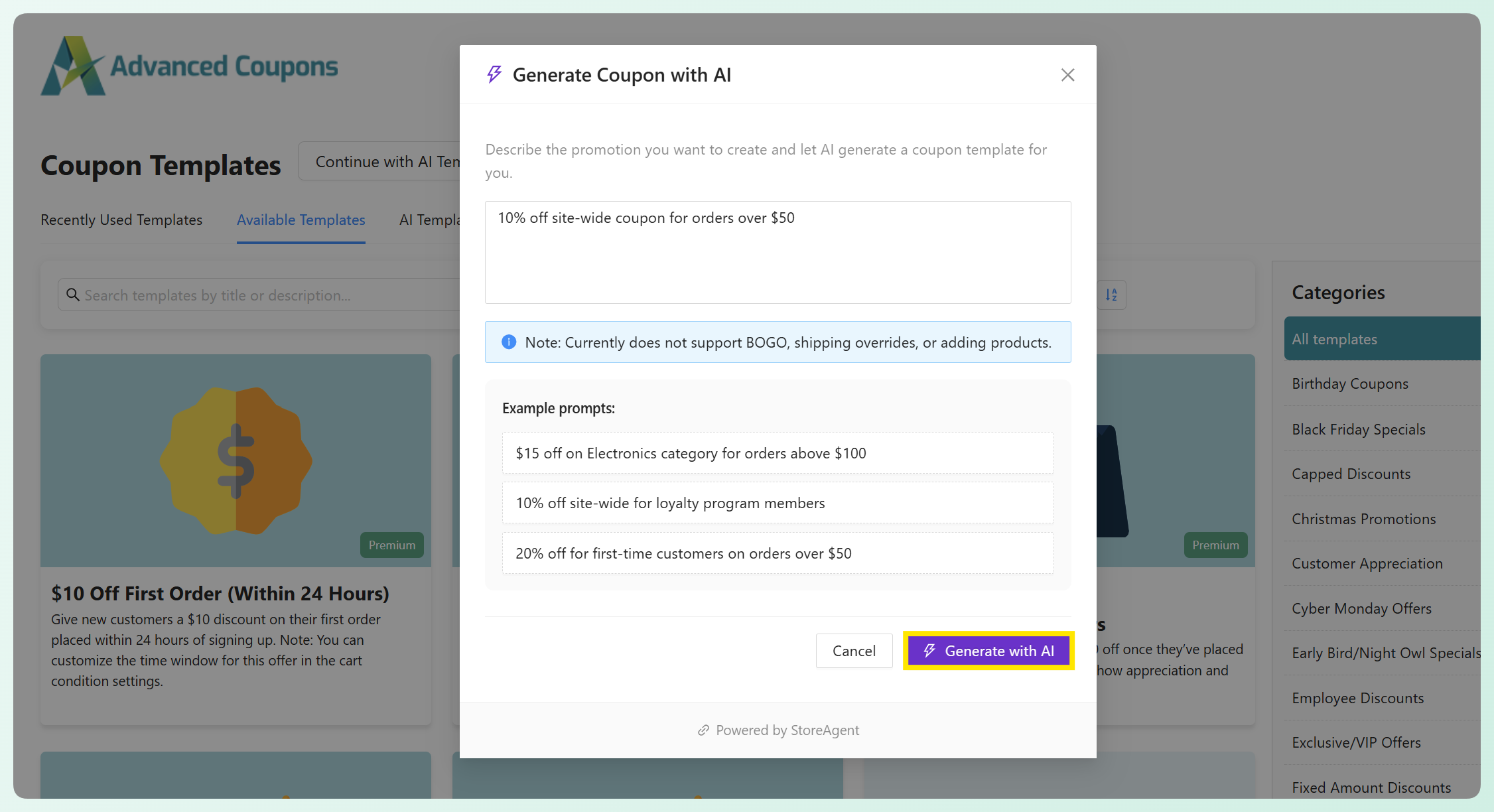
This works well for standard discount types like percentage off, fixed cart discounts, and fixed product discounts, along with details like product or category targeting, usage limits, and an expiry date. For example, you could prompt: “Create a 15% off coupon for everything in the Summer Collection that expires on August 31.” From there, you can review the generated coupon and activate it when everything looks right.
For the full walkthrough on generating coupons with StoreAgent, check out our step-by-step guide.
2. Auto-write the coupon description
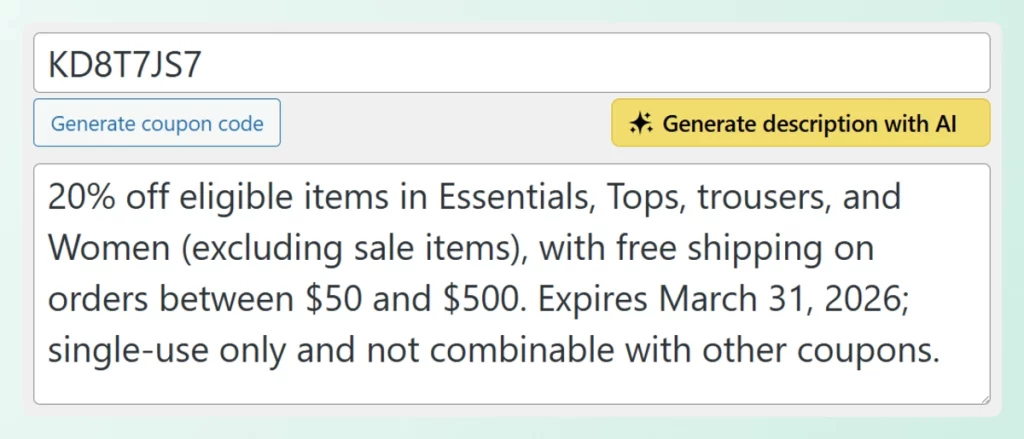
Every coupon has a description field, and most store owners leave it blank. This is another place where StoreAgent AI fits naturally. It can write the coupon description based on the coupon’s own settings, including the discount type, products or categories, conditions, and dates.
That gives you a clear internal summary your team can understand at a glance, while still keeping you in control. Review the generated description, make any edits you need, and save it with the coupon.
For wider promotional copy, such as email subject lines or social captions, you can use a general AI assistant like ChatGPT or Claude. Paste in the coupon’s real details and try a prompt like: “Write three email subject lines for a 25% off back-to-school coupon running August 15 to 30.” Just make sure the final copy matches the offer terms you actually built.
3. Build targeted offers for customer segments
Targeting is an Advanced Coupons strength. Its cart conditions and usage restrictions let you limit a coupon by user role, spend thresholds, and other rules, so one discount can apply to a specific group instead of everyone. That’s how you turn a blanket offer into a more intentional promotion.
For this part of your AI coupon strategy, tools like ChatGPT or Claude are most useful as planning partners. You don’t need to upload customer details to get value from them. Instead, start with general segment ideas and campaign goals, then ask for offer suggestions. For example: “Suggest three coupon ideas for first-time buyers, repeat customers, and shoppers who have not purchased recently.”
Once you have a few ideas, choose the ones that fit your store and set them up in Advanced Coupons using the right cart conditions or usage restrictions. AI helps you shape the offer, while Advanced Coupons controls who can use the coupon and when it applies.
🎯 Practical note: The strongest coupon strategy is not always the biggest discount. A smaller, more relevant offer for a specific customer group can be more intentional than sending the same discount to everyone.
4. Create coupon variations to test
Testing different offers is easier when you have a few clear options to compare. You can use tools like ChatGPT or Claude to brainstorm coupon angles first, then use the AI coupon generator to help create standard coupon variations you can review inside WooCommerce.
For example, you might ask: “Give me three coupon ideas for a summer sale: one percentage discount, one fixed cart discount, and one fixed product discount.” From there, you can choose the strongest options, create the coupons, review each setup, and run them for a set period.
To measure the results, lean on Advanced Coupons’ built-in WooCommerce coupon reporting. It shows how often each coupon was used and how much it discounted, which gives you a practical starting point for comparing which variation performed best.
5. Offer the right coupon in live chat
StoreAgent AI can also support your coupon strategy through live chat. If you use its WooCommerce chatbot, you can choose which coupons the assistant is allowed to share during customer conversations. Then, when a shopper asks about discounts or shows buying intent, the assistant can recommend a relevant coupon from your approved list.
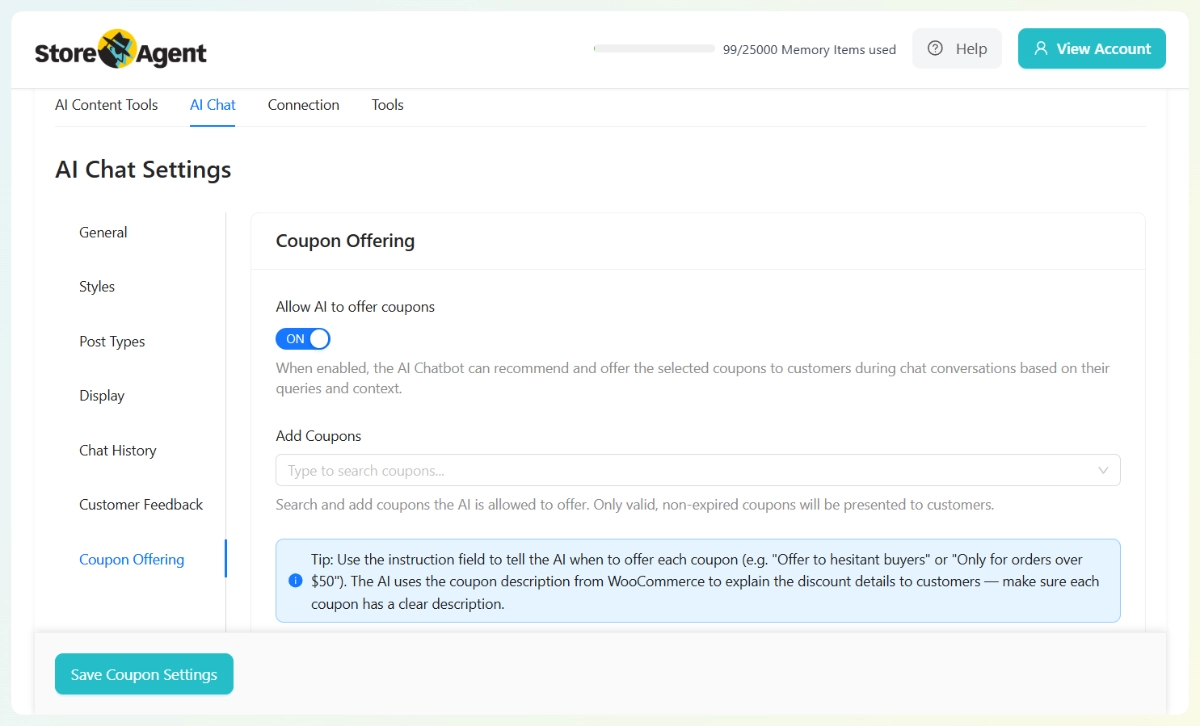
The important part is that you stay in control of the offer. The assistant does not create a new discount on the spot. It only offers coupons you’ve already created and approved, such as a welcome coupon for first-time buyers or a limited-time deal for a specific campaign.
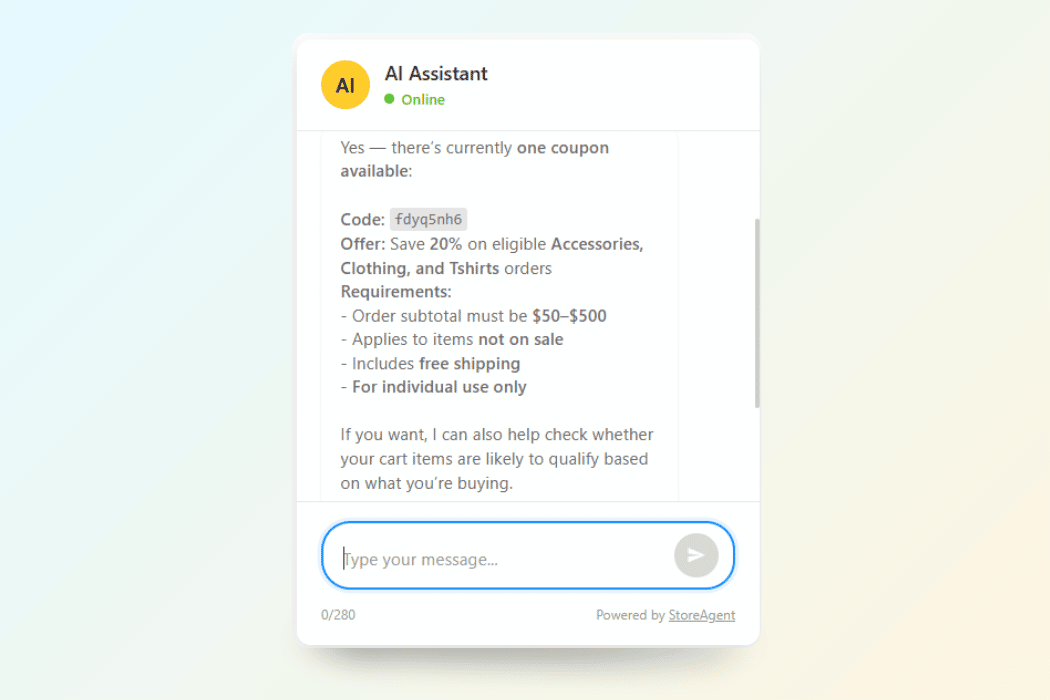
That gives shoppers a more helpful experience without putting your discounting on autopilot. You decide which coupons are available, and StoreAgent AI helps present them when they fit the conversation.
6. Read your results and improve next time
After a campaign runs, Advanced Coupons’ coupon dashboard gives you the numbers you need to review performance. You can see metrics such as coupons used, amount discounted, orders discounted, discounted order revenue, plus your most used and recently created coupons by time period.
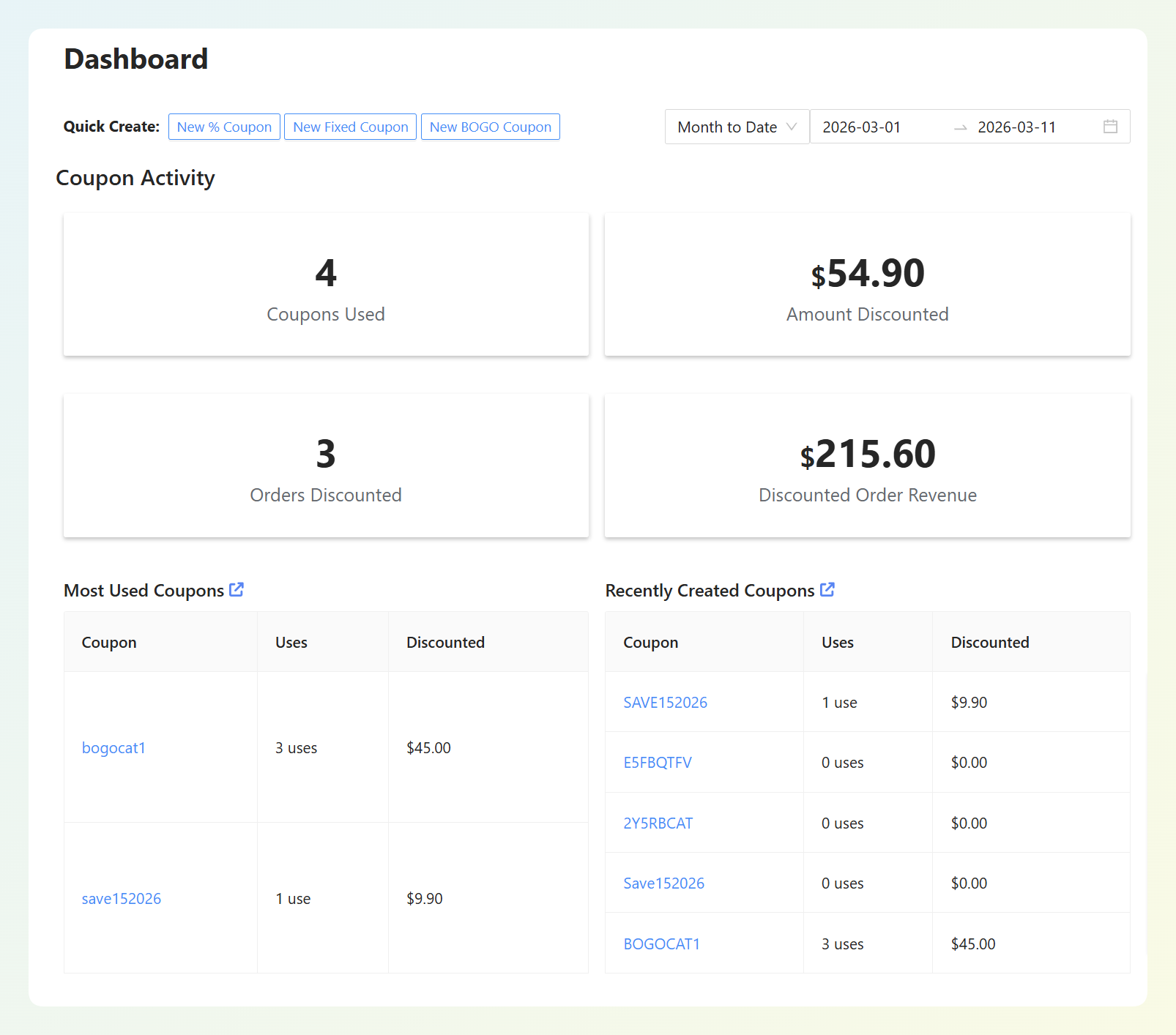
From there, tools like ChatGPT or Claude can help you turn those numbers into takeaways. Copy the key numbers from your coupon dashboard into your AI tool and ask: “Which coupons had the strongest usage, which drove the most discounted order revenue, and what should I test next?” That turns a table of figures into a clearer plan for your next campaign.
Over time, this gives your AI coupon strategy a simple feedback loop. You keep what worked, adjust what didn’t, and use each campaign to make the next one more intentional.
How To Get Started With An AI Coupon Strategy In WooCommerce
The easiest way to start is to choose one part of your coupon workflow where AI can remove friction right away. That might be creating a standard coupon from a plain-language prompt, writing a clearer coupon description, offering approved discounts in chat, or reviewing coupon results after a campaign ends.
For WooCommerce stores, tools like StoreAgent AI are a strong place to begin because they connect directly to the kind of coupon work you’re already doing with Advanced Coupons. Instead of using AI only as a separate brainstorming tool, you can bring it closer to the actual coupon setup, review, and customer-facing experience.
Here’s a simple way to put the workflow into action:
- Set up Advanced Coupons: Use Advanced Coupons as the engine behind your promotions, including BOGO deals, cart conditions, auto-apply, scheduling, usage limits, and other coupon rules. See the Advanced Coupons Premium features page for the full list.
- Connect StoreAgent AI: Install StoreAgent AI, a WooCommerce AI plugin, on your store so you can use AI for supported coupon tasks, including coupon generation, coupon descriptions, and approved coupon offering in chat.
- Generate your first coupon: Open the AI coupon generator and describe a standard discount in plain language. Review the generated setup before publishing so the coupon matches your actual campaign.
- Review, activate, and measure: Publish the coupon when everything looks right, then use Advanced Coupons’ reports to see how it performs. You can bring those results into your next planning session so each campaign becomes more intentional.
Frequently Asked Questions
Can AI create WooCommerce coupons automatically?
Yes, for standard discount types. With Advanced Coupons and StoreAgent AI, you describe a promotion in plain language and the AI generates the coupon configuration in WooCommerce. You review and approve it before it goes live, so you keep full control over what gets published.
What coupon types can the AI coupon generator create?
The AI coupon generator is best for standard discounts like percentage off, fixed cart discounts, and fixed product discounts. You can also use Advanced Coupons for more advanced promotion types, including BOGO deals, cart conditions, auto-apply, scheduling, and usage restrictions.
Is the AI coupon generator free?
The generator works with Advanced Coupons and StoreAgent AI. Advanced Coupons has a free version with core features, while the Premium version unlocks advanced options like BOGO deals, cart conditions, and auto-apply. Check the Advanced Coupons pricing page for current plans.
Will AI-generated coupons override my existing coupons?
No. AI-generated coupons are created as new coupons in your store. They don’t modify or overwrite existing coupons or settings, and you review every generated coupon before activating it.
Can I use AI to target specific customer segments?
Yes, but the targeting itself happens through Advanced Coupons’ cart conditions and usage restrictions, such as user role and spend thresholds. AI can help you brainstorm segment ideas without uploading customer details, then you can build the matching coupon rules inside Advanced Coupons.
Build A Smarter AI Coupon Strategy For WooCommerce
A strong AI coupon strategy works best when each tool has a clear role. StoreAgent AI can help you generate standard coupons, write coupon descriptions, and offer approved discounts in chat. Advanced Coupons gives you the rules, reporting, and promotion controls you need to run the campaign properly.
Here’s what to try first:
- Generate a standard coupon from plain language to skip the manual setup
- Auto-write the coupon description so every coupon is clear
- Offer the right coupon in live chat from a set you’ve approved
- Read your results to sharpen the next campaign
Ready to build your AI coupon strategy for WooCommerce? Start with the AI coupon generator and explore the All Access Bundle to unlock every Advanced Coupons feature.
Have questions about putting AI to work on your coupons? Drop them in the comments, we’re happy to help.