If every promotion you run is the same flat “10% off,” customers start waiting for the discount instead of buying at full price, and thin-margin products can end up losing you money instead of moving them. Promotional pricing strategies solve this by giving you more control over who gets the discount, when it runs, and how deep it goes, rather than reaching for the same blanket coupon every time.
Here are 8 promotional pricing strategies you can set up directly through WooCommerce and Advanced Coupons, along with a worked example for each one so you can see exactly how it plays out:
- Put a single product on sale
- Group products together for a discount
- Create a sale on a category of products
- Make a broad coupon offer
- Create a targeted coupon offer
- Quantity based discounting
- Cart subtotal threshold deals
- Free or discounted shipping
Read on for the details behind each strategy, including when it works best and how to set it up in your own store.
1. Put A Single Product On Sale
The simplest discount pricing strategy is to just put one product on sale.
In WooCommerce this is as easy as defining a sale price which, on the front end, creates a strikeout effect on the regular price and shows the sale price underneath.
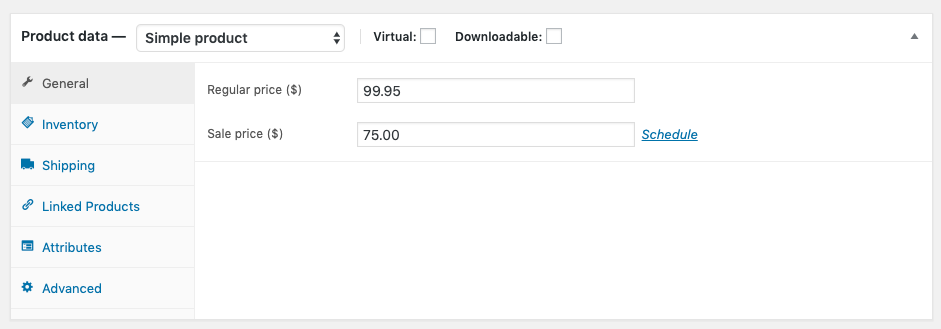
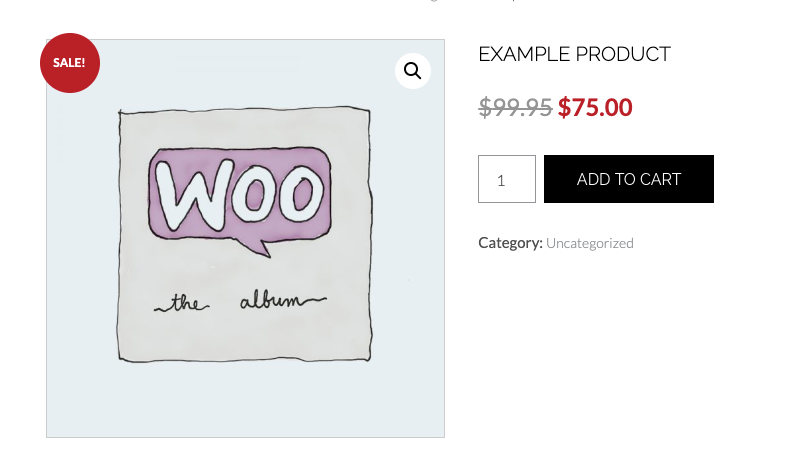
Here’s what this looks like in practice (example data): a $60 candle drops to $45 for two weeks. The strikethrough shows shoppers the $15 they’re saving without you writing a single word of promotional copy.
2. Group Products Together For A Discount
If you want to create a bigger promotion you can group a set of similar products.
This can be a great way to cross-sell multiple products in a “deal” to give your customer a great discount while also securing a higher order value.
To do this I recommend using a coupon and creating a larger promotional effort. If you like you can also create a “grouped” product to have the products added to the cart together.
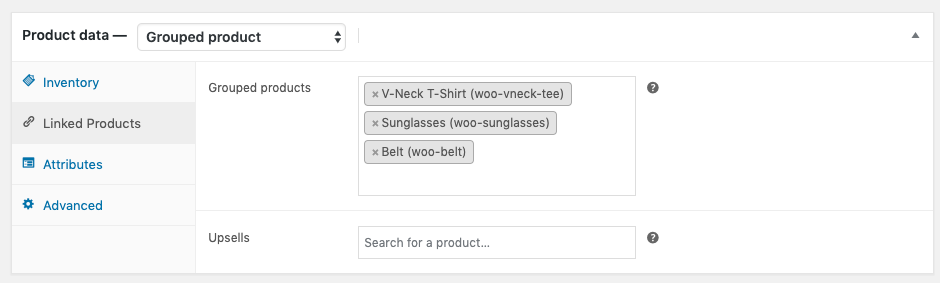
This creates a new product on your store for the bundle of products and when added, it adds all the products to the customer’s cart at once. From here you can give them a coupon to apply to the cart.
If you want to make it even easier you can create an auto-apply coupon that detects when the correct products are in the cart.
Here’s what this looks like in practice (example data): bundle a $40 cleanser with a $35 moisturizer and take $15 off the pair, so the bundle rings up at $60 instead of $75 bought separately.
3. Create A Sale On A Category Of Products
Category sales are great for moving inventory in a specific product category on your site.
It’s very easy to create a coupon that applies a discount when a product from a specific category is in the cart in WooCommerce.
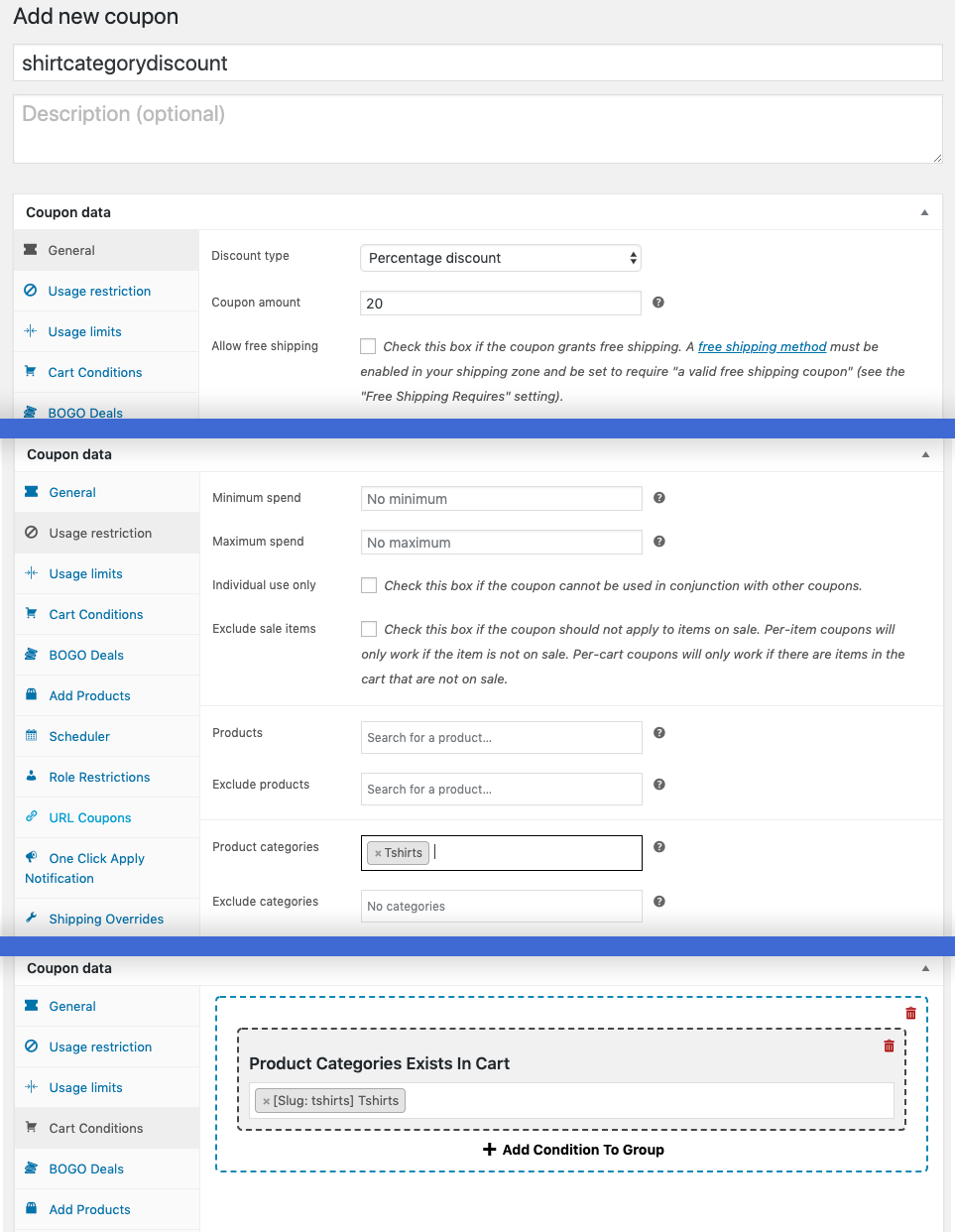
This coupon will only apply the discount to the specified category and all other products will be priced as normal.
Here’s what this looks like in practice (example data): a 20% category coupon on your Winter Boots category clears end-of-season stock, while the rest of your catalog stays at full price.
4. Make A Broad Coupon Offer
If you want to create a big buzz around a single promotion a broad coupon offer will get people purchasing. A broad coupon offer works best with short and snappy deadlines to encourage the “fear of missing out” feeling.
Use the Scheduler feature in Advanced Coupons to add this feature to your store and see this guide on how to set a WooCommerce coupon expiry date.
Without a deadline or restriction, a broad offer will be just that, too broad. The good side of a broad offer though is that you can send it to everyone in one hit which will provide you with a short burst of revenue.
Here’s what this looks like in practice (example data): a site-wide 15% off coupon that expires in 48 hours, sent to your whole list in one email.
5. Create A Targeted Coupon Offer
The converse to a broad offer is a targeted offer.
Targeted offers are mostly aimed toward previous customers to encourage a repeat purchase.
But if your email tool supports it, you can also target specific customers that have satisfied certain criteria like “visited a specific product page in the last 48 hours”.
Targeted offers, unlike broad offers, have the happy upside of a higher uptake rate. The ROI on targeted marketing can be up to 5-8x higher than broad marketing.
To do target offers properly you’ll need an email tool capable of recording what your customer does on your site (what products they ordered and when, what pages they visited, etc.) and you’ll need a tool that can enforce the rules for specific coupons that you send on those offers.
We talk a lot about targeted marketing in our free 28-day e-commerce marketing plan guide.
Here’s what this looks like in practice (example data): a 10% coupon sent only to customers who viewed a product page in the last 48 hours but didn’t buy, rather than your entire list.
6. Quantity Based Discounting
When a customer purchases a certain quantity of a product, you can apply a discount. This method of discounting is called quantity-based discounting.
You can also do this on multiple levels, giving further discounts for even higher quantities purchased. We created a guide on how to do this with Advanced Coupons in WooCommerce.
Here’s what this looks like in practice (example data): 10% off when a customer buys 3 of an item, rising to 15% off at 6, so bigger orders keep earning a bigger discount.
7. Cart Subtotal Threshold Deals
Triggering a deal based on how much someone is buying is one of the oldest tricks in the retail book. But you don’t see it done online very much for some reason.
The best way to set this up is to calculate the average order size on your site and put the threshold for securing a discount just beyond that. I suggest taking into account the last 6 months of orders.
Export all those orders and load them into a Google Sheet or an Excel document, then run the AVERAGE() function on the column showing all the order totals.
This will give you the average order size for that period.
Here’s what this looks like in practice (example data): if your average order comes out to $85, setting the threshold at $100 nudges shoppers just past their usual spend to unlock the discount. From there you can calculate profit per order to make sure your threshold discount still pays off.
8. Free Or Discounted Shipping
Shipping is a huge motivator for customers and if you are lucky enough to offer free shipping this will already be removed as a limiting factor.
If you don’t offer free shipping normally, using it as a temporary discount can be extremely effective.
Don’t want to offer completely free shipping? You can now do discounted shipping in Advanced Coupons for WooCommerce.
This also opens up promotions on things like “half-price express shipping” just before holiday periods.
Here’s what this looks like in practice (example data): switch standard shipping to free for the week before a holiday, then return to your normal rates once the rush passes.
Check Your Margin Before You Discount
Before you lock in any of the strategies above, it’s worth knowing how much discount your margin can actually absorb. A discount that looks appealing on the front end can turn a profitable sale into a loss if the product’s margin is too thin to support it.
Our free discount margin calculator does this math for you. Enter your cost of goods and regular price, and it works out the maximum discount you can offer on that product before you start losing money on the sale.
Here’s what this looks like in practice (example data): a product that costs you $30 to make and sells for $50 has a maximum discount of 40% before you hit your cost price. Anything past that starts costing you money on every sale.
Frequently Asked Questions
Which promotional pricing strategy should I start with?
If you’re new to running promotions, a broad coupon offer is the easiest starting point since it requires no customer data and gets a promotion out quickly. As you build up order history, targeted offers based on past purchases or browsing behavior tend to convert better, since targeted marketing can see up to 5-8x higher ROI than broad campaigns.
How much can I discount without hurting my margin?
It depends on your cost of goods versus your regular price. Use our discount margin calculator to work out the maximum discount you can offer on a specific product before you start losing money, then keep your promotion below that ceiling.
Can I combine more than one of these strategies at once?
Yes, many of these work well together. A category sale can run alongside a cart subtotal threshold deal, for example, giving shoppers a reason to add more items while you’re already clearing that category’s inventory. Just check your margin covers the combined discount before you launch.
Do I need coding skills to set these up?
No. Every strategy on this list can be set up through WooCommerce and Advanced Coupons’ own settings screens, using coupon rules, cart conditions, and scheduling options rather than custom code.
What’s the difference between a broad and a targeted coupon offer?
A broad offer goes out to your whole audience at once and works well for urgency-driven promotions with a short deadline. A targeted offer goes only to specific customers who meet certain criteria, like recent purchasers or people who viewed a product page recently, and tends to convert at a higher rate since it’s more relevant to them.
Conclusion
As always with e-commerce, the right promotional pricing strategy depends on your situation, so test a few of these with your own audience rather than assuming one approach fits every campaign. Check your margin with the calculator above before you commit to a discount, so a promotion that looks good on the front end doesn’t cost you on the back end.
Getting more sophisticated about your discount pricing strategies is a great way to introduce more promotions without just running the same tired “another 10% off” that your customers ignore.
Here’s a quick way to jump back to any of them:
- Put a single product on sale — for a straightforward, no-frills discount
- Bundle products together — to raise order value while still giving a discount
- Run a category sale — to clear inventory in one specific area
- Send a broad coupon — for urgency-driven, site-wide promotions
- Send a targeted coupon — for higher-converting, personalized offers
- Offer quantity-based discounts — to reward bigger orders
- Set a cart subtotal threshold — to nudge shoppers past their usual spend
- Discount or waive shipping — for a low-effort seasonal promotion
Ready to put these promotional pricing strategies to work? Compare Advanced Coupons’ free and premium features to see which tools fit your next promotion.
Mix things up and see how you can make these promotional pricing strategies above work for your store!