

There’s a new way to manage WooCommerce coupons with AI. Advanced Coupons for WooCommerce 4.7.4 now supports the WordPress Abilities API, allowing you to connect a compatible AI assistant such as Claude Desktop and manage coupons through plain-language requests.
Instead of opening the coupon editor each time you need to create a code, update its settings, adjust a schedule, or review your existing promotions, you can ask your assistant to handle these everyday tasks for you. The integration is included in the free plugin, and in this guide, we’ll show you how it works, what it can manage today, and what you’ll need to connect it to your store.
What Is The WordPress Abilities API?
The WordPress Abilities API, introduced in WordPress 6.9, gives plugins a standard way to describe actions that other software can discover and use. Each ability defines a specific task, along with the information it needs, what it returns, and who has permission to run it.
To make those abilities available to an AI assistant, your site also needs an MCP adapter. MCP, or Model Context Protocol, lets compatible AI clients connect to outside tools. Advanced Coupons registers eight coupon abilities, and the WordPress MCP Adapter makes them available through an MCP connection that a compatible client can discover. Advanced Loyalty Program offers a similar set of built-in abilities, letting you manage your loyalty program with AI through the same kind of MCP connection. If you run a multi-vendor store, WC Vendors registers marketplace abilities for vendors, orders, and commissions alongside a full marketplace REST API and webhooks.
What You Can Manage With an AI Assistant
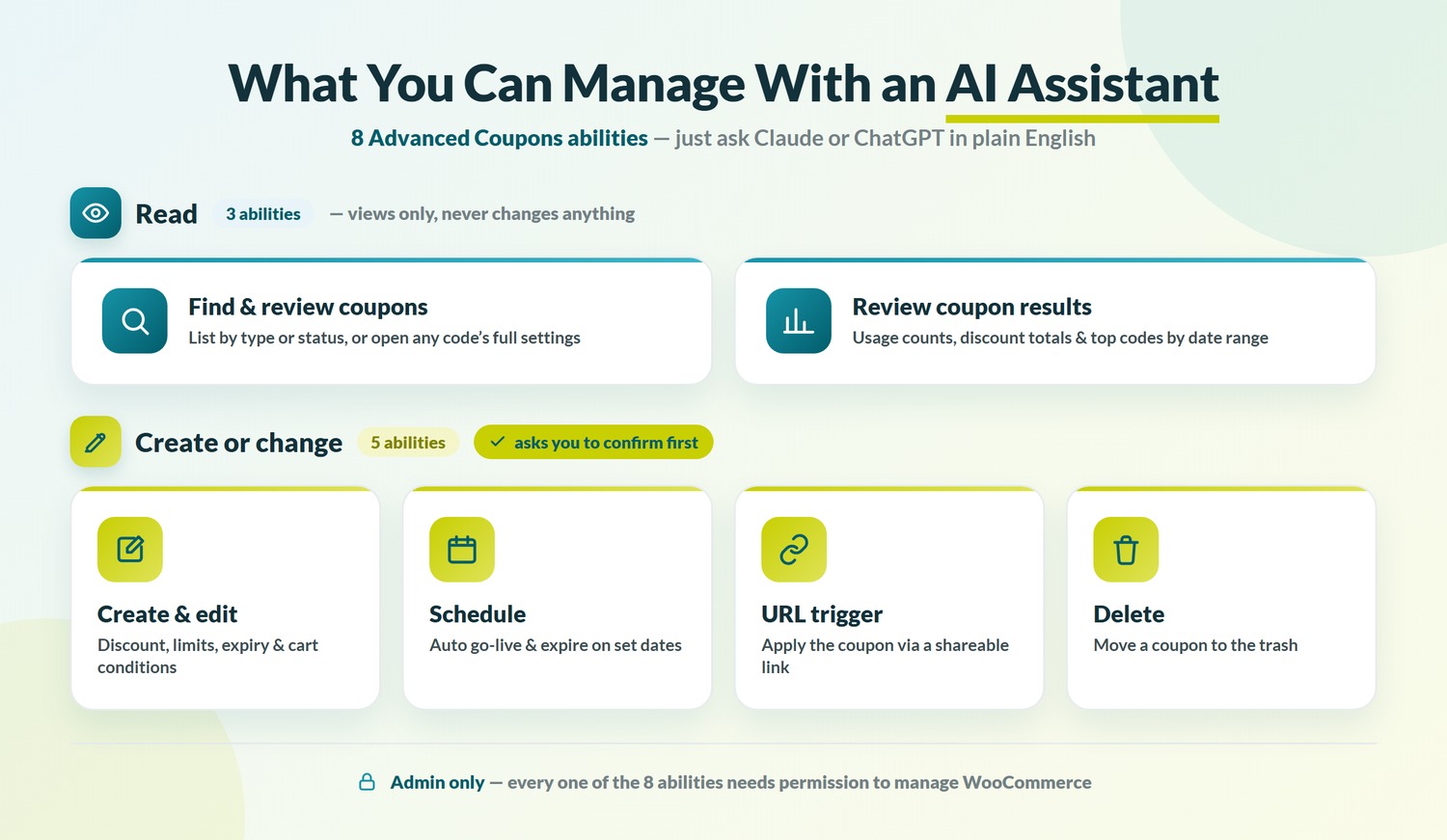
Once connected, your assistant can use eight Advanced Coupons abilities. Three retrieve coupon information, while five can create or change coupon data.
Together, they cover these everyday tasks:
- Find and review coupons: list coupons or view the full settings for a specific code.
- Create and edit coupons: set the code, discount type, amount, description, usage limit, expiry date, free shipping, individual-use rule, and supported cart conditions.
- Schedule coupons: set a start and end date so a coupon goes live and expires automatically.
- Set URL coupon triggers: create a link that applies the coupon when a shopper visits it.
- Delete coupons: move an existing coupon to the trash.
- Review coupon results: retrieve usage counts, discount totals, and top-performing codes for a selected date range.
The abilities cover many everyday coupon tasks, with a few limits to keep in mind. Your assistant can view BOGO and role-restriction settings, but it cannot create or update them, and premium-only settings are not included. The URL coupon trigger and scheduling abilities also require the URL Coupons and Scheduler features to be enabled. All eight abilities require a WordPress user with permission to manage WooCommerce.
For example, you could ask your assistant to create a percentage discount with an expiry date. Because actions that change coupon data are marked as destructive, a compatible client may let you review and confirm the request before it runs.
How To Connect Advanced Coupons To Your AI Assistant
Connecting Advanced Coupons requires WordPress 6.9 or newer, the WordPress MCP Adapter, and an MCP-compatible client. The exact configuration depends on whether you are connecting to a local or remote WordPress site, so this setup is best suited to users who are comfortable editing an MCP settings file or working with a developer. If you would rather skip the settings file, the free StoreAgent plugin includes a WooCommerce MCP server that connects Claude, ChatGPT or Cursor to your store with no code, and it can run these coupon abilities once you allow them.
- Run WordPress 6.9 or newer, with WooCommerce and Advanced Coupons for WooCommerce 4.7.4 or later.
- Install and activate the latest stable release of the WordPress MCP Adapter plugin.
- Choose the connection method that fits your site. Local development sites can connect through WP-CLI using STDIO, while remote or hosted sites can connect through an HTTP proxy such as
@automattic/mcp-wordpress-remote. - Follow the configuration instructions for your chosen method. For a remote connection using an application password, create one under Users, then Profile, then Application Passwords for a WordPress user who can manage WooCommerce.
- Add the connection details required by your chosen method to your client’s MCP configuration, then restart the client.
- Start with a read-only request, such as asking the assistant to list your active coupons, to confirm the connection works.
For current local and remote configuration examples, refer to the WordPress MCP Adapter setup instructions.
For a more detailed walkthrough, check out our support documentation about this new feature.
Frequently Asked Questions
Is it safe to let AI manage my coupons?
Advanced Coupons includes guardrails to help keep coupon changes under your control. All eight abilities require a WordPress user who can manage WooCommerce. The five actions that change data are also marked as destructive, allowing compatible clients to ask for confirmation before they run. Any changes follow the same save process as the coupon editor, so existing emails and integrations can continue to work as expected. You can also disable all eight abilities with a single constant. As with any store connection, use a trusted MCP client and protect the credentials you use to connect it.
Do I need WordPress 6.9 or WordPress 7.0?
WordPress 6.9 or newer is enough. WordPress 6.9 introduced the server-side Abilities API that Advanced Coupons uses. WordPress 7.0 added client-side support, but it is not required for these coupon abilities. On older WordPress versions, Advanced Coupons does not register the abilities and the rest of the plugin continues to work normally.
Is this feature free?
Yes. WordPress Abilities API support is included in the free Advanced Coupons for WooCommerce plugin, version 4.7.4 and later. You do not need an Advanced Coupons Premium plan to use the eight coupon abilities.
Can AI create BOGO deals?
Not through the current abilities. An AI assistant can read a BOGO coupon’s settings, but it cannot create or update the BOGO configuration. You can still set up the deal in the coupon editor, then use the connected assistant for tasks such as listing coupons, updating standard settings, scheduling, and reviewing coupon summaries.
Is this the same as the AI coupon generator?
No. The AI coupon generator uses the StoreAgent WooCommerce AI plugin to help you generate a coupon from inside WordPress. WordPress Abilities API support connects an external MCP-compatible assistant to specific coupon actions, allowing it to manage coupons after you configure the connection.
Start Managing WooCommerce Coupons With AI
The WordPress Abilities API gives you a practical new way to handle everyday coupon work with Advanced Coupons. Once your assistant is connected, you can use plain-language requests to find existing codes, create or update coupons, adjust schedules, and review coupon results.
A good first step is to ask for a list of your active coupons. Once you know the connection is working, you can move on to creating or updating standard coupons, while continuing to use the coupon editor for BOGO deals and role restrictions.
Ready to try it? Update to Advanced Coupons for WooCommerce 4.7.4 or install the latest free version of Advanced Coupons, then follow the connection steps above. For more ideas on pairing AI with your promotions, see our guide to AI coupon strategy for WooCommerce stores.





Really clear explanation, thanks!