
You set up a few pricing rules, the quantity table shows on your product pages, and discounts land in the cart on their own. Then you want to email a “spend $150, get $25 off” coupon, offer refunds in store credit, or share a category BOGO deal with selected shoppers. If you need more ways to run promotions, it may be time to consider an Acowebs dynamic pricing alternative.
Acowebs’ Dynamic Pricing With Discount Rules for WooCommerce is built for automatic catalog price rules with a pricing table on the product page. Advanced Coupons focuses on coupon campaigns you can share, schedule, and target, with free store credit and BOGO for specific products. It can be a stronger fit when those campaign tools matter more than a product-page pricing table.
The right choice depends on how you want to manage discounts, which offers you run, and what each plugin costs.
Rule-Led Vs Coupon-Led Discounting
Rule-led discounting applies an offer automatically when a cart or product meets a rule. Coupon-led discounting lets you create coupons to share, schedule, or restrict to eligible shoppers. With Advanced Coupons Premium, you can also apply qualifying coupons automatically.
With a rule-led tool, you build a list of rules (“10% off this category,” “buy 5 or more, save $2 each”) and the plugin applies them to anyone who qualifies. It’s set-and-forget pricing, and it works well for standing quantity breaks. For a wider look at the options, see our WooCommerce dynamic pricing and discounts guide.
With Advanced Coupons, you can share a coupon code by email or turn it into a link. Premium adds purchase-history conditions for returning-customer offers and auto-apply for eligible carts. You can also track coupon usage as you run different promotions.
Acowebs uses virtual coupons behind the scenes to apply its pricing rules, so WooCommerce coupons need to stay enabled. That differs from creating a coupon code to share with shoppers or use in a targeted campaign.
Shoppers also go looking for codes. According to Savings.com’s 2025 coupon survey, 91% of the 1,011 U.S. adults surveyed regularly seek coupons or discount codes, and 54% of online shoppers search for discounts while browsing or checking out. A code you can email, print as a QR code, or share as a link puts the offer where those shoppers are already looking.
What Acowebs Dynamic Pricing Does Well
Dynamic Pricing With Discount Rules for WooCommerce is a free rule-based discount plugin by Acowebs, with a paid Pro version. Its strength is automatic price rules plus a quantity pricing table on the product page. In October 2026, the free plugin is at version 5.1.0, with a 4.5 out of 5 rating from 68 reviews.
The free version covers:
- Percentage or fixed discounts: Based on product price or cart total, including quantity and range discounts.
- Product-page pricing table: Shows quantity breaks on the product page, with a table for each variation and options to change titles and border colors.
- Scheduling: Multiple date ranges per rule, so one rule can run across several start and end dates.
- Restrictions: User-role rules, registered-user rules, and custom offer text on the product page.
The Pro version adds tiered discounts, gift products, BOGO, cheapest-item and nth-item discounts, rules based on order count and amount spent, shipping and payment method rules, usage limits, weekend deals, sale badges, and a countdown timer.
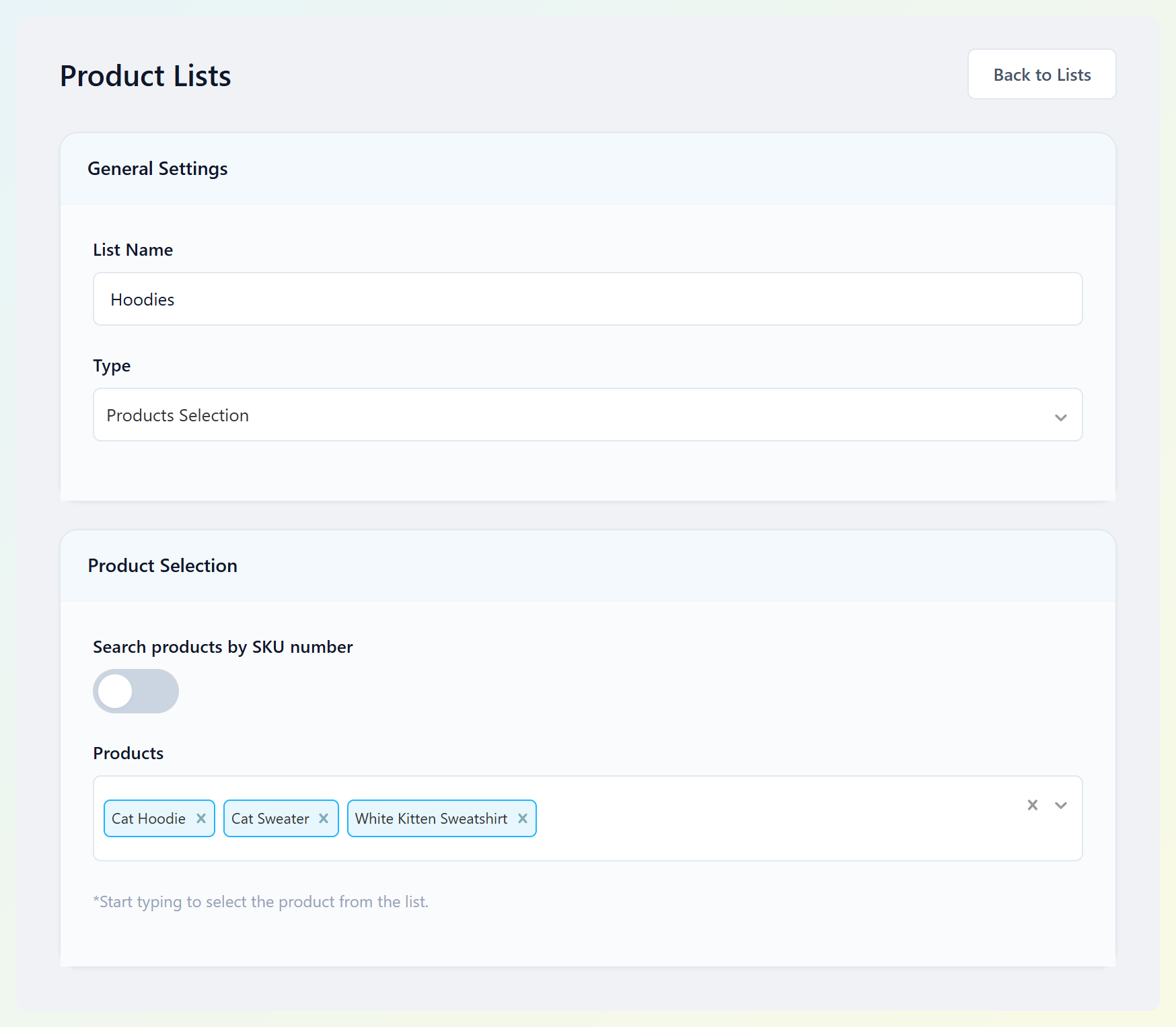
You can target products by creating a Product List under Pricing Rules > Product Lists and selecting it in a rule. Alternatively, the custom product filter within a rule can match products by category or tag.
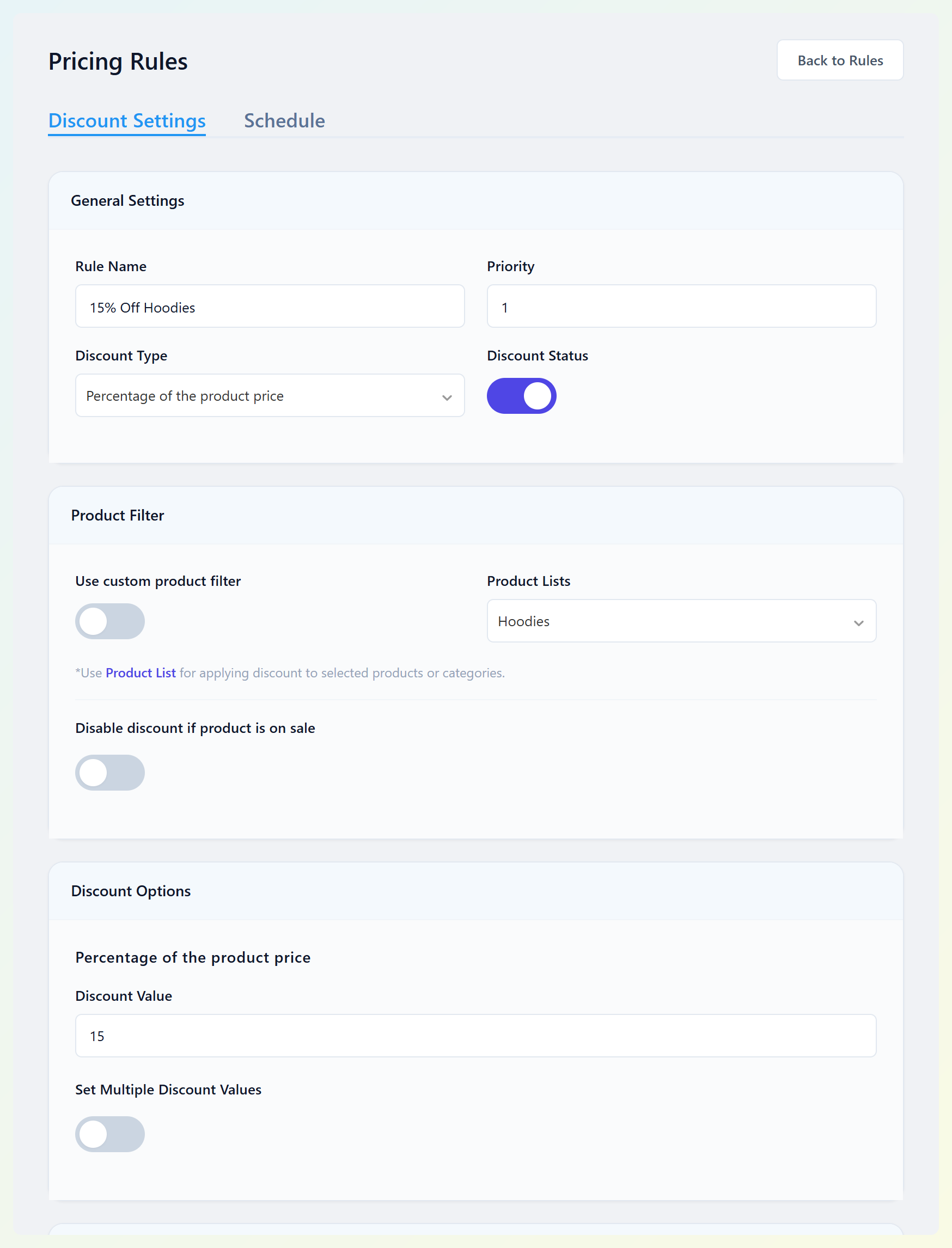
Each rule also has a Priority field. When several rules match the same cart, priority affects which rule gets considered first, so it helps to review rule order when promotions overlap.
If a quantity table on the product page is the main thing you need, Acowebs does that job well.
What Advanced Coupons Does Differently
Advanced Coupons extends the native WooCommerce coupon system with conditions, BOGO deals, scheduling, and other campaign features. Store credit is included too, although it works as a customer balance rather than a regular coupon. This makes it a good fit for stores running shareable or targeted promotions.
The free Advanced Coupons plugin already covers a lot of what Acowebs keeps in Pro:
- BOGO deals: Buy X get Y on specific products, set to apply once or repeat.
- URL coupons and QR codes: Share a link that applies the coupon when clicked.
- Six cart conditions: Cart quantity, cart subtotal, product categories in the cart, allowed role, disallowed role, and logged-in status, combined with AND/OR groups.
- Scheduling: Start and end dates with times.
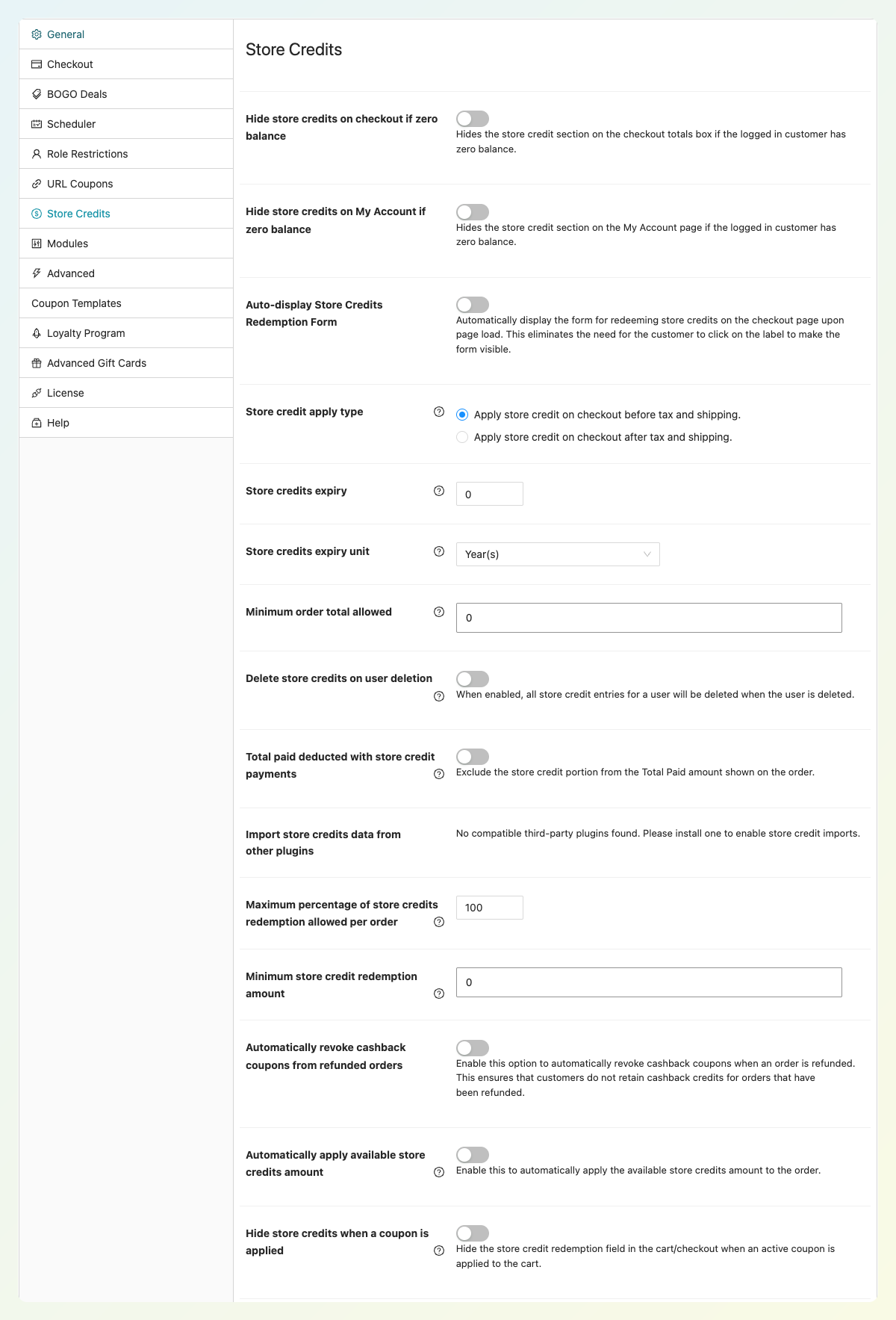
- Store credit: A full free store credit system with a balance ledger, refunds to store credit, a My Account tab, and redemption at checkout.
Advanced Coupons Premium then adds auto-apply coupons and one-click apply notices, every BOGO type (plus a choice of discounting the cheapest or most expensive items first), more than 15 extra cart conditions, Add Products, Shipping Overrides, payment method restrictions, and Virtual Coupons for bulk unique codes.
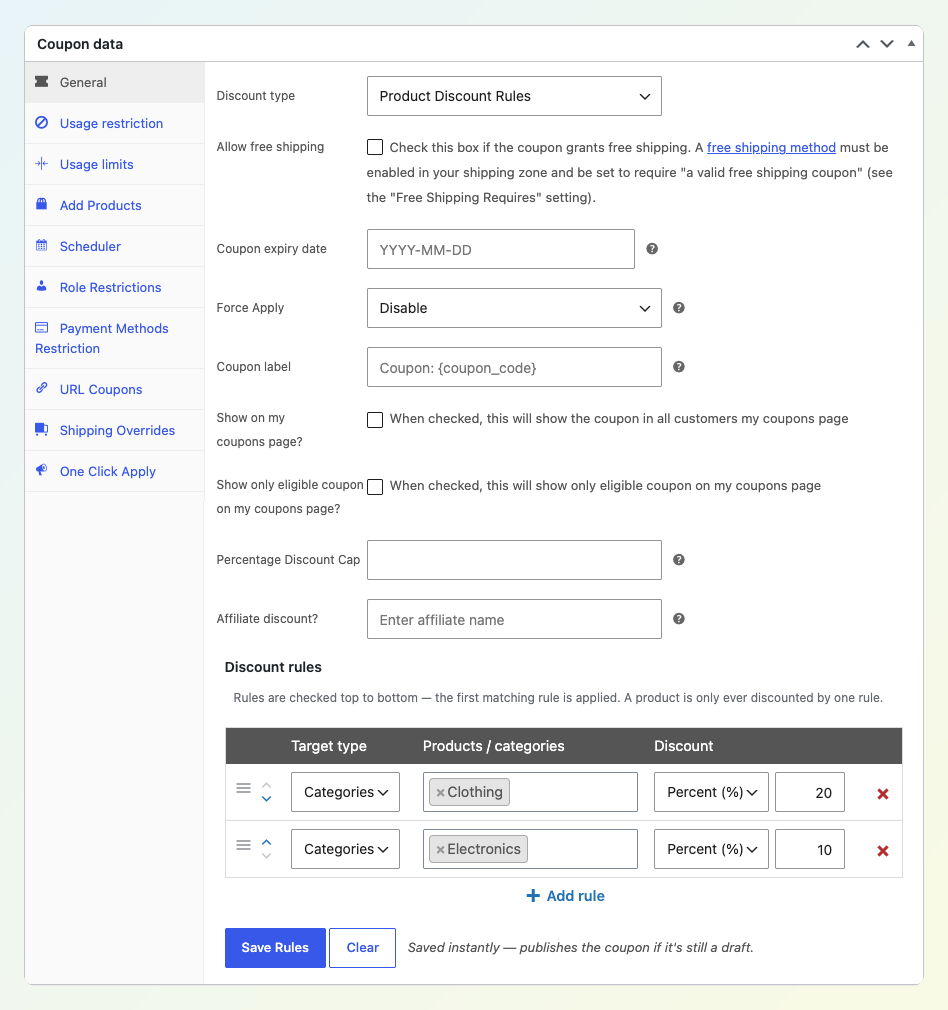
Two Premium coupon types map closely to rule-plugin habits. With Product Discount Rules, you list per-product or per-category rules inside one coupon. Rules are checked top to bottom and each item takes the first rule it matches, so an item never gets two discounts from the same coupon. Items that match no rule stay at full price, fixed amounts come off each unit, and a category rule also covers its subcategories.
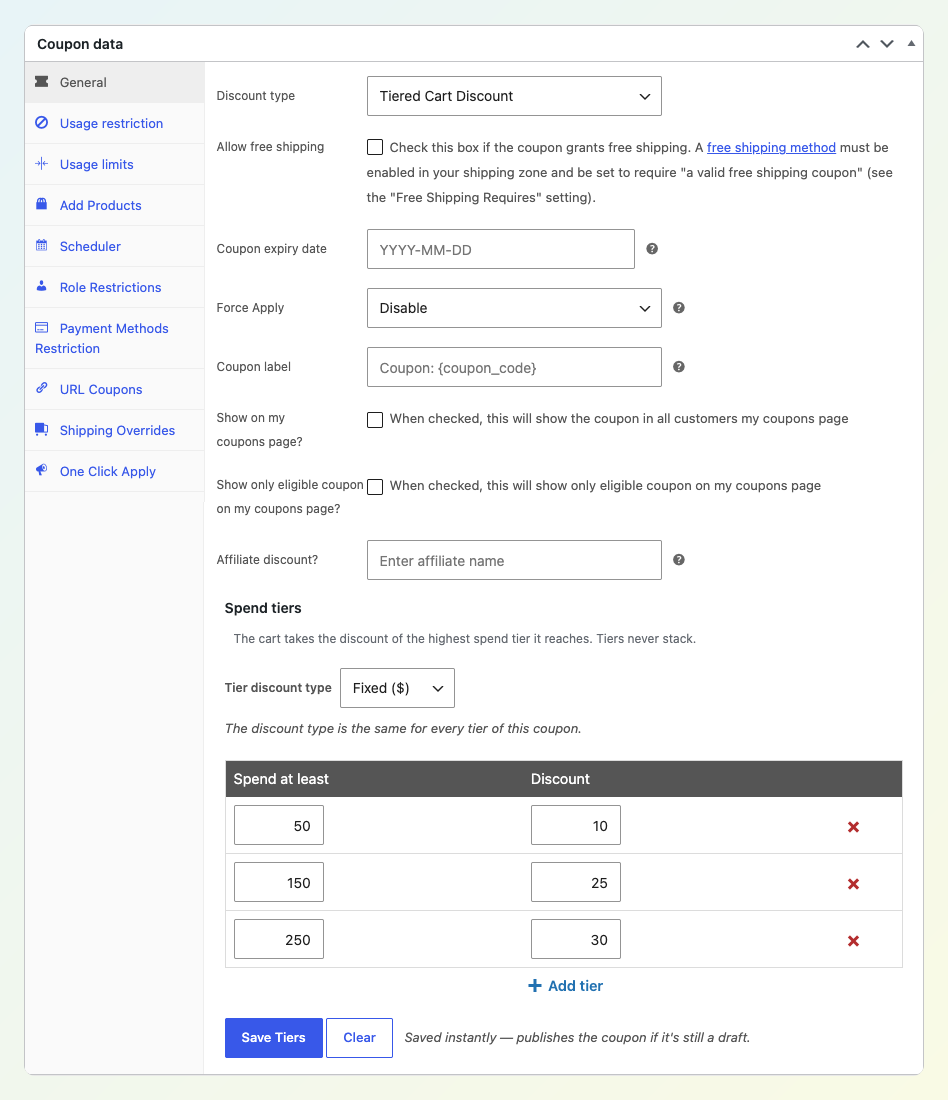
With tiered cart discounts, one coupon holds a whole spend ladder. The cart only takes the highest tier it reaches, so tiers never stack. You also pick one discount type (fixed or percentage) for the full ladder, which keeps the offer simple to explain.
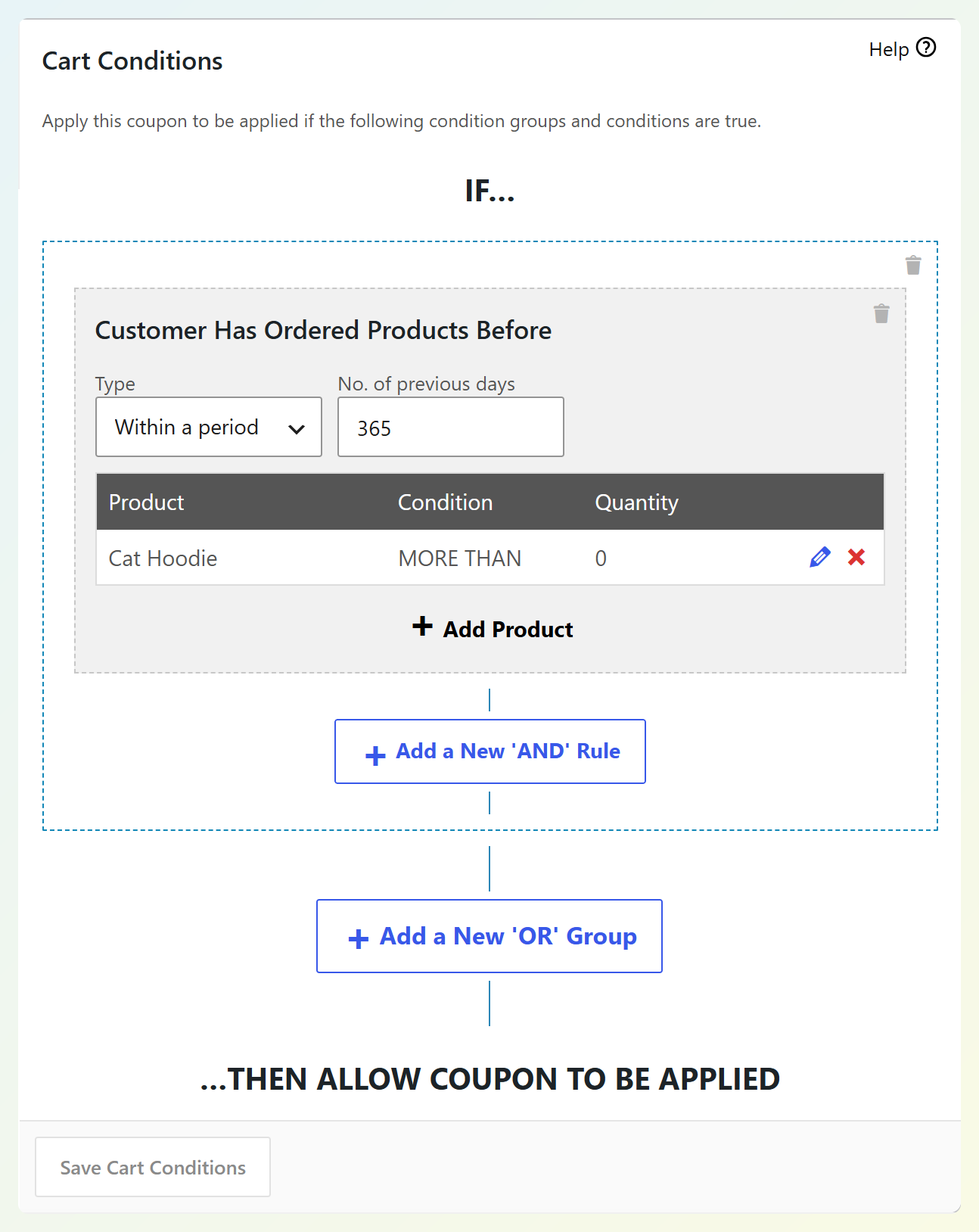
Advanced Coupons Premium lets you add purchase-history conditions such as Customer Has Ordered Products Before, Number of Customer Orders, and Total Customer Spend directly to a coupon. Acowebs Pro also supports restrictions based on order count and amount spent, but Advanced Coupons keeps that targeting in the same coupon you can share or schedule.
Advanced Coupons Vs Acowebs: Feature Comparison
Advanced Coupons includes free BOGO for specific products, URL coupons, and store credit, with more coupon-campaign tools in Premium. Acowebs offers automatic pricing rules and product-page quantity tables. Here is how their features compare:
| Feature | Advanced Coupons | Acowebs Dynamic Pricing With Discount Rules |
|---|---|---|
| Free version | Yes: store credit, BOGO, URL coupons, 6 cart conditions | Yes: pricing rules, quantity discounts, pricing table |
| Product-page quantity pricing table | No dedicated product-page quantity table | Yes |
| Discounts without a code | Yes, Premium auto-apply | Yes, rules apply automatically |
| BOGO deals | Free (specific products), Premium (all types) | Pro only |
| Tiered spend discounts | Premium (Tiered Cart Discount) | Pro (tiered discounts); the free version has cart-total and range-based rules |
| Per-product or per-category rules in one offer | Premium (Product Discount Rules) | Free (pricing rules with Product Lists) |
| Purchase-history and spend conditions | Premium | Pro only |
| Shareable URL coupons and QR codes | Free | Primarily automatic pricing rules, rather than shareable coupon links |
| Store credit | Free | Not included in this plugin |
| Loyalty points and gift cards | With the All Access Bundle | Not included in this plugin |
| Free products with an order | Premium (Add Products) | Pro (gift options) |
| Sale badges on product cards | Advanced Promo Kit (separate plugin) | Pro |
Acowebs has an advantage if your shoppers need to see quantity price breaks directly on product pages. Advanced Coupons does not provide that table. Advanced Promo Kit, a separate plugin in the All Access Bundle, can display discount badges or coupon-related text on product cards, but those badges are not a quantity pricing table.
Advanced Coupons includes store credit, URL coupons, and BOGO for specific products for free. You can start with those features without upgrading to Premium.
Pricing Compared: Advanced Coupons Vs Acowebs
Both plugins have a free version. Acowebs Pro has the lower starting price, while Advanced Coupons Premium adds tools for shareable, targeted, and automatically applied coupon campaigns.
Advanced Coupons Premium pricing, first year:
- Growth: $99.50 for one site.
- Business: $199.50 for unlimited sites.
- All Access Bundle: $249 for Advanced Coupons Premium, Advanced Loyalty Program, Advanced Gift Cards, and Advanced Promo Kit on unlimited sites.
Each plan comes with a 14-day money-back guarantee.
Acowebs Pro costs $49 for one site with a year of updates, or $119 for up to five sites with a year of updates. Lifetime licenses are also available.
Acowebs costs less to start, and $49 buys you a pricing-rule tool. Advanced Coupons Growth adds every BOGO type, auto-apply, more than 15 extra conditions, Product Discount Rules, Tiered Cart Discount, Shipping Overrides, and Virtual Coupons on top of free store credit. If you’d later want loyalty points or gift cards, the All Access Bundle covers all four plugins.
Which Plugin Should You Choose?
Advanced Coupons is the stronger choice if your store regularly runs coupon campaigns, shares targeted offers, or issues store credit. It includes free BOGO for specific products, shareable URL coupons, and store credit, while Premium adds purchase-history targeting and auto-apply.
Acowebs handles automatic pricing rules and product-page quantity tables well. Its Pro version also supports category BOGO and restrictions based on previous orders or spending. Advanced Coupons is a better fit when you want to manage those offers as coupon campaigns, send shareable codes, or provide a store credit balance.
Tip: If you run several promotions at once, review how your discounts interact before launching them. Keeping coupon campaigns in Advanced Coupons makes it easier to manage their settings together, while its built-in store credit gives you another way to reward customers without adding a separate store credit plugin.
Advanced Coupons suits:
- Campaign-led stores: Email codes, URL coupons, QR codes, and scheduled sales.
- Loyalty-focused stores: Returning-customer conditions now, with a path to Advanced Loyalty Program and Advanced Gift Cards later.
- Stores that refund in credit: Free store credit gives customers a balance they can use on a future order.
For a real example, our case study on how Z Grills uses Advanced Coupons shows a store running shipping offers, cart-recovery coupons, and free-product deals through coupons. If you’re also weighing Flycart’s plugin, we cover that one in Advanced Coupons vs Discount Rules for WooCommerce.
Switching From Acowebs To Advanced Coupons
Many Acowebs promotions can be recreated with Advanced Coupons, but the features are not always interchangeable. For example, Advanced Coupons cannot reproduce Acowebs’ product-page quantity pricing table. For coupon-style promotions, rebuild each offer, compare how it behaves in the cart, and use Premium auto-apply if customers should receive it without entering a code.
Here are some ways to recreate overlapping promotion types:
| Acowebs rule | Possible Advanced Coupons approach |
|---|---|
| Percentage off selected products or categories | Product Discount Rules targeting the same products or categories (Premium) |
| Discount tiers based on cart total | Tiered Cart Discount coupon (Premium) |
| BOGO on products or categories | BOGO deal (Free for specific products, Premium for categories) |
| Discount for a user role | Coupon with the Allowed Role cart condition (Free) |
| Discount based on order count or amount spent | Coupon with Number of Customer Orders or Total Customer Spend (Premium) |
| Gift product with an order | Add Products (Premium) |
For example, if an Acowebs Hoodies list includes all products in the Hoodies category, you can build a Product Discount Rules coupon that takes 15% off that category. If the list contains only selected hoodies, target those products instead. You can add another row for Accessories if needed. For setup details, see our Product Discount Rules and tiered cart discounts guides linked above.
With Premium auto-apply, eligible customers can receive the coupon discount without entering a code. Otherwise, they can enter the code or use a URL coupon link. Test the results against the original offer before switching off the old rule.
Before going live, test each coupon on a staging copy of your store. Deactivate overlapping Acowebs rules when switching to the new coupons to reduce the risk of stacked or conflicting discounts.
Frequently Asked Questions
Is there a free alternative to Acowebs Dynamic Pricing?
Yes, if you need a free plugin for coupon campaigns. Advanced Coupons Free includes BOGO for specific products, URL coupons, six cart conditions with AND/OR logic, scheduling, and store credit. Acowebs offers free automatic quantity-discount rules and a product-page pricing table, which Advanced Coupons does not replace. Acowebs requires Pro for BOGO.
Can Advanced Coupons apply discounts without a coupon code?
Yes, with Advanced Coupons Premium. Auto-apply adds the coupon as soon as the cart meets its conditions, so customers never type a code. Premium also offers one-click apply notices, which show shoppers an offer they can add with a single click.
Does Advanced Coupons show a pricing table on the product page?
No. Advanced Coupons applies discounts in the cart rather than rewriting catalog prices or showing a quantity table. If you want shoppers to see an offer before they add to cart, Advanced Promo Kit (a separate plugin in the All Access Bundle) can show badges with the discount percentage on product cards.
Can I run both plugins together?
You can install both, but do not assume their discounts will combine as intended. Acowebs uses virtual coupons for its pricing rules, so check how the two plugins handle overlapping offers on a staging site before using them together on your live store.
Which plugin handles BOGO deals for free?
Advanced Coupons. Its free plugin includes Buy X Get Y deals on specific products. Premium adds more BOGO types, including category and any-product offers, plus a setting to choose the order in which eligible items are discounted. Acowebs requires Pro for BOGO.
Choosing Between Pricing Rules And Coupon Campaigns
Acowebs is useful when you want automatic pricing rules and quantity tables on product pages. If you also want shareable coupons, targeted offers, and store credit, Advanced Coupons is a strong Acowebs dynamic pricing alternative. You can start with its free campaign tools and add Premium when you need more targeting and automation.
Your next steps:
- Learn how rule-led and coupon-led discounting differ
- Compare the features side by side
- Check the first-year pricing
- Map your Acowebs rules to coupons
Start with the Advanced Coupons free plugin for free BOGO, URL coupons, and store credit, then explore the Advanced Coupons Premium discount features when you’re ready for auto-apply, Product Discount Rules, and tiered cart discounts.