Online shoppers rely on visual cues to decide what to click and what to buy. Using compelling sale badges and product labels for WooCommerce is a powerful way to highlight key offers, guide attention, and help customers understand value at a glance. That’s exactly why we built Advanced Promo Kit, our newest plugin designed to give WooCommerce store owners a simple, flexible way to showcase promotions strategically! 🎉
With Advanced Promo Kit, you can create eye-catching product labels, target them with precise conditions, schedule them for upcoming campaigns, and style them to match your branding. It’s everything you need to make your promotions more visible, more clickable, and more effective.
Ready to learn what it can do for your store? Let’s get right into it!
What You Can Do With Advanced Promo Kit
Advanced Promo Kit gives you a complete visual promotion toolkit without the complexity. We’ve designed the plugin to make showcasing promotions easy, intentional, and on-brand for your store.
Here are some of its most powerful features:
1. Create global and product-specific product labels
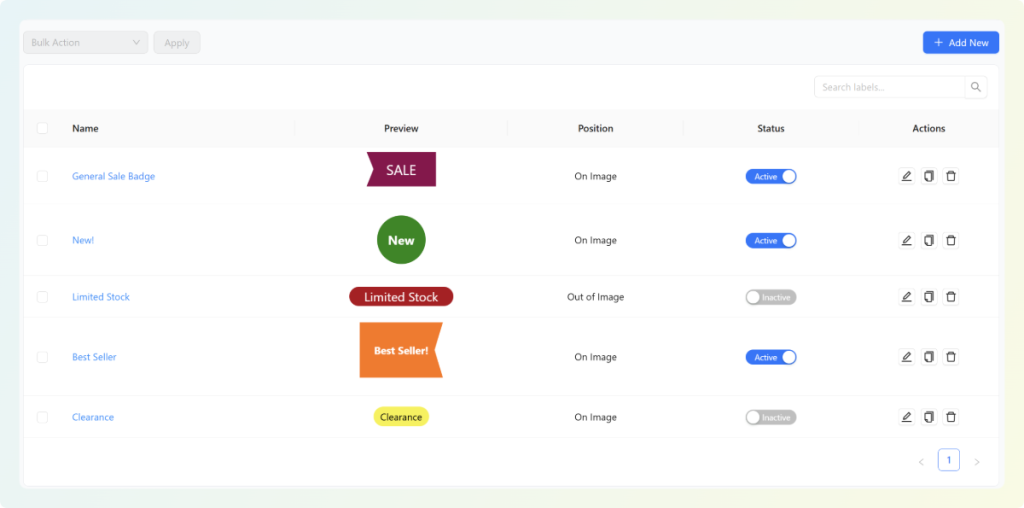
With Advanced Promo Kit, you have full control over where WooCommerce sale badges and product labels appear. You can create global labels that automatically apply to multiple products. This is perfect for storewide sales, seasonal campaigns, or any promotion that repeats often. You can easily manage global labels in your Manage Labels dashboard, where you can edit, delete, or disable them as needed.
For more targeted campaigns, you can also create product-specific labels for special items like bestsellers or limited-edition products. You can configure this directly from the WooCommerce product edit screen, making it seamless to apply one-off labels while updating your product details.
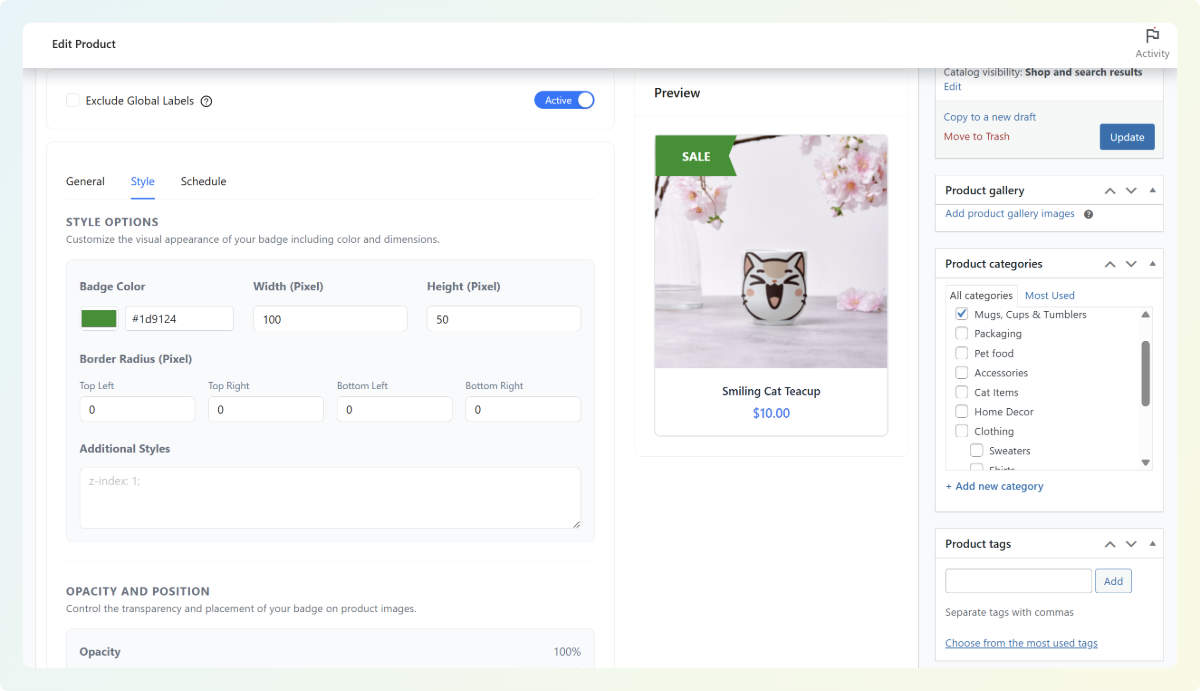
With both global and product-level options available, you have complete flexibility to decide exactly where your labels appear and how they elevate your promotions.
2. Design on-brand badges with full styling controls
Your promotions should look and feel like your brand. Advanced Promo Kit gives you complete control over how your badges appear, so you can design on-brand sale badges and product labels for WooCommerce without needing custom CSS or coding skills.
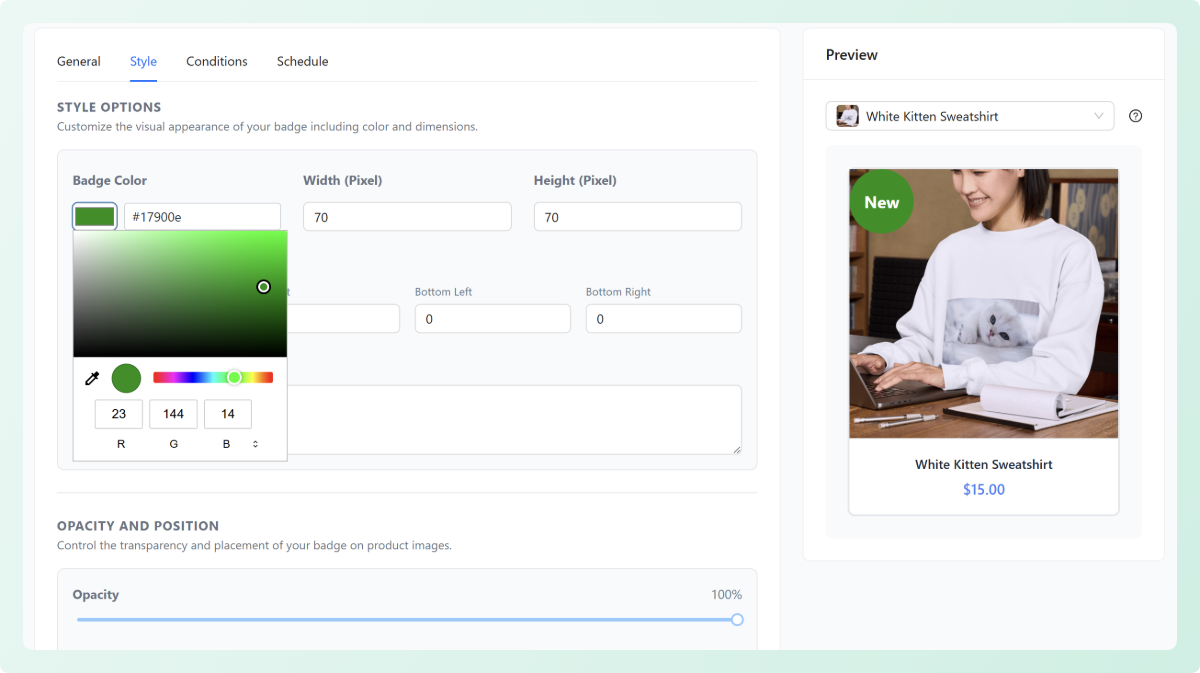
Choose from multiple shapes and layouts, then customize colors, backgrounds, borders, spacing, and more. You can even add animations or make labels clickable with a custom URL—perfect for directing shoppers to collections, bundles, or URL coupons.
3. Preview your labels live before publishing
Advanced Promo Kit makes it easy to visualize how your labels will look on real product listings with a built-in live preview mode.
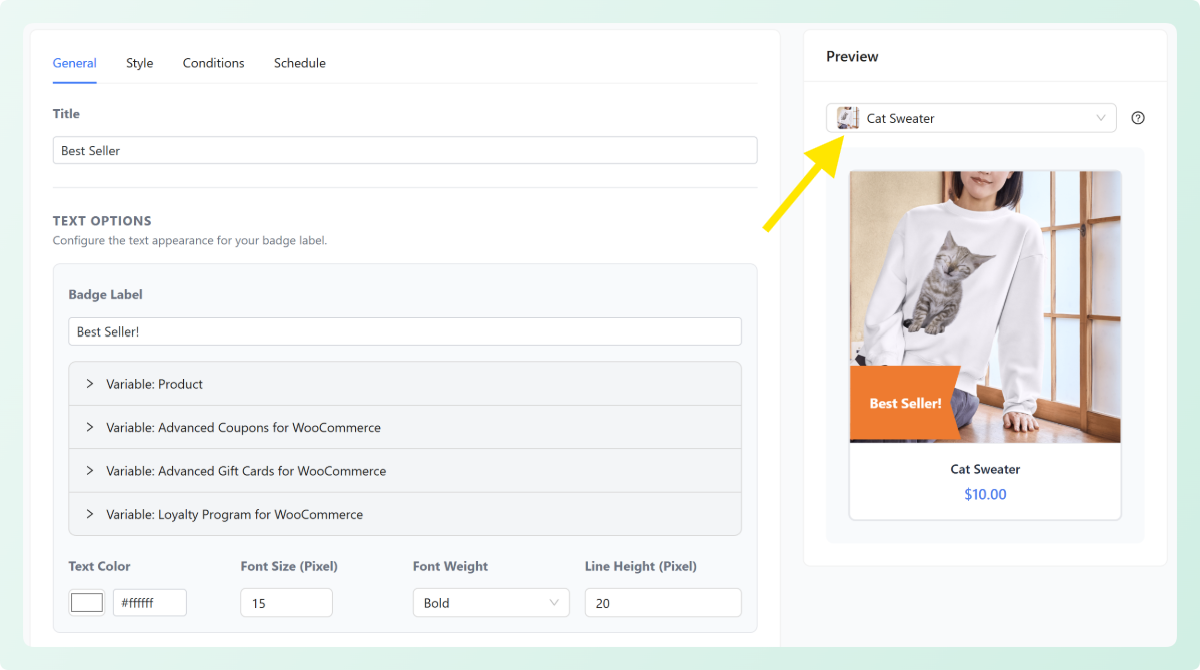
You can even choose which product to preview, allowing you to test labels against different product types. With this feature, every color choice, text update, size adjustment, and layout tweak is shown instantly—helping you tailor the design before anything goes live.
4. Target labels with powerful rule-based conditions
With Advanced Promo Kit, you have full control over when and where your labels appear. Instead of manually adding sale badges and product labels for WooCommerce one by one, you can automate which products they show using smart condition groups.
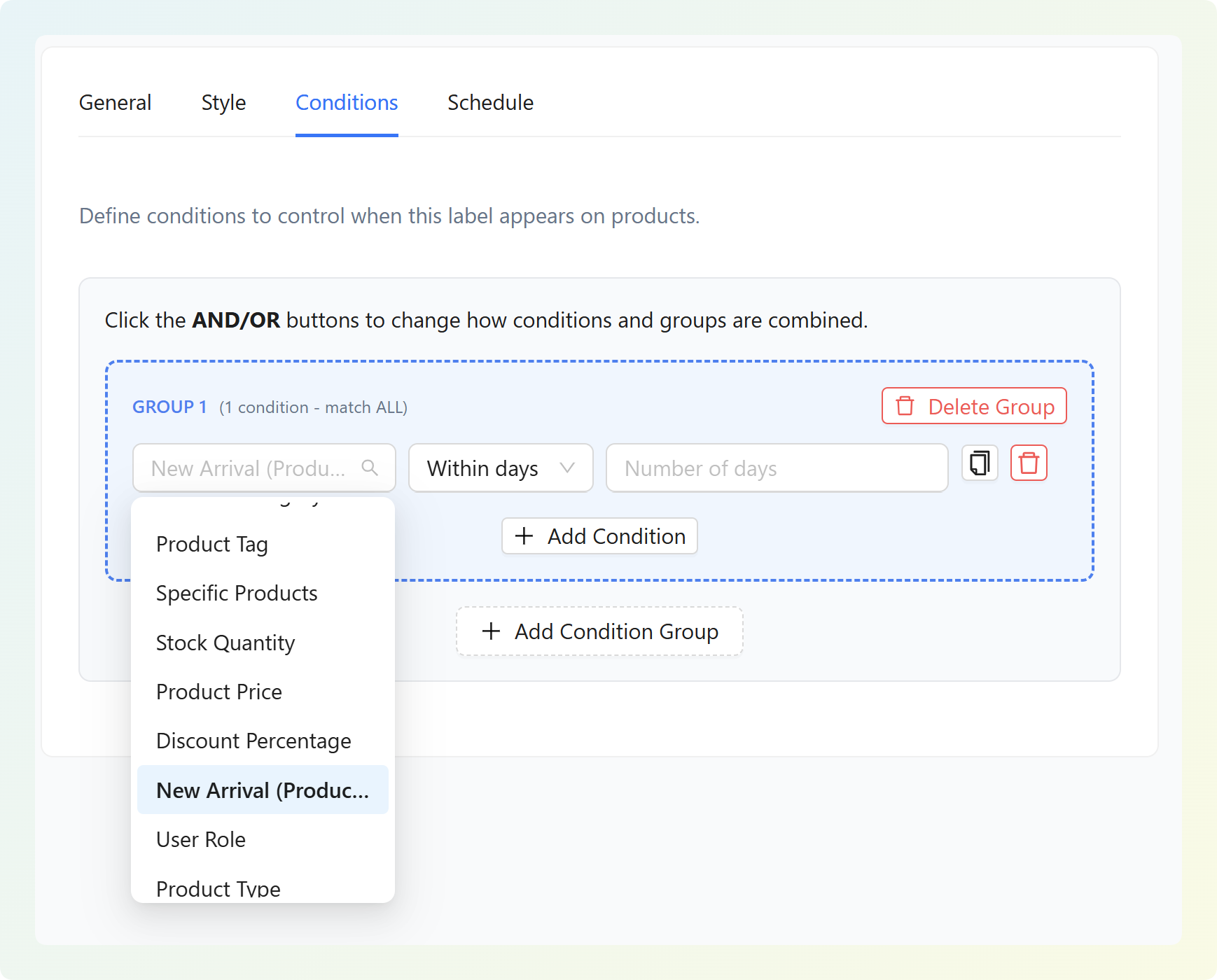
Choose from a wide range of conditions such as product tags, specific products, stock quantity, product price, discount percentage, user role, product type, or even “new arrival” timing based on product age. You can combine multiple conditions using AND/OR logic, create structured condition groups, and build highly targeted label rules without touching code.
This flexibility lets you tailor product labels to product status and promotional strategy without having to add each label manually.
5. Schedule labels for limited-time sales and seasonal campaigns
This feature is perfect if you often run time-sensitive promotions like flash sales and seasonal discounts. Advanced Promo Kit has a built-in scheduling system that lets you set a start and end date for your product badges and labels.
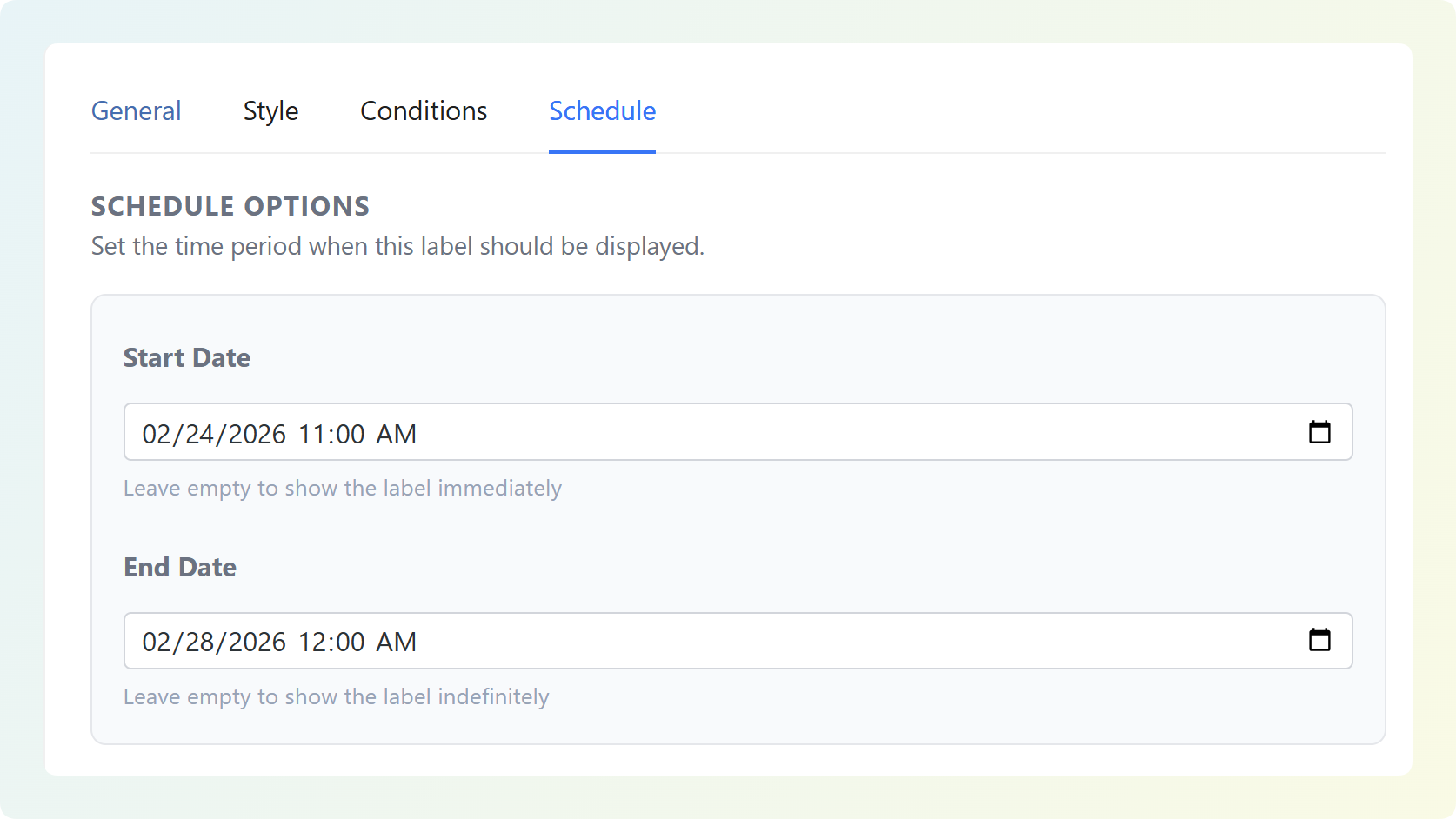
You can schedule labels weeks or months in advance, giving you the freedom to plan campaigns early and ensure your promotions go live even if you’re not online. By combining targeting rules with scheduling, you can run automated promotions and showcase your best offers at the right time.
6. Use dynamic placeholders for discounts, prices, and stock
To ensure your product labels stay accurate and trustworthy, it’s important that they reflect real-time product data. With Advanced Promo Kit, you can pull dynamic values directly into your labels using built-in placeholders. These include variables like:
- {product_price}
- {regular_price}
- {sale_price}
- {discount_percent}
- {discount_amount}
- {stock_quantity}
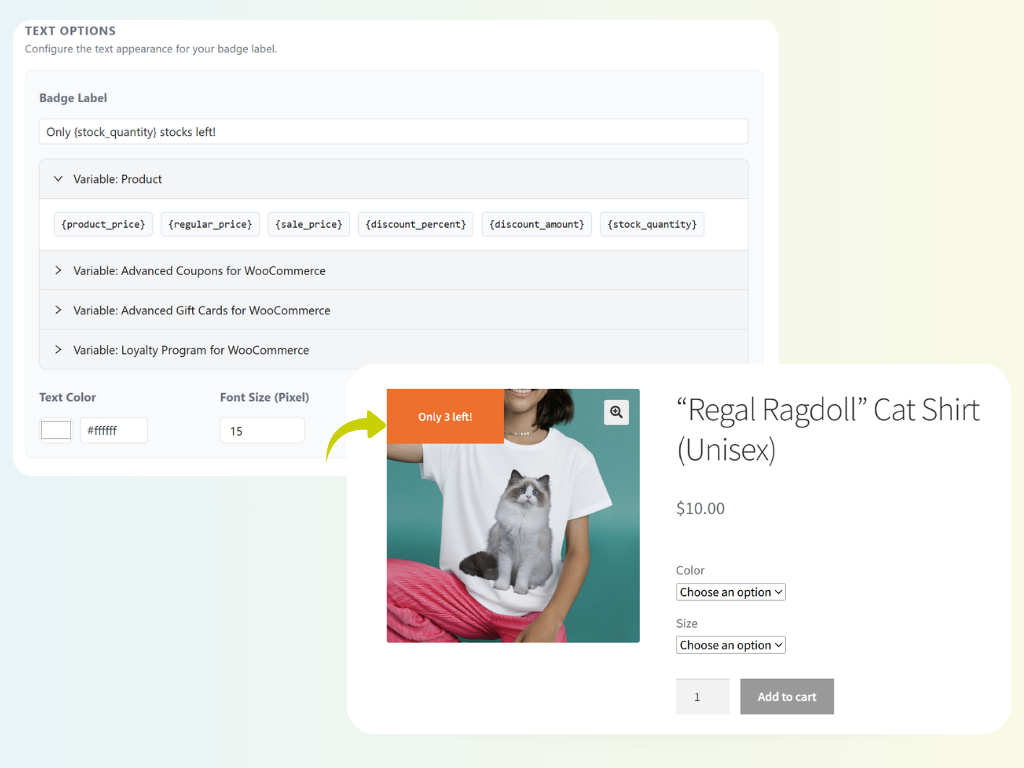
This lets you set up compelling WooCommerce product labels like “Save {discount_percent}%” or “Only {stock_quantity} left!” From working with thousands of WooCommerce stores, we’ve seen how real-time, accurate messaging can significantly improve shopper clarity and help them make more confident buying decisions.
7. Stack multiple labels per product with drag-and-drop priority
WooCommerce store owners often run multiple promotions at the same time. Advanced Promo Kit makes managing these promotions simple by giving you full control over how many product labels appear and which labels display first.
In the General settings, you can enable label stacking and set how many labels appear per product.
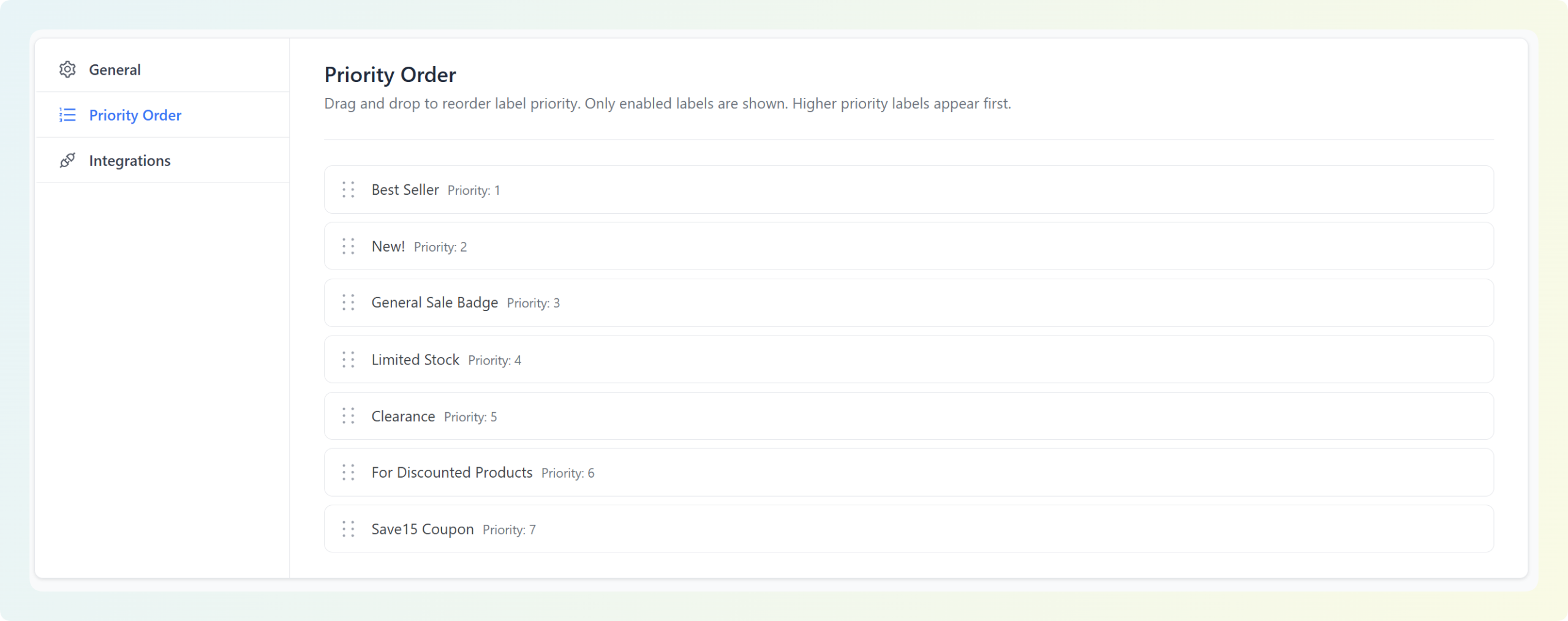
You also have access to the Priority Order in the settings tab, which lets you order labels using an intuitive drag-and-drop priority list. These features help you maintain clean and intentional product pages even when multiple promotions overlap.
8. Highlight coupons, loyalty points, and gift cards in your product labels
Advanced Promo Kit works seamlessly with the rest of the Advanced Coupons plugins. If you’re using Advanced Coupons, Loyalty Program, or Gift Cards, you can pull key promotional values directly into your labels, making it easier for shoppers to understand the benefits of buying right now.
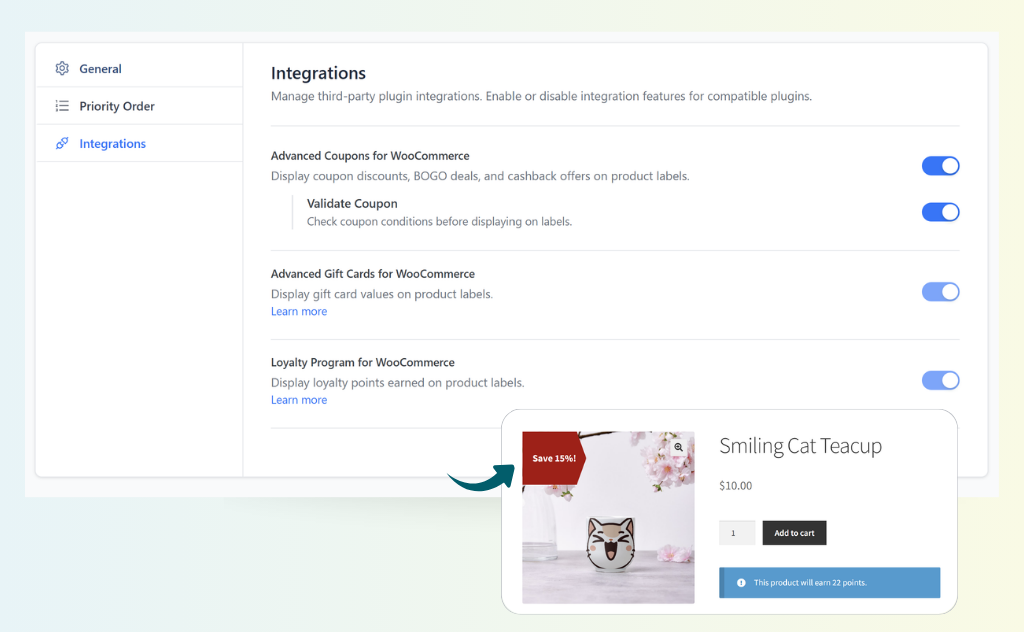
Inside the editor, you’ll find additional dynamic variables such as:
- Coupons: Show coupon discounts, BOGO deals, cashback offers, or special promos using real coupon data. You can even validate coupon conditions before displaying the label to ensure accuracy.
- Gift card values: Automatically display gift card values on eligible products, helping shoppers instantly recognize gifting options.
- Loyalty points earned per purchase: Display how many loyalty points shoppers can earn when purchasing an item, helping boost engagement and repeat purchases.
These integrations make your product labels far more compelling because they highlight benefits customers care about—discounts, rewards, gifting value, and incentives. When customers see these perks upfront, they’re more likely to explore the product and complete a purchase.
💡GOOD TO KNOW: The All Access Bundle gives you access to all four plugins—Advanced Coupons, Loyalty Program, Gift Cards, and Advanced Promo Kit. Together, they form a complete promotional toolkit that lets you run advanced coupon campaigns, reward shoppers with points, sell gift cards, and showcase everything visually with product labels.
How Advanced Promo Kit Can Help Grow Your Store
Even if you’re running the most compelling offers, they won’t perform well if they’re not visible. Advanced Promo Kit gives you everything you need to make your offers stand out using strategic sale badges and product labels for WooCommerce. When used strategically, these labels can help guide attention and influence customer behavior in meaningful ways.
Here’s how the plugin helps your store grow:
Draw shopper attention to the right products at the right time
Online shoppers often skim before they read, and visual cues play a major role in which products they notice first. With Advanced Promo Kit, you can quickly spotlight your most important products and offers. This makes it easy to highlight limited-stock items, bestsellers, or items on sale.
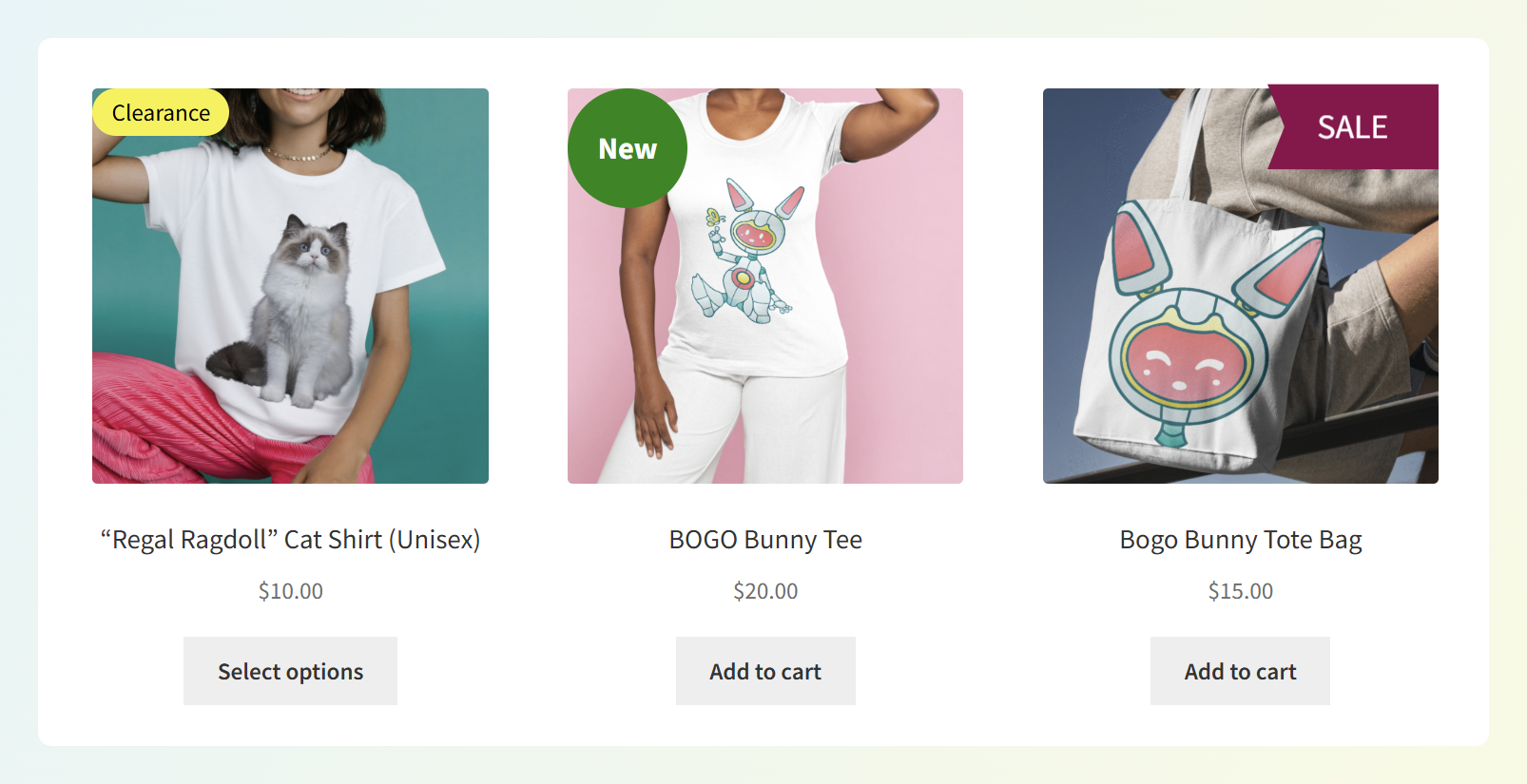
As a result, shoppers don’t overlook key items or miss out on your best deals, which brings us to the next benefit!
Boost click-through rates on promotions and featured collections
Clear, visually consistent product labels give customers immediate context and communicate value at a glance. This is especially effective when promoting:
- Seasonal or limited-time sales
- Featured collections or curated bundles
- Discounts or price drops
- Loyalty points or rewards messaging
Product badges that highlight urgency, savings, or added value naturally increase click-through rates, guiding shoppers toward the products you want to promote. With more attention on high-priority products, you gain more opportunities to convert visitors into customers.
Reduce decision friction with clear visual cues
WooCommerce product labels help eliminate uncertainty by displaying the most important information upfront. Badges like “Save 15%,” “Only 3 Left,” or “Earn X Points” provide instant clarity and build confidence in the purchase decision. So, instead of guessing or digging through product details, shoppers immediately understand the value and urgency behind each item.
As a result, customers can compare products faster, recognize which options offer the best deal, and understand which items they should act on quickly. This reduces hesitation and creates a smoother path from product discovery to checkout.
Frequently Asked Questions
What’s the difference between global labels and product-specific labels?
Global labels are created once and automatically applied to multiple products based on the conditions you set. They’re perfect for storewide discounts, seasonal campaigns, or recurring promotions. Product-specific labels, on the other hand, are added directly from the WooCommerce product edit page and apply only to that individual item. You can use this option to highlight specific offers for certain items, limited editions, or special product-level offers.
How many labels can I show on a single product, and how are they prioritized?
You can choose the exact number of labels to display and enable label stacking in the plugin’s General settings. While you can allow up to 10 labels per product, we recommend keeping it minimal for the best visual experience. Each label follows a priority order that you control using a drag-and-drop list in the settings. This ensures your most important messages—such as urgency, discounts, or special offers—always appear first.
Is Advanced Promo Kit included in the All Access Bundle?
Yes! Advanced Promo Kit is included in the All Access Bundle, which gives you access to all plugins in the suite—coupons, loyalty points, gift cards, and now powerful sale badges and product labels for WooCommerce. It’s the easiest way to unlock the full promotional toolkit for your store.
Wrapping Up
Advanced Promo Kit gives store owners a powerful, flexible way to make promotions stand out using sale badges and product labels for WooCommerce. With this plugin, you can easily create, customize, and schedule product labels that guide shoppers toward your best products.
In this guide, we walked you through some of its most powerful features, including:
- Creating global and product-specific labels
- Designing fully customizable, on-brand badges
- Previewing your labels live before publishing
- Targeting labels with smart, rule-based conditions
- Scheduling labels for time-limited promotions
- Using dynamic placeholders for real-time product data
- Stacking multiple labels with drag-and-drop priority
- Highlighting coupons, loyalty points, and gift cards
If you’re looking to make your offers more visible and increase conversions in your WooCommerce store, Advanced Promo Kit is the perfect addition to your marketing toolkit.
Explore the plugin today and start bringing your promotions to life with beautiful, high-converting product labels! 💛