
If you’re looking for a YITH dynamic pricing alternative, chances are you want more flexibility with your WooCommerce promotions. Beyond automatic price discounts, you might want to reward loyal customers, share exclusive coupon codes, or run special offers without managing a long list of pricing rules.
That’s where Advanced Coupons comes in! It builds on WooCommerce’s existing coupon system, giving you more ways to create and manage promotions. You can start with specific-product BOGO deals, URL coupons, and store credit for free, then explore Premium features like category discounts, spend tiers, and auto-apply.
In this guide, we’ll compare Advanced Coupons with YITH WooCommerce Dynamic Pricing & Discounts, explore where each plugin works best, and walk through how to switch without accidentally stacking discounts.
Why Store Owners Look For A YITH Dynamic Pricing Alternative
Here are four practical reasons to consider switching:
- No free starting point: YITH WooCommerce Dynamic Pricing & Discounts is a premium-only plugin, while Advanced Coupons has a free version you can try first.
- Rule upkeep: Seasonal dates, exclusions, and overlapping offers all need attention as campaigns change.
- Shareable deals: YITH’s automatic price rules are different from coupon codes you can send to subscribers or share through a link.
- More than price discounts: Advanced Coupons includes store credit in its free plugin. Loyalty points and gift cards are available through separate plugins in its All Access Bundle.
If you’re still weighing the strategy itself, our guide to WooCommerce dynamic pricing and discounts explains how it works on a WooCommerce store. If you’re also weighing other pricing plugins, see our Acowebs Dynamic Pricing alternative comparison. And if gift cards are part of the same clean-up, our YITH gift cards alternative comparison covers that side, while PW WooCommerce Gift Cards vs Advanced Gift Cards looks at another popular option.
What YITH Dynamic Pricing Does Well
YITH WooCommerce Dynamic Pricing & Discounts can change prices directly on shop and product pages, so shoppers can see the offer before adding anything to the cart. That’s a meaningful advantage if quantity-based pricing is central to your store.
YITH reports that more than 27,000 customers use the plugin, and its product page shows a 4.47 out of 5 rating from 122 reviews. It supports several common promotion setups:
- Shop-wide and category price rules: You can take 10% off the whole catalog or one category without editing each product.
- Quantity tables on the product page: Quantity rules can show a horizontal or vertical price table, and the displayed price updates as shoppers change the quantity.
- Cart rules with notices: Cart rules can reduce the order total or offer free shipping above a threshold, with dynamic notices that highlight available offers.
- Special offers and gifts: 3-for-2, 2-for-1, BOGO, and gift products, plus modal windows that promote qualifying offers.
Free shipping has an extra setup step in YITH: it’s available through cart rules, and you’ll need to enable WooCommerce free shipping and select a valid free-shipping coupon.
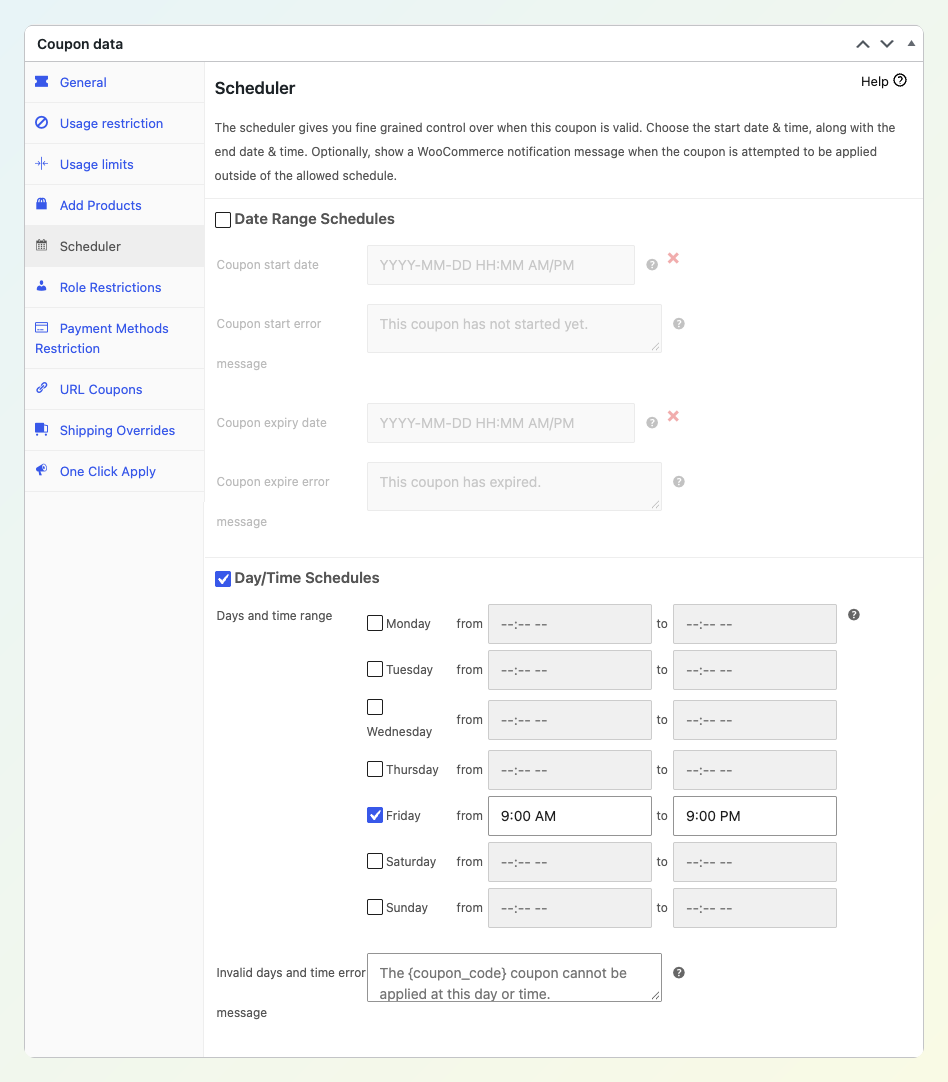
YITH lets you schedule a rule with start and end dates, but you can’t select specific weekdays. A recurring Friday-only offer needs a different approach.
How Advanced Coupons Handles The Same Promotions
Advanced Coupons builds many of these promotions through WooCommerce coupons, with extra discount types, cart conditions, and automation. It extends the coupon screen you already use, starts with a free plugin, and adds Premium features like auto-apply when a deal should work without a code.
Here’s how Advanced Coupons handles four common promotion setups:
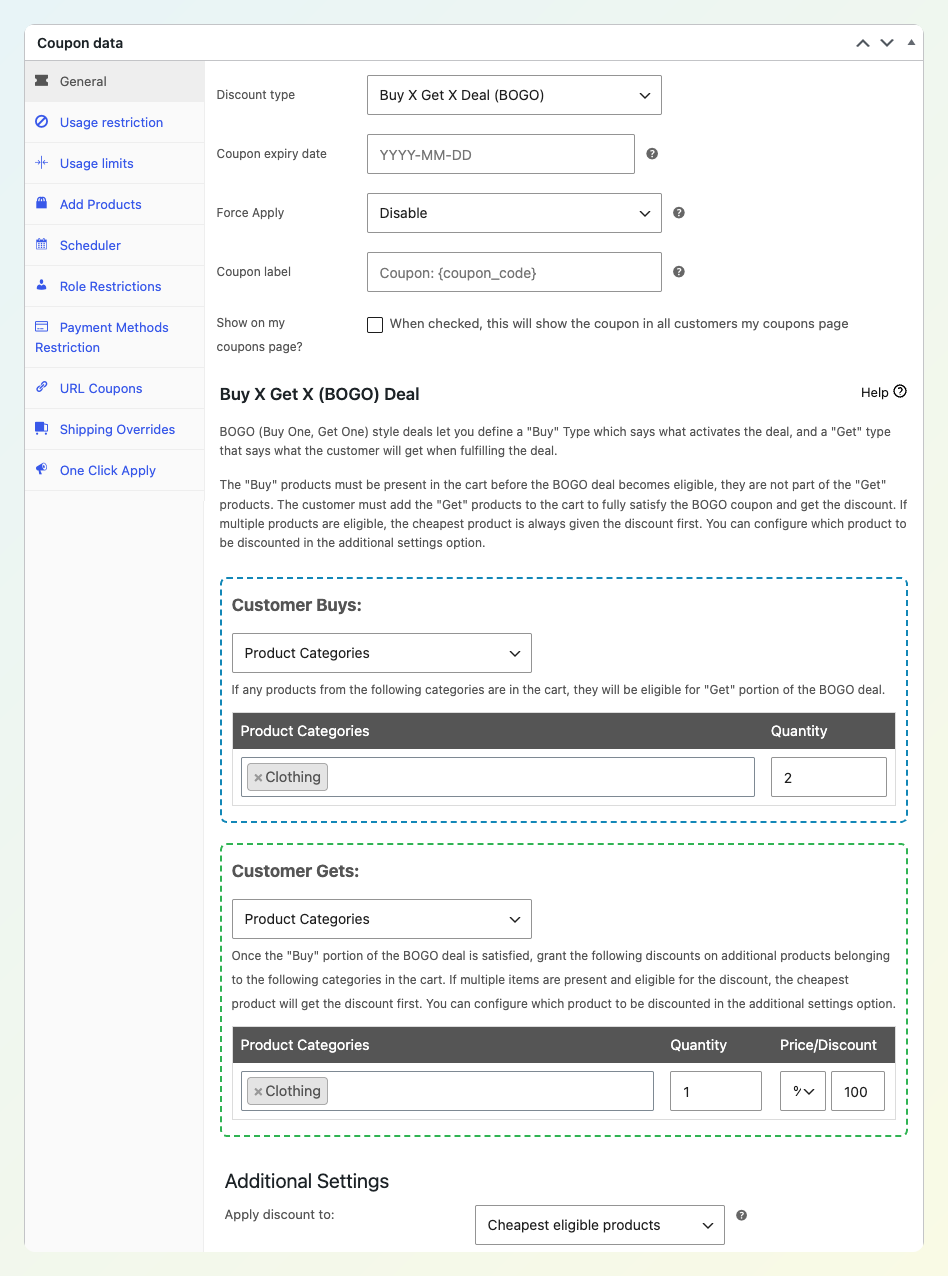
- A 3-for-2 deal with the cheapest item free: Build a Premium BOGO coupon for two qualifying items and one free item. Under “Apply discount to,” choose “Cheapest eligible products” so the lowest-priced eligible item in the Get group receives the discount.
- Category sales in one code: When you pick the Product Discount Rules type, the usual Coupon amount field disappears because each rule carries its own value. Rules are checked from top to bottom, and each item takes the first rule it matches, so an item never gets two discounts from the same coupon.
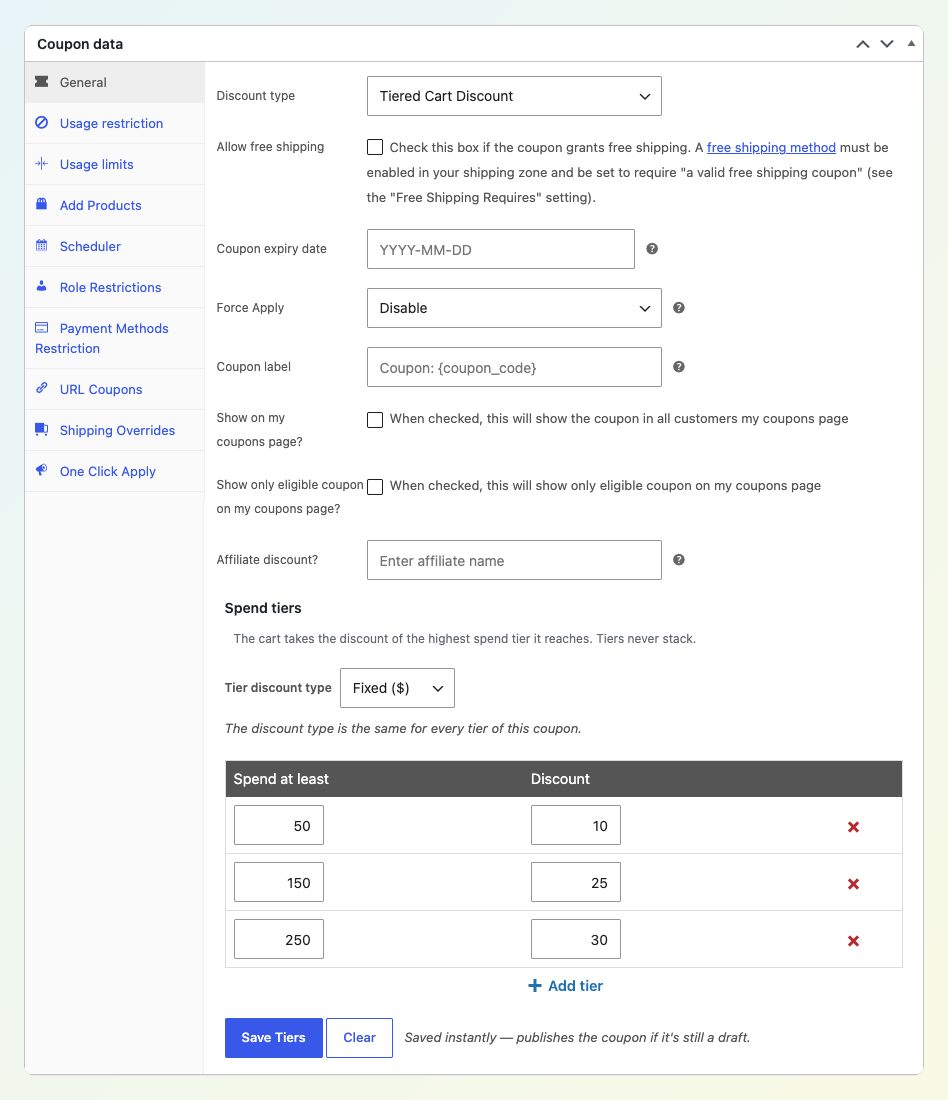
- A spend ladder in one coupon: A Tiered Cart Discount coupon holds every spend threshold in a single code. The cart takes the highest tier it reaches, and only that one.
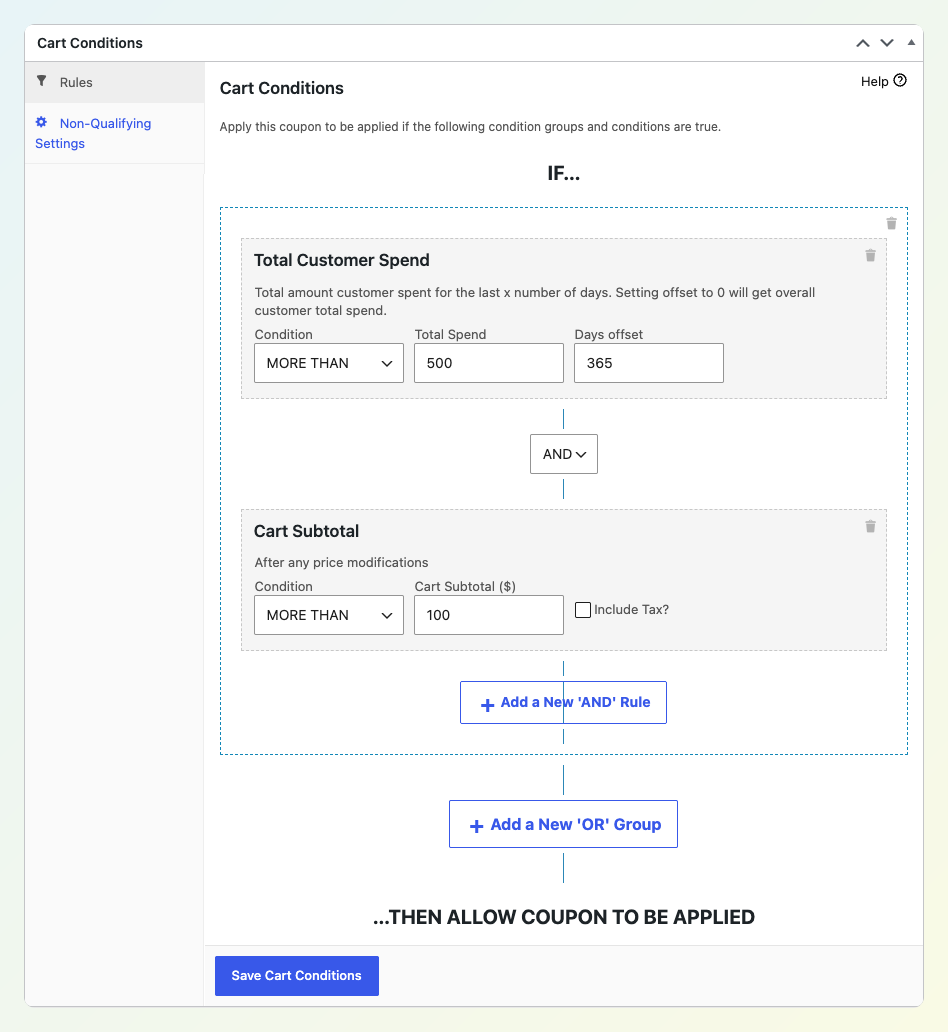
- Customer history on the coupon: Total Customer Spend, Customer Has Ordered Products Before, and Number of Customer Orders are Premium cart conditions. VIP and returning-customer offers sit on the same coupon as the discount itself.
For a real example, our case study with Z Grills shows how the team offers a free bag of pellets or barbecue accessories with a grill and runs limited-time free shipping offers.
Promotion-By-Promotion Mapping
Here’s how common YITH promotions translate into Advanced Coupons coupons.
| Promotion | How to run it in Advanced Coupons | Plan |
|---|---|---|
| Buy one get one free | BOGO coupon, specific products | Free |
| 3 for 2 or 2 for 1 across a category | BOGO coupon, product categories, apply discount to cheapest | Premium |
| 20% off one category, 10% off another | Product Discount Rules coupon | Premium |
| Spend $100 get $10, spend $250 get $30 | Tiered Cart Discount coupon | Premium |
| Free shipping over a cart total | Minimum-spend free shipping: WooCommerce’s Free shipping method. For coupon-based free shipping, set that method to accept a valid free-shipping coupon and enable Allow free shipping on the coupon; add a Cart Subtotal condition if needed. Lower paid shipping rates: Shipping Overrides | WooCommerce core; Advanced Coupons Free for coupon conditions; Premium for Shipping Overrides |
| Free gift product with a purchase | Add Products with a $0 override price and a qualifying Cart Condition; use auto-apply for a no-code gift | Premium |
| Discount for returning or high-spend customers | Customer Has Ordered Products Before or Total Customer Spend condition | Premium |
| Black Friday sale that starts and ends itself | Scheduler start and end date and time | Free |
| Deal that only runs on certain weekdays | Weekly Day/Time Schedules | Premium |
| Discount with no code to type | Auto-apply | Premium |
| Quantity price table on the product page | No built-in quantity pricing table. Advanced Promo Kit can highlight coupon offers with product badges | Not applicable |
For a closer look at BOGO deals, our WooCommerce BOGO coupon guide walks through specific-product offers, category triggers, and other setups. Specific-product BOGO is free, while category-based deals require Premium.
Category sales map to the Product Discount Rules coupon type, which sets a different percentage or fixed amount per product or category inside one coupon. Categories include their subcategories, so one rule on Clothing also covers Hoodies underneath it.
Spend-and-save offers map to a Tiered Cart Discount coupon. You choose fixed or percentage once for the whole ladder, then add a threshold and a discount per tier.
Feature And Pricing Comparison
Both plugins handle BOGO, category promotions, and cart discounts, but in different ways. Advanced Coupons adds coupon links, store credit, and coupon campaign tools, while YITH offers dynamic product pricing, quantity tables, and promotional popups.
| Capability | Advanced Coupons | YITH WooCommerce Dynamic Pricing & Discounts |
|---|---|---|
| Free version | Yes, the free Advanced Coupons plugin | No, sold as a premium plugin |
| BOGO, 3×2, and 2×1 deals | Yes (specific products free, every BOGO type in Premium) | Yes |
| Different discounts per category in one offer | Product Discount Rules coupon | Category and shop-wide price rules |
| Spend-tier cart discounts | Tiered Cart Discount coupon (multiple thresholds in one coupon) | Cart-total discount rules, rather than one coupon with multiple tiers |
| Returning and high-spend customer offers | Total Customer Spend, Customer Has Ordered Products Before, Number of Customer Orders | Order count and total spent rules |
| Weekday-only scheduling | Yes, weekly Day/Time Schedules (Premium) | No recurring weekday-only schedules |
| Shareable codes and URL coupons | Yes, URL coupons are free | Coupon sharing is separate from YITH’s automatic pricing rules |
| Bulk unique codes | Virtual Coupons (Premium) | Not part of its dynamic pricing rules |
| Store credit | Included in the free plugin | Not part of its dynamic pricing rules |
| Quantity price table on the product page | No | Yes |
| Cart messages about offers | Non-qualifying notices (free) and one-click apply notices (Premium) | Dynamic cart notices |
Advanced Coupons Premium costs $99.50 for the first year on the Growth plan, which covers one site. Business costs $199.50 for the first year and covers unlimited sites. The All Access Bundle costs $249 for the first year and adds Advanced Loyalty Program, Advanced Gift Cards, and Advanced Promo Kit, all with a 14-day money-back guarantee.
YITH includes one year of updates and support with a 30-day money-back guarantee, compared with 14 days for Advanced Coupons. The difference is that Advanced Coupons has a free plugin you can use to try specific-product BOGO, cart conditions, and scheduled coupons before paying for Premium-only features.
Moving Your YITH Rules Into Advanced Coupons
Start by listing the offers you still use, then rebuild them as coupons. Some YITH rules may become separate coupons, while several category or spend-tier discounts can fit inside one Advanced Coupons coupon. To avoid overlapping offers, disable the old YITH rule before its replacement goes live.
- List your active rules: Note each enabled YITH rule with its dates, products, user roles, and cart thresholds.
- Rebuild each active offer: Use the mapping table above to choose a coupon type or cart condition, grouping compatible category or spend-tier discounts when appropriate.
- Apply eligible offers automatically: Turn on auto-apply coupon settings for offers every qualifying shopper should get, like a storewide sale.
- Schedule seasonal offers: Set start and end dates and times in the Scheduler. Use weekly Day/Time Schedules in Premium for weekday deals.
- Test on staging: Run each coupon through a test cart on a staging copy of your store before it touches real orders.
- Disable the YITH rule first: Turn off the old rule before you publish its coupon, so no shopper gets both discounts.
Migration tip: You don’t need to rebuild every old rule. Prioritize promotions you still plan to run, and leave unused offers out of the migration.
If both plugins need to stay active during the move, YITH lets you control whether most rules still apply when a coupon is used. Gift-product rules are an exception. Test overlapping offers on staging, and disable each replaced YITH rule before activating its new coupon on your live store.
For VIP offers, the Total Customer Spend condition can restrict a coupon to customers who have already spent a set amount in your store.
Should You Stay With YITH?
Advanced Coupons is the stronger choice if you want to manage promotions through shareable coupon codes, links, and customer-specific offers. YITH has an advantage when you need live product-page prices, quantity tables, or its built-in cart and checkout popups.
If you want shoppers to notice a coupon offer before they reach the cart, Advanced Promo Kit can display discount values or coupon details on product badges. It’s a separate plugin in the All Access Bundle, and those badges do not replace YITH’s live price changes or quantity tables.
For coupon-led promotions, Advanced Coupons brings BOGO, spend tiers, category discounts, and VIP offers into the coupon workflow. URL coupons and store credit are free; spend tiers, advanced BOGO types, and bulk unique codes require Premium. That gives you a clear starting point and room to add more campaign tools when you need them.
Frequently Asked Questions
Is there a free alternative to YITH Dynamic Pricing?
Yes. The free Advanced Coupons plugin includes BOGO deals for specific products, six cart conditions with AND/OR groups, start and end date scheduling, URL coupons, role restrictions, and store credit. Advanced Coupons Premium adds category BOGO deals, Product Discount Rules, Tiered Cart Discount coupons, and auto-apply when you need them.
Can Advanced Coupons apply discounts automatically without a code?
Yes, with Advanced Coupons Premium. Auto-apply adds a coupon to the cart as soon as the shopper meets its cart conditions, so nobody has to type a code. One-click apply notices are the other option: they show qualifying shoppers a message with a button that applies the coupon.
Can I run a 3-for-2 deal with Advanced Coupons?
Yes. Create a BOGO coupon that triggers on two items and gives one item at 100% off, then set “Apply discount to” to the cheapest items. Specific-product BOGO deals work in the free plugin, while category triggers and the cheapest-first setting come with Advanced Coupons Premium.
Does Advanced Coupons show a quantity pricing table?
No. Advanced Coupons doesn’t display quantity pricing tables on product pages. If you want a coupon to apply only after a shopper adds enough of a specific product, the Premium “Product Quantity In The Cart” condition can set that requirement. Advanced Promo Kit can also highlight an offer with product badges.
Can I use YITH and Advanced Coupons together?
If you keep both plugins active during migration, test their discounts together on a staging site before changing your live store. YITH lets you control whether most rules still apply when a coupon is used, but gift-product rules are an exception. Disable overlapping YITH rules before their replacement coupons go live.
Moving From Price Rules To Coupon Campaigns
With a coupon-led promotion, you can decide who qualifies, when the deal runs and how customers receive it. Advanced Coupons keeps those settings tied to the coupon, whether you share a code, send a URL, or apply an eligible offer automatically with Premium.
You can also check coupon activity in the free dashboard, while Premium adds an order-level coupon report. For more ways to build campaigns, explore the Advanced Coupons Premium discount features.
- List your live rules and pick the reasons to switch
- Match each YITH promotion to its coupon type
- Compare features and first-year pricing
- Move your rules over without double discounts
Start with the free Advanced Coupons plugin to try specific-product BOGO, URL coupons, or store credit. If your promotions need category BOGO, spend tiers, or auto-apply, Advanced Coupons Premium gives you those options.