
Choosing the right loyalty program for your WooCommerce store can take some research, especially when different plugins handle rewards in different ways.
If you’re considering a WPLoyalty alternative, one of the biggest differences to look at is how customers use the points they earn. WPLoyalty turns redeemed points into coupon-based rewards. Advanced Loyalty Program gives customers a choice: convert points into store credit, or claim a specific product or coupon you’ve set up as a reward.
In this comparison, we’ll look at earning options, redemption, tiers, pricing, and other features to help you see which approach fits your store.
WPLoyalty Features At A Glance
WPLoyalty is a capable points and rewards plugin with a free version on WordPress.org and paid plans for additional campaigns and features.
Earning rules are broad:
- Purchases, sign-ups and reviews: the standard trio, all included.
- Social engagement: rewards for social sharing, with social follow campaigns available too.
- Birthdays and referrals: both built in, with a guest referral option available as a premium add-on.
- Conditional campaigns: points that only apply to specific user roles or above a given order total.
Redemption offers four reward types: points, a discount, free shipping, or a free product. A free-product reward is a useful option if you want to offer something other than a discount.
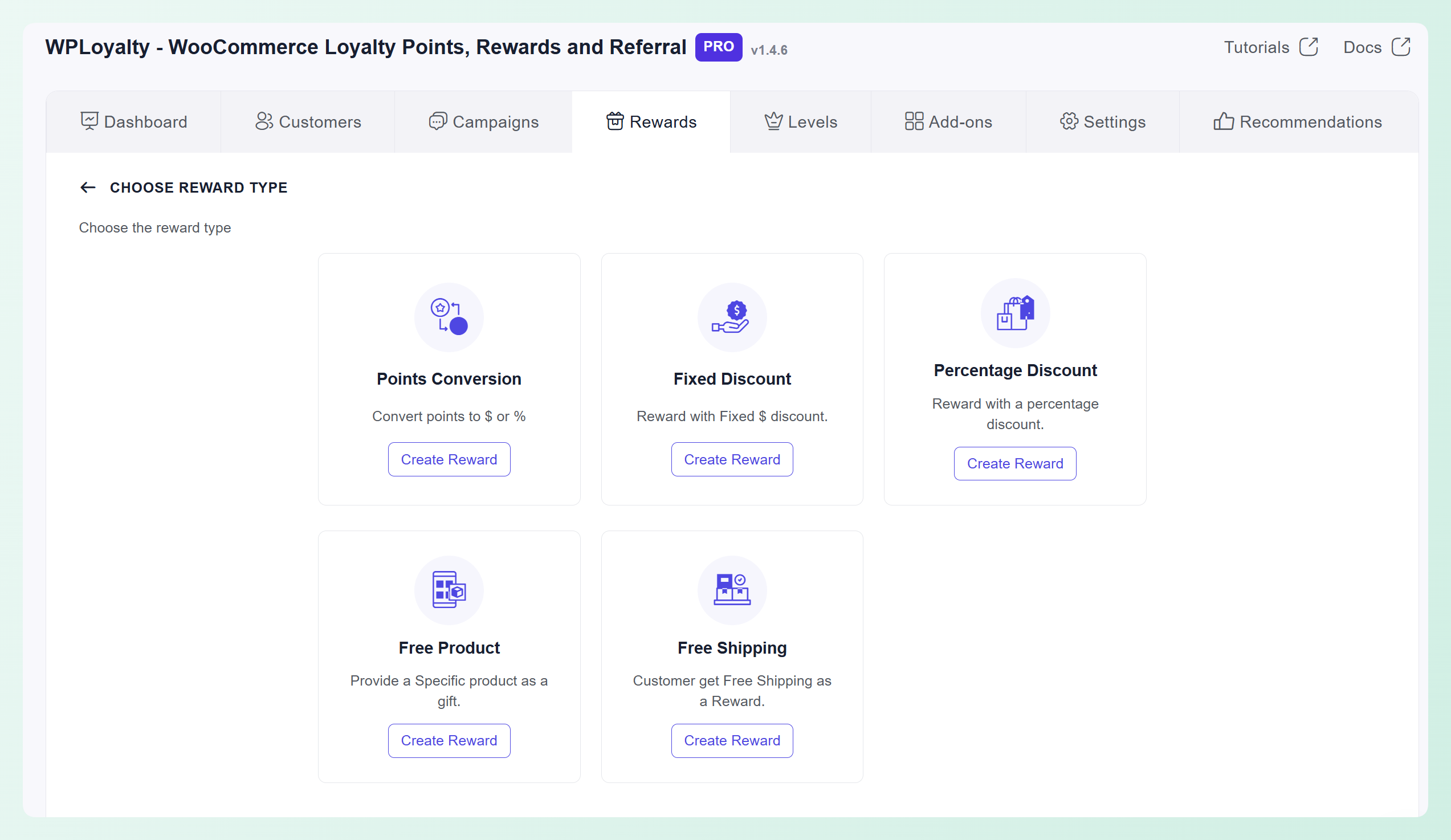
WPLoyalty also includes Levels, which let you build Silver, Gold and Platinum tiers with different rewards. It also offers a free version on WordPress.org for stores that want to start with a basic loyalty setup.
Rounding it out: point expiry with reminder notifications, CSV import and export of point balances, a customer reward page, points displayed on product, cart and checkout pages, WPML support, and add-ons covering a launcher widget, multi-currency and discount-rule integration.
Coupon Rewards vs Store Credit: The Key Difference
The clearest difference appears when customers redeem their points.
WPLoyalty lets customers turn earned points into coupon-based rewards. Customers can choose how many points to convert within the reward’s limits, and the converted value is issued as a coupon. Advanced Loyalty Program issues coupons too, for the product and coupon rewards you set up, and adds a second path: converting points into store credit. Coupon rewards and store credit behave differently in three practical ways:
A coupon is tied to one reward. With WPLoyalty, customers can convert only part of their points balance, so unused points stay available, but the portion they convert becomes a coupon rather than an account credit balance. Advanced Loyalty Program reward coupons work in a similar way: each claim creates a single-use code for that product or discount.
Store credit sits in one balance. If you also issue refunds as Advanced Coupons store credit or let customers redeem Advanced Gift Cards into store credit, points converted to store credit join that same balance. A reward coupon from either plugin is tracked separately from it.
Redemption controls live in different places. WPLoyalty has its own minimum and maximum points-per-coupon settings. With Advanced Loyalty Program, points converted to store credit follow your store credit rules, while each product or coupon reward has its own points cost.
There’s a broader point here too. According to PwC, 46% of consumers say the quality of the product or service is what drives their loyalty, while only 23% of executives think so, and more than 60% of executives raised their loyalty budgets in their most recent planning cycle. The gap is a warning: spending more on a points program doesn’t substitute for the fundamentals. What a points program can do well is make the value a customer has already earned visible and easy to spend, which is where the choice between a coupon and a balance comes in.
Whatever tool you choose, set redemption limits before launch. WPLoyalty lets you set minimum and maximum points per coupon, while Advanced Coupons Premium can limit the percentage of an order covered by store credit and set a minimum store credit redemption amount. Clear limits make it easier to protect your margins as customer balances grow.
Advanced Loyalty Program As A WPLoyalty Alternative
Advanced Loyalty Program answers the redemption question with two options. Customers can convert points into their store credit balance, or spend them on a specific product or coupon you’ve marked as a reward.
The store credit option matters most when your store already uses store credit in other ways. Advanced Gift Cards redeem into the same store credit balance, and refunds can be issued there too. Redeemed loyalty points, gift card credit and refund credit can all sit in one place for customers to spend across future orders. There’s more detail in our guide to converting loyalty points to store credit.
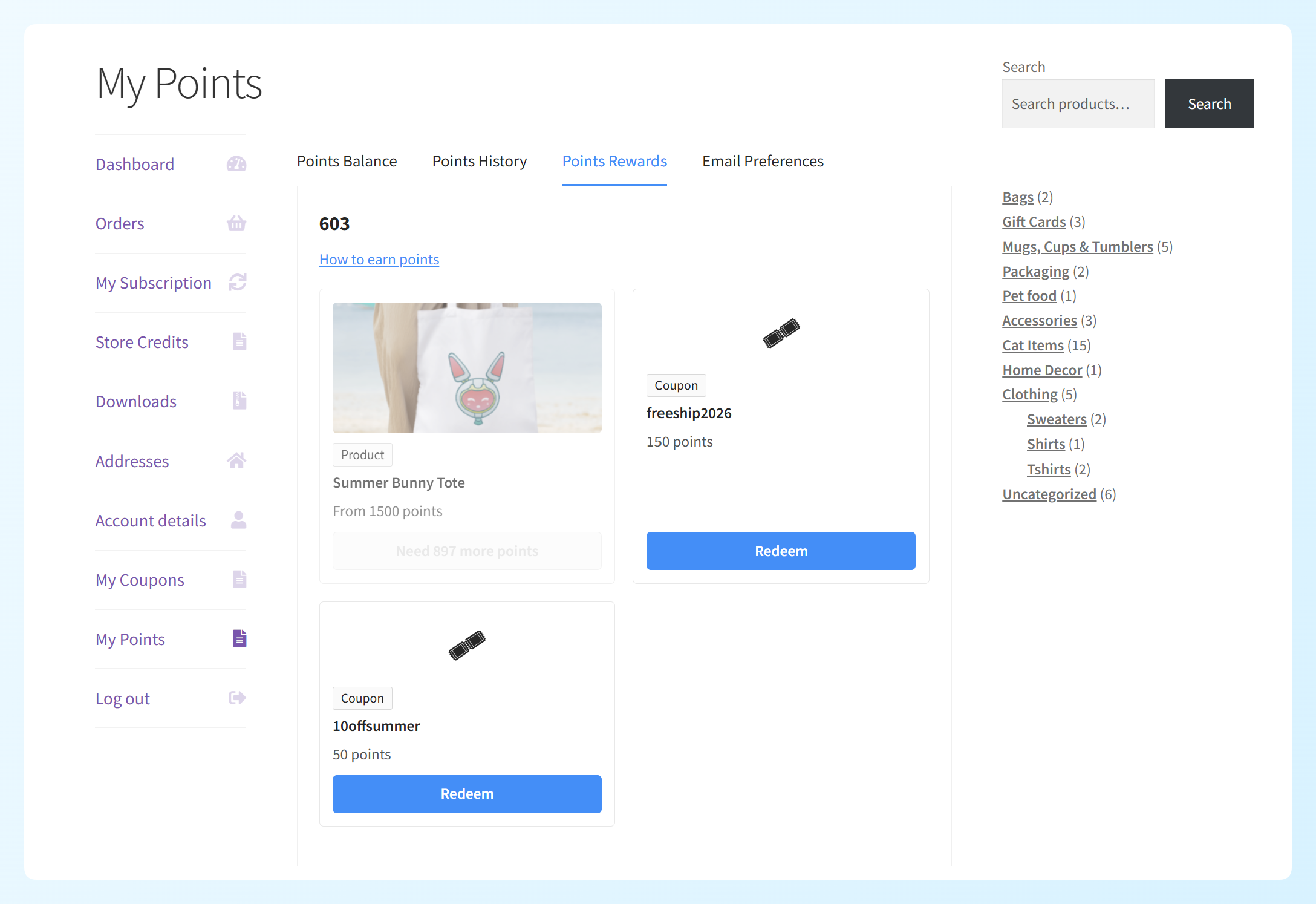
The rewards option works more like a catalog. You can mark any simple or variable product, or any coupon, as a loyalty reward and set how many points it costs. Customers browse those rewards on the Points Rewards tab of their My Points page, and each claim creates a single-use coupon code locked to their email address. A product reward takes 100% off that product (shipping still follows your normal rules), while a coupon reward copies the discount or free shipping from the coupon you set up. There’s a full walkthrough in our guide to redeeming loyalty points for products and coupons.
💡 PRO TIP: If you offer rewards and store credit together, check the automatic redemption setting first. When it’s on, points convert to store credit once the threshold is reached, which can stop customers from saving up for a reward. Set the threshold above your most expensive reward, or turn it off if rewards are the focus.
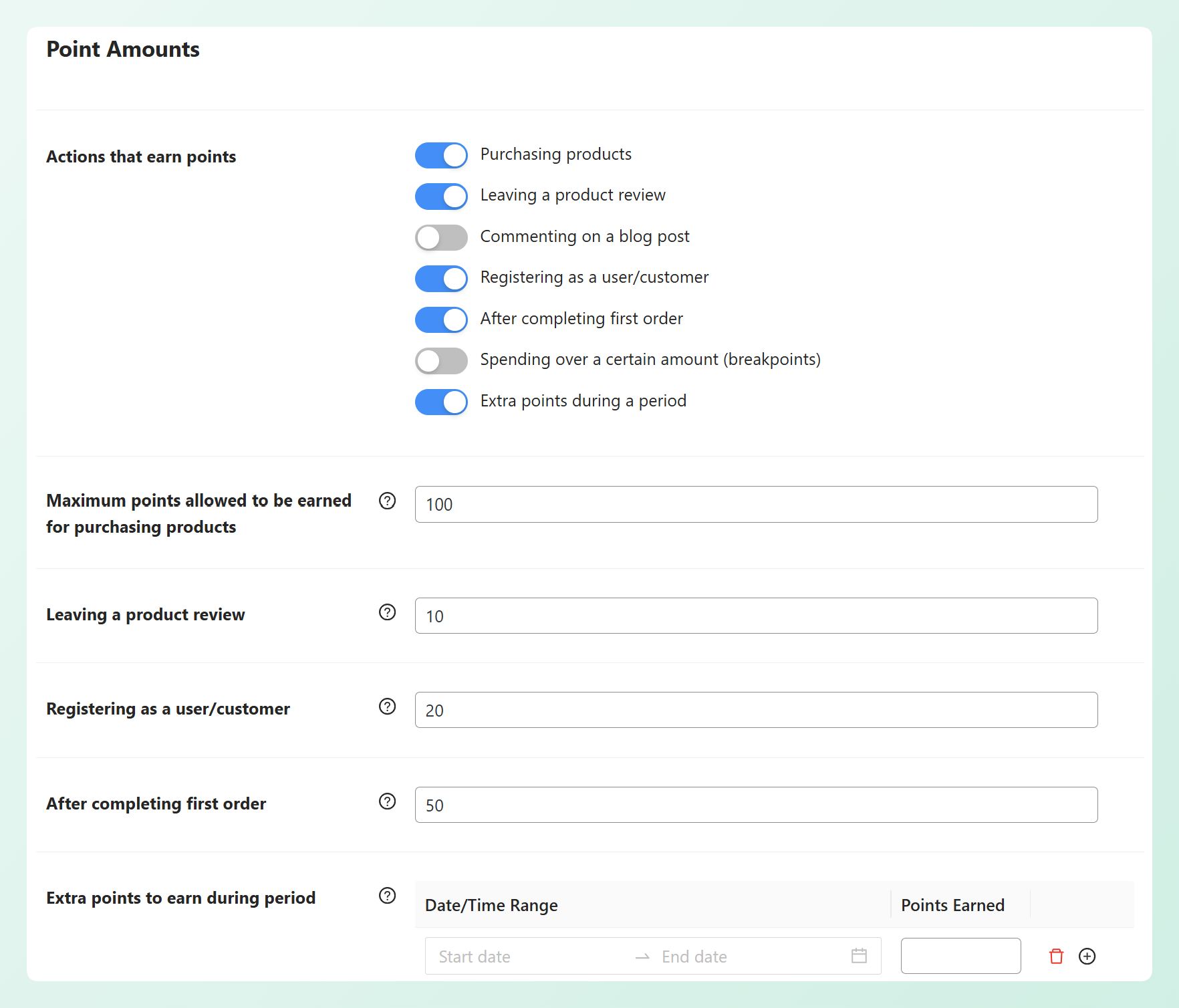
Advanced Loyalty Program covers several common earning actions: orders, reviews, sign-ups, blog comments, referrals, spending above a threshold, and a customer’s first order. Each rule can be switched on or off with its own point value. Points appear on product and checkout pages so shoppers see what they’re earning as they shop, and there’s an insights dashboard covering points issued, points redeemed, top customers and earning history, plus per-customer history you can adjust by hand.
Two details matter when customers convert points into store credit:
The redeemed value stays available as a balance. Customers can choose how many loyalty points to redeem, and once those points become store credit, they can use part of that credit on one order and keep the rest for later. WPLoyalty also allows partial point conversion, but the value it converts is issued as a coupon rather than added to store credit.
The loyalty payout inherits the store credit controls. When points land in store credit, your store credit settings govern how that balance is used. The free base plugin handles credit expiry and the minimum order total that has to remain after credit is applied. Advanced Coupons Premium adds a maximum percentage of an order that credit can cover and a minimum redemption amount. So if you cap store credit at 40% of an order, that same rule also applies to store credit created from loyalty points.
For a real example of promotions and loyalty working together rather than in parallel, our case study on how Layers of Learning uses coupon marketing to build customer loyalty is worth a read.
Feature And Pricing Comparison
Here’s how the two plugins compare on earning, redemption, store credit, and pricing.
| Capability | Advanced Loyalty Program | WPLoyalty |
|---|---|---|
| Points for orders, sign-ups, reviews and referrals | Yes | Yes |
| Points for blog comments | Yes | Not documented |
| Points for social shares | No | Yes |
| Points for birthdays | No | Yes |
| Tiers or levels | No | Yes, with level-based rewards |
| Free product as a reward | Yes, simple and variable products | Yes |
| Discount or free shipping coupon as a reward | Yes | Yes |
| Point expiry | Yes | Yes, with notifications |
| Points shown on product and checkout pages | Yes | Yes |
| Insights dashboard | Yes | Yes |
| Manual point adjustment per customer | Yes | Yes |
| What redemption produces | Store credit balance, or a single-use coupon for a product or coupon reward | A coupon code |
| Can redeem part of the points balance | Yes, any amount into store credit, while rewards have a set points cost | Yes, within configured limits |
| Redemption governed by store credit settings | Yes, for points converted to store credit: expiry and minimum order total in the free plugin, percentage cap and minimum redemption amount with Advanced Coupons Premium | Not applicable |
| Same balance as gift cards and refunds | Yes, for points converted to store credit | No |
| Free loyalty plugin available | No; Advanced Coupons Free provides the store credit base | Yes, free plugin on WordPress.org |
| Single-site pricing | $99.50 first-year introductory price | $105 per year |
| Single-site renewal | $199 | Not published |
Advanced Loyalty Program is $99.50 for the first year on a single site and renews at $199. Unlimited sites is $199.50 for the first year and $399 after. The All Access Bundle, which adds Advanced Coupons Premium, Advanced Gift Cards and Advanced Promo Kit for unlimited sites, is $249 for the first year and $498 after. WPLoyalty lists its one-site annual plan at $105, with discounted three-year and five-year terms also available. It doesn’t publish a separate renewal rate, so we can’t make a direct renewal-to-renewal comparison.
What Switching Involves
Advanced Loyalty Program has a built-in importer for several loyalty plugins, but WPLoyalty isn’t currently one of the supported sources. That means WPLoyalty point balances won’t transfer through the built-in migration tool.
WPLoyalty can export point balances to CSV, which gives you a record of what every customer holds. From there, two practical paths are:
- Honor the old balance as store credit. Work out what each customer’s remaining points are worth under the conversion rate you plan to use, then add the equivalent store credit. For a small list, you can adjust customers individually. The bulk store credit adjustment tool in Advanced Coupons Premium can help when groups of customers need the same fixed or percentage adjustment, but it doesn’t import a CSV of different customer-by-customer balances.
- Let the old points run down. Keep WPLoyalty active temporarily, stop awarding new points, give customers a clear redemption deadline, and retire it once the outstanding balances are cleared.
The first option keeps the value inside your new store credit system but takes more manual reconciliation. The second is simpler to administer, but you’ll be running both systems during the transition. Either way, tell customers what is changing before you move or retire their balances. If they’re used to claiming a free product or a free shipping reward in WPLoyalty, you can set up the same rewards in Advanced Loyalty Program, so the switch doesn’t take those options away.
Which Loyalty Plugin Should You Choose?
Choose Advanced Loyalty Program if you want customers to choose how they spend their points: as store credit that shares one balance with gift cards and refunds, or on specific product and coupon rewards.
WPLoyalty gives you a points ledger that pays out in coupons. Advanced Loyalty Program pays out in coupons too, for the rewards you set up, and adds store credit as a second option. Points converted to store credit join the same balance used by gift card redemptions and store credit refunds, governed by your store credit settings. If your store gives customers value in several ways, keeping those credits in one balance can make them easier for customers and your team to track.
WPLoyalty takes a different approach in a few areas. Its Levels feature supports tiered VIP status, and its regular single-site annual list price is $105. Advanced Loyalty Program focuses on flexible redemption, with store credit that works with the broader Advanced Coupons store credit system. WPLoyalty doesn’t publish a separate renewal rate, so the pricing figures aren’t a direct renewal-to-renewal comparison.
For a wider view of the category rather than this head-to-head, we cover how the wider category compares separately.
Frequently Asked Questions
What is the best WPLoyalty alternative for WooCommerce?
Advanced Loyalty Program is a strong WPLoyalty alternative for stores that want more than one way to redeem points. Customers can convert points into store credit, which shares the same balance used for Advanced Gift Cards and store credit refunds, or claim a product or coupon you’ve set up as a reward. WPLoyalty uses coupon-based redemption and also includes tiered VIP Levels.
Does WPLoyalty have a free version?
Yes. WPLoyalty has a free plugin on WordPress.org, and its one-site paid plan is $105 for one year. Advanced Coupons also has a free base plugin that includes store credit, with Advanced Loyalty Program as a paid addition.
Can I move my existing loyalty points to a new plugin?
Not through the built-in importer. Advanced Loyalty Program can import from SUMO Reward Points, WooCommerce Points and Rewards, and YITH WooCommerce Points and Rewards, but WPLoyalty isn’t currently listed. WPLoyalty can export balances to CSV, so you can use that record to reconcile balances manually or keep WPLoyalty active temporarily while customers redeem what they have left.
What is the difference between points redeeming as a coupon and as store credit?
WPLoyalty lets customers choose how many points to convert within the reward’s limits, and the converted value is issued as a coupon. Advanced Loyalty Program offers both. Customers can claim a product or coupon reward, which creates a single-use coupon code, or convert points into store credit and use part of that credit on one order while keeping the rest for later. Store credit also follows its own settings: expiry and a minimum order total in the free plugin, plus a percentage cap and a minimum redemption amount with Advanced Coupons Premium.
Can Advanced Loyalty Program give free products as rewards?
Yes. You can mark a simple or variable product as a loyalty reward and set its points cost, including different costs for individual variations. When a customer claims it, they get a single-use coupon code that takes 100% off that product, locked to their email address. Out-of-stock products can’t be claimed, and you can offer coupons with a discount or free shipping as rewards the same way.
How much does Advanced Loyalty Program cost?
$99.50 for the first year on a single site, renewing at $199. Unlimited sites is $199.50 for the first year and $399 after. The All Access Bundle, which includes Advanced Coupons Premium, Advanced Gift Cards and Advanced Promo Kit, is $249 for the first year and $498 after. The first-year rates are introductory and all renewals are at full price.
Choosing Your WooCommerce Loyalty Plugin
The choice isn’t only about how customers earn points. It also comes down to what happens after redemption: whether every reward stays in a coupon workflow, or customers can also send points into the store credit balance your store already uses.
Here’s where to start:
- WPLoyalty Features At A Glance: earning rules, tiers, reward options, and a free version
- Coupon Rewards vs Store Credit: The Key Difference: how coupon rewards and store credit behave once points are redeemed
- Advanced Loyalty Program As A WPLoyalty Alternative: store credit or product and coupon rewards, your customers’ choice
- Feature And Pricing Comparison: the two plugins side by side on features and pricing
- What Switching Involves: what to do when WPLoyalty isn’t supported by the built-in importer
If a shared balance or a choice of rewards is what you’re missing, Advanced Loyalty Program is the WPLoyalty alternative worth testing, and store credit in Advanced Coupons is where converted points end up.