Thriving e-commerce store owners like you know that seasonal sales are golden opportunities to capture more sales and engage your customers. It’s no different for Halloween! As the spooky season rolls around, you have a chance to bewitch customers with creative Halloween promotions and boost your sales.
We got your back! In this guide, we walk you through simple (yet eerily effective) Halloween discount strategies to make your WooCommerce store stand out. Ready to craft some irresistible deals? Let’s get right into it!
10 Killer Halloween Promotions To Help You Drive Sales
In our guide “10+ Spooktacular Halloween Marketing Ideas For WooCommerce”, we revealed some general marketing strategies that can help you catch the attention of shoppers this Halloween. We also touched on why Halloween is a wonderful opportunity for store owners like you, so make sure to check it out.
Today, we’ll dive into actual discount strategies and promotions you can run to turn that engagement into sales!
1. Spooky flash sales
Flash sales are incredibly effective because they invoke a sense of FOMO (fear of missing out). This effect is even stronger during seasonal or holiday events when customers are actively on the prowl for the best deals. Imagine pairing this with an irresistible discount, limited timeframe, and spooky Halloween theme – it’s the perfect recipe to get customers excited and boost sales!
Flash sales typically run only for a few hours up to a day, giving customers a reason to act fast. To create a sense of urgency, leverage the power of visuals–add countdown timers, pop-ups, and Halloween-themed graphics to emphasize the limited-time offer!
This year, Halloween falls on a Saturday, October 31, 2026. That makes a weekend flash sale an easy fit, since many shoppers will have more time to browse (and buy!) over the weekend.

💡 PRO TIP: To make your flash sale more effective, consider offering a “bigger discount” than usual during a limited time frame. For example, you can set up coupons that activate only for a few hours.
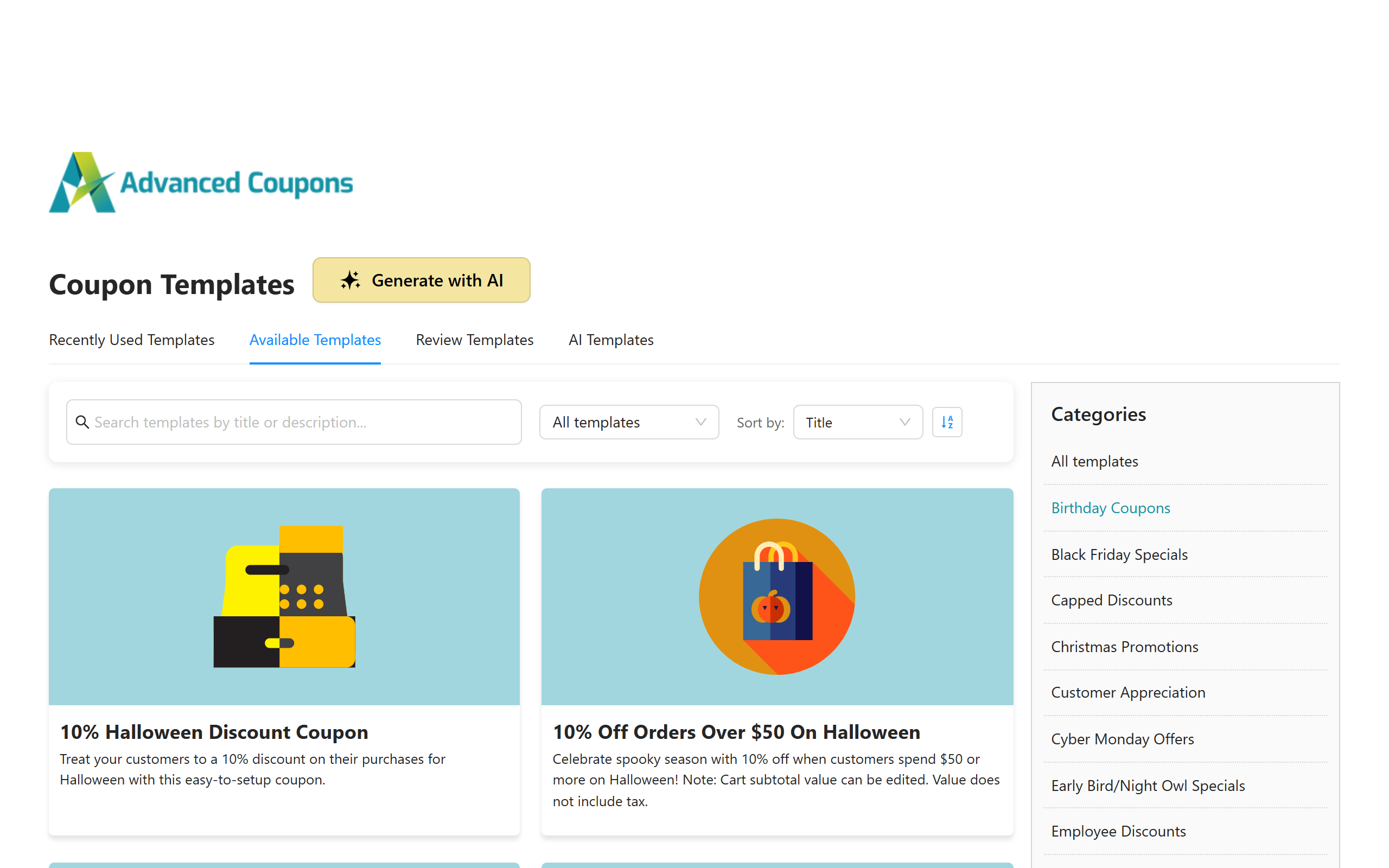
WooCommerce store owners can make use of plugins like Advanced Coupons to craft promotions for specific times and dates. This powerful plugin also features ready-made coupon templates for special sale periods like Halloween, allowing you to create irresistible deals in just a few clicks!
2. Free gift with purchase
Getting something for free is a thrilling treat, for sure! By offering a free item for every purchase this Halloween, you create an extra nudge for customers to complete their purchases.
You can make your offer more impactful by giving away themed or limited-edition items. For instance, if you run a skincare and makeup brand, you can give away a limited-edition Halloween lip balm shade, or a spooky-themed makeup pouch. It’s about making your customers feel extra special!
This promotional tactic can also work wonders in boosting your average order values. To do so, consider setting minimum order requirements that customers must reach to qualify for a free gift. Order requirements can come in the form of minimum spend or cart quantities, whichever fits best for your current business goals.
💡 PRO TIP: With Advanced Coupons Premium, you can use the Add Products feature to add the free gift to the cart automatically once the coupon is applied. Set the gift’s price to zero, and your customer doesn’t have to go hunting for it!
3. BOGO (Buy One Get One) deals
The appeal of BOGO (Buy One Get One) deals is undeniable, and even more so during special seasons. Getting a second item for free (or at a discounted price) creates a heightened sense of value for shoppers, helping you attract lots of attention.
It’s also an excellent way for small business owners to move seasonal or slow-moving inventory. With bigger sales events like Black Friday coming (it’s on November 27 this year), running a Halloween BOGO sale can help you “clear out” stock ahead of time to make room for new, in-demand items. BOGO deals are perfect for this purpose, as they encourage shoppers to get extra items they might not have considered otherwise.

💡 PRO TIP: Plugins like Advanced Coupons allow you to set up BOGO deals in many different ways. For instance, you can offer a second item completely free or at a markdown, depending on your goals. You can also leverage advanced cart conditions and usage restrictions to target specific products, product categories, or attributes.
If your Halloween range comes from one supplier, Advanced Coupons Premium also lets you run BOGO deals by brand, so you don’t have to pick every product by hand.
4. Free shipping
We all know it by now… Unexpected costs at checkout can make or break a sale. In fact, according to Baymard Institute, 40% of US online shoppers who abandoned a cart did so because extra costs like shipping, taxes, and fees were too high. So, why not remove that barrier for your Halloween promotions? Offering free shipping can help you reduce cart abandonment and potentially increase conversions.
To make this offer more impactful, consider combining it with other promotions, such as a percentage discount or a free gift. You can protect your margins and encourage higher order values by setting minimum spend requirements.
Take this thrilling deal for example, “Get 10% off PLUS free shipping on orders above $75!”. Offers like this can encourage shoppers to add more items to their carts to get the most value out of their purchase.
Another option you can explore is to offer shipping discounts. This is particularly helpful if you cater to several locations or have international customers. Creating a “50% off shipping” coupon can be just as enticing, while also helping you manage shipping costs for your business.
5. Halloween gift card promotion
If there’s one thing customers seek during special days and occasions, then it’s gift cards! A Halloween-themed gift card promotion can help you boost engagement and sales by giving customers a flexible and thoughtful gifting option for their friends and family–or even as a treat for themselves!

What’s great about gift cards is that they can bring in new customers to your store! Gift card recipients who may not have heard of your brand before will likely check out your offerings to redeem their gift cards. This gives you a golden opportunity to turn them into repeat buyers, especially if you provide them with a smooth shopping experience.
💡 PRO TIP: Consider offering giftable, limited-edition Halloween gift card designs to appeal to shoppers. Plugins like Advanced Gift Cards make this easy for WooCommerce store owners to sell and manage gift cards. You can choose from default templates or upload your own designs, which is perfect for seasonal sales. You can also let shoppers choose their own gift card amount, so it works for any budget.
6. Bonus loyalty points for Halloween shoppers
Seasonal or holiday sales are also excellent ways to engage your existing loyal shoppers! After all, they’re the lifeblood of your e-commerce business. By offering “extra loyalty points” during your Halloween sale, you can make shoppers feel like they’re getting additional value. This can help strengthen their affinity with your brand.
There are several ways you can run this promotion. For instance, you can offer double or triple loyalty points for all purchases made during your Halloween sale.
Another option is to pair this deal with a flash sale or create a tiered bonus points structure that rewards customers for spending more. This approach adds a touch of gamification to your Halloween promotions, creating a sense of excitement that works wonders with customer engagement.
💡 PRO TIP: You can easily create a loyalty program and reward customers using plugins like Advanced Loyalty Program. This powerful tool lets you reward customers with points they can turn into store credit to keep them coming back to your store. Customers can also redeem their points for products and coupons, so a limited-edition Halloween item makes a fun reward to save up for!
7. Spooky sale badges and product labels
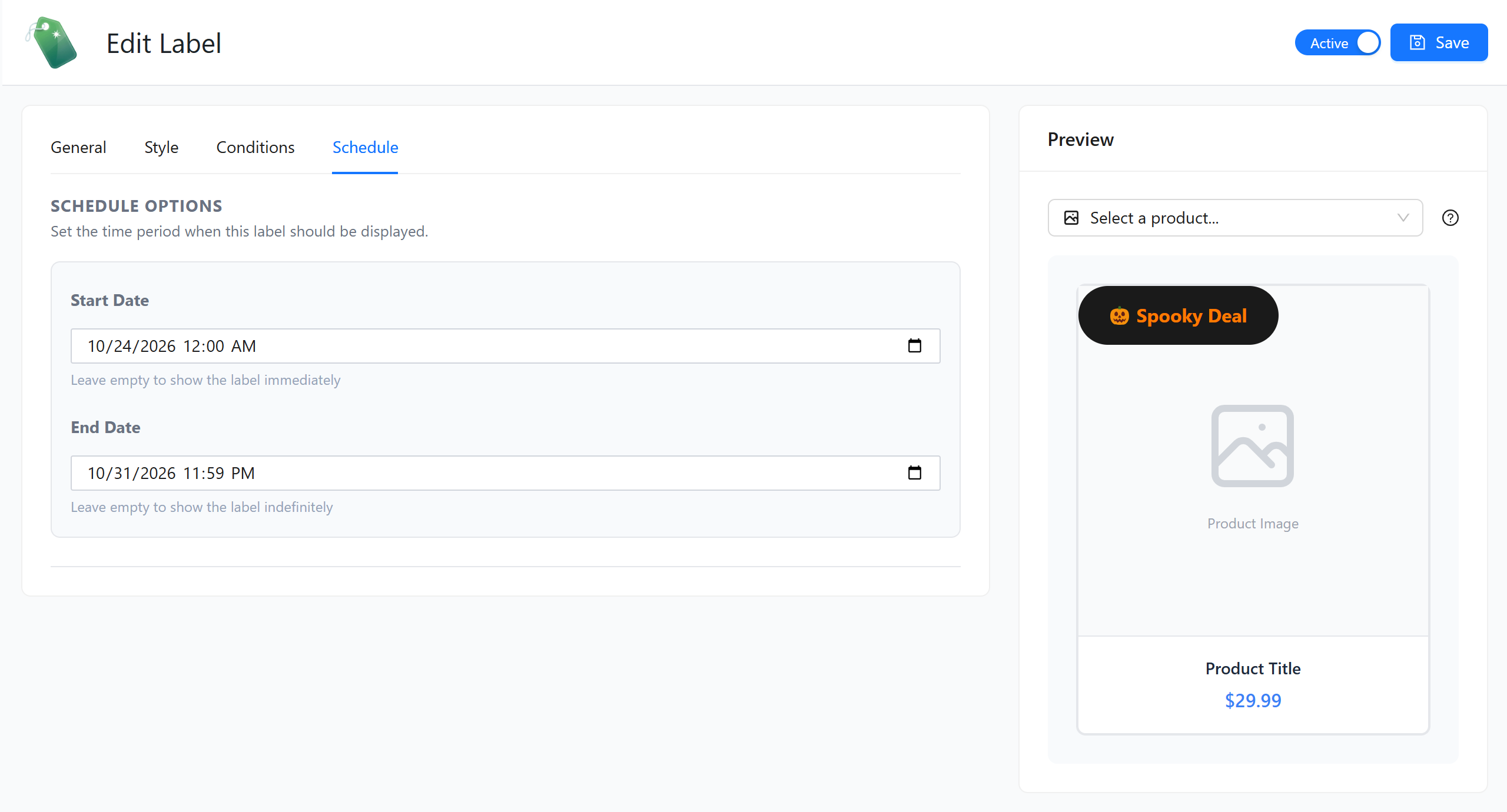
A great Halloween deal only works if shoppers actually notice it! Sale badges and product labels put your offer right on the product image, so customers can spot a discount while they’re scrolling your shop page, not just once they reach the cart.
You can go all out with the theme here. Think orange and black “Spooky Deal” badges, a “Last Chance Before Halloween” label on low-stock items, or a badge that shows the exact discount, like “30% OFF.” Small visual cues like these help your Halloween sale feel like an event.
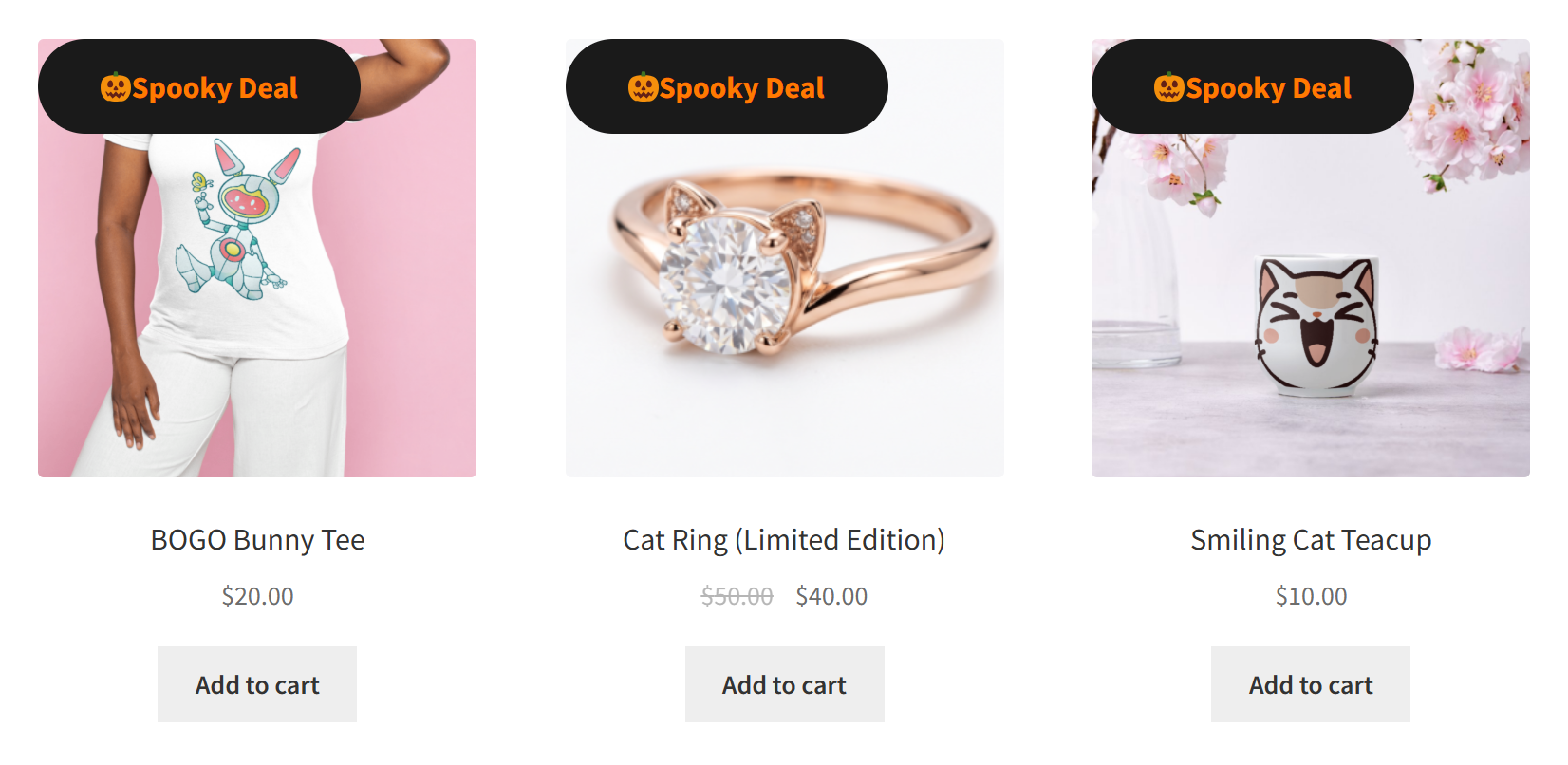
💡 PRO TIP: Advanced Promo Kit lets you create sale badges and product labels for WooCommerce, with placeholders like {discount_percent} that fill in the real discount for each product. Each label also has a Start Date and End Date, so you can schedule your Halloween badges ahead of time and have them disappear once the sale ends.
8. Tiered “spend more, save more” discounts
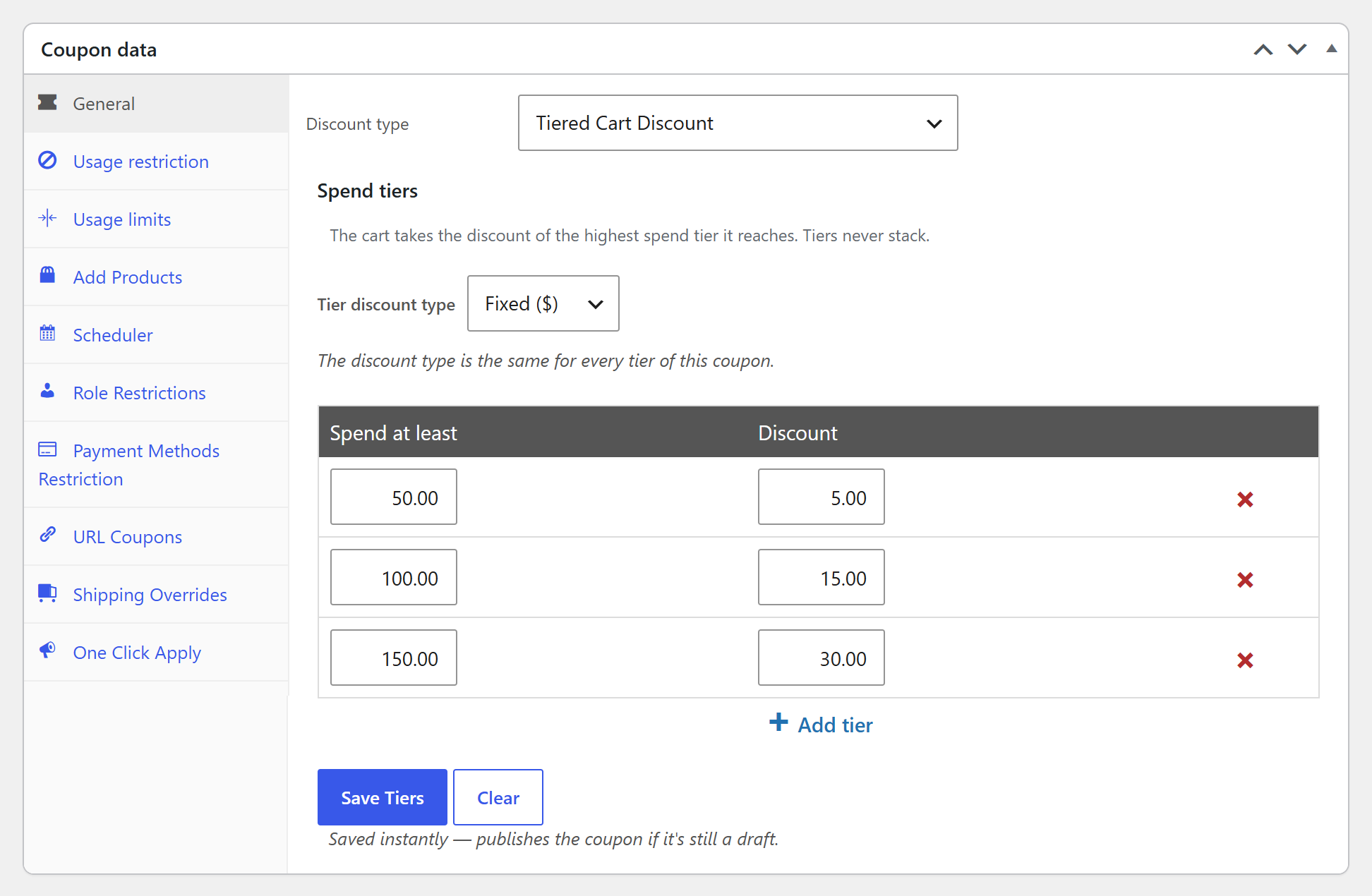
Want to give shoppers a reason to add just one more item to the cart? Tiered discounts reward customers with bigger savings the more they spend. For example:
- Spend $50, get $5 off
- Spend $100, get $15 off
- Spend $150, get $30 off
This works nicely for Halloween because shoppers are often buying several things at once, like costumes, decorations, and party treats. A clear “next tier” gives them a fun goal to reach, and it can help lift your average order value.
💡 PRO TIP: With Advanced Coupons Premium, you can build all of these tiers inside one coupon using the Tiered Cart Discount type. The cart applies the highest tier the customer reaches, and shoppers below the first tier see exactly how much more they need to spend to unlock the deal.
9. Category-specific Halloween deals
Not every product in your store needs a Halloween discount. A category-specific deal puts the spotlight on your seasonal range, like costumes, décor, or themed snacks, while your everyday best sellers stay at full price.
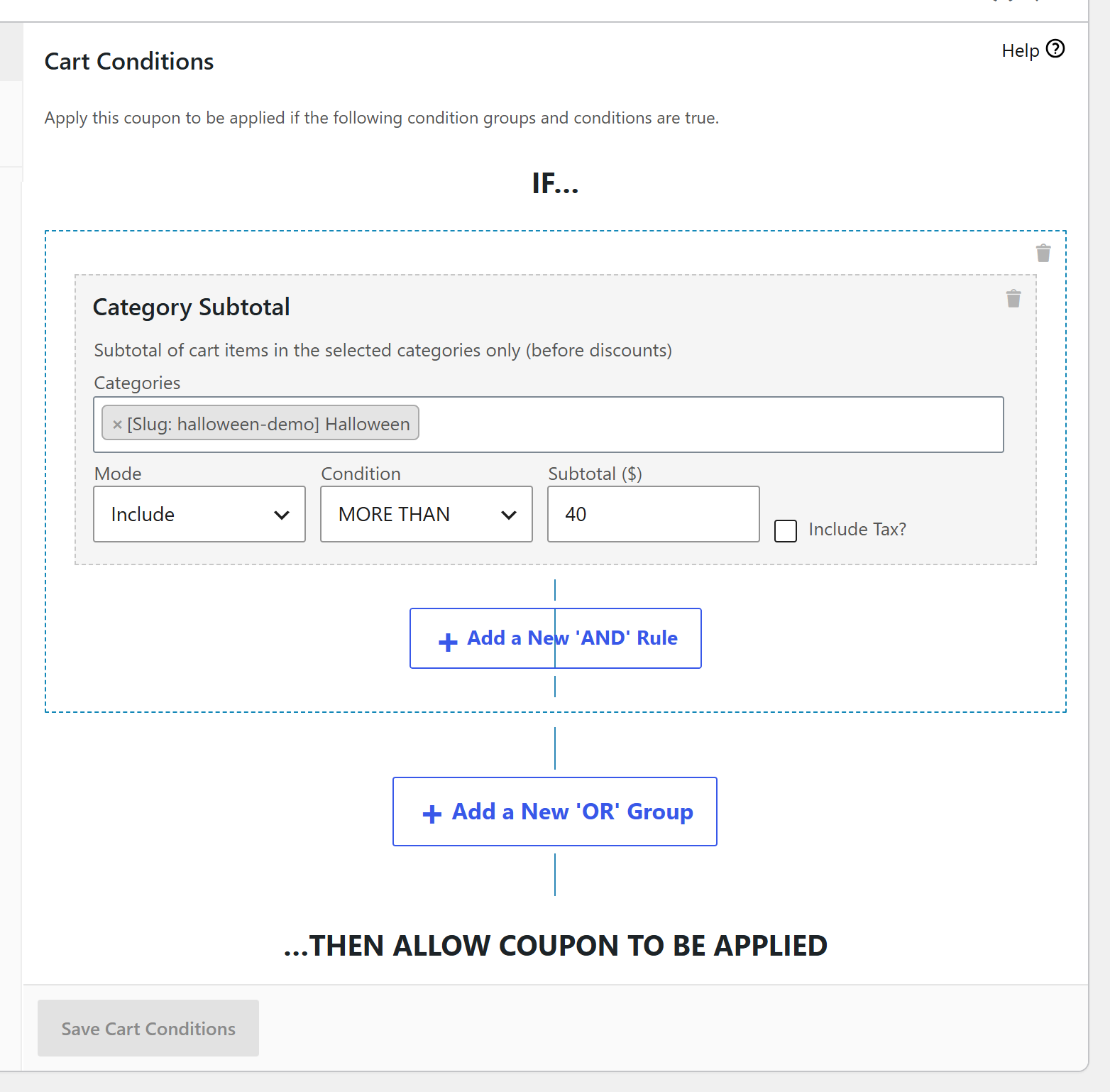
For example, you can offer “15% off when you spend $40 on Halloween costumes.” Shoppers get a treat on the items they came for, and you get to move seasonal stock before it loses its appeal after October 31.
💡 PRO TIP: Advanced Coupons Premium has a Category Subtotal cart condition that checks how much a customer has spent in the categories you choose, before discounts. That way, the coupon only kicks in once they’ve spent enough on your Halloween products, not the whole cart.
10. Cashback rewards that bring shoppers back for Black Friday
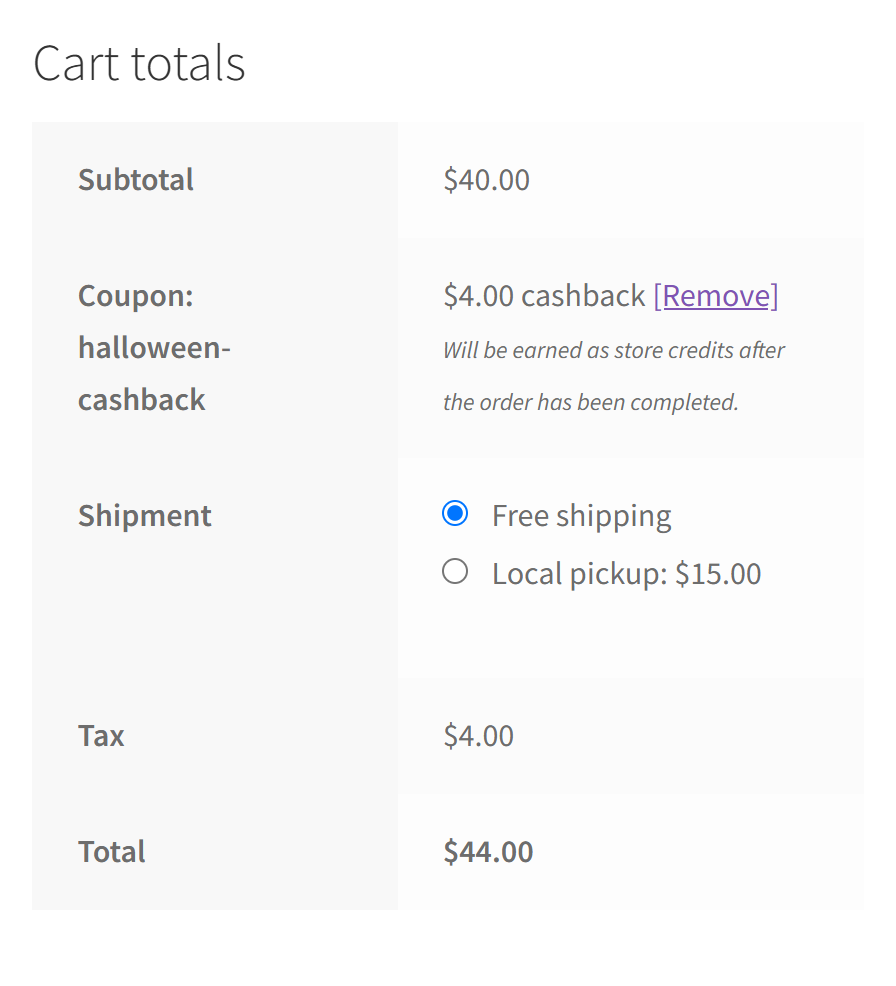
Halloween doesn’t have to be a one-time sale. A cashback promotion gives customers part of their spend back as store credit, which they can use on a future order. With Black Friday just a few weeks after Halloween, that’s a great reason for shoppers to come back!
Here’s an example: “Get 10% back in store credit on your Halloween order, ready to spend during our Black Friday sale.” Instead of cutting your prices even further, you’re giving customers a reward that brings them back to your store.
💡 PRO TIP: Advanced Coupons Premium includes Percentage cashback and Fixed cashback coupon types. The cashback is added to the customer’s store credit balance once their order is completed, and you can set a waiting period if you’d like to hold it for a few days (handy for refunds). Just note that cashback coupons are for registered customers, so guests are asked to log in first.
Setting Up Halloween Promotions On WooCommerce
After walking you through some exciting Halloween discounts and promotions, you’re probably looking forward to setting them up for your sale! Plugins like Advanced Coupons make this a breeze.
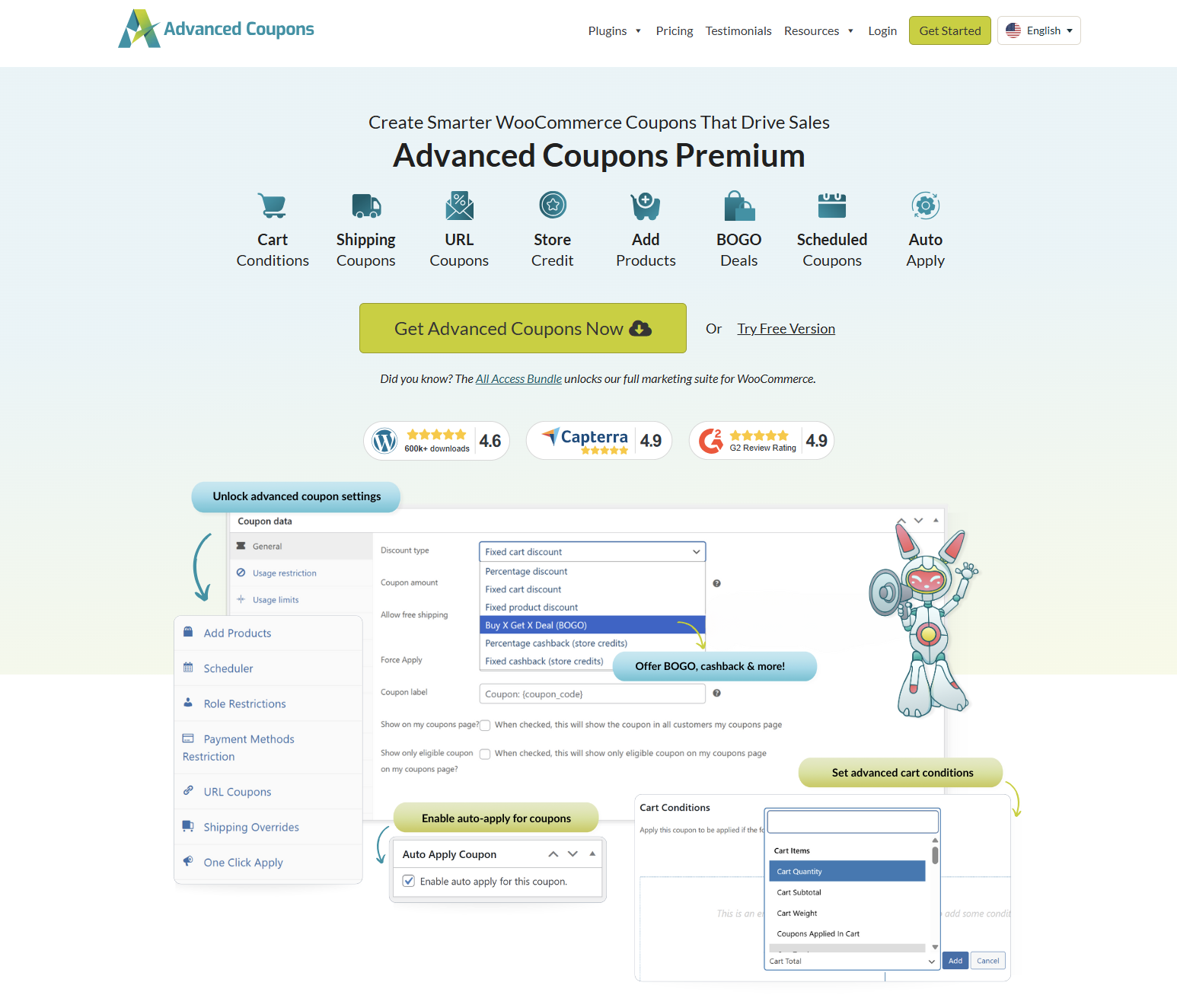
Advanced Coupons extends WooCommerce’s default coupon functionality, allowing you to run advanced and highly targeted promotions like BOGO deals, shipping discounts, scheduled coupons, tiered discounts, cashback, and so much more. This plugin also allows you to set cart conditions to specify exactly how and when your coupons can be used.
For the rest of your Halloween toolkit, Advanced Promo Kit handles your sale badges, Advanced Gift Cards covers your gift card promotions, and Advanced Loyalty Program takes care of your bonus points.
Want to learn more? Check out our helpful resources below:
- How To Make A WooCommerce BOGO Coupon (Full Guide)
- How To Offer WooCommerce Shipping Discounts (Easy Tutorial)
- Ultimate Guide To WooCommerce Cart Conditions
- How To Set Up WooCommerce Tiered Cart Discounts
- Sale Badges And Product Labels For WooCommerce
Frequently Asked Questions
How to market a Halloween event?
You can leverage a mix of marketing channels to market Halloween promotions and events. Some common examples are email campaigns, social media posts, opt-ins, website banners and in-store banners. Make sure to use countdown timers and engaging Halloween graphics to create a sense of urgency and excitement.
How do you increase sales at Halloween?
Small business owners can leverage promotions that create a sense of urgency. Some scary good examples include limited-time flash sales, BOGO offers, and free shipping deals. You can also reward existing customers or high spenders by granting bonus loyalty rewards and offering free products for orders over a certain amount. For budget-friendly ideas you can run all year, see our small business ecommerce promotions playbook.
When to start advertising for Halloween?
It’s best to start advertising early, at least 2 weeks before the event. With Halloween falling on Saturday, October 31, 2026, that means getting your promotions out by mid-October. This can help build anticipation and give customers time to plan their orders. Consider sending out teaser emails or posting social media content to create buzz and keep buyers excited.
How long should a Halloween sale run?
It depends on your goals, but many stores run their Halloween sale during the final week of October, with a bigger flash deal on Halloween itself. For 2026, that could look like a sale from Monday, October 26 to Saturday, October 31. Keep it short enough to feel urgent, especially with Black Friday on November 27 right around the corner.
Conclusion
Halloween is a golden opportunity for e-commerce store owners like you to connect with customers and drive sales. In this guide, we provide you with ten tried and tested Halloween promotion strategies that will help you do just that! Let’s recap them below:
- Spooky flash sales
- Free gift with purchase
- BOGO deals
- Free shipping
- Halloween gift card promotions
- Bonus loyalty points
- Spooky sale badges and product labels
- Tiered discounts
- Category-specific Halloween deals
- Cashback rewards
Tools like Advanced Coupons make setting up these strategies a breeze. With this powerful plugin, WooCommerce store owners can create advanced coupon promotions like BOGO deals, shipping discounts, URL coupons, and more!
We hope this article helped you out! Got any questions for us? Let us know in the comments!